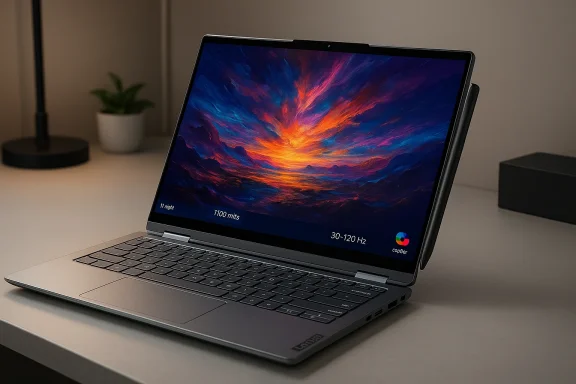
Lenovo’s refreshed Yoga 9i 2‑in‑1 Aura Edition Gen 11 lands at Mobile World Congress 2026 as a measured, confident update—one that doubles down on the convertible formula the series perfected rather than chasing flashy gimmicks. s://www.theverge.com/tech/885724/lenovo-yoga-9i-2-in-1-angled-canvas-mode)
For more than a decade the Yoga line has been Lenovo’s showcase for convertible design: a watchband or drop‑hinge lineage, premium materials, and a focus on real‑world ergonomics over headline specs. The Gen 11 Aura Edition is framed as the latest expression of that thinking: a 14‑inch convertible pairing a high‑end OLED panel with Intel’s third‑generation Core Ultra silicon and a refined set of input, audio, and cotended for creative multitaskers and hybrid workers.
This article unpacks what’s new, what’s carried forward, and where buyers should be cautious. I cross‑checked Lenovo’s claims and independent coverage, and I flag the points that still need real‑world testing—battery life, thermal behavior, and the practical impact of on‑device AI features.
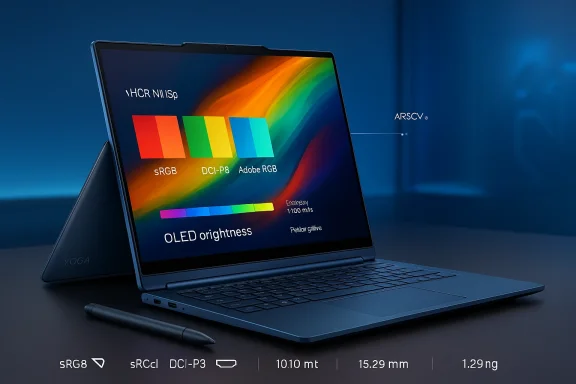
Why that matters: high peak brightness and wide color gamut mean HDR content looks vivid without the exaggerated saturation often seen on cheaper OLED panels. A Delta‑E under 1 implies factory‑grade color accuracy suitable for photo and video work where accurate color matching is important. The 120Hz variable refresh rate makes UI interactions and pen strokes feel more responsive while conserving power when the panel can run at lower refresh rates.
Why that matters: other manufacturers have largely deprioritized full‑convertible designs in favor of detachable tablets or clamshell ultrabooks. Lenovo’s iterative approach signals confidence that a true 2‑in‑1 still delivers unique value when executed well.
Practical note: the rotating soundbar adds mechanical complexity and likely raises manufacturing cost. It pays off for users who prioritize laptop audio without external speakers, but it’s an incremental benefit for buyers who mostly use headphones or dock with external speakers.
Why that matters: Series 3 is designed to deliver better sustained performance, improved integrated graphics, and higher on‑device AI throughput t, which shows up in smoother multitasking and more consistent Copilot/AI feature behavior. Lenovo’s Aura Edition program specifically aligns firmware, thermals, and software tuning to the silicon, which should improve out‑of‑box performance for AI‑enabled workflows.
Performance takeaway: for photo editing, drawing, and light video work—tasks Lenovo clearly targets—the combination of Series 3 silicon, fast LPDDR5X memory, and NVMe storage should be more than adequate. It’s not a gaming machine or a mobile workstation, but it is a productive creative platform.
Why those choices matter: practical ports and a solid webcam array speak to the Yoga’s everyday use case—video calls, external displays, and varied peripherals—without expecting buyers to always carry dongles or hubs.
Why Lenovo’s incrementalism works here: the Yoga 9i’s identity is built on balance—premium design, excellent audio, and flexible 2‑in‑1 utility. Large disruptive changes would risk undermining that identity; Gen 11 refines the formula rather than replacing it.
I flagged these specific points for careful testing:
That said, it’s not a slam dunk for everyone. The premium price, soldered RAM, and the unresolved questions around real‑world battery life under AI load and sustained thermal behavior mean buyers should wait for full reviews if those factors matter to them. For users who prize a compact convertible with a top‑tier 14‑inch display, pen support, and outstanding built‑in audio—and who accept soldered RAM as a trade‑off—the Gen 11 Yoga 9i remains the most compelling 2‑in‑1 on the market today.
Lenovo’s Yoga 9i Aura Edition Gen 11 is not a reinvention—it's a refinement. For buyers who have wanted a premium, usable 2‑in‑1 that doesn’t force compromises in display or audio, this generation reasserts the Yoga 9i’s position as the default recommendation; for everyone else, the next few months of reviews will tell whether the Gen 11’s promises hold up under sustained, real‑world use.
Source: Windows Central This is still the best Windows 2‑in‑1 for most people
 Background / Overview
For more than a decade the Yoga line has been Lenovo’s showcase for convertible design: a watchband or drop‑hinge lineage, premium materials, and a focus on real‑world ergonomics over headline specs. The Gen 11 Aura Edition is framed as the latest expression of that thinking: a 14‑inch convertible pairing a high‑end OLED panel with Intel’s third‑generation Core Ultra silicon and a refined set of input, audio, and cotended for creative multitaskers and hybrid workers.This article unpacks what’s new, what’s carried forward, and where buyers should be cautious. I cross‑checked Lenovo’s claims and independent coverage, and I flag the points that still need real‑world testing—battery life, thermal behavior, and the practical impact of on‑device AI features.
What Lenovo aals)
- A 14‑inch Yoga 9i 2‑in‑1 Aura Edition (Gen 11) updated at MWC 2026 with a 2.8K PureSight Pro OLED display, a new Canvas Mode, and the Yoga Pen Gen 2 in a magnetic case.
-ies 3 processors inside (the commonly cited SKU for this model is the Core Ultra 7 355), paired with up to 32GB LPDDR5X and 2TB PCIe Gen4 SSD options; the machine is presented as a Copilot Plus PC to enable Windows 11 on‑device AI features. - A conservative but practical port selection (Thunderbolt 4, USB‑A, HDMI 2.1 FRL), a rotating soundbar hinge for consistent upward‑facing audio, and a 70Wh battery in a 15.29mm, 1.29kg chassis. Availability is slated for May 2026 with a starting price of $1,949.
ne attraction
A panel that upends the usual tradeoffs
Lenovo retained the 14‑inch 2880×1800 PureSight Pro OLED panel but pushed its calibration and brightness into territory typically reserved for creator‑class laptops. The company and press coverage list a peak HDR luminance figure of 1,100 nits, full coverage of sRGB, DCI‑P3, and Adobe RGB, and a reported Delta‑E < 1, plus variable 120Hz refresh support. Those specifications, if accurate in retail units, place the Yoga 9i Gen 11 among the best displays available on 14‑inch convertibles.Why that matters: high peak brightness and wide color gamut mean HDR content looks vivid without the exaggerated saturation often seen on cheaper OLED panels. A Delta‑E under 1 implies factory‑grade color accuracy suitable for photo and video work where accurate color matching is important. The 120Hz variable refresh rate makes UI interactions and pen strokes feel more responsive while conserving power when the panel can run at lower refresh rates.
Canvas Mode and pen improvements
Lenovo’s new Canvas Mode is a small but pragmatic feature: the Yoga Pen Gen 2 case magnetically attaches to the A‑cover (lid) and lifts the display slightly when the device is used on a flat surface, tilting the touchscreen to a more natural angle for sketching and note‑taking. The pen now uses AES 3.0 to improve latency and tracking fidelity—an iteration that benefits artists and frequent note‑takers. Independent coverage highlighted the canvas tilt in hands‑on previews, reinforcing that this is more than marketing polish. ([theverge.com](The new Yoga 9i 2-in-1 from Lenovo has an angled ‘canvas mode’ for easier note-taking sheets and early hands‑on demos can overstate perceived real‑world performance gains; latency and palm rejection depend heavily on OS integration and software (Photoshop, OneNote, Surface‑style ink stacks), so final judgment belongs to full reviews and user testing.Design and build: refined, not radical
Lenovo has not abandoned the Yoga playbook; instead it polishes it. The Gen 11 keeps the Comfort Edge rounded rim for tablet use, retains the slim convertible chassis (15.29mm, ~1.29kg / 2.84lb), and offers a restrained Cosmic Blue finish that reads premium without flash. The company’s dedication to a convertible-first experience is evident in the continuing emphasis on mode‑switch ergonomics.Why that matters: other manufacturers have largely deprioritized full‑convertible designs in favor of detachable tablets or clamshell ultrabooks. Lenovo’s iterative approach signals confidence that a true 2‑in‑1 still delivers unique value when executed well.
Audio: the soundbar hinge remains a differentiator
Lenovo’s rotating soundbar hinge—first popularized in earlier Yoga generations—returns as the audio differentiator for compact convertibles. The hinge keeps the tweeters oriented toward the user in any mode, while woofers in the base deliver bottom‑end. Hands‑on reporting continues to single this out as the best audio experience in a thin Windows laptop category, and Lenovo’s ongoing investment in that hinge shows measurable returns for media consumption and videoconferencing.Practical note: the rotating soundbar adds mechanical complexity and likely raises manufacturing cost. It pays off for users who prioritize laptop audio without external speakers, but it’s an incremental benefit for buyers who mostly use headphones or dock with external speakers.
Performance: Intel’s Core Ultra Series 3 in the Yoga 9i
The silicon: Core Ultra Series 3 and the Core Ultra 7 355
Lenovo’s Gen 11 Yoga 9i is built around Intel’s Core Ultra Series 3 family—the company’s 2026 mainstream AI‑accelerated mobile platform built on the Intel 18A process. The SKU most frequently referenced for this Yoga is the Core Ultra 7 355, an 8‑core part with integrated Intel graphics and on‑chip AI capabilities designed to accelerate Copilot+ and local inferencing workloads. Intel’s public materials and ARK entries confirm the Series 3 rollout and the 355 SKU among the initial Q1'26 wave.Why that matters: Series 3 is designed to deliver better sustained performance, improved integrated graphics, and higher on‑device AI throughput t, which shows up in smoother multitasking and more consistent Copilot/AI feature behavior. Lenovo’s Aura Edition program specifically aligns firmware, thermals, and software tuning to the silicon, which should improve out‑of‑box performance for AI‑enabled workflows.
Memory, storage, and real‑world expectations
The Yoga 9i Gen 11 ships with soldered LPDDR5X memory up to 32GB (7467MHz) and PCIe Gen4 SSDs up to 2TB. Soldered RAM is increasingly common in thin convertibles for density and power savings, but it removes a traditional upgrade path—an important consideration for buyers who want future headroom. Storage remains user‑serviceable in many thin designs, but confirm the regional configuration and service manual before purchase.Performance takeaway: for photo editing, drawing, and light video work—tasks Lenovo clearly targets—the combination of Series 3 silicon, fast LPDDR5X memory, and NVMe storage should be more than adequate. It’s not a gaming machine or a mobile workstation, but it is a productive creative platform.
Ports, webcam, and practicalities
Lenovo’s port selection is thoughtfully conservative: two Thunderbolt 4 ports, a USB‑A 3.2 Gen 2 port, HDMI 2.1 FRL, and a combined headphone/mic jack. The inclusion of HDMI is notable given modern ultrathin laptops’ tendency to drop it. A 5MP IR webcam with a privacy shutter and four 3D noise‑cancelling microphones rounds out the hybrid‑work primer. The device is reported to carry MIL‑STD‑810H testing and EPEAT Gold certification, with plastic‑free packaging—points Lenovo highlights for durability and sustainability.Why those choices matter: practical ports and a solid webcam array speak to the Yoga’s everyday use case—video calls, external displays, and varied peripherals—without expecting buyers to always carry dongles or hubs.
What “Aura Edition” actually means
Lenovo’s Aura Edition program, first publicized in 2024, represents a closer co‑engineering bet with Intel: joint hardware, firmware, and user‑experience tuning targeted at flagship implementations of Intel’s latest platforms. Aura Edition laptops aim to deliver a smoother, more predictable experience for features like pen latency, power management, AI feature consistency, and thermal profiles. In short: Aura Edition is meant to be more than a brand badge; it’s a collaborative product‑level commal implication is that Aura Edition models should offer more consistent Copilot+ behavior and better platform integration than generic OEM designs. That said, Aura’s value still depends on the quality of firmware tuning and driver support over the product life—areas buyers should monitor through reviews and long‑term tests.How Gen 11 compares with Gen 10 and earlier
Across recent refreshes, the Yoga 9i has advanced incrementally: brighter and more accurate displays, improved pen tech, sturdier hinges, and more refined thermal/firmware tuning. The Gen 11’s primary gains over Gen 10 are display peak brightness and color fidelity, pen improvements (AES 3.0 plus Canvas Mode ergonomics), and the performance uplift from Series 3 silicon. Previous jumps—Gen 9 to Gen 10—were more visually dramatic; Gen 11 is evolutionary.Why Lenovo’s incrementalism works here: the Yoga 9i’s identity is built on balance—premium design, excellent audio, and flexible 2‑in‑1 utility. Large disruptive changes would risk undermining that identity; Gen 11 refines the formula rather than replacing it.
Battery life, thermals, and the on‑device AI question
Lenovo lists a 70Wh battery for the Gen 11 Yoga. That’s a healthy capacity for a 14‑inch convertible, but the real story will be use‑case dependent. Intel Series 3 brings better efficiency and AI acceleration, but modern AI features and high‑brightness OLED panels can rapidly erode battery life in mixed‑use scenarios.I flagged these specific points for careful testing:
- Mixed‑use battery life with 120Hz variable refresh engaged and frequent Copilot queries.
- Sustained performance and thermal throttling under extended creative loads (exporting video, large image edits).
- Real‑world pen latency and palm‑rejection behavior across common creative apps.
Strengths: who benefits most
- Creators who value a compact, color‑accurate OLED panel and pen input for photo editing, illustration, and note‑taking. The display specs and Canvas Mode are genuine wins for these users.
- Hybrid workers who want premium audio without external speakers: the rotating soundbar hinge continues to deliver above‑class audio results.
- Buyers who prioritize a cohesive hardware + silicon experience: Aura Edition and Core Ultra Series 3 promise smoother Copilot+ integration.
Risks and trade‑offs
- Price: Lenovo’s MSRP starting point of $1,949 is premium for a 14‑inch convertible. Historically Lenovo discounts aggressively, but the initial tag positions the Gen 11 in a premium bracket where buyers compare to ultraportables and larger creator laptops. Independent coverage and Lenovo’s own release material confirm the $1,949 start and May availability; expect regional configuration differences that can push final prices higher.
- Soldered RAM: the move to LPDDR5X soldered at up to 32GB eliminates an upgrade path—fine for most buyers but a negative for those who want a multi‑year upgrade roadmap.
- Repairability and longevity: premium thin convertible designs frequently compromise repairability. MIL‑STD testing and EPEAT Gold are positive signs for durability and sustainability, but they don’t guarantee easy component replacement or low repair costs. Buyers who value upgradability should weigh this carefully.
- Battery and thermals with heavy AI workloads: on‑device AI is an exciting capability, but intensive local inferencing can push thermals and battery faster than standard office workloads. Until independent long‑form testing appears, treat on‑device Copilot claims as promising but not definitive.
Alternatives to consider
If the Yoga 9i Gen 11 looks appealing but the price, soldered RAM, or convertible form are concerns, consider these categories as alternatives:- Larger creator laptops (16‑inch Yoga Pro / clamshell Ultrabooks) for heavier GPU workloads and better sustained thermals.
- Detachable tablets (Surface Pro family equivalents) if you prioritize tablet ergonomics and modular keyboard accessories over a full convertible hinge.
- Thin clamshell ultrabooks with upgradeable RAM/SSD options if longevity and repairability are paramount.
Availability and pricing (what to expect)
Lenovo’s Gen 11 Yoga 9i Aura Edition is slated for a May 2026 launch with a starting price of $1,949, per Lenovo and independent coverage from hands‑on reporting at MWC. Historically Lenovo runs frequent promotions, so launch MSRP may not reflect street pricing after the first wave. Confirm regional SKUs and configuration pricing when ordering; accessories (Yoga Pen Gen 2 case, extra storage) and chosen memory/SSD options will materially affect final cost.Final verdict: still the best 2‑in‑1 for most people?
The Yoga 9i 2‑in‑1 Aura Edition Gen 11 is a conservative, thoughtful update that preserves the strengths that made the line successful: an unapologetically premium convertible identity, best‑in‑class thin‑laptop audio, and a stellar OLED panel that nudges the product toward Coupled with Intel’s Core Ultra Series 3 and the Aura Edition partnership, the Gen 11 looks like the most polished Yoga 9i yet.That said, it’s not a slam dunk for everyone. The premium price, soldered RAM, and the unresolved questions around real‑world battery life under AI load and sustained thermal behavior mean buyers should wait for full reviews if those factors matter to them. For users who prize a compact convertible with a top‑tier 14‑inch display, pen support, and outstanding built‑in audio—and who accept soldered RAM as a trade‑off—the Gen 11 Yoga 9i remains the most compelling 2‑in‑1 on the market today.
Quick buying checklist (1‑page decision aid)
- Do you need a convertible that’s also a strong creative tool? If yes, consider the Yoga 9i Gen 11.
- Will you rely on external displays frequently? Confirm HDMI 2.1 FRL and Thunderbolt 4 ports on your SKU.
- Is upgradability important? If yes, the Gen 11’s soldered LPDDR5X may be a dealbreaker.
- Are you price sensitive? Expect initial MSRP of $1,949 but watch for promotions; total cost depends on RAM/SSD choices.
- Do you need long battery endurance with heavy AI tasks? Wait for independent battery and thermal testing.
Lenovo’s Yoga 9i Aura Edition Gen 11 is not a reinvention—it's a refinement. For buyers who have wanted a premium, usable 2‑in‑1 that doesn’t force compromises in display or audio, this generation reasserts the Yoga 9i’s position as the default recommendation; for everyone else, the next few months of reviews will tell whether the Gen 11’s promises hold up under sustained, real‑world use.
Source: Windows Central This is still the best Windows 2‑in‑1 for most people