Lenovo’s new Yoga Mini i compresses a surprising amount of modern PC capability into a palm‑sized, 0.65‑liter aluminum cylinder — a Copilot+ Windows 11 mini PC that pairs Intel’s Core Ultra X7 silicon with a rich I/O set, on‑device AI features, and a $699.99 entry price that positions it as a serious contender in the compact desktop market.
The mini PC category has matured from cheap media boxes and basic thin clients into a legitimate desktop alternative for productivity, hybrid work, and light creative tasks. Lenovo’s CES announcement places the Yoga Mini i squarely in that transition: a device designed to be both visually premium and technically modern, while explicitly targeting users who need a tiny footprint without sacrificing ports, connectivity, or AI‑aware capabilities. Lenovo’s own product brief describes the Mini i as a 0.65‑liter aluminum chassis that weighs about 600 grams and is configurable up to an Intel Core Ultra X7‑358H with up to 32 GB LPDDR5X and 2 TB PCIe Gen4 storage. Independent coverage and press reporting at CES corroborate the central claims: starting price of $699.99, June 2026 availability window, and an emphasis on Copilot+ features and on‑device AI tasks such as real‑time transcription and summarization. These reports broadly agree on the headline specs and Lenovo’s positioning of the product.
Yet buyers should treat early marketing claims as the starting point for validation — check final retail SKUs, insist on independent sustained performance testing, confirm upgrade paths, and verify privacy/manageability controls. If those real‑world checks align with Lenovo’s materials, the Yoga Mini i will be a practical, elegant choice for offices, studios, and home workspaces that want capability without a large footprint.
Source: TechloMedia Lenovo Yoga Mini i, Compact Windows 11 Mini PC, Unveiled at CES 2025
 Background
The mini PC category has matured from cheap media boxes and basic thin clients into a legitimate desktop alternative for productivity, hybrid work, and light creative tasks. Lenovo’s CES announcement places the Yoga Mini i squarely in that transition: a device designed to be both visually premium and technically modern, while explicitly targeting users who need a tiny footprint without sacrificing ports, connectivity, or AI‑aware capabilities. Lenovo’s own product brief describes the Mini i as a 0.65‑liter aluminum chassis that weighs about 600 grams and is configurable up to an Intel Core Ultra X7‑358H with up to 32 GB LPDDR5X and 2 TB PCIe Gen4 storage. Independent coverage and press reporting at CES corroborate the central claims: starting price of $699.99, June 2026 availability window, and an emphasis on Copilot+ features and on‑device AI tasks such as real‑time transcription and summarization. These reports broadly agree on the headline specs and Lenovo’s positioning of the product. Design and hardware overview
A palm‑scale chassis with a premium feel
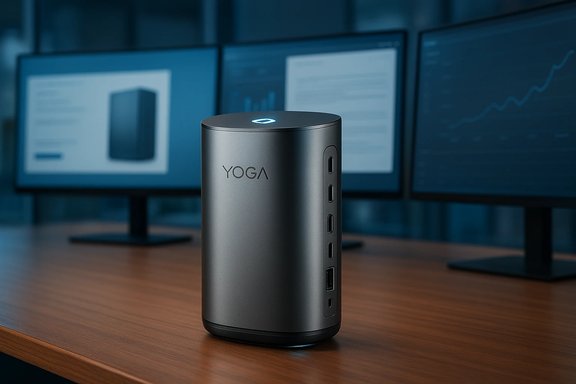
Lenovo has chosen a cylindrical aluminum case for the Yoga Mini i that’s unmistakably different from the usual rectangular mini PC shoebox. The company’s materials and early write‑ups list the dimensions and volume (0.65 L / roughly 130 x 130 x 48.6 mm) and a weight near 600 g, making the unit extremely portable within a workspace or for short moves between desks. The aluminum finish and tight industrial design align the Mini i visually with Lenovo’s Yoga lineage rather than commodity mini PCs.Internal platform and memory
At the top end the Yoga Mini i can be configured with an Intel Core Ultra X7 Series 3 part (model X7‑358H). Lenovo markets this explicitly for productivity and on‑device AI acceleration rather than as a workstation GPU replacement. Memory tops out at 32 GB LPDDR5X (soldered to the board) and storage options include up to 2 TB PCIe Gen4 NVMe. The soldered LPDDR5X delivers power efficiency and high memory bandwidth for interactive workloads, but it also means no user RAM upgrades, an important trade‑off in an otherwise serviceable platform.Port and I/O density
One of the Mini i’s most remarkable engineering choices is its port density for a sub‑liter device. The announced I/O slate includes:- 2 × Thunderbolt 4 ports
- 2 × USB‑C 3.2 Gen 2 full‑function ports (one reportedly PD/100W capable)
- 1 × USB‑A (USB 3.2 Gen 2)
- 1 × HDMI 2.1 (TMDS)
- 1 × 2.5G Ethernet (RJ‑45)
- 1 × 3.5 mm combo audio jack
Copilot+ and on‑device AI: real benefits and real limits
What Lenovo promises
Lenovo positions the Yoga Mini i as a Copilot+ PC, emphasizing on‑device AI tasks that run locally rather than requiring constant cloud calls. Promised features include:- Real‑time speech transcription and live captioning
- Automatic meeting summarization and on‑device content summarization
- Multitasking acceleration for supported apps using local NPU/GPU resources
- Presence‑aware interactions that leverage local sensing to improve convenience and privacy
Grounding marketing in reality
The Core Ultra family does include on‑die acceleration intended for inference and low‑latency tasks, and the combination with fast storage and LPDDR5X makes the Mini i credible as a Copilot+ endpoint for everyday AI tasks (transcription, summarization, context retrieval). However, important caveats apply:- On‑device inference performance is heavily workload dependent. Small, optimized models for transcription and summarization will run well; larger LLMs or model fine‑tuning are outside the thermal and computational envelope of this class.
- The translator from “NPU TOPS” or marketing TOPS to user‑visible performance varies significantly by framework, optimization, and memory footprint. Expect lower latency for supported, lightly sized tasks — and significant slowdowns if applications attempt large local models.
Connectivity, wireless, and presence sensing
Wireless: Wi‑Fi 7 and Bluetooth 6.0
Lenovo states the Yoga Mini i supports Wi‑Fi 7 and Bluetooth 6.0, bringing the latest wireless standards to a tiny desktop. Wi‑Fi 7 offers higher aggregated throughput and lower latency in supported networks; Bluetooth 6.0 brings improved range and energy efficiency over prior versions. Both are strong future‑looking choices that fit the Mini i’s hybrid/remote work target.Presence detection: Wi‑Fi sensing and ambient lights
Two user‑facing innovations deserve attention:- Wi‑Fi sensing: the Mini i can detect nearby motion by analyzing reflections and changes in Wi‑Fi signals to automatically wake the device.
- Adaptive ambient lighting: an ambient notification/presence LED pulses to indicate notifications or that the device has woken.
Multi‑display claims: what “four displays” actually means
Lenovo’s claim that the Yoga Mini i can support up to four high‑resolution external displays is technically plausible because of the combination of dual Thunderbolt 4 ports (which can carry multiple DP streams), HDMI 2.1, and the integrated Xe GPU/display pipelines on Core Ultra silicon. However, real‑world limits matter:- Resolution and refresh rate: driving multiple 4K60 displays simultaneously uses a lot of display pipeline throughput. In practice, simultaneous multi‑4K60 output, particularly at HDR and high chroma, may force compromises in refresh rate, color depth, or internal codec offloading.
- GPU/display pipeline: integrated Xe graphics and the CPU package determine how many pixel engines and display planes can be active without dropping frames. Paper claims don’t always match sustained real‑world loading.
Thermals, sustained performance, and real‑world workloads
Compacting Intel Core Ultra X7 silicon into a 0.65‑liter aluminum cylinder creates important thermal constraints. Early reporting and editorial guidance consistently flag three concerns:- Sustained TDP and throttling: Lenovo’s early materials do not publish a sustained thermal envelope for the top‑end X7‑358H in the Mini i chassis. That omission means short turbo bursts may look strong in benchmarks, but sustained multi‑core loads (video renders, lengthy AI inference) are where thermal throttling will surface.
- Fan acoustics and cooling trade‑offs: very small fans can remain quiet in light use but ramp up noticeably under heavier loads. Buyers must balance the need for sustained performance with acceptable noise profiles for their workspace.
- Intended workloads: the Yoga Mini i is best read as a compact productivity and content‑creation assistant rather than a compact workstation replacement. It will handle Office suites, heavy multitasking, local Copilot+ tasks, light photo/video editing, and multiple displays well — but will trail dedicated towers or compact desktops with discrete GPUs on GPU‑heavy render or training tasks.
Upgradeability, serviceability, and long‑term ownership
One of the key trade‑offs with ultra‑compact PCs is what you cannot upgrade. The Yoga Mini i follows current design patterns:- RAM is soldered (LPDDR5X), making post‑purchase RAM upgrades impossible. Buyers should purchase the RAM configuration they expect to need for the device’s lifetime.
- M.2 SSD upgradeability is not yet fully documented in Lenovo’s early materials. Some reporting suggests single or dual M.2 slots may be present in some compact designs, but Lenovo’s public specs do not clearly confirm tool‑free user access or the number of slots for the Mini i. Treat this as unverified until Lenovo publishes final retail teardown details.
Security, privacy, and enterprise manageability
The Mini i adds a fingerprint reader in the power button for Windows Hello authentication and integrates on‑device AI features that could be configured to keep sensitive data local. Those are positive signals for security‑conscious buyers. However, the presence‑sensing features and on‑device AI also introduce governance questions:- Enterprises will need to confirm whether Wi‑Fi sensing, ambient presence data, or AI agents send telemetry off‑device and how user opt‑outs are implemented. Clear OS‑level toggles, group policy support, and documentation are essential for managed deployments.
- Buyers should demand transparency around the lifecycle of on‑device transcripts, summaries, and any model updates that might interact with cloud services — particularly where compliance regimes or data residency rules apply.
Pricing, availability, and positioning
Lenovo lists a U.S. starting price of $699.99 for the Yoga Mini i with availability expected in June 2026. That starting price makes the Mini i competitive with entry‑level NUCs and some Mac mini configurations, given a premium aluminum chassis and the generous port list. Independent outlets repeating Lenovo’s numbers corroborate the MSRP and timing in early CES coverage. Still, final retail SKUs, regional pricing, and bundled configurations (RAM/storage, Windows edition, warranty tiers) will determine real value. Pricing guidance to buyers:- If you value upgradeability and long life, choose higher RAM/storage SKUs at purchase rather than relying on post‑sale upgrades.
- For multi‑monitor creative setups, budget for higher tiers or validate multi‑display capabilities before committing.
- Enterprises should verify manageability, optional warranty, and privacy controls as part of procurement.
Competitive landscape: where the Yoga Mini i fits
The Yoga Mini i joins a crowded mini PC market that includes Apple’s Mac mini, Intel NUCs, Geekom, Minisforum, Zotac, and boutique SFF makers. Lenovo’s differentiators are clear:- Design and finish: aluminum cylinder and Yoga styling rather than a plastic box.
- Copilot+ focus: explicit on‑device AI features and a platform aligned to Windows Copilot+ initiatives.
- Unusually dense I/O for size: dual TB4, HDMI 2.1, 2.5G Ethernet — an attractive mix for many office users.
Practical buying checklist
- Choose RAM (16–32 GB) at purchase if you expect heavy multitasking; RAM is soldered and not user‑upgradeable.
- Confirm the exact SSD configuration and whether the retail SKU provides a user‑accessible M.2 slot if future storage expansion matters. This remains unverified in Lenovo’s early materials.
- If you plan to drive multiple 4K displays at 60 Hz (or higher), wait for independent tests confirming simultaneous throughput and artifact‑free performance.
- For enterprise purchases, request documentation on Wi‑Fi sensing opt‑out, telemetry controls, and how Copilot+ features store/process local data.
- Test real workloads that matter to you (multi‑tab browsing + video conferencing + a heavy Office suite, or light Adobe workflows) in retailer demo stations or review units before committing to fleet buys.
Strengths, risks, and verdict
Strengths
- Design and portability: premium aluminum finish, tiny footprint, and extremely light weight for easy placement or between‑desk portability.
- I/O density: dual Thunderbolt 4, HDMI 2.1, 2.5G Ethernet and full USB options in a sub‑liter chassis is a real engineering win.
- Copilot+ readiness: modern Core Ultra silicon + LPDDR5X makes practical on‑device AI features (transcription, local summarization) realistic for many users.
Risks and open questions
- Sustained thermal performance remains unverified; sustained high‑load behavior will determine whether the Mini i belongs on a creative bench or as a productivity host.
- Upgradeability trade‑offs: soldered RAM and unclear M.2 access are long‑term ownership risks for power users.
- Privacy and manageability: Wi‑Fi sensing and ambient presence features need clear opt‑out and enterprise controls for broad adoption in managed environments.
- Unverified multi‑display and throughput claims: while plausible, “four high‑resolution displays” must be validated under the exact resolutions/refresh rates buyers need.
Final verdict
The Lenovo Yoga Mini i is a bold and well‑executed entry in the evolving mini PC category. It smartly blends premium industrial design, a surprisingly generous ports list, and Copilot+‑oriented hardware that will appeal to hybrid workers, small studios, and users who prize a neat desk and local AI convenience. However, it is not an across‑the‑board workstation replacement: sustained thermals, soldered memory, and final retail configuration details are the practical checkpoints buyers must validate. For many users who prioritize compactness with capable day‑to‑day performance and modern connectivity, the Yoga Mini i will be an attractive, future‑proofed choice — provided Lenovo’s retail SKUs and real‑world performance match the CES promise.Conclusion
Lenovo’s Yoga Mini i restates an important thesis for 2026: mini PCs no longer have to be compromises of ports and performance. When engineered well, tiny desktops can deliver real productivity, contemporary wireless and wired connectivity, and a measure of on‑device AI responsiveness that reduces friction in everyday tasks. The Mini i’s aluminum cylinder, Copilot+ positioning, and aggressive port layout make it one of the most interesting compact Windows hosts announced at CES.Yet buyers should treat early marketing claims as the starting point for validation — check final retail SKUs, insist on independent sustained performance testing, confirm upgrade paths, and verify privacy/manageability controls. If those real‑world checks align with Lenovo’s materials, the Yoga Mini i will be a practical, elegant choice for offices, studios, and home workspaces that want capability without a large footprint.
Source: TechloMedia Lenovo Yoga Mini i, Compact Windows 11 Mini PC, Unveiled at CES 2025