

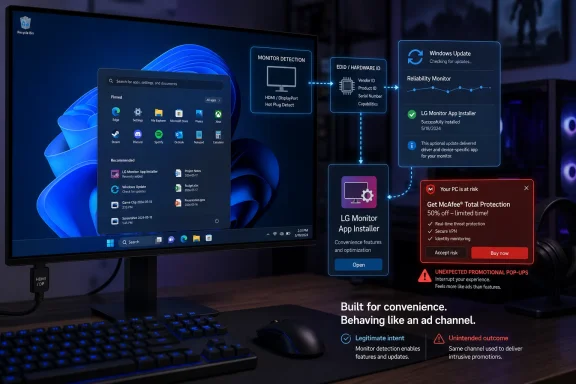
That distinction matters. If a shady download bundle installs antivirus nagware, users know whom to blame. When a display connected over DisplayPort or HDMI results in a Microsoft Store package appearing in Reliability Monitor, the trust chain is muddier: Microsoft provides the plumbing, OEMs supply the payload, and the user gets the pop-up.
The Monitor Became the Installer
The core allegation is straightforward. A Reddit user posting as “Mags_Smash” said that after connecting LG UltraGear monitors, Windows installed an “LG Monitor App Installer” package identified as “9PM9N6F47JB8-LGElectronics.LGMonitorApp.” According to the user’s account, Windows Reliability Monitor and Event Viewer showed the package arriving successfully through Windows Update or Store-associated installation paths, and the first visible payoff was not a firmware tool or color-profile wizard but a McAfee advertisement.
TechSpot’s write-up framed the finding as a “hot potato” because adware has traditionally been associated with prebuilt PCs, bundled freeware, browser extensions, and download-site trickery. Here, the hardware was reputable, the monitor was ordinary gaming hardware, and the delivery route appeared to be sanctioned Windows infrastructure. Tom’s Hardware separately reported the same Reddit thread and noted that other commenters described comparable auto-installs tied to Alienware and Samsung displays.
The important nuance is that the monitor itself is not “infected” in the horror-movie sense. A modern monitor exposes identifying information to the PC, and Windows can use metadata associated with that device to retrieve drivers, color profiles, companion apps, or vendor utilities. That mechanism can be useful when it installs a needed control panel or firmware updater. It becomes user-hostile when the first-run experience is a third-party commercial pitch.
That is why this story has legs among Windows enthusiasts. Nobody is shocked that OEMs like preloaded software. People are shocked when a peripheral they bought at retail behaves like a preloaded PC.
Microsoft’s Convenience Layer Has Become the Attack Surface for Annoyance
Microsoft documents a Windows policy called “Prevent automatic download of applications associated with device metadata.” In plain English, that policy exists because Windows can automatically fetch applications linked to installed hardware. If enabled, Windows does not download those metadata-associated apps.
That alone tells us this is not some exotic hack. The mechanism is part of Windows’ broader attempt to make hardware setup less painful. Plug in a device, let Windows identify it, get the matching support bits, and avoid sending ordinary users to vendor websites full of confusing model numbers and questionable download buttons.
The problem is that a frictionless installation path is only as trustworthy as the business incentives behind it. Microsoft can vet Store packages for security, but that does not mean every post-install prompt is respectful. A vendor utility can be technically legitimate, signed, and distributed through approved channels while still behaving in a way users reasonably experience as adware.
This is the same old Windows ecosystem bargain wearing a newer interface. For decades, PC makers and peripheral vendors have treated “support software” as a broad license to install update agents, telemetry modules, launchers, companion dashboards, subscription trials, and security-suite offers. The difference now is that Windows itself can mediate the installation after device detection, which gives the whole interaction the feel of operating-system authority.
That authority is precisely why the McAfee angle burns. A pop-up from a random installer is irritating. A pop-up that appears because Windows quietly installed an OEM monitor app feels like a violation of the boundary between hardware support and advertising.
Alienware Shows This Is a Pattern, Not a One-Off
LG is the brand in the spotlight because of the McAfee pop-up reports, but Alienware owners have been complaining for years about Alienware Command Center appearing after connecting certain displays. Dell’s own community responses have characterized this as expected Windows automatic identification behavior, even while acknowledging that it can surprise users who are not running an Alienware PC.
That history matters because it weakens the idea that this is merely one vendor making one bad decision. The Windows hardware experience increasingly treats peripherals as services with companion apps, and those apps often arrive through update channels that users associate with drivers and security patches. Once a monitor can trigger an app install, the only remaining question is what the vendor decides to put inside the app.
Alienware Command Center is not the same thing as an LG app showing McAfee promotions. It is a control suite for lighting, profiles, firmware, and device features. But for a user who never asked for it and cannot keep it away, the practical difference can feel academic.
Windows users have seen similar friction elsewhere. Asus motherboards have long drawn criticism for firmware-level prompts that offer Armoury Crate installation after setup. Printer vendors push scan utilities and cloud accounts. GPU vendors bundle overlays, launchers, account systems, and promotional surfaces around drivers. The monitor story is simply the latest category of hardware to discover that the support app can be a marketing surface.
The Store Is Not the Same as Consent
One defense of this behavior is that Microsoft Store delivery is safer than random executable downloads. That is true, but it dodges the central complaint. Users are not objecting only to the binary’s provenance; they are objecting to the absence of meaningful consent.
There is a difference between “Windows found a driver” and “Windows installed an app that can run at startup and show commercial prompts.” Microsoft has spent years training users to accept Windows Update as a trust anchor. Security fixes, driver packages, firmware updates, and Microsoft Store app maintenance all blur together in the background. That is good for patch compliance, but dangerous for user agency when nonessential vendor apps ride along.
The LG package name appearing in Reliability Monitor is especially telling. Enthusiasts were not discovering this through a clear prompt that said, “LG would like to install a monitor companion app that may show offers.” They were reverse-engineering the event after the fact. That is backwards.
For ordinary users, the discovery path is worse. They see a McAfee pop-up, assume they accidentally installed something, search Programs and Features, maybe blame a browser extension, and only later learn the source was a monitor companion installer. That confusion is exactly what makes the experience feel like adware even if every component arrived through an approved channel.
The Fixes Are Too Heavy for the Offense
The practical remedies reported by users range from mild to sledgehammer. The least invasive fix is to prevent the LG monitor app from launching at startup through Windows Settings. That may stop the nagging, but it does not address the deeper issue: the app was installed without the sort of explicit approval users expected.
The more durable fix is a local Group Policy change. On Windows editions with the Local Group Policy Editor, users can navigate to Computer Configuration, Administrative Templates, System, Device Installation, and enable the policy that prevents automatic downloads of applications associated with device metadata. That is a reasonable setting for managed fleets and power users, but it is absurdly obscure for the consumer affected by a gaming monitor pop-up.
The nuclear option is disabling the Microsoft Store through policy. That may satisfy someone who wants an aggressively locked-down workstation, but it is a bad general recommendation for most Windows 11 users. The Store is involved in app servicing, inbox app updates, winget-backed acquisition flows, and a growing portion of Microsoft’s consumer software model.
This is where Microsoft’s design problem becomes obvious. The user-level control is not proportional to the behavior. There should be a simple Settings toggle that says something like: “Automatically install manufacturer apps for connected devices.” Better still, Windows should distinguish between drivers and optional companion applications, asking before installing anything that can run at startup or display promotions.
Instead, the current fix path sends users into policy settings originally intended for administrators. That is not consent. It is a treasure hunt.
Security Software Ads Make the Trust Problem Worse
McAfee is not just another advertiser in this context. Security software carries a particular psychological weight because its prompts often imply risk, urgency, or incomplete protection. Even when an offer is clearly promotional, users may interpret it as a warning from the system.
That is why antivirus bundling has such a long and unhappy history in the PC market. Trialware security suites have been staples of OEM images for years because they convert fear into subscriptions. Many technically literate users remove them immediately, not because all third-party security tools are useless, but because the sales motion often feels indistinguishable from nagware.
Putting that sales motion behind a monitor installer is uniquely tone-deaf. A display is a peripheral, not a security boundary. The owner bought pixels, refresh rate, panel quality, ergonomics, and maybe firmware-update support. They did not buy a new channel for antivirus lead generation.
The result is reputational damage beyond the specific app. LG becomes the brand associated with the pop-up. Microsoft becomes the platform that allowed it. McAfee becomes, once again, the name users invoke when discussing software they never wanted in the first place.
Enterprise IT Will See a Small Incident With a Large Policy Shadow
For sysadmins, the immediate risk is not that LG monitor apps are going to compromise the domain. The risk is that Windows’ automatic hardware-app model adds another source of uncontrolled software drift. A fleet can be clean at imaging time and later accumulate vendor utilities simply because users connect displays, docks, printers, headsets, or other peripherals.
That undermines application control, helpdesk predictability, and security baselines. Even benign apps create patching obligations and privacy questions. They may add startup entries, scheduled tasks, background update services, or user-facing prompts that generate tickets. If they include third-party offers, they also create reputational confusion: employees may think the company endorses the advertised product.
Most mature environments already constrain driver delivery, Store access, or device installation behavior through Group Policy, Intune, or other endpoint management tools. But this story is a useful reminder to audit those assumptions. Device metadata is not just decoration; it can influence what software lands on a machine.
The enterprise lesson is not “ban LG monitors.” It is that device-associated applications deserve the same scrutiny as any other auto-installed software. If an organization would not allow a vendor utility through normal software deployment review, it should not arrive just because an EDID string or hardware ID made Windows feel helpful.
The Consumer PC Is Still Haunted by the Bloatware Deal
This incident also exposes how little the industry has internalized the backlash against bloatware. PC buyers have spent two decades complaining about trial software on new machines. The enthusiast answer was simple: build your own PC, install a clean copy of Windows, and control the stack yourself.
The monitor app story punctures that confidence. Even a self-built desktop with a fresh Windows installation can inherit OEM software after the fact through peripheral detection. The “clean install” is no longer a fixed state; it is a temporary condition negotiated against every device and service Windows decides to integrate with.
Vendors see a companion app as a support channel, an update vehicle, a feature unlocker, and a monetization surface. Users see another thing in Startup Apps. Both can be true, but only one side owns the machine. Or at least, one side should.
This is the broader tension in Windows 11. Microsoft wants a more managed, Store-connected, cloud-adjacent operating system. Hardware vendors want deeper software relationships with buyers. Users want the machine to stop surprising them. Those incentives are not aligned, and the surprise almost always lands on the person at the keyboard.
Microsoft Should Draw a Brighter Line Between Drivers and Apps
There is a defensible version of automatic device support. Drivers should install automatically when needed. Color profiles should arrive when they improve accuracy. Firmware tools can be offered when they fix real problems. Accessibility utilities and hardware control panels can be genuinely helpful.
But optional software should be opt-in, and promotional software should be forbidden from auto-installed device flows. If a vendor wants to advertise a security suite, a cloud service, or a subscription, it should have to earn that interaction after the user knowingly opens the app. Better yet, Microsoft should restrict device-metadata-associated installs to functionality directly related to the device.
The line is not impossible to draw. A monitor app that controls brightness, updates firmware, manages KVM settings, or switches picture modes is device-related. A McAfee promotion is not. A command center that changes RGB lighting or fan curves on Alienware hardware is device-related. A startup nag that cannot be cleanly declined is not.
Microsoft also needs clearer UI. Windows Update history, Reliability Monitor, the Microsoft Store, and Settings should make it obvious when a device triggered an app install. Users should be able to remove the app and block future installs for that device class without spelunking through gpedit.msc.
This is not merely a consumer-comfort issue. It is a trust issue. The more Windows hides commercial payloads behind system mechanisms, the more users learn to distrust the mechanisms Microsoft needs them to trust for security.
The Lesson From a McAfee Pop-Up on a Gaming Monitor
The practical advice is not complicated, but the fact that it is necessary says plenty. If a monitor or other peripheral suddenly produces vendor pop-ups on Windows, the culprit may not be something you downloaded in the conventional sense.
- Check Settings, Apps, Startup, and disable any unexpected vendor installer or companion app that appeared after connecting new hardware.
- Look in Reliability Monitor and Event Viewer for Store or Windows Update entries tied to the vendor package name or hardware installation time.
- On Windows Pro, Enterprise, and Education systems, consider enabling the policy that prevents automatic downloads of applications associated with device metadata.
- Avoid disabling the Microsoft Store entirely unless you understand the servicing and management consequences for your system.
- In managed environments, audit whether device-associated applications are permitted to install automatically and whether that matches your organization’s application-control policy.
- Treat vendor companion apps as optional software, not as an unavoidable part of owning a monitor.
The larger lesson is that adware does not need to sneak in through the back door when the front door has been redesigned as a convenience feature. LG’s reported McAfee pop-ups may become a short-lived embarrassment, and Dell’s Alienware behavior may remain merely irritating rather than scandalous. But unless Microsoft forces a cleaner consent model, the next peripheral controversy will look familiar: a useful Windows automation, a vendor with something to promote, and a user wondering why their own PC just started selling to them.
References
- LG and Alienware monitors caught auto-installing Windows adware - TechSpot TechSpot · Wed, 08 Jul 2026 00:32:43 GMT
- techcommunity.microsoft.com techcommunity.microsoft.com