

LG TV owners across multiple forums woke up to a firmware update that added a Microsoft Copilot tile to their webOS home screens — and many discovered there’s no obvious way to remove it, only to hide it, sparking a sharp backlash about forced software, privacy, and device control.
LG and Microsoft announced plans to bring Microsoft Copilot — the company’s conversational AI assistant — to living‑room screens as part of an AI push for smart TVs at trade shows and in product messaging earlier in the year. LG marketed new webOS AI features such as AI Search and an AI Remote, and those announcements made Copilot on TVs an expected feature of 2025 models.
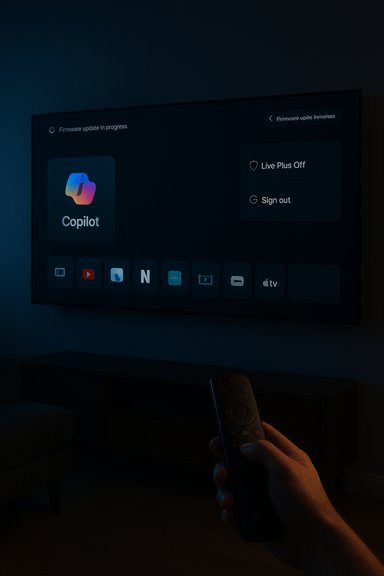
What changed in the field was the distribution method: multiple LG owners reported that an over‑the‑air webOS firmware update pinned a Copilot tile directly to the home ribbon. Crucially, many affected users report that the normal app-management flows do not offer an uninstall option — Copilot can be hidden from view but not removed — and in several documented cases the tile returned after a factory reset. Those on‑the‑ground reports have been collected across forums and social threads.
However, the rollout pattern documented in community threads reveals a critical execution flaw: when an assistant is pushed via firmware and cannot be uninstalled through normal UI flows, a feature turns into a contested imposition. That failure is not just a UX bug — it is a trust failure. Without transparent opt‑ins, effective removal paths, and clear privacy defaults, the long‑term cost to brand trust and regulatory exposure is likely to exceed any short‑term engagement gains.
For now, affected owners have imperfect mitigations — hiding the tile, disabling Live Plus, avoiding sign‑ins, or using external streamers — but the durable solution requires vendor action: transparent explanations, privacy‑first defaults, and supported removal or rollback options. If LG and Microsoft adopt those steps, Copilot on TV can be a worthwhile addition; if not, the controversy will remain a cautionary tale about forced AI in the living room.
Source: PCWorld LG TV owners baffled by a Microsoft Copilot app that can't be removed
 Background
LG and Microsoft announced plans to bring Microsoft Copilot — the company’s conversational AI assistant — to living‑room screens as part of an AI push for smart TVs at trade shows and in product messaging earlier in the year. LG marketed new webOS AI features such as AI Search and an AI Remote, and those announcements made Copilot on TVs an expected feature of 2025 models.What changed in the field was the distribution method: multiple LG owners reported that an over‑the‑air webOS firmware update pinned a Copilot tile directly to the home ribbon. Crucially, many affected users report that the normal app-management flows do not offer an uninstall option — Copilot can be hidden from view but not removed — and in several documented cases the tile returned after a factory reset. Those on‑the‑ground reports have been collected across forums and social threads.
What owners are seeing — the observable facts
- After a routine webOS firmware-over-the-air (FOTA) update, a Copilot icon or tile appears on the TV home screen in the apps row or AI/assistant section.
- When users open the TV’s Edit or App Manager workflow, Copilot often lacks the usual uninstall/delete affordance; at best the UI shows hide or disable.
- Several owners reported performing a factory reset and finding Copilot reappeared afterwards, which strongly suggests the component may be installed as a privileged system package or baked into the installed firmware image.
Why this matters: ownership, privacy, and trust
Smart TVs have moved well beyond simple displays into fully connected platforms. That evolution brings convenience — voice search, aggregated content discovery, and smart assistants — but it also raises three overlapping sensitivities that explain the intense reaction.- Loss of device autonomy: Consumers reasonably expect optional third‑party services installed on purchased hardware to be removable. A component that cannot be uninstalled feels like forced bloatware and reduces the sense of ownership.
- Expanded telemetry surface: LG’s webOS already includes Automatic Content Recognition (ACR), marketed as Live Plus, which can identify on‑screen content to power personalization and ads. An assistant that leverages on‑screen context magnifies telemetry concerns unless opt‑outs are clear and persistent.
- Opaque update mechanics: Firmware updates are understood by users to deliver security fixes and stability patches. When such updates add persistent partner services without clear announcement or uninstall paths, trust erodes.
Technical explanation: how an app becomes “undeletable”
Two well‑understood packaging patterns explain why users experience the Copilot tile as non‑removable:- Install as a privileged system package: The OEM installs the component outside the normal user app sandbox and marks it as a system app. In that model, the UI may expose only hide or disable actions, not uninstall. This pattern is used legitimately for DRM or low‑level services — but it also makes third‑party components effectively permanent from the end‑user perspective.
- Firmware‑baked component: The Copilot component is included in the firmware image applied during a FOTA update. A factory reset re‑applies that image and restores any baked‑in components. Removing such components typically requires a vendor rollback or low‑level reflashing tools consumers do not have.
What Copilot on TV actually does (features and intended benefits)
When implemented transparently, a conversational assistant on a TV can deliver concrete benefits that explain why manufacturers are eager to ship it:- Improved content discovery: search across multiple streaming apps and surface spoiler‑free episode summaries, cast info, and metadata in one conversational flow.
- Accessibility gains: voice navigation and contextual explanations help users with mobility or vision impairments.
- Ecosystem convenience: tighter tie‑ins with Microsoft services (for households tied to Windows, Xbox, or Microsoft 365) could simplify cross‑device experiences.
What remains unverified — proceed with caution
Several claims circulating in forums and social posts need vendor confirmation or independent technical analysis before being stated as fact:- Any assertion that Copilot introduced new classes of continuous ambient audio capture beyond existing webOS microphone behavior is not currently verified and requires forensic inspection or an explicit LG/Microsoft statement. Treat such claims cautiously until audited.
- Whether LG intentionally packaged Copilot as an undeletable system module across all firmware branches or whether the behavior was limited to specific regional builds is not yet clear. A vendor technical bulletin would resolve that.
Practical guidance for affected owners
If Copilot appears on your LG webOS TV and you want to minimize its visibility and the TV’s telemetry footprint, the community and vendor documentation point to a few practical steps. These are ordered from least to most disruptive.- Hide the Copilot tile
- Long‑press or use the Edit / Manage Apps flow to hide the tile from the home ribbon. This removes daily visibility but does not delete the component.
- Avoid signing in with a Microsoft account
- Many personalization and cross‑device features require account linking. Not signing in reduces the data tied to your identity.
- Turn off Live Plus / Automatic Content Recognition (ACR)
- Navigate to Settings → All Settings → General → System → Additional Settings → Live Plus (menu wording differs by model) and set it Off. This reduces on‑screen context signals used for personalization and ads.
- Opt out of interest‑based advertising and viewing‑info collection
- During the TV’s user agreements or within Privacy settings, opt out of ad personalization, viewing information sharing, and similar toggles.
- Disconnect from the network (most disruptive)
- Turning Wi‑Fi off stops cloud calls and future FOTA updates but also breaks app streaming and other smart features. Use this only if you’re willing to trade smart functionality for isolation.
- Use network‑level blocking (advanced)
- Blocking known telemetry domains via a router, Pi‑hole, or firewall can stop some cloud calls from the TV. This is technical and can break legitimate services; proceed carefully.
- External streamer work‑around
- Use an external streaming box (Apple TV, Roku, Amazon Fire TV, Android TV stick) and set it as the default input to avoid using the native webOS home layer. This preserves streaming capabilities while sidestepping the integrated homescreen experience.
The business logic: why LG (and Microsoft) shipped Copilot this way
Understanding the commercial incentives explains the behavior even if it doesn’t excuse the UX:- Feature differentiation: When display hardware is largely commoditized, software and AI experiences become headline differentiators for premium models. Bundling Copilot into the platform helps LG market AI features.
- Monetization and ad inventory: Smart TV home screens are monetized with promotions and ad formats. An assistant that improves personalization can increase ad revenue unless privacy‑preserving guardrails are enforced.
- Ecosystem reach for Microsoft: putting Copilot on TVs expands the brand beyond PCs and phones, normalizing conversational assistants in the living room.
Regulatory and reputational risk
Shipping a persistent, non‑removable assistant with unclear privacy defaults carries real regulatory and reputational hazards:- Consumer protection authorities in privacy‑sensitive jurisdictions may view forced installs and opaque opt‑outs as problematic, especially where personalization relies on sensitive behavioral signals.
- Reputational damage can be amplified rapidly on social platforms, with community outrage reducing future trust in firmware updates and the brand’s smart‑TV ecosystem.
What LG and Microsoft should do now (recommended remediation)
To defuse the controversy and restore trust, vendors should pursue a short list of concrete steps:- Publish a clear technical bulletin explaining how Copilot was delivered (system package vs firmware‑baked) and which models/regions are affected. This resolves uncertainty and demonstrates accountability.
- Provide a supported removal or rollback path for owners who want Copilot removed, or at minimum supply a documented process for IT‑savvy users to revert to a prior firmware image.
- Default to privacy‑minimal settings for any assistant and require a clear, explicit opt‑in for personalization features that leverage ACR or voice data. Persistent opt‑outs must remain effective across updates.
- Publish transparent change logs and user‑visible prompts before pushing significant functional additions via FOTA so owners are not surprised by non‑optional features.
Broader implications for the smart‑TV landscape
This episode matters beyond LG alone. It highlights a series of systemic tensions in modern connected devices:- The balance between platform control and user autonomy is shifting. When manufacturers treat devices as ongoing service platforms, consumers often lose the simple expectation that purchased hardware is under their full control.
- As AI agents spread across screens, telemetry governance becomes a cross‑device concern: the same assistant that improves discovery can increase profiling unless privacy defaults and audits are rigorous.
- The playbook vendors use to deliver features (FOTA, system apps, firmware images) should be visible to regulators and consumers alike, because packaging choices materially affect what owners can control.
Final analysis — benefits vs. risks
Microsoft Copilot on TVs is a plausible, even compelling, UX evolution: conversational interfaces can simplify discovery, support accessibility, and tie households into richer cross‑device experiences. Those benefits are real and worth pursuing.However, the rollout pattern documented in community threads reveals a critical execution flaw: when an assistant is pushed via firmware and cannot be uninstalled through normal UI flows, a feature turns into a contested imposition. That failure is not just a UX bug — it is a trust failure. Without transparent opt‑ins, effective removal paths, and clear privacy defaults, the long‑term cost to brand trust and regulatory exposure is likely to exceed any short‑term engagement gains.
Conclusion
The Copilot-on-LG episode is a textbook case of a valuable technology undermined by delivery choices and defaults. Owners who value control and privacy are rightly upset: a feature that arrives silently, cannot be removed through normal settings, and reappears after factory reset feels like an imposition on purchased hardware.For now, affected owners have imperfect mitigations — hiding the tile, disabling Live Plus, avoiding sign‑ins, or using external streamers — but the durable solution requires vendor action: transparent explanations, privacy‑first defaults, and supported removal or rollback options. If LG and Microsoft adopt those steps, Copilot on TV can be a worthwhile addition; if not, the controversy will remain a cautionary tale about forced AI in the living room.
Source: PCWorld LG TV owners baffled by a Microsoft Copilot app that can't be removed
