

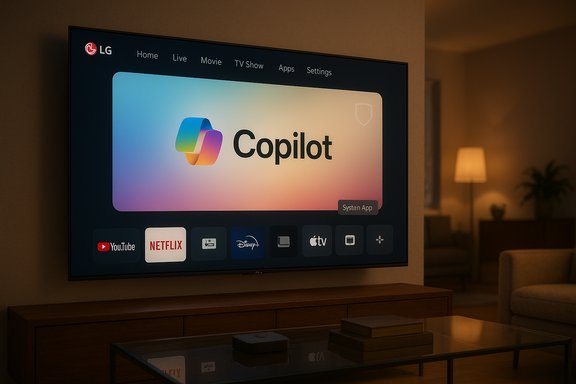
Owners of LG webOS televisions are reporting that Microsoft’s Copilot AI appeared on their home screens following a recent over‑the‑air firmware update—and in many cases the Copilot tile behaves like a system component that can be hidden but not uninstalled, provoking privacy, control, and consumer‑rights concerns.
LG and Samsung publicly announced plans to bring Microsoft Copilot to TVs as part of a broader 2025 push to add conversational AI to large screens. Microsoft framed the effort as a way to make discovery and contextual information easier on the living‑room screen, while OEMs positioned Copilot as part of new “AI” sections and remote features on modern webOS and Tizen platforms. Shortly after these announcements, multiple LG owners reported receiving a webOS firmware update that placed a visible Copilot tile on the TV home screen. Forum and social posts consistently reported the same detail: the Copilot entry could be hidden from view but could not be removed through the normal app‑management UI. Several users also reported that a factory reset returned the TV to the same post‑update state—an indicator that the Copilot component may be provisioned as a privileged system package or baked into the firmware image.
At the same time, LG’s built‑in Automatic Content Recognition (ACR) system—commonly marketed as Live Plus on webOS—remains a default control point for contextual personalization and advertising. Owners alarmed by Copilot’s arrival pointed to the combination of a privileged assistant plus default‑on ACR as the heart of the privacy worry.
The combination of a privileged assistant provisioned by firmware plus default‑on personalization or ACR settings creates a red flag for privacy advocates: if new telemetry classes are introduced or opt‑out is made difficult, complaints and investigations could follow. That outcome will depend on vendor disclosures, how clearly consent is offered, and whether users are provided practical mechanisms to exercise control.
But the current controversy with LG owners is a textbook example of execution undermining intent. The strongest, verifiable facts are simple: Microsoft signaled TV integrations for Copilot, LG’s webOS includes Live Plus (ACR), and multiple owners report a firmware update that added a Copilot tile without a standard uninstall path—often only hide or disable—and in some reports factory resets reintroduced the app. Those combined realities explain the intensity of the backlash: useful feature + opaque installation model + default personalization = perceived loss of control.
If vendors want Copilot to be seen as a convenience rather than an imposition, the corrective actions are equally straightforward: restore clear choice, default privacy‑minimal behavior, and publish transparent update mechanics. Doing so preserves the product’s utility while respecting buyer expectations and reducing regulatory risk.
This episode is a reminder that platform control, consent, and transparency are not optional extras when integrating AI into everyday consumer devices. The technical ability to ship capabilities is only half the product problem—how those capabilities are delivered, documented, and controlled ultimately determines whether they are welcome enhancements or a renewed source of consumer distrust.
Source: GIGAZINE Microsoft Copilot was added to LG TVs without permission and cannot be removed
 Background / Overview
LG and Samsung publicly announced plans to bring Microsoft Copilot to TVs as part of a broader 2025 push to add conversational AI to large screens. Microsoft framed the effort as a way to make discovery and contextual information easier on the living‑room screen, while OEMs positioned Copilot as part of new “AI” sections and remote features on modern webOS and Tizen platforms. Shortly after these announcements, multiple LG owners reported receiving a webOS firmware update that placed a visible Copilot tile on the TV home screen. Forum and social posts consistently reported the same detail: the Copilot entry could be hidden from view but could not be removed through the normal app‑management UI. Several users also reported that a factory reset returned the TV to the same post‑update state—an indicator that the Copilot component may be provisioned as a privileged system package or baked into the firmware image.At the same time, LG’s built‑in Automatic Content Recognition (ACR) system—commonly marketed as Live Plus on webOS—remains a default control point for contextual personalization and advertising. Owners alarmed by Copilot’s arrival pointed to the combination of a privileged assistant plus default‑on ACR as the heart of the privacy worry.
What’s verifiable right now
- Microsoft announced Copilot integrations for TVs at CES and Microsoft’s product channels confirmed Copilot is being rolled to select smart displays and TV partners.
- Multiple community threads and firsthand reports show that some LG owners received a webOS FOTA update that added a Copilot tile which, in the UI, lacks the usual uninstall affordance (users report only hide or disable). Screenshots and post‑reset tests have been shared by those owners.
- LG’s webOS includes Live Plus / ACR settings that can be toggled; these settings have been documented in user guides and community troubleshooting as the path to limit certain recognition and personalization flows.
How an app becomes “undeletable” on a smart TV (technical mechanics)
Manufacturers have a small set of well‑understood mechanisms to deliver code to embedded devices; two of them explain why an app can be practically impossible to remove from the consumer UI:- Privileged system package: the OEM delivers the component outside the normal user app sandbox and flags it as a system app. The UI commonly exposes only limited management actions—hide or disable—but not uninstall. This is a standard approach for DRM, platform agents, or deeply integrated services.
- Firmware‑baked component: the package is incorporated into the firmware image that the TV boots from. A factory reset typically restores the installed firmware image, which reintroduces any baked‑in components. Removing such a component requires vendor tools or a supported firmware rollback.
Why manufacturers and partners do this: the business logic
The commercial incentives are straightforward:- Feature differentiation. With panel hardware converging, manufacturers sell UX and software experiences. AI assistants are headline features that can be marketed to justify premium pricing.
- Monetization of home‑screen inventory. Smart TV home screens are valuable ad and promotion real estate. A persistent assistant that improves personalization can increase ad effectiveness and open new ad/engagement formats.
- Ecosystem reach. For Microsoft, Copilot on TVs extends brand touchpoints across household devices and ties the assistant into a broader services ecosystem (Windows, Xbox, Office, cloud). For LG, partnering with a major platform can speed perceived feature parity with competitors.
Why users are upset (concise)
- Loss of device autonomy: Users reasonably expect optional, partner apps to be removable. A system‑level, non‑removable assistant feels like forced software bundled into purchased hardware.
- Privacy creep and telemetry surface area: An assistant becomes more useful when it has contextual signals—what’s on screen, timestamps, voice queries. If ACR (Live Plus) is enabled by default and a privileged assistant is present, the amount and sensitivity of data that may flow off the device increases.
- Opaque update behavior: Firmware updates are invisible to many users; surprise additions without clear patch notes or an explicit opt‑in step provoke distrust and a sense of lost agency.
- Monetization concerns: Owners worry that a more powerful personalization engine will be leveraged to drive higher‑value ad targeting or new paid conversions without adequate consent mechanics.
What we know about the Copilot rollout (verified timelines and vendor stance)
- Microsoft and TV OEMs first signaled Copilot for TVs publicly at CES 2025; Samsung pushed Copilot to select models first and published rollout details. LG likewise included Copilot in its webOS AI roadmap for 2025 models.
- Community reports of a webOS update that placed Copilot on LG TVs and the subsequent inability to uninstall were widely shared on Reddit and product forums in mid‑December 2025. Those forum threads contain screenshots and step‑by‑step reports from multiple owners.
- As of the moment community reporting peaked, there was no clear, public LG technical bulletin explicitly confirming the packaging model that made Copilot appear non‑removable. That absence is material and worth flagging: community evidence is strong, but vendor confirmation remains the final arbiter of the technical details.
Practical mitigations for owners (ranked from least to most disruptive)
If Copilot appeared on your LG TV and you want to reduce the feature surface or telemetry footprint, consider these options. Each contains tradeoffs—some cut convenience or features.- 1. Turn off Live Plus / ACR and ad personalization.
- Path: Settings → All Settings → General → System → Additional Settings → Live Plus (menu wording varies). Also opt out of interest‑based advertising and viewing‑information toggles where present. This reduces contextual signals but may not remove a system app.
- 2. Hide the Copilot tile and avoid signing in.
- Use the UI to hide the tile if available, and do not link a Microsoft account. Hiding removes daily visibility and reduces personalization tied to an account.
- 3. Keep the TV offline or block telemetry domains at the router.
- Disconnect Wi‑Fi/Ethernet to prevent cloud calls and remote updates. Alternatively use Pi‑hole or firewall rules to block known telemetry domains. These approaches can break legitimate functionality and are technically demanding.
- 4. Use an external streamer.
- Route streaming through Apple TV, Roku, Fire TV, or Nvidia Shield and use the TV as a display. This effectively sidesteps webOS for daily apps but sacrifices integrated UX and some accessibility features.
- 5. Factory reset (cautious).
- A factory reset can remove user‑level apps, but if Copilot is baked into the firmware image the reset will return the app. Proceed with caution and test before relying on reset as a fix.
- 6. Seek support or consumer remedies.
- If your TV was sold with promised features that materially changed, or if you have concerns about removal of advertised functionality, pursue manufacturer support or retailer remedies (refunds or replacements) where appropriate.
Regulatory and consumer‑rights angle
Non‑removable system apps on consumer devices are attracting more regulatory attention worldwide when they intersect with data collection and consent mechanics. In jurisdictions with strong data‑protection rules, obscured consent flows or difficult opt‑outs can invite scrutiny from consumer protection bodies.The combination of a privileged assistant provisioned by firmware plus default‑on personalization or ACR settings creates a red flag for privacy advocates: if new telemetry classes are introduced or opt‑out is made difficult, complaints and investigations could follow. That outcome will depend on vendor disclosures, how clearly consent is offered, and whether users are provided practical mechanisms to exercise control.
What vendors should do now (practical, high‑impact recommendations)
To restore user trust and reduce regulatory friction, platform vendors and partners should take these concrete steps immediately:- Make Copilot optional or easily uninstallable. If technical integration requires a privileged component, provide a single‑click uninstall that also purges associated telemetry artifacts.
- Default to privacy‑minimal settings. ACR and ad personalization should be off until the user explicitly opts in.
- Publish clear update notes and visible opt‑out instructions. Every FOTA push that adds or changes functionality should include a short, discoverable explanation and the steps to remove or disable new features.
- Provide a privacy dashboard and data‑deletion tools. Let owners see what viewing data has been collected and offer straightforward deletion requests.
- Roll back contentious changes to a preview channel while a better consent model is developed. Keep broad rollouts to stable channels only after consumer UX, privacy, and uninstall pathways are validated.
Strengths and potential benefits of Copilot on TVs (when done right)
It is important not to throw out the baby with the bathwater: a properly implemented conversational assistant on a large screen can deliver clear user value if the rollout is transparent and optional.- Improved content discovery: Copilot can aggregate searches across multiple streaming apps, provide conversational discovery, and reduce friction when hunting for content.
- Accessibility gains: Voice navigation and conversational explanations can make TVs more usable for viewers with mobility or vision limitations.
- Contextual companion features: Live metadata cards, sports stats, or scene summaries can enrich viewing experiences for sports and documentary programming.
- Ecosystem convenience: For households already invested in Microsoft services, a TV Copilot that integrates with Xbox or Windows can be a helpful bridge—provided account linking is optional and secure.
Evidence gaps and what still needs independent verification
Several important technical and behavioral claims remain unverified by vendors and require independent confirmation:- Whether the Copilot component was intentionally packaged as a privileged, non‑removable system app across specific webOS firmware builds. Community tests strongly suggest this in some cases, but a vendor technical note would be definitive.
- Whether Copilot (or associated updates) introduced new classes of telemetry beyond existing webOS flows—such as continuous ambient audio capture routed to cloud services specifically for Copilot functionality. These claims are plausible and worth investigating, but they require network forensic analysis or vendor transparency to confirm.
- The scale of the rollout across regions and model years: which LG models and firmware revisions included the change, and whether the behavior is uniform across markets. Public OEM patch notes should list affected builds.
How to evaluate firmware updates going forward (a quick checklist for owners)
- Read update notes before automatic installation, if vendor patch notes are published.
- Delay non‑critical FOTA for 1–2 weeks to let early adopters surface problems.
- If privacy is important, disable ACR/ad personalization and avoid account sign‑ins until you review new features.
- Consider using an external streaming device to decouple your day‑to‑day media consumption from platform changes.
- Use router‑level protection (Pi‑hole, firewall) cautiously to block telemetry domains—expect some service breakage.
Final assessment — product promise vs. execution
The idea of bringing a helpful conversational assistant to the biggest screen in the home is sensible: Copilot can make search easier, help with contextual queries, and add accessibility benefits. When surfaced as an opt‑in user‑level app with privacy‑forward defaults, it can improve the TV experience.But the current controversy with LG owners is a textbook example of execution undermining intent. The strongest, verifiable facts are simple: Microsoft signaled TV integrations for Copilot, LG’s webOS includes Live Plus (ACR), and multiple owners report a firmware update that added a Copilot tile without a standard uninstall path—often only hide or disable—and in some reports factory resets reintroduced the app. Those combined realities explain the intensity of the backlash: useful feature + opaque installation model + default personalization = perceived loss of control.
If vendors want Copilot to be seen as a convenience rather than an imposition, the corrective actions are equally straightforward: restore clear choice, default privacy‑minimal behavior, and publish transparent update mechanics. Doing so preserves the product’s utility while respecting buyer expectations and reducing regulatory risk.
Immediate takeaways for owners
- Check your TV’s Privacy settings and disable Live Plus / ACR and ad personalization if you prefer tighter defaults.
- Hide the Copilot tile and avoid signing into a Microsoft account on the TV if you want to limit personalization.
- If privacy or control is paramount, consider using an external streaming device and keep the TV offline for daily streaming.
- Track vendor statements and firmware patch notes; seek support or consumer remedies if your device’s delivered functionality materially deviated from what was promised at purchase.
This episode is a reminder that platform control, consent, and transparency are not optional extras when integrating AI into everyday consumer devices. The technical ability to ship capabilities is only half the product problem—how those capabilities are delivered, documented, and controlled ultimately determines whether they are welcome enhancements or a renewed source of consumer distrust.
Source: GIGAZINE Microsoft Copilot was added to LG TVs without permission and cannot be removed
