

LG’s decision to use a Windows 11 device-app installation mechanism to place its Monitor App Installer on PCs has turned a convenience feature into a case study in broken consent. Owners of some LG UltraGear displays report that connecting the monitor can silently trigger a Microsoft Store installation, after which LG’s software may promote products such as McAfee through unsolicited pop-ups. The central problem is not that Windows can automatically obtain legitimate companion software, but that hardware metadata can initiate an optional, commercially motivated app installation without a clear prompt, an explanation of permissions, or an obvious way to refuse.
Windows has automatically retrieved information and software for connected hardware for many years. The operating system identifies a peripheral, searches Microsoft’s services for matching metadata and drivers, and configures the device with minimal involvement from the person sitting at the PC.
This behavior is normally beneficial. A new printer may gain a management utility, a gaming mouse may receive configuration software, and a monitor may acquire an app capable of controlling brightness, color profiles, input selection, or firmware updates.
Windows 8 and Windows 10 extended the concept through Microsoft Store device apps built on the Universal Windows Platform. Hardware manufacturers could associate an external device with a Store package by submitting metadata containing the relevant hardware or model identifiers.
When Windows sees a matching peripheral, it can retrieve that metadata and use it to locate the associated app. Microsoft’s documentation describes automatic installation as a standard acquisition route for UWP device apps, especially for external peripherals.
Those requirements amount to broad platform-level permission, however, rather than informed consent for a particular application. Agreeing to recommended Windows settings during initial setup does not necessarily communicate that connecting a monitor months later may install a manufacturer’s promotional utility.
That gap between technical authorization and meaningful permission sits at the center of the controversy.
Instead of behaving solely as a display-management utility, the software presented promotions for other products, including McAfee services. That transformed what might have been an unremarkable companion-app deployment into something users reasonably described as adware.
The issue is proportionality. If an automatically installed app offers little immediate value but quickly displays third-party promotions, the installation looks less like hardware enablement and more like the creation of a new advertising channel.
That distinction matters because the monitor itself does not require the utility to perform its essential role. Standard display functions are generally handled through established interfaces, Windows display settings, the graphics driver, and the monitor’s own firmware.
In this case, the label reflects three combined characteristics:
This makes the process more comparable to automated Store provisioning than to a USB drive executing bundled software.
That separation explains why uninstalling the monitor from Device Manager does not necessarily remove the application. Microsoft’s documentation says a UWP device app must be removed separately, while drivers and metadata follow their own installation and removal processes.
The company’s documentation even acknowledges that users may find this behavior confusing or frustrating and may respond by giving the app a poor rating. LG’s Monitor App Installer reportedly had a Microsoft Store rating near the bottom of the available scale as the controversy intensified.
A warning to developers is not an adequate substitute for a safeguard presented to users. Microsoft appears to have recognized the usability problem without redesigning the workflow around explicit consent.
A capability declaration describes what Windows may permit an application to access under its package configuration. It does not, by itself, prove that the application has collected every category of information that the Store interface lists or that it has abused every available capability.
The wording nevertheless creates a serious trust problem. An application with a broad resource capability deserves a higher level of disclosure, especially if it launches at startup, communicates over the internet, or can display remote promotional content.
The Store page would provide some warning to a person who intentionally searched for the app and pressed Install. A user receiving the package automatically may never see that page, its privacy details, or its declared permissions before installation.
Those protections reduce some risks, but they do not settle the question of whether an app is appropriate. A properly signed Store application can still be intrusive, commercially aggressive, privacy-unfriendly, badly designed, or unnecessary.
Security review and user consent solve different problems. Passing Microsoft Store requirements should not grant a manufacturer an unlimited right to place optional marketing software on every compatible PC.
A person connecting a display expects Windows to configure display output. That expectation may extend to installing a monitor driver or color profile, but it does not naturally extend to receiving advertisements for antivirus subscriptions.
Treating one general selection as durable consent for an unknown list of future manufacturer applications is weak privacy design. The user cannot evaluate an app that has not yet been identified, explain why it is needed, or assess the reputation of its publisher.
A better process would prompt when each app becomes relevant. Windows already knows the package name, publisher, size, permissions, rating, and connected device, so it has enough information to present a meaningful decision.
That confusion is not merely cosmetic. Accurate attribution is essential when users investigate startup changes, network activity, pop-ups, and unexplained resource use.
A transparent notification could say that Windows found an optional LG application for the newly connected monitor and offer three choices: install it, review it in the Store, or decline. The existing silent process substitutes convenience for accountability.
That is not the case. A driver, a firmware updater, a hardware-control panel, a promotional installer, and a Store companion app perform very different roles.
Manufacturers may provide an INF file that improves model identification or supplies color information. Advanced features may also justify an optional utility, but basic image output should not depend on a promotional application.
Users should therefore avoid assuming that removing LG Monitor App Installer will disable the panel. It may remove access to convenience features associated with the utility, but it should not ordinarily prevent the monitor from displaying the Windows desktop.
Companion apps live at a different layer. They can provide user-facing controls, but they can also become storefronts, telemetry clients, account portals, and advertising platforms.
Bundling both concepts into one seamless “device setup” experience makes it harder for consumers to distinguish necessity from monetization. Windows should communicate that distinction before optional software reaches the system.
The frustration becomes sharper when the hardware is a premium product. Buyers paying four-figure prices for an UltraGear display are unlikely to accept that the purchase also entitles the manufacturer to occupy desktop space with third-party sales pitches.
Pop-ups can also interrupt games, full-screen applications, streaming sessions, and professional presentations. The harm is not limited to CPU cycles; it includes distraction, uncertainty, and time spent identifying what changed.
The episode may therefore influence purchasing decisions beyond the affected software. Monitor buyers increasingly evaluate firmware support, warranty service, panel quality, ports, and privacy practices alongside refresh rate and response time.
That ambiguity benefits neither LG nor McAfee. Security marketing that resembles a system alert can pressure users into installing software they did not seek, particularly if it appears immediately after new hardware is connected.
A companion app should make its publisher and purpose unmistakable. It should never exploit uncertainty about the health of the PC to generate a conversion.
Even so, the underlying mechanism should concern IT departments. Employees connect monitors, docks, headsets, webcams, printers, and conference-room equipment to managed Windows 11 PCs every day.
The conceptual problem is that a hardware connection can become an application acquisition trigger. If administrators have not considered device-associated Store apps in their security baseline, software may arrive through a route outside their expected deployment workflow.
Enterprises should inventory Store packages as well as traditional desktop applications. They should also test common peripherals against a representative Windows image before approving them for widespread use.
Organizations operating under strict data-handling rules must also determine whether a newly installed companion app transmits telemetry, uses third-party advertising services, or processes identifiers. A vague privacy disclosure can force security teams to block the software until the vendor provides precise answers.
The indirect cost can exceed the value of the utility. Every unnecessary package adds another publisher, update channel, privacy policy, network destination, and potential vulnerability to the organization’s attack surface.
The first step is to verify the system rather than react to a pop-up alone.
Users can also open the Start menu and search for the app directly. If LG Monitor App Installer appears and its features are not wanted, use the three-dot menu beside the entry in Installed apps and select Uninstall.
After removal, restart Windows and observe whether the app or its prompts return. Because device apps, metadata, and drivers are handled separately, uninstalling the Store package should not be confused with removing the monitor driver.
Next, visit Settings, System, and Notifications. Check whether the LG application or any associated component has permission to send notifications.
Disabling notifications can stop visible interruptions, but it does not remove the underlying app. Uninstallation is the cleaner choice when the software provides no desired functionality.
Selecting the option that prevents automatic manufacturer downloads can reduce this class of installation. Users should understand that the setting may also stop useful companion experiences and custom device presentation.
Windows Pro, Enterprise, and Education administrators can additionally examine the Group Policy setting named Prevent automatic download of applications associated with device metadata. As with any policy change, organizations should test the result because connected-device workflows differ across fleets.
The solution is not simply to remove every automated hardware experience. It is to separate required drivers from optional applications and to require affirmative permission for the latter.
Third-party offers, if permitted at all, should remain opt-in, clearly labeled, and separated from security warnings. An automatically delivered device utility should also provide a straightforward way to disable promotions permanently.
Microsoft already controls the Store listing, metadata association, signing pipeline, and distribution infrastructure. It therefore has both the technical ability and the responsibility to enforce higher standards.
Deprecating a technology does not immediately remove it from deployed Windows systems. Legacy metadata workflows can remain relevant for years because hardware ecosystems, drivers, and enterprise images change slowly.
The replacement should launch with clear consent requirements, auditable deployment records, administrative controls, and a firm distinction between hardware enablement and commercial promotion.
Silence would allow speculation to fill the gaps. A technically detailed response would help users distinguish confirmed behavior from broader claims that have not yet been demonstrated.
The package should not automatically launch marketing prompts merely because the user connected a display. If LG believes the app is important for firmware or feature management, it should explain that value before installation.
Premium hardware should be supported as a product, not treated as the entry point to an advertising funnel.
The app should publish a concise data map covering identifiers, diagnostics, approximate or precise location, network requests, advertising endpoints, retention periods, and third-party recipients. Users should be able to disable nonessential telemetry without losing basic monitor controls.
A privacy policy written for an entire corporate ecosystem is not enough. People need information tied to the exact Windows package installed on their PCs.
The LG controversy demonstrates how quickly that value disappears when the software becomes intrusive.
Reviewers may need to document what happens when a monitor is first connected to a clean Windows installation. That includes Store packages, services, scheduled tasks, startup behavior, outbound connections, account requirements, and promotional content.
Manufacturers that offer optional, lightweight, transparent utilities can use that restraint as a competitive advantage. A monitor that leaves the operating system alone unless invited may appeal strongly to enthusiasts and enterprise buyers.
If more companies use device metadata to distribute promotions, users may disable automatic manufacturer software entirely. That would also reduce adoption of genuinely useful companion apps.
Abuse of a convenience channel can therefore damage the broader hardware ecosystem. Vendors have a collective interest in ensuring that automatic or recommended software remains narrowly connected to the product.
Any response should be judged by concrete changes rather than general assurances about customer experience.
Watch for changes to Device Installation Settings, Microsoft Store policy, Windows notification behavior, and the documentation for Driver Package Container Metadata. Microsoft may also clarify whether automatically acquired device apps face different advertising requirements from voluntarily installed Store software.
A meaningful fix should cover all hardware manufacturers, not create a one-off exception for LG.
Useful findings would include package-version histories, network destinations, startup triggers, advertising frequency, affected monitor identifiers, regional differences, and behavior when recommended device software is disabled.
It is also important to determine whether reports of installation on PCs no longer using an LG display result from cached metadata, delayed Store acquisition, a previously connected monitor, or a broader matching error. Those possibilities have different security and reliability implications.
The LG Monitor App Installer controversy is ultimately a warning about how convenience features change when commercial incentives enter the design. Windows 11 should be able to discover useful software for connected hardware, but discovery must not silently become installation, and installation must not quietly become advertising. Microsoft should require explicit approval for optional device apps, while LG should remove the promotions, minimize permissions, and disclose the software’s actual data behavior. Until those changes occur, Windows users and administrators should treat every new peripheral not only as hardware, but as a potential software deployment event that deserves inspection.
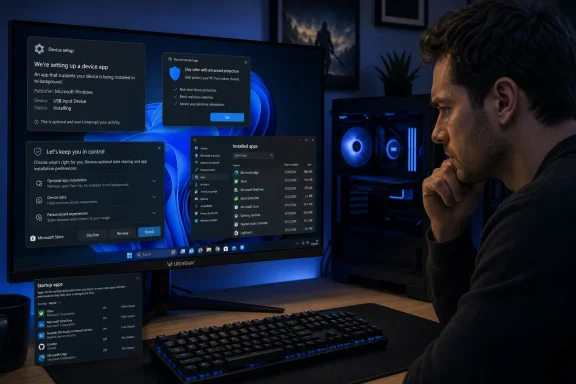 Background
Windows has automatically retrieved information and software for connected hardware for many years. The operating system identifies a peripheral, searches Microsoft’s services for matching metadata and drivers, and configures the device with minimal involvement from the person sitting at the PC.This behavior is normally beneficial. A new printer may gain a management utility, a gaming mouse may receive configuration software, and a monitor may acquire an app capable of controlling brightness, color profiles, input selection, or firmware updates.
From Device Stage to UWP companion apps
The roots of this system stretch back to Windows 7 and its Device Stage initiative. Microsoft wanted connected products to appear in Windows with recognizable icons, manufacturer branding, support links, and device-specific actions rather than as cryptic hardware entries.Windows 8 and Windows 10 extended the concept through Microsoft Store device apps built on the Universal Windows Platform. Hardware manufacturers could associate an external device with a Store package by submitting metadata containing the relevant hardware or model identifiers.
When Windows sees a matching peripheral, it can retrieve that metadata and use it to locate the associated app. Microsoft’s documentation describes automatic installation as a standard acquisition route for UWP device apps, especially for external peripherals.
The conditions required for installation
The installation is not expected to occur on every Windows PC under every configuration. Microsoft says the user must have selected Recommended Settings during Windows setup, must be signed in to the Microsoft Store, and must have an internet connection.Those requirements amount to broad platform-level permission, however, rather than informed consent for a particular application. Agreeing to recommended Windows settings during initial setup does not necessarily communicate that connecting a monitor months later may install a manufacturer’s promotional utility.
That gap between technical authorization and meaningful permission sits at the center of the controversy.
What LG’s Monitor App Installer Does
The reported behavior came to wider attention after complaints from LG monitor owners and an investigation by the Gamers Nexus YouTube channel. Testing with an expensive LG UltraGear display reportedly showed the Monitor App Installer appearing after the monitor was connected to a Windows system.Instead of behaving solely as a display-management utility, the software presented promotions for other products, including McAfee services. That transformed what might have been an unremarkable companion-app deployment into something users reasonably described as adware.
Limited utility, prominent promotion
A monitor application can serve legitimate functions. Depending on the model, useful features might include desktop control of picture modes, split-screen layouts, firmware maintenance, input switching, and synchronization of settings that would otherwise require navigating physical on-screen controls.The issue is proportionality. If an automatically installed app offers little immediate value but quickly displays third-party promotions, the installation looks less like hardware enablement and more like the creation of a new advertising channel.
That distinction matters because the monitor itself does not require the utility to perform its essential role. Standard display functions are generally handled through established interfaces, Windows display settings, the graphics driver, and the monitor’s own firmware.
Why users call it adware
“Adware” can describe a broad range of software, from explicitly malicious advertising programs to legitimate applications that use intrusive commercial prompts. Calling an application adware does not necessarily mean that it compromises files, steals passwords, or meets a security vendor’s definition of malware.In this case, the label reflects three combined characteristics:
- The software reportedly arrives without a specific installation prompt.
- Its presence is not required for ordinary monitor operation.
- It displays promotions for unrelated or loosely related paid services.
How Windows 11 Installs the App
The LG monitor does not appear to contain a conventional Windows executable that launches directly over HDMI or DisplayPort. Instead, Windows identifies the connected hardware and consults Microsoft-managed metadata that links the device to an application in the Microsoft Store.This makes the process more comparable to automated Store provisioning than to a USB drive executing bundled software.
The four-stage installation chain
Microsoft documents a sequence that can be summarized as follows:- Windows detects the connected peripheral and reads identifiers that describe the device or model.
- The operating system retrieves matching device metadata through Microsoft’s infrastructure.
- Windows obtains any required driver components through Windows Update when applicable.
- The associated UWP device app is downloaded from the Microsoft Store and installed for the signed-in user.
That separation explains why uninstalling the monitor from Device Manager does not necessarily remove the application. Microsoft’s documentation says a UWP device app must be removed separately, while drivers and metadata follow their own installation and removal processes.
Why there is no visible confirmation
The most contentious detail is not an undocumented loophole. Microsoft explicitly warns device-app developers that the automatic installation feature does not notify the user when the app is installed.The company’s documentation even acknowledges that users may find this behavior confusing or frustrating and may respond by giving the app a poor rating. LG’s Monitor App Installer reportedly had a Microsoft Store rating near the bottom of the available scale as the controversy intensified.
A warning to developers is not an adequate substitute for a safeguard presented to users. Microsoft appears to have recognized the usability problem without redesigning the workflow around explicit consent.
The Permission Question
The Microsoft Store listing reportedly states that LG’s application can access the internet connection and “all system resources.” That phrase sounds alarming, particularly when paired with a silent installation, but it requires careful interpretation.A capability declaration describes what Windows may permit an application to access under its package configuration. It does not, by itself, prove that the application has collected every category of information that the Store interface lists or that it has abused every available capability.
Capability is not evidence of collection
Claims that the installer necessarily harvests credentials, contacts, transactions, geolocation, browsing activity, and every other category visible in a permissions disclosure go further than the available evidence supports. Determining actual collection would require network analysis, package inspection, privacy-policy review, and observation of the application under controlled conditions.The wording nevertheless creates a serious trust problem. An application with a broad resource capability deserves a higher level of disclosure, especially if it launches at startup, communicates over the internet, or can display remote promotional content.
The Store page would provide some warning to a person who intentionally searched for the app and pressed Install. A user receiving the package automatically may never see that page, its privacy details, or its declared permissions before installation.
UWP does not automatically mean harmless
UWP applications run within a more structured security and deployment model than traditional unrestricted Win32 installers. They use signed packages, declare capabilities, and are distributed through mechanisms that can support cleaner installation and removal.Those protections reduce some risks, but they do not settle the question of whether an app is appropriate. A properly signed Store application can still be intrusive, commercially aggressive, privacy-unfriendly, badly designed, or unnecessary.
Security review and user consent solve different problems. Passing Microsoft Store requirements should not grant a manufacturer an unlimited right to place optional marketing software on every compatible PC.
Why the Consent Model Has Failed
Microsoft can argue that users opted into Recommended Settings and that LG used a documented feature. LG can argue that its app came through the Microsoft Store rather than an untrusted download. Neither argument addresses what the owner of the computer reasonably expected to happen.A person connecting a display expects Windows to configure display output. That expectation may extend to installing a monitor driver or color profile, but it does not naturally extend to receiving advertisements for antivirus subscriptions.
One old choice authorizes future installations
Windows setup presents users with a series of broad choices at a time when they are trying to reach the desktop. These settings can influence diagnostics, personalization, recommendations, updates, and hardware experiences long after setup has finished.Treating one general selection as durable consent for an unknown list of future manufacturer applications is weak privacy design. The user cannot evaluate an app that has not yet been identified, explain why it is needed, or assess the reputation of its publisher.
A better process would prompt when each app becomes relevant. Windows already knows the package name, publisher, size, permissions, rating, and connected device, so it has enough information to present a meaningful decision.
Silence obscures accountability
Without a notification, users may not understand whether the app came from LG, Microsoft, Windows Update, the Microsoft Store, the monitor itself, or another program. Some may conclude that their PC has been infected.That confusion is not merely cosmetic. Accurate attribution is essential when users investigate startup changes, network activity, pop-ups, and unexplained resource use.
A transparent notification could say that Windows found an optional LG application for the newly connected monitor and offer three choices: install it, review it in the Store, or decline. The existing silent process substitutes convenience for accountability.
The Difference Between Drivers and Optional Apps
The controversy also exposes widespread confusion about drivers. Users are often told that Windows automatically installs software needed for new hardware, encouraging the assumption that anything appearing after a device is connected must be technically necessary.That is not the case. A driver, a firmware updater, a hardware-control panel, a promotional installer, and a Store companion app perform very different roles.
What the monitor actually needs
A conventional monitor can operate through standard display protocols. Windows and the graphics driver negotiate resolution, refresh rate, color capabilities, adaptive synchronization, and high-dynamic-range support using information reported by the display.Manufacturers may provide an INF file that improves model identification or supplies color information. Advanced features may also justify an optional utility, but basic image output should not depend on a promotional application.
Users should therefore avoid assuming that removing LG Monitor App Installer will disable the panel. It may remove access to convenience features associated with the utility, but it should not ordinarily prevent the monitor from displaying the Windows desktop.
Why bundling changes the risk calculation
Drivers occupy a privileged and sensitive position in Windows. They may run in the kernel or interact closely with protected hardware interfaces, so Microsoft has built signing, servicing, and compatibility processes around them.Companion apps live at a different layer. They can provide user-facing controls, but they can also become storefronts, telemetry clients, account portals, and advertising platforms.
Bundling both concepts into one seamless “device setup” experience makes it harder for consumers to distinguish necessity from monetization. Windows should communicate that distinction before optional software reaches the system.
Consumer Impact
For home users, the most immediate harm is loss of control. Someone who has carefully removed trialware, disabled recommendation notifications, and kept a clean startup environment can still find a manufacturer app appearing after a peripheral connection.The frustration becomes sharper when the hardware is a premium product. Buyers paying four-figure prices for an UltraGear display are unlikely to accept that the purchase also entitles the manufacturer to occupy desktop space with third-party sales pitches.
Gaming PCs are especially sensitive
Gaming enthusiasts routinely optimize startup tasks, background services, overlays, latency, and memory usage. Even when a small UWP application has negligible performance impact, an unexplained process or notification damages confidence in the system.Pop-ups can also interrupt games, full-screen applications, streaming sessions, and professional presentations. The harm is not limited to CPU cycles; it includes distraction, uncertainty, and time spent identifying what changed.
The episode may therefore influence purchasing decisions beyond the affected software. Monitor buyers increasingly evaluate firmware support, warranty service, panel quality, ports, and privacy practices alongside refresh rate and response time.
A new burden on less technical users
Experienced Windows users can inspect installed apps, startup entries, Task Manager, Store history, and notification settings. Less technical owners may mistake the McAfee promotion for a security warning or assume that Windows has detected an infection.That ambiguity benefits neither LG nor McAfee. Security marketing that resembles a system alert can pressure users into installing software they did not seek, particularly if it appears immediately after new hardware is connected.
A companion app should make its publisher and purpose unmistakable. It should never exploit uncertainty about the health of the PC to generate a conversion.
Enterprise and Managed-PC Implications
The reported prerequisites may limit the number of tightly managed enterprise devices affected. Corporate endpoints are often configured without consumer Microsoft Store accounts, and administrators may restrict Store access, device metadata retrieval, or unauthorized application deployment.Even so, the underlying mechanism should concern IT departments. Employees connect monitors, docks, headsets, webcams, printers, and conference-room equipment to managed Windows 11 PCs every day.
Application control can be bypassed conceptually
The Store mechanism does not literally bypass properly enforced application-control policies. Windows Defender Application Control, AppLocker, Intune policies, Store restrictions, and least-privilege configurations can still limit what reaches an endpoint.The conceptual problem is that a hardware connection can become an application acquisition trigger. If administrators have not considered device-associated Store apps in their security baseline, software may arrive through a route outside their expected deployment workflow.
Enterprises should inventory Store packages as well as traditional desktop applications. They should also test common peripherals against a representative Windows image before approving them for widespread use.
Support and compliance costs
An unsolicited app can create help-desk incidents even when it is not malicious. Users may report pop-ups, unexpected startup entries, privacy concerns, or apparent antivirus conflicts.Organizations operating under strict data-handling rules must also determine whether a newly installed companion app transmits telemetry, uses third-party advertising services, or processes identifiers. A vague privacy disclosure can force security teams to block the software until the vendor provides precise answers.
The indirect cost can exceed the value of the utility. Every unnecessary package adds another publisher, update channel, privacy policy, network destination, and potential vulnerability to the organization’s attack surface.
How Windows Users Can Check and Remove It
Users with an LG monitor should not assume that the application is present, nor should owners of other brands assume they are immune from comparable behavior. The Windows device-app mechanism is available to multiple hardware manufacturers.The first step is to verify the system rather than react to a pop-up alone.
Inspect installed applications
Open Settings, select Apps, and then open Installed apps. Search for terms such as “LG,” “Monitor App Installer,” or the name of any unexpected security product promoted by the application.Users can also open the Start menu and search for the app directly. If LG Monitor App Installer appears and its features are not wanted, use the three-dot menu beside the entry in Installed apps and select Uninstall.
After removal, restart Windows and observe whether the app or its prompts return. Because device apps, metadata, and drivers are handled separately, uninstalling the Store package should not be confused with removing the monitor driver.
Review startup and notifications
Open Settings, select Apps, and then choose Startup to look for LG-related entries. Task Manager’s Startup apps page provides another view, including the status and estimated startup effect of listed programs.Next, visit Settings, System, and Notifications. Check whether the LG application or any associated component has permission to send notifications.
Disabling notifications can stop visible interruptions, but it does not remove the underlying app. Uninstallation is the cleaner choice when the software provides no desired functionality.
Limit manufacturer-app retrieval
Windows includes a Device Installation Settings control that asks whether the system should automatically download manufacturers’ apps and custom icons for devices. The exact route and wording can vary by Windows build, but users can search the Start menu or Control Panel for Change device installation settings.Selecting the option that prevents automatic manufacturer downloads can reduce this class of installation. Users should understand that the setting may also stop useful companion experiences and custom device presentation.
Windows Pro, Enterprise, and Education administrators can additionally examine the Group Policy setting named Prevent automatic download of applications associated with device metadata. As with any policy change, organizations should test the result because connected-device workflows differ across fleets.
What Microsoft Should Change
Microsoft designed automatic device apps to reduce setup friction, and that goal remains reasonable. The system can be preserved without allowing silent installation to become a monetization shortcut.The solution is not simply to remove every automated hardware experience. It is to separate required drivers from optional applications and to require affirmative permission for the latter.
Add a device-app consent prompt
When Windows detects an associated Store package, it should present a standard notification containing:- The app’s full name and verified publisher.
- The hardware device that triggered the recommendation.
- A short explanation of what the app does.
- Its declared sensitive capabilities and background behavior.
- Buttons to install, decline, or inspect the Store listing.
- A “remember my choice for this publisher” option controlled by the user.
Police advertising in automatically offered apps
Microsoft should impose stricter Store rules on applications distributed through hardware metadata. A package delivered automatically should have a direct functional relationship with the device and should not primarily act as an affiliate installer or advertising surface.Third-party offers, if permitted at all, should remain opt-in, clearly labeled, and separated from security warnings. An automatically delivered device utility should also provide a straightforward way to disable promotions permanently.
Microsoft already controls the Store listing, metadata association, signing pipeline, and distribution infrastructure. It therefore has both the technical ability and the responsibility to enforce higher standards.
Use the metadata transition to reset policy
Microsoft has marked the older device metadata framework as deprecated and plans to replace it with Driver Package Container Metadata. That transition offers an opportunity to redesign the trust model rather than merely reproducing the same silent behavior in newer packaging.Deprecating a technology does not immediately remove it from deployed Windows systems. Legacy metadata workflows can remain relevant for years because hardware ecosystems, drivers, and enterprise images change slowly.
The replacement should launch with clear consent requirements, auditable deployment records, administrative controls, and a firm distinction between hardware enablement and commercial promotion.
What LG Should Do
LG should remove advertising from the Monitor App Installer and explain exactly which models trigger its deployment. It should also identify the versions involved, describe all data processed by the software, and state whether any telemetry or promotional targeting occurs.Silence would allow speculation to fill the gaps. A technically detailed response would help users distinguish confirmed behavior from broader claims that have not yet been demonstrated.
Make the utility genuinely optional
LG can still offer a monitor-management application. It should appear as an optional recommendation during setup or be available through the Microsoft Store and LG’s support pages for users who want its features.The package should not automatically launch marketing prompts merely because the user connected a display. If LG believes the app is important for firmware or feature management, it should explain that value before installation.
Premium hardware should be supported as a product, not treated as the entry point to an advertising funnel.
Narrow permissions and improve disclosure
LG should review whether the app’s declared capabilities are broader than its actual functions require. Overly expansive permission language alarms customers and weakens the company’s ability to rebut accusations of surveillance.The app should publish a concise data map covering identifiers, diagnostics, approximate or precise location, network requests, advertising endpoints, retention periods, and third-party recipients. Users should be able to disable nonessential telemetry without losing basic monitor controls.
A privacy policy written for an entire corporate ecosystem is not enough. People need information tied to the exact Windows package installed on their PCs.
Competitive Implications for the Monitor Market
Monitor manufacturers increasingly use software to differentiate products built around similar panel technologies. Desktop control, automatic input switching, KVM management, RGB integration, firmware updates, window layouts, and game-specific profiles can all make companion applications valuable.The LG controversy demonstrates how quickly that value disappears when the software becomes intrusive.
Trust is becoming a product feature
Display reviews traditionally focus on brightness, contrast, motion clarity, color accuracy, local dimming, variable refresh rate, and port selection. Software conduct now deserves a place in the evaluation.Reviewers may need to document what happens when a monitor is first connected to a clean Windows installation. That includes Store packages, services, scheduled tasks, startup behavior, outbound connections, account requirements, and promotional content.
Manufacturers that offer optional, lightweight, transparent utilities can use that restraint as a competitive advantage. A monitor that leaves the operating system alone unless invited may appeal strongly to enthusiasts and enterprise buyers.
The risk of an industry-wide backlash
LG is the focus of the current complaints, but the Windows mechanism is not exclusive to LG. Other peripheral vendors have used related processes to recommend or install management software for mice, keyboards, printers, docks, headsets, and monitors.If more companies use device metadata to distribute promotions, users may disable automatic manufacturer software entirely. That would also reduce adoption of genuinely useful companion apps.
Abuse of a convenience channel can therefore damage the broader hardware ecosystem. Vendors have a collective interest in ensuring that automatic or recommended software remains narrowly connected to the product.
Strengths and Opportunities
Automatic device-app installation is not inherently a bad idea. Properly implemented, it can solve real support and usability problems.- It can reduce setup complexity by locating the correct application for an exact hardware model.
- It can provide safer distribution through signed Microsoft Store packages rather than random download pages and bundled web installers.
- It can improve accessibility by exposing hardware controls through a familiar Windows interface.
- It can simplify firmware maintenance when the application clearly explains and manages device updates.
- It can help enterprises standardize peripherals if administrators can preapprove packages and block everything else.
- It gives Microsoft an enforcement point from which to require privacy disclosures, capability minimization, and responsible notification behavior.
- It could become a trusted recommendation system if Windows asks before installation and clearly separates essential drivers from optional utilities.
Risks and Concerns
The LG episode highlights risks extending beyond one monitor application or one antivirus promotion.- Broad setup consent can be stretched beyond reasonable user expectations.
- Silent installation makes it difficult to identify which device or company caused a system change.
- Optional applications can be mistaken for required drivers.
- Advertising prompts can mimic security warnings and pressure inexperienced users.
- Broad Store capability declarations create privacy fears even when actual data collection has not been proven.
- Background apps add update, network, reliability, and vulnerability exposure.
- Enterprise endpoints may acquire unapproved software unless administrators explicitly govern device-associated Store apps.
- Aggressive vendors can undermine trust in useful automatic hardware configuration.
- Uninstallation may not prevent later reinstalls if metadata retrieval remains enabled or the package association changes.
- A deprecated metadata framework may receive insufficient policy attention while remaining active across millions of systems.
What to Watch Next
The immediate questions are whether LG will remove the advertisements, modify the app, narrow its permissions, or stop associating the package with affected monitor metadata. Microsoft must also decide whether a documented but user-hostile installation behavior still meets its expectations for Windows 11.Any response should be judged by concrete changes rather than general assurances about customer experience.
Possible Microsoft action
Microsoft could delist or update the package, require LG to change its behavior, remove the metadata association, or redesign the installation flow in a future Windows update. A temporary enforcement action would address the current case, while a consent prompt would address the architectural problem.Watch for changes to Device Installation Settings, Microsoft Store policy, Windows notification behavior, and the documentation for Driver Package Container Metadata. Microsoft may also clarify whether automatically acquired device apps face different advertising requirements from voluntarily installed Store software.
A meaningful fix should cover all hardware manufacturers, not create a one-off exception for LG.
Evidence still needed
Independent technical analysis will be important. Researchers should distinguish between the capabilities declared by the package, the information the app actually reads, and the data it transmits.Useful findings would include package-version histories, network destinations, startup triggers, advertising frequency, affected monitor identifiers, regional differences, and behavior when recommended device software is disabled.
It is also important to determine whether reports of installation on PCs no longer using an LG display result from cached metadata, delayed Store acquisition, a previously connected monitor, or a broader matching error. Those possibilities have different security and reliability implications.
Questions LG must answer
LG should provide specific answers to several points:- Which monitor models and regions are associated with the Monitor App Installer?
- When was the automatic installation association activated or expanded?
- Why does the application display McAfee promotions?
- Does LG receive compensation for installations, trials, subscriptions, or referrals?
- What data does the app collect, transmit, retain, or share?
- Why are its declared capabilities necessary for monitor management?
- Will LG remove the advertising and provide a clean version of the utility?
- How can users permanently decline installation without losing driver updates?
The LG Monitor App Installer controversy is ultimately a warning about how convenience features change when commercial incentives enter the design. Windows 11 should be able to discover useful software for connected hardware, but discovery must not silently become installation, and installation must not quietly become advertising. Microsoft should require explicit approval for optional device apps, while LG should remove the promotions, minimize permissions, and disclose the software’s actual data behavior. Until those changes occur, Windows users and administrators should treat every new peripheral not only as hardware, but as a potential software deployment event that deserves inspection.
References
- Primary source: The Register
Published: 2026-07-21T12:30:00+00:00
Loading…
www.theregister.com - Related coverage: tomshardware.com
- Related coverage: pcgamer.com
It looks like monitor manufacturers can download bloatware without consent that will serve you pop-up ads | PC Gamer
Here's hoping this doesn't become a trend.www.pcgamer.com