

LG has started pushing a webOS update that adds Microsoft’s Copilot app to a range of smart TVs — and for many owners the new Copilot tile appears as a system-level component that cannot be deleted through the normal app-management tools.
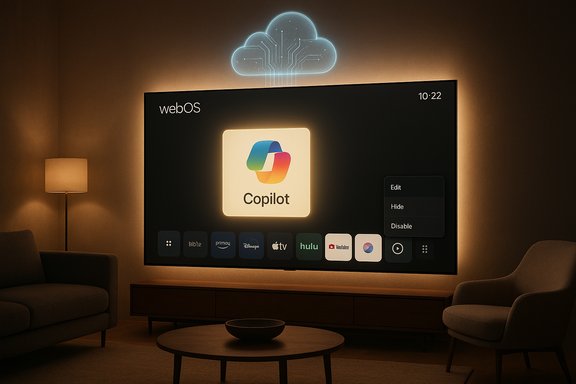
The change arrived quietly through a routine firmware-over-the-air (FOTA) update distributed to recent webOS models. After the update completes and the set reboots, users report discovering a new Copilot tile pinned to the home ribbon alongside streaming apps. Unlike ordinary store-installed apps such as Netflix or YouTube, Copilot’s tile commonly lacks an uninstall option; the on-screen app editor often offers only hide or disable rather than deletion. Multiple independent reports and broad community discussion show this pattern repeating across different model years and regions, indicating the component is being delivered as a privileged or firmware‑baked package rather than a removable third‑party download.
This development raises two immediate realities for TV owners: a new native entry point for a cloud AI assistant, and a loss of control over whether that assistant remains installed on devices purchased by consumers. The rollout appears gradual and vendor-managed, and the manufacturer has not published definitive public documentation explaining why Copilot is being treated as an undeletable system app on affected models.
However, the industry’s approach to installation — whether by opt‑in, opt‑out, or forced install — matters. When updates add system components without clear user consent or straightforward removal options, the relationship between vendor and customer shifts toward a post-sale monetization model that many consumers find unwelcome.
This episode is a timely reminder that building interaction between hardware and cloud AI requires not only technical integration but also clear, user‑centered policy choices. For now, affected owners must rely on hiding the tile, adjusting privacy settings, or using network/workaround strategies. The more durable remedy will come from vendor transparency, user‑friendly controls, and thoughtful product design that respects purchaser choice while delivering useful AI features.
Source: Trusted Reviews It looks like LG is adding a Copilot app to TVs that can’t be deleted
 Background / Overview
The change arrived quietly through a routine firmware-over-the-air (FOTA) update distributed to recent webOS models. After the update completes and the set reboots, users report discovering a new Copilot tile pinned to the home ribbon alongside streaming apps. Unlike ordinary store-installed apps such as Netflix or YouTube, Copilot’s tile commonly lacks an uninstall option; the on-screen app editor often offers only hide or disable rather than deletion. Multiple independent reports and broad community discussion show this pattern repeating across different model years and regions, indicating the component is being delivered as a privileged or firmware‑baked package rather than a removable third‑party download.This development raises two immediate realities for TV owners: a new native entry point for a cloud AI assistant, and a loss of control over whether that assistant remains installed on devices purchased by consumers. The rollout appears gradual and vendor-managed, and the manufacturer has not published definitive public documentation explaining why Copilot is being treated as an undeletable system app on affected models.
What changed on affected LG TVs
How the Copilot tile shows up
- A standard webOS system update is applied (either automatically or when the user approves).
- After the update finishes and the TV restarts, a Copilot tile is visible on the home screen and in the launcher bar.
- The tile normally launches a Copilot interface that behaves as an online assistant; on many observed sets the implementation looks like a web‑wrapped Copilot interface rather than a fully native, deeply integrated application.
- When editing the app row, the Copilot tile typically cannot be deleted; options are limited to hiding it or moving it.
Who is seeing it and where
- Reports are coming from owners of recent LG models running newer webOS versions. The distribution pattern appears broad but staggered: not every set receives the tile at the same time, which is consistent with a phased FOTA rollout.
- The manufacturer has not published an exhaustive compatibility list naming the specific models or regions that will receive Copilot as a system app, and current vendor documentation does not fully clarify the permanence or management options for the new app.
Why Copilot may be undeletable: technical explanation
Understanding why the Copilot tile cannot be removed requires a short detour into how smart‑TV platforms manage software.System apps vs. user apps
Smart-TV platforms typically distinguish between two software classes:- User-installable apps — Delivered through an app store, sandboxed, and removable by consumers. These are the apps users typically add or delete.
- System / preinstalled apps — Bundled with firmware, given privileged placement in the UI, and often protected from removal because the system assumes they are integral to the platform or vendor services.
Firmware-baked components
If an app is included in the device’s firmware image, a factory reset will restore it. That behaviour — the app returning after a reset — is a practical indicator that the app is firmware-baked rather than a removable store item. Removing such a component requires vendor tools, unsigned firmware modifications, or unsupported hacks, none of which are recommended for mainstream users.What Copilot on a TV can — and can’t — do (what we can confirm and what remains unclear)
Confirmed or strongly supported observations
- Copilot is arriving on webOS TVs as part of an LG system update and appears as a prominent home‑screen tile.
- The tile is commonly non‑removable through the usual app management UI; hiding is usually possible.
- The version deployed on many sets behaves like an online Copilot experience, often accessed through an embedded web interface rather than a completely native app.
Unclear or currently unverifiable details
- Whether Copilot is enabled by default once installed or requires an explicit first launch and sign‑in to activate full features.
- The depth of integration with LG’s voice assistant, remote‑based mic button, or other system services; in many reported cases the tile acts as a launch point rather than an always‑listening agent.
- Precisely which LG models and geographic markets are in the current rollout window — the vendor has not published a model-by-model list.
- The precise data flows and telemetry collected by the Copilot implementation on webOS beyond the vendor’s general privacy policies; there is no detailed public spec explaining what data is transmitted, stored, or used for personalization.
Why this matters: benefits, friction, and privacy concerns
Potential benefits
- Convenience and accessibility: A well‑implemented TV Copilot can provide quick answers, voice search, recommendations, and contextual information — useful for channel info, cast lookups, or hands‑free controls.
- Unified ecosystem: For users already in Microsoft’s ecosystem, Copilot on the TV could offer continuity with Copilot features available on Windows and mobile devices.
- New interface possibilities: Copilot could evolve into an assistive viewing companion that summarizes episodes, finds related content, or offers accessibility features for visual and hearing‑impaired users.
Consumer friction and risks
- Loss of choice: Users who do not want additional AI assistants on their devices now face a component they cannot trivially remove.
- Interface clutter and bloat: Pinned tiles for features users don’t want reduce the perceived value of the UI and can degrade the experience for owners who prefer streamlined home screens.
- Privacy and telemetry: Smart TVs already collect metadata about viewing habits and device usage. Adding a cloud AI assistant increases the number of data flows and raises questions about what transcripts, logs, or usage signals are being collected, stored, or shared and whether those flows are opt‑in or opt‑out.
- Security surface: Any new network‑connected service widens the attack surface. If the Copilot implementation relies on external web services or web wrappers, it inherits web security risks that must be managed by the device vendor.
The consumer reaction and community fallout
Initial public reaction has been sharp. Community threads and social posts show:- Many owners expressed frustration at the automatic install and inability to remove the tile.
- Some users equate the move to “bloatware” and see it as an intrusive vendor decision to push additional services post‑sale.
- Practical mitigation tactics being shared include hiding the tile, disabling automatic updates, keeping the TV offline (not sustainable for smart functionality), or using an external streaming box to avoid the native home screen.
Practical steps TV owners can take right now
If a Copilot tile appears on an LG TV and removal via the standard UI is not available, here are practical, ordered actions owners can take:- Use the Edit / App Manager to hide the Copilot tile from the home bar. This often removes it from immediate view even though the underlying software remains present.
- Review webOS Privacy and Voice settings. Disable voice recognition features if the concern is about always‑listening behavior, keeping in mind disabling voice may reduce legitimate convenience features.
- Turn off automatic system updates to prevent further silent additions — but be aware this may block critical security patches.
- If privacy is the primary concern, temporarily disconnect the TV from the network. This prevents Copilot from working but also disables streaming and other smart features.
- Consider using an external streaming device (e.g., a streaming stick or set‑top streamer) to bypass the native launcher and place an alternative home interface in front of the TV.
- Contact LG support and request clarity about the app’s management options, data handling, and whether an uninstall will be made available in a future update.
- Document the device model, firmware version, and the behavior, and raise the issue in consumer forums or with local consumer‑protection agencies if desired.
Vendor responsibilities and what LG / Microsoft should clarify
Manufacturers and service providers introducing system-level components post‑sale should clearly disclose the following to maintain consumer trust:- A list of specific models and firmware versions that will receive the update.
- Clear settings that allow users to uninstall, permanently disable, or decline cloud‑assistant features at the device level.
- Easy-to‑find privacy documentation explaining what data Copilot will collect on a TV, how it is processed, retention periods, and how it is shared.
- A clear UI path in the settings that removes tiles entirely where technically feasible, or a justification when that is not possible.
- Explicit technical notes about whether Copilot is implemented as a web wrapper or a full native service, and what that means for local processing, microphone usage, and networking.
Broader industry context: why this isn’t unique to one vendor
The appearance of an AI assistant preinstalled at the system level is part of a larger trend where device makers and big platform companies place AI features directly into hardware ecosystems. Several major TV manufacturers have announced Copilot or comparable assistants as part of their 2025 AI TV strategies. The move reflects a broader strategy to tie hardware to cloud services and to introduce interactive AI as a product differentiator.However, the industry’s approach to installation — whether by opt‑in, opt‑out, or forced install — matters. When updates add system components without clear user consent or straightforward removal options, the relationship between vendor and customer shifts toward a post-sale monetization model that many consumers find unwelcome.
Legal, regulatory and reputational risks (analysis)
This integration exposes vendors to several non‑technical risks:- Regulatory attention: In jurisdictions with strong consumer protection or digital‑market rules, regulators could question whether preinstalling non-removable services after purchase violates consumer rights, advertising rules, or transparency requirements.
- Privacy enforcement risk: Lack of clear, accessible privacy documentation and inadequate opt‑out mechanisms could attract privacy regulators or watchdog scrutiny, especially when microphone, camera, or viewed-content metadata is involved.
- Reputational damage: For premium hardware brands, forcing unwanted software onto purchased devices can damage brand perception and reduce long‑term loyalty.
- Support burden: Customer support volumes may spike as frustrated buyers request uninstall options or refunds, increasing operational costs.
Editorial analysis: strengths, likely motivations, and strategic tradeoffs
Why LG and Microsoft would do this
- Integrating Copilot into televisions is a natural extension of cloud‑AI strategies: it keeps users inside a platform ecosystem and opens additional monetization and engagement channels.
- For LG, bundling an AI assistant with TV hardware — even as a system app — aligns with an “AI TV” positioning, offering a headline feature for future sales and marketing.
- For Microsoft, broadening Copilot availability expands the assistant’s footprint and creates cross‑device continuity with Windows, Office, and mobile experiences.
Strengths of this approach
- Potentially meaningful UX improvements for users who welcome cloud AI assistance on the big screen.
- Differentiation for LG against competitors that may not offer a similar assistant or partnership.
- Faster deployment: delivering Copilot as a system component reduces friction for users who would otherwise need to discover and install an app from the store.
Strategic tradeoffs and vulnerabilities
- Forcing the app onto devices and making it effectively undeletable risks eroding goodwill and provoking coordinated consumer backlash.
- Privacy concerns are magnified when the default model appears opaque; transparency is a necessary counterbalance that is currently lacking.
- The benefit of a bigger installed base is offset by potential legal/regulatory response and brand harm.
What to watch next
- Whether LG publishes a product bulletin that lists affected models, clarifies management options, and provides detailed privacy and data‑handling information.
- Whether LG issues a firmware update that converts Copilot into a removable app or adds a clear uninstall option.
- How Microsoft frames Copilot’s TV behavior and what settings it recommends for privacy and data controls.
- Whether regulators or consumer‑rights groups raise formal complaints or issue guidance on non‑removable software pushed to devices post‑sale.
Recommended consumer best practices and policy suggestions
For owners and for industry policymakers, a balanced path forward would include:- Vendor best practice: provide an explicit opt‑out or uninstall path for system-level services added after purchase, unless there is a compelling technical reason not to.
- Privacy design: ship with privacy‑first defaults (off for any data collection beyond essential operation) and easy access to controls.
- Transparency: accompany any update with clear release notes that explain the change, the affected models, and how to remove or disable the added functionality.
- Consumer tools: offer a “minimal OS” mode for users who want only core streaming functionality without additional vendor services and advertising.
- Regulation: encourage regulators to clarify expectations about post‑sale software additions and consumer consent so vendors have predictable compliance targets.
Conclusion
The arrival of Microsoft Copilot on LG webOS TVs highlights a tension at the heart of modern consumer electronics: the push for value‑added, cloud‑driven services versus the user’s right to control the software running on devices they own. The immediate technical facts are straightforward — Copilot is appearing via a webOS update and is being treated as a system-level app on many sets, with no standard uninstall option — but the broader implications for privacy, consumer choice, and vendor trust are complex and consequential.This episode is a timely reminder that building interaction between hardware and cloud AI requires not only technical integration but also clear, user‑centered policy choices. For now, affected owners must rely on hiding the tile, adjusting privacy settings, or using network/workaround strategies. The more durable remedy will come from vendor transparency, user‑friendly controls, and thoughtful product design that respects purchaser choice while delivering useful AI features.
Source: Trusted Reviews It looks like LG is adding a Copilot app to TVs that can’t be deleted
