

Microsoft is rolling out a “Remove PC” control in the Link to Windows Android beta, letting users delete stale or unwanted linked computers from the phone-side app without returning to the original Windows machine. The change, reported by Windows Latest and now visible to at least some beta testers on version 1.26062.125.0-preprod, sounds small only if you have never lived with the mess it fixes. For Windows Insiders, VM-heavy testers, repair techs, and anyone who has reinstalled Windows more than once, the feature closes a long-standing gap between Microsoft’s cross-device ambition and the ordinary hygiene required to keep that ambition usable.
The real story is not that Microsoft added a button. It is that Phone Link and Link to Windows are becoming important enough that their missing buttons now matter.
For years, Microsoft’s phone-to-PC story has been lopsided. The PC was the command center, the phone was the accessory, and the account cloud was the invisible broker that either made the relationship work or left users staring at duplicate device names they could not remove.
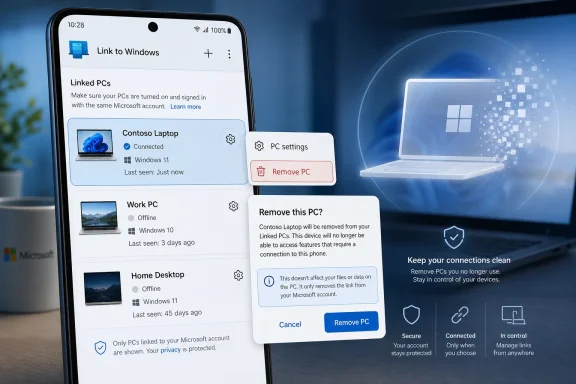
The new Link to Windows option changes that balance in a modest but meaningful way. According to Windows Latest, the Android app now exposes a per-device page under Linked PCs, where users can choose between disconnecting a PC temporarily and removing it outright. The confirmation dialog warns that the PC will be removed from the account and device list, while also noting that it may still appear elsewhere and need cleanup from other Microsoft surfaces.
That wording is worth lingering on because it reveals the architecture beneath the friendly UI. Microsoft is not merely hiding a local shortcut from the Android app. It is attempting to synchronize the user’s intent across a Microsoft account, a mobile client, Windows-side Phone Link state, and whatever backend database has been tracking these pairings.
That is exactly why this feature took on more importance than its size suggests. In a modern Microsoft account, “device” can mean a hardware record, a Windows installation, an app pairing, a cloud service entitlement, or a stale identifier that survived longer than the machine itself. Link to Windows users were not asking for a power feature; they were asking Microsoft to stop treating yesterday’s laptop as if it were still part of today’s workflow.
The classic case is familiar to anyone who tests Windows Insider builds in virtual machines. Pair a VM with Link to Windows, test a feature, delete the VM, and the PC can remain behind in the Android app’s Linked PCs list. The same pattern can appear after reinstalling Windows, replacing a broken laptop, renaming a PC, swapping hardware, or cleaning up a Microsoft account device page that does not fully reflect what Link to Windows believes is paired.
The practical irritation is obvious. When a user tries to send a link, resume activity, or manage device sync, they may be presented with names that no longer correspond to real PCs. Worse, those entries could appear disconnected and unmanageable from the app, leaving the user with a list that looks like a history of mistakes rather than a set of active devices.
For enthusiasts, this is clutter. For less technical users, it is ambiguity. If your phone says an old laptop is still linked, does that mean it can still receive content? Is the old machine still authorized? Did removing it from the Microsoft account fail? The answer may be mundane, but Microsoft cannot build confidence in cross-device workflows while leaving users to decode backend leftovers.
That explanation does not absolve Microsoft, but it does clarify the delay. This was not simply a missing Android preference toggle. If the mobile app’s list was a projection of backend state, deleting an entry required Microsoft to expose a safe mutation path for a relationship that may be referenced by multiple services.
The distinction matters because Phone Link is no longer a cute companion app. It now touches notifications, messages, calls, clipboard sharing on supported devices, file transfer experiences, mobile device management surfaces, and Windows taskbar resume prompts. A destructive “remove” action in that world cannot be treated like deleting a recent file from a local menu.
Still, the user experience failure was Microsoft’s to own. If a system can create a link between a phone and a PC, it must also provide a comprehensible way to break that link. The absence of that symmetry is what made the old behavior feel unfinished.
The difference between those two verbs is important. “Disconnect” is a session-level action. “Remove” is an identity-level action. Microsoft is finally teaching the app to distinguish between “I do not want this PC connected right now” and “this PC should no longer belong to my phone’s universe.”
That distinction is especially valuable in households and small offices where device names are not always pristine. A user may have a desktop, a work laptop, an old laptop, and a test machine all called variations of DESKTOP-ABC123. If the app only offers a blunt disconnect, users are left guessing which relationship will return and which one is dead.
The new device screen also reflects a broader maturation of Microsoft’s Android integration. Phone Link started as a way to pull phone notifications onto Windows and send texts from the desktop. It is now becoming a cross-device identity layer. Once you are in that business, lifecycle management is not optional.
Virtual machines are the perfect stress test. They are born quickly, renamed casually, paired for experiments, snapshotted, reverted, and deleted. Each one can look to Microsoft’s cloud like a legitimate PC, at least long enough to get into a device relationship. If the cleanup path is weak, Insider users will hit the wall immediately.
But the same failure mode exists in normal life. A student replaces a laptop mid-semester. A parent resets a hand-me-down PC. A small business reimages a fleet without a formal mobile device cleanup process. A repair shop swaps a motherboard. A user leaves a job and keeps their personal phone but loses access to the work PC it once paired with.
In each case, the ghost entry is less a bug than a symptom of modern device identity. Hardware is not the whole device anymore. The device is also an account record, an app registration, a cloud permission, and a remembered relationship across operating systems. Microsoft’s cleanup tools have lagged behind that reality.
That is a very different product posture from “mirror my notifications.” It borrows from the logic of Apple’s Handoff, but with a more complicated terrain. Microsoft does not control Android. It must negotiate with phone makers, app developers, Windows builds, Microsoft account services, and regional availability constraints.
The examples already show the shape of the strategy. Microsoft’s support material says vivo Android phone users can continue browsing activity from the vivo Browser on their linked Windows PC. Reporting by Windows Latest has also described resume experiences involving M365 Copilot documents and supported Android devices.
This is where the ghost PC issue becomes more than cosmetic. If Windows is going to surface phone activity on the taskbar, users need to know which PC is eligible to receive that activity. A stale device list is not just messy; it undermines the mental model of continuity.
Underneath, the product depends on identity plumbing. The phone must be signed into the right Microsoft account. The PC must be recognized as linked. The app must know which devices are online, which features each supports, which OEM integrations are available, and which permissions the user has granted. Then the system has to make all of that feel ordinary.
That is why a Remove PC button is not a mere maintenance feature. It is part of the trust contract. Users are more willing to let devices share state when they can revoke that sharing without spelunking through account pages or reinstalling apps.
Microsoft has learned this lesson the hard way in other corners of Windows. Settings that create cloud relationships are easy to advertise; settings that unwind them are harder to design, less glamorous, and often delayed. But for administrators and security-minded users, the off-ramp is part of the feature.
That requires Microsoft to respect the Android app as a first-class control surface. Users should not need the old PC to clean up a relationship that is visible on the phone. They should not need to understand whether the authoritative record lives in Windows Settings, Phone Link, the Microsoft account device page, or a backend service.
The phone is often the device that remains when everything else changes. Laptops are wiped, sold, replaced, or enrolled in different organizations. Virtual machines vanish. Windows installations come and go. The Android phone persists, carrying the user’s app state and their expectation that they can manage what is connected to it.
By putting removal in Link to Windows itself, Microsoft is acknowledging that reality. The phone is not merely a remote endpoint. It is one of the places where the user’s device graph must be governed.
That is both honest and slightly unsatisfying. From an engineering perspective, it may be unavoidable. From a user perspective, it sounds like the same old Microsoft account sprawl with a better button attached.
The ideal version of this experience would be a single cross-device dashboard that explains every pairing and every permission in plain language. It would show the PC name, last connection, Windows installation identity, Microsoft account association, supported Phone Link features, and where removal will propagate. It would also distinguish between a hardware device, a Windows install, and a Phone Link pairing.
Microsoft is not there yet. But the new Remove PC option is a step away from opaque state and toward user-owned state. That is the right direction, even if the map still has blank spaces.
Phone Link is not typically managed with the same seriousness as Intune enrollment or Entra device registration, but it still participates in the user’s work surface. Calls, messages, notifications, file handoff, and app continuity can all intersect with business data depending on policy and device mix. That means stale pairings are not just aesthetic debt in environments where users mix personal phones and work PCs.
The new Android-side removal option gives users a cleaner self-service path, which is useful. But enterprises will still want clarity on policy controls, logging, and whether removal affects only the app pairing or also other Microsoft account device records. The Windows Latest test found that removing a PC from Link to Windows also removed it from the Microsoft account Devices page in that case, but Microsoft’s own warning language suggests the propagation story may not be identical everywhere.
That uncertainty is not a reason to panic. It is a reason to document. If Phone Link is allowed in an organization, help desk guidance should cover how to remove old PCs, how to verify the result, and when to escalate account-state inconsistencies.
That fragmentation is part of the broader challenge. A Windows feature that depends on an Android app and cloud services does not ship like Notepad. It arrives as a choreography of Store updates, Play Store updates, backend flags, Insider flights, OEM permissions, and support documentation that may lag behind the actual rollout.
For WindowsForum readers, the practical advice is simple: if the option appears, use it deliberately. Remove entries you recognize as stale, but do not treat the button as a bulk cleanup toy unless you understand which PC is which. If a device still appears in another Microsoft surface afterward, Microsoft’s own dialog has already warned that additional cleanup may be required.
For everyone else, patience is probably the right posture. The feature’s presence in beta is a strong signal that Microsoft knows the old behavior was unacceptable. But until it reaches the stable channel broadly, it remains a fix in transit.
That strategy makes sense. Windows cannot become Android, and Android cannot become Windows. But Microsoft can make the boundary between them feel thinner for users who live in both worlds. The more successful that effort becomes, the more important boring management features become.
This is where Microsoft’s old habits can either help or hurt. The company knows enterprise identity, device registration, and sync infrastructure better than almost anyone. It also has a long history of scattering related settings across too many apps, panels, portals, and support pages. Phone Link sits at the crossroads of those two Microsofts.
The Remove PC button belongs to the better one. It reduces dependency on the missing or discarded PC. It gives the user a visible way to correct stale cloud state. It makes the Android app feel less like a passive viewer and more like a control plane.
Microsoft’s Android-and-Windows bridge has become one of the company’s more credible answers to life after Windows Phone, but bridges need exits as much as entrances. A Remove PC button will not sell a single Copilot+ PC, and it will not make Android and Windows magically share an architecture. It will, however, make the relationship feel less haunted — and that is exactly the kind of unglamorous repair Microsoft must keep making if the next wave of cross-device features is going to feel like infrastructure rather than a parlor trick.
The real story is not that Microsoft added a button. It is that Phone Link and Link to Windows are becoming important enough that their missing buttons now matter.
 Microsoft Finally Gives the Phone a Vote
For years, Microsoft’s phone-to-PC story has been lopsided. The PC was the command center, the phone was the accessory, and the account cloud was the invisible broker that either made the relationship work or left users staring at duplicate device names they could not remove.The new Link to Windows option changes that balance in a modest but meaningful way. According to Windows Latest, the Android app now exposes a per-device page under Linked PCs, where users can choose between disconnecting a PC temporarily and removing it outright. The confirmation dialog warns that the PC will be removed from the account and device list, while also noting that it may still appear elsewhere and need cleanup from other Microsoft surfaces.
That wording is worth lingering on because it reveals the architecture beneath the friendly UI. Microsoft is not merely hiding a local shortcut from the Android app. It is attempting to synchronize the user’s intent across a Microsoft account, a mobile client, Windows-side Phone Link state, and whatever backend database has been tracking these pairings.
That is exactly why this feature took on more importance than its size suggests. In a modern Microsoft account, “device” can mean a hardware record, a Windows installation, an app pairing, a cloud service entitlement, or a stale identifier that survived longer than the machine itself. Link to Windows users were not asking for a power feature; they were asking Microsoft to stop treating yesterday’s laptop as if it were still part of today’s workflow.
The Ghost PC Problem Was a Trust Problem
A ghost PC in Link to Windows is not usually dangerous in the cinematic sense. It is annoying, confusing, and occasionally disruptive. But those three things are enough to erode trust in a feature whose entire promise is that your devices understand each other.The classic case is familiar to anyone who tests Windows Insider builds in virtual machines. Pair a VM with Link to Windows, test a feature, delete the VM, and the PC can remain behind in the Android app’s Linked PCs list. The same pattern can appear after reinstalling Windows, replacing a broken laptop, renaming a PC, swapping hardware, or cleaning up a Microsoft account device page that does not fully reflect what Link to Windows believes is paired.
The practical irritation is obvious. When a user tries to send a link, resume activity, or manage device sync, they may be presented with names that no longer correspond to real PCs. Worse, those entries could appear disconnected and unmanageable from the app, leaving the user with a list that looks like a history of mistakes rather than a set of active devices.
For enthusiasts, this is clutter. For less technical users, it is ambiguity. If your phone says an old laptop is still linked, does that mean it can still receive content? Is the old machine still authorized? Did removing it from the Microsoft account fail? The answer may be mundane, but Microsoft cannot build confidence in cross-device workflows while leaving users to decode backend leftovers.
The Backend Was the Missing Villain
The most revealing piece of this story comes from Microsoft’s own community ecosystem. A Microsoft Q&A thread earlier this year included an Independent Advisor relaying that an engineer had explained the limitation: the Linked PCs list was stored in a backend database that users could not directly access. In another Q&A case, users were told Microsoft was working on a feature to remove devices from the list because the database was hidden at the backend.That explanation does not absolve Microsoft, but it does clarify the delay. This was not simply a missing Android preference toggle. If the mobile app’s list was a projection of backend state, deleting an entry required Microsoft to expose a safe mutation path for a relationship that may be referenced by multiple services.
The distinction matters because Phone Link is no longer a cute companion app. It now touches notifications, messages, calls, clipboard sharing on supported devices, file transfer experiences, mobile device management surfaces, and Windows taskbar resume prompts. A destructive “remove” action in that world cannot be treated like deleting a recent file from a local menu.
Still, the user experience failure was Microsoft’s to own. If a system can create a link between a phone and a PC, it must also provide a comprehensible way to break that link. The absence of that symmetry is what made the old behavior feel unfinished.
A Small Menu Item Carries a Lot of Product Debt
The new flow is refreshingly direct. Open Link to Windows on Android, tap the profile picture, go to Settings, find Linked PCs, tap the gear next to a device, and choose either Disconnect or Remove PC. Disconnect pauses the relationship; Remove PC deletes the entry.The difference between those two verbs is important. “Disconnect” is a session-level action. “Remove” is an identity-level action. Microsoft is finally teaching the app to distinguish between “I do not want this PC connected right now” and “this PC should no longer belong to my phone’s universe.”
That distinction is especially valuable in households and small offices where device names are not always pristine. A user may have a desktop, a work laptop, an old laptop, and a test machine all called variations of DESKTOP-ABC123. If the app only offers a blunt disconnect, users are left guessing which relationship will return and which one is dead.
The new device screen also reflects a broader maturation of Microsoft’s Android integration. Phone Link started as a way to pull phone notifications onto Windows and send texts from the desktop. It is now becoming a cross-device identity layer. Once you are in that business, lifecycle management is not optional.
Windows Insiders Are the Canary for Everyone Else’s Mess
It is tempting to treat this as a niche fix for people who run too many Insider builds. That would be a mistake. Enthusiasts and IT pros merely encounter the problem first because they create and destroy Windows identities at a higher rate than ordinary users.Virtual machines are the perfect stress test. They are born quickly, renamed casually, paired for experiments, snapshotted, reverted, and deleted. Each one can look to Microsoft’s cloud like a legitimate PC, at least long enough to get into a device relationship. If the cleanup path is weak, Insider users will hit the wall immediately.
But the same failure mode exists in normal life. A student replaces a laptop mid-semester. A parent resets a hand-me-down PC. A small business reimages a fleet without a formal mobile device cleanup process. A repair shop swaps a motherboard. A user leaves a job and keeps their personal phone but loses access to the work PC it once paired with.
In each case, the ghost entry is less a bug than a symptom of modern device identity. Hardware is not the whole device anymore. The device is also an account record, an app registration, a cloud permission, and a remembered relationship across operating systems. Microsoft’s cleanup tools have lagged behind that reality.
Phone Link’s Ambition Has Outgrown Its Settings Pages
The timing is not accidental. Microsoft has been steadily expanding Phone Link and Link to Windows from convenience utilities into a broader continuity platform. Microsoft’s support documentation describes Cross-device Resume as a feature that can show a phone activity on the Windows taskbar, marked with a phone badge, so the user can continue it on the PC.That is a very different product posture from “mirror my notifications.” It borrows from the logic of Apple’s Handoff, but with a more complicated terrain. Microsoft does not control Android. It must negotiate with phone makers, app developers, Windows builds, Microsoft account services, and regional availability constraints.
The examples already show the shape of the strategy. Microsoft’s support material says vivo Android phone users can continue browsing activity from the vivo Browser on their linked Windows PC. Reporting by Windows Latest has also described resume experiences involving M365 Copilot documents and supported Android devices.
This is where the ghost PC issue becomes more than cosmetic. If Windows is going to surface phone activity on the taskbar, users need to know which PC is eligible to receive that activity. A stale device list is not just messy; it undermines the mental model of continuity.
The Cross-Device Future Is Mostly Account Plumbing
Microsoft’s marketing naturally presents cross-device features as moments of magic. Start on your phone, continue on your PC. Copy here, paste there. Open a document on Android, see it offered on the Windows taskbar. The demo is always cleaner than the dependency graph.Underneath, the product depends on identity plumbing. The phone must be signed into the right Microsoft account. The PC must be recognized as linked. The app must know which devices are online, which features each supports, which OEM integrations are available, and which permissions the user has granted. Then the system has to make all of that feel ordinary.
That is why a Remove PC button is not a mere maintenance feature. It is part of the trust contract. Users are more willing to let devices share state when they can revoke that sharing without spelunking through account pages or reinstalling apps.
Microsoft has learned this lesson the hard way in other corners of Windows. Settings that create cloud relationships are easy to advertise; settings that unwind them are harder to design, less glamorous, and often delayed. But for administrators and security-minded users, the off-ramp is part of the feature.
The Android Side Is No Longer Secondary
There is also a platform politics angle here. Microsoft lost the mobile OS war, then rebuilt a portion of its consumer device strategy around Android. Link to Windows is one of the clearest results of that accommodation. It accepts that the phone is usually not running Microsoft’s operating system, then tries to make Windows the best desktop companion for it.That requires Microsoft to respect the Android app as a first-class control surface. Users should not need the old PC to clean up a relationship that is visible on the phone. They should not need to understand whether the authoritative record lives in Windows Settings, Phone Link, the Microsoft account device page, or a backend service.
The phone is often the device that remains when everything else changes. Laptops are wiped, sold, replaced, or enrolled in different organizations. Virtual machines vanish. Windows installations come and go. The Android phone persists, carrying the user’s app state and their expectation that they can manage what is connected to it.
By putting removal in Link to Windows itself, Microsoft is acknowledging that reality. The phone is not merely a remote endpoint. It is one of the places where the user’s device graph must be governed.
Microsoft’s Warning Text Shows the Job Is Not Finished
The confirmation dialog’s caveat that a PC may still appear on other mobile devices and Microsoft products should temper expectations. Microsoft is not claiming universal instant deletion across every surface. It is saying the Android app can remove the entry from this relationship, while other records may need separate cleanup.That is both honest and slightly unsatisfying. From an engineering perspective, it may be unavoidable. From a user perspective, it sounds like the same old Microsoft account sprawl with a better button attached.
The ideal version of this experience would be a single cross-device dashboard that explains every pairing and every permission in plain language. It would show the PC name, last connection, Windows installation identity, Microsoft account association, supported Phone Link features, and where removal will propagate. It would also distinguish between a hardware device, a Windows install, and a Phone Link pairing.
Microsoft is not there yet. But the new Remove PC option is a step away from opaque state and toward user-owned state. That is the right direction, even if the map still has blank spaces.
Enterprise IT Will See a Familiar Pattern
For IT pros, this story rhymes with a hundred other lifecycle problems. Enrollment is easy; de-enrollment is messy. Pairing is one click; unpairing depends on which service created the durable record. The device that appears in a user-facing app may not be the same object that appears in an admin portal or account inventory.Phone Link is not typically managed with the same seriousness as Intune enrollment or Entra device registration, but it still participates in the user’s work surface. Calls, messages, notifications, file handoff, and app continuity can all intersect with business data depending on policy and device mix. That means stale pairings are not just aesthetic debt in environments where users mix personal phones and work PCs.
The new Android-side removal option gives users a cleaner self-service path, which is useful. But enterprises will still want clarity on policy controls, logging, and whether removal affects only the app pairing or also other Microsoft account device records. The Windows Latest test found that removing a PC from Link to Windows also removed it from the Microsoft account Devices page in that case, but Microsoft’s own warning language suggests the propagation story may not be identical everywhere.
That uncertainty is not a reason to panic. It is a reason to document. If Phone Link is allowed in an organization, help desk guidance should cover how to remove old PCs, how to verify the result, and when to escalate account-state inconsistencies.
The Beta Label Matters More Than Usual
The feature is currently described as limited to the preprod beta channel of the Android app. That means most users should not assume it will appear today in the stable Link to Windows release. Microsoft often stages mobile companion features gradually, and Phone Link behavior can vary by app version, Windows build, phone model, region, and account configuration.That fragmentation is part of the broader challenge. A Windows feature that depends on an Android app and cloud services does not ship like Notepad. It arrives as a choreography of Store updates, Play Store updates, backend flags, Insider flights, OEM permissions, and support documentation that may lag behind the actual rollout.
For WindowsForum readers, the practical advice is simple: if the option appears, use it deliberately. Remove entries you recognize as stale, but do not treat the button as a bulk cleanup toy unless you understand which PC is which. If a device still appears in another Microsoft surface afterward, Microsoft’s own dialog has already warned that additional cleanup may be required.
For everyone else, patience is probably the right posture. The feature’s presence in beta is a strong signal that Microsoft knows the old behavior was unacceptable. But until it reaches the stable channel broadly, it remains a fix in transit.
A Button That Says Microsoft Is Serious About Continuity
The larger strategic read is that Microsoft is preparing Phone Link for a heavier role. The Phone Link social account teased more cross-device work earlier this year around MVP Summit, according to the reporting, and the steady appearance of resume-oriented features suggests that Windows is being positioned as a hub for Android activity rather than a separate island.That strategy makes sense. Windows cannot become Android, and Android cannot become Windows. But Microsoft can make the boundary between them feel thinner for users who live in both worlds. The more successful that effort becomes, the more important boring management features become.
This is where Microsoft’s old habits can either help or hurt. The company knows enterprise identity, device registration, and sync infrastructure better than almost anyone. It also has a long history of scattering related settings across too many apps, panels, portals, and support pages. Phone Link sits at the crossroads of those two Microsofts.
The Remove PC button belongs to the better one. It reduces dependency on the missing or discarded PC. It gives the user a visible way to correct stale cloud state. It makes the Android app feel less like a passive viewer and more like a control plane.
The Cleanup Button Reveals the Shape of the Next Update
The immediate lesson from this beta rollout is not complicated, but it is concrete.- Link to Windows beta testers are beginning to see a Remove PC option that deletes stale linked computers directly from the Android app.
- The feature appears under Settings, inside the Linked PCs list, behind a per-device gear icon.
- Disconnect and Remove PC are separate actions, with disconnect pausing sync and removal deleting the device relationship.
- Microsoft community answers indicate the old limitation was tied to backend storage that users could not directly edit.
- The fix matters most to Windows Insiders, VM testers, frequent reinstallers, and anyone replacing or retiring PCs.
- The feature is still in beta, so stable-channel users should expect a staged rollout rather than universal availability.
Microsoft’s Android-and-Windows bridge has become one of the company’s more credible answers to life after Windows Phone, but bridges need exits as much as entrances. A Remove PC button will not sell a single Copilot+ PC, and it will not make Android and Windows magically share an architecture. It will, however, make the relationship feel less haunted — and that is exactly the kind of unglamorous repair Microsoft must keep making if the next wave of cross-device features is going to feel like infrastructure rather than a parlor trick.
References
- Primary source: Windows Latest
Published: 2026-07-05T18:40:10.854367
Loading…
www.windowslatest.com - Official source: support.microsoft.com
Loading…
support.microsoft.com - Official source: learn.microsoft.com
Loading…
learn.microsoft.com - Official source: techcommunity.microsoft.com
Loading…
techcommunity.microsoft.com - Related coverage: phonearena.com
Loading…
www.phonearena.com - Official source: cdn-dynmedia-1.microsoft.com
- Related coverage: passkey.bms.com
https://sites.bms.com/teams/it-ux/Communications/Windows Hello/2025 Rollout/Windows Hello + Passkey FAQ
PDF documentpasskey.bms.com