

Linux kernel maintainers have begun removing support for Intel’s 486-era processors in 2026, while Canonical is sketching a more cautious path for AI on Ubuntu and KDE continues to fundraise with a single annual prompt. That combination says something larger than “Linux is lighter than Windows.” It says the Linux desktop, for all its chaos and factionalism, is developing a taste for restraint at the exact moment Windows most needs one. Microsoft still treats the operating system as a distribution channel; the best Linux desktops increasingly treat it as a place where the user should be left alone.
The easy story is that Linux desktops are “doing less.” That is not quite right. Modern Linux is not a monkish exercise in austerity: GNOME is opinionated, KDE Plasma is sprawling, Ubuntu is commercially backed, Fedora is tied closely to Red Hat’s engineering priorities, and the kernel supports an absurd range of hardware by any normal consumer standard.
The shift is subtler. Linux is learning where not to spend its complexity budget. That is the difference between a platform that offers power and a platform that keeps inventing reasons to interrupt you.
For decades, Linux’s appeal to desktop refugees has been framed around control. You can pick a window manager, package format, init system, filesystem, release cadence, theme, and update policy. But too much choice can become its own form of noise, and Linux has often suffered from exactly that. The interesting development now is not that Linux has become simple; it is that parts of the Linux ecosystem are becoming more disciplined about what deserves to remain in the default path.
That discipline matters because the modern OS is no longer just a kernel and a shell. It is an update mechanism, an app platform, an identity layer, a cloud sync client, a search surface, a telemetry system, a software store, and now, inevitably, an AI launchpad. Every vendor is tempted to use that surface area as leverage. Linux’s advantage is that, structurally and culturally, it still has people willing to say: no, not there, not by default, not forever.
But the symbolism is powerful because Linux has long worn hardware compatibility as a badge of honor. The project’s willingness to boot on almost anything has become part of its mythology. So when maintainers start dismantling support for a 37-year-old processor line, they are not betraying that identity; they are defending the part of it that still matters.
Compatibility is not free. Every ancient code path has to be understood, preserved, tested, or at least not accidentally broken. Every special case increases the chance that future work becomes slower, riskier, or uglier. When the number of real users approaches zero, the maintenance burden stops being noble and starts being theatrical.
That is the lesson Windows has struggled to internalize. Microsoft’s compatibility story is legendary, and deservedly so. Businesses still run strange line-of-business applications, ancient installers, brittle drivers, and workflows that should have been retired three procurement cycles ago. Windows won the enterprise partly because it made yesterday’s software feel safer than tomorrow’s disruption.
The problem is that compatibility can become governance by hostage crisis. If every old assumption must remain valid forever, the platform loses the ability to make architectural moves that would improve security, reliability, and maintainability. Microsoft can sandbox, virtualize, shim, and redirect, but it cannot easily tell the Windows ecosystem that the old world is over.
Linux can, because Linux is not one product promise. It is a stack of projects, distributions, maintainers, vendors, and users who can fork, freeze, or migrate at different speeds. That fragmentation is maddening when you want one answer. It is liberating when the right answer is to let something die.
That makes restraint harder. Microsoft cannot simply optimize for the cleanest architecture. It must optimize for the broadest coalition of people who will scream if anything changes and the broadest coalition of partners who will scream if nothing new can be monetized.
The result is a platform caught between preservation and promotion. On one side, Windows drags forward decades of legacy expectations. On the other, it keeps adding surfaces for Microsoft accounts, OneDrive, Microsoft 365, Edge, widgets, ads, recommendations, Copilot, and whatever the next strategic priority happens to be. The operating system is asked to be both a compatibility bunker and a growth engine.
That is where the user experience curdles. A system that already has to preserve so much old behavior should be especially careful about adding new intrusions. Instead, Windows often behaves as if every boot, update, settings page, and out-of-box flow is a chance to re-litigate the user’s relationship with Microsoft services.
There is a difference between integration and insistence. OneDrive integration can be useful. Microsoft account sync can be useful. Copilot may become useful for some workflows. But usefulness does not justify the assumption that the OS should constantly steer the user toward the vendor’s preferred commercial layer.
Linux, by contrast, has no single commercial layer to promote across the entire desktop. Canonical has its priorities. Red Hat has its priorities. KDE, GNOME, System76, Valve, SUSE, Debian, Arch, and the rest all have theirs. But no one entity owns the whole Linux desktop experience end to end. That makes Linux less coherent, but it also makes it harder to turn the desktop into one giant upsell funnel.
The issue was the campaign-like quality of the rollout. Copilot appeared not as a modest utility earning its place, but as a strategic mandate radiating through Windows, Microsoft 365, Edge, Bing, and the company’s hardware branding. The Copilot key on new keyboards captured the mood perfectly: a physical declaration that Microsoft’s roadmap deserved a reserved seat on your desk.
Users noticed. Some objected to privacy implications. Some disliked the resource footprint. Some simply did not want an assistant in the OS. Others resented the feeling that Windows was becoming less an environment they controlled and more a terminal for Microsoft’s current enterprise narrative.
This is why Canonical’s emerging AI posture for Ubuntu deserves attention even from skeptics. The company is hardly allergic to commercial strategy, and Ubuntu users have plenty of scars from past Canonical decisions. But the reported direction around AI on Ubuntu sounds more like a guarded integration policy than a land grab: open tooling where possible, local inference where useful, accessibility as a serious use case, and removable components rather than an unavoidable personality layer.
That does not guarantee success. “AI” is a baggy term covering everything from speech recognition to hallucination-prone chatbots to local automation agents with serious security implications. Linux distributions will have to decide how much privilege these tools get, how they are packaged, what data they see, and whether “local” becomes a fig leaf for opaque models and careless defaults.
Still, the distinction matters. Microsoft has often framed AI as the future of Windows. Canonical appears to be treating AI as a class of tools that may belong on Ubuntu if they satisfy the norms of the platform. One is a campaign. The other is a negotiation.
Linux has a cultural advantage here because removability is not an exotic demand. Package managers teach users that software is installed, updated, and removed. Desktop environments may ship defaults, but the expectation remains that components are components. Even when distributions make controversial packaging choices, users and downstream projects retain escape hatches.
That does not make Linux pure. Snap, Flatpak, AppImage, distro repositories, vendor repos, and manual installs can create their own mess. Some components are harder to remove than they appear. And mainstream users should not need to become package archaeologists to disable a feature they never asked for.
But the philosophical baseline is different. On Linux, “uninstall it” is usually treated as a normal answer. On Windows, “uninstall it” increasingly feels like the start of an argument. Some Microsoft experiences can be removed, some can be hidden, some come back, some are replaced by web apps, and some are entangled with account or subscription logic. The user is left wondering whether the OS heard “no” or merely recorded “not now.”
AI makes that ambiguity more dangerous. An unwanted media app is clutter. An unwanted assistant with access to files, context, search, notifications, and cloud accounts is a trust problem. If desktop AI is going to survive user backlash, it will need a visible off switch, a limited permission model, and defaults that assume skepticism is legitimate.
Linux may not get this right everywhere. But at least the argument is happening in the open, among communities that still treat user agency as a first-class concern rather than a conversion-rate obstacle.
That restraint is not just politeness. It is product strategy. KDE needs money, but it also understands that goodwill is a finite asset. The project can ask because it has not spent the previous 364 days training users to distrust its motives.
Commercial software often behaves as if every unused pixel is a missed revenue opportunity. The start menu can recommend apps. The lock screen can show promotions. The setup flow can sell cloud storage. The browser can nudge defaults. The office suite can upsell AI. The file manager can advertise backup. Each individual prompt can be rationalized. Together, they create an atmosphere.
Windows suffers badly from this accumulation. Microsoft may argue that many of these prompts help users discover valuable services, and sometimes that is true. But discovery becomes pressure when it appears during setup, after updates, in system surfaces, and inside workflows that users did not enter for shopping.
Linux projects cannot rely on that kind of captive monetization, which is partly why they have avoided it. KDE, GNOME, Debian, Fedora, Arch, Linux Mint, and others must maintain trust because trust is their distribution channel. A user who feels abused can leave without waiting for a license renewal or IT procurement cycle.
That does not mean open-source projects are magically sustainable. Many are underfunded, undermaintained, and dependent on a small number of exhausted contributors. The Linux desktop’s restraint is admirable, but it is also subsidized by volunteer labor, corporate sponsorship, and the patience of maintainers who deserve more than applause.
Still, the way a project asks for support reveals what it thinks the user is. KDE’s prompt treats the user as a participant. Windows too often treats the user as inventory.
Some of that onboarding is defensible. A modern operating system has security settings, recovery options, sync features, and accessibility choices that users need to understand. The trouble is that Microsoft mixes necessary configuration with commercial steering, and the blend makes even legitimate prompts feel suspect.
Linux installers are not universally elegant. Some are confusing, some are ugly, some assume knowledge Windows users do not have, and some still make partitioning feel like defusing a bomb. But the better ones tend to ask operational questions: language, keyboard, disk, encryption, user account, updates, proprietary drivers, maybe telemetry if the distro collects it. The installer is there to install the system.
That difference changes the emotional tone. A Linux desktop often begins with the sense that the computer is yours and the OS is waiting for instruction. A Windows desktop increasingly begins with the sense that the OS has a checklist of vendor objectives to complete before it grants you full access.
Microsoft can fix this without abandoning its ecosystem. It could separate system setup from service marketing. It could make local accounts straightforward. It could stop reviving prompts after major updates. It could treat “skip” as a durable preference rather than a temporary setback. None of this requires Windows to become Linux; it requires Windows to remember that the shell is not a billboard.
Fedora Silverblue, openSUSE MicroOS, Vanilla OS, SteamOS, Ubuntu Core Desktop experiments, and other image-based approaches all circle the same idea. The base system should be predictable. Applications should live in containers or layered packages. Updates should be atomic and reversible. The OS should be harder to accidentally corrupt.
This is not a perfect model for everyone. Developers, tinkerers, driver experimenters, and power users may find immutable systems constraining. The Linux desktop still has rough edges around portals, sandbox permissions, hardware support, and the split between traditional packages and newer app formats. But the direction is coherent.
Windows would benefit enormously from a cleaner separation between base OS, user apps, drivers, enterprise policy, and vendor services. Microsoft has moved in that direction in pieces: app containers, Windows Sandbox, virtualization-based security, system componentization, reset and recovery improvements, Store apps, MSIX, and cloud-managed enterprise images. But Windows cannot easily become immutable in the consumer sense because too much software expects to write into too many places with too much historical permission.
That is the compatibility tax again. It is not that Microsoft lacks engineers capable of designing a more modern Windows. It is that the existing Windows ecosystem has been trained for decades to treat the OS as a mutable shared substrate. Installers patch runtimes, drivers add services, apps hook shell surfaces, vendors preload utilities, and enterprise tools assume deep control.
Linux is not immune to that history, but it has a more plausible migration path. Package-managed systems already normalize central control over system files. Containerized app formats are controversial but increasingly ordinary. Many users expect to change distributions or reinstall more casually than Windows users do. The cultural muscle for a cleaner base is stronger.
But restraint does not mean avoiding ambition. It means sequencing ambition around consent. SteamOS is ambitious, but it focuses on making a handheld console-like PC work. Fedora is ambitious, but it tends to push platform technologies with a clear engineering thesis. KDE is ambitious, but its defaults rarely feel like a commercial ambush. Ubuntu is ambitious, but its AI plans will be judged partly on whether users can remove the pieces they do not want.
Windows, meanwhile, often confuses ambition with saturation. If Microsoft believes something is strategic, Windows becomes one of the delivery mechanisms. That made sense when the company needed to bring security baselines forward or move users away from dangerously obsolete components. It is less persuasive when the strategic item is another subscription surface.
The irony is that Microsoft knows how to build excellent restraint into enterprise tools. Group Policy, Intune, Windows Update for Business, Defender management, and deployment rings all exist because organizations need control. Microsoft understands that administrators do not want surprises. The consumer and enthusiast experience deserves the same respect.
A desktop OS should be opinionated about safety, performance, and coherence. It should be cautious about monetization, identity pressure, and trend-chasing. Windows has too often inverted that priority, hesitating where it should modernize and pushing where it should ask permission.
The lesson is that desktop trust is built from small refusals to exploit the user’s attention. Retiring dead hardware support, cautiously packaging AI, and asking for donations without harassment are not the same kind of decision, but they rhyme. Each says the platform does not have to turn every possibility into a default demand.
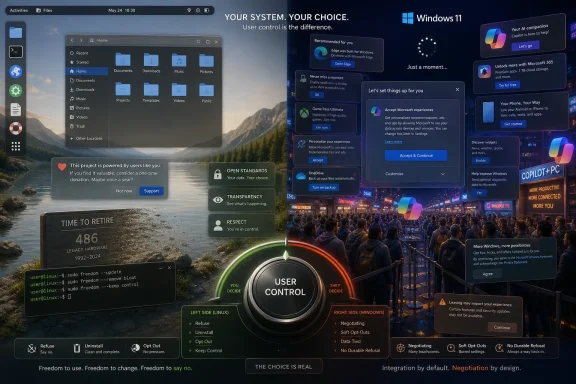 Linux’s New Maturity Is Not Minimalism
The easy story is that Linux desktops are “doing less.” That is not quite right. Modern Linux is not a monkish exercise in austerity: GNOME is opinionated, KDE Plasma is sprawling, Ubuntu is commercially backed, Fedora is tied closely to Red Hat’s engineering priorities, and the kernel supports an absurd range of hardware by any normal consumer standard.The shift is subtler. Linux is learning where not to spend its complexity budget. That is the difference between a platform that offers power and a platform that keeps inventing reasons to interrupt you.
For decades, Linux’s appeal to desktop refugees has been framed around control. You can pick a window manager, package format, init system, filesystem, release cadence, theme, and update policy. But too much choice can become its own form of noise, and Linux has often suffered from exactly that. The interesting development now is not that Linux has become simple; it is that parts of the Linux ecosystem are becoming more disciplined about what deserves to remain in the default path.
That discipline matters because the modern OS is no longer just a kernel and a shell. It is an update mechanism, an app platform, an identity layer, a cloud sync client, a search surface, a telemetry system, a software store, and now, inevitably, an AI launchpad. Every vendor is tempted to use that surface area as leverage. Linux’s advantage is that, structurally and culturally, it still has people willing to say: no, not there, not by default, not forever.
Retiring the 486 Is a Small Patch With a Big Message
The removal of Intel 486 support from the Linux kernel is not going to strand many living systems. The 486 arrived in 1989; any machine still depending on modern upstream kernels in 2026 is either a museum piece, an industrial oddity, or a hobbyist project whose owner already understands the bargain. Old kernels and niche downstream builds will continue to exist for people who genuinely need them.But the symbolism is powerful because Linux has long worn hardware compatibility as a badge of honor. The project’s willingness to boot on almost anything has become part of its mythology. So when maintainers start dismantling support for a 37-year-old processor line, they are not betraying that identity; they are defending the part of it that still matters.
Compatibility is not free. Every ancient code path has to be understood, preserved, tested, or at least not accidentally broken. Every special case increases the chance that future work becomes slower, riskier, or uglier. When the number of real users approaches zero, the maintenance burden stops being noble and starts being theatrical.
That is the lesson Windows has struggled to internalize. Microsoft’s compatibility story is legendary, and deservedly so. Businesses still run strange line-of-business applications, ancient installers, brittle drivers, and workflows that should have been retired three procurement cycles ago. Windows won the enterprise partly because it made yesterday’s software feel safer than tomorrow’s disruption.
The problem is that compatibility can become governance by hostage crisis. If every old assumption must remain valid forever, the platform loses the ability to make architectural moves that would improve security, reliability, and maintainability. Microsoft can sandbox, virtualize, shim, and redirect, but it cannot easily tell the Windows ecosystem that the old world is over.
Linux can, because Linux is not one product promise. It is a stack of projects, distributions, maintainers, vendors, and users who can fork, freeze, or migrate at different speeds. That fragmentation is maddening when you want one answer. It is liberating when the right answer is to let something die.
Windows Still Carries the Cost of Being Everyone’s Default
Windows compatibility is not just a technical posture; it is a business contract. Microsoft sells continuity. The operating system is expected to run on consumer laptops, gaming rigs, government desktops, medical devices, factory floors, school fleets, and corporate images assembled by people who left the company five years ago.That makes restraint harder. Microsoft cannot simply optimize for the cleanest architecture. It must optimize for the broadest coalition of people who will scream if anything changes and the broadest coalition of partners who will scream if nothing new can be monetized.
The result is a platform caught between preservation and promotion. On one side, Windows drags forward decades of legacy expectations. On the other, it keeps adding surfaces for Microsoft accounts, OneDrive, Microsoft 365, Edge, widgets, ads, recommendations, Copilot, and whatever the next strategic priority happens to be. The operating system is asked to be both a compatibility bunker and a growth engine.
That is where the user experience curdles. A system that already has to preserve so much old behavior should be especially careful about adding new intrusions. Instead, Windows often behaves as if every boot, update, settings page, and out-of-box flow is a chance to re-litigate the user’s relationship with Microsoft services.
There is a difference between integration and insistence. OneDrive integration can be useful. Microsoft account sync can be useful. Copilot may become useful for some workflows. But usefulness does not justify the assumption that the OS should constantly steer the user toward the vendor’s preferred commercial layer.
Linux, by contrast, has no single commercial layer to promote across the entire desktop. Canonical has its priorities. Red Hat has its priorities. KDE, GNOME, System76, Valve, SUSE, Debian, Arch, and the rest all have theirs. But no one entity owns the whole Linux desktop experience end to end. That makes Linux less coherent, but it also makes it harder to turn the desktop into one giant upsell funnel.
AI Exposes the Difference Between a Feature and a Campaign
Microsoft’s Copilot push has been the clearest recent example of Windows overreach. The issue was never merely that Microsoft added an AI assistant. Operating systems have always absorbed successful app categories: search, compression, antivirus, screenshot tools, cloud sync, screen recording, even basic photo editing. AI assistance was always going to arrive somewhere in the shell.The issue was the campaign-like quality of the rollout. Copilot appeared not as a modest utility earning its place, but as a strategic mandate radiating through Windows, Microsoft 365, Edge, Bing, and the company’s hardware branding. The Copilot key on new keyboards captured the mood perfectly: a physical declaration that Microsoft’s roadmap deserved a reserved seat on your desk.
Users noticed. Some objected to privacy implications. Some disliked the resource footprint. Some simply did not want an assistant in the OS. Others resented the feeling that Windows was becoming less an environment they controlled and more a terminal for Microsoft’s current enterprise narrative.
This is why Canonical’s emerging AI posture for Ubuntu deserves attention even from skeptics. The company is hardly allergic to commercial strategy, and Ubuntu users have plenty of scars from past Canonical decisions. But the reported direction around AI on Ubuntu sounds more like a guarded integration policy than a land grab: open tooling where possible, local inference where useful, accessibility as a serious use case, and removable components rather than an unavoidable personality layer.
That does not guarantee success. “AI” is a baggy term covering everything from speech recognition to hallucination-prone chatbots to local automation agents with serious security implications. Linux distributions will have to decide how much privilege these tools get, how they are packaged, what data they see, and whether “local” becomes a fig leaf for opaque models and careless defaults.
Still, the distinction matters. Microsoft has often framed AI as the future of Windows. Canonical appears to be treating AI as a class of tools that may belong on Ubuntu if they satisfy the norms of the platform. One is a campaign. The other is a negotiation.
The Best AI Feature May Be the One You Can Remove
The test for AI on the desktop is not whether it can summarize a document or rename files. The test is whether it respects refusal. A user who does not want an AI assistant should not have to hunt through policies, registry keys, subscription settings, cloud dashboards, startup entries, and hidden app packages to make that preference stick.Linux has a cultural advantage here because removability is not an exotic demand. Package managers teach users that software is installed, updated, and removed. Desktop environments may ship defaults, but the expectation remains that components are components. Even when distributions make controversial packaging choices, users and downstream projects retain escape hatches.
That does not make Linux pure. Snap, Flatpak, AppImage, distro repositories, vendor repos, and manual installs can create their own mess. Some components are harder to remove than they appear. And mainstream users should not need to become package archaeologists to disable a feature they never asked for.
But the philosophical baseline is different. On Linux, “uninstall it” is usually treated as a normal answer. On Windows, “uninstall it” increasingly feels like the start of an argument. Some Microsoft experiences can be removed, some can be hidden, some come back, some are replaced by web apps, and some are entangled with account or subscription logic. The user is left wondering whether the OS heard “no” or merely recorded “not now.”
AI makes that ambiguity more dangerous. An unwanted media app is clutter. An unwanted assistant with access to files, context, search, notifications, and cloud accounts is a trust problem. If desktop AI is going to survive user backlash, it will need a visible off switch, a limited permission model, and defaults that assume skepticism is legitimate.
Linux may not get this right everywhere. But at least the argument is happening in the open, among communities that still treat user agency as a first-class concern rather than a conversion-rate obstacle.
KDE’s Donation Prompt Understands the Social Contract
The KDE Plasma donation notification is almost comically modest by modern software standards. Once a year, a small prompt asks whether the user wants to support the project. Say yes, and it opens a donation page. Say no, and the desktop goes back to being the desktop.That restraint is not just politeness. It is product strategy. KDE needs money, but it also understands that goodwill is a finite asset. The project can ask because it has not spent the previous 364 days training users to distrust its motives.
Commercial software often behaves as if every unused pixel is a missed revenue opportunity. The start menu can recommend apps. The lock screen can show promotions. The setup flow can sell cloud storage. The browser can nudge defaults. The office suite can upsell AI. The file manager can advertise backup. Each individual prompt can be rationalized. Together, they create an atmosphere.
Windows suffers badly from this accumulation. Microsoft may argue that many of these prompts help users discover valuable services, and sometimes that is true. But discovery becomes pressure when it appears during setup, after updates, in system surfaces, and inside workflows that users did not enter for shopping.
Linux projects cannot rely on that kind of captive monetization, which is partly why they have avoided it. KDE, GNOME, Debian, Fedora, Arch, Linux Mint, and others must maintain trust because trust is their distribution channel. A user who feels abused can leave without waiting for a license renewal or IT procurement cycle.
That does not mean open-source projects are magically sustainable. Many are underfunded, undermaintained, and dependent on a small number of exhausted contributors. The Linux desktop’s restraint is admirable, but it is also subsidized by volunteer labor, corporate sponsorship, and the patience of maintainers who deserve more than applause.
Still, the way a project asks for support reveals what it thinks the user is. KDE’s prompt treats the user as a participant. Windows too often treats the user as inventory.
The Out-of-Box Experience Has Become the First Ad Break
The first boot of a Windows PC should be a moment of ownership. Instead, it often feels like passing through a sales checkpoint. Account sign-in, cloud backup, Microsoft 365 trials, browser defaults, privacy toggles, device services, and recovery prompts all compete for attention before the user has even reached the desktop.Some of that onboarding is defensible. A modern operating system has security settings, recovery options, sync features, and accessibility choices that users need to understand. The trouble is that Microsoft mixes necessary configuration with commercial steering, and the blend makes even legitimate prompts feel suspect.
Linux installers are not universally elegant. Some are confusing, some are ugly, some assume knowledge Windows users do not have, and some still make partitioning feel like defusing a bomb. But the better ones tend to ask operational questions: language, keyboard, disk, encryption, user account, updates, proprietary drivers, maybe telemetry if the distro collects it. The installer is there to install the system.
That difference changes the emotional tone. A Linux desktop often begins with the sense that the computer is yours and the OS is waiting for instruction. A Windows desktop increasingly begins with the sense that the OS has a checklist of vendor objectives to complete before it grants you full access.
Microsoft can fix this without abandoning its ecosystem. It could separate system setup from service marketing. It could make local accounts straightforward. It could stop reviving prompts after major updates. It could treat “skip” as a durable preference rather than a temporary setback. None of this requires Windows to become Linux; it requires Windows to remember that the shell is not a billboard.
Immutable Linux Shows What Windows Cannot Easily Become
The XDA piece points toward immutability, and that is where the comparison gets especially sharp. Immutable operating systems are not just a Linux fad. They represent a serious answer to a serious problem: desktop systems are too easy to mutate into states no vendor, admin, or user can reliably reason about.Fedora Silverblue, openSUSE MicroOS, Vanilla OS, SteamOS, Ubuntu Core Desktop experiments, and other image-based approaches all circle the same idea. The base system should be predictable. Applications should live in containers or layered packages. Updates should be atomic and reversible. The OS should be harder to accidentally corrupt.
This is not a perfect model for everyone. Developers, tinkerers, driver experimenters, and power users may find immutable systems constraining. The Linux desktop still has rough edges around portals, sandbox permissions, hardware support, and the split between traditional packages and newer app formats. But the direction is coherent.
Windows would benefit enormously from a cleaner separation between base OS, user apps, drivers, enterprise policy, and vendor services. Microsoft has moved in that direction in pieces: app containers, Windows Sandbox, virtualization-based security, system componentization, reset and recovery improvements, Store apps, MSIX, and cloud-managed enterprise images. But Windows cannot easily become immutable in the consumer sense because too much software expects to write into too many places with too much historical permission.
That is the compatibility tax again. It is not that Microsoft lacks engineers capable of designing a more modern Windows. It is that the existing Windows ecosystem has been trained for decades to treat the OS as a mutable shared substrate. Installers patch runtimes, drivers add services, apps hook shell surfaces, vendors preload utilities, and enterprise tools assume deep control.
Linux is not immune to that history, but it has a more plausible migration path. Package-managed systems already normalize central control over system files. Containerized app formats are controversial but increasingly ordinary. Many users expect to change distributions or reinstall more casually than Windows users do. The cultural muscle for a cleaner base is stronger.
Restraint Is Not the Same as Being Small
It would be a mistake to romanticize Linux as the humble alternative that never overreaches. The Linux world has its own ambitions and its own messes. GNOME has made decisions that infuriated users. Canonical has repeatedly pushed technologies before the community was ready to embrace them. KDE can overwhelm newcomers with options. Packaging fragmentation remains a tax on developers. Hardware support can still be a lottery, especially around sleep states, fingerprint readers, HDR, and vendor-specific laptop features.But restraint does not mean avoiding ambition. It means sequencing ambition around consent. SteamOS is ambitious, but it focuses on making a handheld console-like PC work. Fedora is ambitious, but it tends to push platform technologies with a clear engineering thesis. KDE is ambitious, but its defaults rarely feel like a commercial ambush. Ubuntu is ambitious, but its AI plans will be judged partly on whether users can remove the pieces they do not want.
Windows, meanwhile, often confuses ambition with saturation. If Microsoft believes something is strategic, Windows becomes one of the delivery mechanisms. That made sense when the company needed to bring security baselines forward or move users away from dangerously obsolete components. It is less persuasive when the strategic item is another subscription surface.
The irony is that Microsoft knows how to build excellent restraint into enterprise tools. Group Policy, Intune, Windows Update for Business, Defender management, and deployment rings all exist because organizations need control. Microsoft understands that administrators do not want surprises. The consumer and enthusiast experience deserves the same respect.
A desktop OS should be opinionated about safety, performance, and coherence. It should be cautious about monetization, identity pressure, and trend-chasing. Windows has too often inverted that priority, hesitating where it should modernize and pushing where it should ask permission.
The Linux Desktop Wins When It Leaves Room for Refusal
The most concrete lesson from Linux’s recent posture is not that every user should switch. Many should not. Windows remains the obvious choice for countless games, workflows, peripherals, enterprise environments, and accessibility setups. Linux still asks too much of too many people when something goes wrong.The lesson is that desktop trust is built from small refusals to exploit the user’s attention. Retiring dead hardware support, cautiously packaging AI, and asking for donations without harassment are not the same kind of decision, but they rhyme. Each says the platform does not have to turn every possibility into a default demand.
- Linux kernel maintainers are showing that compatibility has a shelf life when the maintenance burden no longer serves real users.
- Ubuntu’s AI direction will be judged less by whether AI exists than by whether it is open, useful, permissioned, and removable.
- KDE’s annual donation prompt is effective because it preserves trust instead of spending it.
- Windows’ biggest desktop problem is not any single ad, prompt, or Copilot feature, but the cumulative sense that the OS is always negotiating for more of the user’s time.
- Microsoft can learn from Linux without copying Linux by making “no” durable, setup cleaner, and system surfaces less promotional.
- The next great desktop upgrade may not be another assistant, widget, or cloud integration, but a renewed respect for silence.
References
- Primary source: XDA
Published: 2026-05-31T18:50:10.712088
Linux desktops finally learned restraint, and that's the upgrade Windows still hasn't made
Sometimes, less is more. www.xda-developers.com
- Related coverage: windowscentral.com
Microsoft confirms plans to integrate Copilot with the Taskbar on Windows 11 this summer: Ask Copilot expected to debut "mid-2026" | Windows Central
First announced last year, a new document has confirmed that Microsoft's upcoming "Ask Copilot" feature for Windows 11's Taskbar is arriving mid-2026.www.windowscentral.com - Related coverage: tomshardware.com
Linux devs start removing support for 37-year-old Intel 486 CPU — head honcho Linus Torvalds says 'zero real reason' to continue support | Tom's Hardware
Linus Torvalds recently telegraphed that there was ‘zero real reason’ to continue support for these ancient CPUs.www.tomshardware.com - Related coverage: techradar.com
Intel 486 users face retirement as the Linux kernel drops compatibility with decades-old processors in modern computing environments | TechRadar
Long-serving Intel 486 CPU officially loses Linux supportwww.techradar.com - Related coverage: wemedia.it
Linux abbandona il supporto per le CPU Intel 486 dopo 37 anni - WEMEDIA
Il kernel Linux 7.1 segna la fine del supporto alle storiche CPU Intel 486, giudicate ormai obsolete dagli sviluppatori.www.wemedia.it - Related coverage: shazoo.ru
Разработчики Linux начали удалять поддержку 37-летнего процессора Intel 486 - Shazoo
Легендарный процессор Intel 486, впервые выпущенный в 1989 году, скоро лишится поддержки в ядре Linux. Как сообщает Phoronix, соответствующие патчи уже подготовлены для ядра Linux 7.1, и процесс демонтажа совместимости...shazoo.ru
- Official source: blogs.windows.com
Copilot on Windows: Connectors, and Document Creation begin rolling out to Windows Insiders
Hello Windows Insiders, we are excited to begin rolling out a new update for the Microsoft Copilot app on Windows that introduces the following changes and improvements: Connectors: Copilot on Windows now supports connecting to persblogs.windows.com - Related coverage: newsminimalist.com
- Related coverage: forum.gnoppix.org
Linux Finally Starts Removing Support for Intel's 37-Year-Old i486 Processor - General - Gnoppix Forum
Linux Kernel Bids Farewell to Intel’s i486: Ending 37 Years of Legacy Support In a significant milestone for the Linux kernel’s evolution, x86 maintainers have initiated the process to remove support for Intel’s venerabl… forum.gnoppix.org
- Related coverage: blog.elhacker.net
Linux dice adiós al Intel 486 de 37 años: “ya no hay ninguna razón para seguir soportándolo”
Blog sobre informática, tecnología y seguridad con manuales, tutoriales y documentación sobre herramientas y programasblog.elhacker.net
- Related coverage: techrepublic.com
Microsoft Makes Every Windows 11 PC an AI Copilot Hub
Windows 11’s AI upgrade brings Copilot voice wake word, Vision worldwide, on-device Actions for files, Microsoft/Google connectors, and a staged rollout.www.techrepublic.com
- Related coverage: pcgamer.com
28 years after the final Intel 486 desktop CPUs rolled off assembly lines, Linux is finally dropping support for it | PC Gamer
Rest now, i486. You did good.www.pcgamer.com
