

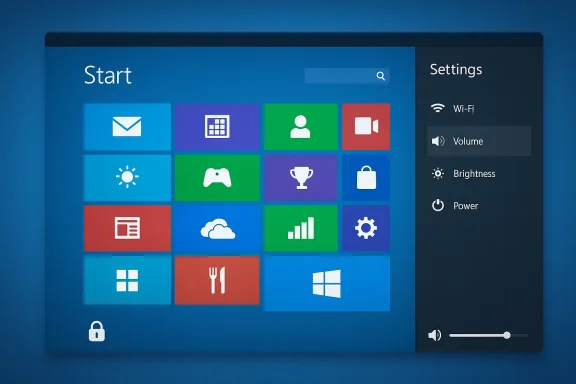
A small, attention-grabbing open‑source project has recreated Windows 8’s tile‑based “Metro” experience as a userland shell foror modern Wayland compositors, delivering a full‑screen start screen, animated lock screen, on‑screen displays, wallpaper utilities and a lightweight settings app that together—if you want it to—make a Linux desktop look and behave like a decade‑old Microsoft experiment. The project is packaged as a modular shell layer with build and install scripts, explicit support for several wlroots‑based compositors, and a deliberate focus on replicating the sights and interactions that made Windows 8 both distinctive and divisive.
Windows 8’s Modern UI arrived as a touch‑first set of large tiles and full‑screen experiences. That design made perfect sense on phones and tablets, but it clashed with mouse‑and‑keyboard workflows on typical desktop monitors—resulting in one of Microsoft’s most controversial interface experiments. The new project resurrects that visual language for Linux users who either remember the era fondly or are simply curious about what the tiled paradigm feels like with modern Wayland underpinnings.
This is not an attempt to recreate the entire Windows stack. Instead, it’s a shell layer that runs atop existing Wayland compositors and supplies the visible UI layer: Start screen, lock screen, OSDs for volume and brightness, wallpaper manager, and a compact settings UI. It intentionally delegates session management, compositing and the heavy lifting to the underlying compositor so it can remain small, modular and easy to build.
For hobbyists, touch‑device owners and designers curious about reintroducing large‑target, tile‑first interactions in 2026, the shell is a tidy, playable experiment. For enterprises and gamers looking for polished stability, it’s a reminder that some UI ideas work best in the right context—and that reviving old paradigms can teach new lessons about when and where design decisions truly belong.
Source: PC Gamer Bring a little bit of Windows 8 into Linux with shell styled after infamous tile-based interface
 Background
Windows 8’s Modern UI arrived as a touch‑first set of large tiles and full‑screen experiences. That design made perfect sense on phones and tablets, but it clashed with mouse‑and‑keyboard workflows on typical desktop monitors—resulting in one of Microsoft’s most controversial interface experiments. The new project resurrects that visual language for Linux users who either remember the era fondly or are simply curious about what the tiled paradigm feels like with modern Wayland underpinnings.This is not an attempt to recreate the entire Windows stack. Instead, it’s a shell layer that runs atop existing Wayland compositors and supplies the visible UI layer: Start screen, lock screen, OSDs for volume and brightness, wallpaper manager, and a compact settings UI. It intentionally delegates session management, compositing and the heavy lifting to the underlying compositor so it can remain small, modular and easy to build.
Overview: what the shell includes
The project is shipped as a set of discrete components that together recompose the Windows 8 surface on top of Wayland. The implementation is deliberately modular so a user can enable or disable parts as needed.- Start screen (Win8Start) — a full‑screen tile grid supporting drag‑and‑drop, tile resizing, live‑tile hooks and an app search.
- Lock screen (Win8Lock) — reproduces the slide‑up/slide‑down lock animation and supports a configurable lock wallpaper and onscreen keyboard.
- OSD (Win8OSD) — on‑screen displays for volume and brightness that run as a client/server pair.
- Wallpaper utility (Win8Wall) — a small tool for managing distinct wallpapers for the Start screen, desktop and lock screen.
- Settings app (Win8Settings) — controls accent colors, backgrounds and a few appearance options.
- Build utilities:
build.sh,install.sh,uninstall.shto compile locally or install system‑wide with minimal manual steps.
Live tiles and customization
- Live tiles are supported through a simple plug‑in model: each tile can optionally include a small QML UI file and/or a Python “logic” script to feed dynamic content.
- Users can place custom
tile.qmlandlogic.pyunder their config directory to make tiles update in place, similar in spirit to the old live‑tile idea. - Accent colors and wallpaper assignments are controlled from the Settings app for a quick visual rebrand.
Technical foundation and supported compositors
This is a userland shell designed to run on modern Wayland compositors rather than replace them. The design emphasizes:- Running on wlroots‑based compositors and similar stacking compositors that expose customary keybinds and autostart semantics.
- Explicitly tested configurations and usage notes for lightweight compositors such as Labwc and more featureful compositors like Hyprland.
- A compact codebase that mixes declarative QML for UI and small helper scripts for logic where appropriate.
Implementation notes for tinkerers
- Build locally with the provided
./build.sh— this produces binaries in a localbuild/bindirectory for per‑user testing. - Optionally run
./install.shto build and install binaries system‑wide (placing them in/usr/bin/) for easier autostart and keybinding integration. - Use separate compositor config folders (copy and adjust) if you want the Win8DE session to run in parallel with your normal session without overwriting your main compositor configuration.
Why this matters: legitimate use cases
At first glance, bringing back a controversial UI may seem purely nostalgic—or even mischievous. But there are practical, defensible reasons to explore the tiled paradigm today.- Touch and tablet devices — the large tile targets and full‑screen app grid remain a solid match for touch‑first hardware. An old tablet or a purpose‑built panel can become usable without reworking core compositor behavior.
- Kiosk and single‑purpose terminals — the tile model is an excellent fit for kiosk UIs where the user should quickly launch a fixed set of applications.
- Educational devices and accessibility — large icons and a simplified, focused surface can benefit some learners or users who prefer reduced visual complexity.
- Design research and interface experimentation — it’s a low‑effort way to validate whether tile‑based navigational metaphors still have merit for certain workflows, especially given modern hardware and compositors.
Strengths: what the project gets right
- Modular design — separating start, lock, OSD and wallpaper into discrete binaries reduces complexity and makes selective use straightforward.
- Low barrier to experimentation — build and install scripts make it trivial for hobbyists and testers to try the shell without deep distro packaging knowledge.
- Live‑tile extensibility — the use of QML and small Python scripts is friendly to hobbyist contributors and allows interesting dynamic tiles without forcing compiled code.
- Wayland‑first approach — integrating with modern compositors rather than trying to subvert them reduces platform friction and makes the project relevant on contemporary Linux desktops.
- Lightweight footprint — the shell layer model avoids reimplementing session managers, power daemons or compositor internals, keeping the codebase focused and easier to maintain.
Risks, limitations and real‑world caveats
This is an experimental shell, and several practical issues merit caution before you replace your daily desktop with it.- Compositor compatibility and fragility — though tested with a handful of compositors, Wayland environment behavior varies. Expect manual tuning for other compositors or for complex setups such as multiple monitors, gaming‑centric toggles, or exotic keymaps.
- Stability concerns for production use — the project is young and intended for hobbyists; it should not be treated as enterprise‑grade software. Upstream compositor changes may break interactions without warning.
- Accessibility maturity — while the tile model has high contrast and large targets, deep accessibility features (screen‑reader integration, high‑contrast themes, keyboard navigation for all features) appear limited or unproven in the initial deliverables.
- Security implications of live‑tile scripting — allowing arbitrary Python logic per tile is convenient but increases attack surface. Treat user‑provided logic with the same caution you would any untrusted script.
- Gaming and full‑screen apps — tight integration with compositor input handling and focus management is essential for games. Users who plan to game should test cursor confinement, fullscreen behavior, and compositor compatibility before adopting this as a daily environment.
- Integration with existing desktop workflows — session integration, notifications, and system tray expectations differ across environments. The shell intentionally focuses on the tiled surface and offloads many responsibilities to the compositor; this can create friction for users expecting a full desktop environment.
Installation and testing checklist
For readers who want to test the shell safely, follow a disciplined approach:- Clone the project into a test environment or VM rather than your primary workstation.
- Build locally with
./build.shto create local binaries underbuild/bin. - Configure a separate compositor config folder (for example, a copy of your existing config) and create a session entry that launches that compositor with the alternate folder.
- Bind the Start toggle to a key your compositor recognizes (many users bind the Super key to the Start toggle).
- Test basic behaviors: showing/hiding Start, launching apps, live tile updates, lock/unlock transitions, OSD responses for brightness and volume, and multi‑monitor behavior.
- If you like the result, consider
./install.shto move binaries to/usr/bin/—but keep your original compositor session as a fallback in the login manager.
Security and privacy considerations
Several specific things to keep in mind before trusting the shell with sensitive workflows:- Arbitrary code execution risk — live tiles that execute Python logic increase risk. Avoid running unreviewed tile scripts or review their content before enabling them.
- Session and lock behavior — confirm that the lock screen actually locks the session at the compositor/wayland level and that the shell does not rely solely on UI animation to simulate locking.
- Package provenance — build from the repository or trusted package builds. Installing community packages from unverified sources increases supply‑chain risk.
- Least privilege when possible — run the shell in a user session, not as root. Treat system installs the same as any other desktop shell: keep the host OS patched and follow distro security guidance.
- Telemetry or data collection — experimental projects sometimes include usage hooks for development; verify there are no unexpected network calls or telemetry in the code you run.
Accessibility and UX critique
The tile aesthetic offers clearer, larger touch targets and reduces visual clutter in some contexts, but it also brings tradeoffs that must be acknowledged.- Pros
- Larger icons and bold accents are easier to see and touch on small screens.
- A full‑screen launcher reduces distractions for single‑purpose devices.
- Cons
- The dense tile grid historically caused discoverability and navigation problems on non‑touch screens; keyboard and mouse users often found it disorienting.
- Keyboard navigation must be thorough—every interactive element needs robust focus handling for real accessibility parity.
- The removal of more traditional taskbar affordances can hinder fast window switching and multi‑tasking workflows favored by many desktop users.
Community, licensing and maintenance
The project is released under a permissive GPL‑compatible license and is visible as an open repository with active commits, issues and community interest. The modular approach and the repository layout (with assets, tile examples and clear build scripts) make it approachable for contributors.- The codebase is intentionally small and written to invite contributions in QML and simple Python scripts.
- Community feedback and bug reports will be essential to harden the shell for broader usage.
Who should try it, and who should not
- Try it if you:
- Own a tablet or touch‑equipped device and want a tailored touch experience on Linux.
- Run a kiosk, single‑purpose terminal or educational device where large tiles and a restricted app set are advantageous.
- Enjoy tinkering and UX experimentation and can revert to a fallback desktop if something breaks.
- Avoid it if you:
- Rely on your machine for critical, time‑sensitive workflows (production systems, workstations with complex multi‑monitor setups).
- Need full, mature accessibility support or enterprise‑grade stability and support.
- Use computationally intensive games and are unwilling to test compositor interactions and fullscreen behavior first.
Final take: an experiment worth watching
This project is a sharp reminder of the flexibility of Linux as a platform for interface experimentation. Recreating a controversial interface like Windows 8’s tiles is part nostalgia, part design research and part practical tool for a narrow set of devices. The modularity, Wayland focus and straightforward build path make it an inviting playground for enthusiasts, while the risks—compatibility, security, and accessibility—mean it isn’t a daily driver for everyone.For hobbyists, touch‑device owners and designers curious about reintroducing large‑target, tile‑first interactions in 2026, the shell is a tidy, playable experiment. For enterprises and gamers looking for polished stability, it’s a reminder that some UI ideas work best in the right context—and that reviving old paradigms can teach new lessons about when and where design decisions truly belong.
Source: PC Gamer Bring a little bit of Windows 8 into Linux with shell styled after infamous tile-based interface
