

 How to Tell Whether Your Linux Device Uses RTL8723BS—and What to Do While Back-Ports Land
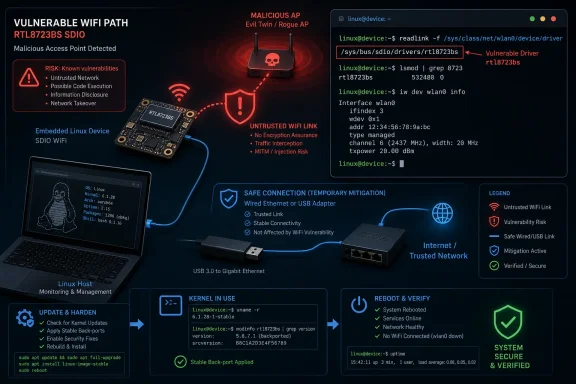
Linux kernel developers have prepared fixes for out-of-bounds reads and writes in the Realtek RTL8723BS WiFi staging driver. The reported trigger involves attacker-controlled wireless data while an affected system connects to a malicious access point. The fixes were prepared for inclusion ahead of Linux 7.2-rc3, and stable back-ports were intended.Those facts describe three distinct update states. First, an upstream patch was prepared for Linux 7.2-rc3. Second, back-porting to maintained stable kernel lines was intended. Third, availability in Linux distribution packages, appliance firmware, and other downstream vendor images remains product-specific and may not coincide with either upstream event. An upstream patch or stable-back-port plan does not by itself show that a particular device has received a fixed kernel.
The immediate decision for administrators is therefore whether a device’s active wireless interface is actually bound to
rtl8723bs. If it is, consult the supplier responsible for that device’s kernel, install the supplier’s corrected package or firmware image when available, reboot, and verify the running system. If no corrected build is available, stop using the affected interface or switch to another supported network path.Reader answer
- Affected component: Linux’s staging driver for Realtek RTL8723BS SDIO WiFi hardware.
- Confirmed issue: Out-of-bounds reads and writes involving attacker-controlled wireless data while connecting to a malicious access point.
- Upstream status: The patches were prepared for Linux 7.2-rc3.
- Stable status: Stable back-porting was intended, but selection and release can occur separately for each maintained line.
- Downstream status: Distribution packages and device-vendor firmware must be checked individually; availability is not established merely by the upstream status.
- Best identification method: Resolve the active wireless interface’s sysfs driver link. Use
ethtoolas an optional secondary check where available.- Response: Install the supplier’s fixed kernel or firmware, reboot, and verify. Until then, disable the affected interface or use another adapter or wired connection.
Identify the Bound Driver First
Do not judge exposure solely from a hardware model name, a PCI inventory, or the presence of a kernel module on disk. The most useful evidence is the driver bound to the wireless interface that the system is using.Start by listing network interfaces:
ip linkWireless interfaces are often named
wlan0, but the name can differ. Substitute the actual interface name in every command below.The strongest primary check uses sysfs:
readlink -f /sys/class/net/wlan0/device/driverIf the resulting path ends in
rtl8723bs, that interface is bound to the affected driver.A compact loop can inspect every network interface:
Code:
for iface in /sys/class/net/*; do
    name=$(basename "$iface")
    driver=$(readlink -f "$iface/device/driver" 2>/dev/null || true)
    printf '%-16s %s\n' "$name" "${driver:-no-device-driver-link}"
done/rtl8723bsWhere
ethtool is installed and supported for the interface, it can provide a secondary check:ethtool -i wlan0The relevant output is the
driver: field:driver: rtl8723bsDo not assume
ethtool is installed on every desktop, appliance, container host, or minimal embedded image. Some systems require the corresponding package to be installed, and some configurations may not return complete driver information through it. That is why the sysfs link is the primary method here.You can also check whether the module is loaded:
lsmod | grep -w rtl8723bsA match shows that
rtl8723bs appears in the loaded-module list. It does not, by itself, prove which interface is using it. Conversely, a module-list check may not settle the question if the driver was built directly into a custom kernel rather than loaded as a separate module. Map the active interface to its driver through sysfs whenever possible.The RTL8723BS is an SDIO chipset. That detail is important because a PCI-only inventory can miss it. An empty result from the following command is not proof that the system is unaffected:
lspci -nnkLikewise,
lsusb is not the primary way to find an integrated SDIO device. It can still be useful when verifying that a temporary USB network adapter uses a different driver:lsusb -tThe recommended identification sequence is:
Code:
ip link
readlink -f /sys/class/net/wlan0/device/driver
lsmod | grep -w rtl8723bs
Code:
ethtool -i wlan0
lspci -nnk
lsusb -t| Finding | Interpretation | Next step |
|---|---|---|
The active WiFi interface’s sysfs driver path ends in rtl8723bs | The device uses the affected driver | Check the responsible vendor’s update status and remediate |
lsmod lists rtl8723bs, but no interface has yet been mapped to it | The module is loaded, but active use has not been established | Inspect every interface through sysfs |
lspci does not show RTL8723BS | Inconclusive because the chipset uses SDIO | Use interface-to-driver mapping |
| A replacement USB adapter is bound to a different driver | The alternate adapter does not use rtl8723bs | Disable the affected interface before relying on the replacement |
No active interface or loaded module can be associated with rtl8723bs | No current evidence of exposure through this driver | Record the inventory result and monitor vendor information if relevant |
Update Through the Supplier Responsible for the Kernel
A system is not remediated merely because a patch exists upstream. The correction must be present in the kernel or firmware image that the device actually boots.Use this workflow:
- Identify systems whose active wireless interface is bound to
rtl8723bs. - Determine who supplies the running kernel: a Linux distribution, appliance manufacturer, hardware vendor, managed image provider, or internal kernel team.
- Check that supplier’s advisory, package notes, or firmware release information.
- Install the kernel package or complete device image that the supplier identifies as corrected.
- Reboot into the updated kernel.
- Verify both the running kernel and the interface’s bound driver.
uname -rThen repeat the primary driver check:
readlink -f /sys/class/net/wlan0/device/driverIf available, use
ethtool as an additional source of information:ethtool -i wlan0Do not clear a remediation ticket merely because a newer package has been downloaded or installed. A machine can continue running its previous kernel until it reboots. After rebooting, compare
uname -r and the installed package state with the supplier’s instructions.Do not prescribe an arbitrary upstream kernel version as the universal minimum for every distribution. A vendor can carry selected corrections without changing to the same version number used by the upstream development release. Conversely, a version string that appears newer does not, without supplier confirmation or source inspection, prove that the relevant changes are included.
Custom-kernel and embedded-device teams may need a different process. They should determine whether their source tree contains the accepted correction, rebuild the kernel or firmware image, test it on the target hardware, deploy it through the established update channel, and verify the image that actually boots. The upstream status remains useful, but it cannot replace product-specific verification.
Temporary Mitigation When No Fixed Build Is Available
The temporary objective is to remove the affected wireless path until a corrected kernel or firmware image can be deployed. Exact behavior varies by distribution, network manager, boot process, and whether the driver is a module or built into the kernel. Test these commands locally before using them on unattended equipment.Warning: Do not disable or unload a wireless interface if it is your only remote-management connection. Doing so can immediately disconnect the session and may leave the system unreachable.
Bring one interface down
Replacewlan0 with the actual interface name:sudo ip link set dev wlan0 downVerify its state:
ip link show dev wlan0This takes the interface down for the current running system. A network-management service may bring it back automatically, and the setting generally does not constitute a persistent boot-time policy.
On systems managed by NetworkManager, a temporary device disconnect can be requested with:
sudo nmcli device disconnect wlan0To turn off WiFi through NetworkManager more broadly:
sudo nmcli radio wifi offRestore it later with:
sudo nmcli radio wifi onThese commands are intentionally manager-specific. Systems using another network service require that service’s equivalent configuration.
Unload the module for the current boot
After disabling the interface and confirming that it is not needed for management, a modular driver may be removable with:sudo modprobe -r rtl8723bsConfirm whether it remains loaded:
lsmod | grep -w rtl8723bsRemoval can fail if the module is in use, another component depends on it, or the driver is built into the kernel. Do not force module removal as a routine workaround.
Block automatic module loading at later boots
For a system wherertl8723bs is a loadable module, create a modprobe policy file:
Code:
printf '%s\n' \
  'blacklist rtl8723bs' \
  'install rtl8723bs /bin/false' |
sudo tee /etc/modprobe.d/rtl8723bs-temporary-disable.confinstall rule adds a stronger block for ordinary modprobe requests. This is a temporary administrative policy, not a kernel fix.Some systems include driver modules in an initial RAM filesystem. If so, rebuild it using the distribution’s normal tool.
For Debian- and Ubuntu-family systems, the command is commonly:
sudo update-initramfs -uFor Fedora- and RHEL-family systems using Dracut, it is commonly:
sudo dracut --forceFor Arch Linux systems using the standard mkinitcpio workflow, it is commonly:
sudo mkinitcpio -PThese examples are distribution-specific. Appliance images, immutable systems, custom boot environments, and embedded products may require a vendor image rebuild instead. Follow the product supplier’s procedure rather than assuming one of these commands applies.
Reboot only after confirming that another management path is available:
sudo rebootAfter rebooting, verify that no interface is bound to the driver:
Code:
for iface in /sys/class/net/*; do
    name=$(basename "$iface")
    driver=$(readlink -f "$iface/device/driver" 2>/dev/null || true)
    printf '%-16s %s\n' "$name" "${driver:-no-device-driver-link}"
donelsmod | grep -w rtl8723bsIf the driver is built into the kernel, a modprobe blacklist will not remove it. In that situation, use a vendor-supported platform setting, a corrected kernel without the affected configuration, or a complete product firmware update. Merely creating a blacklist file is not proof that the path has been disabled.
To reverse the temporary module policy after installing a corrected build:
sudo rm -f /etc/modprobe.d/rtl8723bs-temporary-disable.confThen rebuild the initial RAM filesystem with the appropriate distribution command and reboot. Verify the running kernel and driver afterward.
Keep the Confirmed Technical Scope Narrow
The supported finding is that the RTL8723BS driver contained out-of-bounds read and write problems reachable through attacker-controlled wireless data while connecting to a malicious access point.The available facts do not establish the exact internal mechanism by which individual values reached the affected operations. They therefore do not support a detailed claim about wireless-frame length fields, driver length calculations, headers, payload validation, offsets, destination capacities, truncation behavior, or specific parser boundaries.
The fixes should similarly be described as corrections for the reported out-of-bounds behavior, not as a particular implementation strategy unless the accepted patch text is examined and cited directly. It would be premature to state that the changes add a named bounds check, reject malformed fields, truncate data, or validate a specific structure based only on the supplied reporting.
The supplied facts also do not require broader protocol claims about discovery, connection-stage management messages, protected-session processing, or a particular WPA-related path. The established condition is narrower: an affected device connects to a malicious access point, and attacker-controlled wireless data reaches the vulnerable driver behavior.
The table below separates established information from conclusions that should not be added without further evidence:
| Topic | What is supported | What is not established here |
|---|---|---|
| Component | Linux’s rtl8723bs staging driver | A Linux-wide flaw affecting unrelated WiFi drivers |
| Hardware connection | RTL8723BS is an SDIO WiFi chipset | Visibility in PCI inventories |
| Security defect | Out-of-bounds reads and writes | The exact field, calculation, copy, or parser operation responsible |
| Input source | Attacker-controlled wireless data associated with connecting to a malicious access point | A complete account of every frame type or protocol phase involved |
| Fix status | Prepared for Linux 7.2-rc3, with stable back-ports intended | Universal downstream package availability |
| Demonstrated impact | Memory-boundary violations in the driver | A demonstrated takeover, secret-extraction method, persistence mechanism, or specific crash outcome |
| Administrative response | Identify the bound driver, update through the supplier, reboot, and verify | Assuming every Linux WiFi device is affected |
Staging and Hardware Context
The RTL8723BS driver has been in the Linux kernel’s staging area since 2017. Reporting about the current work also described it as a “beast of a driver.” The quote provides context for the code’s complexity, but it should not be assigned to a particular person without direct support for that attribution.The driver’s staging history does not show that these exact defects were known since 2017. Nor does the supplied information establish a specific restructuring history for Linux 7.2 beyond the reported preparation of the security corrections for Linux 7.2-rc3.
For administrators, the non-obvious hardware point matters more than the staging label: RTL8723BS uses SDIO. Inventory processes designed around PCI and USB devices can therefore miss it. Checking the driver bound to the actual wireless interface avoids that blind spot.
The reporting identifies RTL8723BS as supporting 802.11 b/g/n WiFi and Bluetooth 4.0. That description does not establish which individual laptops, tablets, embedded boards, or appliances contain the chipset. Product names, age, form factor, and vendor branding are not substitutes for checking the running system.
Patch and Deployment Timeline
The update process should be understood as a sequence of distinct states rather than one event:| Stage | What it means | What administrators should conclude |
|---|---|---|
| Patch prepared for Linux 7.2-rc3 | The correction was readied for the upstream development cycle | The issue has an upstream correction path |
| Stable back-port intended | Maintained stable kernel lines were expected to receive relevant changes | Production kernels may receive fixes without moving to Linux 7.2 |
| Stable release published | A specific maintained kernel line has released the correction | Downstream suppliers can incorporate that stable update, but timing can vary |
| Distribution or vendor package published | A supplier has built and released a corrected kernel or firmware image | Administrators can follow that supplier’s installation procedure |
| Package or image installed | Corrected software is present on the device | A reboot may still be required |
| Updated kernel booted and verified | The running system uses the intended build | Remediation can be recorded based on supplier guidance and local verification |
This distinction is especially important for embedded products. A conventional Linux workstation may obtain the correction through its normal kernel package channel. An appliance may require a complete signed firmware image. A product using an abandoned vendor kernel may not receive a downstream package even after the relevant work exists upstream.
Action Checklist for Administrators
Inventory
- List the device’s network interfaces:
ip link - Replace
wlan0below with the actual wireless interface. - Resolve the bound driver through sysfs:
readlink -f /sys/class/net/wlan0/device/driver - Flag the device if the path ends in
rtl8723bs. - Check the loaded-module list as supporting evidence:
lsmod | grep -w rtl8723bs - If installed and supported, collect optional
ethtooloutput:
ethtool -i wlan0 - Do not clear the device based only on
lspci; RTL8723BS uses SDIO.
Remediation
- Identify the distribution, product vendor, or internal team responsible for the kernel.
- Check that supplier’s advisory and package or firmware channel.
- Confirm that the offered build contains the RTL8723BS correction.
- Install the supplier-supported kernel package or firmware image.
- Reboot the system.
- Verify the running kernel:
uname -r - Verify the bound driver again:
readlink -f /sys/class/net/wlan0/device/driver - Record the supplier’s corrected package or image identifier, installation time, reboot time, running kernel, and post-reboot driver mapping.
Temporary containment
- Confirm that disabling WiFi will not remove the only management connection.
- Bring the interface down if appropriate:
sudo ip link set dev wlan0 down - On NetworkManager systems, optionally disable WiFi through the manager:
sudo nmcli radio wifi off - If the driver is a removable module and is no longer in use:
sudo modprobe -r rtl8723bs - For a persistent temporary block, create the modprobe policy file and rebuild the initial RAM filesystem using the distribution’s supported procedure.
- Reboot and verify that the driver did not bind to an interface.
- Use wired networking or a separately supported adapter whose active interface is bound to a different driver.
- Remove the temporary blacklist only after installing and validating a corrected build.
Prioritize Affected Devices Without Declaring a Linux-Wide Emergency
This issue applies to a specific driver rather than every Realtek adapter or every Linux WiFi implementation. Organizations should begin with interface-level inventory and divide systems into three groups:- Devices confirmed to use
rtl8723bs. - Devices where the driver mapping remains unknown.
- Devices confirmed to use another driver.
Embedded and vendor-controlled systems may require extra attention because their update process can differ from the package workflow used on general-purpose Linux distributions. That observation does not prove that any particular device is unpatched. It means administrators may have to consult the product supplier rather than expecting a kernel update from a conventional distribution repository.
If a supplier does not yet offer a corrected image, using another network path can reduce exposure while back-ports and downstream releases arrive. Integrated SDIO hardware may not be physically replaceable, but its interface can potentially be disabled while Ethernet or a separately supported adapter is used. Where neither an update nor a safe alternate network path exists, administrators should evaluate whether the device can remain in service under their operational requirements.
What RTL8723BS Owners Should Watch Next
The practical story is defined by the gap between upstream preparation and downstream delivery. The correction was prepared for Linux 7.2-rc3, stable back-porting was intended, and availability in a particular distribution package or device firmware image must still be verified with the responsible supplier.Administrators do not need to wait passively for every downstream announcement. They can identify affected devices now by resolving each wireless interface’s sysfs driver link. They can also prepare a controlled containment plan, confirm alternate management paths, and document which supplier owns the kernel update for each affected product.
As back-ports land, the most useful new information will be product-specific: which maintained kernel lines received the changes, which distributions incorporated them, which appliance vendors released firmware, and whether any unsupported products remain dependent on older kernels. Those updates should be tracked separately from the original upstream patch status.
The immediate response remains concise: find active interfaces bound to
rtl8723bs, check the responsible supplier, install the corrected kernel or firmware when available, reboot, and verify what is running. If no corrected build is available, disable that wireless path with commands appropriate to the system and use another supported connection until downstream updates arrive.References
- Primary source: Phoronix
Published: Sun, 12 Jul 2026 10:15:00 GMT
Loading…
www.phoronix.com - Related coverage: patchew.org
Loading…
patchew.org - Related coverage: support.bull.com
PSM Customer
support.bull.com