

This is the kind of Windows customization story that lands because it solves a small but emotionally important problem: making a PC feel personal. Lively Wallpaper does that by turning the desktop into a living surface instead of a static backdrop, and it does so with an unusually strong pitch for Windows 11 users: open source, free, lightweight, and flexible enough to handle videos, GIFs, webpages, and interactive effects. Microsoft’s own guidance still frames wallpaper as a basic personalization feature, but Lively pushes far beyond the stock experience and into territory that feels closer to a desktop environment you curate than one you merely use.
Windows personalization has always been one of the easiest ways to tell a machine from a machine. A wallpaper, a theme, a taskbar color choice, or a lock screen image can change the emotional tone of a desktop instantly, even when the hardware underneath remains identical. Microsoft officially supports standard wallpaper customization, but not the kind of dynamic, interactive, media-driven desktop behavior that products like Lively Wallpaper deliver.
That gap matters more in 2026 than it did a few years ago. Many Windows users now spend long hours in front of OLED monitors, high-refresh gaming displays, or wide multimonitor setups, and they want desktop polish without constant manual effort. A static wallpaper is fine, but a wallpaper that can respond to audio, animate subtly, or pause intelligently during games taps into a much more modern expectation of what a personal PC should do. Lively’s appeal is that it makes that upgrade feel accessible rather than niche.
The app’s open-source roots also matter. Compared with commercial rivals, especially the long-running wallpaper customization category associated with Wallpaper Engine, Lively’s value proposition is simple: you get a feature-rich wallpaper manager without a paywall. The GitHub project describes it as free and open-source software with support for video, GIF, webpages, WebGL wallpapers, multiple monitors, and performance rules that reduce impact during full-screen apps or battery use.
What makes this especially interesting is that Lively does not try to be flashy for its own sake. It gives you plenty of room to build absurdly busy desktops if you want them, but it also includes enough controls to keep things tasteful. That balance is why it can feel like a desktop-making tool rather than a novelty launcher. That distinction is important, because novelty usually fades; a practical personalization layer tends to stick.
It also stands out because it is not limited to one media type. According to the project’s documentation, users can drag and drop videos, GIFs, webpages, and other media into the interface, then assign them as wallpapers with very little friction. That breadth gives it a broader creative envelope than a plain wallpaper picker, and it makes the software feel closer to a visual runtime than a static utility.
That matters because personalization tools succeed when they are adaptable. A desktop background is a high-visibility, low-effort touchpoint, so the best apps in this category are the ones that give users enough depth to play with but not so much complexity that setup becomes a chore. Lively’s drag-and-drop approach is part of that appeal, and it helps explain why it can resonate with casual users and enthusiasts alike. Ease of use is the secret weapon here.
The latest release notes suggest the project has continued modernizing its internals. GitHub release information says WebView2 has become the default browser engine for website wallpapers, reducing install size and improving out-of-the-box compatibility, while recent updates also brought better wallpaper pausing, better screensavers, and compatibility improvements for Windows 11 24H2. That is the kind of maintenance that matters for an app living so close to the operating system.
That same technical pragmatism shows up in the media pipeline. The GitHub documentation describes hardware-accelerated video playback and performance behavior that pauses wallpapers during full-screen games, remote desktop sessions, and battery use. In practice, that means the app tries to be a good desktop citizen instead of a constant background tax on system resources. That is a crucial difference from older dynamic wallpaper approaches that looked cool but behaved badly.
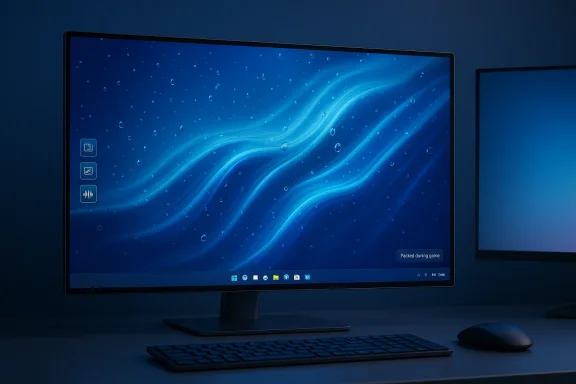
Among the better-known examples, the app includes wallpapers like Fluids, Rain, Music Tunnel, and Music TV, each with a distinct visual identity. Fluids is the eye candy play: bright, reactive, and almost hypnotic. Rain is the more usable background, because it delivers motion without dominating the entire screen. That split is healthy, because it lets users choose between spectacle and ambience.
By contrast, Rain appears to strike a better balance. The effect is recognizable, calm, and visually rich without becoming noisy, which makes it easier to imagine as a day-to-day Windows 11 background. Music Tunnel and Music TV lean more into retro visualizer aesthetics, which will appeal strongly to users who enjoy a little nostalgia with their motion graphics.
The article premise from XDA captures this well: the app makes a Windows 11 machine feel more personal because it invites experimentation. That includes the ability to turn a webpage into a live wallpaper, which is a clever extension of the idea that desktops can be interfaces, not just backgrounds. A favorite site can become a living visual centerpiece, and that opens the door to all kinds of niche use cases.
That tradeoff is why static art still has a place. Not every image benefits from depth simulation, especially lower-resolution images or artwork with unclear subject separation. The user experience described in the source material is a useful reminder that more effects do not automatically produce a better wallpaper. Taste matters as much as technology here.
The project documentation says wallpapers can pause when full-screen applications or games are running, when the PC switches to remote desktop, or when battery power is in use. Those rules matter because they turn the app from an always-on visual layer into a context-aware system component. That context-awareness is what separates a smart utility from a gimmick.
This is where Lively’s value proposition is strongest for gaming PC owners. It can provide motion and flair when the machine is idle, then step aside when performance actually matters. That makes it easier to justify than wallpaper tools that simply look impressive in screenshots and awkward in daily use.
There is also a broader consistency issue in Windows personalization. Microsoft community discussions show users still encountering wallpaper behavior that reverts unexpectedly, or desktop setups that do not fully behave the way users expect across virtual desktops and sync settings. That does not mean Windows is broken; it does mean the default experience is not always as personalized or robust as users want.
The app also benefits from the fact that wallpaper is one of the few visible elements of Windows that users interact with every single day. Even users who do not care about themes or widgets may care deeply about what they see when the PC boots. That makes wallpaper a disproportionately powerful part of the overall PC identity. It is the first impression your machine makes on you.
That openness matters because wallpaper apps sit at an awkward intersection of aesthetics, system resources, and permissions. Users are often wary of software that runs constantly in the background, especially if it touches video playback, browser rendering, or system hooks. A transparent project with visible development activity can feel more trustworthy than a polished commercial app with opaque internals.
Open-source also creates a subtle psychological benefit: users feel more willing to experiment when they know the software is community-driven and modifiable. For a wallpaper app, that can be the difference between casual trial and permanent installation. Trust is part of the user experience, even when the product is decorative.
Another thing to watch is whether the project becomes even more of a creation platform. If webpage wallpapers, media pipelines, and interactive controls continue to improve, Lively could become a default recommendation not just for enthusiasts but for anyone who wants their PC to feel more individual. That would move it from niche utility to mainstream personalization tool. That is a realistic path, but not a guaranteed one.
For now, the most convincing argument in Lively’s favor is not that it is technically impressive, though it is. It is that the app gives users a way to express taste on a platform that still often feels standardized. That is a surprisingly valuable thing in 2026, and it is why a wallpaper app can still feel like a meaningful upgrade. A good desktop background does not just decorate a machine; it tells you that the machine is yours.
Source: XDA This open-source wallpaper app makes my Windows 11 PC finally feel like it's truly mine
 Overview
Windows personalization has always been one of the easiest ways to tell a machine from a machine. A wallpaper, a theme, a taskbar color choice, or a lock screen image can change the emotional tone of a desktop instantly, even when the hardware underneath remains identical. Microsoft officially supports standard wallpaper customization, but not the kind of dynamic, interactive, media-driven desktop behavior that products like Lively Wallpaper deliver.That gap matters more in 2026 than it did a few years ago. Many Windows users now spend long hours in front of OLED monitors, high-refresh gaming displays, or wide multimonitor setups, and they want desktop polish without constant manual effort. A static wallpaper is fine, but a wallpaper that can respond to audio, animate subtly, or pause intelligently during games taps into a much more modern expectation of what a personal PC should do. Lively’s appeal is that it makes that upgrade feel accessible rather than niche.
The app’s open-source roots also matter. Compared with commercial rivals, especially the long-running wallpaper customization category associated with Wallpaper Engine, Lively’s value proposition is simple: you get a feature-rich wallpaper manager without a paywall. The GitHub project describes it as free and open-source software with support for video, GIF, webpages, WebGL wallpapers, multiple monitors, and performance rules that reduce impact during full-screen apps or battery use.
What makes this especially interesting is that Lively does not try to be flashy for its own sake. It gives you plenty of room to build absurdly busy desktops if you want them, but it also includes enough controls to keep things tasteful. That balance is why it can feel like a desktop-making tool rather than a novelty launcher. That distinction is important, because novelty usually fades; a practical personalization layer tends to stick.
Why Lively Wallpaper Stands Out
Lively stands out first because it removes the biggest psychological barrier to trying animated wallpaper: cost. A free download lowers the stakes, which makes experimentation easier, and experimentation is the whole point of desktop customization. If a wallpaper app is meant to help a user feel ownership over a PC, it should not force that expression behind a purchase decision.It also stands out because it is not limited to one media type. According to the project’s documentation, users can drag and drop videos, GIFs, webpages, and other media into the interface, then assign them as wallpapers with very little friction. That breadth gives it a broader creative envelope than a plain wallpaper picker, and it makes the software feel closer to a visual runtime than a static utility.
A wallpaper app that behaves like a creative platform
The key difference is not just that Lively animates the desktop. It is that the app lets the desktop become a canvas for different kinds of motion, interaction, and context awareness. The project highlights interactive WebGL wallpapers, browser-based wallpaper support, and a screensaver mode, which means the same engine can serve multiple personalization scenarios rather than only one.That matters because personalization tools succeed when they are adaptable. A desktop background is a high-visibility, low-effort touchpoint, so the best apps in this category are the ones that give users enough depth to play with but not so much complexity that setup becomes a chore. Lively’s drag-and-drop approach is part of that appeal, and it helps explain why it can resonate with casual users and enthusiasts alike. Ease of use is the secret weapon here.
- Free and open-source licensing lowers the barrier to entry.
- Video, GIF, webpage, and WebGL support expands the creative range.
- Screensaver support extends the app beyond desktop idle use.
- Multiple-monitor handling matters for modern setups.
- Performance pausing helps keep the desktop from interfering with work or games.
The Technology Under the Hood
Lively’s technical architecture is a big part of why it has staying power. The project notes support for mpv and VLC-based playback, plus browser-based wallpapers through CefSharp or, in newer releases, WebView2. That combination gives the app a lot of flexibility, because video and webpage wallpapers are fundamentally different workloads, and they need different rendering choices.The latest release notes suggest the project has continued modernizing its internals. GitHub release information says WebView2 has become the default browser engine for website wallpapers, reducing install size and improving out-of-the-box compatibility, while recent updates also brought better wallpaper pausing, better screensavers, and compatibility improvements for Windows 11 24H2. That is the kind of maintenance that matters for an app living so close to the operating system.
Why engine choices matter
Choosing a browser engine for webpage wallpapers is not trivial. A built-in engine can reduce packaging complexity, but it also needs to stay aligned with the host operating system and the app’s rendering expectations. Lively’s move toward WebView2 is notable because Microsoft distributes it with Windows and keeps it updated via Windows updates, which should simplify maintenance for users and developers alike.That same technical pragmatism shows up in the media pipeline. The GitHub documentation describes hardware-accelerated video playback and performance behavior that pauses wallpapers during full-screen games, remote desktop sessions, and battery use. In practice, that means the app tries to be a good desktop citizen instead of a constant background tax on system resources. That is a crucial difference from older dynamic wallpaper approaches that looked cool but behaved badly.
- mpv brings strong video playback support.
- WebView2 aligns webpage wallpapers with current Windows infrastructure.
- Hardware acceleration reduces overhead.
- Full-screen pause rules protect gaming performance.
- Remote desktop and battery behaviors support practical use on laptops and work machines.
The Best Wallpaper Types Lively Offers
The most compelling thing about Lively is that its preset wallpapers are not just technically impressive; they are varied enough to suit different moods. That matters because one person’s mesmerizing desktop is another person’s distraction, and a good wallpaper app should acknowledge that tension rather than ignore it. Lively’s library seems designed with that in mind, offering both calm and dramatic options.Among the better-known examples, the app includes wallpapers like Fluids, Rain, Music Tunnel, and Music TV, each with a distinct visual identity. Fluids is the eye candy play: bright, reactive, and almost hypnotic. Rain is the more usable background, because it delivers motion without dominating the entire screen. That split is healthy, because it lets users choose between spectacle and ambience.
Spectacle versus restraint
Fluids is the sort of wallpaper that reminds you why dynamic desktops became popular in the first place. It reacts to input and audio, and it creates a living, almost liquid visual field that can feel like a toy and a piece of ambient art at the same time. But it is also the kind of wallpaper that can become exhausting if it is left on all day. A desktop should support attention, not consume it.By contrast, Rain appears to strike a better balance. The effect is recognizable, calm, and visually rich without becoming noisy, which makes it easier to imagine as a day-to-day Windows 11 background. Music Tunnel and Music TV lean more into retro visualizer aesthetics, which will appeal strongly to users who enjoy a little nostalgia with their motion graphics.
- Fluids is the most visually dramatic option.
- Rain feels closest to a practical daily wallpaper.
- Music Tunnel evokes classic media player visualizers.
- Music TV adds a retro gadget-like personality.
- Triangles and Light works best for users who like visual energy and do not mind distraction.
Creating Your Own Desktop Identity
One of Lively’s strongest ideas is that it treats wallpaper as something you can author rather than merely select. The ability to turn a local image, a YouTube video, or a website into a wallpaper transforms the app from a consumer product into a customization toolkit. That is a subtle but important shift in how users relate to the desktop.The article premise from XDA captures this well: the app makes a Windows 11 machine feel more personal because it invites experimentation. That includes the ability to turn a webpage into a live wallpaper, which is a clever extension of the idea that desktops can be interfaces, not just backgrounds. A favorite site can become a living visual centerpiece, and that opens the door to all kinds of niche use cases.
AI-enhanced depth and image conversion
Lively also includes image-based wallpaper features that try to add depth and motion to static art. The idea is similar to the layered effects seen in smartphone ecosystems, where foreground and background elements shift slightly to create a sense of parallax. When it works, it can make a still image feel much more premium; when it does not, the effect can look artificial or overprocessed.That tradeoff is why static art still has a place. Not every image benefits from depth simulation, especially lower-resolution images or artwork with unclear subject separation. The user experience described in the source material is a useful reminder that more effects do not automatically produce a better wallpaper. Taste matters as much as technology here.
- Local images can be used as wallpaper sources.
- Webpages can be converted into live desktop scenes.
- Video wallpapers are ideal for high-quality motion art.
- AI depth effects can add dimension to suitable images.
- Poor source material still looks poor, no matter how clever the effect layer.
Performance, Battery Life, and Gaming
Performance is where desktop wallpaper apps either earn trust or lose it. If they interfere with gaming, add needless GPU load, or behave unpredictably on laptops, they stop feeling like a fun enhancement and start feeling like bloat. Lively addresses that directly with pause rules and full-screen detection, which is one of the reasons it can appeal to gaming-focused Windows users.The project documentation says wallpapers can pause when full-screen applications or games are running, when the PC switches to remote desktop, or when battery power is in use. Those rules matter because they turn the app from an always-on visual layer into a context-aware system component. That context-awareness is what separates a smart utility from a gimmick.
Why high-refresh displays benefit from fine-tuning
The source material also points to practical customization: turning off parallax, disabling the frame cap, and tuning the refresh behavior so animated droplets better match a 144Hz 4K monitor. That kind of knob is not essential for every user, but it is essential for enthusiasts who care about smoothness and visual consistency. In a premium desktop setup, small mismatches in motion can stand out quickly.This is where Lively’s value proposition is strongest for gaming PC owners. It can provide motion and flair when the machine is idle, then step aside when performance actually matters. That makes it easier to justify than wallpaper tools that simply look impressive in screenshots and awkward in daily use.
- Wallpaper playback pauses during full-screen gaming.
- Battery-aware pausing helps laptop users.
- Remote desktop support reduces surprise overhead.
- Frame caps can be adjusted for smoother motion.
- Parallax can be disabled when subtlety matters more than novelty.
The Windows 11 Personalization Problem
One reason Lively resonates is that Windows 11’s native personalization tools, while functional, remain conservative. Microsoft officially supports desktop backgrounds, themes, and related personalization settings, but the platform does not natively offer the same level of animated, interactive wallpaper customization that enthusiasts now expect. That leaves a clear opening for third-party tools.There is also a broader consistency issue in Windows personalization. Microsoft community discussions show users still encountering wallpaper behavior that reverts unexpectedly, or desktop setups that do not fully behave the way users expect across virtual desktops and sync settings. That does not mean Windows is broken; it does mean the default experience is not always as personalized or robust as users want.
Why third-party apps keep winning this niche
A third-party wallpaper app wins when it offers three things at once: more creative control, predictable performance, and less friction than the system defaults. Lively checks those boxes more effectively than most apps in the category because it is free, actively maintained, and designed for modern Windows versions. That combination is harder to ignore than a flashy one-off utility.The app also benefits from the fact that wallpaper is one of the few visible elements of Windows that users interact with every single day. Even users who do not care about themes or widgets may care deeply about what they see when the PC boots. That makes wallpaper a disproportionately powerful part of the overall PC identity. It is the first impression your machine makes on you.
- Native Windows personalization is useful but limited.
- Third-party apps fill the gap for motion and interactivity.
- Cross-desktop and sync quirks still frustrate some users.
- Wallpaper is one of the most persistent parts of the Windows UI.
- Small visual changes can have an outsized emotional effect.
Open Source, Community, and Trust
Open source is not just a licensing detail here; it is part of the product identity. Lively’s repository states plainly that it is fully open-source and free, with no features hidden behind a paywall. That invites community contributions, bug reports, localization help, and the kind of user-driven improvement that long-lived enthusiast software often needs.That openness matters because wallpaper apps sit at an awkward intersection of aesthetics, system resources, and permissions. Users are often wary of software that runs constantly in the background, especially if it touches video playback, browser rendering, or system hooks. A transparent project with visible development activity can feel more trustworthy than a polished commercial app with opaque internals.
Community maintenance as a competitive advantage
The release notes show a project that is still actively evolving, including fixes for Windows 11 updates and changes to browser internals. That kind of maintenance is not glamorous, but it is what makes an app durable. In software terms, keeping pace with Windows platform changes is often more important than adding one more visual effect.Open-source also creates a subtle psychological benefit: users feel more willing to experiment when they know the software is community-driven and modifiable. For a wallpaper app, that can be the difference between casual trial and permanent installation. Trust is part of the user experience, even when the product is decorative.
- The codebase is visible, not black-boxed.
- Community contributions can improve features and translations.
- Public release notes help users see active maintenance.
- Transparency reduces anxiety around background software.
- Open-source branding fits the enthusiast audience well.
Strengths and Opportunities
Lively’s strongest advantage is that it delivers a premium-feeling customization experience without charging for entry. The second biggest advantage is that it treats wallpaper as a flexible media layer rather than a single-purpose image slot. That means it can serve casual users, gamers, and desktop tinkerers at the same time. It also benefits from the growing expectation that a modern PC should feel personalized, animated, and responsive.- Free and open-source with no feature paywall.
- Supports videos, GIFs, webpages, and WebGL wallpapers.
- Works well with multiple monitors and high-resolution displays.
- Includes performance-aware pausing during games and battery use.
- Offers enough controls to make subtle or flashy setups equally viable.
- Can turn a favorite site or clip into a desktop identity marker.
- Actively maintained for Windows 11 compatibility.
Risks and Concerns
The biggest risk is the same one that affects most dynamic wallpaper tools: novelty fatigue. A wallpaper that dazzles for ten minutes may become distracting during a workday, and the more active the effect, the more likely it is to compete with actual tasks. There is also the practical risk that some visual effects will look good only on certain source images or monitor configurations. Lively can help, but it cannot magically improve weak art or low-resolution media.- Some effects are more distracting than useful.
- Image depth enhancements can look inconsistent.
- Poor source quality still produces poor results.
- More rendering complexity can mean more troubleshooting.
- Browser-based wallpapers may depend on Windows and engine updates.
- Over-customization can make a desktop feel busy rather than polished.
- Users may need time to tune settings for best results.
What to Watch Next
The most interesting question is not whether Lively works today, but how it evolves as Windows itself changes. The project’s recent focus on Windows 11 24H2 compatibility and WebView2 integration suggests the maintainers understand that wallpaper software lives on a moving platform. The app’s future probably depends on continuing that pace of adaptation while keeping the interface approachable.Another thing to watch is whether the project becomes even more of a creation platform. If webpage wallpapers, media pipelines, and interactive controls continue to improve, Lively could become a default recommendation not just for enthusiasts but for anyone who wants their PC to feel more individual. That would move it from niche utility to mainstream personalization tool. That is a realistic path, but not a guaranteed one.
- Continued Windows 11 compatibility updates.
- More refinement in WebView2 wallpaper behavior.
- Better handling of wallpaper pausing and detection rules.
- Expanded preset wallpapers with stronger usability balance.
- More intuitive depth and motion tuning for image wallpapers.
For now, the most convincing argument in Lively’s favor is not that it is technically impressive, though it is. It is that the app gives users a way to express taste on a platform that still often feels standardized. That is a surprisingly valuable thing in 2026, and it is why a wallpaper app can still feel like a meaningful upgrade. A good desktop background does not just decorate a machine; it tells you that the machine is yours.
Source: XDA This open-source wallpaper app makes my Windows 11 PC finally feel like it's truly mine
