

I gave my local LLM access to my files, and it quietly exposed a bigger truth about modern software: a surprising amount of paid productivity software is really just a polished interface on top of file ingestion, retrieval, and summarization. Once the indexing and embedding work move onto your own machine, the value proposition of several subscriptions changes fast. That is the core argument in the MakeUseOf piece, and it lands because it is both practical and a little unsettling: the apps we pay for are often doing work our hardware can already handle.
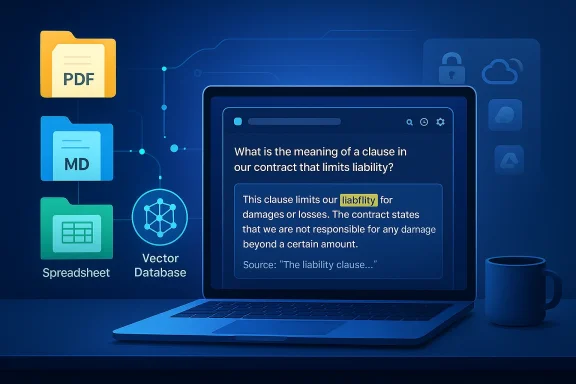
The article’s premise is simple but powerful. If you already have a pile of PDFs, notes, spreadsheets, and project files, a local LLM with RAG can often search, summarize, and cross-reference them well enough to replace category-specific apps. The key difference is where the computation happens: instead of uploading documents to a cloud service, the files are split into chunks, embedded locally, and queried on-device. That means your private material stays on your disk while the model retrieves only the most relevant passages, which is exactly the sort of workflow many power users have been waiting for.
That matters because document intelligence has become one of the most common reasons people buy subscriptions. PDF Q&A tools, note workspace search, and desktop indexers all promise to make scattered information usable again. The MakeUseOf argument is that, for a lot of users, these products are less about exclusive capabilities and more about packaging and convenience. If your machine can run a quantized model through Ollama or similar tooling, you may be able to recreate the same basic workflow for free after the initial setup.
The author’s examples are useful because they are grounded in real workflows rather than abstract AI enthusiasm. The first swap is a PDF chat app, where the local setup provides document Q&A and section summarization without sending files to a server. The second is a note-taking and workspace search use case, where a local-first app with embedded LLM support can surface semantically related notes and answer questions over a vault of markdown files. The third is desktop file search, where the local LLM is presented as a content-aware layer above folders, exports, and code repositories. That progression makes the central point hard tval becomes local, the subscription moat narrows quickly.
There is also a broader trend behind the article. Local AI has moved from a hobbyist niche into an increasingly mainstream productivity option, especially on Windows. The combination of lower-cost quantized models, better consumer CPUs, and more capable consumer GPUs has made “good enough” local inference realistic for more people than ever before. That has immediate implications for consumers, but it also creates pressure on SaaS products whose main value is simply “we let you ask questions about your own files.”
The appeal of this design is that it transforms the file system into a searchable knowledge layer. Traditional desktop search can find filenames and, sometimes, keywords, but RAG adds a semantic tier: you can ask for ideas, topics, references, or summaries instead of exact matches. That is a meaningful shift for anyone working with contracts, manuals, research notes, or large archives of PDFs. It is also why tools like AnythingLLM position themselves as local document workspaces rather than merely chat apps. Their value is not just the model; it is the indexing pipeline and the workspace model around it.
The MakeUseOf article also captures an important psychological shift. For years, cloud AI was sold as the easiest way to get usable document intelligence. Upload a file, wait for a response, pay a monthly fee, and accept that your data may be processed outside your machine. Local AI inverts that bargain. The setup takes a bit more effort, but the result is a workflow with lower recurring cost, less v stronger privacy by default. That is why the author frames the change not as anti-cloud sentiment, but as reclaiming control over a task that does not actually need the cloud.
This is also why the article resonates with Windows users in particular. Windows has long been a platform where people fill product gaps with third-party software, especially around file search, note management, and document handling. The local LLM trend just extends that habit into AI. If a workflow can be decomposed into indexing, retrieval, and summarization, then there is a good chance a local-first Windows setup can approximate what a paid SaaS product is charging for. In that sense, the article is less about one person’s experiment and more about the maturation of a platform pattern.
The local approach is especially attractive when the documents are sensitive. Legal files, HR records, financial documents, and internal project PDFs are exactly the sort of material many people hesitate to send to a third-party server. A local workflow removes that trust problem entirely, which is a major reason local document AI is gaining traction. GPT4All explicitly describes LocalDocs as bringing information from files on-device into chats “privately,” and AnythingLLM likewise markets itself as local by default.
A second advantage is endurance. Cloud document tools can be useful, but they are dependent on pricing plans, account limits, and service policies. If the user has a lot of files or uses the feature daily, a subscription can quickly become a permanent line item.ue is not that cloud services are bad, but that the recurring fee starts to look expensive when the underlying task is something your own hardware can already handle. That is a practical critique, not a philosophical one.
The article’s Notion comparison is important because Notion AI’s Q&A feature is one of the clearest subscription examples of “we host search over your stuff.” If a user is already ston locally, the paywall begins to look arbitrary. A local embedding pipeline can approximate the same query experience while also keeping the user’s notes in a format they own. That is a strong argument for local-first systems in the knowledge management market.
This also points to a broader design truth: the more portable and structured the source data is, the more replaceable the SaaS layer becomesain text notes, and local folders are all easy to index. Once the data is in open formats, the value shifts from storage to interpretation. That is exactly where local LLMs now compete. The app becomes a front end, not a lock-in strategy.
This is where the competitive threat becomes broader than one app. If local LLM search can find file paths and explain why a result matterith not just dedicated desktop indexers, but also note apps, document managers, and even parts of enterprise search. The interface may be less polished than a mature product like X1 Search, but the underlying capability is becoming good enough for many power users. That is often enough to trigger subscription churn.
The article is also right to note that traditional apps still have UX advantages. A native search tool may offer faster navigation, better filtering, more predictable ranking, and fewer setup hurdles. But local LLM search adds something those apps usually do not: explainability in plain language. It can tell you why a result matches and synthesize the answer rather than merely list hits. That difference is small in concept and huge in daily use.
The article’s mention of 45 TOPS PCs also reflects a changing hardware landscape. Consumer devices are increasingly marketed arounmance, which lowers the barrier for everyday local inference. Even if a user is not buying a special AI PC, the broader trend is the same: the baseline machine is becoming capable enough that local document intelligence is no longer exotic. That changes the economics of subscriptions substantially.
Still, hardware should not be romanticized. A small quantized model may be good enough for indexing, summarization, and retrieval, but that does not mean it will match the quality of the biggest cloud systems on complex reasoning tasks. The article hints at this by suggesting users can try larger models if they have the headroom. The real lesson is that model choice and workload shape matter more than the “local vs cloud” slogan.
The privacy story also helps explain why local AI is spreading beyond hardcore tinkerers. On-device reasoning is no longer just about ideological purity or avoiding cloud lock-in; it is a straightforward operational choice for anyone who deals with confidential or semi-confidential material. For many users, that is the difference between “nice demo” and “daily utility.”
There is a subtle but important enterprise angle here as well. Local document AI reduces some compliance headaches, but it does not eliminate governance needs. Organizations still have to manage model quality, access controls, retention, indexing scope, and user expectations. In other words, local deployment solves it is treated as a silver bullet. Privacy improves, but governance still matters.
What will matter most is polish. Better ingestion pipelines, stronger OCR, more reliable citations, cleaner workspace management, and easier setup will do more to expand adoption than another flashy benchmark result. If local AI is going to replace paid apps in the long run, it has to feel simpler than the thing it is replacing. That is the bar.
In the end, the MakeUseOf article is persuasive because it is modest in the right places and bold in the right places. It does not claim local LLMs are perfect. It claims something more practical: for a surprisingly large number of everyday tasks, your files do not need to be sent anywhere, and the software you were paying for may not be as indispensable as it looked. That is not just a productivity tip. It is a quiet challenge to the economics of modern software, and it is one that Windows power users are increasingly well equipped to answer for themselves.
Source: MakeUseOf I gave my local LLM access to my files and it replaced three apps I was paying for
 Overview
The article’s premise is simple but powerful. If you already have a pile of PDFs, notes, spreadsheets, and project files, a local LLM with RAG can often search, summarize, and cross-reference them well enough to replace category-specific apps. The key difference is where the computation happens: instead of uploading documents to a cloud service, the files are split into chunks, embedded locally, and queried on-device. That means your private material stays on your disk while the model retrieves only the most relevant passages, which is exactly the sort of workflow many power users have been waiting for.That matters because document intelligence has become one of the most common reasons people buy subscriptions. PDF Q&A tools, note workspace search, and desktop indexers all promise to make scattered information usable again. The MakeUseOf argument is that, for a lot of users, these products are less about exclusive capabilities and more about packaging and convenience. If your machine can run a quantized model through Ollama or similar tooling, you may be able to recreate the same basic workflow for free after the initial setup.
The author’s examples are useful because they are grounded in real workflows rather than abstract AI enthusiasm. The first swap is a PDF chat app, where the local setup provides document Q&A and section summarization without sending files to a server. The second is a note-taking and workspace search use case, where a local-first app with embedded LLM support can surface semantically related notes and answer questions over a vault of markdown files. The third is desktop file search, where the local LLM is presented as a content-aware layer above folders, exports, and code repositories. That progression makes the central point hard tval becomes local, the subscription moat narrows quickly.
There is also a broader trend behind the article. Local AI has moved from a hobbyist niche into an increasingly mainstream productivity option, especially on Windows. The combination of lower-cost quantized models, better consumer CPUs, and more capable consumer GPUs has made “good enough” local inference realistic for more people than ever before. That has immediate implications for consumers, but it also creates pressure on SaaS products whose main value is simply “we let you ask questions about your own files.”
Background
Retrieval-Augmented Generation, or RAG, is the technical backbone of the entire argument. Instead of feeding an entire file into a model at once, RAG breaks documents into smaller chunks, creates embeddings for those chunks, and stores them in a vector database. When a user asks a question, the system retrieves the most relevant chunks and injects them into the prompt. That pattern is efficient, scalable, and especially useful when the source material is too large for a context window or too sensitive to leave the machine. GPT4All’s LocalDocs implementation follows exactly this approach, indexing local folders and converting text snippets into embedding vectors on-device.The appeal of this design is that it transforms the file system into a searchable knowledge layer. Traditional desktop search can find filenames and, sometimes, keywords, but RAG adds a semantic tier: you can ask for ideas, topics, references, or summaries instead of exact matches. That is a meaningful shift for anyone working with contracts, manuals, research notes, or large archives of PDFs. It is also why tools like AnythingLLM position themselves as local document workspaces rather than merely chat apps. Their value is not just the model; it is the indexing pipeline and the workspace model around it.
The MakeUseOf article also captures an important psychological shift. For years, cloud AI was sold as the easiest way to get usable document intelligence. Upload a file, wait for a response, pay a monthly fee, and accept that your data may be processed outside your machine. Local AI inverts that bargain. The setup takes a bit more effort, but the result is a workflow with lower recurring cost, less v stronger privacy by default. That is why the author frames the change not as anti-cloud sentiment, but as reclaiming control over a task that does not actually need the cloud.
This is also why the article resonates with Windows users in particular. Windows has long been a platform where people fill product gaps with third-party software, especially around file search, note management, and document handling. The local LLM trend just extends that habit into AI. If a workflow can be decomposed into indexing, retrieval, and summarization, then there is a good chance a local-first Windows setup can approximate what a paid SaaS product is charging for. In that sense, the article is less about one person’s experiment and more about the maturation of a platform pattern.
The First Replacement: PDF Chat Apps
The easiest app category to challenge is the PDF chat service. These tools usually promise one thing: upload a document and ask questions about it. The MakeUseOf example uses AskYourPDF as the cloud baseline and then shows how GPT4All LocalDocs can do the same job locally once the user points it at a folder and waits for indexing. That comparison is effective because it highlights te: the cloud version is often paying for ingestion and retrieval, not some magical proprietary understanding of documents.Why this matters
For many users, the actual task is not “chat with PDFs” in the abstract. It is finding exact clauses, summarizing sections, extracting tables, and surfacing facts buried across dozens of files. A local RAG setup is often well suited to those jobs because it can search across a collection without forcing the user to upload one document at a time. The article’s practical point is that once the embeddings are built, the workflow becomes repeatable and session-independent. That makes it more like a private document assistant than a disposable web app.The local approach is especially attractive when the documents are sensitive. Legal files, HR records, financial documents, and internal project PDFs are exactly the sort of material many people hesitate to send to a third-party server. A local workflow removes that trust problem entirely, which is a major reason local document AI is gaining traction. GPT4All explicitly describes LocalDocs as bringing information from files on-device into chats “privately,” and AnythingLLM likewise markets itself as local by default.
A second advantage is endurance. Cloud document tools can be useful, but they are dependent on pricing plans, account limits, and service policies. If the user has a lot of files or uses the feature daily, a subscription can quickly become a permanent line item.ue is not that cloud services are bad, but that the recurring fee starts to look expensive when the underlying task is something your own hardware can already handle. That is a practical critique, not a philosophical one.
What local users should expect
Local document chat is not magic, and the article is honest about that. It says the results are “excellent” at specific tasks, not flawless in every scenario. That distinction matters because RAG can still struggle with document structure, table-heavy files, or quunderstanding across distant passages. In other words, the technology is mature enough to replace some paid tools, but not mature enough to make every PDF assistant obsolete. That nuance is important.- Best at targeted questions, summaries, and retrieval of exact passages.
- Less ideal for deeply formatted PDFs, scanned documents, or fragile layouts.
- Strongest benefit is privacy, because files stay local.
- Secondary benefit is speed, especially once a collection is indexed.
- Main trade-off is setup time and model quality.
Notes, Markdown Vaults, and Semantic Memory
The article’s second major example is note search, and that is where the argument gets especially interesting. Notes are already a semi-structured knowledge base, which makes them a natural fit for semantic search and local LLM workflows. The author describes movand into a local-first note stack where Reor can use Ollama under the hood to connect related notes via vector similarity. That creates a “living” knowledge base that can answer questions across a vault without relying on a cloud account.Why notes are a perfect RAG use case
Notes differ from raw documents because they are usually smaller, more interconnected, and more personally meaningful. That makes them ideal for semantic linking. Reor’s positioning as a local-first app that automatically links related notes makes sense in that environment because the software is not just retrieving text; it is building a relationship map among ideas. In practice, that can feel like a private second brain without the recurring cost of a hosted AI workspace.The article’s Notion comparison is important because Notion AI’s Q&A feature is one of the clearest subscription examples of “we host search over your stuff.” If a user is already ston locally, the paywall begins to look arbitrary. A local embedding pipeline can approximate the same query experience while also keeping the user’s notes in a format they own. That is a strong argument for local-first systems in the knowledge management market.
This also points to a broader design truth: the more portable and structured the source data is, the more replaceable the SaaS layer becomesain text notes, and local folders are all easy to index. Once the data is in open formats, the value shifts from storage to interpretation. That is exactly where local LLMs now compete. The app becomes a front end, not a lock-in strategy.
The workflow impact
One underappreciated advantage is continuity across sessions. Cloud note search often works best within the platform’s own boundaries, but local indexing can span files, folders, and project spaces. That means a user can keep one reusable knowledge store across multiple tools and projects. For people who live in markdown-heavy workflows, that can be more valuable than the fancy Q&A panel itself.- Semantic linking turns disconnected notes into a navigable knowledge graph.
- Local embeddings eliminate upload friction.
- Markdown compatibility preserves portability and vendor independence.
- Workspace separation keeps projects isolated when needed.
- Built-in chat lowers the barrier to asking cross-note questions.
Desktop Search Becomes the Real Battleground
If there is one area where local LLMs can genuinely threaten paid software, it is desktop search. The MakeUseOf article points to tools like X1 Search as the kind oecomes harder to justify once a local vector store can index work folders, code, notes, and exports. That claim is not that X1 Search is bad; rather, it is that the same class of “search inside everything” capability can increasingly be assembled from local AI building blocks.Search as a product category is changing
Classic desktop search is built around indexing and keyword lookup, with some modern tools adding OCR, mail, and attachment support. Local LLM search goes one step further by adding natural-language querying over content. Instead of searching for a filename or an exact phrase, you can ask for the spreadsheet that mentions a vendor issue from last quarter, or the PDF that references a policy exception. That semantic layer changes user expectations dramatically.This is where the competitive threat becomes broader than one app. If local LLM search can find file paths and explain why a result matterith not just dedicated desktop indexers, but also note apps, document managers, and even parts of enterprise search. The interface may be less polished than a mature product like X1 Search, but the underlying capability is becoming good enough for many power users. That is often enough to trigger subscription churn.
The article is also right to note that traditional apps still have UX advantages. A native search tool may offer faster navigation, better filtering, more predictable ranking, and fewer setup hurdles. But local LLM search adds something those apps usually do not: explainability in plain language. It can tell you why a result matches and synthesize the answer rather than merely list hits. That difference is small in concept and huge in daily use.
Why power users care
Power users live at the intersection of recall and retrieval. They do not re a file is; they want to know what it says, how it relates to other files, and whether it contains an answer worth acting on. A local RAG system can do that without turning every search into a cloud request. For users with noisy workstations and sprawling archives, that can feel like a genuine upgrade rather than a novelty.- Content-aware search finds the meaning, not just the filename.
- Natural-language queries reduce the need for exact keywords.
- Local file paths preserve the ability to act on results.
- Cross-file synthesis helps when the answer is spread across documents.
- Offline operation keeps the workflow reliable when the network is not.
Hardware, Cost, and the Real Price of “Free”
One of the strongest parts of the MakeUseOf piece is that it refuses to oversell local AI as free in every sense. It is free of monthly subscription fees, yes, but n, hardware requirements, or the need to choose a decent model. The article’s hardware guidance is pragmatic: a machine with around 16 GB of RAM and roughly 6 GB of VRAM can run a quantized 7B or 13B model reasonably well for these tasks, especially through Ollama.What “local” really costs
Local AI usually costs attention more than money. You have to choose a model, configure the runtime, create embeddings, and accept that performance depends on your CPU, GPU, and memory bandwidth. In exchange, you avoid recurring bills and data transfer to third parties. That trade-off is attractive for many Windows users, especially those already comfortable tweaking software.The article’s mention of 45 TOPS PCs also reflects a changing hardware landscape. Consumer devices are increasingly marketed arounmance, which lowers the barrier for everyday local inference. Even if a user is not buying a special AI PC, the broader trend is the same: the baseline machine is becoming capable enough that local document intelligence is no longer exotic. That changes the economics of subscriptions substantially.
Still, hardware should not be romanticized. A small quantized model may be good enough for indexing, summarization, and retrieval, but that does not mean it will match the quality of the biggest cloud systems on complex reasoning tasks. The article hints at this by suggesting users can try larger models if they have the headroom. The real lesson is that model choice and workload shape matter more than the “local vs cloud” slogan.
The math of subscription replace, the best question is not whether local AI is free, but whether it is cheaper over time. If a service charges monthly for document Q&A, note intelligence, or desktop search, then even a modest local setup can pay for itself quickly. That is especially true for users who already own suitable hardware and do not mind spending an afternoon setting things up. One-time friction can beat permanent rent.
- No monthly fee is the most obvious savings.
- No upload costs reduce data exposure.
- No vendor lock-in preserves flexibility.
- No service outage risk improves resilience.
- No usage caps helps heavy users more than casual ones.
Privacy Is Not the Side Benefit; It Is the Sales Pitch
The privn accessory in the article; it is central to the appeal. The author repeatedly contrasts local workflows with cloud tools that require uploads, account logins, and trust in a third party’s handling of private files. That is why local LLMs are resonating so strongly with Windows users who manage personal archives, internal documents, or sensitive projects. The machine becomes both the interface and the boundary.Why this resonates now
People have become much more aware that “upload a file and ask questions” is not a neutral act. Even when a service is reputable, there are still policy questions, retention questions, and uncertainty about what happens to the content after processing. Local AI bypasses that anxiety. The data never has to leave the device, and that alone can be enough to justify the effort.The privacy story also helps explain why local AI is spreading beyond hardcore tinkerers. On-device reasoning is no longer just about ideological purity or avoiding cloud lock-in; it is a straightforward operational choice for anyone who deals with confidential or semi-confidential material. For many users, that is the difference between “nice demo” and “daily utility.”
There is a subtle but important enterprise angle here as well. Local document AI reduces some compliance headaches, but it does not eliminate governance needs. Organizations still have to manage model quality, access controls, retention, indexing scope, and user expectations. In other words, local deployment solves it is treated as a silver bullet. Privacy improves, but governance still matters.
The trust model changes
A cloud app asks users to trust a company. A local setup asks users to trust their own machine. That is a far more acceptable bargain for many people, even if it requires more responsibility. The article’s enthusiasm is rooted in that shift: once you can keep your files on disk and still query them intelligently, the case for a third-party intermediary gets weaker.- Data stays local by default.
- Threat surface shrinks because there is no upload step.
- User control increases over indexing scope and retention.
- Compliance story improves for many personal and small-business use cases.
- Trust shifts from vendor policy to local device security.
Strengths and Opportunities
The most compelling thing about the MakeUseOf experiment is that it identifies a genuine category shift rather than a gimmick. Local AI is not merely a novelty chatbot on your desktop; it is a practical retrieval layer that can absorb multiple subscription products at once. That creates real opportunity for power users, privacy-conscious users, and anyone who prefers owning their workflow over renting it.- Private-by-default workflows are easier to justify for sensitive files.
- One local index can serve multiple tools and use cases.
- Cross-app replacement reduces monthly software bills.
- Markdown and folder-based sources are highly portable.
- Offline access keeps working when cloud services do not.
- Semantic search is often more useful than keyword search alone.
- Rapid iteration makes experimentation cheap for enthusiasts.
Risks and Concerns
The article’s optimistic tone is deserved, but it can hide the fact that local AI is still a moving target. Embeddings, retrieval quality, and model behavior vary widely, and a poorly chosen setup can produce confident but unreliable answers. This is especially risky when users begin treating the assistant as an authority rather than a search layer. Convenience can invite overtrust.- Hallucinations can still occur during summarization or synthesis.
- Poor indexing leads to weak retrieval and missed context.
- Hardware limits can make the system sluggish or frustrating.
- Setup complexity may overwhelm casual users.
- Maintenance burden shifts to the user.
- Scanned or messy PDFs may underperform.
- Security misconceptions can create false confidence.
Looking Ahead
The next phase of this story is not whether local LLMs can answer questions about files at all. They already can. The real question is how quickly the experience improves from “good enough for enthusiasts” to “obvious default for mainstream users.” GPT4All, AnythingLLM, Reor, and Ollama point in that direction already, and each one lowers the barrier a little further.What will matter most is polish. Better ingestion pipelines, stronger OCR, more reliable citations, cleaner workspace management, and easier setup will do more to expand adoption than another flashy benchmark result. If local AI is going to replace paid apps in the long run, it has to feel simpler than the thing it is replacing. That is the bar.
- Better document parsing will make local PDF workflows more dependable.
- Improved OCR will help scanned archives and image-heavy files.
- Cleaner interfaces will reduce the setup tax for new users.
- Stronger citation handling will increase trust in answers.
- Native Windows integration could make local search feel first-party.
- More efficient models will widen the hardware base that can participate.
In the end, the MakeUseOf article is persuasive because it is modest in the right places and bold in the right places. It does not claim local LLMs are perfect. It claims something more practical: for a surprisingly large number of everyday tasks, your files do not need to be sent anywhere, and the software you were paying for may not be as indispensable as it looked. That is not just a productivity tip. It is a quiet challenge to the economics of modern software, and it is one that Windows power users are increasingly well equipped to answer for themselves.
Source: MakeUseOf I gave my local LLM access to my files and it replaced three apps I was paying for
