

Logicalis said on July 7, 2026, from London that it has achieved Microsoft Frontier Partner status alongside its Microsoft Copilot specialisation, positioning the global technology service provider to help enterprises move from AI pilots to governed adoption across Microsoft’s cloud and AI stack. The release frames the recognition around a specific problem for enterprise customers: moving AI work from experimentation into production without losing control of identity, data access, security, workflow ownership, and measurement.
The announcement is best read as a Microsoft-partner capability update rather than a broad statement about Microsoft’s channel strategy. Logicalis says Frontier Partner status recognises partners with advanced expertise in delivering enterprise AI solutions using Microsoft cloud and AI technologies. The company is also tying the recognition to its Microsoft Copilot specialisation, its 12 Microsoft Advanced Specialisations, and its continued Azure Expert MSP status.
For IT leaders and WindowsForum readers, the practical importance is straightforward: Copilot and agentic AI projects expose weaknesses in Microsoft 365 permissions, Entra identity governance, SharePoint information architecture, Purview policy coverage, and workflow accountability. Before expanding deployment, admins need to know what AI can access, what it can do, who approved it, how activity is logged, and how success will be measured.
Logicalis’s release focuses on the transition from AI pilots to wider enterprise adoption. That distinction matters because pilot projects can often succeed in narrow, controlled environments while avoiding the harder operational questions that appear at scale.
A limited Copilot trial may show that employees can summarize meetings, draft documents, search internal knowledge, or accelerate routine tasks. A production deployment has to answer additional questions. Which users should receive access? Which SharePoint sites and Teams workspaces contain overshared data? Which information should be classified or excluded? Which business processes are appropriate for Copilot Studio extensions? Which actions require human approval? How will the organization know whether adoption created business value?
Logicalis says Frontier Partner status is awarded to partners with advanced expertise in delivering enterprise AI solutions using Microsoft’s cloud and AI technologies. The company says the recognition reinforces its expertise across Microsoft Copilot, data and AI, security, and cloud transformation as organisations move beyond AI pilots to enterprise-wide adoption.
That is the verified scope of the announcement. It is not necessary to turn the release into a prediction about the future of Microsoft’s partner ecosystem or the wider AI economy. The useful news is narrower and more concrete: Logicalis is presenting itself as a Microsoft partner with validated capabilities across Copilot, Azure, data, security, and managed cloud operations at the point when many customers are trying to make AI deployments safer and more measurable.
The Microsoft Copilot specialisation is central to that positioning. Logicalis says the specialisation validates expertise in designing, deploying, and extending Microsoft 365 Copilot through Copilot Studio and agentic AI. That places the emphasis not only on enabling Copilot seats, but on adapting Copilot to business workflows and governance requirements.
For admins, this changes the deployment conversation. A Copilot rollout is not only a licensing and training project. It is also a permissions review, a data governance exercise, an identity control check, a content lifecycle review, and a monitoring plan. If those foundations are weak, AI can make the weaknesses more visible.
Those constraints are familiar to Windows and Microsoft 365 administrators. Users are members of too many groups. Legacy SharePoint sites still contain sensitive files. Teams workspaces have grown without clear ownership. Old documents remain searchable long after they should have been archived or deleted. External sharing exceptions have accumulated. Conditional access policies are inconsistent. Privileged roles are not reviewed frequently enough. Data classification policies exist, but coverage is uneven.
AI does not create all of those problems. It changes their importance. If Copilot can reason over content a user is already permitted to access, then bad permissions become an AI exposure issue. If Copilot Studio agents are connected to business systems, then identity, approval flows, connector governance, and logging become part of AI risk management. If AI-generated outputs influence customer service, finance, HR, legal, or security processes, then accountability must be defined before production use expands.
Bob Bailkoski, Global CEO of Logicalis, said the next wave of enterprise transformation will be defined by organisations that can turn AI ambition into secure, measurable business impact. In the context of this announcement, that quote is a useful standard for evaluating AI projects. A project should not be considered ready to scale simply because the demo works or users are enthusiastic. It should have a defined owner, an approved data boundary, a security model, a measurement plan, and a rollback or remediation path.
The Microsoft Copilot specialisation is relevant because Logicalis connects it to designing, deploying, and extending Microsoft 365 Copilot through Copilot Studio and agentic AI. Copilot Studio introduces a different class of decision from a standard productivity rollout. Once organizations build agents, connect data sources, automate responses, or invoke workflows, the question becomes what those agents are allowed to do and under whose authority.
An agent that drafts an internal summary carries one risk profile. An agent that retrieves customer data, updates a service record, sends a notification, creates a ticket, or recommends an operational action carries another. Each step requires controls around identity, data access, human review, logging, exception handling, and ownership.
That is the post-pilot problem Logicalis is addressing. Microsoft provides the platform capabilities, and Logicalis is asserting that it can help customers apply them across real enterprise environments. Customers should still treat the badge as an input into due diligence, not a replacement for it.
Anita Swann, VP, Global Alliances at Logicalis, said that as Microsoft’s FY27 financial year begins, Logicalis is launching from a position of strength: 12 Microsoft Advanced Specialisations, the Microsoft Frontier Partner badge, and continued Azure Expert MSP status. She also said the company is focused on helping customers balance innovation with governance, security, and measurable business outcomes.
That balance is where many AI deployments will succeed or fail. Technical enablement alone is not enough. Organizations also need decisions about policy, access, information architecture, user training, lifecycle management, and operational ownership.
Logicalis cites its 2026 Global CIO Report to support that point. According to the company, 94% of organisations have increased their appetite for AI, while more than half believe adoption is already moving too fast. Those two figures capture the pressure many CIOs face: business leaders want acceleration, while IT and security teams must make sure adoption does not become unmanaged sprawl.
For Windows-focused organizations, the governance work is concrete. Microsoft 365 identity, endpoint posture, SharePoint permissions, Teams content, Purview policies, Defender signals, Entra controls, and Azure architecture all shape whether Copilot and related AI workflows can be deployed responsibly.
That means the work starts before a broad Copilot expansion. Admins should know where sensitive information lives, who can access it, which labels and retention policies apply, which users are eligible for AI features, which agents are allowed to connect to business systems, and which monitoring processes will detect misuse or unexpected behavior.
The governance message should not be treated as abstract risk language. It is a set of operational decisions. Who owns each AI use case? Which data sources are approved? Which connectors are blocked? Which users can create agents? Which outputs require human review? Which logs are retained? Which incidents are escalated? Which metrics prove that the deployment is useful?
Those questions are more important than the badge itself. Logicalis’s announcement indicates that it wants to help customers answer them across Microsoft technologies. Customers should require those answers in project plans, design documents, and operating models.
In many enterprises, those areas have grown over years of migrations, mergers, departmental projects, and emergency exceptions. AI adoption brings them together. A Copilot response may depend on Microsoft 365 content. A Copilot Studio agent may rely on connectors and workflows. Access may depend on Entra group membership and conditional access. Data handling may depend on Microsoft Purview sensitivity labels, data loss prevention, retention, and audit configuration. Endpoint eligibility may depend on Intune compliance and Defender posture.
This is why AI projects often become a test of existing hygiene. If SharePoint sites are poorly governed, Copilot can make oversharing more obvious. If Teams workspaces have no owners, content lifecycle decisions become harder. If Entra groups are stale, access boundaries are unreliable. If privileged roles are not reviewed, administrative exposure increases. If Purview policies are incomplete, sensitive content may not receive the controls the organization expects.
The release says Logicalis has expertise across Microsoft Copilot, data and AI, security, and cloud transformation. That combination is relevant because AI adoption touches all of those domains at once. A narrowly scoped deployment that ignores identity and data governance may be faster to launch, but it can create problems when users start relying on the tools for daily work.
The practical question for customers is not whether AI should be explored. The practical question is whether each deployment is ready for production. Production readiness requires more than a successful proof of concept. It requires defined access boundaries, approved data sources, monitored activity, user guidance, incident response procedures, and evidence that the use case is worth expanding.
Customers should also be careful about the word “agentic.” In this announcement, Logicalis connects its Copilot specialisation to Copilot Studio and agentic AI. For admins, that should trigger a governance review. Agents that only answer questions are different from agents that take actions. Agents that work inside a limited knowledge base are different from agents connected to multiple systems. Agents used by a small internal team are different from agents that influence customer-facing or regulated processes.
The more an agent can do, the more important it becomes to define approvals, limits, logging, testing, and shutdown procedures. That is an operational requirement, not an optional policy exercise.
Microsoft Frontier Partner status, as described by Logicalis, signals advanced expertise in delivering enterprise AI solutions using Microsoft cloud and AI technologies. The Microsoft Copilot specialisation points to designing, deploying, and extending Microsoft 365 Copilot through Copilot Studio and agentic AI. The 12 Microsoft Advanced Specialisations indicate broader Microsoft technical depth. Continued Azure Expert MSP status points to managed Azure capability.
Taken together, those recognitions support Logicalis’s message that AI adoption is not a single-product project. Copilot may be the visible user experience, but the deployment depends on the surrounding estate. Microsoft 365 content, Entra identity, Purview governance, Defender and security operations, Azure architecture, Power Platform controls, and change management all influence whether AI can be scaled safely.
Buyers should not treat all AI partner claims as equivalent. A partner that can run a Copilot workshop may not be the right partner to redesign information governance. A partner that can build a Copilot Studio prototype may not be prepared to operate it in production. A partner that understands Azure infrastructure may not automatically understand SharePoint permissions, sensitivity labels, or Microsoft 365 content lifecycle management.
The better procurement question is not simply, “Can this partner deploy Copilot?” The better questions are:
The release is aimed at enterprise customers because the deployment challenge is organizational as much as technical. AI adoption touches content ownership, security policy, compliance requirements, process design, training, support, and budget review. A badge can indicate capability. It cannot replace the customer’s own governance decisions.
Those figures explain why governance is now part of the AI buying conversation. Interest is high, but confidence is not universal. Many organizations are trying to encourage useful AI adoption while preventing unmanaged tools, uncontrolled data exposure, duplicated pilots, and unclear accountability.
For CIOs, the challenge is no longer only whether to allow AI experimentation. Employees already know AI tools exist. Business units are asking for automation. Vendors are embedding AI features into existing software. Developers, analysts, support teams, and managers are finding their own use cases. The CIO’s task is to turn that activity into a governed operating model.
That operating model needs clear decision points. Which AI use cases are approved? Which are experimental? Which are prohibited? Which data types are allowed? Which users are in scope? Which business units own outcomes? Which security controls are mandatory? Which review board approves agents that take actions? Which metrics determine whether a pilot expands or ends?
Logicalis’s release positions the company around that problem by emphasizing Microsoft Copilot, data and AI, security, cloud transformation, Advanced Specialisations, Frontier Partner status, and Azure Expert MSP status. The common thread is that enterprise AI requires both platform knowledge and operating discipline.
Admins should expect this pressure to arrive before the board sees a finished AI strategy. Requests for Copilot access, Copilot Studio agents, data connectors, workflow automation, and new AI-enabled business tools will land in IT queues. Security teams will ask about auditability and data boundaries. Compliance teams will ask about retention, records, and sensitive information. Business leaders will ask why deployment is not faster.
The answer should not be a blanket delay. It should be a readiness model that allows low-risk use cases to proceed while forcing higher-risk use cases through stronger controls.
SharePoint permissions are a clear example. In a standard collaboration environment, oversharing is already a problem. In a Copilot-enabled environment, oversharing can shape what AI is able to retrieve and summarize for a user. The first control is not an AI setting; it is accurate access control on the underlying content.
Teams sprawl is another example. Old teams, abandoned channels, guest users, and unclear ownership can all complicate AI readiness. If content has no owner, it is harder to decide whether it should remain discoverable, be archived, be retained, be labeled, or be deleted.
Entra identity governance is equally important. Group membership, guest access, privileged roles, conditional access, lifecycle workflows, and access reviews all influence the boundary of what users and AI-assisted workflows can reach. A stale account or broad group assignment is not only an identity issue. It can become part of the AI exposure path.
Purview becomes more central as Copilot expands. Sensitivity labels, data loss prevention, retention labels, audit, eDiscovery, records management, and insider risk processes all help define how sensitive information is handled. If those controls are uneven, Copilot and agentic workflows can reveal gaps that were already present.
Copilot Studio adds another layer. Admins need to decide who can create agents, which environments they can use, which connectors are allowed, which data sources are approved, whether actions require human approval, and how agent behavior is tested before production use. Low-code does not mean low-risk.
Endpoint and device posture also matter. If users access sensitive AI-enabled workflows from unmanaged or noncompliant devices, the organization may undermine the same governance it is trying to build. Intune compliance, Defender status, device enrollment, and conditional access should be part of the readiness review.
Partner-led adoption can help if it forces these conversations early. Logicalis says it can help design, deploy, and extend Microsoft 365 Copilot through Copilot Studio and agentic AI. Customers should use that capability to demand a clear architecture and operating model, not just a rollout schedule.
A strong engagement should produce decisions and artifacts that admins can use after launch: access review findings, data source approvals, label and retention guidance, agent inventories, connector policies, monitoring plans, support procedures, incident-response playbooks, training materials, and measurement dashboards.
A weak engagement will treat AI adoption as a feature enablement exercise. That approach may look fast at the start, but it leaves the organization to discover governance gaps after users have already built habits around the tools.
Review Teams and Exchange settings that influence collaboration and data exposure. Confirm guest access rules, external sharing settings, meeting transcription policies, retention behavior, and audit availability. If AI will summarize meetings or search collaboration content, admins need confidence that the underlying collaboration estate is governed.
Check whether users understand what Copilot can and cannot access. Training should explain that Copilot works within existing permissions and that bad permissions can produce bad outcomes. User guidance should also cover handling sensitive prompts, reviewing generated content, and reporting unexpected results.
Use access reviews for privileged groups, guest users, and high-impact application access. Confirm that lifecycle processes remove or change access when employees transfer roles or leave the organization.
Check conditional access policies for Copilot users and administrators. Require strong authentication where appropriate, apply device compliance requirements for sensitive access, and review exceptions that weaken the policy. Privileged role management should be reviewed before AI tools are connected to administrative or operational workflows.
Remove or restrict content that should not be broadly discoverable. Archive stale sites, assign owners where ownership is unclear, and document which repositories are approved for AI-assisted retrieval.
Review information architecture. Copilot readiness improves when content is current, owned, labeled, and stored in the right location. If business-critical documents are duplicated across old sites and unmanaged libraries, AI results may be confusing or unreliable even when access control is technically correct.
Review data loss prevention policies for sensitive information that may appear in prompts, documents, emails, chats, or generated outputs. Confirm policies are tested and tuned before broad enforcement.
Check retention labels and retention policies for Teams, SharePoint, OneDrive, and Exchange. AI readiness depends on content lifecycle discipline. Keeping everything forever can create unnecessary exposure; deleting without policy can create compliance risk.
Verify audit coverage and eDiscovery readiness. If an AI-assisted workflow creates a dispute, incident, or compliance question, the organization needs records of relevant activity and content.
Review connectors and actions. Block or restrict connectors that create unacceptable data movement or operational risk. Require approval for agents that write to systems, send messages, create tickets, update records, or trigger workflows.
Require human approval for higher-risk actions. If an agent affects customers, money, legal obligations, regulated records, security operations, or employee data, it should not move directly from prototype to autonomous production.
Create an agent inventory. Each agent should have an owner, purpose, approved data sources, allowed actions, test history, review date, and support contact. Agents without owners should not remain in production.
Define monitoring and shutdown procedures. Admins need a way to detect unusual behavior, investigate incidents, disable an agent, revoke connector access, and communicate changes to affected users.
That signal should be taken seriously, but not treated as a guarantee. A specific Copilot or agentic AI project still needs careful scoping. Customers should ask what data will be accessed, what systems will be connected, which controls will be configured, who will own the workflow, how outputs will be reviewed, and what evidence will prove value.
The most important question is not whether an organization can turn on more AI capability. It can. The important question is whether the organization can expand AI while keeping control of identity, data, workflows, monitoring, and accountability.
Logicalis is making the case that its Microsoft credentials put it in a strong position to help with that work as Microsoft’s FY27 financial year begins. For admins, the takeaway is more immediate: before expanding Copilot or building agents, inspect the Microsoft estate that AI will depend on. Fix access. Classify and govern content. Review Entra controls. Tighten SharePoint exposure. Configure Purview policies. Control Copilot Studio connectors and actions. Define ownership and measurement.
AI adoption will expose the quality of existing administration. Organizations that do the governance work first will have a better chance of turning Copilot and agentic AI into useful production tools rather than another layer of unmanaged complexity.
The announcement is best read as a Microsoft-partner capability update rather than a broad statement about Microsoft’s channel strategy. Logicalis says Frontier Partner status recognises partners with advanced expertise in delivering enterprise AI solutions using Microsoft cloud and AI technologies. The company is also tying the recognition to its Microsoft Copilot specialisation, its 12 Microsoft Advanced Specialisations, and its continued Azure Expert MSP status.
For IT leaders and WindowsForum readers, the practical importance is straightforward: Copilot and agentic AI projects expose weaknesses in Microsoft 365 permissions, Entra identity governance, SharePoint information architecture, Purview policy coverage, and workflow accountability. Before expanding deployment, admins need to know what AI can access, what it can do, who approved it, how activity is logged, and how success will be measured.
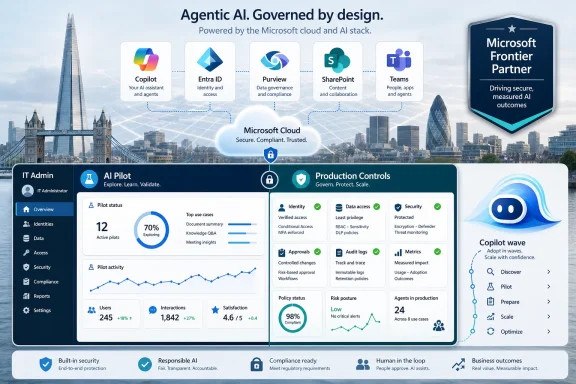 Microsoft AI Adoption Is Moving From Pilot Projects to Production Controls
Logicalis’s release focuses on the transition from AI pilots to wider enterprise adoption. That distinction matters because pilot projects can often succeed in narrow, controlled environments while avoiding the harder operational questions that appear at scale.A limited Copilot trial may show that employees can summarize meetings, draft documents, search internal knowledge, or accelerate routine tasks. A production deployment has to answer additional questions. Which users should receive access? Which SharePoint sites and Teams workspaces contain overshared data? Which information should be classified or excluded? Which business processes are appropriate for Copilot Studio extensions? Which actions require human approval? How will the organization know whether adoption created business value?
Logicalis says Frontier Partner status is awarded to partners with advanced expertise in delivering enterprise AI solutions using Microsoft’s cloud and AI technologies. The company says the recognition reinforces its expertise across Microsoft Copilot, data and AI, security, and cloud transformation as organisations move beyond AI pilots to enterprise-wide adoption.
That is the verified scope of the announcement. It is not necessary to turn the release into a prediction about the future of Microsoft’s partner ecosystem or the wider AI economy. The useful news is narrower and more concrete: Logicalis is presenting itself as a Microsoft partner with validated capabilities across Copilot, Azure, data, security, and managed cloud operations at the point when many customers are trying to make AI deployments safer and more measurable.
The Microsoft Copilot specialisation is central to that positioning. Logicalis says the specialisation validates expertise in designing, deploying, and extending Microsoft 365 Copilot through Copilot Studio and agentic AI. That places the emphasis not only on enabling Copilot seats, but on adapting Copilot to business workflows and governance requirements.
For admins, this changes the deployment conversation. A Copilot rollout is not only a licensing and training project. It is also a permissions review, a data governance exercise, an identity control check, a content lifecycle review, and a monitoring plan. If those foundations are weak, AI can make the weaknesses more visible.
The Badge Is About the Post-Pilot Problem
The phrase “move beyond AI pilots” appears in the release because it describes a common enterprise challenge. Early AI pilots are often designed to demonstrate possibility. Post-pilot adoption has to prove that the technology can operate inside the real constraints of the organization.Those constraints are familiar to Windows and Microsoft 365 administrators. Users are members of too many groups. Legacy SharePoint sites still contain sensitive files. Teams workspaces have grown without clear ownership. Old documents remain searchable long after they should have been archived or deleted. External sharing exceptions have accumulated. Conditional access policies are inconsistent. Privileged roles are not reviewed frequently enough. Data classification policies exist, but coverage is uneven.
AI does not create all of those problems. It changes their importance. If Copilot can reason over content a user is already permitted to access, then bad permissions become an AI exposure issue. If Copilot Studio agents are connected to business systems, then identity, approval flows, connector governance, and logging become part of AI risk management. If AI-generated outputs influence customer service, finance, HR, legal, or security processes, then accountability must be defined before production use expands.
Bob Bailkoski, Global CEO of Logicalis, said the next wave of enterprise transformation will be defined by organisations that can turn AI ambition into secure, measurable business impact. In the context of this announcement, that quote is a useful standard for evaluating AI projects. A project should not be considered ready to scale simply because the demo works or users are enthusiastic. It should have a defined owner, an approved data boundary, a security model, a measurement plan, and a rollback or remediation path.
The Microsoft Copilot specialisation is relevant because Logicalis connects it to designing, deploying, and extending Microsoft 365 Copilot through Copilot Studio and agentic AI. Copilot Studio introduces a different class of decision from a standard productivity rollout. Once organizations build agents, connect data sources, automate responses, or invoke workflows, the question becomes what those agents are allowed to do and under whose authority.
An agent that drafts an internal summary carries one risk profile. An agent that retrieves customer data, updates a service record, sends a notification, creates a ticket, or recommends an operational action carries another. Each step requires controls around identity, data access, human review, logging, exception handling, and ownership.
That is the post-pilot problem Logicalis is addressing. Microsoft provides the platform capabilities, and Logicalis is asserting that it can help customers apply them across real enterprise environments. Customers should still treat the badge as an input into due diligence, not a replacement for it.
Logicalis Is Emphasizing Governance Alongside Technical Capability
The most important part of the release is not only the list of Microsoft recognitions. It is the way Logicalis pairs those recognitions with governance and measurement.Anita Swann, VP, Global Alliances at Logicalis, said that as Microsoft’s FY27 financial year begins, Logicalis is launching from a position of strength: 12 Microsoft Advanced Specialisations, the Microsoft Frontier Partner badge, and continued Azure Expert MSP status. She also said the company is focused on helping customers balance innovation with governance, security, and measurable business outcomes.
That balance is where many AI deployments will succeed or fail. Technical enablement alone is not enough. Organizations also need decisions about policy, access, information architecture, user training, lifecycle management, and operational ownership.
Logicalis cites its 2026 Global CIO Report to support that point. According to the company, 94% of organisations have increased their appetite for AI, while more than half believe adoption is already moving too fast. Those two figures capture the pressure many CIOs face: business leaders want acceleration, while IT and security teams must make sure adoption does not become unmanaged sprawl.
For Windows-focused organizations, the governance work is concrete. Microsoft 365 identity, endpoint posture, SharePoint permissions, Teams content, Purview policies, Defender signals, Entra controls, and Azure architecture all shape whether Copilot and related AI workflows can be deployed responsibly.
That means the work starts before a broad Copilot expansion. Admins should know where sensitive information lives, who can access it, which labels and retention policies apply, which users are eligible for AI features, which agents are allowed to connect to business systems, and which monitoring processes will detect misuse or unexpected behavior.
The governance message should not be treated as abstract risk language. It is a set of operational decisions. Who owns each AI use case? Which data sources are approved? Which connectors are blocked? Which users can create agents? Which outputs require human review? Which logs are retained? Which incidents are escalated? Which metrics prove that the deployment is useful?
Those questions are more important than the badge itself. Logicalis’s announcement indicates that it wants to help customers answer them across Microsoft technologies. Customers should require those answers in project plans, design documents, and operating models.
The Microsoft Stack Is the Control Surface for Copilot Readiness
Logicalis’s announcement concerns Microsoft cloud and AI technologies, but the impact for customers reaches across the existing Microsoft estate. Copilot readiness depends on identity, collaboration data, endpoint compliance, information protection, cloud architecture, and workflow design.In many enterprises, those areas have grown over years of migrations, mergers, departmental projects, and emergency exceptions. AI adoption brings them together. A Copilot response may depend on Microsoft 365 content. A Copilot Studio agent may rely on connectors and workflows. Access may depend on Entra group membership and conditional access. Data handling may depend on Microsoft Purview sensitivity labels, data loss prevention, retention, and audit configuration. Endpoint eligibility may depend on Intune compliance and Defender posture.
This is why AI projects often become a test of existing hygiene. If SharePoint sites are poorly governed, Copilot can make oversharing more obvious. If Teams workspaces have no owners, content lifecycle decisions become harder. If Entra groups are stale, access boundaries are unreliable. If privileged roles are not reviewed, administrative exposure increases. If Purview policies are incomplete, sensitive content may not receive the controls the organization expects.
The release says Logicalis has expertise across Microsoft Copilot, data and AI, security, and cloud transformation. That combination is relevant because AI adoption touches all of those domains at once. A narrowly scoped deployment that ignores identity and data governance may be faster to launch, but it can create problems when users start relying on the tools for daily work.
The practical question for customers is not whether AI should be explored. The practical question is whether each deployment is ready for production. Production readiness requires more than a successful proof of concept. It requires defined access boundaries, approved data sources, monitored activity, user guidance, incident response procedures, and evidence that the use case is worth expanding.
Customers should also be careful about the word “agentic.” In this announcement, Logicalis connects its Copilot specialisation to Copilot Studio and agentic AI. For admins, that should trigger a governance review. Agents that only answer questions are different from agents that take actions. Agents that work inside a limited knowledge base are different from agents connected to multiple systems. Agents used by a small internal team are different from agents that influence customer-facing or regulated processes.
The more an agent can do, the more important it becomes to define approvals, limits, logging, testing, and shutdown procedures. That is an operational requirement, not an optional policy exercise.
A Credential Stack for a Multi-System Deployment Problem
Logicalis’s announcement lists several Microsoft recognitions, and each maps to a different part of enterprise AI adoption.Microsoft Frontier Partner status, as described by Logicalis, signals advanced expertise in delivering enterprise AI solutions using Microsoft cloud and AI technologies. The Microsoft Copilot specialisation points to designing, deploying, and extending Microsoft 365 Copilot through Copilot Studio and agentic AI. The 12 Microsoft Advanced Specialisations indicate broader Microsoft technical depth. Continued Azure Expert MSP status points to managed Azure capability.
Taken together, those recognitions support Logicalis’s message that AI adoption is not a single-product project. Copilot may be the visible user experience, but the deployment depends on the surrounding estate. Microsoft 365 content, Entra identity, Purview governance, Defender and security operations, Azure architecture, Power Platform controls, and change management all influence whether AI can be scaled safely.
Buyers should not treat all AI partner claims as equivalent. A partner that can run a Copilot workshop may not be the right partner to redesign information governance. A partner that can build a Copilot Studio prototype may not be prepared to operate it in production. A partner that understands Azure infrastructure may not automatically understand SharePoint permissions, sensitivity labels, or Microsoft 365 content lifecycle management.
The better procurement question is not simply, “Can this partner deploy Copilot?” The better questions are:
- Can the partner assess Microsoft 365 permissions before rollout?
- Can it identify overshared SharePoint and Teams content?
- Can it align Copilot deployment with Entra conditional access and identity governance?
- Can it help define which Copilot Studio connectors and actions are allowed?
- Can it design human approval points for higher-risk workflows?
- Can it configure monitoring, audit, retention, and incident response?
- Can it define success metrics with business owners before scaling?
- Can it document who owns each agent or AI-assisted workflow after go-live?
The release is aimed at enterprise customers because the deployment challenge is organizational as much as technical. AI adoption touches content ownership, security policy, compliance requirements, process design, training, support, and budget review. A badge can indicate capability. It cannot replace the customer’s own governance decisions.
CIO Anxiety Is Now Part of the AI Buying Cycle
Logicalis’s 2026 Global CIO Report figures are the clearest data points in the announcement. The company says 94% of organisations have increased their appetite for AI, while more than half believe adoption is already moving too fast.Those figures explain why governance is now part of the AI buying conversation. Interest is high, but confidence is not universal. Many organizations are trying to encourage useful AI adoption while preventing unmanaged tools, uncontrolled data exposure, duplicated pilots, and unclear accountability.
For CIOs, the challenge is no longer only whether to allow AI experimentation. Employees already know AI tools exist. Business units are asking for automation. Vendors are embedding AI features into existing software. Developers, analysts, support teams, and managers are finding their own use cases. The CIO’s task is to turn that activity into a governed operating model.
That operating model needs clear decision points. Which AI use cases are approved? Which are experimental? Which are prohibited? Which data types are allowed? Which users are in scope? Which business units own outcomes? Which security controls are mandatory? Which review board approves agents that take actions? Which metrics determine whether a pilot expands or ends?
Logicalis’s release positions the company around that problem by emphasizing Microsoft Copilot, data and AI, security, cloud transformation, Advanced Specialisations, Frontier Partner status, and Azure Expert MSP status. The common thread is that enterprise AI requires both platform knowledge and operating discipline.
Admins should expect this pressure to arrive before the board sees a finished AI strategy. Requests for Copilot access, Copilot Studio agents, data connectors, workflow automation, and new AI-enabled business tools will land in IT queues. Security teams will ask about auditability and data boundaries. Compliance teams will ask about retention, records, and sensitive information. Business leaders will ask why deployment is not faster.
The answer should not be a blanket delay. It should be a readiness model that allows low-risk use cases to proceed while forcing higher-risk use cases through stronger controls.
Windows and Microsoft 365 Admins Will Feel This Before the Board Does
For WindowsForum readers, the announcement matters because enterprise AI adoption turns familiar admin responsibilities into AI readiness work.SharePoint permissions are a clear example. In a standard collaboration environment, oversharing is already a problem. In a Copilot-enabled environment, oversharing can shape what AI is able to retrieve and summarize for a user. The first control is not an AI setting; it is accurate access control on the underlying content.
Teams sprawl is another example. Old teams, abandoned channels, guest users, and unclear ownership can all complicate AI readiness. If content has no owner, it is harder to decide whether it should remain discoverable, be archived, be retained, be labeled, or be deleted.
Entra identity governance is equally important. Group membership, guest access, privileged roles, conditional access, lifecycle workflows, and access reviews all influence the boundary of what users and AI-assisted workflows can reach. A stale account or broad group assignment is not only an identity issue. It can become part of the AI exposure path.
Purview becomes more central as Copilot expands. Sensitivity labels, data loss prevention, retention labels, audit, eDiscovery, records management, and insider risk processes all help define how sensitive information is handled. If those controls are uneven, Copilot and agentic workflows can reveal gaps that were already present.
Copilot Studio adds another layer. Admins need to decide who can create agents, which environments they can use, which connectors are allowed, which data sources are approved, whether actions require human approval, and how agent behavior is tested before production use. Low-code does not mean low-risk.
Endpoint and device posture also matter. If users access sensitive AI-enabled workflows from unmanaged or noncompliant devices, the organization may undermine the same governance it is trying to build. Intune compliance, Defender status, device enrollment, and conditional access should be part of the readiness review.
Partner-led adoption can help if it forces these conversations early. Logicalis says it can help design, deploy, and extend Microsoft 365 Copilot through Copilot Studio and agentic AI. Customers should use that capability to demand a clear architecture and operating model, not just a rollout schedule.
A strong engagement should produce decisions and artifacts that admins can use after launch: access review findings, data source approvals, label and retention guidance, agent inventories, connector policies, monitoring plans, support procedures, incident-response playbooks, training materials, and measurement dashboards.
A weak engagement will treat AI adoption as a feature enablement exercise. That approach may look fast at the start, but it leaves the organization to discover governance gaps after users have already built habits around the tools.
Concrete Takeaways for Admins Before Expanding Copilot
Before expanding Microsoft 365 Copilot, Copilot Studio, or agentic AI deployment, admins should turn the announcement’s governance message into a practical readiness review.Microsoft 365
Check which users are licensed, which workloads are in scope, and whether adoption is tied to approved use cases. Do not expand access only because licenses are available. Define eligible user groups, business owners, training requirements, and support paths.Review Teams and Exchange settings that influence collaboration and data exposure. Confirm guest access rules, external sharing settings, meeting transcription policies, retention behavior, and audit availability. If AI will summarize meetings or search collaboration content, admins need confidence that the underlying collaboration estate is governed.
Check whether users understand what Copilot can and cannot access. Training should explain that Copilot works within existing permissions and that bad permissions can produce bad outcomes. User guidance should also cover handling sensitive prompts, reviewing generated content, and reporting unexpected results.
Entra
Review group memberships that grant access to sensitive Microsoft 365 content and business applications. Remove stale users, nested groups that no longer match business need, and broad access assignments that were created for convenience.Use access reviews for privileged groups, guest users, and high-impact application access. Confirm that lifecycle processes remove or change access when employees transfer roles or leave the organization.
Check conditional access policies for Copilot users and administrators. Require strong authentication where appropriate, apply device compliance requirements for sensitive access, and review exceptions that weaken the policy. Privileged role management should be reviewed before AI tools are connected to administrative or operational workflows.
SharePoint
Audit high-value SharePoint sites before expanding Copilot access. Prioritize sites containing HR, finance, legal, customer, engineering, security, or executive content. Check site owners, sharing links, guest access, broken inheritance, and broad groups such as “Everyone except external users.”Remove or restrict content that should not be broadly discoverable. Archive stale sites, assign owners where ownership is unclear, and document which repositories are approved for AI-assisted retrieval.
Review information architecture. Copilot readiness improves when content is current, owned, labeled, and stored in the right location. If business-critical documents are duplicated across old sites and unmanaged libraries, AI results may be confusing or unreliable even when access control is technically correct.
Microsoft Purview
Confirm sensitivity labels are deployed for the data types that matter most. Labels should map to real handling rules, not only visual markings. Where appropriate, apply encryption, access restrictions, or content marking based on classification.Review data loss prevention policies for sensitive information that may appear in prompts, documents, emails, chats, or generated outputs. Confirm policies are tested and tuned before broad enforcement.
Check retention labels and retention policies for Teams, SharePoint, OneDrive, and Exchange. AI readiness depends on content lifecycle discipline. Keeping everything forever can create unnecessary exposure; deleting without policy can create compliance risk.
Verify audit coverage and eDiscovery readiness. If an AI-assisted workflow creates a dispute, incident, or compliance question, the organization needs records of relevant activity and content.
Copilot Studio
Decide who can create agents and in which environments. Agent creation should not be open-ended for every user if the organization has not defined governance. Use environment strategy, role assignments, and data policies to separate experimentation from production.Review connectors and actions. Block or restrict connectors that create unacceptable data movement or operational risk. Require approval for agents that write to systems, send messages, create tickets, update records, or trigger workflows.
Require human approval for higher-risk actions. If an agent affects customers, money, legal obligations, regulated records, security operations, or employee data, it should not move directly from prototype to autonomous production.
Create an agent inventory. Each agent should have an owner, purpose, approved data sources, allowed actions, test history, review date, and support contact. Agents without owners should not remain in production.
Define monitoring and shutdown procedures. Admins need a way to detect unusual behavior, investigate incidents, disable an agent, revoke connector access, and communicate changes to affected users.
Action Checklist for Admins
- Audit Microsoft 365 permissions before expanding Copilot access, with priority on SharePoint, Teams, OneDrive, and sensitive document repositories.
- Review Entra ID group memberships, guest access, conditional access policies, privileged roles, and access reviews that shape what users and agents can reach.
- Identify high-risk SharePoint sites and fix broad access, anonymous or organization-wide links, stale owners, and broken inheritance before wider rollout.
- Confirm Microsoft Purview sensitivity labels, DLP policies, retention settings, audit, and eDiscovery coverage for content that Copilot may surface.
- Define who can build in Copilot Studio, which connectors are approved, which actions require human approval, and which environments are for testing versus production.
- Build an inventory of Copilot Studio agents, including owner, data sources, allowed actions, review cadence, and shutdown procedure.
- Set success metrics for each AI use case before launch, including business owner, baseline, expected outcome, measurement source, and review date.
- Confirm incident-response procedures for AI-assisted workflows, including how to investigate unexpected outputs, oversharing, connector misuse, or inappropriate automation.
- Treat partner credentials as a starting point for due diligence, not a substitute for architecture review, security assessment, and operational accountability.
The Partner Signal Is Useful, but Delivery Still Matters
Logicalis’s Frontier Partner announcement is a useful signal for customers evaluating Microsoft AI adoption support. It tells the market that Logicalis has achieved Microsoft Frontier Partner status, holds a Microsoft Copilot specialisation, has 12 Microsoft Advanced Specialisations, and continues to hold Azure Expert MSP status. It also tells customers that Logicalis wants to be judged on helping organisations move from AI experimentation to governed, measurable adoption.That signal should be taken seriously, but not treated as a guarantee. A specific Copilot or agentic AI project still needs careful scoping. Customers should ask what data will be accessed, what systems will be connected, which controls will be configured, who will own the workflow, how outputs will be reviewed, and what evidence will prove value.
The most important question is not whether an organization can turn on more AI capability. It can. The important question is whether the organization can expand AI while keeping control of identity, data, workflows, monitoring, and accountability.
Logicalis is making the case that its Microsoft credentials put it in a strong position to help with that work as Microsoft’s FY27 financial year begins. For admins, the takeaway is more immediate: before expanding Copilot or building agents, inspect the Microsoft estate that AI will depend on. Fix access. Classify and govern content. Review Entra controls. Tighten SharePoint exposure. Configure Purview policies. Control Copilot Studio connectors and actions. Define ownership and measurement.
AI adoption will expose the quality of existing administration. Organizations that do the governance work first will have a better chance of turning Copilot and agentic AI into useful production tools rather than another layer of unmanaged complexity.
References
- Primary source: Macau Business
Published: 2026-07-08T22:50:08.613436
Loading…
macaubusiness.com - Related coverage: techradar.com
Microsoft is spending $2.5bn on deploying AI engineers to its customers | TechRadar
Microsoft becomes latest tech giant with an AI FDE programwww.techradar.com - Related coverage: logicalis.com
CIOs leading the charge into an AI powered future
AI continues to be the hottest topic in boardrooms and IT departments across the globe. The 12th annual Logicalis Global CIO Report, reveals a widening gap between ambition and operational readiness, with governance, skills and infrastructure struggling to keep pace. www.logicalis.com
- Related coverage: de.logicalis.com
Die Einführung von KI beschleunigen: Logicalis erhält Status als „Microsoft Frontier Partner“
Der neue Status als „Microsoft Frontier Partner“ und die ebenfalls erreichte Copilot-Spezialisierung stärken die Fähigkeit von Logicalis, Unternehmen auf dem Weg von ersten KI-Projekten hin zu einer sicheren und geregelten Einführung zu unterstützen. www.de.logicalis.com
- Related coverage: a.prod.logicalis.pdcx.tech
Logicalis leaps into enterprise AI with Frontier Partner status and Copilot specialisation
Read how Logicalis’ Microsoft Frontier Partner status and 12 Advanced Specialisations helps securely scale AI and turn ambition into measurable business impact. a.prod.logicalis.pdcx.tech
- Official source: blogs.microsoft.com
Accelerating Frontier Transformation with Microsoft partners - The Official Microsoft Blog
AI has moved quickly from experimentation to production. Customers want measurable business outcomes, along with security, governance and responsible AI built in from day one. Microsoft partners are a meaningful differentiator to deliver these objectives. They turn ideas into deployable...blogs.microsoft.com
- Related coverage: technologyrecord.com
Microsoft awards Frontier Partner status and Copilot...
Global technology service provider Logicalis has been awarded Microsoft Frontier Partner status, alongside its Microsoft Copilot specialisation,...www.technologyrecord.com
- Related coverage: prnewswire.com
Loading…
www.prnewswire.com - Official source: partner.microsoft.com
Loading…
partner.microsoft.com - Related coverage: news.cognizant.com
Cognizant and Microsoft Expand Partnership to Advance AI Transformation and Frontier Firm Experiences - Dec 18, 2025
PDF documentnews.cognizant.com
- Related coverage: logicalis-hub.com
- Related coverage: us.logicalis.com
2032172120
On-Stage Successful Female Speaker Presents Technological Product, Uses Remote Control for Presentation, Showing Infographics, Statistics Animation on Screen. Live Event / Device Release.www.us.logicalis.com