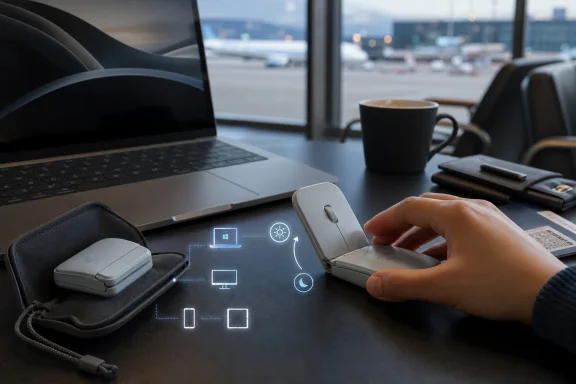
Logitech officially introduced the Mobi Fold on June 10, 2026, positioning its first foldable portable mouse as a travel-focused productivity accessory for Windows, macOS, ChromeOS, Android, iPadOS, and Linux users. The pitch is simple: if work has left the desk, the mouse has to follow without becoming another awkward lump in the bag. The more interesting question is whether Logitech has solved a real mobile-work problem or simply dressed an old peripheral category in the language of foldables. The answer is probably both, which is why the Mobi Fold matters more than its novelty suggests.
For years, the portable mouse has lived in a compromise zone. Full-size mice are comfortable but bulky; tiny travel mice are easy to carry but often unpleasant for extended work; laptop trackpads are always available but still second-best for spreadsheets, image editing, dense admin consoles, and remote desktop sessions. Logitech’s Mobi Fold is an attempt to escape that triangle by changing the object’s physical state rather than merely shrinking it.
That makes the Microsoft Surface Arc comparison unavoidable. Microsoft’s Arc line has long used a bend-to-use, flatten-to-pack trick, making it one of the few genuinely distinctive mobile mice in the Windows ecosystem. Logitech’s move is not an imitation in the lazy sense, but it is clearly playing in the same conceptual space: the mouse as a shape-shifting tool that disappears when idle and becomes ergonomic when needed.
The difference is that Mobi Fold leans harder into the language of the current gadget moment. It folds, it has a hinge, it has a silicone skin, it talks about accidental-input prevention, and it arrives in a market trained by folding phones to accept mechanical complexity as a premium feature. That is a meaningful shift for a category where the most exciting design change often amounts to a new scroll wheel.
For Windows users and IT buyers, the appeal is less about gadget theatre than deployment reality. Hybrid work has made the airport lounge, train table, hotel room, shared office, and client site part of the default computing environment. Logitech is betting that enough people hate trackpads in those places to justify carrying a mouse — provided the mouse stops behaving like a rigid desktop object.
Most professionals do not leave a mouse behind because they love trackpads. They leave it behind because every mobile kit becomes a negotiation. The laptop, charger, earbuds, phone, notebook, badges, dongles, portable battery, and perhaps a tablet all compete for space before a mouse even enters the conversation.
A normal mouse is not heavy in isolation, but it is an awkward shape. It creates dead space in a slim bag, bulges in a sleeve, and feels silly in a jacket pocket. That is why the Mobi Fold’s value proposition is less about weight than packability.
At 79 grams and with a compact 122 mm by 57 mm footprint in use, the device is not trying to be a featherweight gaming mouse or a luxury MX-series desktop replacement. It is trying to cross the psychological line where the user stops asking, “Should I bring a mouse?” and starts treating it like a default travel item. If Logitech succeeds, the Mobi Fold is not selling a new mouse so much as a new habit.
Portable peripherals often fail not because they are bad at their jobs, but because they add tiny bits of friction. A power switch left on drains the battery. A dongle gets misplaced. A device wakes in a bag and does something dumb. A user has to remember a charging cable or a pairing mode. The best travel accessory is the one that removes micro-decisions.
By tying power state to physical state, Logitech makes the hinge part of the interface. Open means work; closed means stored. It is a classic hardware trick: turn a behavior the user already understands into a system control.
The risk is equally obvious. Hinges are promises waiting to be tested. Logitech says the internal hinge is built for years of daily use, and the company has wrapped the body in a dust-resistant silicone sleeve while claiming drop-tested durability. Still, anyone who has watched laptop hinges loosen, foldable phones crease, or soft-touch coatings age badly will understand why durability will define the Mobi Fold’s reputation more than launch-day photos.
A mouse is handled constantly. It is squeezed, clicked, shoved into pockets, tossed into backpacks, wiped down, and used on questionable surfaces. A foldable mouse has to survive not only ordinary wear but the suspicion that it is solving portability by introducing a new failure point.
Logitech appears to be trying to avoid that trap by presenting Mobi Fold as a practical business accessory rather than a design object. The pitch emphasizes muscle strain reduction versus a laptop trackpad, quiet clicks for shared spaces, adaptive touch scrolling, and cross-platform switching. In other words, Logitech is not merely saying “look, it folds.” It is saying the folding mechanism enables a mouse you might actually use during serious work away from the desk.
That distinction matters for WindowsForum readers because the Windows ecosystem already contains plenty of mobile pointing options. There are cheap Bluetooth travel mice, premium compact mice like Logitech’s own MX Anywhere line, trackballs, stylus workflows, and increasingly good precision touchpads. A foldable mouse has to justify itself against products that are less interesting but more proven.
The Mobi Fold’s strongest argument is not that it beats a full-size mouse. It probably does not. Its argument is that it is more likely to be present when the full-size mouse is not.
That is a subtle but important distinction. The best peripheral is sometimes the one with the highest ceiling; on the road, it is often the one you actually remembered to pack.
But the underlying problem is real. If the user is folding and unfolding a device whose top surface includes clickable controls, accidental input becomes a design hazard. A traditional mouse does not have to interpret the act of being transformed from pocket object to pointing device.
The question is whether this needs to be called AI. Hardware makers increasingly use machine-learning language for pattern recognition that might once have been described as firmware logic, sensor filtering, or input suppression. The label may be marketing inflation, but the function is sensible if it works invisibly.
This is where the Mobi Fold will have to earn trust in reviews. Nobody wants a travel mouse that clicks while being opened, wakes a laptop at the wrong time, or triggers UI actions while being packed away. At the same time, nobody wants a mouse that second-guesses legitimate clicks because its clever model is being overprotective.
For IT departments, the AI label is less important than predictability. A mouse does not need to be smart in the way a copilot is smart. It needs to be boringly reliable. If the local model reduces accidental input without adding latency, configuration burden, privacy questions, or support tickets, most users will never care what Logitech calls it.
The one-minute claim is more emotionally powerful than the 30-day claim. Month-long battery life is useful, but it fades into the background if users charge periodically. Emergency fast charging changes behavior because it reduces the penalty for forgetting.
Here again, the folding power mechanism matters. If the mouse reliably turns off when closed, the user is less likely to discover a drained battery after a week in a bag. The device’s physical form becomes part of its power-management strategy.
Still, battery performance is one of the easiest launch specs to oversimplify. Real-world life depends on usage patterns, connection mode, surface tracking, firmware behavior, and battery aging. The more relevant question for professionals is not whether the Mobi Fold reaches the absolute advertised maximum, but whether it remains dependable across a messy month of travel, standby, quick sessions, and partial charges.
A replaceable battery would be especially important if Logitech wants the Mobi Fold to be taken seriously as a long-lived business peripheral. Road warriors can forgive a device that costs more upfront if it does not become e-waste the moment the cell weakens. Logitech’s broader sustainability messaging only lands if the product can actually remain in service.
For consumers, the story is lifestyle productivity: a mouse that fits into modern mobile work and looks good doing it. Color choices like Graphite, Lilac, and Off White reinforce that this is meant to live alongside slim laptops, tablets, and travel keyboards. It is an accessory for the person who treats a café table as an office.
For businesses, the story is control. The business model includes Logi Bolt support and compatibility with Logitech’s management tooling, allowing organizations to monitor devices in a more centralized way. That matters for companies that issue standardized kits to consultants, executives, field workers, sales teams, or hybrid employees.
The price delta is small enough that many organizations will ignore the consumer model entirely if they are buying in volume. In a managed environment, a $10 difference can be easier to justify than the operational mess of mixed receiver types, inconsistent support paths, and unmanaged accessories. The device itself may be novel, but the procurement logic is conventional.
There is also a security subtext. Bluetooth peripherals have improved, but IT departments still tend to prefer known, managed wireless stacks for business gear. Logi Bolt exists because enterprise buyers want more than “it pairs.” They want predictable behavior, documented compatibility, and fewer surprises when hundreds or thousands of peripherals enter circulation.
A sysadmin may carry a Windows notebook, use an iPad in meetings, remote into Linux systems, and occasionally support Android devices. A consultant may bounce between a corporate Windows build, a personal Mac, and a customer-controlled virtual desktop. A student or developer may use ChromeOS on one machine and Windows on another. The mouse has to follow the identity sprawl.
Multi-device switching is therefore not a luxury feature in the old sense. It is a coping mechanism for fragmented work. The Mobi Fold’s value increases if it can become the one pointing device that moves across whatever screen happens to be in front of the user.
For Windows users specifically, the interesting angle is that Logitech continues to treat Windows as the center of the productivity universe without treating it as the only endpoint. That is where modern peripheral makers have landed: Windows compatibility is table stakes, but exclusivity is a weakness. The Mobi Fold is designed for a world where the Windows laptop is still primary, yet rarely alone.
This also means the software experience matters. Customizable buttons through Logi Options+ can be useful, but only if configuration does not become another cloud-account nuisance or enterprise packaging headache. Power users like customization; IT departments like defaults that do not break.
Laptop makers solved some of the problem by improving trackpads and battery life. Microsoft helped with Precision Touchpad standards, and modern Windows laptops are far less painful to use without a mouse than their predecessors. But precision pointing never disappeared as a need.
Spreadsheets remain hostile to imprecise input. Design tools reward fine control. Remote desktops often turn trackpad gestures into awkward compromises. Browser-based enterprise software still contains tiny controls, dense tables, draggable panes, and legacy UI assumptions. The mouse persists because software continues to assume it exists.
That persistence is why a folding mouse is not as silly as it first sounds. The device is a physical answer to a software truth: modern apps may run anywhere, but many of them are still most efficient with a pointer. The mismatch between mobile work and desktop-era interfaces creates the opening Logitech is trying to occupy.
The company is also reading the room on shared-space etiquette. Quiet clicks are not glamorous, but anyone who has worked in a library, aircraft cabin, or conference room understands their value. The mobile mouse has to be not only compact but socially acceptable.
It is reasonable because Logitech has included a real mechanical transformation, multi-device support, fast charging, quiet clicks, touch scrolling, and a business variant with enterprise-friendly features. This is not a $19 travel mouse with a marketing makeover. The engineering cost is visible.
It is dangerous because the product’s benefit is contextual. A user who rarely travels, drives to an office, or already carries a full-size mouse will see the folding mechanism as unnecessary. A user who works on trains, planes, client sites, and cramped tables may see it as exactly the missing piece.
That means the Mobi Fold’s market is narrower than the launch language might imply. It is not for everyone who owns a laptop. It is for people who repeatedly find themselves doing desktop-style work in non-desktop spaces and are annoyed enough to pay for a better answer.
The competitive threat is Logitech’s own catalog. The MX Anywhere line, Pebble series, and other compact mice already cover much of the mobile market. Mobi Fold has to outperform them not in sensor specs or button count, but in the lived experience of carrying and deploying the device daily.
A folding mouse faces a particular ergonomic challenge. To be packable, it must compromise its resting shape. To be useful, it must offer enough palm support and button stability that users do not feel punished for choosing portability. If the Mobi Fold only feels good for 20-minute sessions, it becomes a clever emergency accessory. If it holds up for several hours of real work, it becomes a category marker.
The touch-based scrolling area will also divide users. Some will appreciate adaptive scrolling and a clean surface. Others will miss the tactile certainty of a physical wheel, especially in admin tools, code editors, spreadsheets, and remote sessions where precision matters. Logitech has experience with alternative scrolling mechanisms, but the travel context raises the stakes.
There is also the question of surface performance. A road mouse must work on café tables, hotel desks, airplane trays, conference-room laminate, paper folders, and occasionally someone’s knee. Specs matter less than tolerance for bad surfaces. A mouse that requires a perfect pad is not a travel mouse; it is a desk mouse with a passport.
Reviews will need to test the Mobi Fold not in a studio but in hostile environments. The device was built for the in-between spaces of work. That is where it should be judged.
They will also ask whether a folding mechanism is a support burden. A conventional mouse fails in familiar ways. A foldable mouse introduces hinge wear, shell damage, sleeve degradation, and possible sensor-state weirdness. None of these are disqualifying, but they change the risk calculation.
The business version’s inclusion of Logi Bolt and management hooks suggests Logitech understands that novelty alone does not sell to enterprise IT. A device issued to employees has to be boring after procurement. It must pair cleanly, survive travel, avoid weird driver demands, and stay out of the ticket queue.
The most likely enterprise niche is not every employee. It is mobile-first roles: consultants, sales staff, executives, auditors, trainers, field engineers, and workers who live in conference rooms and client sites. For those users, the ability to carry a real mouse without dedicating bag space may be worth the premium.
The least likely fit is the fixed-desk worker who occasionally works from home. That person is better served by a comfortable full-size mouse at each location. The Mobi Fold is for movement, not merely flexibility.
That says something about the limits of integrated design. Laptops are general-purpose compromises. Their trackpads are good enough for browsing, communication, and light productivity, but not always good enough for the work that pays the bills. The more serious the task, the more likely users are to reach for specialized input.
It also says something about the persistence of the desktop metaphor. Windows, macOS, and Linux all continue to reward pointer precision. Web apps have absorbed desktop complexity rather than eliminating it. Even tablets, once positioned as post-PC devices, increasingly support mice and trackpads because productivity keeps pulling them back toward desktop interaction.
The Mobi Fold therefore is not merely a quirky peripheral. It is a small admission that mobile computing still depends on accessories to become fully productive. The laptop is the center, but the kit completes the job.
That is why Logitech’s product is more interesting than a spec sheet. It sits at the intersection of hybrid work, business travel, foldable hardware, enterprise manageability, and the stubborn endurance of the mouse. Few accessories tell a broader story so neatly.
If the Mobi Fold becomes something users show off once and then stop carrying, it will be remembered as a clever curiosity. If it becomes the mouse that lives permanently in a travel pouch, Logitech will have created something more durable than a launch gimmick. The distinction will not be decided by press-release claims but by habits formed over months.
The early signs are promising because the product is aimed at a real behavioral gap. Many people prefer mice but do not carry them. Many mobile workers tolerate trackpads rather than choose them. Many IT departments want standardized, portable kits for employees whose offices are temporary by design.
But the Mobi Fold also faces the classic danger of premium peripherals: it must feel inevitable after purchase. Users need to think, “Why didn’t this already exist?” not “This is neat, but I could have used any mouse.” That is a high bar for an $80 accessory.
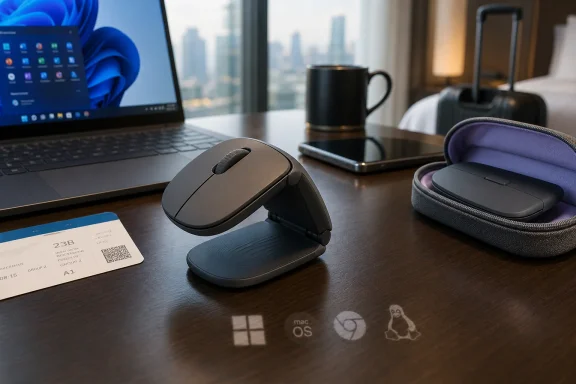 Logitech Turns the Travel Mouse Into a Folding Argument
For years, the portable mouse has lived in a compromise zone. Full-size mice are comfortable but bulky; tiny travel mice are easy to carry but often unpleasant for extended work; laptop trackpads are always available but still second-best for spreadsheets, image editing, dense admin consoles, and remote desktop sessions. Logitech’s Mobi Fold is an attempt to escape that triangle by changing the object’s physical state rather than merely shrinking it.That makes the Microsoft Surface Arc comparison unavoidable. Microsoft’s Arc line has long used a bend-to-use, flatten-to-pack trick, making it one of the few genuinely distinctive mobile mice in the Windows ecosystem. Logitech’s move is not an imitation in the lazy sense, but it is clearly playing in the same conceptual space: the mouse as a shape-shifting tool that disappears when idle and becomes ergonomic when needed.
The difference is that Mobi Fold leans harder into the language of the current gadget moment. It folds, it has a hinge, it has a silicone skin, it talks about accidental-input prevention, and it arrives in a market trained by folding phones to accept mechanical complexity as a premium feature. That is a meaningful shift for a category where the most exciting design change often amounts to a new scroll wheel.
For Windows users and IT buyers, the appeal is less about gadget theatre than deployment reality. Hybrid work has made the airport lounge, train table, hotel room, shared office, and client site part of the default computing environment. Logitech is betting that enough people hate trackpads in those places to justify carrying a mouse — provided the mouse stops behaving like a rigid desktop object.
The Numbers Say the Mouse Stayed Home
Logitech’s own framing is built around a productivity gap. The company says 72 percent of professionals own or use a mouse at home or in the office, but only 26 percent use one when working in public or while traveling. Vendor studies deserve a raised eyebrow, but the behavior described is familiar enough to pass the smell test.Most professionals do not leave a mouse behind because they love trackpads. They leave it behind because every mobile kit becomes a negotiation. The laptop, charger, earbuds, phone, notebook, badges, dongles, portable battery, and perhaps a tablet all compete for space before a mouse even enters the conversation.
A normal mouse is not heavy in isolation, but it is an awkward shape. It creates dead space in a slim bag, bulges in a sleeve, and feels silly in a jacket pocket. That is why the Mobi Fold’s value proposition is less about weight than packability.
At 79 grams and with a compact 122 mm by 57 mm footprint in use, the device is not trying to be a featherweight gaming mouse or a luxury MX-series desktop replacement. It is trying to cross the psychological line where the user stops asking, “Should I bring a mouse?” and starts treating it like a default travel item. If Logitech succeeds, the Mobi Fold is not selling a new mouse so much as a new habit.
Folding Is the Feature, but the Hinge Is the Product
The Mobi Fold’s central design decision is obvious from its name: it folds into a more compact shape for carrying and opens into a curved working form. Logitech says the folding action also controls power, switching the mouse on when opened and off when folded. That small detail may be more important than it sounds.Portable peripherals often fail not because they are bad at their jobs, but because they add tiny bits of friction. A power switch left on drains the battery. A dongle gets misplaced. A device wakes in a bag and does something dumb. A user has to remember a charging cable or a pairing mode. The best travel accessory is the one that removes micro-decisions.
By tying power state to physical state, Logitech makes the hinge part of the interface. Open means work; closed means stored. It is a classic hardware trick: turn a behavior the user already understands into a system control.
The risk is equally obvious. Hinges are promises waiting to be tested. Logitech says the internal hinge is built for years of daily use, and the company has wrapped the body in a dust-resistant silicone sleeve while claiming drop-tested durability. Still, anyone who has watched laptop hinges loosen, foldable phones crease, or soft-touch coatings age badly will understand why durability will define the Mobi Fold’s reputation more than launch-day photos.
A mouse is handled constantly. It is squeezed, clicked, shoved into pockets, tossed into backpacks, wiped down, and used on questionable surfaces. A foldable mouse has to survive not only ordinary wear but the suspicion that it is solving portability by introducing a new failure point.
The Arc Mouse Shadow Cuts Both Ways
Microsoft’s Surface Arc remains the ghost in this story because it proved that a mobile mouse could be iconic without being conventionally comfortable. It also proved that cleverness has limits. The Arc’s flat-to-curved design is wonderfully packable, but many users find it better for short bursts than all-day work.Logitech appears to be trying to avoid that trap by presenting Mobi Fold as a practical business accessory rather than a design object. The pitch emphasizes muscle strain reduction versus a laptop trackpad, quiet clicks for shared spaces, adaptive touch scrolling, and cross-platform switching. In other words, Logitech is not merely saying “look, it folds.” It is saying the folding mechanism enables a mouse you might actually use during serious work away from the desk.
That distinction matters for WindowsForum readers because the Windows ecosystem already contains plenty of mobile pointing options. There are cheap Bluetooth travel mice, premium compact mice like Logitech’s own MX Anywhere line, trackballs, stylus workflows, and increasingly good precision touchpads. A foldable mouse has to justify itself against products that are less interesting but more proven.
The Mobi Fold’s strongest argument is not that it beats a full-size mouse. It probably does not. Its argument is that it is more likely to be present when the full-size mouse is not.
That is a subtle but important distinction. The best peripheral is sometimes the one with the highest ceiling; on the road, it is often the one you actually remembered to pack.
Logitech Adds AI Where a Debounce Circuit Used to Be Enough
The most modern-sounding Mobi Fold feature is its local micro-model of artificial intelligence, reportedly used to recognize finger movement during folding and prevent accidental button presses. This is exactly the kind of feature that will make some readers roll their eyes. A folding mouse with AI sounds like a parody of 2026 product marketing.But the underlying problem is real. If the user is folding and unfolding a device whose top surface includes clickable controls, accidental input becomes a design hazard. A traditional mouse does not have to interpret the act of being transformed from pocket object to pointing device.
The question is whether this needs to be called AI. Hardware makers increasingly use machine-learning language for pattern recognition that might once have been described as firmware logic, sensor filtering, or input suppression. The label may be marketing inflation, but the function is sensible if it works invisibly.
This is where the Mobi Fold will have to earn trust in reviews. Nobody wants a travel mouse that clicks while being opened, wakes a laptop at the wrong time, or triggers UI actions while being packed away. At the same time, nobody wants a mouse that second-guesses legitimate clicks because its clever model is being overprotective.
For IT departments, the AI label is less important than predictability. A mouse does not need to be smart in the way a copilot is smart. It needs to be boringly reliable. If the local model reduces accidental input without adding latency, configuration burden, privacy questions, or support tickets, most users will never care what Logitech calls it.
The Battery Claim Is Built for Panic, Not Patience
Logitech says a one-minute charge can provide up to 22 hours of use, while a full charge can last roughly a month. That is exactly the kind of spec designed for business travel because it addresses the moment every road worker knows: the device is dead, the meeting starts soon, and the charger situation is unclear.The one-minute claim is more emotionally powerful than the 30-day claim. Month-long battery life is useful, but it fades into the background if users charge periodically. Emergency fast charging changes behavior because it reduces the penalty for forgetting.
Here again, the folding power mechanism matters. If the mouse reliably turns off when closed, the user is less likely to discover a drained battery after a week in a bag. The device’s physical form becomes part of its power-management strategy.
Still, battery performance is one of the easiest launch specs to oversimplify. Real-world life depends on usage patterns, connection mode, surface tracking, firmware behavior, and battery aging. The more relevant question for professionals is not whether the Mobi Fold reaches the absolute advertised maximum, but whether it remains dependable across a messy month of travel, standby, quick sessions, and partial charges.
A replaceable battery would be especially important if Logitech wants the Mobi Fold to be taken seriously as a long-lived business peripheral. Road warriors can forgive a device that costs more upfront if it does not become e-waste the moment the cell weakens. Logitech’s broader sustainability messaging only lands if the product can actually remain in service.
The Business Version Is Really About Fleet Anxiety
The consumer Mobi Fold is priced at $79.99 in the United States, with corresponding regional pricing in Europe and the United Kingdom. The Mobi Fold for Business costs more, at $89.99 in the U.S., and adds features aimed less at individual convenience than IT manageability. That split is important because Logitech is selling two different stories under one chassis.For consumers, the story is lifestyle productivity: a mouse that fits into modern mobile work and looks good doing it. Color choices like Graphite, Lilac, and Off White reinforce that this is meant to live alongside slim laptops, tablets, and travel keyboards. It is an accessory for the person who treats a café table as an office.
For businesses, the story is control. The business model includes Logi Bolt support and compatibility with Logitech’s management tooling, allowing organizations to monitor devices in a more centralized way. That matters for companies that issue standardized kits to consultants, executives, field workers, sales teams, or hybrid employees.
The price delta is small enough that many organizations will ignore the consumer model entirely if they are buying in volume. In a managed environment, a $10 difference can be easier to justify than the operational mess of mixed receiver types, inconsistent support paths, and unmanaged accessories. The device itself may be novel, but the procurement logic is conventional.
There is also a security subtext. Bluetooth peripherals have improved, but IT departments still tend to prefer known, managed wireless stacks for business gear. Logi Bolt exists because enterprise buyers want more than “it pairs.” They want predictable behavior, documented compatibility, and fewer surprises when hundreds or thousands of peripherals enter circulation.
Cross-Platform Support Is the Quiet Windows Story
The Mobi Fold supports Windows, macOS, ChromeOS, Android, iPadOS, and Linux, with switching across up to three devices. That cross-platform support is often marketed as convenience, but for Windows-heavy environments it reflects a deeper change. The average professional’s computing life is no longer one Windows laptop and a desk phone.A sysadmin may carry a Windows notebook, use an iPad in meetings, remote into Linux systems, and occasionally support Android devices. A consultant may bounce between a corporate Windows build, a personal Mac, and a customer-controlled virtual desktop. A student or developer may use ChromeOS on one machine and Windows on another. The mouse has to follow the identity sprawl.
Multi-device switching is therefore not a luxury feature in the old sense. It is a coping mechanism for fragmented work. The Mobi Fold’s value increases if it can become the one pointing device that moves across whatever screen happens to be in front of the user.
For Windows users specifically, the interesting angle is that Logitech continues to treat Windows as the center of the productivity universe without treating it as the only endpoint. That is where modern peripheral makers have landed: Windows compatibility is table stakes, but exclusivity is a weakness. The Mobi Fold is designed for a world where the Windows laptop is still primary, yet rarely alone.
This also means the software experience matters. Customizable buttons through Logi Options+ can be useful, but only if configuration does not become another cloud-account nuisance or enterprise packaging headache. Power users like customization; IT departments like defaults that do not break.
The Travel Desk Is Becoming a Product Category
The Mobi Fold makes more sense when seen alongside the broader rise of mobile productivity kits. Slim keyboards, portable displays, compact chargers, USB-C hubs, noise-canceling headsets, tablet stands, webcam lights, and travel docks all reflect the same reality: work escaped the office before the tools were redesigned for the escape.Laptop makers solved some of the problem by improving trackpads and battery life. Microsoft helped with Precision Touchpad standards, and modern Windows laptops are far less painful to use without a mouse than their predecessors. But precision pointing never disappeared as a need.
Spreadsheets remain hostile to imprecise input. Design tools reward fine control. Remote desktops often turn trackpad gestures into awkward compromises. Browser-based enterprise software still contains tiny controls, dense tables, draggable panes, and legacy UI assumptions. The mouse persists because software continues to assume it exists.
That persistence is why a folding mouse is not as silly as it first sounds. The device is a physical answer to a software truth: modern apps may run anywhere, but many of them are still most efficient with a pointer. The mismatch between mobile work and desktop-era interfaces creates the opening Logitech is trying to occupy.
The company is also reading the room on shared-space etiquette. Quiet clicks are not glamorous, but anyone who has worked in a library, aircraft cabin, or conference room understands their value. The mobile mouse has to be not only compact but socially acceptable.
The Price Makes This a Premium Habit, Not an Impulse Buy
At roughly $80 for the consumer model and $90 for the business version, the Mobi Fold is not competing with commodity Bluetooth mice. It sits in premium accessory territory, where buyers expect durability, comfort, software support, and a noticeable improvement over cheaper alternatives. That price is both reasonable and dangerous.It is reasonable because Logitech has included a real mechanical transformation, multi-device support, fast charging, quiet clicks, touch scrolling, and a business variant with enterprise-friendly features. This is not a $19 travel mouse with a marketing makeover. The engineering cost is visible.
It is dangerous because the product’s benefit is contextual. A user who rarely travels, drives to an office, or already carries a full-size mouse will see the folding mechanism as unnecessary. A user who works on trains, planes, client sites, and cramped tables may see it as exactly the missing piece.
That means the Mobi Fold’s market is narrower than the launch language might imply. It is not for everyone who owns a laptop. It is for people who repeatedly find themselves doing desktop-style work in non-desktop spaces and are annoyed enough to pay for a better answer.
The competitive threat is Logitech’s own catalog. The MX Anywhere line, Pebble series, and other compact mice already cover much of the mobile market. Mobi Fold has to outperform them not in sensor specs or button count, but in the lived experience of carrying and deploying the device daily.
The Novelty Will Fade, and the Comfort Will Remain
The first wave of attention will focus on the fold. That is inevitable, and Logitech knows it. But the long-term judgment will come down to comfort, tracking, scrolling, and reliability — the boring qualities that decide whether a mouse stays in a bag or gets left in a drawer.A folding mouse faces a particular ergonomic challenge. To be packable, it must compromise its resting shape. To be useful, it must offer enough palm support and button stability that users do not feel punished for choosing portability. If the Mobi Fold only feels good for 20-minute sessions, it becomes a clever emergency accessory. If it holds up for several hours of real work, it becomes a category marker.
The touch-based scrolling area will also divide users. Some will appreciate adaptive scrolling and a clean surface. Others will miss the tactile certainty of a physical wheel, especially in admin tools, code editors, spreadsheets, and remote sessions where precision matters. Logitech has experience with alternative scrolling mechanisms, but the travel context raises the stakes.
There is also the question of surface performance. A road mouse must work on café tables, hotel desks, airplane trays, conference-room laminate, paper folders, and occasionally someone’s knee. Specs matter less than tolerance for bad surfaces. A mouse that requires a perfect pad is not a travel mouse; it is a desk mouse with a passport.
Reviews will need to test the Mobi Fold not in a studio but in hostile environments. The device was built for the in-between spaces of work. That is where it should be judged.
IT Departments Will Ask the Unromantic Questions
Consumer gadget coverage tends to celebrate form-factor innovation, but enterprise buyers will move more slowly. They will ask how the mouse is updated, how it behaves before login, how it pairs in locked-down builds, how it works with virtual desktops, whether management software is optional, and whether help desks can troubleshoot it without touching the user’s machine.They will also ask whether a folding mechanism is a support burden. A conventional mouse fails in familiar ways. A foldable mouse introduces hinge wear, shell damage, sleeve degradation, and possible sensor-state weirdness. None of these are disqualifying, but they change the risk calculation.
The business version’s inclusion of Logi Bolt and management hooks suggests Logitech understands that novelty alone does not sell to enterprise IT. A device issued to employees has to be boring after procurement. It must pair cleanly, survive travel, avoid weird driver demands, and stay out of the ticket queue.
The most likely enterprise niche is not every employee. It is mobile-first roles: consultants, sales staff, executives, auditors, trainers, field engineers, and workers who live in conference rooms and client sites. For those users, the ability to carry a real mouse without dedicating bag space may be worth the premium.
The least likely fit is the fixed-desk worker who occasionally works from home. That person is better served by a comfortable full-size mouse at each location. The Mobi Fold is for movement, not merely flexibility.
A Folding Mouse Reveals the Limits of the Laptop
The irony of the Mobi Fold is that it arrives after years of laptop improvement. Touchpads are better, Windows gestures are more consistent, battery life is stronger, and USB-C has simplified charging. Yet Logitech is still able to make a credible argument that professionals need a separate pointing device on the road.That says something about the limits of integrated design. Laptops are general-purpose compromises. Their trackpads are good enough for browsing, communication, and light productivity, but not always good enough for the work that pays the bills. The more serious the task, the more likely users are to reach for specialized input.
It also says something about the persistence of the desktop metaphor. Windows, macOS, and Linux all continue to reward pointer precision. Web apps have absorbed desktop complexity rather than eliminating it. Even tablets, once positioned as post-PC devices, increasingly support mice and trackpads because productivity keeps pulling them back toward desktop interaction.
The Mobi Fold therefore is not merely a quirky peripheral. It is a small admission that mobile computing still depends on accessories to become fully productive. The laptop is the center, but the kit completes the job.
That is why Logitech’s product is more interesting than a spec sheet. It sits at the intersection of hybrid work, business travel, foldable hardware, enterprise manageability, and the stubborn endurance of the mouse. Few accessories tell a broader story so neatly.
The Mobi Fold’s Real Test Is Whether It Disappears
The best travel tools become invisible. They do not demand ceremony, explanation, or constant charging. They sit in a bag until needed, work immediately, and vanish again. For all the talk of folding mechanisms and AI input prevention, that is the standard Logitech has set for itself.If the Mobi Fold becomes something users show off once and then stop carrying, it will be remembered as a clever curiosity. If it becomes the mouse that lives permanently in a travel pouch, Logitech will have created something more durable than a launch gimmick. The distinction will not be decided by press-release claims but by habits formed over months.
The early signs are promising because the product is aimed at a real behavioral gap. Many people prefer mice but do not carry them. Many mobile workers tolerate trackpads rather than choose them. Many IT departments want standardized, portable kits for employees whose offices are temporary by design.
But the Mobi Fold also faces the classic danger of premium peripherals: it must feel inevitable after purchase. Users need to think, “Why didn’t this already exist?” not “This is neat, but I could have used any mouse.” That is a high bar for an $80 accessory.
The Road-Warrior Mouse Finally Gets Its Own Shape
The concrete case for Mobi Fold is narrower than the marketing but stronger than the novelty implies. Logitech has not reinvented pointing; it has redesigned the carrying problem around it.- Logitech announced the Mobi Fold and Mobi Fold for Business on June 10, 2026, as its first foldable portable mouse line.
- The device folds for storage, opens into a working mouse shape, and uses that physical motion to turn power on and off.
- Logitech is targeting the gap between professionals who use mice at desks and the much smaller share who carry them into public or travel workspaces.
- The consumer model is priced at $79.99 in the U.S., while the business model is priced at $89.99 and adds enterprise-oriented connectivity and management features.
- Cross-platform support and switching across up to three devices make the mouse relevant to Windows users who also work across tablets, Macs, Chromebooks, Linux systems, or mobile devices.
- The product’s success will depend less on the fact that it folds and more on whether its hinge, comfort, battery life, scrolling, and pairing remain boringly reliable over time.
References
- Primary source: hi-tech.ua
Published: 2026-06-11T14:10:10.412754
Logitech Mobi Fold: a folding mouse of the new generation for work on the road and business trips
Logitech has officially unveiled its first foldable portable mouse called the Mobi Foldhi-tech.ua
- Related coverage: t3.com
Forget folding phones, Logitech just announced a folding mouse | T3
The Mobi Fold looks quite remarkablewww.t3.com - Related coverage: techradar.com
Logitech launches a foldable mouse for workers on the move — and it can charge up 22 hours in just a minute | TechRadar
Logitech Mobi Fold to close so-called 'on-the-go productivity gap'www.techradar.com - Related coverage: news.logitech.com
Logitech Launches Mobi Fold, Its First Ultra-Portable Foldable Mouse for Life On the Go | Logitech
This compact companion provides the freedom to be productive from any location Innovative Form Factor : A unique folding mechanism transforms this pocket-sized companion into a comfortable mouse, reducing muscle strain by 22% compared to a laptop trackpad. Adaptive Touch Scrolling Customization...news.logitech.com - Related coverage: logitech.com
How Logitech Designed a Mouse that Fits in Your Pocket – logi BLOG
This week, Logitech announced Mobi Fold, our first ultra-portable, foldable mouse. When designing something that reimagines mobile productivity, there’s a lot to consider. How do you build productivity, comfort, and style into something that fits into your pocket? To understand the design...www.logitech.com - Related coverage: gizmochina.com
Logitech launches its first portable mouse that folds in half and fits in your pocket - Gizmochina
Logitech launches the Mobi Fold, a foldable wireless mouse that shrinks to pocket size, offers 32-day battery life, and supports multi-device pairing. www.gizmochina.com
- Related coverage: tomshardware.com
Logi Mobi Fold portable mouse bends in half and slides neatly into your pocket — wireless mouse has a month-long battery life | Tom's Hardware
Shades of Motorola Razr phone, anyone?www.tomshardware.com - Related coverage: ubergizmo.com
Logitech Launches Mobi Fold, Its First Foldable Mouse For Work Anywhere | Ubergizmo
Logitech unveiled Mobi Fold, its first foldable mouse, designed for people who work in airports, cafés, hotel lobbies, shared spaces, or anywhere a...www.ubergizmo.com - Related coverage: eftm.com
Logitech announces the Mobi Fold, a foldable, lightweight mouse designed for comfortable use while away from the office
Logitech has launched a new ultra-portable foldable mouse, the Mobi Fold, designed for the professional on the go. Logitech’s first foldable mouseeftm.com - Related coverage: basic-tutorials.com
Logitech Mobi Fold: The first foldable mouse from Logitech for on the go - Basic Tutorials
Logitech Mobi Fold is the manufacturer's first foldable mouse - compact enough for your pocket, robust enough for everyday use. All information on price and technology.basic-tutorials.com - Related coverage: notebookcheck.net
Mobi Fold: New Logitech compact wireless mouse detailed before imminent June 2026 global release - Notebookcheck News
Logitech is on the verge of releasing a new compact wireless mouse globally. In the meantime, the company has been spotted revealing the accessory's name and design. A prominent leaker has shared pricing information ahead of time, too. www.notebookcheck.net
- Related coverage: cincodias.elpais.com
Ya no son solo los móviles: Logitech lanza Mobi Fold, su primer ratón plegable | Gadgets | Smartlife | Cinco Días
Este modelo genera una nueva gama de producto que, hasta la fecha, no estaba muy desarrollada por los fabricantes.cincodias.elpais.com