

Logitech’s Logi Dock is a USB-C docking station with an integrated speakerphone, announced in September 2021 and built for hybrid workers who want one cable for laptop charging, displays, peripherals, and meeting audio at a desk. Its real importance is not that it invented the dock, but that it made the dock part of the meeting stack. In a market crowded with cheap hubs and expensive conference-room systems, Logitech tried to sell order itself: fewer cables, fewer support tickets, fewer awkward minutes at the start of a call.
The old docking station was never glamorous. It lived behind a monitor, did its job quietly, and became visible only when something failed. Logitech’s Logi Dock changes that bargain by moving the dock into the center of the workspace and giving it a voice, a speaker, a microphone array, and meeting buttons.
That sounds like product-manager convergence, and in some ways it is. The device combines USB-C power delivery up to 100 W, ports for peripherals, HDMI and DisplayPort output, and a built-in speakerphone certified or positioned for major meeting platforms including Microsoft Teams, Zoom, and Google Meet. But the more interesting move is behavioral: Logitech is betting that the dock should not merely connect the laptop to the desk, but also mediate the workday.
For Windows users, that framing matters. The hybrid-work desk is now a peripheral ecosystem: webcam, headset, keyboard, mouse, charger, monitor, phone, and corporate meeting software. The Logi Dock’s pitch is that the desk should behave like a small meeting room, not a collection of adapters.
Logitech announced the product during the pandemic-era transition from emergency remote work to permanent hybrid work. That timing shaped the device. It was not aimed at gamers chasing bandwidth or workstation users demanding three displays and 10 Gb Ethernet. It was aimed at employees whose workday had collapsed into Teams meetings, browser tabs, Slack messages, and a laptop that needed to charge while everything else stayed connected.
The dock’s single upstream USB-C connection is both the magic and the constraint. When the laptop supports USB-C power delivery and DisplayPort Alt Mode, the experience can feel almost appliance-like. When it does not, the all-in-one dream becomes another compatibility checklist for IT.
That is the quiet truth behind every modern USB-C dock. USB-C is a connector shape, not a guarantee of equal capabilities. For enterprises, the Logi Dock makes the most sense when issued with a known laptop fleet, tested images, managed firmware, and a standard monitor configuration.
The top controls are part of that argument. Mute, volume, camera, and meeting controls are physical affordances in a work culture that increasingly hides essential functions inside app windows. A dedicated mute button is not a luxury when every day includes back-to-back calls and every meeting app moves controls to a slightly different place.
The audio design also fits Logitech’s larger enterprise story. The company already sells webcams, room systems, headsets, and video bars; Logi Dock extends that logic down to the personal desk. It is the same thesis scaled smaller: if meetings are the center of office work, then audio and video hardware should be managed, certified, and visible to IT.
This is where the device escapes the commodity dock category. A hub with HDMI and USB-A is a port replicator. A hub with a tuned microphone array, speakerphone, and meeting integration is closer to a personal collaboration endpoint.
Logitech’s software layer, including Logi Tune for users and Logitech Sync for device management, is central to that enterprise pitch. Hardware that can receive firmware updates, expose status, and integrate with meeting platforms is easier to support than a drawer full of anonymous adapters. It also gives IT a clearer answer when users complain that calls sound bad or monitors fail to wake.
Still, manageability does not erase complexity. A dock that combines power, video, USB, audio, Bluetooth, and meeting controls creates more failure modes than a simple charger. If the device works, it feels elegant. If it fails, users may lose several desk functions at once.
That is the central trade-off of convergence. One box can clean up the desk, but one box can also become the desk’s single point of confusion.
It is less compelling for edge cases. Power users with three monitors, high-refresh displays, dedicated wired networking needs, Thunderbolt storage arrays, or specialized AV workflows will quickly find the limits. The absence of built-in Ethernet on the original Logi Dock is especially notable for some corporate environments, where wired networking remains a reliability and security preference.
The display story also depends heavily on the connected laptop. USB-C Alt Mode and available bandwidth affect what the dock can drive. For Windows administrators, that means the procurement decision should be tied to actual laptop models and monitor standards, not just the dock’s marketing language.
The best use case is therefore not “everyone.” It is a standardized hybrid-work kit: a modern Windows laptop, one or two mainstream monitors, a webcam, keyboard, mouse, and a user who spends enough time in calls for the speakerphone to matter.
Logitech’s broader portfolio shows the same direction. Rally Bar, Tap, Brio cameras, MX input devices, Zone headsets, and Logi Dock all point toward a company that wants to own the meeting experience from the conference room to the spare bedroom. For investors, video collaboration is no longer just a lockdown story; it is part of Logitech’s attempt to defend margins and relevance in a mature peripherals market.
That does not mean one desk dock “drives” Logitech’s share price in any simple sense. Public companies move on earnings, guidance, margins, buybacks, currency, category growth, and investor expectations. Logi Dock is better understood as one piece of a larger strategy: Logitech wants business users to buy ecosystems, not one-off accessories.
The difference matters. A bestseller can help a product line; a coherent portfolio can help a company narrative. Logi Dock’s strategic value is that it makes Logitech look less like a mouse-and-keyboard vendor and more like a workplace infrastructure supplier.
But Windows users also know the rough edges of docks better than anyone. Sleep and wake behavior, monitor detection, firmware versions, USB bandwidth, app permissions, and audio-device defaults can all turn a clean setup into troubleshooting theater. The Logi Dock does not abolish those problems; it packages them behind a more polished industrial design.
That is not a criticism so much as a warning against magical thinking. A premium dock still depends on the laptop’s port capabilities, the operating system’s device handling, meeting-app integration, and corporate policy. The more tightly an organization standardizes, the better the experience is likely to be.
The consumer buyer should be more cautious. If your setup is a single laptop and one monitor, a cheaper dock plus a good headset may be enough. If your workday is dominated by calls and you want a tidier, more appliance-like desk, Logi Dock becomes easier to justify.
That bundle can be rational for employers. Buying separate docks, chargers, speakerphones, and support time can cost more than it appears, especially when remote workers are left to assemble their own setups. A single approved device also makes onboarding and replacement easier.
For individuals, the value calculation is harsher. A good USB-C dock, a headset, and a charger can be assembled separately, often for less money. The Logi Dock earns its keep only if the integration is worth the premium.
That is why the product is best read as B2B hardware with consumer visibility. It looks attractive on a home desk, but its strongest argument is administrative: standardization, fewer boxes, and a more predictable meeting experience.
Companies spent years optimizing conference rooms, then suddenly discovered that the most important meeting room was an employee’s desk. That desk might be in an office, a bedroom, a coworking space, or a hotel. The hardware had to become more portable, more personal, and less dependent on local expertise.
Logi Dock is one answer to that shift. It brings some conference-room thinking to the individual workspace: dedicated audio, obvious controls, device management, platform certification, and a cleaner physical footprint. It is not dramatic, but it is aligned with how work actually changed.
There is also a cultural point here. The visible mess of cables became a symbol of hybrid work’s half-finished state. A product like Logi Dock sells the feeling that the new work model can be made orderly, professional, and supportable.
Logitech’s business spans gaming, pointing devices, keyboards, webcams, headsets, video collaboration gear, and more. Its shares trade on expectations about category demand, operating margins, currency exposure, inventory discipline, capital returns, and the durability of post-pandemic work patterns. Logi Dock belongs in that conversation, but it is not the conversation.
The more defensible claim is that Logi Dock reflects the product strategy investors care about. Logitech is trying to attach more value to the desk, move beyond commodity accessories, and sell into enterprise workflows where software, certification, and manageability matter. That is a better story than “one dock moves the stock.”
For IT buyers, the stock-market framing is mostly noise. The relevant question is whether the product reduces friction for users and support teams. For investors, the question is whether Logitech can turn products like this into repeatable enterprise revenue rather than one-cycle hardware spikes.
Its industrial design helps. A compact matte block with a prominent control surface is more desk-friendly than the typical tangle of hubs and bricks. The device signals its purpose without looking like a miniature server.
The same design also makes expectations higher. When a product sits visibly on the desk and costs premium money, users expect it to behave less like a generic adapter and more like an appliance. That means firmware, app integration, and compatibility support are not secondary details; they are the product.
This is where Logitech’s scale helps. The company has the distribution, software ecosystem, and enterprise channel relationships to support a device like this better than many accessory vendors. But the category remains unforgiving because every laptop fleet is different.
Logi Dock’s requirement for compatible USB-C capabilities is therefore not a footnote. It is the foundation. Without the right host support, the dock cannot deliver the one-cable experience that justifies its existence.
This is especially relevant in mixed Windows fleets. Two laptops can look nearly identical and behave differently depending on port wiring, firmware, GPU routing, and vendor implementation. A dock that works perfectly with one model may disappoint with another.
The lesson is simple but often ignored: test before standardizing. The clean-desk dream should be validated with real laptops, real monitors, real meeting apps, and real users before procurement turns it into policy.
For a Windows-heavy organization, the pilot criteria should be concrete. Does it wake displays reliably? Does it charge the fleet’s laptops at full speed? Do Teams or Zoom controls behave consistently? Does audio improve compared with laptop microphones? Does support volume fall when users stop mixing random hubs and chargers?
Those questions are more useful than asking whether the dock is “worth it” in the abstract. Worth is contextual. A $399 device is expensive for a spare bedroom with one monitor and occasional calls; it is cheap if it prevents repeated meeting failures for a high-salary employee or reduces support friction across hundreds of desks.
That is the business-hardware reality Logitech is exploiting. The product does not need to be perfect for everyone. It needs to be predictable for the right fleet.
 Logitech Turns the Desk Dock Into a Meeting Appliance
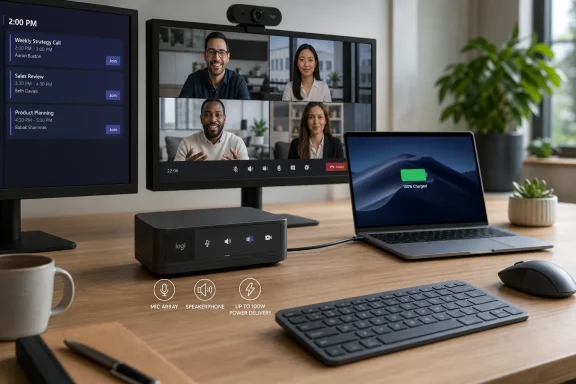
The old docking station was never glamorous. It lived behind a monitor, did its job quietly, and became visible only when something failed. Logitech’s Logi Dock changes that bargain by moving the dock into the center of the workspace and giving it a voice, a speaker, a microphone array, and meeting buttons.That sounds like product-manager convergence, and in some ways it is. The device combines USB-C power delivery up to 100 W, ports for peripherals, HDMI and DisplayPort output, and a built-in speakerphone certified or positioned for major meeting platforms including Microsoft Teams, Zoom, and Google Meet. But the more interesting move is behavioral: Logitech is betting that the dock should not merely connect the laptop to the desk, but also mediate the workday.
For Windows users, that framing matters. The hybrid-work desk is now a peripheral ecosystem: webcam, headset, keyboard, mouse, charger, monitor, phone, and corporate meeting software. The Logi Dock’s pitch is that the desk should behave like a small meeting room, not a collection of adapters.
One Cable Became the Symbol of Hybrid Work
The strongest argument for Logi Dock is not the spec sheet. It is the ritual of arriving at a desk, plugging in one USB-C cable, and having power, displays, audio, and accessories come alive without reconstructing the workspace every morning. That promise is familiar to anyone who has hot-desked, carried a laptop between home and office, or watched a user plug HDMI into the wrong dongle five minutes before a call.Logitech announced the product during the pandemic-era transition from emergency remote work to permanent hybrid work. That timing shaped the device. It was not aimed at gamers chasing bandwidth or workstation users demanding three displays and 10 Gb Ethernet. It was aimed at employees whose workday had collapsed into Teams meetings, browser tabs, Slack messages, and a laptop that needed to charge while everything else stayed connected.
The dock’s single upstream USB-C connection is both the magic and the constraint. When the laptop supports USB-C power delivery and DisplayPort Alt Mode, the experience can feel almost appliance-like. When it does not, the all-in-one dream becomes another compatibility checklist for IT.
That is the quiet truth behind every modern USB-C dock. USB-C is a connector shape, not a guarantee of equal capabilities. For enterprises, the Logi Dock makes the most sense when issued with a known laptop fleet, tested images, managed firmware, and a standard monitor configuration.
The Speakerphone Is the Product’s Real Differentiator
A basic USB-C hub can be bought for a fraction of the Logi Dock’s original $399 price. Even competent multiport docks are common. Logitech’s differentiator is the integrated speakerphone and meeting-control layer, which turns the dock from passive infrastructure into something users touch dozens of times a week.The top controls are part of that argument. Mute, volume, camera, and meeting controls are physical affordances in a work culture that increasingly hides essential functions inside app windows. A dedicated mute button is not a luxury when every day includes back-to-back calls and every meeting app moves controls to a slightly different place.
The audio design also fits Logitech’s larger enterprise story. The company already sells webcams, room systems, headsets, and video bars; Logi Dock extends that logic down to the personal desk. It is the same thesis scaled smaller: if meetings are the center of office work, then audio and video hardware should be managed, certified, and visible to IT.
This is where the device escapes the commodity dock category. A hub with HDMI and USB-A is a port replicator. A hub with a tuned microphone array, speakerphone, and meeting integration is closer to a personal collaboration endpoint.
The Clean Desk Is Also an IT Management Strategy
The consumer version of Logi Dock’s appeal is obvious: fewer cables, a tidier desk, a cleaner background. The business version is more important. Standardizing on one device can reduce the messy support burden created by random hubs, old chargers, underpowered adapters, Bluetooth speakers, and mystery cables purchased by employees during remote-work improvisation.Logitech’s software layer, including Logi Tune for users and Logitech Sync for device management, is central to that enterprise pitch. Hardware that can receive firmware updates, expose status, and integrate with meeting platforms is easier to support than a drawer full of anonymous adapters. It also gives IT a clearer answer when users complain that calls sound bad or monitors fail to wake.
Still, manageability does not erase complexity. A dock that combines power, video, USB, audio, Bluetooth, and meeting controls creates more failure modes than a simple charger. If the device works, it feels elegant. If it fails, users may lose several desk functions at once.
That is the central trade-off of convergence. One box can clean up the desk, but one box can also become the desk’s single point of confusion.
The Spec Sheet Reveals the Target Customer
Logi Dock’s design choices make clear who it is for. It supports up to two displays, up to 100 W laptop charging, multiple USB peripherals, Bluetooth audio switching with compatible Logitech headsets, and mainstream conferencing apps. That is a solid profile for office workers, managers, sales teams, analysts, and home-office professionals.It is less compelling for edge cases. Power users with three monitors, high-refresh displays, dedicated wired networking needs, Thunderbolt storage arrays, or specialized AV workflows will quickly find the limits. The absence of built-in Ethernet on the original Logi Dock is especially notable for some corporate environments, where wired networking remains a reliability and security preference.
The display story also depends heavily on the connected laptop. USB-C Alt Mode and available bandwidth affect what the dock can drive. For Windows administrators, that means the procurement decision should be tied to actual laptop models and monitor standards, not just the dock’s marketing language.
The best use case is therefore not “everyone.” It is a standardized hybrid-work kit: a modern Windows laptop, one or two mainstream monitors, a webcam, keyboard, mouse, and a user who spends enough time in calls for the speakerphone to matter.
Logitech’s Hybrid-Work Bet Outlived the Emergency
The pandemic hardware boom faded, but hybrid work did not disappear. That is why Logi Dock remains interesting even years after its launch. It belongs to a category that tried to make remote-work improvisation permanent, managed, and sellable.Logitech’s broader portfolio shows the same direction. Rally Bar, Tap, Brio cameras, MX input devices, Zone headsets, and Logi Dock all point toward a company that wants to own the meeting experience from the conference room to the spare bedroom. For investors, video collaboration is no longer just a lockdown story; it is part of Logitech’s attempt to defend margins and relevance in a mature peripherals market.
That does not mean one desk dock “drives” Logitech’s share price in any simple sense. Public companies move on earnings, guidance, margins, buybacks, currency, category growth, and investor expectations. Logi Dock is better understood as one piece of a larger strategy: Logitech wants business users to buy ecosystems, not one-off accessories.
The difference matters. A bestseller can help a product line; a coherent portfolio can help a company narrative. Logi Dock’s strategic value is that it makes Logitech look less like a mouse-and-keyboard vendor and more like a workplace infrastructure supplier.
Windows Users Get Convenience, But Not Magic
For Windows users, the Logi Dock’s appeal is practical. Plug in one cable, power the laptop, connect monitors, route audio, and use hardware controls during meetings. In a Windows 10 or Windows 11 environment with supported USB-C capabilities, that can be a genuinely better daily experience.But Windows users also know the rough edges of docks better than anyone. Sleep and wake behavior, monitor detection, firmware versions, USB bandwidth, app permissions, and audio-device defaults can all turn a clean setup into troubleshooting theater. The Logi Dock does not abolish those problems; it packages them behind a more polished industrial design.
That is not a criticism so much as a warning against magical thinking. A premium dock still depends on the laptop’s port capabilities, the operating system’s device handling, meeting-app integration, and corporate policy. The more tightly an organization standardizes, the better the experience is likely to be.
The consumer buyer should be more cautious. If your setup is a single laptop and one monitor, a cheaper dock plus a good headset may be enough. If your workday is dominated by calls and you want a tidier, more appliance-like desk, Logi Dock becomes easier to justify.
The Price Makes Sense Only If the Meeting Layer Matters
At roughly $399 at launch, Logi Dock was never competing with impulse-buy USB-C hubs. It was priced closer to a premium business accessory, and that remains the right lens. Buyers are paying for the combination of dock, speakerphone, meeting controls, industrial design, and software integration.That bundle can be rational for employers. Buying separate docks, chargers, speakerphones, and support time can cost more than it appears, especially when remote workers are left to assemble their own setups. A single approved device also makes onboarding and replacement easier.
For individuals, the value calculation is harsher. A good USB-C dock, a headset, and a charger can be assembled separately, often for less money. The Logi Dock earns its keep only if the integration is worth the premium.
That is why the product is best read as B2B hardware with consumer visibility. It looks attractive on a home desk, but its strongest argument is administrative: standardization, fewer boxes, and a more predictable meeting experience.
The Dock Is a Small Answer to a Bigger Workplace Problem
The deeper issue Logi Dock addresses is not cable clutter. It is the fragmentation of the modern work setup. Every employee is now a small AV installation, a network endpoint, a security surface, and a help-desk ticket waiting to happen.Companies spent years optimizing conference rooms, then suddenly discovered that the most important meeting room was an employee’s desk. That desk might be in an office, a bedroom, a coworking space, or a hotel. The hardware had to become more portable, more personal, and less dependent on local expertise.
Logi Dock is one answer to that shift. It brings some conference-room thinking to the individual workspace: dedicated audio, obvious controls, device management, platform certification, and a cleaner physical footprint. It is not dramatic, but it is aligned with how work actually changed.
There is also a cultural point here. The visible mess of cables became a symbol of hybrid work’s half-finished state. A product like Logi Dock sells the feeling that the new work model can be made orderly, professional, and supportable.
The Share-Price Story Needs More Discipline Than the Product Story
The source article frames Logi Dock as a bestseller that helps drive Logitech International’s shares. That may be directionally plausible as part of a broader portfolio argument, but it should be handled carefully. No single docking station explains the market value of a multinational peripherals company.Logitech’s business spans gaming, pointing devices, keyboards, webcams, headsets, video collaboration gear, and more. Its shares trade on expectations about category demand, operating margins, currency exposure, inventory discipline, capital returns, and the durability of post-pandemic work patterns. Logi Dock belongs in that conversation, but it is not the conversation.
The more defensible claim is that Logi Dock reflects the product strategy investors care about. Logitech is trying to attach more value to the desk, move beyond commodity accessories, and sell into enterprise workflows where software, certification, and manageability matter. That is a better story than “one dock moves the stock.”
For IT buyers, the stock-market framing is mostly noise. The relevant question is whether the product reduces friction for users and support teams. For investors, the question is whether Logitech can turn products like this into repeatable enterprise revenue rather than one-cycle hardware spikes.
The Best Version of Logi Dock Is Boring in Exactly the Right Way
A successful office device should disappear into routine. The user plugs in, joins the meeting, hears clearly, gets heard clearly, charges the laptop, and stops thinking about the hardware. Logi Dock is designed to make that boring outcome more likely.Its industrial design helps. A compact matte block with a prominent control surface is more desk-friendly than the typical tangle of hubs and bricks. The device signals its purpose without looking like a miniature server.
The same design also makes expectations higher. When a product sits visibly on the desk and costs premium money, users expect it to behave less like a generic adapter and more like an appliance. That means firmware, app integration, and compatibility support are not secondary details; they are the product.
This is where Logitech’s scale helps. The company has the distribution, software ecosystem, and enterprise channel relationships to support a device like this better than many accessory vendors. But the category remains unforgiving because every laptop fleet is different.
A Desk-Cleaning Box Cannot Clean Up USB-C Itself
The uncomfortable background to Logi Dock is the ongoing ambiguity of USB-C. The connector promised simplicity, but the market delivered a maze of capabilities: charging wattage, USB speeds, DisplayPort Alt Mode, Thunderbolt, USB4, cable quality, monitor limitations, and host-device support. Consumers see one oval port; IT sees a compatibility matrix.Logi Dock’s requirement for compatible USB-C capabilities is therefore not a footnote. It is the foundation. Without the right host support, the dock cannot deliver the one-cable experience that justifies its existence.
This is especially relevant in mixed Windows fleets. Two laptops can look nearly identical and behave differently depending on port wiring, firmware, GPU routing, and vendor implementation. A dock that works perfectly with one model may disappoint with another.
The lesson is simple but often ignored: test before standardizing. The clean-desk dream should be validated with real laptops, real monitors, real meeting apps, and real users before procurement turns it into policy.
The Desk Hardware That Actually Deserves a Pilot
The Logi Dock is neither a gimmick nor a universal solution. It is a carefully targeted device for organizations and individuals whose daily work is defined by laptop mobility and video meetings. Its success depends less on raw port count than on whether the meeting layer solves a real pain point.For a Windows-heavy organization, the pilot criteria should be concrete. Does it wake displays reliably? Does it charge the fleet’s laptops at full speed? Do Teams or Zoom controls behave consistently? Does audio improve compared with laptop microphones? Does support volume fall when users stop mixing random hubs and chargers?
Those questions are more useful than asking whether the dock is “worth it” in the abstract. Worth is contextual. A $399 device is expensive for a spare bedroom with one monitor and occasional calls; it is cheap if it prevents repeated meeting failures for a high-salary employee or reduces support friction across hundreds of desks.
That is the business-hardware reality Logitech is exploiting. The product does not need to be perfect for everyone. It needs to be predictable for the right fleet.
The Cable Mess Was the Symptom, Not the Disease
The practical read on Logi Dock is straightforward: it is a premium hybrid-work dock that makes the most sense when the speakerphone and meeting controls are central to the purchase, not incidental extras.- Logi Dock combines USB-C docking, up to 100 W laptop charging, display output, peripheral ports, and an integrated speakerphone in one desk device.
- Its strongest fit is a modern USB-C Windows or macOS laptop setup with one or two monitors and frequent video meetings.
- Organizations should test laptop compatibility, monitor behavior, firmware management, and meeting-app controls before standardizing on it.
- Power users who need three displays, built-in Ethernet, Thunderbolt-class expansion, or specialized workstation bandwidth may be better served by a different dock.
- The product matters to Logitech’s enterprise story, but it should not be treated as a standalone explanation for Logitech’s share price.
References
- Primary source: ad-hoc-news.de
Published: 2026-06-27T17:42:07.609098
The Logi Dock from Logitech International - one box cleans up the desk
The Logi Dock turns a tangled USB-C setup into a single, tidy hub with integrated speakerphone and laptop charging up to 100 W. This bestseller drives the price of Logitech International S.A. shares (ISIN CH0025751329).www.ad-hoc-news.de - Related coverage: news.logitech.com
Logitech Introduces All-In-One Dock to Declutter the Desktop and Make Joining Meetings Easy | Logitech
Logi Dock Dramatically Improves the Work-from-Home Experience Today, Logitech (SIX: LOGN) (NASDAQ:LOGI) is simplifying personal workspaces and improving the video meeting experience for remote and hybrid workers with the launch of Logi Dock , an all-in-one docking station with one-touch meeting...news.logitech.com - Related coverage: techradar.com
Logitech’s new dock is designed for a work from home world | TechRadar
Logi Dock eliminates desk clutter while improving your video conferencing experiencewww.techradar.com - Related coverage: notebookcheck.net
Logitech Logi Dock: A US$399 docking station that doubles as a speakerphone - Notebookcheck News
Logitech has unveiled a fancy-looking docking station, and an expensive one at that. The Logi Dock can recharge devices at up to 100 W and has an integrated speakerphone for Google Meet, Microsoft Teams and Zoom calls. www.notebookcheck.net
- Related coverage: ir.logitech.com
Logitech International - Logitech Announces Q4 and Full Fiscal Year 2026 Results
Strong FY 2026 Demonstrates Strategy and Operating Principles Are Delivering SIX Swiss Exchange Ad hoc announcement pursuant to Art. 53 LR — Logitech International (SIX: LOGN) (Nasdaq: LOGI) today announced financial results for the fourth quarter and full Fiscal Year 2026. For Fiscal Year 2026...ir.logitech.com
- Related coverage: logitech.com
Logi Dock Flex | Logitech
Buy Logi Dock Flex. Managed docking station that integrates with Microsoft Teams, Zoom Workspace Reservations, and Logitech Desk Booking Service.www.logitech.com
- Related coverage: windowscentral.com
Logitech announces all-in-one docking station with plethora of ports, the Logi Dock | Windows Central
Logitech announced a new docking station today that features a wide range of ports. It’s also an enterprise-grade speaker that works with Microsoft Teams, Zoom, and Google Meet.www.windowscentral.com - Related coverage: macobserver.com
Logitech's New 'Logi Dock' Combines a Speaker and Dock for Cords
On Wednesday Logitech announced Logi Dock, a product that features one-touch controls for video meetings, a speakerphone, and ports.www.macobserver.com - Related coverage: laptopmag.com
Logitech's new all-in-one dock transforms a docking station into a noise-canceling speaker | Laptop Mag
Logitech introduced a one-of-a-kind docking station that not only cleans up your work from home setup but acts as a noise-canceling speaker that aims to make video conferencing and meetings easier to take control of.www.laptopmag.com - Related coverage: hub.sync.logitech.com
Logi Dock Technical Specifications
This article contains Logi Dock Technical Specificationshub.sync.logitech.com - Related coverage: sec.gov
- Related coverage: resource.logitech.com
- Related coverage: manuals.plus
