

In 2026, the best background noise remover for most online meetings is Krisp, because it works across Zoom, Microsoft Teams, Google Meet, Slack, and other calling apps while filtering both your own microphone audio and noisy incoming voices. That matters because the meeting problem is no longer just a bad microphone; it is the whole acoustic mess of hybrid work. Built-in suppression from Zoom and Teams has improved enough to be useful, and NVIDIA Broadcast remains excellent for users with compatible RTX hardware, but the winner is the tool that follows workers across their actual day.
The office never really came back as a single place. It came back as a rotation: kitchen table, hotel room, shared apartment, airport lounge, coworking booth, car parked outside a school, and occasionally an actual conference room. That has turned noise removal from a convenience feature into a credibility layer.
The strange thing is that most people still treat meeting audio as a hardware problem. Buy a better headset, move closer to the mic, close the window, ask the dog to reconsider its priorities. But the better question in 2026 is not which microphone hears you most clearly; it is which software is smart enough to decide what not to send.
The last decade of video calling normalized bad webcams, awkward pauses, and the soft tyranny of “Can you hear me?” But audio remains the part of remote work that breaks trust fastest. A fuzzy camera can be forgiven. A voice buried under a blender, keyboard, child, espresso grinder, or HVAC drone makes the speaker feel unprepared even when the content is solid.
That is why background noise removal has quietly become one of the most important productivity tools on a Windows laptop. It sits in the same category as password managers and clipboard history: invisible when it works, glaringly obvious when it does not. Nobody praises the meeting where the leaf blower disappeared; they only remember the one where it didn’t.
The market has split into two camps. One camp lives inside conferencing apps: Zoom, Teams, Google Meet, and their built-in suppression models. The other camp lives at the system level, creating a virtual microphone or speaker that works across whatever meeting software your calendar throws at you.
That difference matters more than most comparison tables admit. A feature inside Teams is excellent if your entire workday lives inside Teams. But the modern worker’s calendar is a patchwork of vendor calls, customer demos, Slack huddles, browser-based webinars, and the occasional mystery dialer chosen by procurement in 2019.
That architecture is the reason Krisp feels more durable than the built-in tools. It does not care whether the call is in Zoom, Teams, Meet, Slack, Discord, or a browser-based sales platform with a name only your customer success team recognizes. Once configured, it follows the user rather than the app.
The second advantage is two-way cancellation. Most built-in tools focus on cleaning your outgoing audio. Krisp can also reduce noise coming from other participants, which is a different and underrated problem. The person dialing in from an airport, a trade show floor, or a kitchen full of hard surfaces can derail a meeting just as effectively as your own bad room.
That makes Krisp particularly useful for people who chair meetings, conduct interviews, run client calls, manage distributed teams, or spend large chunks of the day listening rather than presenting. Noise removal is often discussed as an etiquette feature for the speaker. In practice, it is also a fatigue-reduction feature for everyone else.
There is a privacy argument, too. Krisp’s pitch rests on on-device processing for noise cleanup, which is exactly what security-conscious organizations want to hear. In a world where every software vendor now wants to summarize, transcribe, classify, and “enrich” your meetings, keeping core audio cleanup local is not just a technical footnote.
But this is where the value calculation becomes personal. If background noise embarrasses you twice a year, built-in tools are probably fine. If you spend twenty hours a week on calls, the difference between “mostly okay” and “reliably clean” starts to look less like luxury and more like basic work equipment.
The pricing also reveals where the category is going. Noise suppression is no longer being sold as a single-purpose utility. Krisp and its rivals increasingly bundle transcription, summaries, action items, recording, and meeting history into the same product. The noise remover is becoming the front door to the AI meeting assistant.
That creates an interesting tension. Some users only want silence. Vendors want to sell a meeting intelligence platform. The best product in the category may therefore be the one that can keep its core promise simple while letting customers ignore the AI extras if they do not need them.
For streamers, gamers, creators, and power users already sitting behind a desktop with a serious GPU, Broadcast is a gift. It is free with the right hardware, and it also offers camera effects such as background replacement and framing tools. In that environment, it feels less like a meeting utility and more like a miniature production suite.
But that hardware dependency is the whole story. Many of the people who need noise removal most are not on gaming towers or workstation laptops. They are on MacBooks, thin-and-light Windows machines, corporate-issued devices with integrated graphics, or locked-down endpoints where installing GPU-centric software is not realistic.
There is also a philosophical difference. NVIDIA Broadcast is a fantastic enhancement for your machine. Krisp is a more general answer to the modern meeting stack. One assumes you have a powerful local PC and want to polish your outgoing presence; the other assumes your calendar is chaotic and your colleagues may be noisy too.
That does not make Broadcast worse. It makes it more specialized. If your setup matches its requirements, it is one of the best free upgrades you can make to your online presence. If it does not, the recommendation collapses before the first call starts.
Teams gives users straightforward suppression controls, including automatic and stronger modes depending on platform and configuration. Zoom offers a similar range, with settings that can be adjusted depending on whether the user wants light cleanup or more aggressive filtering. Neither product is standing still because both vendors know audio quality is now part of the collaboration experience.
For organizations, built-in suppression has obvious advantages. It is already deployed, already supported, and already inside the security and compliance perimeter that IT understands. There is no extra procurement cycle, no separate training, and no new virtual audio device for users to misconfigure.
The problem is boundaries. Teams suppression helps in Teams. Zoom suppression helps in Zoom. The moment a user jumps into another platform, that protection may disappear or behave differently. For a company standardized on one collaboration suite, that may be acceptable. For anyone whose day spans multiple ecosystems, it is a patchwork.
The built-ins also tend to focus on your microphone rather than the full meeting soundscape. That is fine when the problem is your dishwasher. It is less helpful when the problem is the person on the other end of the call taking a sales meeting from a café.
This is why “best” lists often mislead. They compare checkboxes instead of workflows. The right answer for a Teams-only government department is not the same as the right answer for a consultant who spends the day bouncing between client platforms.
A worker who controls only their own audio can survive with the native suppression in their primary meeting app. A worker who needs predictable audio everywhere should look at a cross-app tool. A creator with an RTX desktop should take advantage of NVIDIA Broadcast. These are different jobs, not minor variations of the same job.
There is also a cost to complexity. Virtual audio devices can confuse users, especially when Windows, Bluetooth headsets, docking stations, and meeting apps all maintain their own device preferences. A noise remover that works beautifully after setup can still cause frustration if the user joins a meeting and discovers the wrong microphone is selected.
That makes onboarding part of the product. Krisp’s advantage is strongest when the setup fades into the background. NVIDIA Broadcast works best when the user already understands PC audio routing. Teams and Zoom win when doing nothing is the correct configuration.
The privacy dimension is becoming more important. A basic noise filter is one thing. A full meeting assistant that records, transcribes, summarizes, stores, and integrates with CRM systems is another. The moment a noise app becomes an AI meeting platform, procurement needs to ask different questions.
Those questions are not exotic. Where is processing done? What is stored? Can administrators control retention? Does the product support single sign-on? Are transcripts enabled by default? Can users accidentally capture sensitive meetings? Does the vendor train models on customer data? These are now ordinary endpoint governance questions.
There is also a support angle. Built-in Teams and Zoom suppression reduces the number of moving parts. A cross-platform virtual microphone adds flexibility but also creates another place for audio to break. In a managed fleet, the best answer may be different for executives, sales teams, recruiters, support staff, and engineers.
This is where the category will likely mature. Noise removal will not remain a purely individual purchase decision. It will become part of the standard collaboration stack, bundled with meeting rooms, headsets, device policies, transcription controls, and AI governance.
NVIDIA’s approach leans into the PC as an AI workstation. Krisp leans into software that can run across ordinary laptops. Microsoft and Zoom lean into meeting platforms that abstract the device away as much as possible. All three strategies make sense, but they imply different futures for the Windows endpoint.
If local AI hardware becomes more common across mainstream laptops, the distinction between special-purpose tools and built-in features may blur. Meeting apps could offload more audio cleanup to NPUs and GPUs. Third-party tools could become more efficient and less battery-hungry. Headset makers could push more intelligence into firmware.
But in 2026, the market is not evenly distributed. Plenty of corporate laptops still lack the AI hardware vendors like to imagine is universal. Plenty of workers still use older machines. Plenty of meetings still happen in browsers. The universal solution has to work on the messy installed base, not just on a keynote-stage PC.
That is another reason cross-app, hardware-agnostic tools remain compelling. The future may belong to tightly integrated local AI. The present still belongs to software that survives whatever laptop, headset, and meeting link the user actually has.
This is where testing matters. Coffee shop noise is different from keyboard clatter. A fan is different from a child talking nearby. Street noise is different from echo. The strongest products are not merely aggressive; they are selective.
Krisp’s strength is that it generally lands on the practical side of that line. NVIDIA Broadcast can be exceptionally clean, especially with steady noises and streamer-style setups. Teams and Zoom are good enough for routine office chaos but can become less graceful when pushed into extreme conditions.
Users should also remember that noise removal is not magic. It cannot turn a terrible microphone into a broadcast studio. It cannot fix every double-talk situation where multiple people speak over each other. It cannot make a reverberant kitchen sound like a treated room in every circumstance. The goal is professional intelligibility, not acoustic perfection.
If your week crosses platforms, Krisp is the most persuasive overall choice. It solves the problem at the level where the problem actually occurs: between your real-world environment and the software stack that changes from meeting to meeting. Its two-way cancellation gives it an additional advantage for people who need to listen to noisy participants, not just protect others from their own noise.
The subscription is the trade-off. For occasional callers, free built-ins are hard to beat. For heavy meeting users, the cost can be justified quickly if it prevents repeated interruptions, improves recordings, reduces fatigue, or makes client calls feel more polished.
There is no moral victory in overbuying. A person with one weekly Zoom call does not need a dedicated noise platform. A sales manager running six calls a day from imperfect spaces probably does. The smart purchase is the one that matches the failure mode.
The office never really came back as a single place. It came back as a rotation: kitchen table, hotel room, shared apartment, airport lounge, coworking booth, car parked outside a school, and occasionally an actual conference room. That has turned noise removal from a convenience feature into a credibility layer.
The strange thing is that most people still treat meeting audio as a hardware problem. Buy a better headset, move closer to the mic, close the window, ask the dog to reconsider its priorities. But the better question in 2026 is not which microphone hears you most clearly; it is which software is smart enough to decide what not to send.
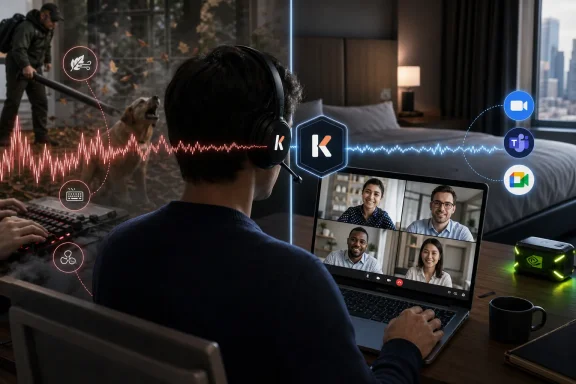 The New Meeting Tax Is Acoustic Chaos
The last decade of video calling normalized bad webcams, awkward pauses, and the soft tyranny of “Can you hear me?” But audio remains the part of remote work that breaks trust fastest. A fuzzy camera can be forgiven. A voice buried under a blender, keyboard, child, espresso grinder, or HVAC drone makes the speaker feel unprepared even when the content is solid.That is why background noise removal has quietly become one of the most important productivity tools on a Windows laptop. It sits in the same category as password managers and clipboard history: invisible when it works, glaringly obvious when it does not. Nobody praises the meeting where the leaf blower disappeared; they only remember the one where it didn’t.
The market has split into two camps. One camp lives inside conferencing apps: Zoom, Teams, Google Meet, and their built-in suppression models. The other camp lives at the system level, creating a virtual microphone or speaker that works across whatever meeting software your calendar throws at you.
That difference matters more than most comparison tables admit. A feature inside Teams is excellent if your entire workday lives inside Teams. But the modern worker’s calendar is a patchwork of vendor calls, customer demos, Slack huddles, browser-based webinars, and the occasional mystery dialer chosen by procurement in 2019.
Krisp Wins Because It Solves the Calendar, Not Just the Microphone
Krisp’s strongest argument is not that it can remove a barking dog, though it can. Its strongest argument is that it behaves like meeting infrastructure rather than a meeting-app feature. Install it, choose the Krisp microphone in your calling app, and it becomes the audio layer between your physical room and the people trying to listen.That architecture is the reason Krisp feels more durable than the built-in tools. It does not care whether the call is in Zoom, Teams, Meet, Slack, Discord, or a browser-based sales platform with a name only your customer success team recognizes. Once configured, it follows the user rather than the app.
The second advantage is two-way cancellation. Most built-in tools focus on cleaning your outgoing audio. Krisp can also reduce noise coming from other participants, which is a different and underrated problem. The person dialing in from an airport, a trade show floor, or a kitchen full of hard surfaces can derail a meeting just as effectively as your own bad room.
That makes Krisp particularly useful for people who chair meetings, conduct interviews, run client calls, manage distributed teams, or spend large chunks of the day listening rather than presenting. Noise removal is often discussed as an etiquette feature for the speaker. In practice, it is also a fatigue-reduction feature for everyone else.
There is a privacy argument, too. Krisp’s pitch rests on on-device processing for noise cleanup, which is exactly what security-conscious organizations want to hear. In a world where every software vendor now wants to summarize, transcribe, classify, and “enrich” your meetings, keeping core audio cleanup local is not just a technical footnote.
The Price of Silence Is Now a Subscription
Krisp’s weakness is equally clear: it costs money after the trial. That should not be glossed over, especially when Teams and Zoom users already have respectable suppression sitting inside apps they may already pay for. For freelancers, students, and casual callers, another monthly subscription may feel like solving an occasional annoyance with a permanent bill.But this is where the value calculation becomes personal. If background noise embarrasses you twice a year, built-in tools are probably fine. If you spend twenty hours a week on calls, the difference between “mostly okay” and “reliably clean” starts to look less like luxury and more like basic work equipment.
The pricing also reveals where the category is going. Noise suppression is no longer being sold as a single-purpose utility. Krisp and its rivals increasingly bundle transcription, summaries, action items, recording, and meeting history into the same product. The noise remover is becoming the front door to the AI meeting assistant.
That creates an interesting tension. Some users only want silence. Vendors want to sell a meeting intelligence platform. The best product in the category may therefore be the one that can keep its core promise simple while letting customers ignore the AI extras if they do not need them.
NVIDIA Broadcast Is Brilliant, but It Lives in a Narrower World
NVIDIA Broadcast remains the most technically impressive option for the right user. If you have a compatible NVIDIA RTX GPU and run Windows, its noise removal can be shockingly aggressive. Mechanical keyboards, PC fans, room echo, and background chatter can vanish in a way that feels closer to studio production than office software.For streamers, gamers, creators, and power users already sitting behind a desktop with a serious GPU, Broadcast is a gift. It is free with the right hardware, and it also offers camera effects such as background replacement and framing tools. In that environment, it feels less like a meeting utility and more like a miniature production suite.
But that hardware dependency is the whole story. Many of the people who need noise removal most are not on gaming towers or workstation laptops. They are on MacBooks, thin-and-light Windows machines, corporate-issued devices with integrated graphics, or locked-down endpoints where installing GPU-centric software is not realistic.
There is also a philosophical difference. NVIDIA Broadcast is a fantastic enhancement for your machine. Krisp is a more general answer to the modern meeting stack. One assumes you have a powerful local PC and want to polish your outgoing presence; the other assumes your calendar is chaotic and your colleagues may be noisy too.
That does not make Broadcast worse. It makes it more specialized. If your setup matches its requirements, it is one of the best free upgrades you can make to your online presence. If it does not, the recommendation collapses before the first call starts.
Teams and Zoom Have Made the Free Option Respectable
The built-in suppression in Microsoft Teams and Zoom deserves more credit than it usually gets. A few years ago, third-party tools could easily embarrass the native options. In 2026, the built-ins are good enough that many users should try them before installing anything else.Teams gives users straightforward suppression controls, including automatic and stronger modes depending on platform and configuration. Zoom offers a similar range, with settings that can be adjusted depending on whether the user wants light cleanup or more aggressive filtering. Neither product is standing still because both vendors know audio quality is now part of the collaboration experience.
For organizations, built-in suppression has obvious advantages. It is already deployed, already supported, and already inside the security and compliance perimeter that IT understands. There is no extra procurement cycle, no separate training, and no new virtual audio device for users to misconfigure.
The problem is boundaries. Teams suppression helps in Teams. Zoom suppression helps in Zoom. The moment a user jumps into another platform, that protection may disappear or behave differently. For a company standardized on one collaboration suite, that may be acceptable. For anyone whose day spans multiple ecosystems, it is a patchwork.
The built-ins also tend to focus on your microphone rather than the full meeting soundscape. That is fine when the problem is your dishwasher. It is less helpful when the problem is the person on the other end of the call taking a sales meeting from a café.
The Best Tool Depends on Whether You Need a Feature or a Layer
The decisive distinction in 2026 is whether noise removal should be an app feature or a system layer. App features are convenient, free, and increasingly competent. System layers are more flexible, more consistent, and better suited to people whose work crosses organizational boundaries.This is why “best” lists often mislead. They compare checkboxes instead of workflows. The right answer for a Teams-only government department is not the same as the right answer for a consultant who spends the day bouncing between client platforms.
A worker who controls only their own audio can survive with the native suppression in their primary meeting app. A worker who needs predictable audio everywhere should look at a cross-app tool. A creator with an RTX desktop should take advantage of NVIDIA Broadcast. These are different jobs, not minor variations of the same job.
There is also a cost to complexity. Virtual audio devices can confuse users, especially when Windows, Bluetooth headsets, docking stations, and meeting apps all maintain their own device preferences. A noise remover that works beautifully after setup can still cause frustration if the user joins a meeting and discovers the wrong microphone is selected.
That makes onboarding part of the product. Krisp’s advantage is strongest when the setup fades into the background. NVIDIA Broadcast works best when the user already understands PC audio routing. Teams and Zoom win when doing nothing is the correct configuration.
IT Departments Should Treat Audio as Endpoint Policy
For sysadmins, noise removal sits in an awkward place. It is not quite security software, not quite productivity software, and not quite hardware support. Yet it touches all three. It affects what leaves the endpoint, how meetings are recorded or transcribed, and whether users can do serious work in imperfect spaces.The privacy dimension is becoming more important. A basic noise filter is one thing. A full meeting assistant that records, transcribes, summarizes, stores, and integrates with CRM systems is another. The moment a noise app becomes an AI meeting platform, procurement needs to ask different questions.
Those questions are not exotic. Where is processing done? What is stored? Can administrators control retention? Does the product support single sign-on? Are transcripts enabled by default? Can users accidentally capture sensitive meetings? Does the vendor train models on customer data? These are now ordinary endpoint governance questions.
There is also a support angle. Built-in Teams and Zoom suppression reduces the number of moving parts. A cross-platform virtual microphone adds flexibility but also creates another place for audio to break. In a managed fleet, the best answer may be different for executives, sales teams, recruiters, support staff, and engineers.
This is where the category will likely mature. Noise removal will not remain a purely individual purchase decision. It will become part of the standard collaboration stack, bundled with meeting rooms, headsets, device policies, transcription controls, and AI governance.
Windows Users Are Caught Between Local AI and Cloud Meetings
Windows is an especially interesting battleground because the platform is moving toward more local AI acceleration while collaboration apps remain deeply cloud-connected. Noise suppression is a perfect example of that tension. The best experience often comes from local processing that quietly improves a cloud meeting.NVIDIA’s approach leans into the PC as an AI workstation. Krisp leans into software that can run across ordinary laptops. Microsoft and Zoom lean into meeting platforms that abstract the device away as much as possible. All three strategies make sense, but they imply different futures for the Windows endpoint.
If local AI hardware becomes more common across mainstream laptops, the distinction between special-purpose tools and built-in features may blur. Meeting apps could offload more audio cleanup to NPUs and GPUs. Third-party tools could become more efficient and less battery-hungry. Headset makers could push more intelligence into firmware.
But in 2026, the market is not evenly distributed. Plenty of corporate laptops still lack the AI hardware vendors like to imagine is universal. Plenty of workers still use older machines. Plenty of meetings still happen in browsers. The universal solution has to work on the messy installed base, not just on a keynote-stage PC.
That is another reason cross-app, hardware-agnostic tools remain compelling. The future may belong to tightly integrated local AI. The present still belongs to software that survives whatever laptop, headset, and meeting link the user actually has.
The Quietest Setup Is the One You Forget Is Running
The best background noise remover is not the one that produces the most dramatic demo. It is the one that leaves your voice sounding normal while making the rest of the room less interesting. Over-processing can be as distracting as noise itself. A voice that warbles, clips, or goes metallic tells the meeting that software is fighting the room.This is where testing matters. Coffee shop noise is different from keyboard clatter. A fan is different from a child talking nearby. Street noise is different from echo. The strongest products are not merely aggressive; they are selective.
Krisp’s strength is that it generally lands on the practical side of that line. NVIDIA Broadcast can be exceptionally clean, especially with steady noises and streamer-style setups. Teams and Zoom are good enough for routine office chaos but can become less graceful when pushed into extreme conditions.
Users should also remember that noise removal is not magic. It cannot turn a terrible microphone into a broadcast studio. It cannot fix every double-talk situation where multiple people speak over each other. It cannot make a reverberant kitchen sound like a treated room in every circumstance. The goal is professional intelligibility, not acoustic perfection.
The Buying Advice Hides in Your Calendar
The simplest recommendation is also the most accurate: look at your calendar before you look at the feature table. If nearly every meeting happens in Teams, start with Teams. If nearly every meeting happens in Zoom, start with Zoom. If you have a compatible RTX Windows machine and care about streaming or creation, install NVIDIA Broadcast and enjoy the free win.If your week crosses platforms, Krisp is the most persuasive overall choice. It solves the problem at the level where the problem actually occurs: between your real-world environment and the software stack that changes from meeting to meeting. Its two-way cancellation gives it an additional advantage for people who need to listen to noisy participants, not just protect others from their own noise.
The subscription is the trade-off. For occasional callers, free built-ins are hard to beat. For heavy meeting users, the cost can be justified quickly if it prevents repeated interruptions, improves recordings, reduces fatigue, or makes client calls feel more polished.
There is no moral victory in overbuying. A person with one weekly Zoom call does not need a dedicated noise platform. A sales manager running six calls a day from imperfect spaces probably does. The smart purchase is the one that matches the failure mode.
The Leaf Blower Test Still Decides the Winner
The useful way to rank these tools is not by how many settings they expose, but by how confidently they handle the rude surprises of real work.- Krisp is the best overall choice for people who move among multiple meeting apps and want both outgoing and incoming noise cancellation.
- NVIDIA Broadcast is the best free option for Windows users who already have a compatible NVIDIA RTX GPU and want strong local audio and video enhancements.
- Microsoft Teams noise suppression is the sensible default for Teams-centered organizations that want fewer moving parts and no extra software.
- Zoom’s built-in suppression is a strong enough first stop for Zoom-heavy workflows, especially for routine keyboard, fan, and room noise.
- The deciding factor is not raw suppression alone, but whether the tool follows the user across the full workday.
References
- Primary source: ilounge.com
Published: 2026-06-07T09:42:07.590108
The Best Background Noise Remover Apps for Online Meetings in 2026 | iLounge
You know the moment. You're three minutes into a client call, finally hitting your stride, and somewhere behind you a leaf blower fires up. Or the dog ...www.ilounge.com - Official source: support.microsoft.com
Zmniejszanie szumu w tle podczas spotkań w usłudze Microsoft Teams | Microsoft Support
Gdy mikrofon jest włączony podczas spotkania lub połączenia w aplikacji Teams, hałas w tle wokół Ciebie może rozpraszać innych. Aplikacja Teams oferuje trzy poziomy redukcji hałasu, aby ułatwić skoncentrowanie się na uczestnikach spotkania.support.microsoft.com - Official source: learn.microsoft.com
Why is there no low noise suppression option in new teams? - Microsoft Q&A
The new teams has no low noise suppression and I have to switch between high fidelity music and noise suppression between music and speaking. With low noise suppression, the music wont play and with high fidelity music, the mic wont work. Its a pain to…learn.microsoft.com - Related coverage: windowscentral.com
How to enable noise suppression for meetings on Microsoft Teams | Windows Central
Background noise can quickly ruin an online meeting. This guide will show you the steps to enable or disable background noise suppression for meetings and calls on Microsoft Teams.www.windowscentral.com - Related coverage: allthings.how
How to Change Background Noise Suppression Settings in Zoom
Zoom has released an update that is full of new features that are sure to enhance your video conferencing experience. You can now add filters to your video, adjust and enhance the video for low-light, share presentations as virtual background, to name a few. One such addition to Zoom is the...allthings.how - Related coverage: zapier.com
How to suppress background noise on Zoom | Zapier
Zoom background noise is the new loud chewing. Here's how to cancel background noise on Zoom—and it actually works.zapier.com
