

Microsoft’s new in‑house image model landed with a splash: MAI‑Image‑1 is already available inside Bing Image Creator and Copilot, it placed among the top models on public leaderboards, and early testers are finding the results fast, photoreal and surprisingly polished for a first release.
Microsoft has publicly rolled out MAI‑Image‑1, its first fully in‑house text‑to‑image model, and integrated it into consumer surfaces including Bing Image Creator and the Copilot image flows. The announcement frames MAI‑Image‑1 as a product‑focused model tuned for photorealism, lighting fidelity and fast iteration, rather than an open research foundation model. Early benchmarking activity and company messaging show Microsoft positioning MAI‑Image‑1 as an option alongside established engines such as DALL·E 3 and other providers on Bing’s model menu. Public comparison platforms (notably LMArena’s community leaderboard) placed MAI‑Image‑1 inside the top ten at launch, an encouraging sign in a crowded landscape that includes Google, OpenAI and multiple open‑source entrants. That placement reflects crowd voting and pairwise comparisons rather than a single technical metric, so it’s a human‑facing signal of quality rather than a specification sheet. Microsoft’s public statements emphasize three practical goals for the model:
Source: Tom's Guide https://www.tomsguide.com/ai/micros...-banana-here-are-5-prompts-i-used-to-test-it/
 Background / Overview
Microsoft has publicly rolled out MAI‑Image‑1, its first fully in‑house text‑to‑image model, and integrated it into consumer surfaces including Bing Image Creator and the Copilot image flows. The announcement frames MAI‑Image‑1 as a product‑focused model tuned for photorealism, lighting fidelity and fast iteration, rather than an open research foundation model. Early benchmarking activity and company messaging show Microsoft positioning MAI‑Image‑1 as an option alongside established engines such as DALL·E 3 and other providers on Bing’s model menu. Public comparison platforms (notably LMArena’s community leaderboard) placed MAI‑Image‑1 inside the top ten at launch, an encouraging sign in a crowded landscape that includes Google, OpenAI and multiple open‑source entrants. That placement reflects crowd voting and pairwise comparisons rather than a single technical metric, so it’s a human‑facing signal of quality rather than a specification sheet. Microsoft’s public statements emphasize three practical goals for the model:- Photorealism — better handling of lighting, reflections and environmental nuance.
- Speed + quality — fast inference so designers can iterate rapidly.
- Product fit — training and evaluation tuned to real creative workflows and feedback from professional creatives.
What MAI‑Image‑1 is (and what it isn’t)
A productized generator, not an academic release
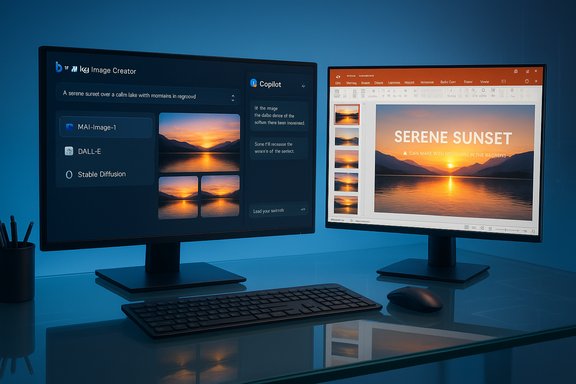
MAI‑Image‑1 is presented as a product model for Microsoft’s ecosystem: integrated into Bing Image Creator and Copilot so end users can generate imagery without separate APIs or installs. That product emphasis means Microsoft is prioritizing workflow integration (insert directly into PowerPoint/Designer, iterative chat edits via Copilot) and user experience over immediately publishing deep research artifacts like parameter counts or a fully detailed model card. Early reporting confirms the model is selectable inside Bing’s model menu, where users can choose between MAI‑Image‑1 and existing models.Not everything is disclosed yet
At the time of writing, Microsoft has not published a comprehensive model card detailing dataset composition, parameter counts, or a full set of training safety results in a single public document. Independent observers and product teams have called for model cards and third‑party audits before recommending MAI‑Image‑1 for unsupervised production use—especially in commercial contexts that require IP clarity and provable safety guarantees. Treat the current launch as a functional preview and a product test rather than a fully documented enterprise release.How to try MAI‑Image‑1 today
- Sign in with a Microsoft account (no paid subscription required to generate images at baseline).
- Open bing.com/images/create or use the Image Creator tab inside Copilot / Designer and select MAI‑Image‑1 from the model/options menu (Bing still exposes DALL·E 3 and GPT‑4o image options as alternatives).
- Type a natural‑language prompt, hit Create and wait a few seconds for 3–4 variations.
- Pick a favorite, iterate with follow‑up edits in Copilot, or export the image into design tools like Photoshop, Figma or PowerPoint.
- Bing’s interface may present multiple models; verify you’ve selected MAI‑Image‑1 if you want to compare model outputs directly.
- Some Microsoft surfaces use a “boosts” or priority generation token model for faster throughput for heavier users; free users typically have a daily allotment for interactive use.
Real‑world integration: Copilot, Designer and PowerPoint
Microsoft’s strategic advantage is product integration. MAI‑Image‑1 is designed to live inside the tools people already use for content creation:- Copilot: conversational edits — generate an image and ask Copilot to “make the sky warmer” or “crop to 16:9 for a slide” without leaving the chat. This lowers friction for non‑designers who need quick iterations.
- Designer / PowerPoint: generate concept visuals in context and push them directly into slides or design templates for immediate use. That workflow is compelling for marketing teams and people building decks on tight schedules.
- Bing Image Creator: the web and mobile entry point for ad‑hoc generation where users can choose their preferred model and export images.
Benchmarks and early evaluations
MAI‑Image‑1’s early public ranking on LMArena indicates strong subjective preferences in blind pairwise comparisons, which is meaningful because LMArena’s methodology uses human voters to judge relative image quality. However, readers should understand the limits:- LMArena results measure perceived output quality in A/B comparisons; they don’t give objective numbers for latency, memorization risk, dataset overlap or bias rates.
- Vendor claims about “faster than larger, slower models” are plausible at product scale (engineering choices can yield lower latency) but require independent measurement under standardized loads to be confirmed.
Five prompts to test MAI‑Image‑1 (copy + paste)
Tom’s Guide suggested five practical prompts for getting started. Use these as starting points, tweak camera/lighting/lens keywords and iterate until you get a variant you like.- Prompt 1 — Structures
- “Create a photorealistic image of a futuristic city skyline at sunset, with reflective glass buildings and flying electric vehicles, in a cinematic wide‑angle style.”
- Prompt 2 — Culinary creations
- “Generate a close‑up of a gourmet vegan dish plated on a sleek black ceramic plate, soft natural side light, minimal background, high resolution.”
- Prompt 3 — Marketing hero
- “Create a high‑contrast marketing hero image for a tech startup: diverse team of four brainstorming around a holographic display, ambient neon lighting, ultra‑wide lens.”
- Prompt 4 — Animals and nature
- “Illustrate a serene wildlife scene: a red fox crossing a misty forest clearing at dawn, warm golden‑hour lighting, ultra‑detailed fur textures, shallow depth of field.”
- Prompt 5 — Storyboarding
- “Create a visual storyboard: three panels showing the evolution of editing workflow from paper notebooks → laptop screen → holographic AI assistant, seamless transition, clean corporate style.”
Strengths observed so far
- Photoreal lighting and reflections: multiple early reviewers highlight MAI‑Image‑1’s handling of bounce light and realistic specular highlights, which improves believability in food, interior and landscape shots. This was a consistent theme in company messaging and press coverage.
- Speed: Microsoft emphasizes lower latency for interactive workflows. Fast iteration is a real UX advantage for designers who want to generate several variants quickly. Independent reports and Microsoft product notes both reference speed as a prioritised goal.
- Integration: shipping the model inside Copilot, Designer and Bing reduces friction for users who already work in the Microsoft ecosystem — that’s a clear product win versus standalone competitors.
- Good out‑of‑the‑box fidelity for common creative tasks: landscapes, food photography, and simple concept art appear strong in early samples, making MAI‑Image‑1 useful for ideation and quick social or presentation assets.
Risks, limitations and governance concerns
No model is risk‑free. Several issues deserve attention before relying on MAI‑Image‑1 for commercial or sensitive uses.Dataset provenance and copyright
Microsoft’s public materials emphasize rigorous data selection, but the company has not (yet) published a detailed dataset manifest or model card that independently documents sources and licensing terms. For organizations that need indemnities and clear licensing for commercial publishing, that gap is material and should be resolved before full production adoption. Until then, treat outputs as useful for ideation and prototyping rather than as guaranteed commercial assets.Memorization and hallucination risks
Like all generative models, image models can reproduce copyrighted material or replicate identifiable public figures and logos. Microsoft has product‑level mitigations (content policies and watermarking) but buyers should preserve prompt/output histories and request provenance metadata or C2PA‑style content credentials when relying on generated assets in revenue‑sensitive contexts.Safety and bias
Visual models can unintentionally embed stereotypes, fail to represent certain demographics accurately, or produce artifacts in faces and hands. Independent, third‑party audits that evaluate bias, identity‑safety and failure modes will be essential for enterprise risk assessments; those audits are not yet widely available for MAI‑Image‑1.Model switching behavior and user expectations
Bing’s multi‑model environment means the UI sometimes exposes several engines. That’s convenient, but it also creates the possibility of unintended model switching during generation experiments — causing inconsistent results if you’re not explicitly choosing MAI‑Image‑1 each time. Verify the selected model in the UI when comparing outputs.Practical recommendations for teams and creators
- Pilot, don’t deploy: Use MAI‑Image‑1 for ideation, mood boards and internal assets first. Reserve revenue‑critical deliverables for models with explicit licensing/backing unless Microsoft publishes enterprise assurances.
- Archive prompts and metadata: Record the exact prompt, UI model selection and the exported image’s metadata for provenance. This step is crucial for audit trails and dispute resolution.
- Ask for documentation: Procurement and legal teams should request model cards, data provenance and indemnity language from Microsoft before green‑lighting commercial use in client work.
- Iterate with Copilot: Use the conversational edit loop in Copilot to refine images rather than re‑prompting from scratch — it’s faster and keeps the creative context in one place.
How MAI‑Image‑1 compares to other engines (early view)
- Versus DALL·E 3 / GPT‑4o: DALL·E 3 remains a high‑barrier engine for complex prompts and inpainting; MAI‑Image‑1’s advantage is product integration and reportedly faster iteration for many scenes. Bing exposes both, so practitioners can A/B test directly.
- Versus Google’s Nano Banana / Imagen: public reports suggest MAI‑Image‑1 competes near the top of crowd‑voted leaderboards, but ranking lists emphasize aesthetics (human preference) over forensic measures of training provenance or IP risk. Expect a mix of strengths—no single engine will dominate every creative task.
- Versus specialized tools (Adobe Firefly, Leonardo.ai, etc.: Microsoft’s product integration is its differentiator; Adobe’s Firefly focuses on commercial licensing clarity and content credentials, while other platforms offer advanced style controls or API access. Choose the model that fits your governance and creative requirements.
What to watch next (critical signals)
- Publication of a formal model card with architecture, parameter counts and dataset provenance.
- Independent benchmarks showing latency (time‑to‑preview) and artifact/failure rates across standardized prompts.
- Formal availability of content credentials or invisible watermarking metadata for exported images to prove provenance.
- Third‑party safety and bias audits that measure identity replication, memorization and demographic fairness.
- Microsoft’s enterprise licensing terms clarifying commercial reuse, indemnity and model training guarantees.
Conclusion
MAI‑Image‑1 is an important milestone for Microsoft’s AI strategy: a first end‑to‑end, in‑house image model that reaches users directly through Bing Image Creator and Copilot. Early reactions are positive — reviewers and public voting platforms rank the model competitively for photoreal output and iteration speed — and Microsoft’s product integrations make the model immediately useful for rapid ideation and slide‑ready visuals. That said, the launch is a preview in governance terms. Key pieces required for production confidence—comprehensive model cards, full dataset provenance, third‑party audits and explicit commercial licensing assurances—are not yet fully public. For creators and IT teams, the sensible path is to pilot MAI‑Image‑1 inside controlled workflows, archive prompts and metadata, and demand the transparency needed to move any model into revenue‑bearing use. For Windows users and designers, MAI‑Image‑1 is a tool worth adding to the creative toolkit today: fast, integrated and often impressive. For legal, procurement and compliance leads, it’s a capability worth vetting carefully before it becomes a system of record. The next weeks and months will determine whether MAI‑Image‑1 becomes a trusted workhorse or an attractive preview that still needs governance to match its technical polish.Source: Tom's Guide https://www.tomsguide.com/ai/micros...-banana-here-are-5-prompts-i-used-to-test-it/
