

ZDNET’s Jack Wallen showed this week that Zorin OS 18.1 can be made to resemble Windows 11 using the free Core edition by changing its panel layout, taskbar geometry, icon placement, GNOME extensions, and wallpaper. The trick is not that Linux has suddenly learned to impersonate Windows; Linux desktops have been doing that for decades. The more interesting story is that a Windows-like interface has become one of the strongest arguments for leaving Windows. Familiarity, once Microsoft’s moat, is now something competitors can clone for free.
For years, the desktop Linux pitch has carried a faint moral demand: switch not merely because it works, but because it is more open, more private, more controllable, more philosophically correct. Those are real advantages, especially for technically literate users. They are also not the first thing most people care about when the Start menu is muscle memory and the taskbar is where their day begins.
That is why Wallen’s walkthrough lands harder than a cosmetic tutorial might suggest. Zorin OS does not ask a Windows user to love GNOME on GNOME’s terms. It says, in effect: keep the desktop map in your head, then change the operating system underneath it.
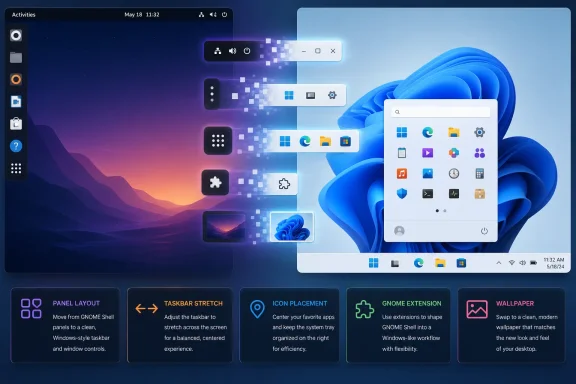
The free version of Zorin OS ships with several layouts, while the paid Pro edition includes additional designs, including a Windows 11-style layout. Wallen’s point is that users do not have to pay for that particular comfort. With a few panel adjustments, a squared-off taskbar, centered elements, and a suitably Windows-like wallpaper, the free edition can get close enough.
Close enough matters. Most users are not conducting a forensic comparison of Fluent Design assets. They want to know where the app launcher lives, how windows behave, whether the system tray makes sense, and whether the machine feels alien in the first ten minutes.
That matters because the hardest part of switching operating systems is often not the kernel, package manager, or init system. It is the accumulated choreography of small habits: pinning apps, opening settings, glancing at notifications, minimizing windows, searching for files, and trusting that the machine will not punish you for doing normal things.
Zorin’s bet is that you can remove a great deal of friction by making Linux look less like a new country. The system still has Linux underneath: repositories, Flatpak and Snap availability, GNOME Shell extensions, Wine-adjacent Windows app support, and the usual Ubuntu lineage. But the user’s first encounter is not a terminal prompt or a manifesto. It is a desktop that looks like somewhere they have already been.
This is not a concession to ignorance. It is product design.
None of this changes what Zorin OS is. It does not make Linux run Microsoft Office natively, solve every hardware edge case, or guarantee that every proprietary Windows workflow survives the move. It simply lowers the visual shock.
But visual shock is not trivial. Microsoft learned that lesson every time it moved the Start button, changed Control Panel, hid settings in a new app, or redesigned the taskbar. Windows users complain about interface change not because they are incapable of learning, but because the operating system is work infrastructure. People resent being retrained without a clear benefit.
Zorin’s free customization flips that dynamic. It says the retraining cost is optional. You can learn Linux gradually, from a desktop that resembles Windows 11 closely enough to keep you productive.
That model will divide readers. On one hand, open-source users are rightly sensitive to any sense that convenience is being paywalled. On the other hand, Zorin is not charging for the Linux kernel, Ubuntu packages, or the right to use the operating system. It is charging for integration, curation, and a reduced setup burden.
That is a defensible business model, especially in a desktop Linux ecosystem where users often expect professional-grade polish without wanting anyone to fund it. The real question is whether the paid tier creates confusion for new users. If someone hears that the Windows 11 layout requires Pro, they may assume the free edition cannot be made familiar. Wallen’s article usefully punctures that assumption.
The deeper lesson is that Zorin Pro is a shortcut, not a gate. For some users, especially those helping relatives or deploying a few machines in a small office, the shortcut may be worth the money. For tinkerers, students, and cautious switchers, the free path is good enough to prove the concept.
The Windows 10 end-of-support deadline sharpened that tension. Millions of PCs that run Windows 10 acceptably do not meet Windows 11’s official requirements, especially around TPM, CPU generation, and platform security baselines. Some users will buy new hardware. Some will pay for extended support where available. Some will bypass checks. Others will ask whether the operating system itself is the problem.
Linux distributions such as Zorin OS, Linux Mint, Ubuntu, Fedora, and others are competing for that last group. They do not need to convert every Windows user. They only need to be plausible for the user who mostly lives in a browser, uses webmail, edits documents, watches video, manages photos, and occasionally installs a desktop app.
For that user, the Windows-shaped Linux desktop is not cosplay. It is an exit ramp.
That distinction matters because disappointment usually comes from mismatched expectations. If a user installs Zorin expecting a free Windows clone, they may bounce off the first incompatible app. If they install it expecting a Windows-like Linux desktop that handles mainstream computing well while requiring adaptation in some workflows, the experience is much more likely to succeed.
The same is true for IT professionals. A Windows-like layout can reduce helpdesk friction, but it does not make Zorin a drop-in enterprise Windows replacement. Group Policy, Intune, Active Directory integration, endpoint management, application packaging, compliance tooling, and vendor support all matter. Linux can participate in many enterprise environments, but not by pretending those differences do not exist.
Zorin’s strength is not that it erases the gap. It makes the first step across it less intimidating.
The cost is that extensions sit between user expectation and desktop churn. GNOME changes can break extensions. Distribution maintainers can pin versions or patch behavior. Extension authors can lose interest. For enthusiasts, that is part of the ecosystem’s texture. For ordinary users, it can feel like the desktop is made of clever parts that may not all age at the same rate.
Zorin reduces some of this risk by shipping a curated desktop experience rather than asking users to assemble one from scratch. But the moment a user starts adding extensions to reproduce every last Windows 11 nicety, they are taking on a maintenance surface. That is not a reason to avoid customization. It is a reason to keep the goal modest.
The best Windows-like Linux setup is not the one that copies every pixel. It is the one that copies enough habits while staying stable.
This has always been true to an extent. Windows borrowed from earlier graphical environments, Linux desktops borrowed from Windows and macOS, and macOS borrowed from ideas that predated it. Interface design is an evolutionary commons with corporate branding layered on top.
But Windows 11’s centered taskbar, rounded visuals, simplified launcher, and widget-adjacent glanceable information have become recognizable enough that a Linux desktop can invoke them with a few settings and a wallpaper. That is a compliment to Microsoft’s visual coherence, but it is also a strategic leak. Once the interface pattern is familiar, the operating system underneath becomes more substitutable.
Microsoft still has enormous advantages: application compatibility, OEM distribution, enterprise management, gaming support, commercial software gravity, and user inertia. But inertia weakens when the alternative looks less like a leap.
If your work happens in Chrome, Edge, Firefox, Slack, Teams, Google Docs, Microsoft 365 on the web, Notion, Trello, Figma, GitHub, or a web-based line-of-business application, the desktop OS becomes less central. It still matters for hardware, security, notifications, file handling, printing, and device management. But it is no longer the universe.
That is why Zorin’s Windows-like face is so potent. It does not need to beat Windows feature for feature. It needs to be a comfortable launcher for the modern computing stack. If the browser is the real platform, the operating system that feels familiar and stays out of the way has a fighting chance.
This is also why Microsoft keeps pulling Windows toward services. The company understands that the value has moved upward into identity, cloud storage, productivity subscriptions, AI features, and management platforms. A Linux desktop that looks like Windows threatens the local shell; Microsoft’s strongest defenses increasingly live beyond it.
That kind of testing sounds dull because it is exactly where operating systems succeed or fail. Desktop wars are won in the mundane. The first boot sells the dream; the third day reveals the truth.
For technically inclined users, Zorin is also a useful reminder that Linux no longer has to announce itself loudly. You can run a polished Ubuntu-based system, use mainstream app formats, keep a conservative support base, and present a desktop that would not alarm a Windows user at first glance. That is not betrayal of Linux identity. It is Linux growing up as a consumer product.
The most interesting Zorin machines may not be the ones covered in elaborate themes and widgets. They may be the ones where the user forgets, for long stretches, that they switched.
 Linux Wins When It Stops Asking Users to Admire the Difference
For years, the desktop Linux pitch has carried a faint moral demand: switch not merely because it works, but because it is more open, more private, more controllable, more philosophically correct. Those are real advantages, especially for technically literate users. They are also not the first thing most people care about when the Start menu is muscle memory and the taskbar is where their day begins.That is why Wallen’s walkthrough lands harder than a cosmetic tutorial might suggest. Zorin OS does not ask a Windows user to love GNOME on GNOME’s terms. It says, in effect: keep the desktop map in your head, then change the operating system underneath it.
The free version of Zorin OS ships with several layouts, while the paid Pro edition includes additional designs, including a Windows 11-style layout. Wallen’s point is that users do not have to pay for that particular comfort. With a few panel adjustments, a squared-off taskbar, centered elements, and a suitably Windows-like wallpaper, the free edition can get close enough.
Close enough matters. Most users are not conducting a forensic comparison of Fluent Design assets. They want to know where the app launcher lives, how windows behave, whether the system tray makes sense, and whether the machine feels alien in the first ten minutes.
Zorin Understands That Migration Is an Interface Problem First
Zorin OS has long positioned itself as a refuge for Windows users who are curious about Linux but not eager to become Linux hobbyists. It is based on Ubuntu, uses a customized GNOME desktop in its main editions, and wraps the whole experience in a layout switcher that makes the desktop feel less doctrinaire than stock GNOME.That matters because the hardest part of switching operating systems is often not the kernel, package manager, or init system. It is the accumulated choreography of small habits: pinning apps, opening settings, glancing at notifications, minimizing windows, searching for files, and trusting that the machine will not punish you for doing normal things.
Zorin’s bet is that you can remove a great deal of friction by making Linux look less like a new country. The system still has Linux underneath: repositories, Flatpak and Snap availability, GNOME Shell extensions, Wine-adjacent Windows app support, and the usual Ubuntu lineage. But the user’s first encounter is not a terminal prompt or a manifesto. It is a desktop that looks like somewhere they have already been.
This is not a concession to ignorance. It is product design.
The Free Tweak Is a Small Hack With a Larger Message
Wallen’s method is straightforward. Start with one of the free Zorin layouts, open Zorin Appearance, pick the layout with a bottom panel, then adjust the taskbar so it stretches across the screen and places key elements in the center. Square the corners, move the application launcher and taskbar items, optionally add a weather extension, and finish with a Windows 11-like wallpaper.None of this changes what Zorin OS is. It does not make Linux run Microsoft Office natively, solve every hardware edge case, or guarantee that every proprietary Windows workflow survives the move. It simply lowers the visual shock.
But visual shock is not trivial. Microsoft learned that lesson every time it moved the Start button, changed Control Panel, hid settings in a new app, or redesigned the taskbar. Windows users complain about interface change not because they are incapable of learning, but because the operating system is work infrastructure. People resent being retrained without a clear benefit.
Zorin’s free customization flips that dynamic. It says the retraining cost is optional. You can learn Linux gradually, from a desktop that resembles Windows 11 closely enough to keep you productive.
The Pro Edition Sells Convenience, Not Freedom
The awkward wrinkle is Zorin OS Pro. Zorin charges for its Pro edition, which includes additional desktop layouts, bundled creative apps, and premium presentation polish. Wallen notes that the Windows 11-style layout is available there out of the box, while also pointing out that Pro licenses are tied to major versions.That model will divide readers. On one hand, open-source users are rightly sensitive to any sense that convenience is being paywalled. On the other hand, Zorin is not charging for the Linux kernel, Ubuntu packages, or the right to use the operating system. It is charging for integration, curation, and a reduced setup burden.
That is a defensible business model, especially in a desktop Linux ecosystem where users often expect professional-grade polish without wanting anyone to fund it. The real question is whether the paid tier creates confusion for new users. If someone hears that the Windows 11 layout requires Pro, they may assume the free edition cannot be made familiar. Wallen’s article usefully punctures that assumption.
The deeper lesson is that Zorin Pro is a shortcut, not a gate. For some users, especially those helping relatives or deploying a few machines in a small office, the shortcut may be worth the money. For tinkerers, students, and cautious switchers, the free path is good enough to prove the concept.
Windows 11 Created the Opening Zorin Is Walking Through
Zorin’s Windows mimicry would be less compelling if Windows 11 were universally loved. It is not. Microsoft’s current desktop is more secure and more modern than Windows 10 in several important respects, but it has also been defined by hardware requirements, account nudges, advertising experiments, Copilot integration, and a sometimes uneasy balance between user control and Microsoft’s cloud ambitions.The Windows 10 end-of-support deadline sharpened that tension. Millions of PCs that run Windows 10 acceptably do not meet Windows 11’s official requirements, especially around TPM, CPU generation, and platform security baselines. Some users will buy new hardware. Some will pay for extended support where available. Some will bypass checks. Others will ask whether the operating system itself is the problem.
Linux distributions such as Zorin OS, Linux Mint, Ubuntu, Fedora, and others are competing for that last group. They do not need to convert every Windows user. They only need to be plausible for the user who mostly lives in a browser, uses webmail, edits documents, watches video, manages photos, and occasionally installs a desktop app.
For that user, the Windows-shaped Linux desktop is not cosplay. It is an exit ramp.
Familiar Does Not Mean Identical
There is a danger in overselling these transformations. Zorin can look like Windows 11, but it is not Windows 11. The settings app is different. The file manager is different. Driver behavior can be different. Gaming is much better than it used to be, thanks largely to Proton and the work around Steam, but anti-cheat systems and launchers can still complicate things. Microsoft 365 desktop apps remain a major sticking point for users who depend on the native Windows versions.That distinction matters because disappointment usually comes from mismatched expectations. If a user installs Zorin expecting a free Windows clone, they may bounce off the first incompatible app. If they install it expecting a Windows-like Linux desktop that handles mainstream computing well while requiring adaptation in some workflows, the experience is much more likely to succeed.
The same is true for IT professionals. A Windows-like layout can reduce helpdesk friction, but it does not make Zorin a drop-in enterprise Windows replacement. Group Policy, Intune, Active Directory integration, endpoint management, application packaging, compliance tooling, and vendor support all matter. Linux can participate in many enterprise environments, but not by pretending those differences do not exist.
Zorin’s strength is not that it erases the gap. It makes the first step across it less intimidating.
GNOME Extensions Are Powerful, but They Are Also a Maintenance Bet
Wallen’s optional weather-panel step highlights one of desktop Linux’s great strengths and one of its recurring vulnerabilities. GNOME extensions let users reshape the shell in ways that would be impossible or unsupported on many commercial desktops. Want a panel widget, different dock behavior, alternate tiling, or a tweaked app launcher? There is often an extension for that.The cost is that extensions sit between user expectation and desktop churn. GNOME changes can break extensions. Distribution maintainers can pin versions or patch behavior. Extension authors can lose interest. For enthusiasts, that is part of the ecosystem’s texture. For ordinary users, it can feel like the desktop is made of clever parts that may not all age at the same rate.
Zorin reduces some of this risk by shipping a curated desktop experience rather than asking users to assemble one from scratch. But the moment a user starts adding extensions to reproduce every last Windows 11 nicety, they are taking on a maintenance surface. That is not a reason to avoid customization. It is a reason to keep the goal modest.
The best Windows-like Linux setup is not the one that copies every pixel. It is the one that copies enough habits while staying stable.
Microsoft’s Design Language Has Become Public Infrastructure
There is a strange irony in watching Linux distributions borrow the Windows 11 layout. Microsoft invests enormous resources into design systems, onboarding flows, icons, and shell behavior. Then an open-source desktop can reproduce the broad strokes without needing permission because the general grammar of a desktop is not proprietary in the way an application binary or service backend is.This has always been true to an extent. Windows borrowed from earlier graphical environments, Linux desktops borrowed from Windows and macOS, and macOS borrowed from ideas that predated it. Interface design is an evolutionary commons with corporate branding layered on top.
But Windows 11’s centered taskbar, rounded visuals, simplified launcher, and widget-adjacent glanceable information have become recognizable enough that a Linux desktop can invoke them with a few settings and a wallpaper. That is a compliment to Microsoft’s visual coherence, but it is also a strategic leak. Once the interface pattern is familiar, the operating system underneath becomes more substitutable.
Microsoft still has enormous advantages: application compatibility, OEM distribution, enterprise management, gaming support, commercial software gravity, and user inertia. But inertia weakens when the alternative looks less like a leap.
The Real Competition Is Not Windows 11, but the Browser
The Zorin-versus-Windows framing can obscure a more important shift. Many users are not choosing between operating systems in the old sense. They are choosing between shells for the browser, a password manager, a few local files, and a handful of specialized apps.If your work happens in Chrome, Edge, Firefox, Slack, Teams, Google Docs, Microsoft 365 on the web, Notion, Trello, Figma, GitHub, or a web-based line-of-business application, the desktop OS becomes less central. It still matters for hardware, security, notifications, file handling, printing, and device management. But it is no longer the universe.
That is why Zorin’s Windows-like face is so potent. It does not need to beat Windows feature for feature. It needs to be a comfortable launcher for the modern computing stack. If the browser is the real platform, the operating system that feels familiar and stays out of the way has a fighting chance.
This is also why Microsoft keeps pulling Windows toward services. The company understands that the value has moved upward into identity, cloud storage, productivity subscriptions, AI features, and management platforms. A Linux desktop that looks like Windows threatens the local shell; Microsoft’s strongest defenses increasingly live beyond it.
For WindowsForum Readers, the Practical Test Is Boring on Purpose
The right way to evaluate a Zorin setup is not to admire screenshots. It is to install it on a secondary machine or live USB, make it look familiar, and then do ordinary work for a week. Can you print? Can you join your meetings? Can you open the documents people send you? Can you use your password manager, VPN, scanner, webcam, game launcher, and remote-access tools?That kind of testing sounds dull because it is exactly where operating systems succeed or fail. Desktop wars are won in the mundane. The first boot sells the dream; the third day reveals the truth.
For technically inclined users, Zorin is also a useful reminder that Linux no longer has to announce itself loudly. You can run a polished Ubuntu-based system, use mainstream app formats, keep a conservative support base, and present a desktop that would not alarm a Windows user at first glance. That is not betrayal of Linux identity. It is Linux growing up as a consumer product.
The most interesting Zorin machines may not be the ones covered in elaborate themes and widgets. They may be the ones where the user forgets, for long stretches, that they switched.
The Windows 11 Costume Works Best When It Stays a Costume
The Wallen recipe is useful because it keeps the promise narrow. It does not claim Zorin OS is Windows. It shows that users can make Linux feel less foreign without buying the Pro edition or becoming desktop theming specialists.- Zorin OS 18.1 can be adjusted in the free edition to approximate the Windows 11 desktop layout closely enough for everyday familiarity.
- The paid Pro edition remains the easier route for users who want the Windows 11-style layout immediately, but it is not the only route.
- The biggest benefit of the tweak is psychological rather than technical, because it reduces the first-hour shock of leaving Windows.
- Users with browser-centered workflows are the best candidates for this kind of migration, while those dependent on native Windows-only software need more careful testing.
- GNOME extensions can add useful polish, but every extra extension is another component that may need maintenance after desktop updates.
- The smartest migration plan is to test boring tasks first, because printing, meetings, files, peripherals, and app compatibility matter more than screenshots.
References
- Primary source: ZDNET
Published: Sat, 27 Jun 2026 10:01:00 GMT
I made Linux look like Windows 11 for free - with a few simple tweaks to Zorin OS
If you fancy a Windows 11 layout, but want to use Linux, you're in luck.www.zdnet.com - Related coverage: zorin.com
- Related coverage: blog.zorin.com
Zorin OS 18.1 Is Released - Zorin
The creators of Zorin OS, the alternative to Windows and macOS designed to make your computer faster, more powerful, secure, and privacy-respecting.blog.zorin.com - Related coverage: omgubuntu.co.uk
Zorin OS 18.1 released, new Lite edition available - OMG! Ubuntu
The first point release to Zorin OS 18 is now available for download, arriving six months and some 3.3 million downloads after the original launch. Zorin www.omgubuntu.co.uk
- Related coverage: notebookcheck.net
Zorin OS 18.1 improves Windows app detection - Notebookcheck News
Six months after the release of version 18, Zorin OS gets updated to 18.1. In this refresh, the Ubuntu-based distro offers better Windows app detection, tiling window improvements, and updates for the desktop panel, which now works seamlessly with right-to-left scripts, enhancing the experience... www.notebookcheck.net
- Related coverage: techspot.com
Zorin OS Download Free - 18.1 | TechSpot
Download Zorin OS - Zorin OS is the alternative to Windows and macOS designed to make your computer faster, more powerful, secure, and privacy-respecting.www.techspot.com
- Related coverage: forum.zorin.com
Use default Ubuntu design - Customization - Zorin Forum
Yo guys, is it possible to change my Zorin 18 Core to the default Ubuntu theme? Since Zorin is Ubuntu-based, I want to change my Zorin's appearance to be close to or restore all of Ubuntu's design. Like the sidebar, top … forum.zorin.com
- Related coverage: ubuntuhandbook.org
- Related coverage: tokenburn.fyi
Zorin OS 18.1 released - and the Lite edition reappears | TokenBurn
Zorin OS 18.1 rebases on Ubuntu 24.04.4 with Linux kernel 6.17 and reintroduces the Lite edition for lower-end hardware, while adding expanded window tiling options.www.tokenburn.fyi
- Related coverage: windowscentral.com
Zorin OS 18.1 adds guided migrations, stronger app compatibility and wider hardware support, making switching from Windows far more practical for millions [clone] | Windows Central
A practical update that reduces friction for Windows users considering a move to Linux.www.windowscentral.com - Related coverage: opensourcefeed.org
Zorin OS 18.1 Released: Linux 6.17, LibreOffice 26.2, and Lite Edition | OpenSourceFeed
Zorin OS 18.1 is out with Linux kernel 6.17, LibreOffice 26.2, expanded Windows app detection, advanced window tiling, and the long-awaited Lite edition.www.opensourcefeed.org
- Related coverage: theregister.com
Zorin OS 18.1 released - and the Lite edition reappears
: Plus news from its Dublin neighbors, Linux Mintwww.theregister.com - Related coverage: linux.fandom.com
Zorin OS | Linux Wiki | Fandom
Zorin OS is a Linux distribution based on Ubuntu. It uses the GNOME 3 and XFCE 4 desktop environment by default, with a heavily customized interface in order to help users who are transitioning from other operating systems such as Windows and macOS. There is also a paid Pro version, which...linux.fandom.com
- Related coverage: osgrove.com
- Related coverage: cccgc.info
- Related coverage: zorkin.uz
- Related coverage: mclibre.org
