

Bungie’s newly published Marathon PC system requirements make a clear statement: the studio wants as many players as possible to access its extraction shooter at launch, and the hardware bar has been set deliberately low enough that most PCs built in the last six to nine years will be serviceable for play.
Bungie updated Marathon’s Steam storefront with the official minimum and recommended PC specifications as part of the pre-order and store-page refresh that typically follows a release-window announcement. The requirements list includes conservative CPU, RAM and GPU targets across NVIDIA, AMD and Intel Arc families, and explicitly calls out a couple of vendor-specific features — notably Resizable BAR (ReBAR) for Intel Arc cards — indicating the studio test vendor parity. These system requirements were widely reported in the press immediately after the Steam update and have been summarized and analyzed by outlets covering PC performance and reach. The short, practical takeaway from Bungie’s published table is straighttargeting a wide addressable install base rather than only high-end rigs.
A conservative minimum:
Items flagged as inconsistent or unverifiable:
At the same time, note the small but meaningful friction points: a naming incm store that should be clarified, the lack of explicit framerate/resolution targets in Bungie’s public table (making third‑party benchmarks essential), and the normal risk that day‑one anti‑cheat or driver pairing will create short-term compatibility headaches for some configurations.
Bungie’s public statement on cross‑platform expansion — specifically the Famitsu reply that a Switch 2 port is not planned at the moment but may be considered later — is a cautious, pragmatic position. The technical feasibility conversation can continue, but any Switch 2 version would require a meaningful engineering and certification investment beyond simply meeting the PC minimums on paper. Marathon’s published system requirements put the game within reach of a wide slice of Windows gamers while leaving the high‑end and console port conversations open for future chapters. The next decisive data points will be independent performance benchmarks, Bungie’s day‑one driver/patch guidance, and any clarification of the NVIDIA naming line on the Steam product page.
Marathon’s accessible hardware bar is a deliberate design choice: it lowers the entry fee for players, helps matchmaking and retention, and signals an engineering focus on parity across GPU vendors — all practical moves for a studio launching a live-service, multiplayer extraction shooter. Keep systems patched, drivers current, and watch third‑party benchmarks in the days after launch to match your upgrade plans to real-world performance.
Source: Wccftech Bungie Reveals Mild Marathon PC System Requirements
 Background
Bungie updated Marathon’s Steam storefront with the official minimum and recommended PC specifications as part of the pre-order and store-page refresh that typically follows a release-window announcement. The requirements list includes conservative CPU, RAM and GPU targets across NVIDIA, AMD and Intel Arc families, and explicitly calls out a couple of vendor-specific features — notably Resizable BAR (ReBAR) for Intel Arc cards — indicating the studio test vendor parity. These system requirements were widely reported in the press immediately after the Steam update and have been summarized and analyzed by outlets covering PC performance and reach. The short, practical takeaway from Bungie’s published table is straighttargeting a wide addressable install base rather than only high-end rigs. What Bungie published — the numbers
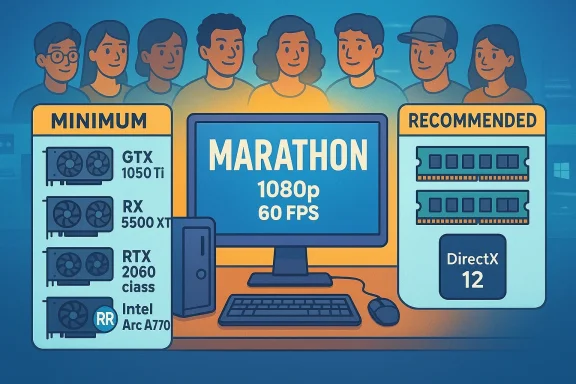
Below is a distilled, easy-to-scan presentation of the two official PC tiers that Bungie listed on Steam.- Minimum
- OS: Windows 10 64‑bit (latest Service Pack)
- CPU: Intel Core i5‑6600 / AMD Ryzen 5 2600
- Memory: 8 GB RAM
- Graphics: NVIDIA GeForce GTX 1050 Ti (4 GB) / AMD Radeon RX 5500 XT (4 GB) / Intel Arc A580 (8 GB, with ReBAR on)
- DirectX: Version 12
- Network: Broadband Internet connection
- Recommended
- OS: Windows 10 64‑bit (latest Service Pack)
- CPU: Intel Core i5‑10400 / AMD Ryzen 5 3500
- Memory: 16 GB RAM
- Graphics: NVIDIA GeForce (listed on Steam as “GTX 2060” — see note below) (6 GB) / AMD Radeon RX 5700 XT (8 GB) / Intel Arc A770 (16 GB, with ReBAR on)
- DirectX: Version 12
- Network: Broadband Internet connection
Important naming caveat (GTX vs RTX)
Steam’s NVIDIA entry is shown in some storefront locales as “GTX 2060,” while vendor name outlets treat the target as the midrange “RTX 2060” class. That is almost certainly a minor store-text inconsistency rather than a different architectural target — treat the intent as a midrange GeForce 20‑series equivalence — but buyers looking for an exact model should note the discrepancy until Bungie or NVIDIA clarifies.Why these numbers matter: reach, matchmaking and player population
Multiplayer live-service and competitive games live and die by population density. Lowering the minimum spec has a direct, measurable effect on a game’s ability to deliver quick matchmaking and sustain a heat time. Bungie’s prior PC strategy with Destiny 2 leaned the same way: accessible minimums that prioritized reach over requiring flagship silicon. Marathon follows that same practical philosophy while raising the recommended RAM to 16 GB to reflect modern multitasking and streaming patterns.A conservative minimum:
- Makes the game installable and playable on more laptops and older desktops.
- Lowers upgrade churn: fewer players are forced into hardware refreshes to join friends.
- Improves queue health for competitive playlists and extraction matches, especially at launch.
Technical read on the GPU choices
Bungie’s GPU selections are telling about the expected baseline performance envelope.- Minimum GPUs
- NVIDIA GeForce GTX 1050 Ti (2016 era) and AMD Radeon RX 5500 XT (2019 era) are **ent parts historically capable of 1080p on low-to-medium settings for many titles.
- Intel Arc A580 is a more recent option and Bungie explicitly lists “with ReBAR on” for Arc parts, indicating specific vendor-feature dependencies used in testing.
- Recommended GPUs
- The listed GeForce “2060” class target (midrange) aligns with a practical aim of stable 1080p/60 on medium-to-high settings.
- AMD’s RX 5700 XT and Intel Arc A770 entries provide equivalent midrange and higher‑VRAM options for the same comfort target.
Memory, CPU and other platform notes
- RAM: Bungie sets the minimum at 8 GB and recommends 16 GB. This is consistent with the modern PC landscape: 8 GB is now the bare minimum for many online games, while 16 GB is the pragmatic default for running background apps, overlays, and streaming.
- CPU: Minimum CPUs (i5‑6600 / Ryzen 5 2600) target mainstream, older 4–6‑core desktop processors. The recommended i5‑10400 / Ryzen 5 3500 represent reasonable midrange uplift for stable multiplayer simulation.
- DirectX 12: Marathon requires DirectX 12, aligning with modern rendering pipelines and platform feature availability.
Engine lineage and optimization signals
Bungie states Marathon is built on an evolved variant of the Destiny 2cussed in the press as the studio’s internal “Tiger” engine). That continuity matters: reused tools, profiling data, and cross‑platform delivery pipelines reducede unknowns when tuning for a wide range of hardware. The explicit inclusion of Intel Arc entries with ReBAR callouts suggests the engineering team tested vendor-specific feature toggles and tuned paths to keep performance parity across GPU ecosystems. Treat “engine continuity” as a positive indicator for predictable performance, but independent benchmarks will still be decisive.Real-world performance expectations and upgrade advice
What players should expect, mapped to Bungie’s tiers:- Minimum (i5‑6600 / GTX 1050 Ti / 8 GB)
- Expect playable 1080p sessions at lower settings, with framerates that can range between ~30–60 FPS depending on map and encounter density.
- Texture quality and view distance are the likeliest settings to reduce on this tier.
- Recommended (i5‑10400 / RTX/GTX “2060” class / 16 GB)
- Expect comfortable 1080p/60 gameplay on medium-to-high presets and smoother matchmaking experiences.
- This is the practical target for most players who will not be chasing ultra visuals or competitive 240 Hz targets.
- Higher resolution / ultra settings
- Will require stronger silicon and more VRAM than the recom
Practical upgrade priorities (order matters): - Move to 16 GB RAM if you’re on 8 GB.
- Use an NVMe or at minimum a SATA SSD for the game to ensure streaming and load-time stability.
- Upgrade GPU only if you need higher-than-1080p fidelity or plan to use high-quality upscalers and frame-generation features.
Nintendo Switch 2: on-paper feasibility and Bungie’s stance
The relative modesty of Marathon’s PC minimum sparked immediate discussion about the technical feasibility of a Nintendo Switch 2 port. On paper, a Switch 2 device — a new hybrid console which Nintendo publicly announced for mid‑2025 — could plausibly run a title that targets GTX 1050 Ti‑class minimum hardware, especially if the platform supports hardware upscaling technologies or if asset-level compromises are accepted. Nintendo’s Switch 2 reveal and hardware messaging emphasized improved graphics performance and a capable SoC, which fuels the speculation. That said, Bungie’s Game Director Joseph Ziegler told Famitsu the team currently has no plans to add additional compatible hardware (i.e., a Switch 2 port), while leaving the door open to consider it in the future. This is a pragmatic “not now” answer rather than a definitive “never.” Multiple outlets reported and quoted Ziegler’s Famitsu reply when covering Marathon’s platform plans. Key realities about a potential Switch 2 port:- A port is not a simple recompile: it requires control remapping, network adaptation, UI scaling, power/thermals optimization and potentially substantial asset and shader work.
- Crossplay and cross-save considerations complicate certification and timing.
- Even if technically feasible, business and scheduling priorities — especially for a live-service multiplayer release — often push console ports to a later window, if at all.
What we verified (and where to be cautious)
Verified against primary public sources:- Steam’s Marathon product page lists the minimum and recommended PC hardware tiers; the table and GPU strings are visible onre.steampowered.com]()
- Bungie’s own news site and FAQ confirm Marathon’s platform targets and pre-order availability for PC, PS5 and Xbox Series X|S.
- Press coverage and technical summaries (including Wccftech and other PC hardware outlets) replicated and analyzed the Steam table immediately after the update.
Items flagged as inconsistent or unverifiable:
- The Steam entry uses the string “GTX 2060”, which conflicts with standard NVIDIA naming (the GeForce 20‑series midrange is widely known as the RTX 2060 in most markets). Multiple outlets noted the discrepancy; treat the intended class as a midrange GeForce 20‑series equivalent until Bungie or NVIDIA clarifies.
- There is no explicihed target resolution/framerate for each tier in Bungie’s table; the community will need independent benchmarks to bond the theoretical tier to reality in specific maps and multiplayer load situations.
Risks and launch watchlist
- Store-text naming inconsistencies: small editorial errors can create real confusion for shoppers. Confirm the intended model class before major upgrades.
- Day‑one driver and anti‑cheat interactions: major multiplayer launches sometimes require specific driver versions or kernel‑level anti‑cheat components that can introduce compatibility and stability issues. Monitor Bungie’s launch notes and recommended driver versions if provided.
- Handheld / Proton / Steam Deck / Linux compatibility: Marathon’s official Steam listing targets Windows 10 64‑bit and lists Windows as the supported OS. Owners of alternative OSes should expect limited support at launch.
- Post‑launch tuning: Bungie will likely iterate on performance targets and patches after the first open test/review window. Independent benchmarks often change recommendations in the weeks following release.
Practical checklist for Windows players today
- Check system memory: upgrade to 16 GB if you want the comfortable recommended experience.
- Confirm GPU class: if you run GTX 1050 Ti or RX 5500 XT you’re in minimum territory; consider a midrange upgrade only if you want 1080p/60 on higher settings.
- Ensure Windows is updated and DirectX 12 is available.
- If you own Intel Arc hardware, enable Resizable BAR in firmware/driver and update to the latest validated Arc drivers.
- Leave extra disk headroom during preloads and day‑one patch windows: large online games frequently require more temporary space than the headline install size.
- Wait for independent benchmarks before purchasing hardware strictly for Marathon; early driver updates and patching can change performance profiles quickly.
Final assessment
Bungie’s Marathon PC system requirements are intentionally welcoming: they prioritize accessibility and player population reach for a multiplayer-first extraction shooter. The minimum GPU and CPU targets are conservative, the recommended tier is realistic for a modern 1080p experience, and the inclusion of Intel Arc entries — complete with ReBAR callouts — demonstrates an engineering focus on cross‑vendor parity rather than vendor favoritism. That strategy reduces the immediate hardware pressure on the market and on players who want to jump into Marathon with friends. It also leaves room for Bungie to introduce optional graphical features that higher-end rigs can enable, while keeping the core experience broadly accessible.At the same time, note the small but meaningful friction points: a naming incm store that should be clarified, the lack of explicit framerate/resolution targets in Bungie’s public table (making third‑party benchmarks essential), and the normal risk that day‑one anti‑cheat or driver pairing will create short-term compatibility headaches for some configurations.
Bungie’s public statement on cross‑platform expansion — specifically the Famitsu reply that a Switch 2 port is not planned at the moment but may be considered later — is a cautious, pragmatic position. The technical feasibility conversation can continue, but any Switch 2 version would require a meaningful engineering and certification investment beyond simply meeting the PC minimums on paper. Marathon’s published system requirements put the game within reach of a wide slice of Windows gamers while leaving the high‑end and console port conversations open for future chapters. The next decisive data points will be independent performance benchmarks, Bungie’s day‑one driver/patch guidance, and any clarification of the NVIDIA naming line on the Steam product page.
Marathon’s accessible hardware bar is a deliberate design choice: it lowers the entry fee for players, helps matchmaking and retention, and signals an engineering focus on parity across GPU vendors — all practical moves for a studio launching a live-service, multiplayer extraction shooter. Keep systems patched, drivers current, and watch third‑party benchmarks in the days after launch to match your upgrade plans to real-world performance.
Source: Wccftech Bungie Reveals Mild Marathon PC System Requirements
