

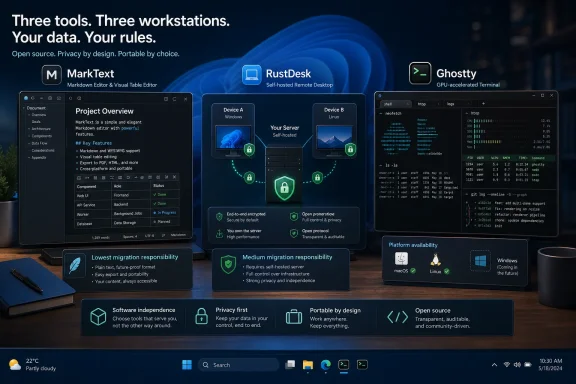
For the July 10–12 weekend, three free, open-source applications worth testing are MarkText for Markdown writing, RustDesk for remote support, and Ghostty for terminal work, although only the first two currently offer straightforward Windows replacements while Ghostty officially remains limited to macOS and Linux. That distinction matters more than the familiar promise that open source automatically delivers a drop-in substitute for commercial software. As highlighted by How-To Geek, each project challenges a default application, but each also asks users to accept a different level of migration, responsibility, and platform compromise.
The strongest case here is not that everyone should uninstall Microsoft’s tools by Monday morning. It is that replacing one narrowly chosen default can expose how much unnecessary friction, dependence, and data collection we have learned to tolerate.
The usual pitch for open-source desktop software begins with price and ends with ideology. The application is free, its code is inspectable, the community can continue development, and no vendor can abruptly convert a useful feature into a monthly subscription. All of that matters, but none of it is enough to make software pleasant.
People do not keep using Notepad, Windows Terminal, Quick Assist, TeamViewer, or AnyDesk because they have carefully audited every alternative. They use them because they are already installed, familiar, documented, and close enough to the task at hand. The incumbent’s most powerful feature is often the absence of an installation wizard.
A replacement therefore has to do more than reproduce a checklist. It must make the recurring job noticeably easier without turning setup, maintenance, or compatibility into a new recurring job of its own. That is why these three recommendations should not be treated as equivalent downloads.
MarkText asks users to exchange a basic editor or raw Markdown workflow for a more visual one. RustDesk asks them to reconsider who operates the infrastructure beneath a remote session. Ghostty asks them to adopt a more capable terminal model—but, for Windows users, without yet providing an official native Windows application.
Those are three very different propositions. One is a direct usability upgrade, one is an operational decision disguised as an app switch, and one is presently more of a preview of where terminals are heading than a universal Windows recommendation.
Traditional Markdown editors often address that friction with a split view. The source appears on one side and a rendered preview appears on the other, requiring the writer to alternate attention between what was typed and what it will become. Developers generally tolerate that model because source-and-output workflows are already part of their working lives, but it is less convincing for anyone who simply wants to write a document.
MarkText instead uses a what-you-see-is-what-you-get editing model in which Markdown is rendered in place. The project’s GitHub documentation describes real-time preview as a central feature, alongside source-code, typewriter, and focus modes. The file remains Markdown, but the user spends less time staring at its scaffolding.
That is the important architectural compromise: MarkText does not try to convert Markdown into a proprietary document format. It presents a visual editing layer over portable text. If the application disappears, changes direction, or no longer suits the user, the files remain usable in another editor, in a code repository, or through an ordinary command-line tool.
This is where MarkText provides something that WordPad never did and Notepad still does not attempt. It separates the longevity of the document from the convenience of the editor. Microsoft Word can export to other formats, but its native experience is built around a complex document container. MarkText’s native material is plain text that can survive almost anything.
As How-To Geek noted in its recommendation, MarkText allows users to invoke a block menu and choose a table size graphically. This is not a headline feature in the conventional software-marketing sense. It does not involve generative AI, cloud collaboration, or a new document database. It merely removes a small, frequent irritation.
That restraint is part of the appeal. Modern productivity software increasingly treats every text box as a launchpad for assistants, summaries, rewrites, templates, accounts, and cloud storage. MarkText is closer to an appliance: open a file, write, format it, and save it.
Its focus mode follows the same philosophy. Rather than generating writing or evaluating it, the editor fades surrounding material so that the current paragraph receives the user’s attention. Typewriter mode can keep the active line positioned consistently on the screen. These features alter the writing environment without interfering with the writing itself.
The application also supports CommonMark, GitHub Flavored Markdown, selected Pandoc syntax, mathematical expressions, front matter, emoji, and direct image pasting. It can export to HTML and PDF when a recipient needs something more polished than a text file. Official project documentation lists Windows 10 and Windows 11 support, including x64 and Arm64 installers, with packages also available for macOS and Linux.
That makes MarkText the closest thing in this group to a genuine weekend replacement. Install it, associate Markdown files with it, open an existing document, and decide whether the visual approach helps. There is no server to deploy, account to create, or workflow to reconstruct.
MarkText’s history once made that concern worth emphasizing because its stable release cadence had slowed considerably. By July 2026, however, the project’s GitHub repository identifies version 0.19.1, released on June 6, 2026, as the latest release. Its repository also shows continuing development activity and native Windows packages for both major processor architectures.
That does not mean every Markdown user should switch. Writers who need a research database, backlinks, plug-ins, synchronization, or a large personal knowledge-management system will find MarkText deliberately smaller than Obsidian or full-scale publishing environments. Developers who prefer exact control over source may be happier in Visual Studio Code.
MarkText’s real competitor is not every application capable of opening a
The interface is not the disruptive part. The disruptive part is that RustDesk allows users to operate the rendezvous and relay infrastructure themselves.
Official RustDesk documentation describes two core server components. The
This distinction is often compressed into the phrase you control your data. That is directionally true but operationally incomplete. Running a relay server gives an administrator control over where relayed traffic travels and who maintains the machine carrying it. It does not magically secure weak passwords, unmanaged endpoints, exposed ports, outdated containers, compromised administrator accounts, or careless unattended-access policies.
Self-hosting exchanges vendor trust for administrator responsibility. For a technically capable household, small business, managed service provider, or lab environment, that may be an excellent bargain. For someone who struggles to update a router, it may be an invitation to build critical remote-access infrastructure and then forget that it exists.
But consumer networking is messy. Carrier-grade NAT, corporate firewalls, restrictive Wi-Fi, segmented networks, mobile providers, and misconfigured routers can all prevent the direct route from succeeding. In that case, the relay is not an obscure backup component; it is the infrastructure keeping remote support functional.
Proprietary remote-support vendors operate relay fleets because this is difficult infrastructure to provide reliably. Their servers have bandwidth, availability monitoring, abuse controls, geographical distribution, and teams responsible for keeping the service reachable. Self-hosting gives users control, but it also discards those economies of scale.
The practical question is therefore not whether third-party relays are inherently unsafe. Proper end-to-end encryption is designed to protect session content even when an intermediary carries the traffic. The more useful question is whether the organization wants control over discovery, routing, metadata exposure, service availability, configuration, and jurisdiction—and whether it can operate that service competently.
RustDesk’s default public infrastructure lets newcomers test the application without deploying anything. That is the right way to evaluate the client experience, but it should not be confused with the full self-hosted proposition. The defining advantage appears only after the clients are pointed toward infrastructure the user controls.
Yet remote access is not the same as a local media catalog or a dashboard visible only inside the house. To connect from the public internet, the service must be reachable, commonly through forwarded ports, a public server, or a private networking layer. That reachability is part of the product, but it is also part of the risk.
A NAS containing backups, family photographs, tax records, and account archives is not automatically the best machine on which to experiment with internet-facing services. Container isolation helps organize workloads but should not be mistaken for an invulnerability barrier. Administrators need updates, logs, backups of configuration, strong credentials, controlled client enrollment, and a clear understanding of which ports and services are exposed.
For many home users, placing RustDesk behind a mesh VPN may be more comfortable than publishing its services directly. A low-cost virtual private server can provide separation from the home network, though it introduces another provider, another bill, and another operating system to patch. A dedicated small server offers local control but still demands firewall and routing competence.
None of this makes RustDesk a bad recommendation. It makes RustDesk a serious recommendation. Unlike a cosmetic utility, remote-control software can display passwords, financial information, personal communications, administrative consoles, and every other secret visible on the target system.
Still, public code is not a substitute for disciplined deployment. Most users do not audit cryptographic implementations, inspect every dependency, or compile their own binaries. They continue to rely on maintainers, package distribution, signing processes, and community scrutiny.
The right claim is not that open source removes trust. It gives technically capable users more places to verify, intervene, and retain control. It can reduce dependence on a single service operator, but it cannot reduce trust to zero.
For occasional family support, the easiest first step is to test RustDesk using its standard infrastructure and require the person at the remote PC to approve each session. Unattended access should follow only when there is a real need and a plan for securing credentials and revoking access.
For business support, the analysis becomes stricter. Inventory, authentication, access logs, role separation, identity-provider integration, support guarantees, regulatory obligations, and incident response may matter more than license cost. RustDesk’s free OSS server can cover the core connection path, while some enterprise controls belong to the paid server offering.
RustDesk can replace a commercial remote desktop tool, but the most valuable replacement is not the client window. It is control of the connection infrastructure—and control is useful only when someone accepts responsibility for operating it.
Official Ghostty documentation says it uses Metal for rendering on macOS and OpenGL on Linux. It also supports the Kitty graphics protocol, allowing compatible terminal applications to display images directly inside the terminal. For command-line programs that present previews, plots, file thumbnails, or other visual output, that capability expands what a terminal session can be.
Ghostty’s attention to compatibility is just as important as its rendering pipeline. The project aims to preserve established xterm behavior while implementing newer protocols for keyboard input, synchronized rendering, graphics, light and dark mode notifications, and richer terminal applications. The result is an emulator designed for both old command-line software and new interfaces that stretch beyond scrolling text.
That makes Ghostty attractive to developers and terminal enthusiasts. It does not, however, make Ghostty a current native replacement for Windows Terminal.
Ghostty’s own feature documentation states that the supported desktop platforms are macOS and Linux and that Windows support is planned for the future. That is clearer and more authoritative than the looser suggestion that Windows users can simply run the application “through WSL.”
But this arrangement does not turn the official Linux application into a native Windows terminal emulator. It adds layers: a Windows host, WSL, a Linux distribution, graphical integration, Linux packaging, and the terminal application itself. File paths, environment variables, shell selection, clipboard behavior, process launching, GPU support, and window integration may differ from a normal Windows installation.
There is also a conceptual inversion. A Windows terminal normally acts as the front end that launches PowerShell, Command Prompt, Azure Cloud Shell, SSH sessions, or WSL distributions. Running a Linux terminal application inside WSL means entering the subsystem first and then using that graphical application to host sessions from within the Linux environment.
That may work for someone whose daily computing life already happens in Ubuntu under WSL. It is not equivalent to replacing Windows Terminal for a sysadmin who moves among PowerShell 7, Windows PowerShell, Command Prompt, multiple WSL distributions, remote servers, and elevated local sessions.
The distinction is especially important because Windows Terminal is not the neglected default that some comparisons imply. Microsoft’s terminal already supports GPU-accelerated text rendering, tabs, panes, profiles, extensive appearance configuration, command-line invocation, and integration with PowerShell, Command Prompt, SSH, and WSL. Its open-source development has also moved the Windows console ecosystem far beyond the old
Ghostty may outperform it in particular workloads or support protocols that Windows Terminal does not fully implement. It may feel cleaner or more responsive on its supported platforms. But “faster than an old default terminal” and “a better replacement for Windows Terminal” are separate claims that require separate evidence.
At the same time, most terminal delays do not originate in drawing characters. Shell startup scripts, antivirus scanning, network latency, slow package managers, remote SSH hosts, filesystem translation between Windows and WSL, and verbose command output can dominate the experience. A faster renderer cannot accelerate a server that takes two seconds to answer.
Ghostty’s deeper value is therefore not a benchmark victory. It is the project’s argument that the terminal remains an active application platform rather than an emulation layer that stopped evolving when color text arrived.
The Kitty graphics protocol illustrates that ambition. Once terminal applications can reliably render images, they can provide previews and visual context without launching a separate GUI. Modern keyboard protocols can represent input more accurately. Synchronized rendering can reduce visual tearing in sophisticated text interfaces.
These capabilities matter first to terminal-application developers and only later to ordinary users. The terminal emulator must support the protocol, but so must the application running inside it. Installing Ghostty does not cause every shell command to become graphical overnight.
Ghostty is consequently best understood as a weekend experiment for macOS and Linux users, plus adventurous WSL specialists prepared to accept unofficial or layered configurations. For mainstream Windows users, the honest recommendation is to watch the project, test its ideas elsewhere, and avoid declaring a migration complete before the official Windows build exists.
MarkText primarily handles local documents. Its failure mode is usually inconvenience: reopen the Markdown file in another editor. RustDesk handles remote control and network traversal. Its failure mode may be inability to reach a machine, exposure of an access path, or loss of a support channel during an incident.
Ghostty is a local interface to shells and terminal applications, but platform integration determines which environments it can launch and how naturally it fits the operating system. Its files are not the issue; its relationship with the host OS is.
This is why “free and open source” cannot be the end of the evaluation. A license tells users what they may do with the code. It does not say how mature the Windows build is, how difficult the server is to secure, how active the release process is, or whether the application can replace an incumbent without functional regressions.
The three projects nevertheless reveal why open-source desktop software remains important. They can focus on narrow improvements that large vendors overlook: a graphical Markdown table builder, a self-hostable rendezvous service, or a modern graphics protocol for terminal applications. They do not need to become universal platforms to justify their existence.
The mistake is insisting that every promising project must immediately replace the default for everyone. Sometimes the better outcome is competition at the edges. MarkText can make plain-text publishing more approachable, RustDesk can pressure remote-access vendors to justify their infrastructure and licensing, and Ghostty can push terminal implementations toward richer protocols and lower latency.
The strongest case here is not that everyone should uninstall Microsoft’s tools by Monday morning. It is that replacing one narrowly chosen default can expose how much unnecessary friction, dependence, and data collection we have learned to tolerate.
 Open Source Wins When It Removes Friction, Not Merely Licensing Fees
The usual pitch for open-source desktop software begins with price and ends with ideology. The application is free, its code is inspectable, the community can continue development, and no vendor can abruptly convert a useful feature into a monthly subscription. All of that matters, but none of it is enough to make software pleasant.People do not keep using Notepad, Windows Terminal, Quick Assist, TeamViewer, or AnyDesk because they have carefully audited every alternative. They use them because they are already installed, familiar, documented, and close enough to the task at hand. The incumbent’s most powerful feature is often the absence of an installation wizard.
A replacement therefore has to do more than reproduce a checklist. It must make the recurring job noticeably easier without turning setup, maintenance, or compatibility into a new recurring job of its own. That is why these three recommendations should not be treated as equivalent downloads.
MarkText asks users to exchange a basic editor or raw Markdown workflow for a more visual one. RustDesk asks them to reconsider who operates the infrastructure beneath a remote session. Ghostty asks them to adopt a more capable terminal model—but, for Windows users, without yet providing an official native Windows application.
Those are three very different propositions. One is a direct usability upgrade, one is an operational decision disguised as an app switch, and one is presently more of a preview of where terminals are heading than a universal Windows recommendation.
MarkText Turns Markdown Back Into Writing
MarkText is the easiest recommendation because it fixes a problem that Markdown users have spent years pretending is not a problem. Markdown syntax is simple, portable, and readable, but editing a heavily formatted document as raw punctuation still imposes cognitive overhead. Headings begin with hash marks, emphasis is wrapped in symbols, links become nested brackets and parentheses, and tables resemble hand-drawn plumbing.Traditional Markdown editors often address that friction with a split view. The source appears on one side and a rendered preview appears on the other, requiring the writer to alternate attention between what was typed and what it will become. Developers generally tolerate that model because source-and-output workflows are already part of their working lives, but it is less convincing for anyone who simply wants to write a document.
MarkText instead uses a what-you-see-is-what-you-get editing model in which Markdown is rendered in place. The project’s GitHub documentation describes real-time preview as a central feature, alongside source-code, typewriter, and focus modes. The file remains Markdown, but the user spends less time staring at its scaffolding.
That is the important architectural compromise: MarkText does not try to convert Markdown into a proprietary document format. It presents a visual editing layer over portable text. If the application disappears, changes direction, or no longer suits the user, the files remain usable in another editor, in a code repository, or through an ordinary command-line tool.
This is where MarkText provides something that WordPad never did and Notepad still does not attempt. It separates the longevity of the document from the convenience of the editor. Microsoft Word can export to other formats, but its native experience is built around a complex document container. MarkText’s native material is plain text that can survive almost anything.
The Table Builder Solves Markdown’s Least Defensible Ritual
Markdown tables demonstrate why an ostensibly simple format can still benefit from graphical tools. A basic table requires vertical bars, separator rows, alignment markers, and enough spacing to remain readable in source form. None of this is conceptually difficult, but it is precisely the sort of mechanical formatting that computers are supposed to handle.As How-To Geek noted in its recommendation, MarkText allows users to invoke a block menu and choose a table size graphically. This is not a headline feature in the conventional software-marketing sense. It does not involve generative AI, cloud collaboration, or a new document database. It merely removes a small, frequent irritation.
That restraint is part of the appeal. Modern productivity software increasingly treats every text box as a launchpad for assistants, summaries, rewrites, templates, accounts, and cloud storage. MarkText is closer to an appliance: open a file, write, format it, and save it.
Its focus mode follows the same philosophy. Rather than generating writing or evaluating it, the editor fades surrounding material so that the current paragraph receives the user’s attention. Typewriter mode can keep the active line positioned consistently on the screen. These features alter the writing environment without interfering with the writing itself.
The application also supports CommonMark, GitHub Flavored Markdown, selected Pandoc syntax, mathematical expressions, front matter, emoji, and direct image pasting. It can export to HTML and PDF when a recipient needs something more polished than a text file. Official project documentation lists Windows 10 and Windows 11 support, including x64 and Arm64 installers, with packages also available for macOS and Linux.
That makes MarkText the closest thing in this group to a genuine weekend replacement. Install it, associate Markdown files with it, open an existing document, and decide whether the visual approach helps. There is no server to deploy, account to create, or workflow to reconstruct.
A Better Editor Still Needs a Healthy Project
Open source does not eliminate product risk; it redistributes it. A proprietary application can be discontinued, acquired, filled with advertising, or pushed toward subscriptions. An open-source project can lose maintainers, accumulate unresolved issues, or continue publishing code without producing stable binaries.MarkText’s history once made that concern worth emphasizing because its stable release cadence had slowed considerably. By July 2026, however, the project’s GitHub repository identifies version 0.19.1, released on June 6, 2026, as the latest release. Its repository also shows continuing development activity and native Windows packages for both major processor architectures.
That does not mean every Markdown user should switch. Writers who need a research database, backlinks, plug-ins, synchronization, or a large personal knowledge-management system will find MarkText deliberately smaller than Obsidian or full-scale publishing environments. Developers who prefer exact control over source may be happier in Visual Studio Code.
MarkText’s real competitor is not every application capable of opening a
.md file. It is the friction between “I need to write this” and “I now have to manage a writing system.” By keeping that system small, it makes a convincing case for becoming the default editor on machines where Markdown is a document format rather than a lifestyle.RustDesk Replaces a Vendor Relationship, Not Just a Remote-Control Window
RustDesk looks like the most conventional alternative in the group. Install the client on two systems, obtain an ID and password, connect, and control the remote machine. File transfer, clipboard sharing, chat, unattended access, and cross-platform clients place it in direct competition with AnyDesk, TeamViewer, and other remote-support products.The interface is not the disruptive part. The disruptive part is that RustDesk allows users to operate the rendezvous and relay infrastructure themselves.
Official RustDesk documentation describes two core server components. The
hbbs service handles identification, rendezvous, and signaling, while hbbr provides relaying when endpoints cannot establish a direct connection. RustDesk Server OSS makes those components available as a free, open-source backend, while the company also sells a Professional edition with additional administrative and enterprise capabilities.This distinction is often compressed into the phrase you control your data. That is directionally true but operationally incomplete. Running a relay server gives an administrator control over where relayed traffic travels and who maintains the machine carrying it. It does not magically secure weak passwords, unmanaged endpoints, exposed ports, outdated containers, compromised administrator accounts, or careless unattended-access policies.
Self-hosting exchanges vendor trust for administrator responsibility. For a technically capable household, small business, managed service provider, or lab environment, that may be an excellent bargain. For someone who struggles to update a router, it may be an invitation to build critical remote-access infrastructure and then forget that it exists.
Direct Connections Do Not Make Relays Irrelevant
Remote-desktop marketing tends to emphasize peer-to-peer connections because they sound both efficient and private. When two endpoints can negotiate a direct route through their networks, the session does not need to carry its bulk traffic through a relay. RustDesk’s documentation says its connections use end-to-end encryption based on NaCl, including its peer-to-peer model.But consumer networking is messy. Carrier-grade NAT, corporate firewalls, restrictive Wi-Fi, segmented networks, mobile providers, and misconfigured routers can all prevent the direct route from succeeding. In that case, the relay is not an obscure backup component; it is the infrastructure keeping remote support functional.
Proprietary remote-support vendors operate relay fleets because this is difficult infrastructure to provide reliably. Their servers have bandwidth, availability monitoring, abuse controls, geographical distribution, and teams responsible for keeping the service reachable. Self-hosting gives users control, but it also discards those economies of scale.
The practical question is therefore not whether third-party relays are inherently unsafe. Proper end-to-end encryption is designed to protect session content even when an intermediary carries the traffic. The more useful question is whether the organization wants control over discovery, routing, metadata exposure, service availability, configuration, and jurisdiction—and whether it can operate that service competently.
RustDesk’s default public infrastructure lets newcomers test the application without deploying anything. That is the right way to evaluate the client experience, but it should not be confused with the full self-hosted proposition. The defining advantage appears only after the clients are pointed toward infrastructure the user controls.
The NAS Is Convenient, but Exposure Changes the Threat Model
Running RustDesk Server OSS through Docker on a NAS or home server sounds like an ideal weekend project. Those devices are generally always on, consume less electricity than a desktop PC, and already host other household services. Docker also makes deployment more repeatable than manually installing dependencies across the operating system.Yet remote access is not the same as a local media catalog or a dashboard visible only inside the house. To connect from the public internet, the service must be reachable, commonly through forwarded ports, a public server, or a private networking layer. That reachability is part of the product, but it is also part of the risk.
A NAS containing backups, family photographs, tax records, and account archives is not automatically the best machine on which to experiment with internet-facing services. Container isolation helps organize workloads but should not be mistaken for an invulnerability barrier. Administrators need updates, logs, backups of configuration, strong credentials, controlled client enrollment, and a clear understanding of which ports and services are exposed.
For many home users, placing RustDesk behind a mesh VPN may be more comfortable than publishing its services directly. A low-cost virtual private server can provide separation from the home network, though it introduces another provider, another bill, and another operating system to patch. A dedicated small server offers local control but still demands firewall and routing competence.
None of this makes RustDesk a bad recommendation. It makes RustDesk a serious recommendation. Unlike a cosmetic utility, remote-control software can display passwords, financial information, personal communications, administrative consoles, and every other secret visible on the target system.
Open Source Improves Auditability, Not Automatic Safety
RustDesk’s open-source client and server provide a meaningful advantage: researchers, administrators, and users can inspect the implementation, reproduce builds, report flaws, and avoid depending entirely on a vendor’s description of its security model. The project supports Windows, macOS, Linux, Android, iOS, and web access, making it unusually broad for a self-hostable remote desktop stack.Still, public code is not a substitute for disciplined deployment. Most users do not audit cryptographic implementations, inspect every dependency, or compile their own binaries. They continue to rely on maintainers, package distribution, signing processes, and community scrutiny.
The right claim is not that open source removes trust. It gives technically capable users more places to verify, intervene, and retain control. It can reduce dependence on a single service operator, but it cannot reduce trust to zero.
For occasional family support, the easiest first step is to test RustDesk using its standard infrastructure and require the person at the remote PC to approve each session. Unattended access should follow only when there is a real need and a plan for securing credentials and revoking access.
For business support, the analysis becomes stricter. Inventory, authentication, access logs, role separation, identity-provider integration, support guarantees, regulatory obligations, and incident response may matter more than license cost. RustDesk’s free OSS server can cover the core connection path, while some enterprise controls belong to the paid server offering.
RustDesk can replace a commercial remote desktop tool, but the most valuable replacement is not the client window. It is control of the connection infrastructure—and control is useful only when someone accepts responsibility for operating it.
Ghostty Shows the Future of Terminals but Not Yet the Windows Default
Ghostty is the most technically exciting recommendation and the least straightforward one for a Windows publication. It is a fast, feature-rich terminal emulator created around native user interfaces, modern terminal compatibility, and GPU-accelerated rendering. It supports tabs, split panes, extensive key bindings, themes, ligatures, and advanced terminal protocols.Official Ghostty documentation says it uses Metal for rendering on macOS and OpenGL on Linux. It also supports the Kitty graphics protocol, allowing compatible terminal applications to display images directly inside the terminal. For command-line programs that present previews, plots, file thumbnails, or other visual output, that capability expands what a terminal session can be.
Ghostty’s attention to compatibility is just as important as its rendering pipeline. The project aims to preserve established xterm behavior while implementing newer protocols for keyboard input, synchronized rendering, graphics, light and dark mode notifications, and richer terminal applications. The result is an emulator designed for both old command-line software and new interfaces that stretch beyond scrolling text.
That makes Ghostty attractive to developers and terminal enthusiasts. It does not, however, make Ghostty a current native replacement for Windows Terminal.
Ghostty’s own feature documentation states that the supported desktop platforms are macOS and Linux and that Windows support is planned for the future. That is clearer and more authoritative than the looser suggestion that Windows users can simply run the application “through WSL.”
WSL Is a Compatibility Route, Not Native Windows Support
Windows Subsystem for Linux can run Linux command-line software, and WSLg can display Linux graphical applications in Windows environments that support it. A determined user may therefore experiment with a Linux build of Ghostty under WSL. Community forks and unofficial Windows-oriented work have also explored ways to bridge Ghostty with WSL and Windows shells.But this arrangement does not turn the official Linux application into a native Windows terminal emulator. It adds layers: a Windows host, WSL, a Linux distribution, graphical integration, Linux packaging, and the terminal application itself. File paths, environment variables, shell selection, clipboard behavior, process launching, GPU support, and window integration may differ from a normal Windows installation.
There is also a conceptual inversion. A Windows terminal normally acts as the front end that launches PowerShell, Command Prompt, Azure Cloud Shell, SSH sessions, or WSL distributions. Running a Linux terminal application inside WSL means entering the subsystem first and then using that graphical application to host sessions from within the Linux environment.
That may work for someone whose daily computing life already happens in Ubuntu under WSL. It is not equivalent to replacing Windows Terminal for a sysadmin who moves among PowerShell 7, Windows PowerShell, Command Prompt, multiple WSL distributions, remote servers, and elevated local sessions.
The distinction is especially important because Windows Terminal is not the neglected default that some comparisons imply. Microsoft’s terminal already supports GPU-accelerated text rendering, tabs, panes, profiles, extensive appearance configuration, command-line invocation, and integration with PowerShell, Command Prompt, SSH, and WSL. Its open-source development has also moved the Windows console ecosystem far beyond the old
conhost.exe experience.Ghostty may outperform it in particular workloads or support protocols that Windows Terminal does not fully implement. It may feel cleaner or more responsive on its supported platforms. But “faster than an old default terminal” and “a better replacement for Windows Terminal” are separate claims that require separate evidence.
Terminal Speed Is Real, but It Is Rarely the Whole Bottleneck
GPU acceleration is easy to market because responsiveness is immediately visible. Large amounts of output can make poorly optimized terminals stutter, and interactive terminal interfaces benefit from predictable rendering. Smooth scrolling and low input latency matter to people who spend hours in shells, editors, multiplexers, debuggers, and text-based dashboards.At the same time, most terminal delays do not originate in drawing characters. Shell startup scripts, antivirus scanning, network latency, slow package managers, remote SSH hosts, filesystem translation between Windows and WSL, and verbose command output can dominate the experience. A faster renderer cannot accelerate a server that takes two seconds to answer.
Ghostty’s deeper value is therefore not a benchmark victory. It is the project’s argument that the terminal remains an active application platform rather than an emulation layer that stopped evolving when color text arrived.
The Kitty graphics protocol illustrates that ambition. Once terminal applications can reliably render images, they can provide previews and visual context without launching a separate GUI. Modern keyboard protocols can represent input more accurately. Synchronized rendering can reduce visual tearing in sophisticated text interfaces.
These capabilities matter first to terminal-application developers and only later to ordinary users. The terminal emulator must support the protocol, but so must the application running inside it. Installing Ghostty does not cause every shell command to become graphical overnight.
Ghostty is consequently best understood as a weekend experiment for macOS and Linux users, plus adventurous WSL specialists prepared to accept unofficial or layered configurations. For mainstream Windows users, the honest recommendation is to watch the project, test its ideas elsewhere, and avoid declaring a migration complete before the official Windows build exists.
These Apps Challenge Three Different Kinds of Default
Defaults are often discussed as though every application occupies the same layer. In reality, MarkText, RustDesk, and Ghostty sit at very different points in the computing stack.MarkText primarily handles local documents. Its failure mode is usually inconvenience: reopen the Markdown file in another editor. RustDesk handles remote control and network traversal. Its failure mode may be inability to reach a machine, exposure of an access path, or loss of a support channel during an incident.
Ghostty is a local interface to shells and terminal applications, but platform integration determines which environments it can launch and how naturally it fits the operating system. Its files are not the issue; its relationship with the host OS is.
This is why “free and open source” cannot be the end of the evaluation. A license tells users what they may do with the code. It does not say how mature the Windows build is, how difficult the server is to secure, how active the release process is, or whether the application can replace an incumbent without functional regressions.
The three projects nevertheless reveal why open-source desktop software remains important. They can focus on narrow improvements that large vendors overlook: a graphical Markdown table builder, a self-hostable rendezvous service, or a modern graphics protocol for terminal applications. They do not need to become universal platforms to justify their existence.
The mistake is insisting that every promising project must immediately replace the default for everyone. Sometimes the better outcome is competition at the edges. MarkText can make plain-text publishing more approachable, RustDesk can pressure remote-access vendors to justify their infrastructure and licensing, and Ghostty can push terminal implementations toward richer protocols and lower latency.
A Weekend Upgrade Needs Three Different Levels of Commitment
These applications belong on the same download list, but not in the same deployment plan. One can be evaluated with a document, another with a carefully controlled remote session, and the third only on an officially supported operating system unless experimentation is the point.- MarkText is the most direct Windows replacement because it installs locally, preserves ordinary Markdown files, and provides visual editing without requiring an account or proprietary format.
- RustDesk can match the core remote-support workflow, but self-hosting its rendezvous and relay services creates an infrastructure and security responsibility rather than eliminating one.
- RustDesk should initially be tested with attended sessions before unattended access, public exposure, or deployment to machines containing sensitive data.
- Ghostty officially supports macOS and Linux as of July 11, 2026, while its own documentation still lists Windows support as a future plan.
- Running a Linux build through WSL or using an unofficial fork is an experiment, not equivalent to installing a supported native Windows replacement.
- The best migration is the one that removes recurring friction without creating a maintenance burden larger than the problem it solves.
References
- Primary source: How-To Geek
Published: 2026-07-10T17:10:08.695576
3 free, open-source apps to replace your defaults this weekend (July 10-12)
It's time to replace the apps you're only using out of habit with better free and open-source alternatives. www.howtogeek.com