
 Microsoft Is Rebuilding Trust One Calendar Feature at a Time
The new Outlook has spent years living in an awkward split-screen reality. Microsoft has positioned it as the future of mail and calendaring on Windows, while many power users and IT departments have treated it as a preview that escaped containment. The May 2026 feature batch is best understood as Microsoft trying to close the gap between strategic inevitability and everyday usability.
That gap has been especially visible in calendar workflows. Email clients can get away with cosmetic changes, but calendars are infrastructure. If a user cannot see the right shared calendar, select the right set of team schedules, or perform a routine bulk action without hunting through menus, the app stops being a productivity tool and becomes an interruption machine.
Automapped calendars are a good example of a feature that sounds minor until it is missing. In Exchange environments, automapping can make shared mailboxes and calendars appear automatically for users who have been granted access. In classic Outlook, that behavior is part of the furniture; people may not know the term, but they know the shared calendar simply appears where it is supposed to appear.
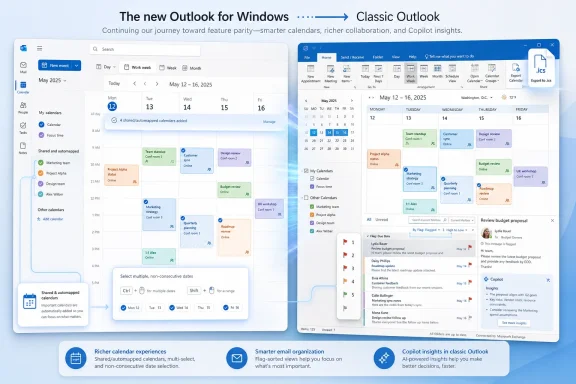
The new Outlook’s failure to fully match that expectation has been one of the quieter blockers for migration. Microsoft’s May rollout addresses that by making automapped calendars visible when users move from classic Outlook to the new Outlook. For an individual user, this removes a nuisance. For an administrator supporting assistants, teams, departments, and shared resources, it removes a source of tickets.
This is the kind of change that does not make a flashy demo, but it matters more than most demos. Microsoft’s challenge is not persuading users that web-era Outlook can look clean. It is persuading them that the new client will not break the deeply specific habits that keep offices functioning.
The New Outlook Still Has to Earn Its “New” Label
Microsoft’s naming problem remains comically persistent. “New Outlook” has now been around long enough that the word new feels less like a description and more like a contractual obligation. Classic Outlook, meanwhile, remains the app many professionals still trust when the work is complicated, delegated, offline, regulated, or just slightly weird.
That is why this May update matters. The features Microsoft is adding are not merely enhancements; they are evidence of an ongoing parity campaign. Multi-select calendar groups, non-consecutive date selection, bulk handling of calendar events, and additional sort fields for flagged email all point in the same direction: Microsoft is trying to make the new Outlook less like a simplified web client and more like a tool that can survive real office workflows.
The calendar group update is particularly telling. In classic Outlook, selecting multiple calendars inside a group is muscle memory for people who coordinate across teams. In the new Outlook, losing that behavior made the app feel narrower, even when the underlying service was modern. Restoring it is not innovation in the Silicon Valley sense; it is Microsoft admitting that mature enterprise software is built from hundreds of small expectations.
The same applies to multi-select events on the calendar surface. Being able to open, copy, paste, delete, or categorize multiple events at once is not glamorous, but it is exactly the sort of capability that separates a professional client from a consumer-grade inbox. The absence of such features tells users to keep one foot in classic Outlook. Their return tells them Microsoft may finally be taking parity seriously.
Non-consecutive date selection in the mini-month calendar fits the same pattern. Shift-click and Ctrl-click behavior is basic desktop fluency, but basic does not mean trivial. For users who plan across scattered dates, review availability, or jump between non-adjacent days, these input conventions reduce friction in a way that feels obvious only after it has been missing.
Teammate Calendars Push Outlook Deeper Into the Org Chart
The addition of teammates’ calendars in the left navigation pane is more than a convenience feature. Microsoft is making Outlook more organizationally aware, automatically surfacing calendars for peers, managers, and direct reports. That moves Outlook closer to being not just a personal mail client, but an interface for navigating workplace structure.
For users, the upside is clear. Scheduling is often a scavenger hunt through availability, names, rooms, and Teams meetings. If Outlook can automatically bring relevant teammate calendars into view, the app becomes faster at answering the question users actually have: who is available, when, and how do I avoid a scheduling collision?
For IT departments, automatic surfacing also raises the usual governance questions. Calendar visibility depends on permissions, tenant configuration, and organizational data quality. A feature that works beautifully in a clean Microsoft 365 tenant may be less predictable in an organization with messy reporting lines, hybrid identity leftovers, acquisitions, contractors, and uneven directory hygiene.
That is the hidden cost of smart defaults. The smarter Outlook becomes about organizational context, the more it depends on the organization having accurate context to provide. Microsoft can build the calendar surface, but customers still have to maintain the directory reality beneath it.
The feature also signals where Outlook is headed. Microsoft wants the client to understand relationships, not just messages. That makes sense in a Microsoft 365 world where Teams, Outlook, Viva, Planner, SharePoint, and Copilot are increasingly bound together by the Microsoft Graph. But it also means Outlook’s evolution is less about email as a standalone app and more about email as one pane in a larger workplace operating system.
Classic Outlook Gets Copilot Because Microsoft Cannot Leave It Behind Yet
The Copilot update for classic Outlook is the most politically interesting part of the May batch. Microsoft is bringing AI-based insights to users who select text in emails and ask Copilot for relevant information. That capability already exists in the new Outlook, but extending it to classic Outlook is an acknowledgment of reality: Microsoft cannot reserve all meaningful innovation for the future client while the present client remains deeply entrenched.
This creates a tension inside Microsoft’s own migration narrative. On one hand, the company wants users to embrace the new Outlook as the modern endpoint for Copilot-assisted productivity. On the other hand, enterprise customers have made clear that classic Outlook is not disappearing on Microsoft’s preferred timetable just because the toggle exists. If Microsoft wants Copilot adoption at scale, it has to meet users where they are.
That decision is pragmatic. Classic Outlook is still where many organizations run add-ins, delegate workflows, mailbox routines, compliance practices, and local behaviors that are not easily replaced. If Copilot is going to be sold as a Microsoft 365 layer rather than a feature of one shiny new app, then classic Outlook cannot be treated as an AI dead zone.
But there is a strategic risk. Every meaningful feature Microsoft adds to classic Outlook reduces the urgency to move. Users who already prefer classic Outlook may see Copilot insights as confirmation that they can stay put while still receiving the future in installments. Microsoft has to modernize the old client just enough to keep Copilot valuable without making the old client feel newly permanent.
That balancing act is visible across Microsoft 365. The company wants to consolidate experiences, simplify code paths, and push users toward cloud-first clients. Yet its most valuable customers are often the least tolerant of disruption. The result is a long, uneven transition in which “classic” keeps receiving enough attention to remain viable while “new” keeps receiving enough parity work to become credible.
Sorting by Flags Is a Small Feature With a Very Microsoft Story
The new email sorting options are easy to overlook. Sorting by flag status, flag due date, and flag start date sounds like the kind of update that belongs deep in a release note. Yet it captures something essential about Outlook’s role in the workplace: for many users, flags are not decoration; they are a task system.
Outlook has always been part inbox, part calendar, part reminder engine, part personal database. Users turn flags into follow-up queues, lightweight project trackers, and private triage systems. When a client lacks mature sorting around flagged items, it does not merely remove a view; it disrupts a personal productivity method built over years.
Adding richer flag sorting to both desktop and web Outlook is therefore another parity-and-trust move. It tells users that Microsoft understands the difference between reading email and managing work. A modern interface is not enough if the work objects underneath cannot be sliced, sorted, and revisited in the ways users expect.
There is also a broader lesson here for the new Outlook transition. Microsoft has often emphasized design consistency, cloud-backed features, and Copilot readiness. Those matter. But users judge an email client by whether it preserves the hundreds of tiny affordances that make high-volume communication survivable.
Flag sorting is one of those affordances. It is not a moonshot feature. It is a “please do not make me change my entire workflow because you changed the client shell” feature. In enterprise software, that category is enormous.
The .ics Export Feature Shows the Web Client Is Still Learning Old Tricks
The ability to save calendar events as .ics files in the new Outlook on the web is another reminder that standards-era interoperability still matters. The .ics format is old, boring, and durable. It lets events move across clients, platforms, and services without demanding that everyone live inside the same Microsoft-controlled experience.
That matters because Outlook is not used only in pristine Microsoft ecosystems. People send calendar files to vendors, clients, schools, associations, family members, conference systems, ticketing platforms, and non-Microsoft accounts. A calendar client that makes export awkward effectively assumes too much about the user’s environment.
By adding .ics support, Microsoft is again closing a functional gap rather than inventing a new category. That is not a criticism. Much of the new Outlook’s path to legitimacy involves recovering behaviors users already considered settled.
There is a subtle irony here. Microsoft is pushing Outlook toward a cloud-first, Graph-aware, Copilot-enabled future, yet one of the important May 2026 improvements is support for a portable calendar file. The future of productivity still depends on old interoperability plumbing. The most successful platforms are usually the ones that remember that.
Roadmaps Are Promises Written in Pencil
Microsoft 365 Roadmap entries are useful signals, but they are not guarantees. The familiar caveat is correctly noted: rollout dates can change. Anyone who has administered Microsoft 365 for more than a season knows that “rolling out” can mean different things depending on tenant, region, channel, license, admin policy, and Microsoft’s own last-minute engineering decisions.
That uncertainty is part of the Microsoft 365 operating model now. Features appear in the roadmap, shift phases, roll out gradually, pause, resume, and sometimes arrive in user interfaces before documentation catches up. For enthusiasts, that can be interesting. For administrators, it is another planning variable.
The May Outlook updates should therefore be treated as a rollout wave, not a synchronized product launch. Some users may see features quickly. Others may wait. Some organizations may suppress or delay parts of the experience through policy, channel management, or cautious deployment rings.
This is especially important for organizations using the new Outlook toggle as part of a migration plan. It is tempting to read a roadmap item as a blocker being removed. In practice, admins need to validate the feature in their own tenant, with their own mailbox configurations, delegates, shared calendars, add-ins, retention policies, and user roles.
Microsoft’s Outlook transition is not one migration. It is thousands of migrations happening under the same brand name. The May 2026 features help, but they do not eliminate the need for testing.
The Real Outlook Battle Is Between Momentum and Memory
The new Outlook’s biggest competitor is not Gmail, Thunderbird, or Apple Mail. It is user memory. Classic Outlook has decades of accumulated expectations behind it, and those expectations are not irrational nostalgia. They are operational knowledge.
People know where things are. Assistants know how delegate calendars behave. Power users know which views, sorts, rules, and add-ins make their day manageable. Sysadmins know which complaints will land the moment a familiar workflow changes. That institutional memory is a moat around classic Outlook.
Microsoft’s strategy is to overcome that memory through a mixture of inevitability and incremental repair. The company keeps presenting the new Outlook as the destination, then fills in the missing roads piece by piece. May’s features are part of that roadwork.
The problem is that users do not grade software on Microsoft’s roadmap curve. They grade it on the task in front of them at 8:57 a.m. before a meeting. If the calendar is wrong, the shared mailbox is missing, or a bulk action is unavailable, the explanation that the feature is coming next quarter does not help.
This is why Microsoft’s Outlook transition has been more fraught than a simple redesign. Outlook is not a lightweight app. It is a workplace habit engine, a compliance endpoint, a scheduling surface, a task list, a contact manager, and a political map of the organization. Replacing it means replacing more than code.
Copilot Is the Future Microsoft Wants to Sell, but Calendar Parity Is the Future Users Need
Microsoft’s marketing center of gravity is Copilot, and understandably so. AI gives the company a premium licensing story, a platform story, and a reason to reframe mature products as newly intelligent. Outlook is a natural home for that pitch because email overload is one of the few productivity problems nearly everyone understands.
But the May 2026 Outlook update wave shows the limits of an AI-first narrative. Before users ask Copilot to reason over their work, they need Outlook to show the right calendars, select the right events, sort the right messages, and export the right invitations. Intelligence layered on top of a frustrating workflow does not feel intelligent. It feels like garnish on an undercooked meal.
That does not mean the Copilot work is irrelevant. The ability to select email text in classic Outlook and ask for related insights could be genuinely useful, especially in long threads, policy-heavy messages, or communications packed with context. If implemented well, it may reduce the time users spend searching, cross-referencing, and reconstructing meaning from fragmented inbox history.
Still, the deeper story is that Microsoft is learning that Copilot adoption depends on baseline confidence. Users are more willing to trust an AI assistant inside an application that already respects their workflow. If the app itself feels like a downgrade, Copilot risks becoming the symbol of misplaced priorities.
In that sense, automapped calendars and multi-select calendar actions may do more for Copilot’s long-term credibility than Copilot itself. They make the client feel less compromised. Only then can Microsoft ask users to accept a more ambitious layer of automation.
Admins Should Read This as a Migration Signal, Not a Victory Lap
For IT teams, the May updates are encouraging but not sufficient. They suggest that Microsoft is continuing to close practical gaps in the new Outlook, especially around shared and team calendars. They do not prove that every organization can safely accelerate migration.
The right response is targeted validation. Admins should test automapped calendars with real shared mailboxes and resource scenarios. They should verify teammate calendar surfacing against directory expectations and privacy assumptions. They should confirm that multi-select behavior matches user workflows rather than merely existing in a demo tenant.
Classic Outlook’s Copilot expansion also deserves policy attention. Organizations that have held back Copilot deployments, restricted AI features, or segmented licenses need to understand where the new entry points appear. A feature arriving in classic Outlook may reach users who were not part of the new Outlook pilot cohort.
Training materials will also need adjustment. One of the hardest parts of the Outlook transition is that feature availability differs by client. A helpdesk script that simply says “use Outlook” is increasingly inadequate. Desktop new Outlook, Outlook on the web, classic Outlook, mobile Outlook, and Teams calendar surfaces do not always behave identically.
The May 2026 changes reduce some of that fragmentation, but they do not erase it. For now, Outlook support remains an exercise in naming the exact client before diagnosing the problem.
The May Update Tells Users Where Microsoft Is Going
This wave of features points to a future in which the new Outlook becomes more capable, more organizationally aware, and more tightly connected to Copilot. It also points to a present in which classic Outlook remains too important to starve. Microsoft is not flipping a single switch; it is managing a slow transfer of trust.
For users who have avoided the new Outlook, May 2026 may be a reasonable time to test it again, particularly if calendar limitations were the main objection. Automapped calendars, teammate calendars, multi-select groups, event bulk actions, and better date selection all address real annoyances. The experience still may not satisfy every classic Outlook power user, but the gap is narrowing in visible ways.
For users who stayed in classic Outlook, the Copilot update is a sign that Microsoft has not abandoned them. That is good news in the short term. In the long term, it is also a reminder that Microsoft wants Copilot to become the connective tissue across Microsoft 365, regardless of which Outlook shell you prefer.
The most telling thing about this update is how ordinary many of the features are. Microsoft is not asking Outlook users to imagine a radically different future this month. It is restoring familiar capabilities, exposing team context, and making the new client behave more like the tool people already know.
The Practical Reading of Microsoft’s May Outlook Push
The shape of this release is more important than any single checkbox. Microsoft is trying to make the new Outlook less risky without freezing classic Outlook in amber, and that means users should watch the parity work as closely as the AI announcements.
- Automapped calendars becoming visible in the new Outlook removes a real migration obstacle for shared-calendar-heavy organizations.
- Teammate calendars in the navigation pane make Outlook more aware of organizational relationships, but they also depend on clean directory data and sensible permissions.
- Multi-select calendar groups, event bulk actions, and non-consecutive date selection are small features that matter because they preserve established scheduling habits.
- Copilot insights in classic Outlook show that Microsoft still needs the old client to carry its AI strategy while the new client matures.
- New flag-based sorting options strengthen Outlook’s role as a work-management surface, not just an inbox.
- The .ics export addition is a reminder that interoperability still matters even as Microsoft pushes cloud-first, AI-assisted workflows.
The Outlook story in May 2026 is not a clean handoff from old to new, and it is not a Copilot victory parade. It is a maintenance-heavy, politically delicate migration in which Microsoft is slowly making the future less irritating than the past. If the company keeps closing practical gaps before forcing big transitions, the new Outlook may eventually become the default because it works, not merely because Microsoft says the calendar has arrived.
