Microsoft is removing Microsoft Defender Application Guard (MDAG) for Office from Microsoft 365 desktop apps, with the feature scheduled for phased removal beginning in early 2026 and complete removal by December 2027—documents that once opened inside a Hyper‑V backed, containerized Application Guard environment will instead open in Protected View, and administrators are being asked to rely on Attack Surface Reduction (ASR) rules and Windows Defender Application Control (WDAC) to preserve security.
Microsoft Defender Application Guard for Office was introduced to address a persistent risk vector: untrusted Office files carrying code or exploits that could compromise a Windows host. MDAG worked by launching Word, Excel, or PowerPoint files inside an isolated Hyper‑V container, separating the file’s runtime from the host OS and limiting what the document could access. That isolation offered a strong, near‑hardware level boundary for high‑risk attachments and downloads.
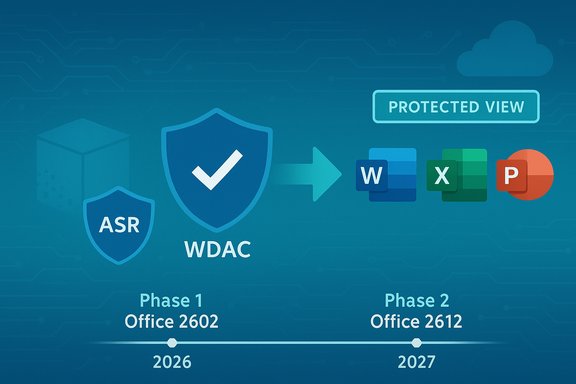
Over recent years Microsoft has adjusted its security portfolio and is now consolidating protection approaches. The vendor announced a phased removal of MDAG from Office applications, beginning with Office version 2602 and completing with Office version 2612. Files that would previously have opened inside MDAG will instead open in Protected View, the existing read‑only safeguard that disables editing and macros until a user explicitly trusts the document.
This change is part of a broader alignment with Windows lifecycle and support timelines and sits alongside guidance to enable Defender for Endpoint ASR rules and WDAC as enterprise controls to compensate for the loss of MDAG’s container‑based defense.
Microsoft’s guidance to enterprise administrators is clear: ensure ASR rules in Microsoft Defender for Endpoint are enabled and deploy WDAC policies to keep unwanted code from running. Administrators should also update helpdesk guidance and endpoint hardening documentation to reflect the change, because the practical behavior for end users (files opening read‑only in Protected View) will differ from the fully isolated experience MDAG delivered.
Enterprises must move from a posture of relying on a single feature to a layered approach. That includes prevention (ASR, WDAC), detection and response (Defender EDR), and operational controls (user behavior training, signed macros). Where necessary, organizations should also consider dedicated sandbox environments or alternative isolation technologies to maintain the highest levels of protection.
Security teams should view this as an opportunity to modernize endpoint defenses, reduce reliance on single‑feature containment, and increase focus on telemetry, response, and policy automation.
For many organizations, the impact will be manageable if they adopt ASR, WDAC, and robust policy‑driven controls. For high‑risk environments where a container boundary is non‑negotiable, the change demands an urgent reassessment of isolation strategies, potentially investing in VMs, sandbox solutions, or other architectural mitigations.
Actionable next steps for administrators:
Source: Windows Report Microsoft to Retire Defender Application Guard for Office by 2027
 Background
Microsoft Defender Application Guard for Office was introduced to address a persistent risk vector: untrusted Office files carrying code or exploits that could compromise a Windows host. MDAG worked by launching Word, Excel, or PowerPoint files inside an isolated Hyper‑V container, separating the file’s runtime from the host OS and limiting what the document could access. That isolation offered a strong, near‑hardware level boundary for high‑risk attachments and downloads.Over recent years Microsoft has adjusted its security portfolio and is now consolidating protection approaches. The vendor announced a phased removal of MDAG from Office applications, beginning with Office version 2602 and completing with Office version 2612. Files that would previously have opened inside MDAG will instead open in Protected View, the existing read‑only safeguard that disables editing and macros until a user explicitly trusts the document.
This change is part of a broader alignment with Windows lifecycle and support timelines and sits alongside guidance to enable Defender for Endpoint ASR rules and WDAC as enterprise controls to compensate for the loss of MDAG’s container‑based defense.
What Microsoft is changing — the timeline and the mechanics
Microsoft has broken the removal into two phases tied to Office release versions and update channels.- Phase 1 — removal begins with Office version 2602:
- Current Channel: early February 2026
- Monthly Enterprise Channel: April 2026
- Semi‑Annual Enterprise Channel: July 2026
- Phase 2 — full removal with Office version 2612:
- Current Channel: early December 2026
- Monthly Enterprise Channel: February 2027
- Semi‑Annual Enterprise Channel: July 2027
Microsoft’s guidance to enterprise administrators is clear: ensure ASR rules in Microsoft Defender for Endpoint are enabled and deploy WDAC policies to keep unwanted code from running. Administrators should also update helpdesk guidance and endpoint hardening documentation to reflect the change, because the practical behavior for end users (files opening read‑only in Protected View) will differ from the fully isolated experience MDAG delivered.
Why Microsoft is retiring Application Guard for Office
Several factors underpin Microsoft’s decision:- Product lifecycle alignment. The retirement aligns with Windows servicing and support schedules, particularly the phasing out of older Windows 11 feature releases and the APIs relied upon by MDAG.
- Simplification of security posture. Microsoft is consolidating defenses around a smaller set of manageable controls—Protected View, ASR, WDAC, and Defender for Endpoint—rather than maintaining a separate heavy‑weight isolation feature for Office.
- Maintenance and API dependencies. MDAG relied on Windows isolation APIs and Hyper‑V features that Microsoft has been deprecating or reworking; supporting MDAG across a fragmented Windows install base created engineering and support overhead.
- Cost/benefit for broad customer base. MDAG provided strong isolation but only to specific licensing and platform combinations. Microsoft appears to be prioritizing security controls that reach a broader set of customers through Defender for Endpoint and platform controls.
Technical comparison: MDAG isolation vs Protected View
Understanding the difference between these two behaviors is crucial for evaluating risk and mitigation strategies.Microsoft Defender Application Guard (MDAG)
- Ran Office files inside a Hyper‑V‑backed container.
- Isolated the Office process from user profile and system resources; network and file system access could be restricted.
- Allowed safer file viewing with more aggressive containment of potential exploit activity.
- Could protect against a wider range of post‑exploit actions because the Office process ran in a separate security boundary.
Protected View
- Opens files in read‑only mode inside the same user session and process space (no separate Hyper‑V container).
- Macros and editing are disabled until a user explicitly enables them or trusts the file.
- Blocks many common file‑based attack vectors but does not provide the same execution isolation as MDAG.
- Easier to understand for end users (open read‑only, click ‘Enable Editing’ to trust) but more reliant on user behavior.
Immediate actions Microsoft recommends — and practical steps for admins
Microsoft recommends enabling Attack Surface Reduction (ASR) rules in Defender for Endpoint and deploying Windows Defender Application Control (WDAC) policies. Those are sensible starting points, but they must be implemented carefully to avoid operational disruption.- Enable core Attack Surface Reduction rules:
- Block macros from the internet.
- Block Office applications creating child processes.
- Block Office applications from creating executable content.
- Prevent Office from spawning or executing potentially risky code paths.
- Implement Windows Defender Application Control (WDAC):
- Create a policy that whitelists signed and trusted binaries.
- Use a phased approach—audit mode first, then enforced—so you can tune allow lists.
- Consider integration with enterprise signing or code‑signing processes for internal tools.
- Harden Office and endpoint configurations:
- Ensure Protected View is enabled for files from the web and other untrusted sources.
- Disable legacy protocols and block known risky file types where possible.
- Use Intune or Group Policy to centrally manage Protected View and macro handling.
- Operational readiness:
- Inventory where MDAG is actively used today and identify user groups and machines that rely on it.
- Run WDAC policies and ASR in audit mode to produce telemetry without blocking production workloads.
- Update helpdesk scripts and documentation explaining the Protected View change to reduce support calls.
- Train users on the meaning of Protected View and safe handling of files that require enabling editing.
Recommended migration plan — a phased, test‑driven approach
- Assess: Discover all devices and users that rely on MDAG, using endpoint telemetry and group policies.
- Pilot: Select a small number of business units to pilot ASR rules and WDAC policies, running in audit mode for 2–4 weeks.
- Harden: Tune ASR and WDAC based on telemetry; address false positives and necessary allow‑lists.
- Educate: Provide clear user guidance on Protected View behavior and the risk model for macros and external content.
- Enforce: Move WDAC and ASR to enforced mode only after confidence in policy coverage.
- Rollout: Coordinate the Office update rollout per channel timing. Ensure helpdesk staffing aligns with the Phase 1/Phase 2 schedule.
- Validate: Post‑deployment, verify telemetry (blocks, ASR events, application control denies) and adapt.
Benefits of the change — what organizations gain
- Simplified security model. Fewer moving parts to manage when MDAG is removed and organizations focus on ASR, WDAC, and Protected View.
- Broader reach. ASR and WDAC apply across many devices and don’t require the Hyper‑V or platform prerequisites MDAG did.
- Reduced support surface. Removing a deprecated feature reduces the need for specialized troubleshooting and lowers attack complexity stemming from stale APIs.
- Predictable behavior. Protected View is a long‑standing Office feature with well‑known behavior for users and admins.
Risks and limitations — where protection weakens
- No container boundary. Protected View does not isolate the Office runtime in a separate Hyper‑V container; advanced post‑exploit techniques could still be effective within a user’s session.
- User decision dependency. Protected View relies on users to not enable editing or macros unless they truly trust the file—social engineering can circumvent this.
- Potential gaps in ASR/WDAC coverage. Misconfiguration, lack of tuning, or incomplete allow lists can create operational friction or leave blind spots.
- Legacy and specialized workflows. Some applications or add‑ins depended on MDAG behavior; those workflows may break or require re‑engineering.
Edge cases and special considerations
- Virtual Desktop Infrastructure (VDI) and shared environments may require different WDAC and ASR tuning compared to physical desktops.
- If any line‑of‑business applications relied on MDAG APIs or isolation semantics, testing is essential—replacing MDAG may require app rewrites or additional host‑based controls.
- Macros: Organizations that legitimately use macros should adopt strict digital signing practices and control macro enablement through Group Policy and Intune.
- Offline or disconnected devices: ASR telemetry and WDAC enforcement benefit from cloud telemetry; offline devices should be given special attention to ensure policies are up to date and signed binaries are available.
Alternatives and complementary technologies
MDAG was one containment option; several other Microsoft and third‑party mechanisms can be combined to approximate or extend protection.- Windows Sandbox: Good for interactive inspection of untrusted binaries and files in an ephemeral environment; not a direct Office integration but useful for analysts.
- Virtual Machines or isolated review workstations: For very high‑risk files, using a dedicated VM that can be quickly reset offers a stronger isolation guarantee.
- Browser and cloud‑based file viewing: Viewing Office files through cloud services (Office for web) or secure browser isolation can offload risk from endpoints.
- Third‑party file sandboxing and detonation services: Some security vendors provide automated file detonation with behavioral analysis that can be integrated into mail or file gateways.
- Microsoft Defender for Endpoint features: Endpoint detection and response (EDR), exploit protection, and threat and vulnerability management remain essential layers.
Practical recommendations for Windows and Microsoft 365 admins
- Start immediately: begin inventory and telemetry collection to identify MDAG users and scenarios.
- Prepare for the Office release cadence: map the Microsoft Office channel timelines to enterprise update rings and coordinate deployment windows accordingly.
- Use ASR and WDAC together: ASR reduces attack surface and blocks risky behaviors, while WDAC prevents unauthorized code execution. Both are stronger when tuned in combination.
- Adopt an evidence‑based rollout: use audit modes, refine policies from telemetry, then enforce.
- Improve macro hygiene: require signed macros, use AppLocker/WDAC to restrict what unsigned macros can perform, and disable VBA where not needed.
- Update documentation and service‑desk scripts: reduce confusion for users encountering Protected View and explain the safe process to request access for trusted documents.
- Consider long‑term architectural changes: where isolation is business‑critical, evaluate VMs, dedicated review systems, or cloud viewing to replace MDAG’s guarantees.
Strategic implications and what this means for enterprise security
The removal of MDAG points to a broader security design shift: Microsoft continues consolidating protections into cross‑platform, centrally manageable capabilities rather than maintaining feature‑specific isolation for particular client apps. For many organizations, that will be an overall positive—simpler policies, fewer compatibility constraints, and wider availability of protections. For others, especially those who use MDAG as a key sandboxing control in high‑risk environments, this retirement forces a strategic reappraisal.Enterprises must move from a posture of relying on a single feature to a layered approach. That includes prevention (ASR, WDAC), detection and response (Defender EDR), and operational controls (user behavior training, signed macros). Where necessary, organizations should also consider dedicated sandbox environments or alternative isolation technologies to maintain the highest levels of protection.
Risk scenarios that require immediate attention
- Financial services, government, healthcare, and critical infrastructure teams that accepted files from external partners and used MDAG as a primary isolation control should treat this change as high priority.
- Organizations using third‑party integrations or macros frequently distributed via email must lock down macro signing and restrict macro execution to signed and vetted publishers.
- Teams with legacy systems or specialized add‑ins should run compatibility tests; MDAG removal can break automation or workflows that assumed containerized file handling.
Longer‑term outlook and evolving security posture
The broader trend is toward centralized, cross‑platform security controls that can be managed at scale. Expect Microsoft to continue investing in Defender for Endpoint, ASR rule sets, cloud‑delivered protections, and improved Office hardening features. At the same time, container and virtualization technologies remain central to isolating untrusted workloads; enterprises will need to choose where those boundaries are enforced—at the Office app layer, the OS, or at a virtual machine boundary.Security teams should view this as an opportunity to modernize endpoint defenses, reduce reliance on single‑feature containment, and increase focus on telemetry, response, and policy automation.
Conclusion
The retirement of Microsoft Defender Application Guard for Office marks the end of a distinctive, container‑based Office protection that provided a powerful isolation boundary for untrusted documents. Microsoft’s planned removal—phased between early 2026 and mid‑2027—will replace MDAG behavior with Protected View and urges administrators to rely on Attack Surface Reduction rules and Windows Defender Application Control to retain strong protections.For many organizations, the impact will be manageable if they adopt ASR, WDAC, and robust policy‑driven controls. For high‑risk environments where a container boundary is non‑negotiable, the change demands an urgent reassessment of isolation strategies, potentially investing in VMs, sandbox solutions, or other architectural mitigations.
Actionable next steps for administrators:
- Inventory current MDAG usage and impacted user groups.
- Pilot ASR and WDAC in audit mode and tune from telemetry.
- Educate users on Protected View and update helpdesk guidance.
- Implement WDAC and ASR in enforced mode only after rigorous testing.
- Consider supplemental isolation (VMs, sandboxing) for highest‑risk scenarios.
Source: Windows Report Microsoft to Retire Defender Application Guard for Office by 2027