

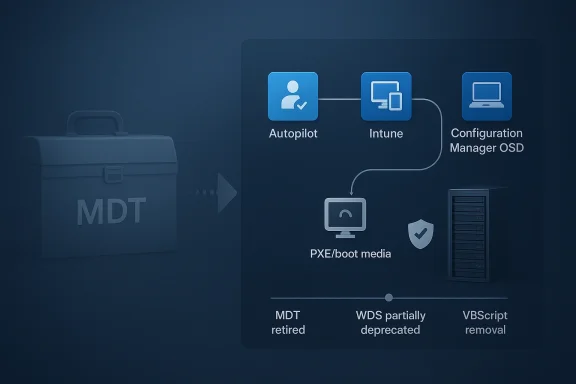
Microsoft’s retirement of Microsoft Deployment Toolkit (MDT) is doing more than closing the book on an old deployment utility. It is forcing IT teams to confront a harder question: what still belongs in a modern Windows imaging strategy, and what can finally move to the cloud? The answer is proving messy, because bare-metal deployment remains essential for recovery, refresh, and scale, even as Microsoft pushes admins toward Windows Autopilot and Configuration Manager OSD. Official Microsoft guidance now states plainly that MDT is retired and no longer supported, while WDS operating system deployment is only partially supported and increasingly constrained on newer Windows releases.
For more than a decade, MDT sat in the middle of countless Windows deployment workflows. It became the practical glue for organizations that needed predictable imaging, task sequences, and repeatable endpoint setup without moving immediately to a cloud-first model. That made it especially valuable in enterprises with mixed hardware, legacy applications, and a long tail of on-premises infrastructure. Microsoft’s retirement notice has therefore landed not as a surprise, but as a deadline that many teams had hoped would keep drifting farther into the future.
What changed is not just the support status, but the direction of Windows management itself. Microsoft has spent years steering administrators toward Autopilot, Intune, and hybrid management patterns, while gradually de-emphasizing older deployment mechanisms. The company’s own documentation now says that for customers with on-premises infrastructure and Configuration Manager, OSD remains fully supported, but MDT workflows should be transitioned into modern deployment solutions. That framing matters: Microsoft is not saying imaging is obsolete, only that the tooling around it should be different.
The hidden tension is that deployment is not one problem. It is a bundle of problems that include provisioning new hardware, rebuilding failed endpoints, handling ransomware recovery, replacing devices at scale, and standardizing software states across fleets. Autopilot helps a lot with enrollment and zero-touch provisioning, but it was not designed as a direct substitute for every bare-metal or disaster recovery workflow. Microsoft’s own deployment guidance still distinguishes between fresh installations, refresh scenarios, and replacement scenarios, which is a reminder that the old imaging model never disappeared; it simply became one option among several.
The latest urgency is sharpened by another deprecation: Microsoft is also phasing out VBScript, and that matters because MDT has long depended on scripting components tied to that legacy stack. Microsoft’s deprecation communications indicate that VBScript will be removed in a future Windows 11 release cycle, and industry coverage has been warning that the absence of VBScript will further constrain MDT’s ability to deploy newer operating systems. In other words, this is not a theoretical retirement notice; it is a compatibility cliff, and the slope is getting steeper.
The real significance is that retirement creates operational friction at exactly the moment when many teams are trying to simplify. Administrators do not merely have to replace MDT; they have to map each of its historical jobs to a different tool. For some, that will mean Autopilot. For others, it will mean Configuration Manager task sequences, PXE boot, or standalone media. The result is not a clean migration but a design exercise, and that takes time, testing, and documentation.
The gap, however, is workflow continuity. MDT often served as the field-tested path of least resistance for organizations with customized scripts, drivers, and stepwise task sequences. Replacing it means preserving the logic of a deployment workflow while changing the plumbing underneath. That is why admins see retirement notices as a risk event, not a convenience update.
At the same time, Microsoft has been more explicit about WDS. The company says the operating system deployment functionality of Windows Deployment Services is being partially deprecated, and workflows that rely on installation-media boot.wim or Windows Setup running in WDS mode are no longer supported for Windows 11 and newer boot images. That is a very specific narrowing of use cases, and it matters because many admins still think of WDS as the easy PXE answer for boot media. Microsoft is signaling that even if the server role remains, the old deployment behavior is not something to build on going forward.
This is also where some admins will feel caught between two eras. On one side sits a mature on-prem toolkit that has reached the end of its road. On the other sits a cloud-first provisioning model that is excellent for many modern devices but incomplete for legacy rebuilds. The transition is less about which tool is “better” and more about which pain points a team can tolerate while it changes course. That distinction matters because the wrong choice can create gaps in disaster recovery.
The limitation is practical, not ideological. If a device is completely bare, needs offline recovery, or must be restored quickly after a ransomware event, organizations still need a deployment mechanism that can operate outside the happy path of user-driven cloud enrollment. Microsoft’s own documentation on Configuration Manager still describes scenarios for refreshing existing systems, replacing devices, and installing operating systems on new computers in bare-metal contexts. That is a tacit acknowledgment that the field still has real-world conditions cloud-only methods do not cover.
The other overlooked factor is production imaging at scale. Some organizations do not want a blank device to build itself from generic cloud policies; they want a tightly controlled standard image with drivers, line-of-business apps, and required baselines ready to go. That is especially true in manufacturing, healthcare, education, and regulated environments. The cloud can orchestrate much of that journey, but it does not eliminate the desire for a fast, predictable starting point.
Hybrid management is not a compromise so much as a bridge. It lets organizations keep Configuration Manager task sequences, imaging, or PXE-based recovery while moving standard enrollment and policy enforcement into Intune. Microsoft’s own materials support this blended approach, including co-management and Autopilot scenarios that still incorporate Configuration Manager in some phases of the device lifecycle. That is the architecture many enterprises are choosing because it spreads risk instead of concentrating it in one model.
The strategic question is whether hybrid becomes a permanent operating model or just a transitional one. That will depend on how quickly Microsoft closes the gaps between provisioning, recovery, and device reconditioning. For now, the evidence suggests a slow migration rather than a cliff-edge switch.
Maintenance overhead is especially important because deployment systems tend to grow invisible until they fail. A task sequence that works today may depend on a script, driver package, boot image, or credential configuration that has not been touched in months. When support ends, the ability to ignore those dependencies vanishes, and every hidden assumption becomes a future incident. That is why the retirement is as much a governance issue as a tooling issue.
Speed matters too, especially when large numbers of machines need to be redeployed quickly. Imaging is often judged not by elegance but by how long a help desk queue sits idle while devices are rebuilt. If a new process adds hours of waiting or more hands-on intervention, the business cost rises quickly. Cost is the final complaint, but it is often the most misleading one because labor, downtime, and recovery risk are usually larger than license fees alone.
Configuration Manager provides multiple paths for the kinds of scenarios MDT once handled. Microsoft documents PXE-based deployment, standalone media, refresh workflows, and bare-metal installation. That breadth makes Configuration Manager the natural landing zone for enterprises that need to preserve advanced deployment logic while retiring MDT-specific steps. The transition is therefore not to “no imaging,” but to “imaging with a different control plane.”
Still, Configuration Manager is not a universal answer either. It can preserve legacy depth, but it also preserves complexity. Organizations adopting it as the successor to MDT will likely keep a sophisticated deployment stack for longer than cloud-first teams, which may be exactly what they want. That is not a failure of modernization; it is a recognition that enterprise endpoints are not all equally ready to be managed the same way.
For enterprises, though, the implications are far more serious. Large organizations depend on repeatable deployment systems to control hardware refresh cycles, security reimaging, and break-fix operations. When one of those systems retires, the impact is not limited to IT; it can affect onboarding times, recovery speed, compliance posture, and employee productivity.
The business risk is highest where IT has built around long-lived imaging assumptions. A hospital, school district, factory, or call center may need fast reimage options that do not depend on a pristine internet connection or a fresh identity-driven enrollment flow. Those are the places where MDT’s retirement will be felt most acutely, and where replacement planning matters most.
The opportunity is to simplify around fewer, better-defined workflows. Instead of supporting every historical deployment path forever, organizations can separate new-device provisioning from recovery imaging and treat them as distinct operational problems. That should produce better documentation, clearer ownership, and, in many cases, faster support response times.
There is also the risk of overcorrecting toward cloud-only assumptions. If organizations replace MDT with an approach that handles enrollment well but fails on recovery, they may create a different vulnerability while trying to eliminate the old one. The point is not to abandon imaging entirely, but to ensure that the new model actually covers the scenarios that matter.
Expect the most successful organizations to be the ones that treat deployment as a portfolio of scenarios rather than a single tool choice. A modern endpoint strategy will probably combine cloud provisioning, task-sequence-based recovery, and a deliberate fallback path for offline or disaster-recovery cases. That kind of design is less glamorous than a full cloud narrative, but it is much closer to how real fleets behave. In practice, resilience beats ideology.
Source: IT Pro IT admins are scrambling for alternatives in the wake of Microsoft’s MDT retirement
 Background
For more than a decade, MDT sat in the middle of countless Windows deployment workflows. It became the practical glue for organizations that needed predictable imaging, task sequences, and repeatable endpoint setup without moving immediately to a cloud-first model. That made it especially valuable in enterprises with mixed hardware, legacy applications, and a long tail of on-premises infrastructure. Microsoft’s retirement notice has therefore landed not as a surprise, but as a deadline that many teams had hoped would keep drifting farther into the future.What changed is not just the support status, but the direction of Windows management itself. Microsoft has spent years steering administrators toward Autopilot, Intune, and hybrid management patterns, while gradually de-emphasizing older deployment mechanisms. The company’s own documentation now says that for customers with on-premises infrastructure and Configuration Manager, OSD remains fully supported, but MDT workflows should be transitioned into modern deployment solutions. That framing matters: Microsoft is not saying imaging is obsolete, only that the tooling around it should be different.
The hidden tension is that deployment is not one problem. It is a bundle of problems that include provisioning new hardware, rebuilding failed endpoints, handling ransomware recovery, replacing devices at scale, and standardizing software states across fleets. Autopilot helps a lot with enrollment and zero-touch provisioning, but it was not designed as a direct substitute for every bare-metal or disaster recovery workflow. Microsoft’s own deployment guidance still distinguishes between fresh installations, refresh scenarios, and replacement scenarios, which is a reminder that the old imaging model never disappeared; it simply became one option among several.
The latest urgency is sharpened by another deprecation: Microsoft is also phasing out VBScript, and that matters because MDT has long depended on scripting components tied to that legacy stack. Microsoft’s deprecation communications indicate that VBScript will be removed in a future Windows 11 release cycle, and industry coverage has been warning that the absence of VBScript will further constrain MDT’s ability to deploy newer operating systems. In other words, this is not a theoretical retirement notice; it is a compatibility cliff, and the slope is getting steeper.
Why the MDT Retirement Matters
The scale of the problem is bigger than a single product announcement suggests. Recast Software’s survey, cited in the IT Pro report, says 99% of respondents still view OS deployment as important, and 81% rate bare-metal or disaster-recovery OSD as highly or critically important. Those numbers explain why the market reaction is so immediate: even organizations that have embraced Intune or hybrid management still need a recovery path when a machine is wiped, a fleet is refreshed, or an outage demands fast reimaging. That is not a niche use case; it is the backbone of endpoint operations.The real significance is that retirement creates operational friction at exactly the moment when many teams are trying to simplify. Administrators do not merely have to replace MDT; they have to map each of its historical jobs to a different tool. For some, that will mean Autopilot. For others, it will mean Configuration Manager task sequences, PXE boot, or standalone media. The result is not a clean migration but a design exercise, and that takes time, testing, and documentation.
The legacy toolchain still has work to do
MDT and WDS persisted because they solved problems that newer tools did not entirely erase. A technician can still value a known-good image when a device must be rebuilt from scratch, offline, or in a low-bandwidth branch office. Microsoft’s Configuration Manager documentation explicitly supports standalone media and PXE for bare-metal deployment, which shows that the enterprise imaging model is still alive inside Microsoft’s modern stack. The difference is that the company wants it managed through Configuration Manager rather than MDT.The gap, however, is workflow continuity. MDT often served as the field-tested path of least resistance for organizations with customized scripts, drivers, and stepwise task sequences. Replacing it means preserving the logic of a deployment workflow while changing the plumbing underneath. That is why admins see retirement notices as a risk event, not a convenience update.
- OS deployment remains mission-critical, even in cloud-first shops.
- Recovery scenarios are often the hardest to modernize.
- Workflow migration is harder than tool replacement.
- Testing and validation can take longer than procurement.
- Documentation drift becomes a hidden operational cost.
What Microsoft Is Actually Retiring
Microsoft’s official wording is worth paying attention to because it separates support from functionality. The retirement notice says MDT is no longer supported and will not receive updates, fixes, or security updates, but existing installations should continue to function for now. That is a classic retirement pattern: the software does not instantly stop working, but the risk profile changes immediately because the vendor has stopped promising future compatibility.At the same time, Microsoft has been more explicit about WDS. The company says the operating system deployment functionality of Windows Deployment Services is being partially deprecated, and workflows that rely on installation-media boot.wim or Windows Setup running in WDS mode are no longer supported for Windows 11 and newer boot images. That is a very specific narrowing of use cases, and it matters because many admins still think of WDS as the easy PXE answer for boot media. Microsoft is signaling that even if the server role remains, the old deployment behavior is not something to build on going forward.
The compatibility trap
The more important point is that retirement and deprecation interact. MDT is retired, WDS deployment features are partially deprecated, and VBScript is on a path toward removal. Individually, each change is manageable. Combined, they can break deployment chains that were assumed to be stable for years. That is why Microsoft now advises removing MDT task sequence steps and MDT integration, rather than trying to stretch the toolkit through another lifecycle cycle.This is also where some admins will feel caught between two eras. On one side sits a mature on-prem toolkit that has reached the end of its road. On the other sits a cloud-first provisioning model that is excellent for many modern devices but incomplete for legacy rebuilds. The transition is less about which tool is “better” and more about which pain points a team can tolerate while it changes course. That distinction matters because the wrong choice can create gaps in disaster recovery.
- MDT is retired, not merely discouraged.
- WDS deployment is narrowing, especially for Windows 11-era workflows.
- Compatibility debt is increasing because of VBScript deprecation.
- Existing deployments continue to function, but without future updates.
- Microsoft wants workflows moved, not patched indefinitely.
Why the Cloud Is Not a Full Substitute
Autopilot has become the default answer in many Microsoft conversations, but it is not a universal answer. Microsoft positions Autopilot as a modern provisioning solution that simplifies device setup, especially for new or reset devices that can be cloud-managed from day one. That makes it extremely valuable for standard office hardware and mobile-first endpoint programs. It does not, however, erase the need for imaging in every scenario.The limitation is practical, not ideological. If a device is completely bare, needs offline recovery, or must be restored quickly after a ransomware event, organizations still need a deployment mechanism that can operate outside the happy path of user-driven cloud enrollment. Microsoft’s own documentation on Configuration Manager still describes scenarios for refreshing existing systems, replacing devices, and installing operating systems on new computers in bare-metal contexts. That is a tacit acknowledgment that the field still has real-world conditions cloud-only methods do not cover.
Bare metal, recovery, and scale
Bare-metal deployment remains attractive because it is deterministic. A known image, a known task sequence, and a known hardware profile can reduce variability in large-scale operations. It also remains essential when organizations need rapid recovery from security incidents, where speed and repeatability matter more than elegance. That is why the survey’s emphasis on disaster recovery is so telling: the cloud may reduce day-to-day overhead, but it does not remove the need for a recovery muscle.The other overlooked factor is production imaging at scale. Some organizations do not want a blank device to build itself from generic cloud policies; they want a tightly controlled standard image with drivers, line-of-business apps, and required baselines ready to go. That is especially true in manufacturing, healthcare, education, and regulated environments. The cloud can orchestrate much of that journey, but it does not eliminate the desire for a fast, predictable starting point.
- Autopilot excels at provisioning, not every rebuild scenario.
- Offline or low-bandwidth sites still need robust alternatives.
- Disaster recovery favors deterministic deployment paths.
- Large fleets often require tighter control than pure self-service onboarding.
- Standard images remain valuable in regulated and time-sensitive environments.
The Rise of Hybrid Deployment Models
The survey data quoted by IT Pro suggests that organizations are not choosing between old and new in a pure sense. Instead, the market is settling into a hybrid reality, with 48% reported as Intune-only and 40% as hybrid. That pattern makes sense because many teams are trying to keep cloud benefits without abandoning on-premises deployment muscle. The migration is therefore gradual, not absolute.Hybrid management is not a compromise so much as a bridge. It lets organizations keep Configuration Manager task sequences, imaging, or PXE-based recovery while moving standard enrollment and policy enforcement into Intune. Microsoft’s own materials support this blended approach, including co-management and Autopilot scenarios that still incorporate Configuration Manager in some phases of the device lifecycle. That is the architecture many enterprises are choosing because it spreads risk instead of concentrating it in one model.
Why hybrid persists
Hybrid persists because endpoint estates are uneven. A company might have new laptops that are ideal candidates for Autopilot, older desktops that still need task-sequence rebuilds, and specialized devices that require custom images. One team can be cloud-native while another remains dependent on a long-standing imaging process. A hybrid model keeps both realities in play without forcing a single universal answer too early.The strategic question is whether hybrid becomes a permanent operating model or just a transitional one. That will depend on how quickly Microsoft closes the gaps between provisioning, recovery, and device reconditioning. For now, the evidence suggests a slow migration rather than a cliff-edge switch.
- Intune-only works for some organizations, but not all.
- Hybrid offers continuity during migration.
- Configuration Manager remains important for advanced OSD.
- Co-management can reduce risk while modernization proceeds.
- Device diversity makes a one-size-fits-all approach unrealistic.
The Pain Points Admins Keep Reporting
The Recast survey highlights familiar operational complaints: maintenance overhead, driver management, speed, and cost. None of those are new, but together they explain why admins are so eager for something simpler. The irony is that replacing MDT may not make those pain points disappear; it may merely shift them to another layer of the stack.Maintenance overhead is especially important because deployment systems tend to grow invisible until they fail. A task sequence that works today may depend on a script, driver package, boot image, or credential configuration that has not been touched in months. When support ends, the ability to ignore those dependencies vanishes, and every hidden assumption becomes a future incident. That is why the retirement is as much a governance issue as a tooling issue.
Drivers and speed still dominate the conversation
Driver handling remains one of the most persistent friction points in OSD. The more hardware models an organization supports, the more work it takes to maintain compatible packages and update images. This is where cloud-centric deployment can look attractive because it promises less image maintenance, but many administrators know that driver drift does not simply disappear. It gets reintroduced through hardware diversity, vendor packages, and timing mismatches between firmware and OS releases.Speed matters too, especially when large numbers of machines need to be redeployed quickly. Imaging is often judged not by elegance but by how long a help desk queue sits idle while devices are rebuilt. If a new process adds hours of waiting or more hands-on intervention, the business cost rises quickly. Cost is the final complaint, but it is often the most misleading one because labor, downtime, and recovery risk are usually larger than license fees alone.
- Maintenance overhead often hides the true lifecycle cost.
- Driver management grows harder as fleets become more heterogeneous.
- Deployment speed influences support backlogs and user downtime.
- Cost includes labor and recovery risk, not just software pricing.
- Complexity is often the biggest tax on IT teams.
How Microsoft Configuration Manager Fits In
Microsoft is careful not to portray all on-premises deployment as obsolete. In fact, its own guidance says that for customers with existing Configuration Manager environments, OSD remains a fully supported option. That is crucial because it means Microsoft still considers enterprise imaging a valid pattern when handled through the right platform. MDT may be retiring, but the core OSD discipline is not.Configuration Manager provides multiple paths for the kinds of scenarios MDT once handled. Microsoft documents PXE-based deployment, standalone media, refresh workflows, and bare-metal installation. That breadth makes Configuration Manager the natural landing zone for enterprises that need to preserve advanced deployment logic while retiring MDT-specific steps. The transition is therefore not to “no imaging,” but to “imaging with a different control plane.”
The task-sequence advantage
Task sequences remain the big reason Configuration Manager matters here. They allow complex, sequential control over image application, application installs, driver handling, and post-deployment tasks. For organizations that have spent years refining those sequences, the cost of moving to a new model is less about installing a tool and more about re-authoring institutional knowledge. That is why Microsoft’s recommendation to audit workflows and remove MDT integration is so important; it forces teams to identify what actually needs to be preserved.Still, Configuration Manager is not a universal answer either. It can preserve legacy depth, but it also preserves complexity. Organizations adopting it as the successor to MDT will likely keep a sophisticated deployment stack for longer than cloud-first teams, which may be exactly what they want. That is not a failure of modernization; it is a recognition that enterprise endpoints are not all equally ready to be managed the same way.
- Configuration Manager OSD is Microsoft’s supported on-prem path.
- PXE and standalone media cover common bare-metal needs.
- Task sequences preserve advanced workflow control.
- Migration effort centers on reworking logic, not just reinstalling software.
- Complexity remains the tradeoff for depth and control.
Enterprise vs Consumer Impact
For consumers, the immediate effect of MDT’s retirement is close to zero. Most home users never interact with MDT or WDS directly, and modern consumer Windows setup already leans on Microsoft account flows, device provisioning, and factory images. The change is therefore an enterprise story first, and a back-office story at that.For enterprises, though, the implications are far more serious. Large organizations depend on repeatable deployment systems to control hardware refresh cycles, security reimaging, and break-fix operations. When one of those systems retires, the impact is not limited to IT; it can affect onboarding times, recovery speed, compliance posture, and employee productivity.
Different stakes, different timelines
Consumer Windows adoption can absorb a lot of change because the setup path is intentionally narrow and highly standardized. Enterprise environments, by contrast, are layered, inherited, and full of exception handling. That makes the retirement of a deployment toolkit feel less like a product sunset and more like an infrastructure redesign project.The business risk is highest where IT has built around long-lived imaging assumptions. A hospital, school district, factory, or call center may need fast reimage options that do not depend on a pristine internet connection or a fresh identity-driven enrollment flow. Those are the places where MDT’s retirement will be felt most acutely, and where replacement planning matters most.
- Consumers are largely insulated from the change.
- Enterprises face workflow redesign and support risk.
- Recovery operations are the most exposed.
- Highly controlled environments may rely on imaging longer.
- Business continuity becomes a major justification for replacement planning.
Strengths and Opportunities
The retirement notice is disruptive, but it also creates a useful forcing function. Teams that have postponed deployment modernization now have a clear reason to map dependencies, remove dead logic, and decide whether their future is cloud-first, hybrid, or still meaningfully on-prem. Microsoft’s broader platform direction is consistent enough that admins can plan with confidence even if the migration work is painful.The opportunity is to simplify around fewer, better-defined workflows. Instead of supporting every historical deployment path forever, organizations can separate new-device provisioning from recovery imaging and treat them as distinct operational problems. That should produce better documentation, clearer ownership, and, in many cases, faster support response times.
- Modernization pressure can finally unlock deferred cleanup.
- Workflow mapping exposes hidden dependencies.
- Hybrid design can reduce disruption.
- Autopilot simplifies new-device provisioning.
- Configuration Manager preserves enterprise-grade OSD where needed.
- Documentation refresh can reduce long-term support drag.
- Security posture may improve if old scripts and components are retired.
Risks and Concerns
The biggest risk is delay. As long as MDT still functions, some teams will treat the retirement as a future problem, not a present one. That is dangerous because support loss, VBScript removal, and WDS deprecation do not wait for budget cycles, and they do not care how busy the help desk is.There is also the risk of overcorrecting toward cloud-only assumptions. If organizations replace MDT with an approach that handles enrollment well but fails on recovery, they may create a different vulnerability while trying to eliminate the old one. The point is not to abandon imaging entirely, but to ensure that the new model actually covers the scenarios that matter.
- Waiting too long increases compatibility and security risk.
- Cloud-only bias can leave disaster recovery uncovered.
- Script dependencies may fail as VBScript disappears.
- Driver and hardware variation can still create support pain.
- Training gaps can slow adoption and increase errors.
- Poorly documented migrations may break critical workflows.
- False confidence in Autopilot can mask bare-metal gaps.
Looking Ahead
The next phase will likely be defined by three kinds of movement: accelerated transitions away from MDT, tighter use of Configuration Manager for enterprise OSD, and broader Autopilot adoption for everything that fits the cloud-first pattern. Microsoft has already drawn the contours of this future, and the real question is how quickly customers align their operations to it.Expect the most successful organizations to be the ones that treat deployment as a portfolio of scenarios rather than a single tool choice. A modern endpoint strategy will probably combine cloud provisioning, task-sequence-based recovery, and a deliberate fallback path for offline or disaster-recovery cases. That kind of design is less glamorous than a full cloud narrative, but it is much closer to how real fleets behave. In practice, resilience beats ideology.
What to watch next
- Further Microsoft guidance on MDT retirement transition steps.
- Changes to WDS support boundaries in future Windows releases.
- Any additional pressure from VBScript removal in Windows 11.
- Expanded Autopilot and co-management scenarios for existing devices.
- New enterprise migration patterns from MDT to Configuration Manager OSD.
- Independent tooling that reduces imaging overhead without losing recovery capability.
Source: IT Pro IT admins are scrambling for alternatives in the wake of Microsoft’s MDT retirement
