

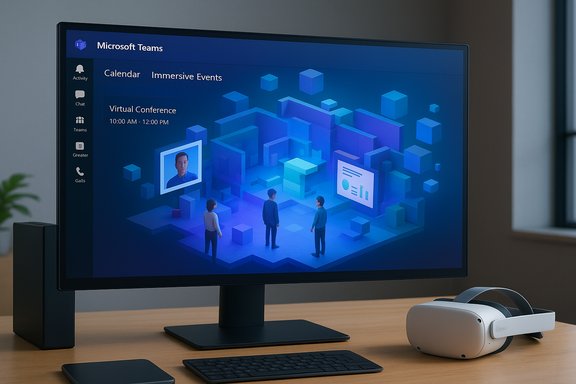
Microsoft quietly closed the chapter on its standalone Mesh platform on December 1, 2025, folding its avatar-driven, 3D meeting capabilities directly into Microsoft Teams as a new Immersive events feature that is now generally available—an explicit signal that Microsoft is consolidating mixed‑reality features into the core collaboration stack rather than maintaining a separate metaverse playbook.
Microsoft first introduced the Mesh concept as an ambitious attempt to bring persistent, avatar‑driven 3D spaces to enterprise collaboration. The original Mesh platform offered deep customizability—Unity‑based environments, immersive audio, and tooling for large multi‑room events—and was positioned as a separate product that coexisted with Teams. Internal and community collateral from Mesh’s active period detailed a spectrum of use cases from small team scrums to large town halls, with the Mesh toolchain supporting much larger crowds than Teams’ built-in 3D meeting view. By mid‑2025 Microsoft began a staged pivot: the Mesh Toolkit was retired, and the company announced plans to decommission Mesh web, the Mesh PC and Quest apps, and the “Immersive space (3D)” view in Teams on December 1, 2025. The company’s documentation and community channels make the timetable explicit and encourage organizations to migrate to the new Teams Immersive events experience.
Microsoft’s consolidation of Mesh into Teams is a pragmatic, product‑level realignment that will simplify delivery of immersive experiences for many organizations while forcing others to make careful tradeoffs between fidelity and manageability. For IT leaders, the immediate priorities are inventory, licensing, pilot validation, and governance alignment—actions that convert a technology transition into a manageable project with predictable outcomes. The transition is complete: Mesh as a standalone service is retired, and immersive event capability inside Teams is the company’s chosen path forward. The hard work now falls to IT and event producers who must convert strategy into production‑ready experiences that meet both user expectations and enterprise controls.
Source: THE Journal: Technological Horizons in Education 3D Meetings Come to Teams as Microsoft Retires Mesh Platform -- THE Journal
 Background
Microsoft first introduced the Mesh concept as an ambitious attempt to bring persistent, avatar‑driven 3D spaces to enterprise collaboration. The original Mesh platform offered deep customizability—Unity‑based environments, immersive audio, and tooling for large multi‑room events—and was positioned as a separate product that coexisted with Teams. Internal and community collateral from Mesh’s active period detailed a spectrum of use cases from small team scrums to large town halls, with the Mesh toolchain supporting much larger crowds than Teams’ built-in 3D meeting view. By mid‑2025 Microsoft began a staged pivot: the Mesh Toolkit was retired, and the company announced plans to decommission Mesh web, the Mesh PC and Quest apps, and the “Immersive space (3D)” view in Teams on December 1, 2025. The company’s documentation and community channels make the timetable explicit and encourage organizations to migrate to the new Teams Immersive events experience. What Microsoft changed — the facts IT teams need now
The concrete retirements and replacements
- Microsoft retired the standalone Microsoft Mesh platform effective December 1, 2025. The Mesh PC and Meta Quest apps are no longer supported, and the mesh.cloud.microsoft web portal has been decommissioned.
- The “Immersive space (3D)” meeting view that could be invoked inside Teams meetings is removed and replaced by the new Immersive events capability that lives in the Teams calendar.
- Mesh content creators and administrators are expected to transition their events and environments into Teams Immersive events; Microsoft provides templates and no‑code editors inside Teams to help with that migration.
Capabilities that move into Teams
- Immersive events let organizers create branded 3D venues inside Teams where attendees appear as avatars, navigate spaces, interact with 3D models, and view embedded videos or screenshares—without requiring Unity development skills. Organizers can sequence content and use templates for common scenarios such as all‑hands, training, and showcases.
- A new Action Groups feature lets presenters trigger animations, play media, or change visual elements live during an event—bringing some of the production control Mesh users expected.
Device and platform support
- Immersive events run on Windows and macOS desktops and on Meta Quest headsets; the Teams client is the primary access point. Microsoft explicitly states that immersive events are available on PC, Mac, and Meta Quest devices.
- Organizations that previously relied on Mesh headsets can re-enroll Quest devices under existing enterprise MDM solutions to access immersive events through Teams.
Side‑by‑side: Mesh (legacy) vs Teams Immersive (today)
Participant scale
- Mesh (legacy): designed for medium‑to‑large events and supported multi‑room experiences for as many as 330 participants in a Mesh event. This was a clear differentiator for large town halls and company‑wide gatherings.
- Teams Immersive (new): Microsoft positions the Teams immersive experiences in two ways—immersive spaces in Teams meetings (for small meetings, up to 16 people), and immersive events in Teams (the new GA capability for scheduled, customizable 3D events). For many scenarios the immersive events capability now replaces Mesh’s event role, albeit running from inside the Teams control plane.
Customization and development model
- Mesh (legacy) allowed richer Unity‑based custom environments and developer toolkits; organizations could craft highly tailored multi‑room experiences with complex interactions.
- Teams Immersive favors an integrated, no‑code / low‑code model: a built‑in editor, templates, and GLB support for 3D assets (previewed) let most event teams author experiences without Unity. Enterprise creators who need fine‑grained control will find Teams more limited than a full Unity pipeline—but far easier to adopt across a typical Microsoft 365 estate.
Management and governance
- Mesh required its own site/tooling for scheduling and templates; its retirement centralizes creation and scheduling in Teams calendar, bringing identity, security, compliance, and audit into the standard Microsoft 365 management boundary. Admins will manage events under the same Entra ID, Intune/MDM and Purview policies they already use for Teams.
Licensing and administration: what IT leaders should budget for
- Hosting immersive events requires a commercial Teams license and a Teams Premium subscription for the organizer—the person who schedules and manages the event. Attendees and co‑organizers can join with standard Microsoft 365 E3 or E5 licensing (or equivalent Teams commercial seats). This creates a clear licensing boundary: organizers need Premium; recipients do not necessarily need it.
- Organizations already using Teams Premium for advanced meeting protection, intelligent meeting recaps, or town‑hall controls will find immersive events included under those plans—potentially lowering incremental cost for teams that already license Premium. But teams that do not use Premium will need to factor organizer seats into budgets.
- From an admin perspective, the migration is deliberately conservative: immersive events use the same identity and compliance controls (Entra ID, Purview, Defender) that govern Teams. That means retention policies, eDiscovery, data loss prevention (DLP) and conditional access continue to apply to event artifacts (recordings, chat, files). IT should validate default retention and DLP behavior for immersive events before wide rollout.
Migration checklist for organizations still using Mesh
For administrators tasked with moving existing Mesh experiences into Teams, the migration path boils down to a short, practical set of actions:- Inventory: catalog all active Mesh events, templates, and custom environments—including any Unity assets that are business‑critical.
- Export assets: download and archive 3D models, media, and environment specifications. If you used Unity, gather GLTF/GLB exports where possible (Microsoft has signaled GLB support is coming for Teams custom environments).
- Recreate or repackage:
- For standard events, use Teams’ immersive events editor and existing templates.
- For advanced experiences, evaluate whether a hybrid approach (host the live 2D broadcast in Teams and use custom Unity experiences for a subset of participants) is acceptable during transition.
- Test: run a staged pilot with Teams Premium organizers and a mix of desktop & Quest endpoints to validate performance, media playback, and Action Groups behavior.
- Update governance: ensure Purview retention, DLP, and audit settings include immersive events and that Copilot/AI artifacts are governed in line with legal requirements.
- Communicate: notify users of the December 1 retirement cutoff and provide training resources to co‑organizers and producers.
Security, compliance and governance implications
Centralizing immersive experiences inside Teams offers immediate governance advantages: events inherit Entra identities, conditional access, and the Purview compliance surface. That simplifies auditing and reduces the attack surface compared with a separate cloud portal and standalone apps. However, there are cautionary points:- Data created during immersive events—recordings, chat messages, Q&A, and any generated artifacts produced by AI features—become discoverable content. Organizations must map these artifacts to retention and eDiscovery policies and consider whether AI‑generated summaries should be treated as authoritative records.
- External participants and guest access require careful configuration: allowing external users into immersive events increases phishing and impersonation risk if tenant settings are permissive. Admins should pilot with limited external audiences and enable domain and app trust controls where appropriate.
- Device management: Meta Quest devices must be enrolled and managed via standard MDM to enforce conditional access and apply security policies; this is the recommended path for enterprise use.
Practical limitations and user experience tradeoffs
- Scale versus polish: Mesh’s legacy multi‑room events supported far larger audiences (up to 330 attendees) and deeper Unity‑based customization. Teams Immersive is more integrated and easier to author, but the small‑group immersive view in Teams meetings remains capped at 16 participants—so careful planning is required for events that need many simultaneous, roaming attendees. Microsoft’s documentation clearly separates the use cases.
- Developer friction: organizations that invested heavily in Unity toolchains and bespoke Mesh environments will need to evaluate whether to rebuild in Teams, maintain a parallel custom experience, or convert assets to GLB and adapt to Teams’ editor model. Microsoft has announced preview capabilities (including GLB import), but full parity with Mesh authoring is not instant. Creators should expect a transition window and factor export/import validation into timelines.
- Accessibility and inclusion: immersive 3D events raise additional accessibility questions. Teams still offers established accessibility paths (captions, transcripts, and meeting artifacts), but 3D spaces bring non‑linear navigation and spatial audio which can be challenging for some users. Event designers should provide equivalent 2D streams or accessible paths inside the event.
Market context and strategic implications
Microsoft’s move to fold Mesh into Teams is consistent with a broader product strategy: prioritize features that scale inside the company’s dominant collaboration hub rather than maintain divergent, hardware‑oriented playbooks. Analysts and industry writers have framed the change as Microsoft taking a pragmatic step back from the grander “metaverse” ambitions of earlier years and aligning with the corporate, cloud‑centric collaboration playbook that underpins Microsoft 365. This shift also follows a period of hardware retrenchment: Microsoft scaled back HoloLens hardware investment in 2024 and refocused work with defense partners; the company has moved away from running separate mixed‑reality ecosystems and towards partnerships with other headset vendors while delivering platform services. That context explains why immersive experiences are now a feature in Teams rather than a standalone product. Readers should view the Mesh retirement as a strategic consolidation rather than a simple product discontinuation.Risks, unanswered questions and items that need watching
- Feature parity: Microsoft’s documentation and third‑party reporting confirm the transition, but some advanced Mesh features—particularly bespoke Unity interactions and large multi‑room scaling for thousands of simultaneous avatars—are not directly matched feature‑for‑feature in Teams today. Organizations must evaluate any functional gaps and plan mitigation.
- Licensing economics: Teams Premium is the gating mechanism for organizers. For large enterprises with many event producers, Premium licensing costs could rise materially if every event organizer requires a license. IT budget owners must map current Mesh organizer seats to Teams Premium seats and plan accordingly.
- Performance and quality tradeoffs: running immersive events through the Teams stack guarantees easier management, but practical performance across diverse enterprise networks and mixed endpoint fleets (Windows PCs, macOS devices, Quest headsets) needs validation. Conduct pilots on representative network paths before committing major events to Teams Immersive.
- Long‑term roadmap and developer tooling: Microsoft has stated intentions to add custom environment support (GLB) and enhancements, but timelines for parity with Mesh’s developer toolkit remain subject to change. Organizations that rely on advanced custom interactions should keep an eye on Microsoft’s community hub posts and roadmap entries for developer updates.
A pragmatic verdict for Windows administrators and event owners
Moving Mesh’s 3D meeting features into Teams removes complexity for many organizations: one control plane, unified governance, and reduced endpoint management headaches. For routine internal events, company town halls, training sessions and onboarding, Teams Immersive events will make immersive experiences far easier to plan and deliver, and will integrate more cleanly with recordkeeping and compliance processes. That said, organizations with heavy investments in bespoke Unity environments, or those that relied on Mesh for very large multi‑room experiences at scale, will face real migration decisions: rebuild inside Teams (accepting some functional tradeoffs), maintain a parallel Unity‑based system and integrate via broadcast, or negotiate a phased sunset. The technical and commercial tradeoffs are real and require explicit planning in IT roadmaps.Tactical next steps (summary list)
- Audit: list all Mesh events, environments and creators.
- License mapping: quantify how many Teams Premium organizer seats you will need and calculate budget impact.
- Pilot: run at least one pilot immersive event from Teams (desktop + Quest) to validate media playback, Action Groups, and attendee experience.
- Export & archive: extract 3D assets and media from Mesh, move them into a corporate asset repository, and convert to GLB where possible.
- Governance: extend Purview/DLP/audit rules to include immersive event artifacts; define retention for AI‑generated outputs.
Microsoft’s consolidation of Mesh into Teams is a pragmatic, product‑level realignment that will simplify delivery of immersive experiences for many organizations while forcing others to make careful tradeoffs between fidelity and manageability. For IT leaders, the immediate priorities are inventory, licensing, pilot validation, and governance alignment—actions that convert a technology transition into a manageable project with predictable outcomes. The transition is complete: Mesh as a standalone service is retired, and immersive event capability inside Teams is the company’s chosen path forward. The hard work now falls to IT and event producers who must convert strategy into production‑ready experiences that meet both user expectations and enterprise controls.
Source: THE Journal: Technological Horizons in Education 3D Meetings Come to Teams as Microsoft Retires Mesh Platform -- THE Journal
