

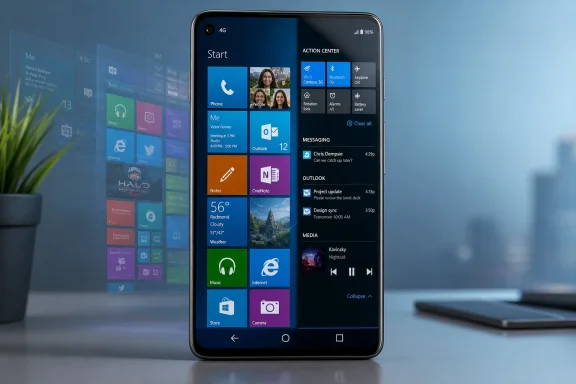
Android users nostalgic for Windows Phone can now get a convincing Lumia-style experience through METROV, an Android launcher that recreates the Windows Phone 8.1 Start screen, live tiles, app list, and Action Center on modern devices such as Google’s Pixel 10 Pro. That is a small software story with a larger point: Microsoft’s abandoned phone interface still solves a problem Android and iOS keep complicating. The home screen, after all, is not just decoration; it is the operating system’s argument about what deserves attention. METROV works because it revives an argument Microsoft made too early, then failed to sustain.
The strange afterlife of Windows Phone has always been more interesting than its market share. Microsoft’s mobile platform died in the most measurable way possible: developers left, hardware partners disappeared, users moved on, and Microsoft eventually accepted that Android and iOS had already won. Yet the interface never quite died with it.
That is because Windows Phone was not merely another grid of icons. Its Metro design language treated the phone home screen as a living dashboard, not a parking lot. Apps were not just destinations; they were surfaces. The Start screen could show messages, calendar events, photos, weather, music, and people in a vertical rhythm that felt both playful and organized.
Android eventually became vastly more capable, more flexible, and more successful. But its default home-screen metaphor still owes more to the desktop and the app drawer than to the glanceable information architecture Microsoft tried to popularize. Widgets help, but they are often visually inconsistent, spatially awkward, and dependent on each app developer’s design taste.
That is where METROV finds its opening. It does not try to resurrect Windows Phone as an operating system. It resurrects Windows Phone as a home-screen philosophy, and that distinction matters.
Windows Phone 8.1 was the version that made the Start screen feel mature. It had the familiar tiles, the vertical scroll, the strong typography, and the sense that the whole device was one coherent surface. Windows 10 Mobile, by contrast, carried the burden of Microsoft’s broader Windows convergence project, and often felt less like a phone-first interface than a compromise waiting for a strategy to arrive.
METROV’s appeal comes from getting that emotional memory right. The tiled grid, the app list, the accent-color logic, the parallax-style wallpaper movement, and the disciplined spacing all work together to trigger recognition. It is not enough for a launcher to put squares on a screen; many have tried that and produced something that looks like Android wearing a costume. METROV gets closer to the original because it understands the tempo of the interface.
That tempo is especially clear on a large modern phone. A Pixel 10 Pro has far more screen, power, and display quality than a Lumia 520 ever did, but the old layout scales surprisingly well. The vertical Start screen remains one of the cleanest answers to the oversized-phone problem: put the most important things in one scrolling column and stop pretending every action needs another folder, page, or gesture.
METROV is more interesting because it grafts Android features onto the Metro idea. Android widgets can sit inside the tiled layout, giving the Start screen access to the ecosystem Microsoft never had at scale. Animation settings can be adjusted or synchronized with Android’s system animation speed, which helps the illusion feel less like a skin and more like a native environment.
The customization options also expose one of Windows Phone’s old weaknesses. Microsoft’s interface was beautiful, but it was often paternalistic. Users could pick accent colors, resize tiles, and make some visual choices, but the platform’s design discipline sometimes shaded into rigidity. METROV keeps the discipline while loosening the grip.
That flexibility matters. Users can choose four, six, or eight columns; change tile spacing; use transparent tiles; lean into app-specific colors; or push the home screen toward a full-screen background reminiscent of later Windows Mobile designs. The result is not a museum piece. It is closer to a modern remix of an interface that deserved more years of iteration than Microsoft gave it.
Windows Phone tried to make the Start screen the stitch. A tile could be a launcher, a status indicator, a miniature information panel, and a design element at the same time. When it worked, the phone felt unusually calm. You did not need to dive into an app just to know whether something mattered.
METROV cannot fully recreate the original live-tile ecosystem because Android was not built around that model. Still, its dynamic tiles and widget support point in the same direction. They make the home screen feel less like a launchpad and more like an instrument panel.
There are limits. Some live tiles reportedly need manual refreshing. Some image previews and enlarged app icons can look low-resolution. Some Android widgets scale awkwardly when the grid is made denser. These are not trivial defects, because the whole premise of Metro is visual coherence; one ugly or stale tile can break the spell.
But the fact that the spell exists at all is notable. On Android, where launchers frequently compete by adding more controls, folders, gestures, and theme packs, METROV’s advantage is that it removes clutter while still surfacing information. That was always the Windows Phone bargain.
By building its own Action Center, METROV narrows that gap. Users can check notifications, control media playback, and toggle some settings without constantly returning to Android’s native shade. It is not a full replacement, but it is a strong design move because it extends the Metro illusion beyond the Start screen.
The limitation is that a launcher cannot become a real operating system shell on Android without running into platform boundaries. It can present notifications, but it cannot own the entire notification model. It can expose toggles, but it may not offer every setting a user expects. Mobile data, eye-comfort modes, and other device-specific controls can still force a trip back into stock Android territory.
That is not METROV’s fault so much as Android’s architecture asserting itself. Third-party launchers are powerful, but they are guests. They can change the front door and rearrange the foyer; they cannot rebuild the house.
This is why METROV’s success is also a reminder of what Microsoft lost. Windows Phone’s interface worked because the Start screen, notification model, typography, animations, and app design rules all came from one system-level vision. Android can imitate that vision impressively, but it cannot fully become it.
But the economics of launchers are not what they were during Android’s earlier enthusiast era. A polished launcher has to survive API changes, OEM quirks, new Android versions, foldables, permissions changes, widget weirdness, and the expectations of users who want both novelty and daily reliability. If the developer is actively maintaining the app, a premium model is not unreasonable.
The real question is whether the free version gives users enough time and functionality to understand the product. A three-day premium trial helps, but it also compresses judgment. Launchers reveal their flaws slowly: a missed notification here, a widget scaling issue there, a stutter that only appears when the phone is hot or the app cache is messy.
A monthly option can make sense as an extended trial, even if most users will see a lifetime purchase as the cleaner choice. The subscription model feels odd for a nostalgic launcher, but the maintenance burden is ongoing. If users want these projects to be more than weekend experiments, someone has to pay for the unglamorous compatibility work.
That makes third-party projects like METROV more culturally interesting. They are not trying to support Microsoft’s current strategy. They are preserving a path Microsoft abandoned. In a healthier software culture, that kind of preservation matters.
Android’s openness makes this possible. Apple would never allow an iPhone launcher to rewrite the home-screen experience this deeply. Android still permits enough surface-level reinvention that a user can make a modern Pixel feel like a Lumia descendant without rooting the device or installing a custom ROM. That is one of Android’s underrated strengths.
It also reveals a tension in Google’s own design direction. Pixel software is increasingly shaped around AI features, assistant surfaces, predictive shortcuts, and Google services. METROV pushes in the opposite direction: a simpler, more spatially obvious interface where the user pins what matters and sees it immediately. In an era of algorithmic homescreens, there is something refreshing about a screen that behaves like a deliberate layout.
That matters when evaluating a launcher running on a modern Pixel. The Pixel 10 Pro is an expensive, AI-forward, high-end Android device. The Lumia 520 was a budget phone from a different mobile economy. Yet the emotional through-line is not performance; it is clarity.
Windows Phone made low-end hardware feel less compromised because the interface was visually economical. Animations were bold but simple. Tiles were flat. Typography carried much of the personality. The operating system did not need dense iconography or heavy visual effects to feel modern.
That is why the design still travels well. Put the same logic on a bright, fast, high-refresh display and it does not feel ancient. It feels like an alternate future that never received the funding, developer support, and executive patience it needed.
Metro was not just squares and colors. It was a discipline of motion, spacing, hierarchy, and restraint. If scrolling stutters, the vertical Start screen loses its smooth poster-like quality. If tiles fail to update, the dashboard metaphor weakens. If icons look blurry at larger tile sizes, the whole interface starts to resemble a theme pack rather than a system.
That does not mean METROV is unusable. Reports suggest it is already stable enough for daily use, which is impressive for a launcher attempting this much visual and behavioral transformation. But the remaining bugs define the difference between a nostalgic novelty and a long-term home-screen replacement.
For enthusiasts, that may be acceptable. The Windows Phone faithful are used to compromise; they lived through app gaps, uncertain roadmaps, and Microsoft’s shifting mobile priorities. For ordinary Android users, the bar is higher. A launcher has to disappear into muscle memory, not become another hobby.
Live tiles anticipated the modern hunger for glanceable information. The People hub anticipated a more humane alternative to app-by-app social silos. The Start screen anticipated the desire to make a phone feel personalized without becoming chaotic. Even the strong typographic identity stands out today, when many mobile interfaces have converged into rounded rectangles, cards, and bottom tabs.
Microsoft eventually pivoted toward meeting users where they were: Office on iOS and Android, Microsoft 365 everywhere, Phone Link, Copilot, Edge, OneDrive, Teams, and enterprise identity across platforms. That strategy makes business sense. It also means the company’s most distinctive consumer mobile interface now survives mostly through fans, launchers, and memory.
There is an irony here. Microsoft could not make Windows Phone win as a platform, but Android can make Windows Phone viable as an interface layer. The operating system that defeated it now hosts its ghost.
That is the deeper appeal of launchers. They let users reject the default answer. Stock Android says the home screen is a flexible grid with widgets, search, and app icons. Samsung says it is a branded layer integrated with Galaxy services. Apple says it is a carefully managed space with limited customization. METROV says the phone should be a vertical dashboard of living tiles.
For Windows enthusiasts, that choice has emotional force. It is not simply about pretending a Pixel is a Lumia. It is about recovering a mode of computing that felt more intentional than the app-icon monoculture that won.
There is also a practical case. A single scrolling Start screen can reduce home-screen sprawl. Tiles can make priorities visible. A coherent accent-color system can make customization feel designed rather than accumulated. The nostalgia is real, but the usability argument is not imaginary.
 Windows Phone Lost the Market but Not the Design Argument
The strange afterlife of Windows Phone has always been more interesting than its market share. Microsoft’s mobile platform died in the most measurable way possible: developers left, hardware partners disappeared, users moved on, and Microsoft eventually accepted that Android and iOS had already won. Yet the interface never quite died with it.That is because Windows Phone was not merely another grid of icons. Its Metro design language treated the phone home screen as a living dashboard, not a parking lot. Apps were not just destinations; they were surfaces. The Start screen could show messages, calendar events, photos, weather, music, and people in a vertical rhythm that felt both playful and organized.
Android eventually became vastly more capable, more flexible, and more successful. But its default home-screen metaphor still owes more to the desktop and the app drawer than to the glanceable information architecture Microsoft tried to popularize. Widgets help, but they are often visually inconsistent, spatially awkward, and dependent on each app developer’s design taste.
That is where METROV finds its opening. It does not try to resurrect Windows Phone as an operating system. It resurrects Windows Phone as a home-screen philosophy, and that distinction matters.
METROV Understands That the Lumia Feeling Was Mostly the Start Screen
The most important choice METROV makes is also the least fashionable one: it aims at Windows Phone 8.1 rather than Windows 10 Mobile. That may sound like a niche distinction, but for people who actually used Lumias, it is the difference between remembering the platform at its confident peak and remembering it during its long goodbye.Windows Phone 8.1 was the version that made the Start screen feel mature. It had the familiar tiles, the vertical scroll, the strong typography, and the sense that the whole device was one coherent surface. Windows 10 Mobile, by contrast, carried the burden of Microsoft’s broader Windows convergence project, and often felt less like a phone-first interface than a compromise waiting for a strategy to arrive.
METROV’s appeal comes from getting that emotional memory right. The tiled grid, the app list, the accent-color logic, the parallax-style wallpaper movement, and the disciplined spacing all work together to trigger recognition. It is not enough for a launcher to put squares on a screen; many have tried that and produced something that looks like Android wearing a costume. METROV gets closer to the original because it understands the tempo of the interface.
That tempo is especially clear on a large modern phone. A Pixel 10 Pro has far more screen, power, and display quality than a Lumia 520 ever did, but the old layout scales surprisingly well. The vertical Start screen remains one of the cleanest answers to the oversized-phone problem: put the most important things in one scrolling column and stop pretending every action needs another folder, page, or gesture.
The Best Nostalgia Apps Improve the Memory Instead of Freezing It
Pure imitation would have been a dead end. Windows Phone was elegant, but it was also constrained by the hardware, APIs, and platform politics of its era. A launcher that copied it too faithfully would be charming for an afternoon and frustrating by dinner.METROV is more interesting because it grafts Android features onto the Metro idea. Android widgets can sit inside the tiled layout, giving the Start screen access to the ecosystem Microsoft never had at scale. Animation settings can be adjusted or synchronized with Android’s system animation speed, which helps the illusion feel less like a skin and more like a native environment.
The customization options also expose one of Windows Phone’s old weaknesses. Microsoft’s interface was beautiful, but it was often paternalistic. Users could pick accent colors, resize tiles, and make some visual choices, but the platform’s design discipline sometimes shaded into rigidity. METROV keeps the discipline while loosening the grip.
That flexibility matters. Users can choose four, six, or eight columns; change tile spacing; use transparent tiles; lean into app-specific colors; or push the home screen toward a full-screen background reminiscent of later Windows Mobile designs. The result is not a museum piece. It is closer to a modern remix of an interface that deserved more years of iteration than Microsoft gave it.
Live Tiles Still Make Widgets Look Messy
The most damning thing about Windows Phone nostalgia is that live tiles still feel conceptually sharper than many modern widgets. Apple and Google have both spent years refining glanceable information, but the result is often a split personality: icons here, widgets there, notification cards somewhere else, quick settings above it all. The user stitches the system together mentally.Windows Phone tried to make the Start screen the stitch. A tile could be a launcher, a status indicator, a miniature information panel, and a design element at the same time. When it worked, the phone felt unusually calm. You did not need to dive into an app just to know whether something mattered.
METROV cannot fully recreate the original live-tile ecosystem because Android was not built around that model. Still, its dynamic tiles and widget support point in the same direction. They make the home screen feel less like a launchpad and more like an instrument panel.
There are limits. Some live tiles reportedly need manual refreshing. Some image previews and enlarged app icons can look low-resolution. Some Android widgets scale awkwardly when the grid is made denser. These are not trivial defects, because the whole premise of Metro is visual coherence; one ugly or stale tile can break the spell.
But the fact that the spell exists at all is notable. On Android, where launchers frequently compete by adding more controls, folders, gestures, and theme packs, METROV’s advantage is that it removes clutter while still surfacing information. That was always the Windows Phone bargain.
The Action Center Shows Why a Launcher Can Only Go So Far
METROV’s swipe-right Action Center is one of its cleverest additions because it attacks the most obvious weakness in any launcher-based resurrection: Android still owns the system layer. Notifications, quick settings, permissions, media controls, and background behavior all live below the launcher’s authority. A Metro-style home screen can look like Windows Phone, but the moment the user pulls down Android’s notification shade, the fantasy cracks.By building its own Action Center, METROV narrows that gap. Users can check notifications, control media playback, and toggle some settings without constantly returning to Android’s native shade. It is not a full replacement, but it is a strong design move because it extends the Metro illusion beyond the Start screen.
The limitation is that a launcher cannot become a real operating system shell on Android without running into platform boundaries. It can present notifications, but it cannot own the entire notification model. It can expose toggles, but it may not offer every setting a user expects. Mobile data, eye-comfort modes, and other device-specific controls can still force a trip back into stock Android territory.
That is not METROV’s fault so much as Android’s architecture asserting itself. Third-party launchers are powerful, but they are guests. They can change the front door and rearrange the foyer; they cannot rebuild the house.
This is why METROV’s success is also a reminder of what Microsoft lost. Windows Phone’s interface worked because the Start screen, notification model, typography, animations, and app design rules all came from one system-level vision. Android can imitate that vision impressively, but it cannot fully become it.
The Paywall Is a Product Decision, Not Just a Grievance
The other friction point is money. METROV locks several of its more interesting features behind a premium tier, including Action Center, dynamic tiles, default-icon changes, and other customization options. For users casually sampling nostalgia, that may feel like a wall placed exactly where the fun begins.But the economics of launchers are not what they were during Android’s earlier enthusiast era. A polished launcher has to survive API changes, OEM quirks, new Android versions, foldables, permissions changes, widget weirdness, and the expectations of users who want both novelty and daily reliability. If the developer is actively maintaining the app, a premium model is not unreasonable.
The real question is whether the free version gives users enough time and functionality to understand the product. A three-day premium trial helps, but it also compresses judgment. Launchers reveal their flaws slowly: a missed notification here, a widget scaling issue there, a stutter that only appears when the phone is hot or the app cache is messy.
A monthly option can make sense as an extended trial, even if most users will see a lifetime purchase as the cleaner choice. The subscription model feels odd for a nostalgic launcher, but the maintenance burden is ongoing. If users want these projects to be more than weekend experiments, someone has to pay for the unglamorous compatibility work.
Android’s Launcher Culture Keeps Microsoft’s Best Mobile Idea Alive
METROV is not alone. Square Home and Launcher 10 have long served users who want Windows-style tiles on Android, and Microsoft itself maintains Microsoft Launcher as a more productivity-oriented Android experience. The difference is that Microsoft Launcher is not really a Windows Phone revival. It is an Android launcher with Microsoft services and a pragmatic cross-device agenda.That makes third-party projects like METROV more culturally interesting. They are not trying to support Microsoft’s current strategy. They are preserving a path Microsoft abandoned. In a healthier software culture, that kind of preservation matters.
Android’s openness makes this possible. Apple would never allow an iPhone launcher to rewrite the home-screen experience this deeply. Android still permits enough surface-level reinvention that a user can make a modern Pixel feel like a Lumia descendant without rooting the device or installing a custom ROM. That is one of Android’s underrated strengths.
It also reveals a tension in Google’s own design direction. Pixel software is increasingly shaped around AI features, assistant surfaces, predictive shortcuts, and Google services. METROV pushes in the opposite direction: a simpler, more spatially obvious interface where the user pins what matters and sees it immediately. In an era of algorithmic homescreens, there is something refreshing about a screen that behaves like a deliberate layout.
The Lumia 520 Legacy Is Bigger Than Its Specs
The Lumia 520 remains a useful symbol because it was never a luxury device. It was cheap, colorful, sturdy, and approachable. For many users, especially outside the flagship bubble, it was the phone that made Windows Phone feel real.That matters when evaluating a launcher running on a modern Pixel. The Pixel 10 Pro is an expensive, AI-forward, high-end Android device. The Lumia 520 was a budget phone from a different mobile economy. Yet the emotional through-line is not performance; it is clarity.
Windows Phone made low-end hardware feel less compromised because the interface was visually economical. Animations were bold but simple. Tiles were flat. Typography carried much of the personality. The operating system did not need dense iconography or heavy visual effects to feel modern.
That is why the design still travels well. Put the same logic on a bright, fast, high-refresh display and it does not feel ancient. It feels like an alternate future that never received the funding, developer support, and executive patience it needed.
The Bugs Matter Because Metro Is a Discipline
METROV’s reported rough edges should not be dismissed as ordinary launcher annoyances. A jittery scroll, a black screen after exiting an app, duplicate email notifications, stale live tiles, and unscrollable widgets all hit harder in a Metro-style launcher than they might elsewhere. The entire aesthetic depends on confidence.Metro was not just squares and colors. It was a discipline of motion, spacing, hierarchy, and restraint. If scrolling stutters, the vertical Start screen loses its smooth poster-like quality. If tiles fail to update, the dashboard metaphor weakens. If icons look blurry at larger tile sizes, the whole interface starts to resemble a theme pack rather than a system.
That does not mean METROV is unusable. Reports suggest it is already stable enough for daily use, which is impressive for a launcher attempting this much visual and behavioral transformation. But the remaining bugs define the difference between a nostalgic novelty and a long-term home-screen replacement.
For enthusiasts, that may be acceptable. The Windows Phone faithful are used to compromise; they lived through app gaps, uncertain roadmaps, and Microsoft’s shifting mobile priorities. For ordinary Android users, the bar is higher. A launcher has to disappear into muscle memory, not become another hobby.
Microsoft’s Mobile Failure Looks Stranger as Its Ideas Keep Returning
The longer Windows Phone is gone, the more Microsoft’s mobile failure looks like a failure of ecosystem and timing rather than imagination. The company missed apps, carrier momentum, developer enthusiasm, and perhaps most importantly, organizational consistency. But the design ideas were not foolish.Live tiles anticipated the modern hunger for glanceable information. The People hub anticipated a more humane alternative to app-by-app social silos. The Start screen anticipated the desire to make a phone feel personalized without becoming chaotic. Even the strong typographic identity stands out today, when many mobile interfaces have converged into rounded rectangles, cards, and bottom tabs.
Microsoft eventually pivoted toward meeting users where they were: Office on iOS and Android, Microsoft 365 everywhere, Phone Link, Copilot, Edge, OneDrive, Teams, and enterprise identity across platforms. That strategy makes business sense. It also means the company’s most distinctive consumer mobile interface now survives mostly through fans, launchers, and memory.
There is an irony here. Microsoft could not make Windows Phone win as a platform, but Android can make Windows Phone viable as an interface layer. The operating system that defeated it now hosts its ghost.
The Pixel-as-Lumia Experiment Is Really About Control
A Pixel 10 Pro running METROV is not a Nokia Lumia. It has Google services, Android permissions, Pixel camera processing, Gemini-era software assumptions, and the modern Play Store ecosystem underneath. But as a daily interaction model, it can make the phone feel less like Google’s device and more like the user’s.That is the deeper appeal of launchers. They let users reject the default answer. Stock Android says the home screen is a flexible grid with widgets, search, and app icons. Samsung says it is a branded layer integrated with Galaxy services. Apple says it is a carefully managed space with limited customization. METROV says the phone should be a vertical dashboard of living tiles.
For Windows enthusiasts, that choice has emotional force. It is not simply about pretending a Pixel is a Lumia. It is about recovering a mode of computing that felt more intentional than the app-icon monoculture that won.
There is also a practical case. A single scrolling Start screen can reduce home-screen sprawl. Tiles can make priorities visible. A coherent accent-color system can make customization feel designed rather than accumulated. The nostalgia is real, but the usability argument is not imaginary.
The Windows Phone Afterlife Has a Checklist Now
METROV is not proof that Microsoft should relaunch Windows Phone, and it is not proof that Android launchers can replace deeply integrated operating-system design. It is proof that a coherent interface idea can outlive the platform that carried it. For anyone tempted to try the Lumia look on a modern Android phone, the practical picture is fairly clear.- METROV appears strongest for users who prefer the Windows Phone 8.1 look over the later Windows 10 Mobile aesthetic.
- The launcher’s best trick is combining Metro-style tiles with Android widgets, which makes the old design feel more useful on current hardware.
- The Action Center helps preserve the illusion, but Android’s native notification shade and quick settings still remain necessary for some controls.
- The premium tier is where several of the most distinctive features live, so the free version is better treated as a preview than the full experience.
- The remaining bugs matter because Metro-style design depends heavily on smooth motion, crisp visuals, and reliable live information.
- Square Home and Launcher 10 remain alternatives, but METROV’s Windows Phone 8.1 focus gives it a sharper identity for Lumia nostalgics.
References
- Primary source: How-To Geek
Published: 2026-05-19T15:20:08.545209
This launcher turned my Pixel into a Nokia Lumia Windows Phone
Even better than the original. www.howtogeek.com
- Related coverage: windowscentral.com
"First time in years I didn't uninstall a WP launcher after 10 minutes": METROV could be a hit if you loved the look of Windows Phone 8.1 | Windows Central
Windows Central readers seem to agree it's not perfect, but the METROV launcher is certainly gaining traction.www.windowscentral.com - Related coverage: androidheadlines.com
Sponsored App Review: Metro UI Launcher 8
Description: Metro UI Launcher 8 is an Android launcher for smartphones and tablets that, unsurprisingly, brings some Windows 8 to Android. It's www.androidheadlines.com
- Related coverage: androidcentral.com
Google Pixel 10 Pro Fold software updates: How many will it get? | Android Central
The Pixel 10 Pro Fold will be updated for many, many years, and its new hinge is designed to outlive the software update cycle.www.androidcentral.com - Related coverage: tomshardware.com
Google switches from Samsung to TSMC — Pixel 10 and Tensor G5 chip use TSMC's N3P process | Tom's Hardware
Ahead of Apple, it seems.www.tomshardware.com - Related coverage: techradar.com
Google Pixel 10 lineup – 5 key upgrades including Pixelsnap, Tensor G5, and Camera Coach | TechRadar
Four new phones, five key upgradeswww.techradar.com
- Related coverage: launchertrends.com
Metro Launcher - Windows Phone nostalgia reimagined | LauncherTrends
Bring back the beloved Windows Phone tile interface with a modern twist. Metro Launcher features live tiles, smooth animations, and the iconic Metro design language. launchertrends.com
- Related coverage: drwindows.de
Tipp - Metrov: Neuer Android-Launcher im Windows Phone-Stil | Dr. Windows
Ich bin eben über den Beitrag bei Windows Central gestolpert. Da hat sich aber jemand ziemlich viel Mühe gegeben, um Windows Phone 8.1 richtig nachzubauen...www.drwindows.de - Related coverage: phonearena.com
Google Pixel 10 Pro Review: New brains, old clothes - PhoneArena
The Pixel 10 Pro looks very similar to its predecessor, but is this really the case? Read on to find out!www.phonearena.com - Related coverage: makeuseof.com
I've used vanilla Android for a decade and I regret not installing this launcher sooner
I’ve always loved the simplicity of stock Android, until this launcher showed me what I was missing. www.makeuseof.com
- Related coverage: investing.com
Google Pixel 10 series debuts with advanced Gemini AI and Tensor G5 chip By Investing.com
Google Pixel 10 series debuts with advanced Gemini AI and Tensor G5 chipwww.investing.com - Related coverage: bongbytes.com
- Related coverage: tdsynnex.com
