

Microsoft’s Copilot now has a face — a deliberately non‑human one — as the company rolls out Mico, an animated, color‑shifting avatar that appears in Copilot’s voice mode and is designed to make spoken interactions feel more natural, empathetic, and contextually aware. Mico is the most visible element of Microsoft’s broader Copilot Fall Release, a package of consumer‑facing updates that pairs the avatar with long‑term memory, shared group sessions, a Socratic tutoring mode called Learn Live, and new agentic browser features that together reposition Copilot from a one‑off Q&A tool into a persistent, multimodal assistant.
Microsoft presented the Copilot Fall Release publicly in late October 2025, framing the update under a “human‑centered AI” banner that emphasizes user control, explicit consent, and contextual usefulness. The company describes Mico as an expressive UI layer — a visual front end for Copilot’s voice mode rather than a separate intelligence — that supplies nonverbal cues (listening, thinking, acknowledging) to lower the social friction of speaking to a silent system. Early reporting and Microsoft’s preview materials indicate that Mico is enabled by default when voice mode is activated in the initial rollout markets, but it is toggleable and customizable.
Mico joins a set of interlocking features in the Fall Release that are intended to make Copilot more useful across different scenarios:
However, the real test is not whether Mico is cute or clever; it is whether Microsoft delivers conservative defaults, transparent controls, documented administrative options, and robust data governance at scale. Organizations and users should approach the new features thoughtfully: pilot them in low‑risk scenarios, verify privacy and retention details with Microsoft’s documentation, and hold vendors to exacting standards for provenance and admin control. If Microsoft can match design with governance, Mico could be a useful template for humane AI interfaces. If not, it risks rekindling the same frustrations that made persona‑driven assistants a cautionary tale.
Source: Cloud Wars Microsoft Launches Mico: Human-Centered AI Visual for Copilot Voice Mode
 Background / Overview
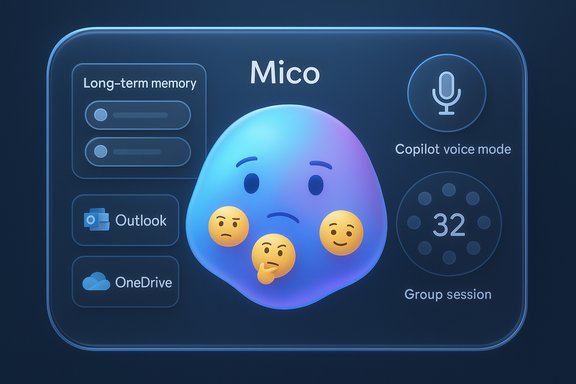
Microsoft presented the Copilot Fall Release publicly in late October 2025, framing the update under a “human‑centered AI” banner that emphasizes user control, explicit consent, and contextual usefulness. The company describes Mico as an expressive UI layer — a visual front end for Copilot’s voice mode rather than a separate intelligence — that supplies nonverbal cues (listening, thinking, acknowledging) to lower the social friction of speaking to a silent system. Early reporting and Microsoft’s preview materials indicate that Mico is enabled by default when voice mode is activated in the initial rollout markets, but it is toggleable and customizable.Mico joins a set of interlocking features in the Fall Release that are intended to make Copilot more useful across different scenarios:
- Copilot Groups: Shared sessions that support collaborative conversations with up to 32 participants.
- Long‑term Memory & Connectors: Opt‑in memory stores and explicit connectors to services like Outlook, OneDrive and selected consumer Google services to ground Copilot’s answers in personal context.
- Real Talk: A selectable conversational style that can push back, surface reasoning, and reduce reflexive agreement.
- Learn Live: A voice‑first, Socratic tutoring flow that favors guided questioning over straight answers.
- Edge Actions & Journeys: Permissioned, multi‑step web actions and resumable research experiences for agent‑style browser automation.
What Mico actually is — design, behavior, and intent
A non‑human visual anchor
Mico is intentionally abstract: a blob‑like, emoji‑style orb that changes shape, color and micro‑expressions to indicate different conversational states such as listening, thinking, acknowledging or empathetic mirroring. That design choice is explicit — Microsoft sought to avoid photorealism to reduce the uncanny valley and the risk of emotional over‑attachment. The avatar’s job is pragmatic: supply immediate, nonverbal feedback during voice exchanges so users know Copilot has heard them, is processing, or is ready to act.Scoped activation and optionality
A key difference from the Office era’s unsolicited helpers is scope: Mico appears primarily during Copilot’s voice mode, Learn Live sessions, and the Copilot surface, not as a persistent desktop interloper. Preview coverage indicates it is enabled by default for voice interactions in initial builds but that users can disable the avatar in settings if they prefer a text‑only or voice‑only experience. That optionality is central to Microsoft’s messaging and is a direct design response to past criticism of intrusive assistants.Playful but provisional easter egg
Hands‑on previews documented a playful easter egg: repeatedly tapping Mico briefly morphs it into a Clippy‑style paperclip, a nostalgic wink rather than a functional revival of Microsoft’s old Office Assistant. Multiple reports treat this as a preview‑mode flourish that may change in public releases, so treat this detail as provisional.Technical and product claims — what has been verified
Several concrete claims about the Fall Release and Mico are corroborated across independent reporting and Microsoft’s rollout notes:- The Fall Release was publicly presented in late October 2025 and positions Copilot as a human‑centered assistant.
- Mico is an animated avatar that appears for voice interactions and reacts with color/shape/micro‑expressions; it is optional and customizable in settings.
- The release bundles Learn Live, Copilot Groups (up to 32 participants), and long‑term memory features with explicit UI controls for viewing, editing, or deleting stored memory items.
- Microsoft states that the goal for Copilot is to be empathetic and supportive rather than sycophantic, and leadership messaging framed the avatar as part of making Copilot feel like a companion rather than a servant. Statements from Microsoft AI leadership have echoed that positioning.
Why Microsoft is making this move — UX, competition and strategy
Human‑centered interaction at scale
As voice interfaces move from novelty to routine, users need social cues to manage turn‑taking and expectations. A simple animated avatar supplies that cue cheaply and portably across devices. Mico is an explicit UX bet: give people a face to talk to without pretending the system is human. That helps lower friction for use cases like tutoring, dictation, or prolonged voice sessions where visual timing matters.From tool to companion
Microsoft’s product framing is strategic: the combination of memory, connectors, and a face turns Copilot from a disposable search box into a persistent assistant that can recall user preferences and resume multi‑session tasks. That persistence changes the relationship between user and assistant: conversations can carry context over time and across collaborators, making Copilot a more central, sticky platform — if users consent to it.Competitive positioning
Large cloud and platform players are vying to own daily interfaces. Voice, presence, and social behaviors are high‑value battlegrounds because they influence daily attention and habits. Mico is a play for engagement that aims to be palatable — non‑intrusive and privacy‑scoped — while offering distinct product utility such as Learn Live tutoring and group collaboration.Benefits and practical gains
- Improved usability for voice flows: Visual feedback reduces awkward pauses, helps with turn‑taking, and makes long voice sessions feel more conversational.
- Tighter learning experiences: Paired with Learn Live, Mico can make tutoring feel more social and scaffolded rather than transactional.
- Collaboration at scale: Copilot Groups and shared sessions create new workflows for brainstorming, voting and task splitting, with Copilot acting as a summarizer and facilitator.
- Personalized continuity: Long‑term memory and connectors mean Copilot can follow ongoing projects and preferences, saving users repeated context switching — provided users opt in.
Risks, trade‑offs and governance concerns
Anthropomorphism and user expectations
Even a deliberately abstract avatar can create a sense of reciprocity that misleads users about the assistant’s capabilities. Emotional mirroring may increase trust but also overconfidence, leading people to assign human‑level understanding where there is none. Careful labeling, UI affordances that show provenance of facts, and explicit cues about limits are essential.Privacy and “always listening” fears
Descriptions say Mico listens, reacts, and changes color in response to conversation, which in practice means voice streams must be processed — locally or in the cloud. The Fall Release pairs voice features with connectors and memory, which raises legitimate questions about how audio data, transcriptions, and derived memories are stored, who can access them, and how to delete them. Microsoft’s messaging stresses opt‑in controls and UI for memory management, but IT teams and privacy teams should demand explicit documentation on retention, encryption, and administrative controls before enabling broad rollouts.Default‑on vs. default‑off
Reports indicate Mico may be enabled by default in voice mode for initial users. Defaults matter: when a visual avatar is on by default, less tech‑savvy users may be unaware of its presence or the associated memory/connectors. Conservative defaults and clear first‑run consent flows will be crucial to avoid backlash reminiscent of earlier intrusive assistants.Safety, hallucination and trustworthiness
Adding a personality layer without robust provenance can make incorrect outputs more persuasive. If Mico is emotionally supportive and the assistant presents unverified or hallucinated content with confidence, users may act on false information. The Real Talk mode (which is intended to push back and surface reasoning) is a valuable counterbalance, but operators must ensure that Copilot’s outputs cite sources and expose uncertainty where appropriate.Accessibility and inclusivity
A visual avatar can help many users but may also create barriers for users who rely on screen readers or who prefer minimal visual distraction. Settings must expose accessible alternatives and parity in voice‑only modes. Microsoft’s optional settings are a good start; enterprises should validate accessibility compliance in their deployments.Practical guidance for Windows users, admins and organizations
- Understand rollout and scope
- Treat the Fall Release as a staged rollout; check Microsoft’s official Copilot release notes for dates, SKUs, and country availability before enabling widely. Early reporting indicates a U.S.‑first rollout with phased expansion.
- Audit default settings and consent flows
- Confirm whether Mico and voice mode are default‑on for your user base. If so, consider delaying broad enablement until you’ve validated privacy and admin controls.
- Review memory and connector controls
- Long‑term memory and service connectors are opt‑in in Microsoft’s public messaging, but organizations should verify data retention policies, access controls, and deletion mechanisms before approving connectors to corporate accounts.
- Test Learn Live and Copilot Groups for compliance
- Evaluate Learn Live’s tutoring flows and shared sessions for scenarios that might expose sensitive information, and set policies to restrict Copilot access in regulated environments.
- Update training and support materials
- Provide clear guidance to end users about what the avatar signals (listening vs. thinking vs. acknowledging), and how to disable Mico or clear remembered data. Simple how‑to materials will reduce confusion and support requests.
- Monitor telemetry and user experience
- Track engagement, support tickets, and any misinformation incidents after enabling the new features. If Mico increases user trust, quantify whether that trust is justified by correctness and provenance.
Design lessons from the past — Clippy, Cortana and the danger of charm without control
Microsoft’s history with persona‑driven assistants is instructive. The Office Assistant (“Clippy”) became notorious not because it had personality, but because it was intrusive and lacked meaningful user control. Cortana showed the limits of a general‑purpose voice assistant in productivity contexts. Mico’s designers appear to have internalized these lessons: scope interactions, avoid photorealism, make features optional, and pair personality with utility (memory, collaboration, tutoring). But history also cautions that aesthetics alone won’t prevent negative outcomes; governance, transparency, and conservative defaults matter most.Product and market implications — who benefits and who should be cautious
Beneficiaries
- Students and educators: Learn Live’s Socratic approach plus Mico’s presence could make study sessions less stilted and more interactive.
- Small teams and hobbyist groups: Copilot Groups with shared sessions and summarization create useful lightweight collaboration flows.
- End users who prefer conversational flows: People who use voice extensively (commuters, accessibility users) may find Mico reduces friction.
Those who should be cautious
- Regulated enterprises: Organizations handling health, finance, legal, or personal data should validate connectors, retention, and admin controls before adopting memory features.
- Privacy‑conscious users: Anyone wary of voice processing should review how audio is processed, stored, and protected.
- Organizations with strict accessibility requirements: Confirm that the avatar doesn’t reduce accessibility parity and that alternatives are available.
What remains uncertain — flagged items requiring confirmation
- Exact enterprise administrative controls (GPO/Intune options, tenant‑level disable switches) were not exhaustively documented in early reporting; organizations should wait for Microsoft’s definitive admin docs.
- The data flow model for voice processing (what is processed on‑device vs. sent to cloud models) and the specific retention timelines for transcriptions and memory items were not fully specified in preview accounts; treat these as operational questions to verify.
- The continued presence of the tap‑to‑Clippy easter egg in final public releases is provisional and may change between preview and GA.
Looking ahead — how Mico could evolve
Mico’s arrival is the start of a broader experiment in blending personality with capability. Possible near‑term evolutions include:- Deeper customization and role‑based personas (e.g., study mode, helpdesk mode).
- Enterprise‑grade controls that allow tenant admins to define whether Mico or memory features can access corporate connectors.
- More explicit provenance UI elements (source citations, confidence scores) surfaced by Mico’s expressions to signal certainty or uncertainty.
- Platform convergence where Mico becomes a consistent presence across Windows, Edge, mobile and immersive devices — subject to user controls and privacy assurances.
Conclusion
Mico is more than a mascot — it is a visible signal of Microsoft’s strategic shift to make Copilot a human‑centered, multimodal companion rather than a strictly transactional tool. The avatar’s pragmatic design choices (non‑human form, scoped activation, opt‑out controls) show a clear learning from prior persona experiments. Paired with memory, group sessions, and Learn Live, Mico helps reshape the conversational surface of Windows and Copilot into something that feels social, continuous, and action‑capable.However, the real test is not whether Mico is cute or clever; it is whether Microsoft delivers conservative defaults, transparent controls, documented administrative options, and robust data governance at scale. Organizations and users should approach the new features thoughtfully: pilot them in low‑risk scenarios, verify privacy and retention details with Microsoft’s documentation, and hold vendors to exacting standards for provenance and admin control. If Microsoft can match design with governance, Mico could be a useful template for humane AI interfaces. If not, it risks rekindling the same frustrations that made persona‑driven assistants a cautionary tale.
Source: Cloud Wars Microsoft Launches Mico: Human-Centered AI Visual for Copilot Voice Mode
