

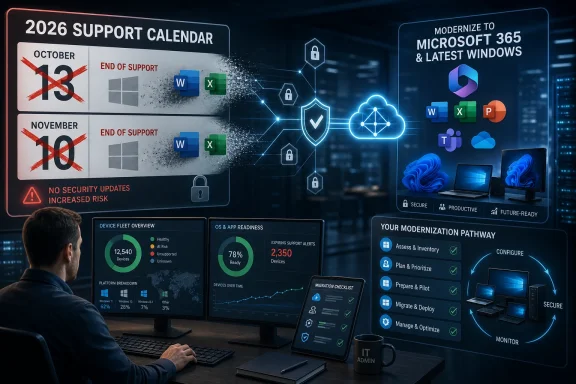
Microsoft’s 2026 support calendar ends security and servicing lifelines for Windows 11 version 24H2 Home and Pro on October 13, Windows 11 version 23H2 Enterprise and Education on November 10, and Office LTSC 2021 on October 13, alongside dozens of older enterprise products. That is the plain answer, but it undersells the real story. Microsoft is not merely tidying up a few dusty lifecycle pages; it is compressing the distance between “supported,” “current,” and “cloud-aligned.” For Windows users and IT departments, 2026 is less a single cliff edge than a reminder that the old Microsoft habit of parking on stable versions for years is disappearing.
The easy version of this story is that Microsoft is retiring legacy software. The more useful version is that Microsoft has turned lifecycle pressure into an operating model. Products no longer simply become old; they become incompatible with the security, cloud, and servicing assumptions Microsoft wants the rest of its ecosystem to follow.
The 2026 list is broad enough to look almost comical at first glance. It includes consumer-visible names such as Office 2021, Windows 11 24H2 for Home and Pro, and Windows 11 SE’s last supported release. It also includes the kind of back-office tools that only surface when an administrator opens a spreadsheet labeled “things we should have migrated three years ago.”
That split matters. For home users, end of support often means an annoying upgrade prompt and the eventual disappearance of security updates. For sysadmins, it means application owners, budget committees, compliance teams, and vendors all suddenly discovering the same calendar at different speeds.
The BGR framing is right to call out the two legacy products most ordinary readers are likely to recognize: Windows 11 versions and the old perpetual Office line. But the bigger pattern is that Microsoft’s support calendar is now doing cultural work. It is pushing customers away from static software estates and toward a world where everything is either continuously serviced or already a liability.
In 2026, Windows 11 Home and Pro version 24H2 reaches end of servicing on October 13. Windows 11 Enterprise, Education, and IoT Enterprise version 23H2 follow on November 10. Microsoft’s lifecycle model makes those dates routine, but routine does not mean trivial.
The old mental model was that a Windows version lasted for years and service packs were occasional waypoints. The modern model is closer to mobile operating systems or browsers: the brand name persists, while individual releases age out on a fixed cadence. If you are running Windows 11, you are not automatically safe; you need to know which release train you are actually on.
That is why the 2026 Windows dates deserve attention even from people who upgraded from Windows 10 in good faith. A machine can say “Windows 11” on the box and still be headed toward a servicing deadline. The relevant question is not whether the PC meets Windows 11 requirements, but whether it is moving with Microsoft’s release cadence.
For unmanaged consumer PCs, Windows Update will usually try to make that problem invisible. For managed fleets, kiosks, lab machines, shared workstations, and tightly controlled business systems, invisibility is not a plan. Someone still has to validate drivers, VPN clients, endpoint security, line-of-business apps, and whatever ancient accounting plugin everyone swears is being replaced next quarter.
That creates an awkward rhythm. A release can be both “the modern baseline” in one planning cycle and “the thing we must move off” in the next. The more Microsoft accelerates Windows as a continuously serviced platform, the less useful it becomes to think of a deployment project as something that ends.
Enterprise and Education customers get a different set of dates, but not a different philosophy. Windows 11 version 23H2 Enterprise and Education gets support until November 10, 2026, long after Home and Pro reached their 23H2 deadline in 2025. That extra runway is useful, but it is not a reprieve from the treadmill.
The result is a two-tier Windows reality. Consumers are nudged forward by Windows Update and UI prompts. Businesses are given more time, but also more responsibility, because every extra month on an older release becomes a month of accumulating upgrade risk.
There is nothing inherently unreasonable about that. Security teams often prefer predictable support windows to vague promises. But Microsoft’s cadence increasingly assumes that IT departments have mature device management, test rings, application telemetry, and enough staffing to treat feature updates as a recurring operational discipline rather than an annual fire drill.
This is not the first time Microsoft has ended support for an Office generation, and it will not be the last. Office 2016 and Office 2019 already crossed their support deadlines in 2025. But Office 2021 occupies a special place because it represents the dwindling appeal of the old “buy once, install locally, keep it for years” bargain.
Microsoft still sells perpetual Office in the form of newer LTSC and consumer releases, but the strategic center of gravity is unmistakably Microsoft 365. The subscription suite gets the features, the cloud integrations, the Copilot positioning, and the administrative attention. The perpetual release gets a lifecycle date.
That does not make Office 2021 bad software. In many organizations, it is precisely the boring reliability of older Office that makes it attractive. A spreadsheet does not become useless because a newer subscription bundle exists, and many users do not need a monthly stream of interface changes to write memos or reconcile budgets.
But support status changes the risk equation. Unsupported Office installations do not just miss new features; they eventually miss security fixes. In a threat environment where malicious documents, macro abuse, and identity-focused attacks remain persistent problems, the old comfort of “it still opens files” is a dangerously low bar.
With Microsoft 365, the desktop apps are part of a service relationship. Updates are continuous. Identity is tied into Entra ID. Policy can flow through cloud management. Features can appear, disappear, or change according to channels rather than boxed-version releases.
For Microsoft, this reduces fragmentation. For administrators, it can be a blessing if they have the tools and governance to manage it. For users who simply want software to stay still, it can feel like being drafted into someone else’s roadmap.
The trade-off is especially sharp in regulated, offline, or low-change environments. A factory floor workstation, a secure enclave, a school lab, and a small law office do not all benefit from the same update philosophy. Microsoft’s lifecycle calendar treats unsupported software as a security problem, but many customers experience forced modernization as an operational problem.
That tension is not new, but 2026 sharpens it. Office 2021’s end of support says, in effect, that the non-subscription path remains available but increasingly bounded. Microsoft will sell you time, but it will not let that time become permanence.
These products came from an era when Microsoft’s management and security stack was heavily on-premises, Windows-centric, and often delivered as a set of specialized tools. They solved real problems. They also created estates full of dependencies, agents, consoles, databases, and institutional knowledge that can be painful to unwind.
Advanced Threat Analytics is a good example. Its successor path points toward cloud-based identity threat protection and Microsoft’s broader Defender ecosystem. That is not just a product swap; it is a change in architecture, staffing, alerting, licensing, and incident response.
Application Virtualization, better known as App-V, is another case where the end date hits more than the software itself. App-V was a workaround machine, a way to package and isolate applications in environments where old Windows apps needed to behave. Ending support for it forces organizations to confront not just packaging strategy, but the brittle applications that made packaging necessary in the first place.
The same goes for older SharePoint and SQL Server releases. Nobody should be shocked that decade-old server software eventually exits support. Yet many organizations still have internal portals, workflows, reports, and departmental databases whose owners left years ago. End-of-support dates have a way of turning forgotten infrastructure into suddenly urgent archaeology.
The industry has learned this lesson repeatedly. Old Windows builds, old Office installations, abandoned web servers, and forgotten middleware are among the most boring and reliable ways attackers gain ground. There is no virtue in keeping unsupported systems alive simply because migration is tedious.
But the security argument also conveniently aligns with Microsoft’s commercial direction. Moving customers to Microsoft 365, Defender, Intune, Entra, Azure, and current Windows releases expands Microsoft’s recurring revenue base and deepens customer dependence on its cloud stack. The same move can be both genuinely safer and commercially advantageous.
That duality is where serious buyers should keep their heads. Microsoft is not wrong that unsupported software is dangerous. Customers are not wrong to notice that the safest path often leads through higher subscriptions, new licensing bundles, hardware refreshes, and deeper cloud integration.
Good IT strategy lives in that tension. The answer is not to reject upgrades as vendor coercion, nor to accept every lifecycle push as pure security hygiene. The answer is to map actual risk, understand dependencies, and modernize deliberately before Microsoft’s calendar becomes your emergency change window.
That context matters because users who just crossed the Windows 10 bridge may not be emotionally prepared to hear that their Windows 11 release has its own deadline. To enthusiasts, this is obvious. To ordinary users, it can feel like a bait-and-switch: “I upgraded to the new thing; why is the new thing already expiring?”
The answer is servicing, not product death. But Microsoft has never fully solved the communication problem. Version numbers such as 23H2, 24H2, 25H2, and 26H1 are meaningful to administrators and Windows watchers, but they are weak public language for explaining risk.
This is one reason end-of-support articles often cause confusion. They compress product families, editions, and release channels into a single headline. Windows 11 is not ending in 2026, but some Windows 11 releases are. Office as a concept is not ending, but Office 2021 support is. Microsoft’s support pages are precise; public understanding is not.
For WindowsForum readers, the practical response is to check the release, not the logo. The Settings app, device management console, or inventory tool will tell you what matters. “Windows 11” is the beginning of the answer, not the end.
For consumers, the friction is often simple: an update fails, a driver misbehaves, or a machine that technically supports Windows 11 no longer feels pleasant on newer releases. For businesses, the friction becomes fleet segmentation. Some machines can move smoothly. Some need BIOS updates. Some need app remediation. Some should be retired, but the budget says otherwise.
The danger is not that every unsupported device instantly becomes compromised. The danger is that exceptions become normalized. A few deferred upgrades turn into a spreadsheet. The spreadsheet becomes a policy. The policy becomes part of the environment nobody questions until an audit, incident, or cyber insurance review forces the issue.
Microsoft’s lifecycle calendar is unforgiving because attackers are unforgiving. But hardware economics are unforgiving too. Organizations that delayed Windows 10 replacement costs may find themselves compressing multiple generations of remediation into the same budget cycle: Windows 11 deployment, Office modernization, server upgrades, app packaging changes, and security tooling transitions.
That is why 2026 planning should not be treated as a product-by-product cleanup exercise. It is a portfolio problem. The machines, applications, identities, and data stores are connected, and the support calendar merely reveals those connections under pressure.
For those organizations, Office 2021’s end of support can sneak up quietly. A perpetual Office license feels like an asset, not a ticking clock. The software still launches, the files still open, and the business still runs. Until the support date passes, there may be no visible symptom at all.
Windows 11 release deadlines are similarly easy to miss if updates are deferred to avoid disruption. A small business may pause feature updates because a printer driver, accounting app, or scanner workflow broke once and nobody wants to relive it. That hesitation is understandable, but it becomes risky when the deferred release approaches its end date.
The hard part is that small businesses often face the same threat landscape as larger companies without the same staffing. They receive malicious attachments, use cloud email, manage customer data, and depend on endpoint security. Unsupported Office and stale Windows builds do not become safer because the company is small.
This is where Microsoft’s push toward Microsoft 365 can be genuinely helpful. Managed updates, cloud identity, and standardized apps can reduce local complexity. But only if licensing, backup, security policies, and user training are handled competently. A subscription is not a security strategy by itself.
Those are clear paths on paper. The work is in the details.
Feature updates must be tested against hardware models, drivers, security agents, VPNs, browser controls, accessibility tools, and business applications. Office migrations must account for add-ins, macros, templates, mail profiles, file formats, automation, and licensing. Server retirements require dependency mapping, backups, migration rehearsals, and rollback planning.
The organizations that handle 2026 well will not be the ones that merely know the dates. They will be the ones that turn those dates into phased programs. Inventory comes first, then risk ranking, then pilot groups, then remediation, then broad deployment, then cleanup.
That order sounds obvious, but many migrations fail because inventory is treated as a formality. Nobody wants to discover in September that a revenue-critical workflow depends on an Office COM add-in last updated in 2017. Nobody wants to learn after a Windows feature update that a manufacturing workstation relies on an unsigned driver from a vendor that no longer exists.
Lifecycle management is tedious because it is supposed to surface boring problems early. The alternative is discovering exciting problems late.
This is not unique to Microsoft. Apple, Google, Adobe, VMware, Red Hat, and the broader SaaS world all operate on lifecycle pressure. What makes Microsoft different is the depth of its footprint. Windows, Office, identity, endpoint security, collaboration, databases, management tools, and developer platforms are woven into daily operations at a scale few vendors can match.
That scale makes Microsoft’s lifecycle decisions feel less like product maintenance and more like public infrastructure management. When Microsoft moves a date, changes support assumptions, or nudges customers toward a new model, entire sectors respond. Schools, hospitals, local governments, manufacturers, and small businesses all inherit the consequences.
There is a legitimate argument that this pressure produces healthier estates. Old software lingers too long. Unsupported systems are dangerous. Modern identity and endpoint management can reduce risk. Standardization can make support easier.
There is also a legitimate argument that the cadence benefits vendors more than customers when change outpaces actual need. Not every organization needs the latest Office feature. Not every Windows feature update improves productivity. Not every cloud migration lowers risk if it is rushed, underfunded, or poorly governed.
The sensible position is neither nostalgia nor blind modernization. It is discipline. Treat support deadlines as real, treat vendor incentives as real, and make decisions based on exposure rather than sentiment.
Microsoft’s support deadlines are often described as endings, but the better word is leverage: leverage to move customers onto newer builds, newer licensing models, newer management assumptions, and newer security architectures. Some of that movement is necessary, some of it is self-serving, and most of it is both at once. The users and IT teams that fare best in 2026 will be the ones that stop arguing with the existence of the calendar and start using it as a forcing function to modernize on their own terms, before Microsoft’s dates turn into their deadlines.
Source: bgr.com Two Legacy Products Microsoft Is Ending Support For In 2026 - BGR
 Microsoft’s Graveyard Is Now a Product Strategy
The easy version of this story is that Microsoft is retiring legacy software. The more useful version is that Microsoft has turned lifecycle pressure into an operating model. Products no longer simply become old; they become incompatible with the security, cloud, and servicing assumptions Microsoft wants the rest of its ecosystem to follow.The 2026 list is broad enough to look almost comical at first glance. It includes consumer-visible names such as Office 2021, Windows 11 24H2 for Home and Pro, and Windows 11 SE’s last supported release. It also includes the kind of back-office tools that only surface when an administrator opens a spreadsheet labeled “things we should have migrated three years ago.”
That split matters. For home users, end of support often means an annoying upgrade prompt and the eventual disappearance of security updates. For sysadmins, it means application owners, budget committees, compliance teams, and vendors all suddenly discovering the same calendar at different speeds.
The BGR framing is right to call out the two legacy products most ordinary readers are likely to recognize: Windows 11 versions and the old perpetual Office line. But the bigger pattern is that Microsoft’s support calendar is now doing cultural work. It is pushing customers away from static software estates and toward a world where everything is either continuously serviced or already a liability.
Windows 11 Is Supported, But Your Windows 11 May Not Be
The phrase “Windows 11 support is ending” is almost always misleading. Windows 11 as a product remains alive. Specific Windows 11 releases, however, have increasingly short lives, and that distinction is where many users get caught.In 2026, Windows 11 Home and Pro version 24H2 reaches end of servicing on October 13. Windows 11 Enterprise, Education, and IoT Enterprise version 23H2 follow on November 10. Microsoft’s lifecycle model makes those dates routine, but routine does not mean trivial.
The old mental model was that a Windows version lasted for years and service packs were occasional waypoints. The modern model is closer to mobile operating systems or browsers: the brand name persists, while individual releases age out on a fixed cadence. If you are running Windows 11, you are not automatically safe; you need to know which release train you are actually on.
That is why the 2026 Windows dates deserve attention even from people who upgraded from Windows 10 in good faith. A machine can say “Windows 11” on the box and still be headed toward a servicing deadline. The relevant question is not whether the PC meets Windows 11 requirements, but whether it is moving with Microsoft’s release cadence.
For unmanaged consumer PCs, Windows Update will usually try to make that problem invisible. For managed fleets, kiosks, lab machines, shared workstations, and tightly controlled business systems, invisibility is not a plan. Someone still has to validate drivers, VPN clients, endpoint security, line-of-business apps, and whatever ancient accounting plugin everyone swears is being replaced next quarter.
The 24H2 Deadline Lands While 25H2 and 26H1 Are Already in Motion
Windows 11 version 24H2 was a major release because it arrived alongside a broader hardware and AI push. It was also the release many organizations treated as the real post-Windows-10 landing zone. By October 2026, however, Home and Pro editions of 24H2 are scheduled to age out, with newer Windows 11 releases already taking their place.That creates an awkward rhythm. A release can be both “the modern baseline” in one planning cycle and “the thing we must move off” in the next. The more Microsoft accelerates Windows as a continuously serviced platform, the less useful it becomes to think of a deployment project as something that ends.
Enterprise and Education customers get a different set of dates, but not a different philosophy. Windows 11 version 23H2 Enterprise and Education gets support until November 10, 2026, long after Home and Pro reached their 23H2 deadline in 2025. That extra runway is useful, but it is not a reprieve from the treadmill.
The result is a two-tier Windows reality. Consumers are nudged forward by Windows Update and UI prompts. Businesses are given more time, but also more responsibility, because every extra month on an older release becomes a month of accumulating upgrade risk.
There is nothing inherently unreasonable about that. Security teams often prefer predictable support windows to vague promises. But Microsoft’s cadence increasingly assumes that IT departments have mature device management, test rings, application telemetry, and enough staffing to treat feature updates as a recurring operational discipline rather than an annual fire drill.
Office 2021 Is the More Symbolic Goodbye
If Windows 11 lifecycle dates are about cadence, Office 2021 is about identity. Office LTSC 2021 and the standalone Office 2021 apps are scheduled to exit support on October 13, 2026. That includes the familiar desktop names: Word, Excel, PowerPoint, Outlook, OneNote, Access, Publisher, Project, and Visio in their 2021-era forms.This is not the first time Microsoft has ended support for an Office generation, and it will not be the last. Office 2016 and Office 2019 already crossed their support deadlines in 2025. But Office 2021 occupies a special place because it represents the dwindling appeal of the old “buy once, install locally, keep it for years” bargain.
Microsoft still sells perpetual Office in the form of newer LTSC and consumer releases, but the strategic center of gravity is unmistakably Microsoft 365. The subscription suite gets the features, the cloud integrations, the Copilot positioning, and the administrative attention. The perpetual release gets a lifecycle date.
That does not make Office 2021 bad software. In many organizations, it is precisely the boring reliability of older Office that makes it attractive. A spreadsheet does not become useless because a newer subscription bundle exists, and many users do not need a monthly stream of interface changes to write memos or reconcile budgets.
But support status changes the risk equation. Unsupported Office installations do not just miss new features; they eventually miss security fixes. In a threat environment where malicious documents, macro abuse, and identity-focused attacks remain persistent problems, the old comfort of “it still opens files” is a dangerously low bar.
Microsoft 365 Is Not Just the Replacement, It Is the Control Plane
Microsoft’s preferred answer to the Office lifecycle problem is obvious: move to Microsoft 365 Apps. That recommendation is not merely a product upsell, though it is certainly that. It is also a shift in where Microsoft wants control to reside.With Microsoft 365, the desktop apps are part of a service relationship. Updates are continuous. Identity is tied into Entra ID. Policy can flow through cloud management. Features can appear, disappear, or change according to channels rather than boxed-version releases.
For Microsoft, this reduces fragmentation. For administrators, it can be a blessing if they have the tools and governance to manage it. For users who simply want software to stay still, it can feel like being drafted into someone else’s roadmap.
The trade-off is especially sharp in regulated, offline, or low-change environments. A factory floor workstation, a secure enclave, a school lab, and a small law office do not all benefit from the same update philosophy. Microsoft’s lifecycle calendar treats unsupported software as a security problem, but many customers experience forced modernization as an operational problem.
That tension is not new, but 2026 sharpens it. Office 2021’s end of support says, in effect, that the non-subscription path remains available but increasingly bounded. Microsoft will sell you time, but it will not let that time become permanence.
The Forgotten Enterprise Tools Tell the Same Story in Smaller Type
The less glamorous retirements in 2026 are easy to skip, but they explain the pattern better than the headline products do. Advanced Threat Analytics, Application Virtualization, User Experience Virtualization, Microsoft BitLocker Administration and Monitoring, the Diagnostics and Recovery Toolset, SharePoint Server 2016 and 2019, SQL Server 2016, Project Server, and other enterprise staples all sit somewhere on the year’s calendar.These products came from an era when Microsoft’s management and security stack was heavily on-premises, Windows-centric, and often delivered as a set of specialized tools. They solved real problems. They also created estates full of dependencies, agents, consoles, databases, and institutional knowledge that can be painful to unwind.
Advanced Threat Analytics is a good example. Its successor path points toward cloud-based identity threat protection and Microsoft’s broader Defender ecosystem. That is not just a product swap; it is a change in architecture, staffing, alerting, licensing, and incident response.
Application Virtualization, better known as App-V, is another case where the end date hits more than the software itself. App-V was a workaround machine, a way to package and isolate applications in environments where old Windows apps needed to behave. Ending support for it forces organizations to confront not just packaging strategy, but the brittle applications that made packaging necessary in the first place.
The same goes for older SharePoint and SQL Server releases. Nobody should be shocked that decade-old server software eventually exits support. Yet many organizations still have internal portals, workflows, reports, and departmental databases whose owners left years ago. End-of-support dates have a way of turning forgotten infrastructure into suddenly urgent archaeology.
The Security Argument Is Strong, But It Is Also Convenient
Microsoft’s case for ending support is straightforward: unsupported software becomes riskier over time. That argument is true. Software that no longer receives security updates is a tempting target, especially when attackers can compare patched and unpatched components across versions.The industry has learned this lesson repeatedly. Old Windows builds, old Office installations, abandoned web servers, and forgotten middleware are among the most boring and reliable ways attackers gain ground. There is no virtue in keeping unsupported systems alive simply because migration is tedious.
But the security argument also conveniently aligns with Microsoft’s commercial direction. Moving customers to Microsoft 365, Defender, Intune, Entra, Azure, and current Windows releases expands Microsoft’s recurring revenue base and deepens customer dependence on its cloud stack. The same move can be both genuinely safer and commercially advantageous.
That duality is where serious buyers should keep their heads. Microsoft is not wrong that unsupported software is dangerous. Customers are not wrong to notice that the safest path often leads through higher subscriptions, new licensing bundles, hardware refreshes, and deeper cloud integration.
Good IT strategy lives in that tension. The answer is not to reject upgrades as vendor coercion, nor to accept every lifecycle push as pure security hygiene. The answer is to map actual risk, understand dependencies, and modernize deliberately before Microsoft’s calendar becomes your emergency change window.
Windows 10 Still Haunts the 2026 Conversation
The 2026 support story does not exist in isolation. Windows 10’s mainstream end of support in October 2025 changed the baseline for millions of PCs, and its shadow remains over every Windows 11 lifecycle discussion. Many organizations spent 2024 and 2025 trying to decide whether to replace hardware, pay for extended security updates, shift workloads, or accept unmanaged risk.That context matters because users who just crossed the Windows 10 bridge may not be emotionally prepared to hear that their Windows 11 release has its own deadline. To enthusiasts, this is obvious. To ordinary users, it can feel like a bait-and-switch: “I upgraded to the new thing; why is the new thing already expiring?”
The answer is servicing, not product death. But Microsoft has never fully solved the communication problem. Version numbers such as 23H2, 24H2, 25H2, and 26H1 are meaningful to administrators and Windows watchers, but they are weak public language for explaining risk.
This is one reason end-of-support articles often cause confusion. They compress product families, editions, and release channels into a single headline. Windows 11 is not ending in 2026, but some Windows 11 releases are. Office as a concept is not ending, but Office 2021 support is. Microsoft’s support pages are precise; public understanding is not.
For WindowsForum readers, the practical response is to check the release, not the logo. The Settings app, device management console, or inventory tool will tell you what matters. “Windows 11” is the beginning of the answer, not the end.
The Hardware Question Is Never Far Away
Every Windows lifecycle story eventually becomes a hardware story. Windows 11’s requirements already forced that issue with TPM 2.0, newer CPU support, Secure Boot expectations, and a sharper line between supported and unsupported PCs. The 2026 deadlines add another layer by keeping pressure on devices that did make the cut but are not moving forward.For consumers, the friction is often simple: an update fails, a driver misbehaves, or a machine that technically supports Windows 11 no longer feels pleasant on newer releases. For businesses, the friction becomes fleet segmentation. Some machines can move smoothly. Some need BIOS updates. Some need app remediation. Some should be retired, but the budget says otherwise.
The danger is not that every unsupported device instantly becomes compromised. The danger is that exceptions become normalized. A few deferred upgrades turn into a spreadsheet. The spreadsheet becomes a policy. The policy becomes part of the environment nobody questions until an audit, incident, or cyber insurance review forces the issue.
Microsoft’s lifecycle calendar is unforgiving because attackers are unforgiving. But hardware economics are unforgiving too. Organizations that delayed Windows 10 replacement costs may find themselves compressing multiple generations of remediation into the same budget cycle: Windows 11 deployment, Office modernization, server upgrades, app packaging changes, and security tooling transitions.
That is why 2026 planning should not be treated as a product-by-product cleanup exercise. It is a portfolio problem. The machines, applications, identities, and data stores are connected, and the support calendar merely reveals those connections under pressure.
Small Businesses Are the Ones Most Likely to Be Surprised
Large enterprises usually have lifecycle dashboards, enterprise agreements, account teams, and enough scar tissue to know that support deadlines matter. Small and midsize businesses often live closer to the edge. They may rely on a managed service provider, a part-time IT person, or the most technical employee in the building.For those organizations, Office 2021’s end of support can sneak up quietly. A perpetual Office license feels like an asset, not a ticking clock. The software still launches, the files still open, and the business still runs. Until the support date passes, there may be no visible symptom at all.
Windows 11 release deadlines are similarly easy to miss if updates are deferred to avoid disruption. A small business may pause feature updates because a printer driver, accounting app, or scanner workflow broke once and nobody wants to relive it. That hesitation is understandable, but it becomes risky when the deferred release approaches its end date.
The hard part is that small businesses often face the same threat landscape as larger companies without the same staffing. They receive malicious attachments, use cloud email, manage customer data, and depend on endpoint security. Unsupported Office and stale Windows builds do not become safer because the company is small.
This is where Microsoft’s push toward Microsoft 365 can be genuinely helpful. Managed updates, cloud identity, and standardized apps can reduce local complexity. But only if licensing, backup, security policies, and user training are handled competently. A subscription is not a security strategy by itself.
The Upgrade Path Is Clearer Than the Migration Work
For a home user on Windows 11 24H2, the answer is mostly straightforward: move to a supported Windows 11 release before October 13, 2026. For an organization on Windows 11 Enterprise 23H2, the comparable answer is to complete the move before November 10, 2026. For Office LTSC 2021, the choice is Microsoft 365 Apps, Office LTSC 2024, Office 2024 where appropriate, or an alternative productivity suite if the organization is willing to absorb that change.Those are clear paths on paper. The work is in the details.
Feature updates must be tested against hardware models, drivers, security agents, VPNs, browser controls, accessibility tools, and business applications. Office migrations must account for add-ins, macros, templates, mail profiles, file formats, automation, and licensing. Server retirements require dependency mapping, backups, migration rehearsals, and rollback planning.
The organizations that handle 2026 well will not be the ones that merely know the dates. They will be the ones that turn those dates into phased programs. Inventory comes first, then risk ranking, then pilot groups, then remediation, then broad deployment, then cleanup.
That order sounds obvious, but many migrations fail because inventory is treated as a formality. Nobody wants to discover in September that a revenue-critical workflow depends on an Office COM add-in last updated in 2017. Nobody wants to learn after a Windows feature update that a manufacturing workstation relies on an unsigned driver from a vendor that no longer exists.
Lifecycle management is tedious because it is supposed to surface boring problems early. The alternative is discovering exciting problems late.
The Old Microsoft Tax Has Become a Calendar Tax
For years, critics talked about the “Microsoft tax” as the cost of living inside Microsoft’s ecosystem. In 2026, that tax is less about any single license and more about cadence. Customers pay in attention, testing, process maturity, and periodic change whether they buy subscriptions or perpetual licenses.This is not unique to Microsoft. Apple, Google, Adobe, VMware, Red Hat, and the broader SaaS world all operate on lifecycle pressure. What makes Microsoft different is the depth of its footprint. Windows, Office, identity, endpoint security, collaboration, databases, management tools, and developer platforms are woven into daily operations at a scale few vendors can match.
That scale makes Microsoft’s lifecycle decisions feel less like product maintenance and more like public infrastructure management. When Microsoft moves a date, changes support assumptions, or nudges customers toward a new model, entire sectors respond. Schools, hospitals, local governments, manufacturers, and small businesses all inherit the consequences.
There is a legitimate argument that this pressure produces healthier estates. Old software lingers too long. Unsupported systems are dangerous. Modern identity and endpoint management can reduce risk. Standardization can make support easier.
There is also a legitimate argument that the cadence benefits vendors more than customers when change outpaces actual need. Not every organization needs the latest Office feature. Not every Windows feature update improves productivity. Not every cloud migration lowers risk if it is rushed, underfunded, or poorly governed.
The sensible position is neither nostalgia nor blind modernization. It is discipline. Treat support deadlines as real, treat vendor incentives as real, and make decisions based on exposure rather than sentiment.
The 2026 Calendar Leaves Little Room for Magical Thinking
The concrete lesson from Microsoft’s 2026 end-of-support wave is that waiting has become expensive. Not always immediately, and not always in licensing dollars, but in compressed timelines, emergency exceptions, and avoidable security exposure. The dates are known now, which means every month of inaction is a decision.- Windows 11 Home and Pro version 24H2 should be moved to a supported release before October 13, 2026.
- Windows 11 Enterprise, Education, and IoT Enterprise version 23H2 should be moved before November 10, 2026.
- Office LTSC 2021 and Office 2021 applications need a replacement plan before October 13, 2026.
- Older infrastructure products such as SharePoint Server 2016 and 2019, SQL Server 2016, App-V, and Advanced Threat Analytics deserve dependency checks now, not during the final quarter.
- Microsoft 365 may be the default migration path, but it still requires update governance, licensing clarity, security configuration, and user training.
- Unsupported software that “still works” should be treated as technical debt with a date attached, not as proof that the deadline does not matter.
Microsoft’s support deadlines are often described as endings, but the better word is leverage: leverage to move customers onto newer builds, newer licensing models, newer management assumptions, and newer security architectures. Some of that movement is necessary, some of it is self-serving, and most of it is both at once. The users and IT teams that fare best in 2026 will be the ones that stop arguing with the existence of the calendar and start using it as a forcing function to modernize on their own terms, before Microsoft’s dates turn into their deadlines.
Source: bgr.com Two Legacy Products Microsoft Is Ending Support For In 2026 - BGR
