

Windows 10’s support deadline has turned a routine operating system sunset into a mass migration problem, and the smartest path forward depends on hardware, budget, and how much change you can tolerate. Microsoft’s own guidance now makes the stakes plain: Windows 10 reached end of support on October 14, 2025, and unsupported devices no longer receive free security fixes, technical assistance, or feature updates. That leaves users balancing three realities at once: some PCs can move to Windows 11 for free, many cannot, and the remaining options range from temporary bridges to full platform shifts. In practical terms, this is less a single “upgrade” story than a forced decision tree for consumers and enterprises alike.
Windows 10’s end of support was never going to be just another lifecycle date, but it took the final cutoff to make the scale visible. Microsoft has spent years steering customers toward Windows 11, and the company’s support pages now frame the transition as a security and compatibility issue, not a cosmetic one. That matters because operating systems are not judged only on whether they boot; they are judged on whether they continue to receive the fixes that keep them viable on the modern internet.
The core tension is hardware. Windows 11’s minimum requirements include TPM 2.0, Secure Boot, a compatible 64-bit processor, and other baseline specs that many older PCs do not meet. Microsoft’s own documentation notes that systems made before roughly 2016 are often the ones that fail the TPM 2.0 bar, which explains why so many otherwise functional devices are stranded on Windows 10 rather than being cleanly upgraded. The company is not hiding that reality; it is building its post-Windows-10 strategy around it.
This is also why the conversation has expanded beyond Microsoft’s own ecosystem. Once a device cannot move to Windows 11, the user is no longer choosing between Windows 10 and Windows 11 alone. They are choosing between replacement hardware, temporary extended support, or an alternative operating system altogether. That dynamic has made ChromeOS Flex, Linux, and third-party patching services far more relevant than they would be in a normal release cycle.
Microsoft’s message is blunt: the operating system will still function, but it will stop getting free updates and fixes. In other words, the machine remains usable while its protection profile degrades. That is the sort of change many users ignore until a vulnerability, compatibility problem, or compliance requirement forces the issue. The support cutoff simply makes the risk more visible, and the options more urgent.
For home users, the deadline also intersects with a broader hardware refresh cycle. New Windows 11 PCs ship with newer security features and, increasingly, AI-facing branding such as Copilot+ positioning. For businesses, the story is harsher, because refresh decisions are tied to procurement cycles, software compatibility testing, and device management policy. The result is a support cliff that looks simple on paper but gets expensive very quickly in the real world.
The real question is eligibility. Microsoft points users to PC Health Check and to Windows Update itself as the simplest way to determine whether the machine qualifies. That process matters because many users assume “old” means “unsupported,” when in fact a surprising number of relatively recent systems can still make the jump. If the device was built after 2016, there is at least a decent chance that TPM 2.0 support is present and merely disabled or not yet configured.
This option is also the least disruptive for enterprise workflows. A successful Windows 11 upgrade preserves user habits, file locations, and most familiar app workflows. That reduces retraining, avoids platform fragmentation, and keeps security controls inside Microsoft’s stack. In a business environment, those are not minor conveniences; they are the difference between a planned upgrade and a support incident.
The upside of buying new is obvious: you get modern security features, better power efficiency, and in many cases more capable silicon for AI-assisted tasks. The downside is equally obvious: you are paying for a refresh that may feel premature if the old PC still meets your needs. That disconnect is one reason the Windows 10 sunset has generated so much frustration. Users do not experience their machines as obsolete just because Microsoft’s roadmap says otherwise.
For businesses, Microsoft also points to Windows 365 as a cloud alternative. Windows 365 Business starts at $28 per user per month according to Microsoft’s pricing pages, with additional plans scaling upward. This is not a trivial cost, but it can still be attractive for organizations that want to defer hardware purchases while standardizing on a managed Windows 11 environment in the cloud. It is a particularly strong fit for contractors, remote staff, and small teams that value predictable monthly pricing over capital expense.
The consumer program has three paths: a paid subscription, enabling Windows Backup to sync files through OneDrive, or redeeming Microsoft Rewards points, according to Microsoft’s support guidance. That makes ESU more flexible than a straight cash charge, but it does not change the basic trade-off. You are still limiting the device to security patches only, with no new features, no broad bug-fix program, and no Microsoft support for anything beyond the narrow ESU scope.
For businesses, the cost rises sharply. Microsoft says Windows 10 ESU for organizations starts at $61 per device for year one, with the price doubling each subsequent year. That means a fleet can become expensive fast, especially if an organization delays migration across multiple budget cycles. The economics are intentional: Microsoft wants ESU to feel like a stopgap, not a lifestyle.
The biggest draw is simplicity. ChromeOS Flex boots quickly, keeps the interface narrow, and minimizes the maintenance burden that comes with a full Windows installation. Google’s own documentation also emphasizes that some hardware features and support expectations differ from ChromeOS on native Chromebooks, so users should understand this is a repurposing path, not a like-for-like replacement. The distinction matters because the platform works best when the browser is the real operating environment.
The limitation is equally clear: ChromeOS Flex does not support Google Play and Android apps in the way Chromebooks do, and it does not pretend to be a Windows compatibility layer. If you rely on specialist Windows software, local creative tools, or legacy peripheral support, ChromeOS Flex may feel too constrained. But if your computing life is already cloud-centric, the trade-off can be excellent.
The reason Linux is gaining renewed attention is that it is no longer a niche hobby answer for technicians alone. Zorin OS 18 and later releases have drawn significant attention from Windows users, and the broader pattern suggests that Microsoft’s hardware gatekeeping has made alternative desktops feel less exotic and more practical. For users whose needs are modest, Linux can be surprisingly comfortable once the initial adjustment is complete.
Still, this option demands honesty. Linux is excellent for browsing, email, office work, streaming, and many development tasks, but it is not a universal substitute for Windows. Some commercial software simply does not exist there, and some peripheral or enterprise workflows are easier to keep on Windows. The best Linux migration is the one that starts with a clear inventory of what you actually need.
The attraction is obvious. Third-party patching can extend the life of a machine without the cost of immediate replacement, and in some cases it can be enough for low-risk usage. But it is important not to romanticize this approach. It is a private safety net, not a vendor-backed operating model. Users still need to assume that the official ecosystem has moved on.
Pricing is also a factor. 0patch lists a personal plan and a Pro plan, with business-oriented coverage carrying annual fees per device. That may still be cheaper than a hardware refresh, but the value depends on how you use the machine and how much risk you are willing to accept. For casual use, the math may work. For banking, confidential work, or anything compliance-sensitive, it is a much weaker argument.
Businesses also have more complexity because they own the software stack, not just the device. Application compatibility testing, endpoint protection, identity controls, and help desk readiness all matter more in a managed environment. A consumer can choose a lightweight workaround; an enterprise often cannot, because supportability and auditability matter more than convenience.
There is also a strategic dimension. Organizations that stay too long on Windows 10 risk compounding technical debt while they wait for procurement cycles to catch up. That can create a messy overlap where unsupported endpoints coexist with modern ones, making policy enforcement more difficult. The longer that overlap lasts, the harder it becomes to maintain a clean security baseline.
For many households, the right answer is not dramatic. If the PC passes the Windows 11 health check, upgrade it. If it does not, decide whether you want to pay for a new machine, try ChromeOS Flex, or move to Linux. The only truly bad choice is passivity. Unsupported Windows does not become safe simply because it remains convenient.
There is also a long-tail effect here. Some users will stay on Windows 10 out of habit, and others will not realize they need to act until they encounter an app or security issue. That means the support deadline will likely keep producing “surprise” migrations long after the actual cutoff date. The visible transition may be over, but the practical one will continue for months.
What happens next will depend on who solves the migration problem with the least friction. If Microsoft makes Windows 11 feel like a natural continuation, it will keep most users inside the fold. If Google and the Linux ecosystem make repurposing old hardware feel painless, they will gain a new audience that might have stayed loyal to Windows otherwise.
Source: TechRepublic Windows 10 Support Ends: 6 Options for Users
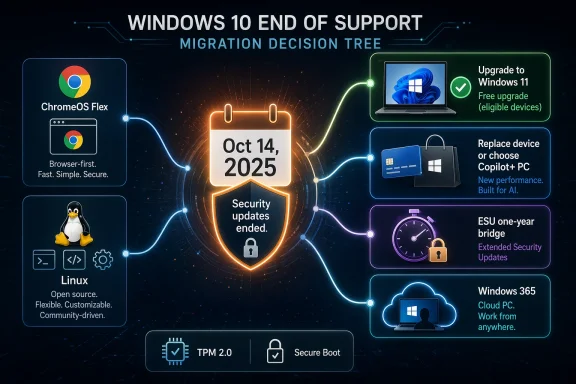 Background
Windows 10’s end of support was never going to be just another lifecycle date, but it took the final cutoff to make the scale visible. Microsoft has spent years steering customers toward Windows 11, and the company’s support pages now frame the transition as a security and compatibility issue, not a cosmetic one. That matters because operating systems are not judged only on whether they boot; they are judged on whether they continue to receive the fixes that keep them viable on the modern internet.The core tension is hardware. Windows 11’s minimum requirements include TPM 2.0, Secure Boot, a compatible 64-bit processor, and other baseline specs that many older PCs do not meet. Microsoft’s own documentation notes that systems made before roughly 2016 are often the ones that fail the TPM 2.0 bar, which explains why so many otherwise functional devices are stranded on Windows 10 rather than being cleanly upgraded. The company is not hiding that reality; it is building its post-Windows-10 strategy around it.
This is also why the conversation has expanded beyond Microsoft’s own ecosystem. Once a device cannot move to Windows 11, the user is no longer choosing between Windows 10 and Windows 11 alone. They are choosing between replacement hardware, temporary extended support, or an alternative operating system altogether. That dynamic has made ChromeOS Flex, Linux, and third-party patching services far more relevant than they would be in a normal release cycle.
Microsoft’s message is blunt: the operating system will still function, but it will stop getting free updates and fixes. In other words, the machine remains usable while its protection profile degrades. That is the sort of change many users ignore until a vulnerability, compatibility problem, or compliance requirement forces the issue. The support cutoff simply makes the risk more visible, and the options more urgent.
For home users, the deadline also intersects with a broader hardware refresh cycle. New Windows 11 PCs ship with newer security features and, increasingly, AI-facing branding such as Copilot+ positioning. For businesses, the story is harsher, because refresh decisions are tied to procurement cycles, software compatibility testing, and device management policy. The result is a support cliff that looks simple on paper but gets expensive very quickly in the real world.
Why this deadline lands so hard
The important change is not that Windows 10 stopped working. The important change is that Microsoft stopped promising to keep it safe. That distinction is easy to miss and easy to underestimate. A machine that still opens files and launches browsers can feel “fine” right up until security, compliance, or app compatibility exposes the gap.- Support ended on October 14, 2025.
- Security updates stopped with it.
- Windows 11 eligibility depends heavily on TPM 2.0.
- Older PCs are the ones most likely to be blocked.
- Users now have to choose a migration path instead of postponing the problem.
Option 1: Upgrade to Windows 11 for free
For eligible machines, this remains the cleanest and least disruptive answer. Microsoft still offers a free upgrade path to Windows 11 for devices that meet the required hardware baseline, and that path is explicitly recommended on the company’s support pages. If your PC passes the check, there is no reason to treat the upgrade as optional comfort food. It is the direct continuation of the Windows path you already use.The real question is eligibility. Microsoft points users to PC Health Check and to Windows Update itself as the simplest way to determine whether the machine qualifies. That process matters because many users assume “old” means “unsupported,” when in fact a surprising number of relatively recent systems can still make the jump. If the device was built after 2016, there is at least a decent chance that TPM 2.0 support is present and merely disabled or not yet configured.
This option is also the least disruptive for enterprise workflows. A successful Windows 11 upgrade preserves user habits, file locations, and most familiar app workflows. That reduces retraining, avoids platform fragmentation, and keeps security controls inside Microsoft’s stack. In a business environment, those are not minor conveniences; they are the difference between a planned upgrade and a support incident.
What the free upgrade really buys you
The value of upgrading is not just the new interface or the newer feature set. It is the fact that the machine remains on a supported platform with ongoing patch flow. Windows 11’s requirements are stricter, but those requirements are also the reason Microsoft treats it as the future baseline. That is why the free route is the obvious first step if your PC qualifies.- No new hardware purchase is needed.
- You keep the Windows ecosystem and app compatibility.
- Security updates continue normally.
- The transition is usually fast compared with re-platforming.
- You avoid temporary stopgap solutions.
Option 2: Buy a new PC or use a cloud PC
When the hardware fails Windows 11’s checks, replacement is Microsoft’s preferred answer. The company now frames new Windows 11 hardware, including Copilot+ PCs, as the long-term path for unsupported Windows 10 users. That advice is technically straightforward but financially inconvenient, because many of the affected machines still feel perfectly serviceable for everyday use.The upside of buying new is obvious: you get modern security features, better power efficiency, and in many cases more capable silicon for AI-assisted tasks. The downside is equally obvious: you are paying for a refresh that may feel premature if the old PC still meets your needs. That disconnect is one reason the Windows 10 sunset has generated so much frustration. Users do not experience their machines as obsolete just because Microsoft’s roadmap says otherwise.
For businesses, Microsoft also points to Windows 365 as a cloud alternative. Windows 365 Business starts at $28 per user per month according to Microsoft’s pricing pages, with additional plans scaling upward. This is not a trivial cost, but it can still be attractive for organizations that want to defer hardware purchases while standardizing on a managed Windows 11 environment in the cloud. It is a particularly strong fit for contractors, remote staff, and small teams that value predictable monthly pricing over capital expense.
When cloud PCs make sense
Windows 365 is not a universal replacement for physical hardware. It makes the most sense when the endpoint is basically a delivery device and the workload lives in Microsoft 365, line-of-business apps, or browser-based tools. Microsoft positions it explicitly around secure, anywhere access and simplified management, which is exactly why it appeals to organizations that want to minimize endpoint complexity.- Good for remote and hybrid work.
- Useful when central management matters more than local power.
- Can reduce refresh pressure on older endpoints.
- Avoids the immediate cost of a full PC replacement.
- Still keeps users in the Windows ecosystem.
Option 3: Enroll in Extended Security Updates
Microsoft’s Extended Security Update, or ESU, program is the official bridge for people who need more time. For consumer users, Microsoft says the program can protect a Windows 10 device for up to one year after support ended on October 14, 2025. The important word here is bridge. ESU is designed to buy time, not to become a permanent retirement home for an unsupported PC.The consumer program has three paths: a paid subscription, enabling Windows Backup to sync files through OneDrive, or redeeming Microsoft Rewards points, according to Microsoft’s support guidance. That makes ESU more flexible than a straight cash charge, but it does not change the basic trade-off. You are still limiting the device to security patches only, with no new features, no broad bug-fix program, and no Microsoft support for anything beyond the narrow ESU scope.
For businesses, the cost rises sharply. Microsoft says Windows 10 ESU for organizations starts at $61 per device for year one, with the price doubling each subsequent year. That means a fleet can become expensive fast, especially if an organization delays migration across multiple budget cycles. The economics are intentional: Microsoft wants ESU to feel like a stopgap, not a lifestyle.
ESU as risk management, not strategy
The value of ESU is mostly psychological and operational. It lets users avoid an abrupt cliff while they move files, test compatibility, or wait for budget approval. But the program does not solve the underlying problem, because it does not restore feature development or long-term confidence in the platform. It simply narrows the security gap for a limited time.- It extends safety, not functionality.
- It is time-limited for consumers.
- It becomes expensive at scale for enterprises.
- It is best used during a transition period.
- It should not be treated as a final answer.
Option 4: Switch to ChromeOS Flex
Google’s ChromeOS Flex pitch is clever because it reframes an old PC not as a failure, but as reusable hardware. Google’s support documentation makes clear that ChromeOS Flex is meant for older Windows, Mac, and Linux devices, and it is designed to run browser-first with a lighter footprint than a traditional desktop OS. For users who live in email, web apps, streaming, and cloud storage, that can feel less like a compromise and more like relief.The biggest draw is simplicity. ChromeOS Flex boots quickly, keeps the interface narrow, and minimizes the maintenance burden that comes with a full Windows installation. Google’s own documentation also emphasizes that some hardware features and support expectations differ from ChromeOS on native Chromebooks, so users should understand this is a repurposing path, not a like-for-like replacement. The distinction matters because the platform works best when the browser is the real operating environment.
The limitation is equally clear: ChromeOS Flex does not support Google Play and Android apps in the way Chromebooks do, and it does not pretend to be a Windows compatibility layer. If you rely on specialist Windows software, local creative tools, or legacy peripheral support, ChromeOS Flex may feel too constrained. But if your computing life is already cloud-centric, the trade-off can be excellent.
Why ChromeOS Flex is a market move as much as a product
This is not just a product release. It is a competitive answer to Windows 10’s sunset. By offering a low-friction way to keep old PCs useful, Google is trying to intercept users at the exact moment Microsoft’s lifecycle policy creates discomfort. That timing is strategic, and it helps Google position itself as the low-cost, low-maintenance alternative.- Best for browser-centric users.
- Low hardware demands.
- No purchase cost for the OS itself.
- Limited app compatibility compared with Windows.
- Strong appeal for schools, households, and simple work setups.
Option 5: Move to Linux
Linux remains the most flexible free escape route for users who want to keep older hardware alive indefinitely. The distribution ecosystem is broad, but the most important thing for Windows users is not purity or ideology. It is whether a given distro makes the transition feel manageable. That is why distributions such as Zorin OS have become so visible in the post-Windows-10 conversation.The reason Linux is gaining renewed attention is that it is no longer a niche hobby answer for technicians alone. Zorin OS 18 and later releases have drawn significant attention from Windows users, and the broader pattern suggests that Microsoft’s hardware gatekeeping has made alternative desktops feel less exotic and more practical. For users whose needs are modest, Linux can be surprisingly comfortable once the initial adjustment is complete.
Still, this option demands honesty. Linux is excellent for browsing, email, office work, streaming, and many development tasks, but it is not a universal substitute for Windows. Some commercial software simply does not exist there, and some peripheral or enterprise workflows are easier to keep on Windows. The best Linux migration is the one that starts with a clear inventory of what you actually need.
What Linux offers that Windows 10 no longer can
Linux’s strongest advantage is longevity. A well-supported distribution can keep receiving updates without forcing the user into annual hardware replacement cycles or vendor-timed OS sunsets. That makes it especially attractive for older but reliable PCs, which often have more than enough life left for general-purpose computing.- Free to install and use.
- Excellent for older hardware.
- Can be customized heavily.
- Has a deep security and open-source ecosystem.
- Requires more adaptation than ChromeOS Flex.
Option 6: Stay on Windows 10 with third-party patches
If you insist on keeping Windows 10 alive, third-party patching services are the last-resort option. The best-known example is 0patch, which continues to provide security micropatches for unsupported software, including Windows 10. This is a very different model from Microsoft’s official support, but for some users it may be the only middle ground between doing nothing and buying a new PC.The attraction is obvious. Third-party patching can extend the life of a machine without the cost of immediate replacement, and in some cases it can be enough for low-risk usage. But it is important not to romanticize this approach. It is a private safety net, not a vendor-backed operating model. Users still need to assume that the official ecosystem has moved on.
Pricing is also a factor. 0patch lists a personal plan and a Pro plan, with business-oriented coverage carrying annual fees per device. That may still be cheaper than a hardware refresh, but the value depends on how you use the machine and how much risk you are willing to accept. For casual use, the math may work. For banking, confidential work, or anything compliance-sensitive, it is a much weaker argument.
The right and wrong use cases
Third-party patching is best seen as a temporary compromise for users who need time but do not want to stay fully exposed. It should not be confused with a long-term platform plan, and it absolutely should not be used as justification for ignoring the support deadline altogether.- Useful as a short-term bridge.
- Cheaper than buying new hardware.
- Not equivalent to official Microsoft support.
- Best suited to low-risk home use.
- Poor fit for sensitive or regulated workloads.
Enterprise implications
For organizations, Windows 10’s end of support is not just a desktop problem. It is a fleet-management problem, a budget problem, and a compliance problem all at once. Microsoft’s enterprise ESU pricing makes that clear, with costs escalating from year one to year three in a way that strongly encourages migration rather than indefinite holdout. That is a deliberate policy lever, and it is working exactly as intended.Businesses also have more complexity because they own the software stack, not just the device. Application compatibility testing, endpoint protection, identity controls, and help desk readiness all matter more in a managed environment. A consumer can choose a lightweight workaround; an enterprise often cannot, because supportability and auditability matter more than convenience.
There is also a strategic dimension. Organizations that stay too long on Windows 10 risk compounding technical debt while they wait for procurement cycles to catch up. That can create a messy overlap where unsupported endpoints coexist with modern ones, making policy enforcement more difficult. The longer that overlap lasts, the harder it becomes to maintain a clean security baseline.
Enterprise priorities are different
The right path for an enterprise depends on fleet age, app dependencies, and how centralized the organization is. Windows 365 may be attractive where endpoint simplicity matters. ESU may be useful where testing is not yet complete. But the longer an organization treats those as substitutes for a real migration plan, the more expensive the eventual catch-up will be.- Compliance and patch posture matter more than convenience.
- Fleet scale makes ESU expensive quickly.
- Cloud PCs may reduce hardware pressure.
- Mixed Windows 10/11 environments increase admin burden.
- Migration planning should be measured in months, not wishes.
Consumer impact
Consumers face the same technical problem but with fewer institutional guardrails. A home user is more likely to delay action because the PC still works, because the upgrade looks annoying, or because the family budget is tight. That makes the consumer side of the Windows 10 sunset more psychologically difficult, even if the path is sometimes simpler.For many households, the right answer is not dramatic. If the PC passes the Windows 11 health check, upgrade it. If it does not, decide whether you want to pay for a new machine, try ChromeOS Flex, or move to Linux. The only truly bad choice is passivity. Unsupported Windows does not become safe simply because it remains convenient.
There is also a long-tail effect here. Some users will stay on Windows 10 out of habit, and others will not realize they need to act until they encounter an app or security issue. That means the support deadline will likely keep producing “surprise” migrations long after the actual cutoff date. The visible transition may be over, but the practical one will continue for months.
What most home users should do
The consumer formula is straightforward, even if the emotions are not. Check eligibility first, because free Windows 11 is the best outcome. If that fails, decide whether you want to remain in the Windows ecosystem or step outside it. Either way, make a deliberate choice rather than waiting for the internet to punish indecision.- Check Windows 11 compatibility immediately.
- Use ESU only as a short bridge.
- Consider ChromeOS Flex for web-heavy households.
- Consider Linux for flexible, low-cost longevity.
- Avoid leaving an unsupported PC unpatched online.
Strengths and Opportunities
The Windows 10 sunset is painful, but it is also forcing a long-overdue refresh in how people think about aging PCs. It creates a chance to simplify security, modernize hardware, and cut support risk before a vulnerability forces the issue. For Microsoft, it reinforces Windows 11 as the new baseline; for competitors, it opens a real window to win users who no longer feel bound to the old desktop contract.- Windows 11 eligibility can still deliver a free, low-friction upgrade.
- Windows 365 gives businesses a predictable cloud fallback.
- ESU offers a safe bridge for users who need time.
- ChromeOS Flex and Linux provide no-cost life extension for old hardware.
- The migration wave encourages better endpoint security across the board.
- Consumers can reassess whether they really need a traditional Windows PC.
- Enterprises can use the moment to remove legacy clutter and standardize fleets.
Risks and Concerns
The biggest danger is inertia. Unsupported Windows 10 machines will continue to work long after they stop being safe, which makes delay feel harmless until something goes wrong. The other major risk is false confidence: users may mistake stopgap measures for permanent solutions, or assume that a machine’s physical health implies software safety. That assumption is exactly what support deadlines are designed to punish.- Doing nothing leaves a still-connected PC exposed.
- ESU can lull users into postponing a real plan.
- ChromeOS Flex may not support the apps people actually need.
- Linux migration can fail without software inventory and testing.
- New hardware can create affordability and e-waste concerns.
- Enterprise migration delays can increase security and compliance risk.
- Third-party patching is not the same as vendor support.
Looking Ahead
The next phase is less about Windows 10 itself and more about what its end reveals about the modern PC market. Microsoft is betting that stricter hardware requirements, cloud services, and a cleaner support lifecycle will make the Windows platform easier to secure and easier to monetize. Rivals are betting that users will rebel against replacement pressure and look for lighter, cheaper alternatives instead.What happens next will depend on who solves the migration problem with the least friction. If Microsoft makes Windows 11 feel like a natural continuation, it will keep most users inside the fold. If Google and the Linux ecosystem make repurposing old hardware feel painless, they will gain a new audience that might have stayed loyal to Windows otherwise.
The key signals to watch
- How many Windows 10 PCs move to Windows 11 versus replacement hardware.
- Whether ChromeOS Flex and Linux retain momentum among casual users.
- How aggressively Microsoft markets Copilot+ and cloud PC options.
- Whether enterprise ESU uptake remains a bridge or becomes a crutch.
- How quickly app vendors stop accommodating Windows 10.
Source: TechRepublic Windows 10 Support Ends: 6 Options for Users
