

Microsoft 365 Apps Version 2606, released July 14, 2026, removes the practical update-channel barrier that kept Semi-Annual Enterprise Channel devices outside the Microsoft 365 Copilot experience. IT teams should stop treating an SAEC-to-Monthly Enterprise Channel migration as the main Copilot gate and instead recheck each user’s license, governance readiness, application state, and ability to absorb monthly servicing.
The change arrives as SAEC build 20131.20150, which receives the same feature and security experience as Monthly Enterprise Channel. Microsoft’s documentation confirms that eligible SAEC devices move into that experience after installing Version 2606, but channel eligibility is not the same as Copilot deployment.
Before Version 2606, update-channel placement offered administrators a simple explanation for why Copilot was unavailable on many managed endpoints: Microsoft 365 Apps needed to run on Current Channel or Monthly Enterprise Channel. Semi-Annual Enterprise Channel estates therefore often appeared in migration plans as a distinct technical blocker.
Version 2606 changes that calculation. Microsoft says SAEC devices receiving build 20131.20150 now get the Monthly Enterprise Channel feature and security experience, making devices associated with users who meet Microsoft 365 Copilot requirements eligible for Copilot.
The visible identity of the installation also changes. After Version 2606 is installed, Word, Excel, PowerPoint, and other Microsoft 365 Apps can report Monthly Enterprise Channel under File > Account even when an endpoint management platform, inventory report, or existing automation continues to identify the device as SAEC.
That mismatch is not necessarily evidence of a broken deployment. It reflects the transition between the channel originally configured for the device and the servicing experience the installed build now receives.
Administrators should consequently avoid using a channel-name field as the only test for update or Copilot readiness. The installed version and build, the account shown inside the application, and the user’s license state now matter more than a single SAEC label in a dashboard.
The most important inventory is therefore the intersection of three records: devices on Version 2606, users assigned to those devices, and users carrying the required Copilot entitlement. A channel-only inventory can show where the software is ready, but it cannot show where Copilot is authorized or operationally appropriate.
After Version 2606, that exclusion no longer holds. Some users in the group may already possess the necessary entitlement, while others may have been intentionally left unlicensed. Still others may be covered by a planned deployment that assumed their devices would first undergo a separately scheduled channel migration.
IT should review license assignments against actual business intent rather than responding with a blanket assignment. A newly eligible device does not establish that its user needs Copilot, has completed required training, or is authorized to use it with the information available through Microsoft 365.
The reverse also matters. Users who were licensed in anticipation of a future migration may begin seeing Copilot after their devices receive Version 2606. If those assignments were being used as placeholders rather than activation decisions, the update can turn administrative preparation into a live user-facing change.
That makes July 14 more than a servicing date. It is the point at which old channel-based scoping rules may stop producing the expected access boundaries.
Administrators should identify newly eligible populations and ask whether their existing access is appropriate for AI-assisted discovery and content generation. The relevant question is no longer simply whether Word can display a Copilot button; it is whether the organization is comfortable with what that user can reach once the button is available.
This is also a service-desk issue. Users may interpret the arrival of Copilot as proof that it has been fully approved for every workflow, while users who do not see it may assume their Office installation is defective. Support documentation should distinguish four states clearly:
Monthly Enterprise Channel normally provides a three-month support window and up to three months of rollback. Microsoft also notes that Copilot-related updates can reach Monthly Enterprise Channel ahead of its usual timing after they have completed rollout through Current Channel.
That qualification deserves attention. Administrators should not interpret “monthly” as an absolute promise that every Copilot-related change will wait for one conventional monthly feature milestone. Microsoft is reserving room to move Copilot updates into the enterprise channel sooner when it considers them ready.
Pilot groups, application validation, help-desk preparation, and change communications therefore remain necessary even if IT no longer performs a formal SAEC-to-Monthly Enterprise migration. The configured name may remain familiar in some tools, but the practical release experience has changed.
Rollback should likewise be treated as a recovery control rather than a long-term substitute for testing. A three-month rollback horizon can provide breathing room after a problematic release, but it does not recreate the former assumption that feature change would be concentrated into widely separated SAEC milestones.
An automation that classifies every SAEC record as Copilot-ineligible can now produce false negatives. A dashboard that counts Monthly Enterprise Channel devices only by their management label can understate the population receiving that experience. A support script that tells technicians to move any SAEC device to another channel may prescribe unnecessary work.
IT should search operational dependencies for references to Semi-Annual Enterprise Channel and determine what each reference is meant to represent. If the rule is trying to identify update behavior, Copilot compatibility, support expectations, or user-facing channel identity, the old label may no longer answer the intended question.
Version and build data should become part of those decisions. Microsoft 365 Apps Version 2606 build 20131.20150 is a more precise indicator for affected SAEC endpoints than a report that merely repeats their historical channel assignment.
The immediate consequence is straightforward: every SAEC device that installs Version 2606 should enter a new review queue. Not every user should receive Copilot, but every organization should now be able to explain whether that user is licensed, governed, supported, and ready for a monthly Microsoft 365 Apps servicing model.
The change arrives as SAEC build 20131.20150, which receives the same feature and security experience as Monthly Enterprise Channel. Microsoft’s documentation confirms that eligible SAEC devices move into that experience after installing Version 2606, but channel eligibility is not the same as Copilot deployment.
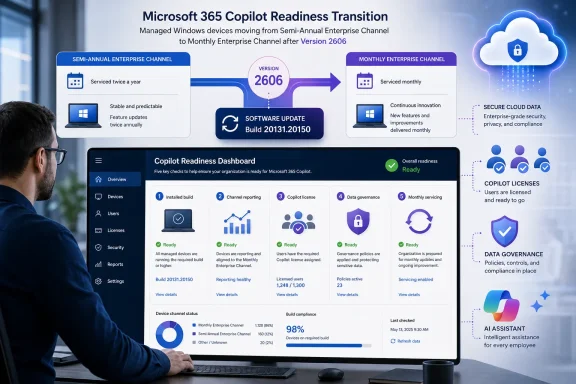 Version 2606 Changes the Meaning of SAEC
Before Version 2606, update-channel placement offered administrators a simple explanation for why Copilot was unavailable on many managed endpoints: Microsoft 365 Apps needed to run on Current Channel or Monthly Enterprise Channel. Semi-Annual Enterprise Channel estates therefore often appeared in migration plans as a distinct technical blocker.Version 2606 changes that calculation. Microsoft says SAEC devices receiving build 20131.20150 now get the Monthly Enterprise Channel feature and security experience, making devices associated with users who meet Microsoft 365 Copilot requirements eligible for Copilot.
The visible identity of the installation also changes. After Version 2606 is installed, Word, Excel, PowerPoint, and other Microsoft 365 Apps can report Monthly Enterprise Channel under File > Account even when an endpoint management platform, inventory report, or existing automation continues to identify the device as SAEC.
That mismatch is not necessarily evidence of a broken deployment. It reflects the transition between the channel originally configured for the device and the servicing experience the installed build now receives.
Administrators should consequently avoid using a channel-name field as the only test for update or Copilot readiness. The installed version and build, the account shown inside the application, and the user’s license state now matter more than a single SAEC label in a dashboard.
The Five Checks IT Should Run Now
Version 2606 does not require administrators to manufacture a new channel migration merely to remove the old Copilot restriction. It does require a broader readiness check, preferably before users discover new Copilot controls themselves or begin opening tickets because those controls have not appeared.- Confirm that the endpoint has actually installed Version 2606. On the device, open a Microsoft 365 application such as Word, select File > Account, and inspect the product and update information. For affected SAEC installations, the relevant release is Version 2606, build 20131.20150.
- Record both the application-reported channel and the management-reported channel. The application may show Monthly Enterprise Channel while another tool continues to report Semi-Annual Enterprise Channel. Treat this as a reporting distinction to investigate, not an automatic failure requiring a reinstall or forced channel switch.
- Verify the signed-in user’s Microsoft 365 Copilot entitlement. Becoming eligible through the new servicing experience does not assign a Copilot license. An unlicensed user on Version 2606 remains unlicensed, regardless of what File > Account says about the channel.
- Review whether the user and their data are ready for Copilot. Confirm that the organization’s licensing decision, access policies, information governance, and user support plan cover the newly eligible population. The update may remove a technical block faster than internal approval processes remove organizational ones.
- Allow time for Copilot to appear before escalating. Microsoft says licensed users may need to wait up to 24 hours and then restart or refresh the supported Microsoft 365 application. An immediate absence after licensing or updating does not prove that Version 2606 failed.
The most important inventory is therefore the intersection of three records: devices on Version 2606, users assigned to those devices, and users carrying the required Copilot entitlement. A channel-only inventory can show where the software is ready, but it cannot show where Copilot is authorized or operationally appropriate.
Licensing Assumptions Now Need a User-Level Audit
The channel change removes one constraint while exposing assumptions that may have remained hidden behind it. An organization may have excluded an entire SAEC device group from Copilot planning because those endpoints were considered technically ineligible.After Version 2606, that exclusion no longer holds. Some users in the group may already possess the necessary entitlement, while others may have been intentionally left unlicensed. Still others may be covered by a planned deployment that assumed their devices would first undergo a separately scheduled channel migration.
IT should review license assignments against actual business intent rather than responding with a blanket assignment. A newly eligible device does not establish that its user needs Copilot, has completed required training, or is authorized to use it with the information available through Microsoft 365.
The reverse also matters. Users who were licensed in anticipation of a future migration may begin seeing Copilot after their devices receive Version 2606. If those assignments were being used as placeholders rather than activation decisions, the update can turn administrative preparation into a live user-facing change.
That makes July 14 more than a servicing date. It is the point at which old channel-based scoping rules may stop producing the expected access boundaries.
Data Governance Becomes the Real Deployment Gate
Copilot eligibility should trigger a permissions and data review, not merely a feature announcement. Copilot operates within a user’s authorized Microsoft 365 context, so excessive access, outdated sharing arrangements, and poorly classified information remain governance concerns even when the application deployment itself is healthy.Administrators should identify newly eligible populations and ask whether their existing access is appropriate for AI-assisted discovery and content generation. The relevant question is no longer simply whether Word can display a Copilot button; it is whether the organization is comfortable with what that user can reach once the button is available.
This is also a service-desk issue. Users may interpret the arrival of Copilot as proof that it has been fully approved for every workflow, while users who do not see it may assume their Office installation is defective. Support documentation should distinguish four states clearly:
- A device can be on Version 2606 without its user having a Copilot license.
- A user can have a Copilot license while the application is still within Microsoft’s stated 24-hour appearance window.
- A supported application may need to be restarted or refreshed before Copilot becomes visible.
- Management reporting may retain an SAEC label even though File > Account shows Monthly Enterprise Channel.
Monthly Servicing Is Now Part of the Copilot Decision
SAEC administrators must also revisit why those devices were placed on that channel. Version 2606 gives affected endpoints the Monthly Enterprise Channel feature and security experience, so Copilot eligibility arrives alongside a materially different servicing expectation.Monthly Enterprise Channel normally provides a three-month support window and up to three months of rollback. Microsoft also notes that Copilot-related updates can reach Monthly Enterprise Channel ahead of its usual timing after they have completed rollout through Current Channel.
That qualification deserves attention. Administrators should not interpret “monthly” as an absolute promise that every Copilot-related change will wait for one conventional monthly feature milestone. Microsoft is reserving room to move Copilot updates into the enterprise channel sooner when it considers them ready.
Pilot groups, application validation, help-desk preparation, and change communications therefore remain necessary even if IT no longer performs a formal SAEC-to-Monthly Enterprise migration. The configured name may remain familiar in some tools, but the practical release experience has changed.
Rollback should likewise be treated as a recovery control rather than a long-term substitute for testing. A three-month rollback horizon can provide breathing room after a problematic release, but it does not recreate the former assumption that feature change would be concentrated into widely separated SAEC milestones.
Reporting Drift Can Break More Than Dashboards
The split between what Office displays and what management systems report creates a quieter operational risk. Scripts, compliance rules, deployment groups, and support procedures may make decisions based on the literal channel name rather than the installed experience.An automation that classifies every SAEC record as Copilot-ineligible can now produce false negatives. A dashboard that counts Monthly Enterprise Channel devices only by their management label can understate the population receiving that experience. A support script that tells technicians to move any SAEC device to another channel may prescribe unnecessary work.
IT should search operational dependencies for references to Semi-Annual Enterprise Channel and determine what each reference is meant to represent. If the rule is trying to identify update behavior, Copilot compatibility, support expectations, or user-facing channel identity, the old label may no longer answer the intended question.
Version and build data should become part of those decisions. Microsoft 365 Apps Version 2606 build 20131.20150 is a more precise indicator for affected SAEC endpoints than a report that merely repeats their historical channel assignment.
The immediate consequence is straightforward: every SAEC device that installs Version 2606 should enter a new review queue. Not every user should receive Copilot, but every organization should now be able to explain whether that user is licensed, governed, supported, and ready for a monthly Microsoft 365 Apps servicing model.
References
- Primary source: learn.microsoft.com
Change update channel to prepare devices for Copilot - Microsoft 365 Apps | Microsoft Learn
Guide for admins on switching devices to Current Channel or Monthly Enterprise Channel for Microsoft 365 Apps to prepare for Copilot usagelearn.microsoft.com - Primary source: WindowsForum
Security Copilot Now Included in Microsoft 365 E5 with SCUs: Enterprise Impact | Windows Forum
Microsoft’s long-running bet that AI can be the backbone of enterprise security just took a substantial commercial turn: Security Copilot—the company’s...windowsforum.com