

Microsoft 365 Apps Version 2606 is not a forced migration from 32-bit Office to 64-bit Office, so organizations do not need to block it merely because they use 32-bit COM or VSTO add-ins. They should deploy the July 14, 2026 update only to add-in-dependent devices that have passed representative compatibility testing; higher-risk systems can remain on Version 2508 while testing finishes, but only through September 8, 2026.
Microsoft’s channel unification changes how frequently these installations receive Office features, not the architecture of the installed applications. That distinction matters because the principal risk is no longer an imagined silent bitness conversion—it is exposing previously slow-moving Semi-Annual Enterprise Channel devices to the Monthly Enterprise Channel feature cadence.
Microsoft released Version 2606 to Semi-Annual Enterprise Channel devices on July 14 as Build 20131.20150. As detailed in Microsoft’s channel-unification guidance and Office update history, existing SAEC devices receive the release through their established update process without an Office reinstall, manual channel migration, or policy migration.
A computer running 32-bit Microsoft 365 Apps before the update remains a 32-bit Office installation afterward. A 32-bit COM or VSTO add-in still requires compatible 32-bit Office components and any matching dependencies it needed before Version 2606 arrived.
That means administrators should separate two decisions that are too easily conflated:
The operational change is nevertheless substantial. Devices retained on SAEC because they host specialized macros, line-of-business integrations, document automation, or older add-ins will now receive the same feature and security updates as Monthly Enterprise Channel devices. The old assumption that SAEC provides a long gap between feature changes no longer applies after Version 2606.
This is the practical next step in the update-channel rewrite WindowsForum has followed since Microsoft began simplifying Microsoft 365 Apps servicing. The new arrangement may reduce channel fragmentation, but it also transfers more responsibility to deployment rings, exclusions, compatibility testing, and rollback readiness.
General-purpose devices with no business-critical add-ins can normally proceed through the established deployment process. Microsoft says no manual migration is required, so an unblocked SAEC device can receive Version 2606 as a normal update and subsequently operate on the Monthly Enterprise feature cadence.
Devices running important but replaceable add-ins should enter a staged rollout. Start with representative users who exercise the same Office applications, add-in versions, document templates, authentication paths, and back-end services as the production population. Expand only after normal work has continued long enough to expose startup, document-opening, save, print, and automation failures.
Systems performing unattended or business-critical Office automation deserve the most caution. If an Excel COM add-in calculates financial workbooks overnight, an Outlook extension drives records into another system, or a Word integration assembles regulated documents, “Office started successfully” is not a meaningful compatibility result. These devices should remain on Version 2508 until their actual workflows have been tested against Version 2606.
Microsoft says SAEC Version 2508 remains supported through September 8, 2026. Staying there requires administrators to explicitly prevent Version 2606 from being installed; doing nothing allows the established update process to deliver the new release.
That makes September 8 a hard planning boundary rather than a reason to postpone testing. Organizations using the remaining support window should already have owners, pilot devices, test cases, and an approval date—not simply a broad update block with no exit plan.
For each affected device group, record the Office application, add-in type, add-in version, deployment owner, installation source, required dependencies, and business workflow. Include add-ins installed for individual users as well as those deployed centrally, because unmanaged extensions can escape normal software-distribution reporting.
The inventory should distinguish at least four integration classes:
This classification prevents a common testing error: treating every extension as if it shares the same failure mode. A web-based Office.js add-in and a 32-bit in-process COM component may appear beside each other in the ribbon, but their dependencies and compatibility risks are not identical.
Administrators should also identify who can repair or replace each integration. An internally developed add-in with source code and an active owner is a different operational risk from an abandoned vendor component installed years ago by a former employee.
After installing Version 2606, verify all Office applications that participate in the workflow. Check application startup, add-in loading, ribbon or task-pane availability, document opening, editing, saving, printing, export, and shutdown. Where an add-in communicates with another system, confirm that the transaction reached that system and produced the expected result.
Testing should also cover the less visible paths that often expose compatibility problems:
Microsoft’s Version 2606-era release notes provide one useful reminder that 32-bit-specific behavior still receives attention: they include a fix for Visio 32-bit unexpectedly closing in Drawing-control scenarios involving COM components or .NET integrations. That fix is not evidence that every legacy integration is safe, but it reinforces why architecture-specific and workflow-specific testing remains necessary.
The rollback decision should be tied to business impact. A cosmetic ribbon issue may justify pausing the next rollout wave while investigation continues; a crash, incorrect calculation, missing document content, or failed automated transaction should stop deployment immediately.
Preserve the Version 2508 installation baseline and the packages needed for dependent add-ins. If an extension is unmanaged, obtain its installer, configuration, license information, and required dependencies before updating the device. Otherwise, rebuilding or repairing the workstation may leave IT unable to reproduce the configuration users had before the incident.
Do not confuse reverting one failed build with preserving the old SAEC servicing model indefinitely. Version 2508 reaches the end of support on September 8, and the channel unification means future planning must accommodate a monthly enterprise feature cadence even if a short-term rollback resolves the immediate incident.
The stronger policy is a targeted hold:
Version 2606 is therefore safe to treat as a servicing transition, but not as a routine checkbox for machines that exist specifically because older Office integrations need stability. The right question for each 32-bit device is whether its complete add-in workflow is ready for Monthly Enterprise builds—and the remaining Version 2508 support window gives administrators until September 8, 2026 to produce an evidence-based answer.
Microsoft’s channel unification changes how frequently these installations receive Office features, not the architecture of the installed applications. That distinction matters because the principal risk is no longer an imagined silent bitness conversion—it is exposing previously slow-moving Semi-Annual Enterprise Channel devices to the Monthly Enterprise Channel feature cadence.
Microsoft released Version 2606 to Semi-Annual Enterprise Channel devices on July 14 as Build 20131.20150. As detailed in Microsoft’s channel-unification guidance and Office update history, existing SAEC devices receive the release through their established update process without an Office reinstall, manual channel migration, or policy migration.
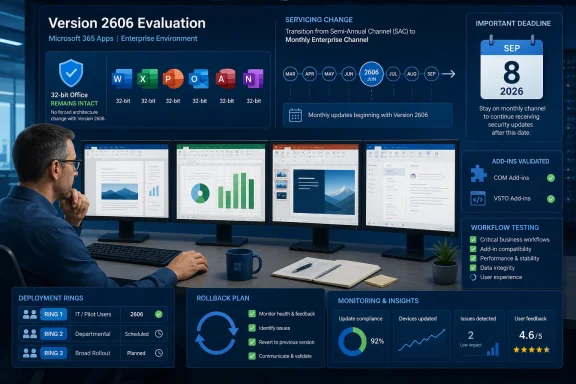 Version 2606 Changes the Servicing Clock, Not Office Bitness
A computer running 32-bit Microsoft 365 Apps before the update remains a 32-bit Office installation afterward. A 32-bit COM or VSTO add-in still requires compatible 32-bit Office components and any matching dependencies it needed before Version 2606 arrived.That means administrators should separate two decisions that are too easily conflated:
- Whether a device is ready to receive Monthly Enterprise Channel feature builds.
- Whether the organization eventually wants to replace 32-bit Office with 64-bit Office.
The operational change is nevertheless substantial. Devices retained on SAEC because they host specialized macros, line-of-business integrations, document automation, or older add-ins will now receive the same feature and security updates as Monthly Enterprise Channel devices. The old assumption that SAEC provides a long gap between feature changes no longer applies after Version 2606.
This is the practical next step in the update-channel rewrite WindowsForum has followed since Microsoft began simplifying Microsoft 365 Apps servicing. The new arrangement may reduce channel fragmentation, but it also transfers more responsibility to deployment rings, exclusions, compatibility testing, and rollback readiness.
Which 32-Bit Devices Should Receive 2606 Now
The safest recommendation is not “block every 32-bit installation” or “approve 2606 everywhere.” Administrators should divide the estate according to dependency risk.General-purpose devices with no business-critical add-ins can normally proceed through the established deployment process. Microsoft says no manual migration is required, so an unblocked SAEC device can receive Version 2606 as a normal update and subsequently operate on the Monthly Enterprise feature cadence.
Devices running important but replaceable add-ins should enter a staged rollout. Start with representative users who exercise the same Office applications, add-in versions, document templates, authentication paths, and back-end services as the production population. Expand only after normal work has continued long enough to expose startup, document-opening, save, print, and automation failures.
Systems performing unattended or business-critical Office automation deserve the most caution. If an Excel COM add-in calculates financial workbooks overnight, an Outlook extension drives records into another system, or a Word integration assembles regulated documents, “Office started successfully” is not a meaningful compatibility result. These devices should remain on Version 2508 until their actual workflows have been tested against Version 2606.
Microsoft says SAEC Version 2508 remains supported through September 8, 2026. Staying there requires administrators to explicitly prevent Version 2606 from being installed; doing nothing allows the established update process to deliver the new release.
That makes September 8 a hard planning boundary rather than a reason to postpone testing. Organizations using the remaining support window should already have owners, pilot devices, test cases, and an approval date—not simply a broad update block with no exit plan.
Build an Add-In Inventory Before Approving the New Cadence
The most important pre-deployment task is identifying what Office actually loads. An application inventory that records only “Microsoft 365 Apps, 32-bit” misses the components most likely to determine whether the update succeeds.For each affected device group, record the Office application, add-in type, add-in version, deployment owner, installation source, required dependencies, and business workflow. Include add-ins installed for individual users as well as those deployed centrally, because unmanaged extensions can escape normal software-distribution reporting.
The inventory should distinguish at least four integration classes:
| Integration class | What must be validated |
|---|---|
| COM add-ins | Confirm that the add-in loads in its host application, remains enabled, and completes its core commands and automation. |
| VSTO add-ins | Test startup, required runtime dependencies, user authentication, document interaction, and calls to connected services. |
| Office.js add-ins | Validate loading, sign-in, task-pane behavior, commands, document access, and any service-dependent workflow. |
| Legacy ActiveX integrations | Test the exact documents, controls, security prompts, data connections, and automation paths still used in production. |
Administrators should also identify who can repair or replace each integration. An internally developed add-in with source code and an active owner is a different operational risk from an abandoned vendor component installed years ago by a former employee.
Test the Workflow, Not Merely the Ribbon Button
A useful Version 2606 test should begin before the update and end with a verified business result. Capture the current Office architecture, Version 2508 build state, enabled add-ins, installation packages, dependency versions, and expected output before moving a pilot device.After installing Version 2606, verify all Office applications that participate in the workflow. Check application startup, add-in loading, ribbon or task-pane availability, document opening, editing, saving, printing, export, and shutdown. Where an add-in communicates with another system, confirm that the transaction reached that system and produced the expected result.
Testing should also cover the less visible paths that often expose compatibility problems:
- Launch each Office host both with and without an existing document.
- Open trusted production-like files containing the macros, controls, templates, or embedded objects the organization actually uses.
- Run every critical add-in command, including commands invoked from context menus or document events rather than the ribbon.
- Exercise authentication, network access, local file access, printing, export, and calls to dependent applications.
- Restart the device and repeat the core workflow to catch registration or startup-state problems.
- Confirm that Office has not disabled the add-in after a crash, delayed startup, or failed initialization.
- Record the result by add-in version and device configuration so approval applies to a known combination rather than to “32-bit Office” in general.
Microsoft’s Version 2606-era release notes provide one useful reminder that 32-bit-specific behavior still receives attention: they include a fix for Visio 32-bit unexpectedly closing in Drawing-control scenarios involving COM components or .NET integrations. That fix is not evidence that every legacy integration is safe, but it reinforces why architecture-specific and workflow-specific testing remains necessary.
Rollback Must Be Prepared Before the Pilot
A test plan is incomplete if the team decides how to recover only after an add-in fails. Before approving Version 2606, document which deployment control will stop expansion, which devices are in each rollout group, and how a failed pilot will be returned to an approved state.The rollback decision should be tied to business impact. A cosmetic ribbon issue may justify pausing the next rollout wave while investigation continues; a crash, incorrect calculation, missing document content, or failed automated transaction should stop deployment immediately.
Preserve the Version 2508 installation baseline and the packages needed for dependent add-ins. If an extension is unmanaged, obtain its installer, configuration, license information, and required dependencies before updating the device. Otherwise, rebuilding or repairing the workstation may leave IT unable to reproduce the configuration users had before the incident.
Do not confuse reverting one failed build with preserving the old SAEC servicing model indefinitely. Version 2508 reaches the end of support on September 8, and the channel unification means future planning must accommodate a monthly enterprise feature cadence even if a short-term rollback resolves the immediate incident.
The September Deadline Favors Targeted Holds
A blanket block across every 32-bit Office device wastes the remaining preparation window and treats architecture as a proxy for application risk. A blanket approval makes the opposite mistake by assuming that an unchanged architecture guarantees unchanged add-in behavior.The stronger policy is a targeted hold:
- Approve Version 2606 for devices with no critical add-ins or with completed compatibility results.
- Use pilot rings for devices with supported, actively maintained integrations.
- Keep high-dependency systems on Version 2508 only while named application owners complete testing.
- Escalate add-ins with no installer, no owner, no support path, or no reproducible test workflow.
- Set an internal decision date ahead of September 8 so failed integrations have time for remediation or replacement.
Version 2606 is therefore safe to treat as a servicing transition, but not as a routine checkbox for machines that exist specifically because older Office integrations need stability. The right question for each 32-bit device is whether its complete add-in workflow is ready for Monthly Enterprise builds—and the remaining Version 2508 support window gives administrators until September 8, 2026 to produce an evidence-based answer.
References
- Primary source: learn.microsoft.com
Upcoming channel unification: Semi-Annual Enterprise Channel to Monthly Enterprise Channel - Microsoft 365 Apps | Microsoft Learn
Provides guidance to customers for the upcoming channel unification of Semi-Annual Enterprise Channel to Monthly Enterprise Channellearn.microsoft.com - Primary source: WindowsForum
Microsoft 365 Apps Update Channels Rewrite: What IT Admins Need to Know 2025 | Windows Forum
Microsoft is set to implement significant changes to the update channels for Microsoft 365 Apps, aiming to streamline the update process and better cater to...windowsforum.com