

Microsoft is developing full-workload backup policies for Microsoft 365 Backup, with preview availability scheduled for July 2026 and general availability for September 2026, so admins can automatically protect all Exchange or OneDrive users and SharePoint sites in a Worldwide standard tenant. The feature, listed as Microsoft 365 Roadmap ID 464990 and still marked “in development,” is small in wording but large in operational meaning. Microsoft is turning backup scope from a selection exercise into a workload-level default, and that changes the risk model for every tenant where new mailboxes, OneDrive accounts, and SharePoint sites appear faster than admins can inventory them. The practical question is no longer whether Microsoft 365 Backup can protect a unit of data; it is whether Microsoft can make comprehensive coverage boring enough that admins stop discovering gaps only after an incident.
The new capability is described plainly by Microsoft: create full-workload backup policies for Microsoft 365 Backup, automatically back up all Exchange or OneDrive users and/or SharePoint sites in the tenant, and automatically add new users or sites to the policy. That is the entire promise, and the restraint of the language is part of what makes it important. This is not a new ransomware brand, not a new dashboard, not a new storage architecture pitch. It is an attempt to remove one of the most failure-prone parts of backup operations: deciding what is in scope and keeping that decision current.
Microsoft 365 Backup already works around policies for SharePoint, Exchange, and OneDrive. Microsoft’s admin documentation says a policy defines the Microsoft 365 data that an organization wants to protect, including SharePoint sites, Exchange mailboxes, and OneDrive accounts. The existing model gives admins selection methods: uploading lists, choosing objects individually, using filters in some cases, and editing policy scope after the fact. That is powerful enough for segmented administration, but it also leaves a familiar enterprise trapdoor: the backup policy is only as complete as the inventory process feeding it.
Full-workload backup policies are Microsoft’s answer to that gap. Instead of asking an admin to maintain a list of the protected Exchange mailboxes, OneDrive accounts, or SharePoint sites, the policy can cover the workload itself. New eligible users or sites are then added automatically. For small tenants, that mostly saves clicks. For enterprise tenants, it removes a class of silent exposure that tends to appear during reorganizations, mergers, seasonal hiring, migrations, and automation-heavy site creation.
That distinction matters because Microsoft 365 is now the record of work for many organizations, not merely a collaboration suite. Exchange mailboxes hold contracts, approvals, and litigation-relevant history. OneDrive contains drafts, local-sync spillover, and executive working files. SharePoint hosts departmental knowledge bases, operational data, intranet publishing, and increasingly business process content generated by low-code and AI-assisted workflows. A backup product that protects “most” of that estate can still fail the moment the incident lands on the one site or mailbox nobody remembered to add.
Microsoft’s Roadmap entry is therefore less about backup novelty than administrative realism. The company is acknowledging that workload coverage cannot depend indefinitely on admins chasing a moving target. In Microsoft 365, the target moves every day.
But granularity has an administrative cost. SharePoint policy creation can involve uploading a CSV list of sites, selecting sites individually, or using filters. Exchange policies can include user and shared mailboxes, while Microsoft’s documentation notes that other Exchange recipient types such as room and group mailboxes are not supported at this time. OneDrive policies similarly depend on scoped account selection. The tool can work at bulk scale, but it still asks the organization to define the protected population.
That is a reasonable product design when the priority is control. It is less satisfying when the priority is certainty. A compliance team may want different handling for a regulated business unit, but a ransomware recovery team wants to know whether every relevant mailbox and site was covered before the attack began. These are not the same operational question, and Microsoft’s new full-workload policy feature appears aimed squarely at the second one.
The old model also creates ambiguity at the edges. If a user is licensed today, migrated tomorrow, and fully active the day after that, when does the mailbox enter the backup policy? If a project team creates a SharePoint site from Teams, a template, a provisioning workflow, or a delegated admin process, does backup coverage follow? If a regional IT group maintains a CSV, who owns the exception report when the CSV stops matching reality? None of those questions are exotic. They are the daily weather of Microsoft 365 administration.
Microsoft’s documentation already warns that adding a mailbox to a backup policy can temporarily fail if the mailbox setup is not yet complete, such as when a user was recently created, licensed, or migrated from on-premises. Full-workload policies will not magically eliminate every transient provisioning state. But they can change the burden from “remember to add every new object” to “monitor whether the workload policy is successfully absorbing new eligible objects.” That is still administration, but it is a better kind of administration: exception handling instead of perpetual enumeration.
The comparison is not a verdict that one model replaces the other for every tenant. Segmented policies remain useful where organizations need different administrative ownership or reporting boundaries. The real shift is that Microsoft is introducing a default-like option for organizations that want comprehensive coverage first and refinement second. For many admins, that is closer to how backup should have worked all along.
Microsoft has positioned Microsoft 365 Backup as a business continuity and disaster recovery service for scenarios such as ransomware, accidental deletion, and malicious overwrites. Its own best-practices material emphasizes that the service keeps data in Microsoft 365’s trust boundary and is designed for fast restoration of OneDrive, SharePoint, and Exchange Online data. Microsoft Learn describes backups as append-only in important respects, with backup data protected from modification or overwrite, while still allowing deletion through product offboarding mechanisms and related administrative controls.
That architecture matters, but architecture does not help an excluded mailbox. Nor does it help a SharePoint site that appeared after a project kicked off and never made its way into a manually maintained policy. The ugly truth of Microsoft 365 backup administration is that collaboration platforms produce backup scope faster than humans review backup scope. Workloads are not static; they are living systems.
Full-workload policies attack that problem at the source. If an organization chooses to protect the Exchange workload, the operational assumption becomes that all eligible Exchange users are covered. If it protects OneDrive, new accounts should enter automatically. If it protects SharePoint, newly created sites should not depend on a quarterly spreadsheet reconciliation to become recoverable. The feature turns backup coverage into a workload posture rather than a list-management habit.
The timing is also telling. The Roadmap entry was created on October 29, 2024, and updated on July 8, 2026, with preview availability listed for July 2026 and general availability for September 2026. That is a long runway for what looks, superficially, like a policy toggle. The likely reason is that “all users and all sites” is deceptively hard in Microsoft 365. It touches licensing states, workload eligibility, provisioning latency, policy limits, billing, admin permissions, reporting, and restore expectations.
Microsoft’s own documentation says initial backups take time after policy creation and after protection units are added. It also states that restore points may take time to become available after sites or mailboxes enter a policy. Full-workload policies therefore should not be read as instantaneous magic. They should be read as automatic inclusion. The distinction is critical in incident response planning: newly created objects may be automatically targeted for protection, but admins still need to understand when restore points actually become available.
Microsoft’s pricing documentation for Microsoft 365 Backup frames cost around protected content and backup usage rather than a conventional flat “turn it on for everyone and forget it” model. It explains that deleted and versioned data can remain part of the charged backup footprint while it is retained, and that reducing restore-point frequency would not materially change costs. Microsoft also points admins toward a pricing calculator to estimate backup storage and cost. The product’s economics reward understanding the data estate, not pretending it is smaller than it is.
Full-workload policies could therefore expose the gap between perceived and actual Microsoft 365 data growth. SharePoint sites accumulate libraries, versions, recycle-bin content, and forgotten project material. OneDrive accounts often become informal archives for employees who moved roles or left projects. Exchange mailboxes grow through archives, attachments, and recoverable items. A tenant-wide policy does not create that data, but it can make the backup bill reflect it more honestly.
That is not an argument against enabling broad protection. It is an argument against enabling it blindly. Microsoft 365 Backup’s value proposition is strongest when the organization values fast recovery inside Microsoft’s cloud boundary and accepts the tradeoff that this is not an independent, customer-owned storage island. For many enterprises, that is attractive: fewer external security domains, less third-party application access, and recovery behavior integrated with Microsoft 365 administration. For others, especially those with strict 3-2-1 backup policies or regulatory expectations around independent copies, native backup may be only one tier of the strategy.
This is where Microsoft’s partner story complicates the market rather than simplifying it. Microsoft says partner applications built on the Microsoft 365 Backup Storage platform can provide differentiated experiences while using the same underlying performance value proposition. In plain English, Microsoft is building the substrate and letting partners wrap workflows, reporting, or cross-estate backup management around it. That gives customers choices, but it also requires them to distinguish between three things that are often blurred in sales language: Microsoft 365 data resiliency, Microsoft 365 Backup, and third-party backup products.
Full-workload backup policies make that distinction more urgent. If native Microsoft 365 Backup can now automatically cover whole workloads, a third-party tool’s value has to be clearer than “we can include everything.” It may be independent storage, broader workload coverage, longer retention, richer item-level workflows, cross-cloud management, compliance reporting, or operational familiarity. But the bar moves. Microsoft is removing one of the easy objections to its native backup tool: that maintaining scope at scale is too manual.
Microsoft’s privacy, security, and compliance documentation says Microsoft 365 Backup keeps organizational data within the tenant and does not use that data to train AI models. It also says retention and deletion policies do not flow through to the backups; backup retention is governed by the backup policy. Microsoft describes the current backup retention period as an invariable one-year retention period. Once data is restored and becomes live again, applicable retention or deletion policies govern that restored data.
That separation is sensible for recovery. If a malicious actor or mistaken retention change could immediately erase backup history, the backup would be much less useful. But the same separation creates governance work. Microsoft notes that GDPR data service request deletion actions operated on the tenant do not delete data in the backups, and those actions must be executed again after restoration to ensure the original request is honored. It also says data existing solely in certain backups may not be discoverable through existing eDiscovery tooling.
Those details are not footnotes for lawyers alone. They are deployment blockers if ignored. A full-workload backup policy may automatically preserve mailboxes, OneDrive accounts, and SharePoint sites that contain data subject to deletion obligations, discovery expectations, internal retention rules, or jurisdiction-specific handling. The answer is not necessarily to avoid broad backup. The answer is to define the governance model before the toggle exists in production.
Admins should expect three conversations before enabling full-workload policies at scale. First, legal and compliance teams need to understand that backup retention is not simply the same as Purview retention. Second, security teams need to decide who can create, modify, offboard, or restore from broad backup policies. Third, finance and data owners need visibility into what broad protection will cost as deleted and versioned content ages through the retention window.
Microsoft’s documentation points to administrative safeguards, including notifications for potentially harmful actions in the Backup tool. That is helpful, but notifications are not governance by themselves. Full-workload coverage increases the blast radius of both good and bad backup administration. A properly protected tenant is more recoverable. A poorly controlled backup admin role becomes more consequential.
The service’s design keeps backup data inside the Microsoft 365 data trust boundary, according to Microsoft’s own overview. It says data residency follows the geographic locations of existing data, with limited metadata sent to Azure for billing purposes. It also says Microsoft 365 Backup Storage is built on top of standard OneDrive and SharePoint infrastructure and standard Exchange Online infrastructure. That is not the architecture a traditional backup purist would design if independence from the primary provider were the overriding goal. It is the architecture Microsoft would design if speed, trust-boundary continuity, and native administration were the goal.
This tradeoff deserves a more honest reading than the usual “native versus third-party” shouting match. Keeping backup inside Microsoft 365 can reduce the need for broad third-party permissions and avoid moving sensitive content into another vendor’s cloud. It can also enable fast restores because Microsoft controls the underlying service fabric. For organizations burned by over-permissive SaaS integrations, that is a real advantage.
But the same design means Microsoft 365 Backup is not a substitute for every independent-backup requirement. Some organizations want a separate administrative plane, separate credentials, separate storage, separate contractual control, or a separate cloud. Some want offline or isolated copies. Some want coverage for workloads and collaboration artifacts that Microsoft’s native backup does not handle in the same way. Full-workload policies do not settle those questions; they make the Microsoft-native option more operationally credible.
The competitive pressure will be felt most sharply in the middle of the market. Small organizations that previously avoided Microsoft 365 backup because scope maintenance seemed fussy may find full-workload policies attractive. Large enterprises may use the feature for baseline coverage while continuing to use partner or third-party products for specialized recovery and compliance needs. Managed service providers will have to decide whether native full-workload coverage becomes the default tier, the upsell trigger, or the competitor.
As Practical 365 observed during the earlier public preview era, Microsoft 365 Backup’s strengths and limitations need to be understood before deployment. That remains true in 2026. A product that is excellent for rapid large-scale recovery may not match every everyday restore workflow, every retention expectation, or every external-copy policy. The arrival of full-workload policies improves coverage mechanics; it does not eliminate architectural due diligence.
The feature’s status remains “in development,” and Microsoft’s Roadmap itself warns that release dates and feature descriptions are estimates subject to change. That caveat matters. Admins should not treat the July preview date as a production commitment for every tenant, nor the September general availability date as a deadline by which all backup strategies must be rewritten. Roadmap dates are planning signals, not service-level guarantees.
Still, the July 8, 2026 update timestamp is fresh enough to treat the item as active. Microsoft is not merely leaving an abandoned 2024 idea on the board. The feature has survived long enough to be tied to near-term availability, and it lines up with Microsoft’s broader push to make Microsoft 365 Backup more usable at scale. Earlier Microsoft 365 blog material previewed the idea of full workload dynamic policies that could automatically back up all Exchange and/or OneDrive users and/or SharePoint sites without maintaining specific group membership. Roadmap ID 464990 is the productization of that concept.
July 2026 — Microsoft lists preview availability for the feature.
July 8, 2026 — Microsoft last updated Roadmap ID 464990, leaving the feature marked as in development.
September 2026 — Microsoft lists general availability for Worldwide standard multi-tenant cloud instances.
The short timeline should shape how admins test. July preview should not be treated as a casual look at a new button. It should be used to answer operational questions that are hard to answer from documentation: how quickly new users and sites appear in policy scope, how exceptions are reported, how billing estimates change, how policy conflicts are handled, and how the interface explains workload-wide coverage to delegated administrators.
The September target also means procurement and compliance teams should be brought in before general availability, not afterward. Backup changes are rarely just technical changes. They affect cost forecasting, incident response plans, legal hold assumptions, restore runbooks, and vendor overlap. A feature that automatically protects all eligible objects can be an enormous improvement, but only if the organization knows what “all” means in its tenant.
That shift changes how admins should think about backup posture. The old endpoint question was, “Can I restore this machine?” The Microsoft 365 question is, “Can I restore the working state of this person, team, department, or tenant?” Full-workload policies support that newer question by reducing the chance that newly created cloud workspaces fall through the cracks.
There is also a security operations angle. Ransomware and destructive attacks against SaaS platforms often exploit legitimate credentials, synchronization, automation, and user permissions. The damage may not look like a classic file-server encryption event. It may look like mass deletion, malicious overwrites, mailbox tampering, or version churn. In that world, recovery depends on clean restore points and broad enough coverage to avoid ugly exceptions during triage.
Microsoft 365 Backup’s same-boundary architecture may be particularly attractive for organizations that have tightened app consent and third-party access after years of OAuth abuse and SaaS supply-chain incidents. If a backup product can operate without handing a separate vendor broad standing access to tenant content, security teams will pay attention. But they will also ask whether Microsoft tenant compromise could threaten backup administration. That is where role design, multi-admin notifications, privileged access controls, and break-glass processes become central.
Full-workload policies should therefore be tested with the same seriousness as conditional access changes or tenant-wide retention policy changes. They are not just convenience settings. They define what data will exist in recoverable form after something goes wrong.
Admins should resist two opposite errors. The first is dismissing the feature because it is native Microsoft and therefore, in some purist sense, not “real backup.” That misses the value of fast, integrated recovery for workloads that live inside Microsoft 365. The second is assuming that native full-workload coverage eliminates the need for independent backup, retention planning, compliance review, or restore testing. That confuses broad inclusion with comprehensive resilience.
The right response is more pragmatic. Use full-workload policies where the organization wants Microsoft-native baseline coverage and rapid recovery. Keep scoped policies where segmentation remains useful. Preserve third-party or partner tools where they provide independent storage, broader coverage, longer retention, or operational capabilities Microsoft’s native tool does not provide. Above all, test restores. A backup strategy that has never restored meaningful data is a theory, not a control.
There is an important cultural shift here as well. Microsoft 365 admins have long lived with the tension between collaboration freedom and governance discipline. Users and teams create content spaces because the platform makes that easy. IT then tries to secure, classify, retain, and recover those spaces after the fact. Full-workload backup policies are one of the rare changes that moves governance closer to the speed of creation. When the workload grows, protection can follow automatically.
That does not remove the need for lifecycle management. If anything, it increases the pressure to clean up stale SharePoint sites, orphaned OneDrive accounts, and unnecessary mailbox data. Backup makes data recoverable; it does not make data free. The more comprehensive the backup posture, the more visible the cost of unmanaged information becomes.
From those facts, several practical conclusions follow:
Microsoft’s move is best understood as a bet that Microsoft 365 backup should be workload-native, automatic, and close to the data it protects. That bet will not satisfy every backup philosophy, and it will not absolve admins from testing, governance, or cost discipline. But if Microsoft delivers the July preview and September general availability as described, the default expectation for Microsoft 365 Backup will shift: protecting new Exchange and OneDrive users and SharePoint sites should no longer depend on somebody remembering to update a list.
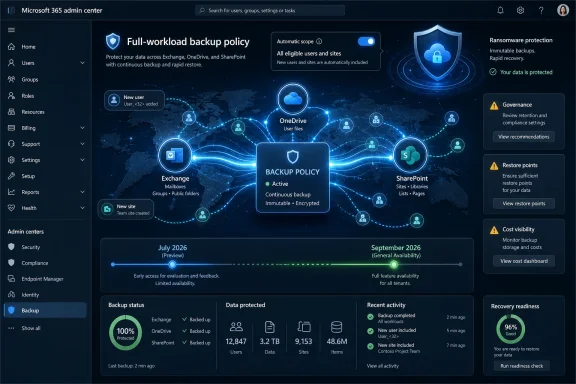 Microsoft Moves Backup From Inventory Chore to Tenant Assumption
The new capability is described plainly by Microsoft: create full-workload backup policies for Microsoft 365 Backup, automatically back up all Exchange or OneDrive users and/or SharePoint sites in the tenant, and automatically add new users or sites to the policy. That is the entire promise, and the restraint of the language is part of what makes it important. This is not a new ransomware brand, not a new dashboard, not a new storage architecture pitch. It is an attempt to remove one of the most failure-prone parts of backup operations: deciding what is in scope and keeping that decision current.Microsoft 365 Backup already works around policies for SharePoint, Exchange, and OneDrive. Microsoft’s admin documentation says a policy defines the Microsoft 365 data that an organization wants to protect, including SharePoint sites, Exchange mailboxes, and OneDrive accounts. The existing model gives admins selection methods: uploading lists, choosing objects individually, using filters in some cases, and editing policy scope after the fact. That is powerful enough for segmented administration, but it also leaves a familiar enterprise trapdoor: the backup policy is only as complete as the inventory process feeding it.
Full-workload backup policies are Microsoft’s answer to that gap. Instead of asking an admin to maintain a list of the protected Exchange mailboxes, OneDrive accounts, or SharePoint sites, the policy can cover the workload itself. New eligible users or sites are then added automatically. For small tenants, that mostly saves clicks. For enterprise tenants, it removes a class of silent exposure that tends to appear during reorganizations, mergers, seasonal hiring, migrations, and automation-heavy site creation.
That distinction matters because Microsoft 365 is now the record of work for many organizations, not merely a collaboration suite. Exchange mailboxes hold contracts, approvals, and litigation-relevant history. OneDrive contains drafts, local-sync spillover, and executive working files. SharePoint hosts departmental knowledge bases, operational data, intranet publishing, and increasingly business process content generated by low-code and AI-assisted workflows. A backup product that protects “most” of that estate can still fail the moment the incident lands on the one site or mailbox nobody remembered to add.
Microsoft’s Roadmap entry is therefore less about backup novelty than administrative realism. The company is acknowledging that workload coverage cannot depend indefinitely on admins chasing a moving target. In Microsoft 365, the target moves every day.
The Old Model Protected What You Remembered to Select
Microsoft’s current Microsoft 365 Backup documentation makes the old shape of the product clear. To use the service for SharePoint, Exchange, or OneDrive, admins create a backup policy for each product. A policy contains the data to protect, and Microsoft says organizations can create more than one backup policy for each product, with a limit of 100 policies per product. That design fits real enterprises: separate departments, geographies, business units, privileged groups, or data classes can have distinct policies.But granularity has an administrative cost. SharePoint policy creation can involve uploading a CSV list of sites, selecting sites individually, or using filters. Exchange policies can include user and shared mailboxes, while Microsoft’s documentation notes that other Exchange recipient types such as room and group mailboxes are not supported at this time. OneDrive policies similarly depend on scoped account selection. The tool can work at bulk scale, but it still asks the organization to define the protected population.
That is a reasonable product design when the priority is control. It is less satisfying when the priority is certainty. A compliance team may want different handling for a regulated business unit, but a ransomware recovery team wants to know whether every relevant mailbox and site was covered before the attack began. These are not the same operational question, and Microsoft’s new full-workload policy feature appears aimed squarely at the second one.
The old model also creates ambiguity at the edges. If a user is licensed today, migrated tomorrow, and fully active the day after that, when does the mailbox enter the backup policy? If a project team creates a SharePoint site from Teams, a template, a provisioning workflow, or a delegated admin process, does backup coverage follow? If a regional IT group maintains a CSV, who owns the exception report when the CSV stops matching reality? None of those questions are exotic. They are the daily weather of Microsoft 365 administration.
Microsoft’s documentation already warns that adding a mailbox to a backup policy can temporarily fail if the mailbox setup is not yet complete, such as when a user was recently created, licensed, or migrated from on-premises. Full-workload policies will not magically eliminate every transient provisioning state. But they can change the burden from “remember to add every new object” to “monitor whether the workload policy is successfully absorbing new eligible objects.” That is still administration, but it is a better kind of administration: exception handling instead of perpetual enumeration.
| Policy model | Scope behavior | Best fit | Main operational risk |
|---|---|---|---|
| Existing scoped backup policies | Admins select or bulk-add specific SharePoint sites, Exchange mailboxes, or OneDrive accounts | Segmented policies by department, geography, or business need | New or missed objects may remain outside protection |
| Full-workload backup policies | The policy protects all Exchange or OneDrive users and/or SharePoint sites in the tenant and automatically adds new users or sites | Broad tenant protection and ransomware readiness | Cost, governance, and exception handling must be planned before enabling broad coverage |
The Ransomware Lesson Is That Scope Fails Before Restore Does
The backup market has spent years arguing about restore speed, immutability, air gaps, and whether native Microsoft 365 retention is “backup” in the way disaster-recovery teams use the word. Those debates are not going away. But in day-to-day incidents, backup failure often begins with a more primitive problem: the object you need was never protected.Microsoft has positioned Microsoft 365 Backup as a business continuity and disaster recovery service for scenarios such as ransomware, accidental deletion, and malicious overwrites. Its own best-practices material emphasizes that the service keeps data in Microsoft 365’s trust boundary and is designed for fast restoration of OneDrive, SharePoint, and Exchange Online data. Microsoft Learn describes backups as append-only in important respects, with backup data protected from modification or overwrite, while still allowing deletion through product offboarding mechanisms and related administrative controls.
That architecture matters, but architecture does not help an excluded mailbox. Nor does it help a SharePoint site that appeared after a project kicked off and never made its way into a manually maintained policy. The ugly truth of Microsoft 365 backup administration is that collaboration platforms produce backup scope faster than humans review backup scope. Workloads are not static; they are living systems.
Full-workload policies attack that problem at the source. If an organization chooses to protect the Exchange workload, the operational assumption becomes that all eligible Exchange users are covered. If it protects OneDrive, new accounts should enter automatically. If it protects SharePoint, newly created sites should not depend on a quarterly spreadsheet reconciliation to become recoverable. The feature turns backup coverage into a workload posture rather than a list-management habit.
The timing is also telling. The Roadmap entry was created on October 29, 2024, and updated on July 8, 2026, with preview availability listed for July 2026 and general availability for September 2026. That is a long runway for what looks, superficially, like a policy toggle. The likely reason is that “all users and all sites” is deceptively hard in Microsoft 365. It touches licensing states, workload eligibility, provisioning latency, policy limits, billing, admin permissions, reporting, and restore expectations.
Microsoft’s own documentation says initial backups take time after policy creation and after protection units are added. It also states that restore points may take time to become available after sites or mailboxes enter a policy. Full-workload policies therefore should not be read as instantaneous magic. They should be read as automatic inclusion. The distinction is critical in incident response planning: newly created objects may be automatically targeted for protection, but admins still need to understand when restore points actually become available.
The Cost Conversation Becomes Harder When Coverage Becomes Easier
The great administrative benefit of full-workload backup policies is also the first budgeting problem. If a policy can protect every eligible Exchange or OneDrive user and every SharePoint site, then the cost model becomes less about a carefully curated subset and more about the real sprawl of the tenant. For many organizations, that will be a useful moment of truth.Microsoft’s pricing documentation for Microsoft 365 Backup frames cost around protected content and backup usage rather than a conventional flat “turn it on for everyone and forget it” model. It explains that deleted and versioned data can remain part of the charged backup footprint while it is retained, and that reducing restore-point frequency would not materially change costs. Microsoft also points admins toward a pricing calculator to estimate backup storage and cost. The product’s economics reward understanding the data estate, not pretending it is smaller than it is.
Full-workload policies could therefore expose the gap between perceived and actual Microsoft 365 data growth. SharePoint sites accumulate libraries, versions, recycle-bin content, and forgotten project material. OneDrive accounts often become informal archives for employees who moved roles or left projects. Exchange mailboxes grow through archives, attachments, and recoverable items. A tenant-wide policy does not create that data, but it can make the backup bill reflect it more honestly.
That is not an argument against enabling broad protection. It is an argument against enabling it blindly. Microsoft 365 Backup’s value proposition is strongest when the organization values fast recovery inside Microsoft’s cloud boundary and accepts the tradeoff that this is not an independent, customer-owned storage island. For many enterprises, that is attractive: fewer external security domains, less third-party application access, and recovery behavior integrated with Microsoft 365 administration. For others, especially those with strict 3-2-1 backup policies or regulatory expectations around independent copies, native backup may be only one tier of the strategy.
This is where Microsoft’s partner story complicates the market rather than simplifying it. Microsoft says partner applications built on the Microsoft 365 Backup Storage platform can provide differentiated experiences while using the same underlying performance value proposition. In plain English, Microsoft is building the substrate and letting partners wrap workflows, reporting, or cross-estate backup management around it. That gives customers choices, but it also requires them to distinguish between three things that are often blurred in sales language: Microsoft 365 data resiliency, Microsoft 365 Backup, and third-party backup products.
Full-workload backup policies make that distinction more urgent. If native Microsoft 365 Backup can now automatically cover whole workloads, a third-party tool’s value has to be clearer than “we can include everything.” It may be independent storage, broader workload coverage, longer retention, richer item-level workflows, cross-cloud management, compliance reporting, or operational familiarity. But the bar moves. Microsoft is removing one of the easy objections to its native backup tool: that maintaining scope at scale is too manual.
The Compliance Edge Is Sharper Than the Backup Checkbox
Every backup feature eventually collides with compliance. Microsoft 365 Backup is no exception, and full-workload policies intensify the collision because they make it easier to preserve more data by default.Microsoft’s privacy, security, and compliance documentation says Microsoft 365 Backup keeps organizational data within the tenant and does not use that data to train AI models. It also says retention and deletion policies do not flow through to the backups; backup retention is governed by the backup policy. Microsoft describes the current backup retention period as an invariable one-year retention period. Once data is restored and becomes live again, applicable retention or deletion policies govern that restored data.
That separation is sensible for recovery. If a malicious actor or mistaken retention change could immediately erase backup history, the backup would be much less useful. But the same separation creates governance work. Microsoft notes that GDPR data service request deletion actions operated on the tenant do not delete data in the backups, and those actions must be executed again after restoration to ensure the original request is honored. It also says data existing solely in certain backups may not be discoverable through existing eDiscovery tooling.
Those details are not footnotes for lawyers alone. They are deployment blockers if ignored. A full-workload backup policy may automatically preserve mailboxes, OneDrive accounts, and SharePoint sites that contain data subject to deletion obligations, discovery expectations, internal retention rules, or jurisdiction-specific handling. The answer is not necessarily to avoid broad backup. The answer is to define the governance model before the toggle exists in production.
Admins should expect three conversations before enabling full-workload policies at scale. First, legal and compliance teams need to understand that backup retention is not simply the same as Purview retention. Second, security teams need to decide who can create, modify, offboard, or restore from broad backup policies. Third, finance and data owners need visibility into what broad protection will cost as deleted and versioned content ages through the retention window.
Microsoft’s documentation points to administrative safeguards, including notifications for potentially harmful actions in the Backup tool. That is helpful, but notifications are not governance by themselves. Full-workload coverage increases the blast radius of both good and bad backup administration. A properly protected tenant is more recoverable. A poorly controlled backup admin role becomes more consequential.
Microsoft Is Also Defending Its Own Cloud Boundary
There is a strategic story underneath the admin feature. Microsoft has spent years telling customers that Microsoft 365 is resilient, redundant, and operated under a shared responsibility model. Backup vendors have spent the same years arguing, often successfully, that resilience is not the same thing as customer-controlled recovery from deletion, corruption, ransomware, or malicious insiders. Microsoft 365 Backup is Microsoft’s attempt to absorb that argument without conceding the platform.The service’s design keeps backup data inside the Microsoft 365 data trust boundary, according to Microsoft’s own overview. It says data residency follows the geographic locations of existing data, with limited metadata sent to Azure for billing purposes. It also says Microsoft 365 Backup Storage is built on top of standard OneDrive and SharePoint infrastructure and standard Exchange Online infrastructure. That is not the architecture a traditional backup purist would design if independence from the primary provider were the overriding goal. It is the architecture Microsoft would design if speed, trust-boundary continuity, and native administration were the goal.
This tradeoff deserves a more honest reading than the usual “native versus third-party” shouting match. Keeping backup inside Microsoft 365 can reduce the need for broad third-party permissions and avoid moving sensitive content into another vendor’s cloud. It can also enable fast restores because Microsoft controls the underlying service fabric. For organizations burned by over-permissive SaaS integrations, that is a real advantage.
But the same design means Microsoft 365 Backup is not a substitute for every independent-backup requirement. Some organizations want a separate administrative plane, separate credentials, separate storage, separate contractual control, or a separate cloud. Some want offline or isolated copies. Some want coverage for workloads and collaboration artifacts that Microsoft’s native backup does not handle in the same way. Full-workload policies do not settle those questions; they make the Microsoft-native option more operationally credible.
The competitive pressure will be felt most sharply in the middle of the market. Small organizations that previously avoided Microsoft 365 backup because scope maintenance seemed fussy may find full-workload policies attractive. Large enterprises may use the feature for baseline coverage while continuing to use partner or third-party products for specialized recovery and compliance needs. Managed service providers will have to decide whether native full-workload coverage becomes the default tier, the upsell trigger, or the competitor.
As Practical 365 observed during the earlier public preview era, Microsoft 365 Backup’s strengths and limitations need to be understood before deployment. That remains true in 2026. A product that is excellent for rapid large-scale recovery may not match every everyday restore workflow, every retention expectation, or every external-copy policy. The arrival of full-workload policies improves coverage mechanics; it does not eliminate architectural due diligence.
Preview in July, General Availability in September, and the Calendar Problem
The Roadmap entry places preview availability in July 2026 and general availability in September 2026 for Worldwide standard multi-tenant cloud instances. That is a tight and meaningful deployment window. Preview in July gives Microsoft and customers time to validate behavior, but September general availability implies that organizations do not have a full planning year to absorb the change.The feature’s status remains “in development,” and Microsoft’s Roadmap itself warns that release dates and feature descriptions are estimates subject to change. That caveat matters. Admins should not treat the July preview date as a production commitment for every tenant, nor the September general availability date as a deadline by which all backup strategies must be rewritten. Roadmap dates are planning signals, not service-level guarantees.
Still, the July 8, 2026 update timestamp is fresh enough to treat the item as active. Microsoft is not merely leaving an abandoned 2024 idea on the board. The feature has survived long enough to be tied to near-term availability, and it lines up with Microsoft’s broader push to make Microsoft 365 Backup more usable at scale. Earlier Microsoft 365 blog material previewed the idea of full workload dynamic policies that could automatically back up all Exchange and/or OneDrive users and/or SharePoint sites without maintaining specific group membership. Roadmap ID 464990 is the productization of that concept.
Timeline
October 29, 2024 — Microsoft created the Roadmap entry for creating full-workload backup policies for Microsoft 365 Backup.July 2026 — Microsoft lists preview availability for the feature.
July 8, 2026 — Microsoft last updated Roadmap ID 464990, leaving the feature marked as in development.
September 2026 — Microsoft lists general availability for Worldwide standard multi-tenant cloud instances.
The short timeline should shape how admins test. July preview should not be treated as a casual look at a new button. It should be used to answer operational questions that are hard to answer from documentation: how quickly new users and sites appear in policy scope, how exceptions are reported, how billing estimates change, how policy conflicts are handled, and how the interface explains workload-wide coverage to delegated administrators.
The September target also means procurement and compliance teams should be brought in before general availability, not afterward. Backup changes are rarely just technical changes. They affect cost forecasting, incident response plans, legal hold assumptions, restore runbooks, and vendor overlap. A feature that automatically protects all eligible objects can be an enormous improvement, but only if the organization knows what “all” means in its tenant.
Where WindowsForum Readers Should See the Operational Stakes
For WindowsForum’s audience of admins, IT pros, and Microsoft platform watchers, this story is not just a Microsoft 365 admin center footnote. It is part of the continuing shift from device-centric IT to identity-and-data-centric recovery. Windows endpoints still matter, but much of the recoverable business state now lives in Exchange Online, OneDrive, and SharePoint. A compromised laptop can be replaced. A corrupted SharePoint knowledge base, encrypted OneDrive library, or executive mailbox is a different class of problem.That shift changes how admins should think about backup posture. The old endpoint question was, “Can I restore this machine?” The Microsoft 365 question is, “Can I restore the working state of this person, team, department, or tenant?” Full-workload policies support that newer question by reducing the chance that newly created cloud workspaces fall through the cracks.
There is also a security operations angle. Ransomware and destructive attacks against SaaS platforms often exploit legitimate credentials, synchronization, automation, and user permissions. The damage may not look like a classic file-server encryption event. It may look like mass deletion, malicious overwrites, mailbox tampering, or version churn. In that world, recovery depends on clean restore points and broad enough coverage to avoid ugly exceptions during triage.
Microsoft 365 Backup’s same-boundary architecture may be particularly attractive for organizations that have tightened app consent and third-party access after years of OAuth abuse and SaaS supply-chain incidents. If a backup product can operate without handing a separate vendor broad standing access to tenant content, security teams will pay attention. But they will also ask whether Microsoft tenant compromise could threaten backup administration. That is where role design, multi-admin notifications, privileged access controls, and break-glass processes become central.
Full-workload policies should therefore be tested with the same seriousness as conditional access changes or tenant-wide retention policy changes. They are not just convenience settings. They define what data will exist in recoverable form after something goes wrong.
Action checklist for admins
- Inventory existing Microsoft 365 Backup policies for Exchange, OneDrive, and SharePoint before enabling any full-workload policy.
- Estimate cost impact using current protected content, deleted content, versioned content, archives, and expected tenant growth.
- Confirm which mailboxes, accounts, and SharePoint sites are eligible for protection and document known exclusions.
- Review backup admin roles, offboarding permissions, restore permissions, and notification recipients before preview testing.
- Test how quickly newly created users and sites are automatically added and when restore points become available.
- Update incident response runbooks so restore teams know when to use full-workload recovery versus scoped or third-party recovery.
The Risk Is Not Turning It On; the Risk Is Forgetting What It Means
The most predictable mistake with full-workload backup policies will be treating them as a universal “backup solved” switch. They are not that. They are a scope automation feature for Microsoft 365 Backup covering Exchange or OneDrive users and/or SharePoint sites in the tenant. That is substantial, but it is not a complete data protection strategy by itself.Admins should resist two opposite errors. The first is dismissing the feature because it is native Microsoft and therefore, in some purist sense, not “real backup.” That misses the value of fast, integrated recovery for workloads that live inside Microsoft 365. The second is assuming that native full-workload coverage eliminates the need for independent backup, retention planning, compliance review, or restore testing. That confuses broad inclusion with comprehensive resilience.
The right response is more pragmatic. Use full-workload policies where the organization wants Microsoft-native baseline coverage and rapid recovery. Keep scoped policies where segmentation remains useful. Preserve third-party or partner tools where they provide independent storage, broader coverage, longer retention, or operational capabilities Microsoft’s native tool does not provide. Above all, test restores. A backup strategy that has never restored meaningful data is a theory, not a control.
There is an important cultural shift here as well. Microsoft 365 admins have long lived with the tension between collaboration freedom and governance discipline. Users and teams create content spaces because the platform makes that easy. IT then tries to secure, classify, retain, and recover those spaces after the fact. Full-workload backup policies are one of the rare changes that moves governance closer to the speed of creation. When the workload grows, protection can follow automatically.
That does not remove the need for lifecycle management. If anything, it increases the pressure to clean up stale SharePoint sites, orphaned OneDrive accounts, and unnecessary mailbox data. Backup makes data recoverable; it does not make data free. The more comprehensive the backup posture, the more visible the cost of unmanaged information becomes.
The Practical Reading Before September
Microsoft’s Roadmap entry gives admins enough to start planning, even if the implementation details will matter during preview. The important facts are concrete: Roadmap ID 464990, status in development, Microsoft 365 product, Web platform, Preview and General Availability rings, Worldwide standard multi-tenant cloud instance, preview availability in July 2026, and general availability in September 2026. The feature is specifically about creating full-workload backup policies for Microsoft 365 Backup.From those facts, several practical conclusions follow:
- Full-workload backup policies are designed to reduce missed coverage for Exchange, OneDrive, and SharePoint.
- The feature is most valuable in tenants where users and sites are created frequently or through distributed processes.
- Automatic inclusion does not remove the need to monitor restore-point availability, policy health, and exclusions.
- Broad backup coverage may increase protected usage and therefore deserves cost modeling before rollout.
- Compliance teams need to understand that backup retention and tenant retention policies are not the same control.
- Native Microsoft 365 Backup may complement, compete with, or partially replace third-party tools depending on recovery requirements.
Microsoft’s move is best understood as a bet that Microsoft 365 backup should be workload-native, automatic, and close to the data it protects. That bet will not satisfy every backup philosophy, and it will not absolve admins from testing, governance, or cost discipline. But if Microsoft delivers the July preview and September general availability as described, the default expectation for Microsoft 365 Backup will shift: protecting new Exchange and OneDrive users and SharePoint sites should no longer depend on somebody remembering to update a list.
References
- Primary source: Microsoft 365 Roadmap
Published: 2026-07-08T23:11:07.7961302Z
Loading…
www.microsoft.com - Official source: learn.microsoft.com
Loading…
learn.microsoft.com - Official source: directionsonmicrosoft.com
Loading…
www.directionsonmicrosoft.com - Official source: techcommunity.microsoft.com
Loading…
techcommunity.microsoft.com - Related coverage: windowscentral.com
"Minimize downtime and simplify troubleshooting": Microsoft's powerful new recovery tool is quietly fixing System Restore. Here's how it actually works. | Windows Central
System Restore has long been the go-to option for Windows recovery, but it's certainly not perfect. Microsoft's new Point-in-Time Restore aims to fill in the blanks.www.windowscentral.com - Official source: adoption.microsoft.com
- Related coverage: veritas.com
Loading…
www.veritas.com - Related coverage: tesserent.com
- Related coverage: m365.co.th
Loading…
www.m365.co.th - Related coverage: practical365.com
Loading…
practical365.com - Related coverage: admindroid.com
Loading…
admindroid.com - Related coverage: docs.rubrik.com
Loading…
docs.rubrik.com - Related coverage: m365admin.handsontek.net
Loading…
m365admin.handsontek.net - Related coverage: platops.com
Loading…
platops.com - Related coverage: avepoint.com
Loading…
www.avepoint.com - Related coverage: crashplan.com
Loading…
www.crashplan.com