

Microsoft has marked Microsoft 365 Roadmap item 561920 as launched, adding SharePoint list support to Agent Builder for Microsoft 365 Copilot. The feature reached general availability in June 2026 for worldwide standard multi-tenant tenants and is available on desktop and web.
Makers can now select a SharePoint list as an agent knowledge source, allowing an agent to answer questions from structured business data rather than relying only on documents, sites, or other supported sources. This is aimed at common internal scenarios such as policy registers, equipment inventories, project risks, service catalogs, location directories, and other list-driven records.
Microsoft’s roadmap entry sets two immediate boundaries: an agent may reference one SharePoint list, and that list can contain up to 20,000 items. The list can sit alongside other supported knowledge-source types, but it is not a replacement for broader multi-list aggregation or a proper transactional application.
The single-list restriction matters for organizations that have normalized data across several linked lists. A service desk agent, for example, may be able to ground itself in a list of known issues, but it cannot directly combine that source with separate lists for device models, owners, and escalation contacts through this feature alone.
Admins and makers should test with representative prompts before publishing an agent, particularly where lists rely heavily on lookup relationships, attachments, calculated views, or nonstandard column designs. The practical approach is to keep the source list’s key answerable fields directly on the list items, rather than expecting the agent to follow related records or inspect attached documents.
Microsoft’s SharePoint agent documentation also notes that agents answer from sources users already have permission to access. That makes existing SharePoint permissions central to deployment: adding a list to an agent does not provide users with access to list data they otherwise could not read.
Makers can now select a SharePoint list as an agent knowledge source, allowing an agent to answer questions from structured business data rather than relying only on documents, sites, or other supported sources. This is aimed at common internal scenarios such as policy registers, equipment inventories, project risks, service catalogs, location directories, and other list-driven records.
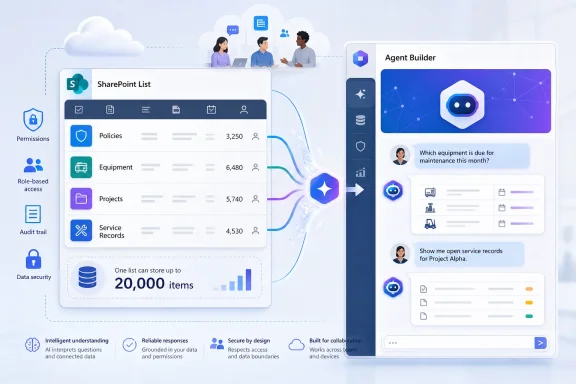 One list, 20,000 items
Microsoft’s roadmap entry sets two immediate boundaries: an agent may reference one SharePoint list, and that list can contain up to 20,000 items. The list can sit alongside other supported knowledge-source types, but it is not a replacement for broader multi-list aggregation or a proper transactional application.The single-list restriction matters for organizations that have normalized data across several linked lists. A service desk agent, for example, may be able to ground itself in a list of known issues, but it cannot directly combine that source with separate lists for device models, owners, and escalation contacts through this feature alone.
Important gaps for list designers
Microsoft also says list attachments and lookup columns are not supported in this release. Agents therefore will not use files attached to list items as part of the list grounding, and data exposed through SharePoint lookup fields should not be assumed to be available for answers.Admins and makers should test with representative prompts before publishing an agent, particularly where lists rely heavily on lookup relationships, attachments, calculated views, or nonstandard column designs. The practical approach is to keep the source list’s key answerable fields directly on the list items, rather than expecting the agent to follow related records or inspect attached documents.
Microsoft’s SharePoint agent documentation also notes that agents answer from sources users already have permission to access. That makes existing SharePoint permissions central to deployment: adding a list to an agent does not provide users with access to list data they otherwise could not read.
What to do
For teams with a well-maintained operational list, this is a straightforward new option in Agent Builder:- Choose a single list with fewer than 20,000 items and clear, directly stored columns.
- Exclude workflows that depend on list attachments or lookup-column values.
- Validate answers using accounts with the same permissions as the intended audience.
- Keep sensitive list permissions tight before sharing the agent.