

The Jamaica Observer has published a practical guide to building a Microsoft 365 Copilot agent that drafts recurring finance variance commentary from monthly budget-versus-actual workbooks. The core idea is sound: replace a repeatedly pasted prompt with a reusable agent that carries standing instructions, example outputs and selected business knowledge.
Microsoft’s current documentation confirms that Agent Builder lets users create custom agents in Microsoft 365 Copilot through a natural-language setup flow or a configuration screen. Instructions are capped at 8,000 characters, and agents can be supplied with SharePoint, OneDrive, Teams, email, website and uploaded-file knowledge sources. The feature is aimed squarely at repeatable internal tasks where output structure and source material do not change much month to month.
The article’s proposed “Variance Commentary” agent is a sensible use case for finance teams. A carefully constrained instruction set can require dollar and percentage variances, establish materiality thresholds, demand a fixed reporting format, and force the draft to say that management input is required when a workbook does not establish a cause.
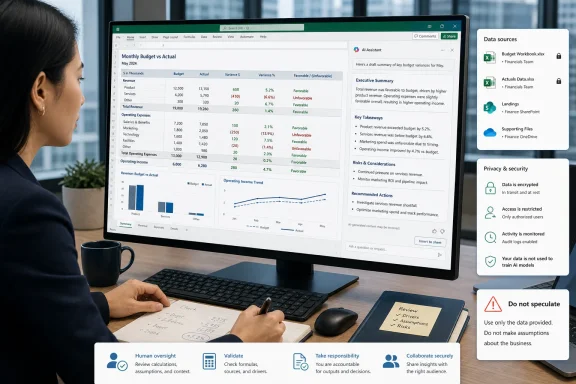
That last constraint matters. Copilot can summarize data, but it cannot reliably infer the real-world reason behind a variance from a spreadsheet alone. A model may produce a plausible explanation even when the supporting data is absent. The article is right to recommend explicit “do not speculate” language and a final human check before management commentary is distributed.
One detail is already dated, however. The article says agents can attach up to 20 sources. Microsoft’s current Agent Builder guidance distinguishes among source types: an agent can use up to 100 SharePoint files, folders or sites, up to 50 OneDrive files, and up to 20 directly uploaded embedded files. The 20-file figure applies to uploads, not the entire knowledge configuration.
For IT teams, the bigger issue is governance rather than prompt craft. Microsoft’s documentation notes that uploaded embedded files become agent knowledge and that anyone given access to the agent can receive responses grounded in them. SharePoint and OneDrive sources respect existing permissions and sensitivity labels, but embedded uploads need closer handling; Information Barriers are not supported for those files.
That makes a narrowly scoped finance folder preferable to an entire departmental site. Before deployment, admins should review who can access the agent, which files it can reference, and whether the reporting pack includes salary, customer, payroll or other restricted data.
The useful outcome is consistent first drafts, not automated financial judgement, and every number still needs to be checked against the source workbook.
Microsoft’s current documentation confirms that Agent Builder lets users create custom agents in Microsoft 365 Copilot through a natural-language setup flow or a configuration screen. Instructions are capped at 8,000 characters, and agents can be supplied with SharePoint, OneDrive, Teams, email, website and uploaded-file knowledge sources. The feature is aimed squarely at repeatable internal tasks where output structure and source material do not change much month to month.
 Useful pattern, with an important correction
The article’s proposed “Variance Commentary” agent is a sensible use case for finance teams. A carefully constrained instruction set can require dollar and percentage variances, establish materiality thresholds, demand a fixed reporting format, and force the draft to say that management input is required when a workbook does not establish a cause.That last constraint matters. Copilot can summarize data, but it cannot reliably infer the real-world reason behind a variance from a spreadsheet alone. A model may produce a plausible explanation even when the supporting data is absent. The article is right to recommend explicit “do not speculate” language and a final human check before management commentary is distributed.
One detail is already dated, however. The article says agents can attach up to 20 sources. Microsoft’s current Agent Builder guidance distinguishes among source types: an agent can use up to 100 SharePoint files, folders or sites, up to 50 OneDrive files, and up to 20 directly uploaded embedded files. The 20-file figure applies to uploads, not the entire knowledge configuration.
Licensing and controls
Microsoft says its advanced Researcher and Analyst agents require a Microsoft 365 Copilot add-on license for business and enterprise users. Copilot Chat without that license has more limited agent access and work-data grounding, while custom agents that use organizational content can also be made available through metered usage where administrators enable it.For IT teams, the bigger issue is governance rather than prompt craft. Microsoft’s documentation notes that uploaded embedded files become agent knowledge and that anyone given access to the agent can receive responses grounded in them. SharePoint and OneDrive sources respect existing permissions and sensitivity labels, but embedded uploads need closer handling; Information Barriers are not supported for those files.
That makes a narrowly scoped finance folder preferable to an entire departmental site. Before deployment, admins should review who can access the agent, which files it can reference, and whether the reporting pack includes salary, customer, payroll or other restricted data.
What Windows admins should do
A pilot should start with a closed, already-reconciled reporting period and one or two finance users. Compare the generated commentary line by line with the approved version, then refine instructions rather than trying to correct output after every run.The useful outcome is consistent first drafts, not automated financial judgement, and every number still needs to be checked against the source workbook.
References
- Primary source: Jamaica Observer
Published: 2026-07-18T04:23:46+00:00
Your first AI agent — teach Microsoft 365 Copilot to draft the month-end commentary your way - Jamaica Observer
Somewhere on your computer there is a note holding your best prompt. You know the one: the paragraph you paste into an AI chat at month-end, refined over months until the commentary comes out the way you like it — the format, the thresholds, the rule about never guessing. It is quietly one of...www.jamaicaobserver.com - Official source: learn.microsoft.com
Add knowledge sources to your declarative agent in Microsoft 365 Copilot | Microsoft Learn
Learn about the different types of knowledge sources that you can add to your declarative agent when you build your agent with the Agent Builder feature in Microsoft 365 Copilot.learn.microsoft.com - Official source: cdn-dynmedia-1.microsoft.com
- Official source: techcommunity.microsoft.com
- Official source: support.microsoft.com
AI credits and limits for Microsoft 365 subscriptions | Microsoft Support
Learn about AI credits and feature limits in Microsoft 365 subscriptions.support.microsoft.com