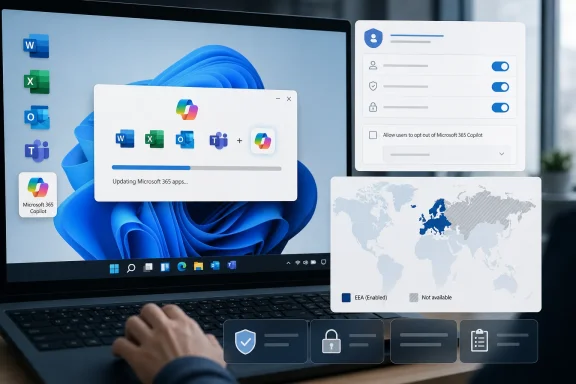
Microsoft resumed automatically installing the Microsoft 365 Copilot app in June 2026 on eligible commercial Windows devices that already run Microsoft 365 desktop apps, using the Office update mechanism rather than the Microsoft Store or a conventional Windows feature update. The detail that matters is not merely that Copilot is appearing again. It is that Microsoft has chosen the administrative path of least resistance: deploy first, require organizations to opt out second. That tells us more about the company’s AI strategy than any keynote demo.
The renewed rollout is narrow enough for Microsoft to describe it as a managed workplace change, but broad enough to matter to almost every IT department running Microsoft 365 at scale. The Microsoft 365 Copilot app is being pushed to Windows devices with the Microsoft 365 desktop apps installed, including the familiar Word, Excel, PowerPoint, Outlook, and Teams estate that defines modern corporate computing.
That delivery route is the story. This is not a splashy Windows 11 Moment update, not a Store app a user chooses to fetch, and not a consumer feature advertised with confetti in the taskbar. It rides through the Microsoft 365 Apps update infrastructure, which many enterprises already trust to keep Office current and secure.
From Microsoft’s perspective, that is elegant. The Office updater reaches the right machines, follows existing update channels, and lands inside the productivity environment where Copilot is supposed to be useful. From an administrator’s perspective, it is also exactly why the move feels slippery: a maintenance mechanism is being used to distribute a new AI-facing application that may carry policy, privacy, licensing, training, and support implications.
The company’s stated rationale is straightforward. Microsoft wants to make Copilot easier to find, especially for workers already inside Microsoft 365 workflows. The app is positioned as a front door to AI-assisted work, not simply a chatbot bolted onto Windows. Yet the optics are hard to miss: the same company that spent the past year insisting Copilot is essential now appears unwilling to wait for customers to ask for it.
June 2026 suggests otherwise. The pause was not the end of the policy; it was a delay while Microsoft adjusted the deployment path, messaging, and controls. The basic premise survived intact: if a commercial Windows device is already part of the Microsoft 365 productivity estate, Microsoft believes the Copilot app belongs there unless an administrator says no.
That distinction matters because it separates product quality from product governance. Microsoft may be right that some users will benefit from Copilot. It may also be right that a unified app reduces confusion across the many Copilot surfaces now scattered across Windows, Office, Edge, Teams, and the web. But those arguments do not settle the question of who gets to decide when a new AI application appears on a managed PC.
The company has learned the politics of AI distribution faster than it has solved the trust problem. Instead of presenting Copilot as an optional add-on, Microsoft is treating it as an expected layer of the Microsoft 365 experience. That may be strategically coherent, but it also confirms what critics have been saying for months: Copilot is not being integrated into Windows and Office so much as institutionalized inside them.
That is a familiar Microsoft pattern. Defaults shape behavior more effectively than marketing, and enterprise IT often lives with defaults because there are too many settings, portals, policies, and exceptions to audit continuously. A feature that is opt-in reaches enthusiasts. A feature that is opt-out reaches everyone who is busy.
For small and mid-sized businesses, that burden is especially real. Many do not have dedicated endpoint engineering teams watching every Microsoft 365 Message Center post and admin center setting. They rely on automatic updates because the alternative is worse: stale Office builds, missed security fixes, and support chaos. Microsoft knows this, and that knowledge gives the Office updater enormous power.
The company would argue that administrators still have control. Technically, that is true. But control that requires constant vigilance is not the same as consent. A tenant admin can block the app, but only if they know the rollout is coming, understand which machines qualify, find the right policy surface, and apply the setting before the update wave reaches their fleet.
Microsoft has spent years adapting Windows and Microsoft 365 behavior for European competition and privacy expectations. The EEA has become the place where default bundling, data flows, and platform leverage face more formal scrutiny. If the automatic Copilot app install is acceptable everywhere but not there, administrators elsewhere are entitled to ask why their users receive less cautious treatment.
This does not necessarily mean the rollout violates any rule outside Europe. It does mean Microsoft appears to understand that automatically placing an AI-branded productivity app onto business devices can raise sharper questions in jurisdictions with stronger consent and platform-control norms. The company’s decision to exclude the EEA reads as both compliance and confession.
For Windows users outside Europe, the practical lesson is uncomfortable. Regulatory pressure can create better defaults, but only for the people covered by the regulation. Everyone else gets the global version of Microsoft’s preferred future: AI surfaces arriving through the pipes that already feed the software stack.
The problem is that usefulness is uneven. Copilot is valuable when it has the right context, the right permissions, the right licensing, and users who understand its limitations. It is much less valuable when it appears as another icon with unclear capabilities, unpredictable eligibility, and a support burden that lands on the help desk.
Microsoft is trying to solve the adoption problem by solving the distribution problem first. If Copilot is present everywhere, the company can work backward toward habit formation. That is how platform vendors think: availability precedes dependency, and dependency becomes defensibility.
But AI is not just another ribbon button. It changes how documents are drafted, how corporate data is queried, and how users think about confidentiality. Dropping the app onto machines does not answer whether employees should feed sensitive files into it, whether managers understand retention policies, or whether regulated teams have approved its use.
Those questions are not theoretical. In a large tenant, access to Microsoft 365 content is already governed by years of SharePoint permissions, Teams sprawl, OneDrive sharing habits, sensitivity labels, retention policies, and exceptions made under deadline pressure. AI does not create that mess, but it can make the mess more visible and easier to query.
That is why many security-minded administrators are wary of Copilot even when they are not anti-AI. Their concern is not that a language model will suddenly become sentient inside Excel. It is that employees may discover information they technically had permission to access but were never meant to find easily. Copilot can compress the distance between permission and exposure.
Microsoft has tools to manage this. Purview, sensitivity labels, conditional access, audit logs, data loss prevention, and admin controls all matter. But the renewed auto-installation means some organizations will confront those governance questions reactively, after users notice the app, rather than proactively as part of a planned Copilot readiness project.
That distinction helps explain why the rollout feels both targeted and hard to avoid. Microsoft does not need to wait for a Windows release train if the Office update channel can do the job. It does not need to persuade consumers through the Store if the device already belongs to a commercial tenant. It does not need to frame the change as a Windows feature if it can frame it as a Microsoft 365 experience.
For years, Windows was the gravitational center of Microsoft’s desktop power. Today, Microsoft 365 is often the stronger control plane. The subscription, identity layer, admin center, compliance stack, and update channels give Microsoft a continuous relationship with corporate machines that is less dependent on old-school OS upgrade cycles.
Copilot fits naturally into that model. It is not a one-time feature delivered in a boxed product. It is a service surface, updated constantly, monetized through subscriptions, and made more valuable by its proximity to organizational data. That is why Microsoft is unlikely to treat distribution as optional for long.
But the consumer memory still shapes the reaction. Windows users have spent years watching Microsoft test the limits of Start menu recommendations, Edge prompts, account nudges, Teams bundling, OneDrive defaults, and other forms of platform steering. Copilot arrives in that context, not in a vacuum.
When Microsoft says it is simplifying access, many users hear a familiar euphemism. They remember unwanted icons, restored defaults, web search in places they did not ask for it, and promotional surfaces described as productivity enhancements. That history makes even a technically defensible enterprise deployment look like another move in a long campaign to make Windows less like an operating system and more like a Microsoft services terminal.
This is the trust tax Microsoft pays for years of aggressive defaults. Even when the company has a reasonable product argument, the audience has learned to inspect the delivery mechanism first. Copilot may be useful, but the method of arrival determines whether users greet it as a tool or an intrusion.
In a managed environment, removal itself becomes work. Someone must detect the install, communicate the change, update documentation, revise images or policies, answer tickets, and decide whether to suppress reinstallation. The cost is not measured in disk space. It is measured in administrative attention.
There is also the risk of mixed states. Some users may receive the app, others may not. Some may have licenses that unlock richer experiences, while others see limited chat surfaces. Some devices may be excluded by geography, update channel, or policy timing. That inconsistency creates the kind of low-grade enterprise confusion that rarely appears in launch demos but dominates help-desk reality.
If Microsoft wants Copilot to become trusted workplace infrastructure, it should want cleaner deployment narratives, not cleverer defaults. Administrators can handle change. What they resent is surprise.
This is not unusual. Platform companies seed entry points before monetization fully matures. The history of software is full of free viewers, bundled clients, default search boxes, trial prompts, and cloud sync folders that later become revenue funnels.
The difference is that AI sits closer to sensitive work than many earlier upsells. A cloud storage prompt asks where to save a file. An AI assistant asks what is in it, what it means, and what should be written next. That intimacy makes distribution strategy feel more consequential.
Microsoft’s challenge is that it wants Copilot to be both mundane and transformative. It wants administrators to treat the app like another Microsoft 365 component, while also telling executives that Copilot will reshape productivity. Those messages collide when the app appears automatically.
Still, this rollout should trigger a governance review. Administrators should confirm whether their tenant is in scope, whether the automatic install setting is enabled, which update channels are affected, and whether policy aligns with the organization’s AI posture. If Copilot is approved, the installation can be folded into a broader adoption plan. If it is not approved, the opt-out should happen before users discover the app organically.
The worst option is ambiguity. Nothing undermines IT credibility faster than users asking whether a newly installed AI app is sanctioned and the help desk not knowing. Microsoft may control the rollout schedule, but organizations still control the internal narrative if they move quickly enough.
That narrative should include plain-language guidance. Employees need to know whether they may use Copilot, what kinds of data are appropriate, where outputs require review, and whether the tool is approved for regulated workflows. The app icon is only the beginning; policy is the product users actually need.
Microsoft may ultimately be right that AI assistants will become as normal in productivity software as spell check, search, and autocomplete. But spell check did not arrive wrapped in questions about tenant data, licensing tiers, regulatory geography, and administrative consent. If Copilot is to become ordinary, Microsoft still has to make it feel earned rather than imposed — and the quiet return of automatic installation suggests that, for now, Redmond is still more confident in its distribution machinery than in its users’ willingness to invite AI in.
 Microsoft Turns the Office Updater Into an AI Distribution Channel
The renewed rollout is narrow enough for Microsoft to describe it as a managed workplace change, but broad enough to matter to almost every IT department running Microsoft 365 at scale. The Microsoft 365 Copilot app is being pushed to Windows devices with the Microsoft 365 desktop apps installed, including the familiar Word, Excel, PowerPoint, Outlook, and Teams estate that defines modern corporate computing.That delivery route is the story. This is not a splashy Windows 11 Moment update, not a Store app a user chooses to fetch, and not a consumer feature advertised with confetti in the taskbar. It rides through the Microsoft 365 Apps update infrastructure, which many enterprises already trust to keep Office current and secure.
From Microsoft’s perspective, that is elegant. The Office updater reaches the right machines, follows existing update channels, and lands inside the productivity environment where Copilot is supposed to be useful. From an administrator’s perspective, it is also exactly why the move feels slippery: a maintenance mechanism is being used to distribute a new AI-facing application that may carry policy, privacy, licensing, training, and support implications.
The company’s stated rationale is straightforward. Microsoft wants to make Copilot easier to find, especially for workers already inside Microsoft 365 workflows. The app is positioned as a front door to AI-assisted work, not simply a chatbot bolted onto Windows. Yet the optics are hard to miss: the same company that spent the past year insisting Copilot is essential now appears unwilling to wait for customers to ask for it.
The Pause Was a Tactical Retreat, Not a Change of Heart
The earlier pause in automatic installation was easy to misread as a concession. After backlash and technical friction, Microsoft temporarily stepped back from forcing the Microsoft 365 Copilot app onto Windows devices with Microsoft 365 desktop apps. That pause created the impression that user sentiment had finally altered Redmond’s AI rollout machinery.June 2026 suggests otherwise. The pause was not the end of the policy; it was a delay while Microsoft adjusted the deployment path, messaging, and controls. The basic premise survived intact: if a commercial Windows device is already part of the Microsoft 365 productivity estate, Microsoft believes the Copilot app belongs there unless an administrator says no.
That distinction matters because it separates product quality from product governance. Microsoft may be right that some users will benefit from Copilot. It may also be right that a unified app reduces confusion across the many Copilot surfaces now scattered across Windows, Office, Edge, Teams, and the web. But those arguments do not settle the question of who gets to decide when a new AI application appears on a managed PC.
The company has learned the politics of AI distribution faster than it has solved the trust problem. Instead of presenting Copilot as an optional add-on, Microsoft is treating it as an expected layer of the Microsoft 365 experience. That may be strategically coherent, but it also confirms what critics have been saying for months: Copilot is not being integrated into Windows and Office so much as institutionalized inside them.
Default-On Is the Real Product Decision
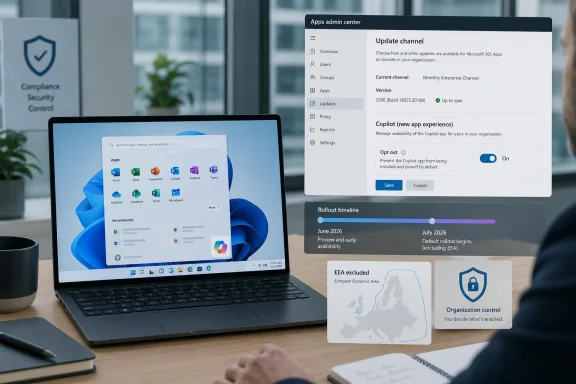
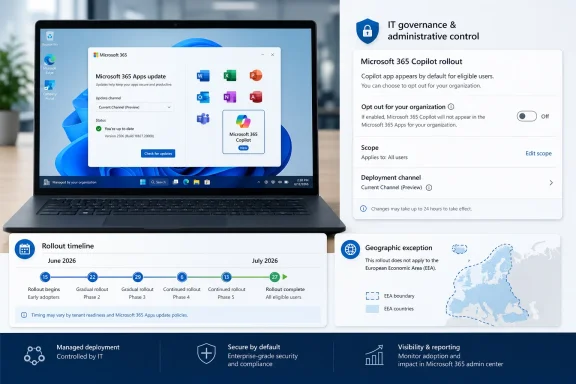
The most consequential setting in this rollout is not a model version, a feature flag, or a license SKU. It is the default. Organizations that do not want the Microsoft 365 Copilot app automatically installed must actively opt out through the Microsoft 365 Apps admin center.That is a familiar Microsoft pattern. Defaults shape behavior more effectively than marketing, and enterprise IT often lives with defaults because there are too many settings, portals, policies, and exceptions to audit continuously. A feature that is opt-in reaches enthusiasts. A feature that is opt-out reaches everyone who is busy.
For small and mid-sized businesses, that burden is especially real. Many do not have dedicated endpoint engineering teams watching every Microsoft 365 Message Center post and admin center setting. They rely on automatic updates because the alternative is worse: stale Office builds, missed security fixes, and support chaos. Microsoft knows this, and that knowledge gives the Office updater enormous power.
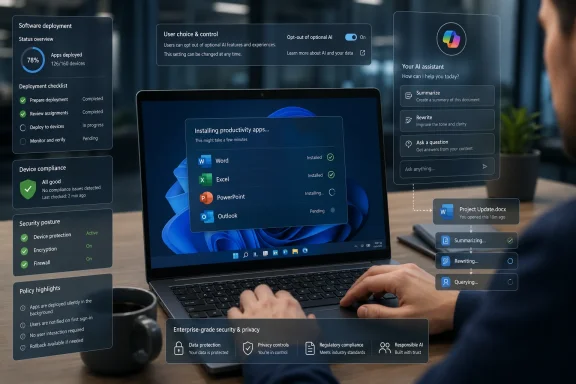
The company would argue that administrators still have control. Technically, that is true. But control that requires constant vigilance is not the same as consent. A tenant admin can block the app, but only if they know the rollout is coming, understand which machines qualify, find the right policy surface, and apply the setting before the update wave reaches their fleet.
Europe’s Absence Says the Quiet Part Loudly
One of the sharpest clues in the rollout is geographic. Devices in the European Economic Area are exempt from the automatic installation plan, according to current reporting and Microsoft’s deployment guidance. That carve-out is not a footnote; it is a map of regulatory risk.Microsoft has spent years adapting Windows and Microsoft 365 behavior for European competition and privacy expectations. The EEA has become the place where default bundling, data flows, and platform leverage face more formal scrutiny. If the automatic Copilot app install is acceptable everywhere but not there, administrators elsewhere are entitled to ask why their users receive less cautious treatment.
This does not necessarily mean the rollout violates any rule outside Europe. It does mean Microsoft appears to understand that automatically placing an AI-branded productivity app onto business devices can raise sharper questions in jurisdictions with stronger consent and platform-control norms. The company’s decision to exclude the EEA reads as both compliance and confession.
For Windows users outside Europe, the practical lesson is uncomfortable. Regulatory pressure can create better defaults, but only for the people covered by the regulation. Everyone else gets the global version of Microsoft’s preferred future: AI surfaces arriving through the pipes that already feed the software stack.
Copilot Is Becoming Infrastructure Before It Becomes Loved Software
The tension around Copilot is not that AI features exist. Many of them are useful. Summarizing long documents, drafting emails, extracting action items from meetings, comparing files, querying internal data, and generating first-pass content are exactly the kinds of tasks knowledge workers already try to automate poorly with search, templates, and copy-paste rituals.The problem is that usefulness is uneven. Copilot is valuable when it has the right context, the right permissions, the right licensing, and users who understand its limitations. It is much less valuable when it appears as another icon with unclear capabilities, unpredictable eligibility, and a support burden that lands on the help desk.
Microsoft is trying to solve the adoption problem by solving the distribution problem first. If Copilot is present everywhere, the company can work backward toward habit formation. That is how platform vendors think: availability precedes dependency, and dependency becomes defensibility.
But AI is not just another ribbon button. It changes how documents are drafted, how corporate data is queried, and how users think about confidentiality. Dropping the app onto machines does not answer whether employees should feed sensitive files into it, whether managers understand retention policies, or whether regulated teams have approved its use.
The Enterprise Burden Moves From Installation to Governance
For IT administrators, the appearance of the Microsoft 365 Copilot app is only the first question. The harder work is deciding what it means inside the organization’s risk model. Is the app merely a launcher? Which accounts can use it? Which features require a paid Microsoft 365 Copilot license? What happens for users with Copilot Chat but not the full enterprise Copilot license? Which data sources are reachable?Those questions are not theoretical. In a large tenant, access to Microsoft 365 content is already governed by years of SharePoint permissions, Teams sprawl, OneDrive sharing habits, sensitivity labels, retention policies, and exceptions made under deadline pressure. AI does not create that mess, but it can make the mess more visible and easier to query.
That is why many security-minded administrators are wary of Copilot even when they are not anti-AI. Their concern is not that a language model will suddenly become sentient inside Excel. It is that employees may discover information they technically had permission to access but were never meant to find easily. Copilot can compress the distance between permission and exposure.
Microsoft has tools to manage this. Purview, sensitivity labels, conditional access, audit logs, data loss prevention, and admin controls all matter. But the renewed auto-installation means some organizations will confront those governance questions reactively, after users notice the app, rather than proactively as part of a planned Copilot readiness project.
Windows 11 Becomes the Stage, but Microsoft 365 Holds the Lever
The headline says Windows 11, and that is fair because the app lands on Windows machines. But the lever is Microsoft 365. This is a productivity-suite deployment decision with operating-system consequences, not a classic Windows feature push.That distinction helps explain why the rollout feels both targeted and hard to avoid. Microsoft does not need to wait for a Windows release train if the Office update channel can do the job. It does not need to persuade consumers through the Store if the device already belongs to a commercial tenant. It does not need to frame the change as a Windows feature if it can frame it as a Microsoft 365 experience.
For years, Windows was the gravitational center of Microsoft’s desktop power. Today, Microsoft 365 is often the stronger control plane. The subscription, identity layer, admin center, compliance stack, and update channels give Microsoft a continuous relationship with corporate machines that is less dependent on old-school OS upgrade cycles.
Copilot fits naturally into that model. It is not a one-time feature delivered in a boxed product. It is a service surface, updated constantly, monetized through subscriptions, and made more valuable by its proximity to organizational data. That is why Microsoft is unlikely to treat distribution as optional for long.
The Consumer Memory Still Haunts the Business Rollout
Microsoft’s defenders can reasonably point out that this rollout mainly targets commercial devices, not ordinary home PCs. That distinction matters. A managed business PC is not the same as a personal gaming rig or a family laptop, and enterprise administrators routinely accept software changes that would annoy consumers.But the consumer memory still shapes the reaction. Windows users have spent years watching Microsoft test the limits of Start menu recommendations, Edge prompts, account nudges, Teams bundling, OneDrive defaults, and other forms of platform steering. Copilot arrives in that context, not in a vacuum.
When Microsoft says it is simplifying access, many users hear a familiar euphemism. They remember unwanted icons, restored defaults, web search in places they did not ask for it, and promotional surfaces described as productivity enhancements. That history makes even a technically defensible enterprise deployment look like another move in a long campaign to make Windows less like an operating system and more like a Microsoft services terminal.
This is the trust tax Microsoft pays for years of aggressive defaults. Even when the company has a reasonable product argument, the audience has learned to inspect the delivery mechanism first. Copilot may be useful, but the method of arrival determines whether users greet it as a tool or an intrusion.
The App Is Removable, but Removal Is Not Strategy
Microsoft has made gestures toward removability and cleaner AI controls in Windows. That is welcome, and it reflects real pressure from users who do not want every workflow decorated with a Copilot button. But the ability to remove an app after installation is not the same as a deployment strategy built around choice.In a managed environment, removal itself becomes work. Someone must detect the install, communicate the change, update documentation, revise images or policies, answer tickets, and decide whether to suppress reinstallation. The cost is not measured in disk space. It is measured in administrative attention.
There is also the risk of mixed states. Some users may receive the app, others may not. Some may have licenses that unlock richer experiences, while others see limited chat surfaces. Some devices may be excluded by geography, update channel, or policy timing. That inconsistency creates the kind of low-grade enterprise confusion that rarely appears in launch demos but dominates help-desk reality.
If Microsoft wants Copilot to become trusted workplace infrastructure, it should want cleaner deployment narratives, not cleverer defaults. Administrators can handle change. What they resent is surprise.
The AI Upsell Is Moving Closer to the Desktop
The Microsoft 365 Copilot app also serves a commercial purpose that Microsoft does not need to overstate. The more visible Copilot becomes, the easier it is to convert curiosity into paid usage. Even if a user does not have the full Microsoft 365 Copilot license, the app can establish the brand, normalize the interface, and point workers toward AI-assisted workflows.This is not unusual. Platform companies seed entry points before monetization fully matures. The history of software is full of free viewers, bundled clients, default search boxes, trial prompts, and cloud sync folders that later become revenue funnels.
The difference is that AI sits closer to sensitive work than many earlier upsells. A cloud storage prompt asks where to save a file. An AI assistant asks what is in it, what it means, and what should be written next. That intimacy makes distribution strategy feel more consequential.
Microsoft’s challenge is that it wants Copilot to be both mundane and transformative. It wants administrators to treat the app like another Microsoft 365 component, while also telling executives that Copilot will reshape productivity. Those messages collide when the app appears automatically.
Administrators Should Treat This as a Governance Trigger
The practical response is not panic. Most organizations already running Microsoft 365 are not suddenly exposed to a mysterious third-party tool because a Copilot app icon appears. Microsoft’s enterprise AI story is intertwined with existing tenant identity, licensing, and compliance controls.Still, this rollout should trigger a governance review. Administrators should confirm whether their tenant is in scope, whether the automatic install setting is enabled, which update channels are affected, and whether policy aligns with the organization’s AI posture. If Copilot is approved, the installation can be folded into a broader adoption plan. If it is not approved, the opt-out should happen before users discover the app organically.
The worst option is ambiguity. Nothing undermines IT credibility faster than users asking whether a newly installed AI app is sanctioned and the help desk not knowing. Microsoft may control the rollout schedule, but organizations still control the internal narrative if they move quickly enough.
That narrative should include plain-language guidance. Employees need to know whether they may use Copilot, what kinds of data are appropriate, where outputs require review, and whether the tool is approved for regulated workflows. The app icon is only the beginning; policy is the product users actually need.
Redmond’s Copilot Bet Now Has an Administrative Price Tag
The concrete lesson from this rollout is that Copilot is no longer something Microsoft merely advertises. It is something Microsoft is operationalizing through the update systems enterprises already depend on. That changes what administrators should watch.- Organizations outside the European Economic Area should verify whether their Microsoft 365 Apps admin center settings allow automatic installation of the Microsoft 365 Copilot app.
- IT teams should treat the June-to-early-July 2026 rollout window as an immediate deployment event, not a future roadmap item.
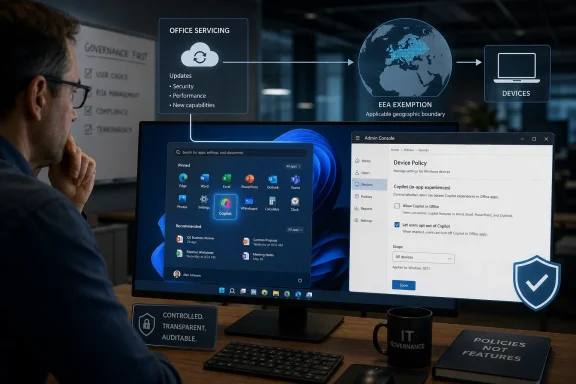
- The installation path through Microsoft 365 Apps updates means Office servicing policy is now part of the Copilot governance conversation.
- Removing the app after it appears may be possible, but preventing unwanted installation is cleaner than cleaning up a mixed fleet later.
- Copilot readiness should include permissions hygiene, user guidance, licensing clarity, and support scripts, not just a decision about whether an icon belongs in the Start menu.
Microsoft may ultimately be right that AI assistants will become as normal in productivity software as spell check, search, and autocomplete. But spell check did not arrive wrapped in questions about tenant data, licensing tiers, regulatory geography, and administrative consent. If Copilot is to become ordinary, Microsoft still has to make it feel earned rather than imposed — and the quiet return of automatic installation suggests that, for now, Redmond is still more confident in its distribution machinery than in its users’ willingness to invite AI in.
References
- Primary source: 5MU
Published: Sat, 27 Jun 2026 22:01:05 GMT
Microsoft is quietly reinstalling Copilot on Windows 11 - 5MU
Microsoft is once again pushing its Copilot AI into Windows 11, with reports confirming the company has resumed automatically installing...www.5mu.com.au - Related coverage: windowslatest.com
Microsoft says it'll force install Microsoft 365 Copilot on Windows 11 with MS 365 Business in the next 30 days
Microsoft quietly confirmed that the Microsoft 365 Copilot app will auto-install on eligible Windows PCs with Microsoft 365 desktop apps. www.windowslatest.com
- Official source: learn.microsoft.com
Deploy the Microsoft 365 Copilot App | Microsoft Learn
Enterprise and company IT Admins can use this guide to manage the deployment of the Microsoft 365 Copilot app to devices in their organization.learn.microsoft.com - Related coverage: windowscentral.com
Microsoft scraps Copilot 365 app auto‑install on Windows 11 | Windows Central
Microsoft won't force the Microsoft 365 Copilot app on Windows 11 for now.www.windowscentral.com - Official source: support.microsoft.com
The Copilot Dynamic Action Button in Word Excel and PowerPoint | Microsoft Support
Learn about the Copilot Dynamic Action Button (DAB) in Word, Excel, and PowerPoint - how to open Copilot, dock the button, and find it if it's missing.support.microsoft.com - Related coverage: letsdatascience.com
Microsoft Auto-Installs Microsoft 365 Copilot on Windows | Let's Data Science
Microsoft resumed automatic installation of the **Microsoft 365 Copilot** app on eligible commercial Windows devices starting in June 2026, per Microsoft's MC1152323 admin-center notification and updated deployment documentation. The rollout targets Windows 10 (22H2 or later) and Windows 11... letsdatascience.com
- Related coverage: windowsforum.com
Microsoft 365 Copilot App Auto-Install (June–July 2026): IT Opt-Out Guide | Windows Forum
Microsoft is resuming automatic installation of the Microsoft 365 Copilot app on eligible Windows devices with commercial Microsoft 365 desktop apps between...windowsforum.com - Related coverage: pcworld.com
Microsoft is force-installing M365 Copilot again after a brief pause | PCWorld
Months after pausing due to bugs and user backlash, Microsoft is now resuming forced Copilot installs for Microsoft 365 users by July 1st.www.pcworld.com - Related coverage: techradar.com
Microsoft 365 Copilot will be automatically installed on 365 Clients in October | TechRadar
Microsoft is pushing the Copilot app on more userswww.techradar.com - Related coverage: tomshardware.com
Microsoft will force install the Copilot AI app for users with desktop versions of 365 apps like Word and Excel — coming October, with no way to opt out for personal users | Tom's Hardware
More bloatware added to Windows, courtesy of Microsoft 365.www.tomshardware.com - Related coverage: pcgamer.com
In a truly galaxy-brained rebrand, Microsoft Office is now the 'Microsoft 365 Copilot app,' but Copilot is also still the name of the AI assistant | PC Gamer
Copilot is the app for launching the other apps, but it's also a chatbot inside the apps. Any questions?www.pcgamer.com - Official source: techcommunity.microsoft.com
- Official source: news.microsoft.com