AI mood boards are the new sketchbook for many designers — a fast, conversational way to go from a brief to several distinct visual directions without leaving PowerPoint, Word, or Microsoft Designer.
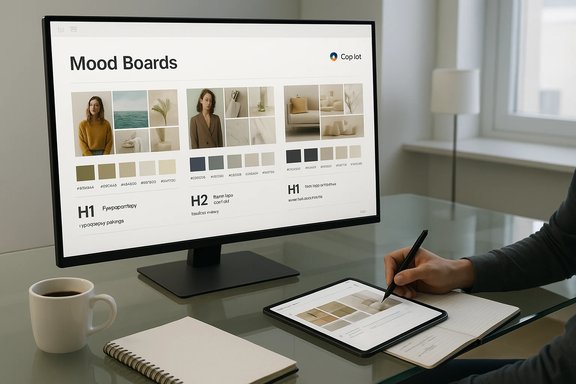
Microsoft positions Copilot as an assistant embedded across Microsoft 365 that helps teams brainstorm, design, plan, and deliver creative work from ideation through to presentation. In practice this means Copilot can generate mood boards — composed sets of thumbnails, color swatches, typographic pairings, and short copy — and insert them directly into familiar productivity canvases like PowerPoint, Word, and Designer. That integration is the product’s core pitch: keep ideation inside the apps teams already use, reduce context‑switching, and shorten the time from concept to a shareable creative brief. Copilot’s mood‑board workflow is conversational: prompt → generate → iterate → export. Designers iterate in chat, ask for alternate palettes or crops, and then export selected assets into a deck or brief for human refinement.
As generative models become more powerful, the central role of human designers will likely shift rather than disappear. AI will expand the number of directions designers can test quickly, but taste, judgement, cultural sensitivity, and craft remain human responsibilities that decide which of those directions survives into production.
At the same time, the most important work remains unchanged: humans shape, contextualize, and approve what finally goes to market. Copyright law, safety considerations, provenance needs, and brand integrity are real constraints that require disciplined processes. The competitive edge will go to design teams that combine Copilot’s speed with strict editorial control, documented provenance, and thoughtful, human-led finishing — turning rapid experimentation into distinctive, responsibly produced creative work.
Source: Microsoft AI Mood Boards: Designers Using Copilot | Microsoft Copilot
 Background / Overview
Microsoft positions Copilot as an assistant embedded across Microsoft 365 that helps teams brainstorm, design, plan, and deliver creative work from ideation through to presentation. In practice this means Copilot can generate mood boards — composed sets of thumbnails, color swatches, typographic pairings, and short copy — and insert them directly into familiar productivity canvases like PowerPoint, Word, and Designer. That integration is the product’s core pitch: keep ideation inside the apps teams already use, reduce context‑switching, and shorten the time from concept to a shareable creative brief. Copilot’s mood‑board workflow is conversational: prompt → generate → iterate → export. Designers iterate in chat, ask for alternate palettes or crops, and then export selected assets into a deck or brief for human refinement.How Copilot’s AI mood boards work
Prompt-driven ideation
The interaction model is intentionally simple and mirrors how many studios brief human designers: define audience, mood, palette, materials, and deliverable format, then ask for multiple directions. Copilot returns composited boards including:- Thumbnail images in multiple stylistic directions
- Color systems with hex codes and suggested hierarchy (primary, accent, background)
- Texture or material cues and layout thumbnails
- Typography pairings and example sizes
- Short copy variants (headlines, captions, speaker notes)
In‑app insertion and format awareness
Copilot can size images and suggest layouts for common outputs — 16:9 slides, Instagram story aspect ratios, A2 posters, and more — so the mood board elements are closer to presentation‑ready when they land in PowerPoint or Designer. PowerPoint’s AI presentation designer features and Copilot‑driven design suggestions can appear alongside traditional Designer ideas for eligible Microsoft 365 subscribers. Microsoft documents these flows and includes step‑by‑step guidance for inserting generated images in Word and PowerPoint.Conversational refinement loop
After an initial generation, Copilot supports conversational edits: “Make the sky warmer,” “Crop for 16:9,” or “Produce three typography options.” This reduces back‑and‑forth between tools and keeps early iteration compact. The practical prompt → revise → export loop is the feature’s main productivity leverage.What Copilot brings to designers: strengths and practical benefits
1. Speed and idea volume
AI mood boards let teams produce several distinct visual directions in the time it previously took to assemble one by hand. For client pitches or internal reviews that benefit from parallel options, this translates into fewer wasted cycles and faster alignment.2. Reduced friction between visual and copy
Copilot can generate short copy — taglines, captions, speaker notes — alongside images and swatches, enabling visual + messaging prototyping in one session. That reduces the need to bounce between a copywriter and a designer for first drafts.3. Accessibility to smaller teams
Solo designers and small studios gain a “starter kit”: a palette, hero image, and a handful of taglines that can be polished into deliverables without large production budgets. This democratizes ideation and encourages disciplined experimentation.4. Integration into familiar workflows
Because Copilot is embedded in Microsoft 365, teams that live in PowerPoint/Word get a UX advantage: mood boards, slide layouts, and narrative outlines can be generated and presented from the same file, preserving context and simplifying handoffs to clients.Practical tips designers should adopt now
- Use detailed prompts. Specific input yields better, more usable results — for example, “Scandinavian kitchen with natural wood and matte black fixtures” outperforms a generic “kitchen design.”
- Request multiple distinct directions. Ask for 3–5 variants (photography vs illustration, minimal vs maximal) so stakeholders can compare conceptually distinct approaches.
- Specify output dimensions and constraints. Give Copilot exact aspect ratios or pixel sizes to reduce rework when inserting assets into slides or social templates.
- Combine AI with manual edits. Treat Copilot outputs as scaffolding; recreate logos and important marks as vectors, retouch images in Photoshop, and verify typography and spacing manually.
- Record provenance. Save prompts, timestamps, and the model used. This traceability is crucial for legal review and future audits.
Technical verification and integration details
Several product documents and community posts confirm that Copilot’s mood‑board features are surfaced in Microsoft 365 apps and that PowerPoint has new Copilot-based design suggestions for eligible users. The Microsoft 365 Insider blog specifically lists build requirements and a staged rollout for the Copilot design suggestions in PowerPoint (Windows: Version 2505 (Build 18827.20006) or later; Mac: Version 16.97 (Build 25040216) or later). Designers using corporate or insider builds should verify their client version before expecting the feature. Microsoft also documents image generation flows in Word and PowerPoint that use DALL·E 3 for Designer’s Image Creator, and product pages clarify that Copilot can generate images directly within the apps. Those pages are the authoritative how‑to for inserting AI‑generated assets into documents and slides. A notable internal shift at Microsoft is the introduction of an in‑house image model family (referred to in product material as MAI‑Image‑1) and tighter Designer integrations across Microsoft 365. Public product guidance highlights MAI‑Image‑1’s photoreal strengths and indicates it has been integrated into Bing Image Creator and Copilot surfaces; however, Microsoft has not published exhaustive model cards enumerating training data, parameter counts, or full provenance details, so any claims about dataset composition should be treated as provisional.Legal, safety, and provenance: the real risks
The productivity benefits are clear, but designers must navigate a complex legal and ethical landscape before deploying AI‑generated mood boards in commercial work.Copyright and authorship
U.S. legal precedent and policy guidance have made clear distinctions between solely AI‑generated works and human‑authored works that use AI as a tool. A U.S. appeals court affirmed that artwork created solely by AI without human authorship is not eligible for copyright protection, emphasizing the need for perceptible human contribution for copyright claims. Designers must therefore document their human edits and decisions if they expect to claim ownership or protect the output. The U.S. Copyright Office has similarly been cautious about extending copyright protection to pure AI outputs while recognizing that works with significant human authorship may still qualify. This legal environment means teams should be conservative about treating raw AI outputs as proprietary, especially when downstream commercial use is planned.Safety, harmful outputs, and content filtering
Generative image tools have produced harmful or unsafe images in some public incidents, and internal whistleblower concerns at major vendors have highlighted content‑safety gaps. Reports have detailed cases where neutral prompts produced problematic imagery, prompting criticism of inadequate safeguards. Design teams should not assume every generated image is safe or compliant and must run human review for sensitive contexts.Provenance and dataset transparency
Microsoft has begun surfacing provenance features — metadata manifests, invisible watermarking, and content credentials in some flows — to support audits and detect AI‑created media. Those features are evolving and vary by surface; teams that require definitive provenance for legal or ethical reasons should validate which metadata is produced in their tenant and whether the provider guarantees specific provenance claims. Public documentation and independent reviews indicate provenance is an active engineering priority but not yet exhaustive.Bias, representation, and cultural sensitivity
Generative models reflect their training distributions, which can lead to under‑ or mis‑representation of certain groups and cultural contexts in generated imagery. Designers must actively audit outputs for representational problems, and build checks for accessibility — e.g., color contrast verification and inclusive casting — into their review process.Governance and procurement checklist for teams
To use Copilot mood boards responsibly in a production environment, follow this practical checklist:- Define permitted uses: create an AI usage policy covering commercial use, client consent, and attribution rules.
- Maintain a brand library: store approved fonts, color tokens, logos, and imagery outside Copilot so AI outputs can be validated against brand constraints.
- Capture provenance: save prompts, model metadata, timestamps, and session logs for every AI asset. This supports audits and copyright inquiries.
- Legal sign‑off for high‑risk assets: require IP clearance for assets used in trademarks, packaging, or products with significant commercial exposure.
- Human polish requirement: require vector recreation, photography replacement, or bespoke illustration before finalizing brand‑critical assets.
- Accessibility QA: test color contrast and typographic legibility for any assets intended for wide audiences.
Workflow recipes: prompt templates and a repeatable process
Adopting structured prompts turns Copilot from a toy into a predictable design engine. Below are battle‑tested patterns that map to standard studio rituals.WIRE+FRAME prompt (4 steps)
- Who & What — State the role and deliverable (e.g., “You are an art director. Create a mood board for…”).
- Input Context — Audience, constraints, and required assets (e.g., “family-friendly living room; must include zoned seating”).
- Style & References — List adjectives and the practical things to avoid (e.g., “mid‑century modern, avoid celebrity likenesses”).
- Expected Output — Count, formats, and exact deliverables (e.g., “3 mood boards; each with 6 thumbnails, 5 hex codes, 2 font pairings; exportable to 16:9 slides”).
Example: rapid mood‑board prompt
“You are a senior interior designer. Create three mood‑board directions for a mid‑century modern living room aimed at young families. Each direction should include: 6 thumbnails, a 5‑color palette with hex codes (primary/accent/background), suggested materials (wood, velvet), two typography pairings (Google Fonts), and two short taglines. Avoid photorealistic faces and celebrity likenesses. Output sizes: 16:9 slide thumbnails.”Iterative refinement loop
- Generate 3 directions.
- Select top 2.
- Ask for fine‑tune edits (lighting, crop, color swap).
- Export chosen assets to Designer or PowerPoint and perform human finishing: vectorize logos, lock brand fonts, test contrast.
The future of AI mood boards and design workflows
Copilot’s feature set is evolving toward deeper personalization, multimodal inputs (uploading sketches or reference images to guide generation), and finer generative edits (fill, erase, on‑canvas compositing). Microsoft’s roadmap and industry reporting suggest increased on‑device processing for privacy‑sensitive flows, more robust content credentials, and expanded real‑time collaboration inside design canvases. These advances will reduce friction between high‑fidelity mockups and ideation, but also raise the bar for governance and provenance.As generative models become more powerful, the central role of human designers will likely shift rather than disappear. AI will expand the number of directions designers can test quickly, but taste, judgement, cultural sensitivity, and craft remain human responsibilities that decide which of those directions survives into production.
Critical analysis: strengths, blind spots, and pragmatic advice
Strengths
- Speed and variability: Copilot accelerates early‑stage exploration and increases the variety of directions available for stakeholder review.
- Contextual outputs: Sizing and format awareness reduce resizing friction and speed prototype-to-deck workflows.
- Democratization: Small teams can experiment at scale without large resource investments.
Blind spots and risks
- Legal ambiguity: Copyright and authorship questions remain unsettled for purely AI‑generated art; organizations should assume some outputs are legally risky without additional human authorship and documentation.
- Safety and filtering gaps: Public incidents show AI image pipelines can produce harmful outputs; rigorous human review is mandatory.
- Opaque provenance: Model training data and dataset composition are not fully disclosed for newer in‑house models; any claim of exhaustive provenance should be treated with caution.
- Homogenization risk: Overreliance on similar prompts can lead to generic, “AI‑looking” creative directions that dilute brand distinctiveness.
Pragmatic advice
- Treat Copilot as an ideation accelerator, not a production engine. Build mandatory human polish steps before client delivery.
- Implement a documented approval path for any asset that will carry legal, branding, or commercial weight.
- Train teams in prompt engineering and mandate provenance capture for every AI session.
- Monitor product rollouts (client builds, tenant settings, and subscription entitlements) because availability and behavior vary by version and plan.
Conclusion
AI mood boards powered by Copilot are a meaningful productivity tool for designers: they shorten the path from brief to visual direction, surface unexpected combinations, and keep ideation inside familiar productivity apps. For teams that embrace them sensibly — using structured prompts, human finishing, and clear governance — Copilot mood boards can drastically reduce the time it takes to get decisions in front of stakeholders.At the same time, the most important work remains unchanged: humans shape, contextualize, and approve what finally goes to market. Copyright law, safety considerations, provenance needs, and brand integrity are real constraints that require disciplined processes. The competitive edge will go to design teams that combine Copilot’s speed with strict editorial control, documented provenance, and thoughtful, human-led finishing — turning rapid experimentation into distinctive, responsibly produced creative work.
Source: Microsoft AI Mood Boards: Designers Using Copilot | Microsoft Copilot