

Microsoft’s recent swap of the familiar “Office” gateway for a Copilot-branded entry point has landed as a marketing pivot with real-world consequences: users are seeing the Microsoft 365 (Office) app relabeled the Microsoft 365 Copilot app, icons and web endpoints updated, and a wave of confusion, concern, and pushback that illustrates how naming and UX copy can become a product issue overnight.
Microsoft’s productivity ecosystem has evolved through several name changes over the last decade—Office → Office 365 → Microsoft 365—and the latest step is squarely aimed at signaling an “AI-first” posture for the suite’s entry points. The company’s own support documentation confirms the visible change: beginning its staged rollout on January 15, 2025, the Microsoft 365 (Office) app was renamed and retitled as the Microsoft 365 Copilot app, and Microsoft adjusted its web routing so office.com and microsoft365.com now point users to a Copilot‑centered web endpoint. This repositioning is consistent with Microsoft’s broader strategy to embed Copilot features—chat, content generation, and AI agents—into Word, Excel, PowerPoint, Outlook and other Microsoft 365 surfaces. The company publicly announced Copilot’s expansion into consumer subscriptions in January 2025 and signaled that AI functionality and bundling would be a core part of future subscription value.
The Copilot pivot is not merely cosmetic. Microsoft is tying a lucrative productivity franchise—one that generates tens of billions in revenue—to generative AI capabilities and new monetization levers. If Copilot consistently reduces friction and time spent on tasks, the strategy will pay. If it fails to deliver accuracy, privacy assurances or predictable governance, Microsoft risks pushing customers toward competitors or conservative procurement policies.
Source: MSN http://www.msn.com/en-us/news/techn...le_21963982-dc2b-4b0a-84ae-0880c105e0e2.html]
 Background
Microsoft’s productivity ecosystem has evolved through several name changes over the last decade—Office → Office 365 → Microsoft 365—and the latest step is squarely aimed at signaling an “AI-first” posture for the suite’s entry points. The company’s own support documentation confirms the visible change: beginning its staged rollout on January 15, 2025, the Microsoft 365 (Office) app was renamed and retitled as the Microsoft 365 Copilot app, and Microsoft adjusted its web routing so office.com and microsoft365.com now point users to a Copilot‑centered web endpoint. This repositioning is consistent with Microsoft’s broader strategy to embed Copilot features—chat, content generation, and AI agents—into Word, Excel, PowerPoint, Outlook and other Microsoft 365 surfaces. The company publicly announced Copilot’s expansion into consumer subscriptions in January 2025 and signaled that AI functionality and bundling would be a core part of future subscription value. What actually changed — the precise facts
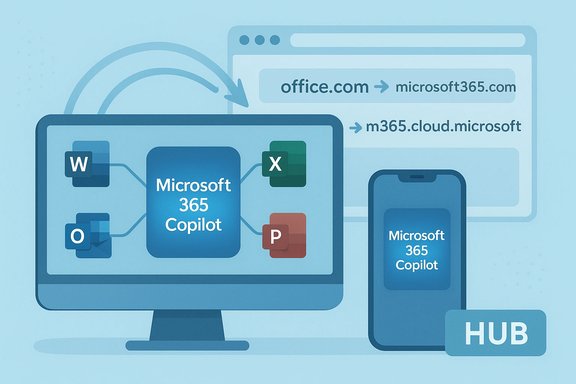
- The visible rename and icon update applied to the hub app that aggregates shortcuts, files and Copilot surfaces (the app many people access via Office.com). This hub is now shown as the Microsoft 365 Copilot app across web, mobile and Windows.
- Microsoft updated the web routing: Office.com and Microsoft365.com redirect to a new Copilot‑forward domain (m365.cloud.microsoft) as part of the rollout.
- The underlying desktop and web editors—Word, Excel, PowerPoint, Outlook—retain their product names; perpetual (one‑time purchase) Office SKUs also continue to exist. Microsoft has repeatedly clarified the rename targeted the hub, not the core apps.
Why users and the press misread the change
Confusing on‑page copy and iconography
The pivot was amplified by a short banner-style phrase on high‑traffic pages that read along the lines of “The Microsoft 365 Copilot app (formerly Office) …” — copy that is literally true for the hub but easy to misinterpret as a sweeping restart of the entire Office brand. Screenshots of that one line spread quickly on social platforms and were divorced from the nuance that the change applied to the portal app, not the entire product family.Overlapping Copilot names across products
Microsoft uses “Copilot” in multiple contexts: Microsoft 365 Copilot (enterprise AI features), the Microsoft 365 Copilot app (the renamed hub), a standalone Microsoft Copilot app (a conversational assistant), and Copilot branding embedded inside Windows and other products. That reuse of the same label across distinct experiences increases the cognitive load and makes a single banner headline far more explosive than intended.Timing and monetization optics
The rename overlapped with Microsoft’s packaging decisions—bringing Copilot features into consumer subscriptions and adjusting prices for Microsoft 365 Personal and Family—which made the change read like a revenue-driven push to many observers. That timing intensified suspicion and made the hub rename appear less like strategic positioning and more like a sales maneuver.The branding problem in practical terms
Brand names do heavy lifting: they signal function, lineage, trust and support expectations. When a brand as durable as “Office” appears to be displaced by a marketing term tied to an emerging technology, users infer risk even if the product mechanics are unchanged.- Cognitive friction: People who have said “open Office” for decades are forced to reconcile that shorthand with a new Copilot label that may or may not mean the same thing.
- Search and discovery problems: Users searching app stores or help docs still use legacy terms; inconsistent labeling creates friction for basic tasks like locating help or installing software.
- Trust erosion: Rapid brand refactoring without careful communication leaves users worrying about future changes to pricing, privacy or feature availability.
The business and strategic rationale
Microsoft’s logic is straightforward: make AI the defining capability of its productivity surface, and telegraph that the hub is now the primary access point for Copilot-enhanced workflows. Copilot features are being sold as time‑saving, context‑aware helpers—capabilities Microsoft believes will increase subscriber engagement and justify higher ARPU (average revenue per user). The company’s blog and roadmap posts describe the move as an incremental step to give consumers and enterprises access to integrated AI features in Word, Excel, PowerPoint and other apps. From a product‑management standpoint, consolidating discoverability—one prominent Copilot tab in a hub that surfaces AI tools and files—can be efficient. From a marketing standpoint, it also creates a clean story to sell the value of AI bundles inside Microsoft 365. But the execution gap between internal intentions and external perception is exactly what produced the social firestorm.Risks and unintended consequences
- User confusion and backlash: As seen in the viral reaction, confusing UI copy can quickly metastasize into reputational damage and regulatory scrutiny.
- Support load for IT and help desks: Enterprises and schools may see a spike in support tickets as employees and students misinterpret the rename as a change in app behavior or license entitlement.
- Regulatory attention: When marketing language implies capabilities that users assume are included (or removed), regulators and watchdogs can take interest; past reviews of Copilot‑style claims have already drawn formal attention.
- Bloat and default‑on concerns: Plans to preinstall or automatically push the Copilot app to devices raise opt‑out and antitrust questions in some jurisdictions—and have already provoked user pushback. Several outlets reported planned automatic installations starting in October 2025 (with regional carve‑outs), fueling concerns about forced defaults.
How enterprises and IT administrators should respond
- Communicate proactively. Notify users that the rename affected the hub/launcher app only, and that Word/Excel/PowerPoint product names and licensing remain unchanged. Use screenshots and URLs to show the distinction.
- Update documentation and training. Refresh collateral that references the Office hub to reflect the new Microsoft 365 Copilot app name and any new navigation flows.
- Review admin controls. For managed devices, check the Microsoft 365 Apps Admin Center and Group Policy settings related to Copilot and app installs; new policies (e.g., RemoveMicrosoftCopilotApp) appeared in Insider builds and enterprise options are evolving.
- Test in controlled rings. Pilot the Copilot-forward flows in a test group before enabling broad distribution; verify privacy settings, audit logs, and the availability of opt‑outs for sensitive workflows.
What consumers should know and do
- Your desktop Office apps are still called Word, Excel, PowerPoint, Outlook; nothing has been forcibly renamed at the application level for most users. If you rely on a specific workflow, confirm the behavior of Copilot features under your subscription tier rather than assuming feature parity.
- Copilot features were added to many consumer subscriptions and Microsoft published guidance describing which accounts and plans get Copilot Chat and which plans must upgrade. If you see new Copilot affordances, check whether they are gated by subscription level (Personal, Family, Premium, Copilot Pro, or enterprise licenses).
- If privacy or training concerns matter to you: Microsoft asserts that prompts, responses and file contents used in Copilot are not used to train foundation models in a way that exposes personal content, but companies should read the privacy and product docs to understand how telemetry and usage data are handled. Where corporate compliance matters, validate retention and governance with legal and security teams. Flag anything that you cannot verify against your tenant’s documentation.
Broader implications: naming, trust, and AI-first transitions
This episode is instructive because it reveals a common trap in technology go‑to‑market strategies: the desire to unify a message (AI + productivity = Copilot) can outpace the careful communication and governance that users and admins require. Brands act as cognitive shortcuts that signal continuity and reliability—when those shortcuts are altered without clarity, users infer risk, and trust is drained faster than it can be rebuilt.The Copilot pivot is not merely cosmetic. Microsoft is tying a lucrative productivity franchise—one that generates tens of billions in revenue—to generative AI capabilities and new monetization levers. If Copilot consistently reduces friction and time spent on tasks, the strategy will pay. If it fails to deliver accuracy, privacy assurances or predictable governance, Microsoft risks pushing customers toward competitors or conservative procurement policies.
Strengths of Microsoft’s approach
- Clear strategic alignment: Making AI the central theme for the productivity hub clarifies the company’s investment road map and encourages ecosystem partners to build around Copilot capabilities.
- Integrated experience potential: A central hub that surfaces files, Copilot agents and app shortcuts can materially improve discoverability for AI features and simplify common tasks when executed well.
- Commercial leverage: Bundling Copilot into consumer and enterprise plans creates an upsell path and justification for investment in large-scale AI infrastructure.
Weaknesses and risks
- Brand dilution and confusion: Reusing “Copilot” as a family name across many products reduces semantic clarity; customers struggle to infer capabilities from the label alone.
- Execution vs. expectation gap: If the AI features do not consistently deliver reliable results, the damage to trust will be larger because the Copilot name is now more conspicuous in day‑to‑day workflows.
- Regulatory and privacy scrutiny: Aggressive defaults and forced installs in some markets invite regulatory scrutiny; Microsoft will need to demonstrate robust governance across regions and tenant types.
Short checklist for readers (practical next steps)
- Check which app you’re opening: if the launcher says Microsoft 365 Copilot app, that refers to the portal/hub; your Word and Excel apps still use their historic names.
- Review subscription entitlements: confirm whether Copilot Chat and agent features are included with your Microsoft 365 plan, and whether AI credits or usage limits apply.
- For admins: locate and test new Group Policy or M365 admin controls for Copilot installs and feature toggles; notify users and update knowledge-base articles.
- For privacy-conscious users: consult the Copilot privacy docs and your organization’s policy; treat Copilot outputs as tools, not authoritative facts—human review remains essential.
The verdict and what to watch next
The Microsoft 365 Copilot app rename is a calculated strategic move that reflects Microsoft’s conviction that AI will be the primary interface for productivity in the years ahead. The change is real at the portal level and was rolled out beginning January 15, 2025, but it is not an across‑the‑board renaming of the Office apps themselves; Word, Excel, and PowerPoint remain intact under the Microsoft 365 umbrella and in perpetual SKUs. This nuance—true but easily misread—was exactly the spark for the recent controversy. What will determine the long‑term outcome is not the name itself but three measurable factors:- Whether Copilot features demonstrably save time and reduce workload at scale.
- Whether Microsoft provides clear, granular governance and opt‑out controls for enterprises and individuals.
- Whether Microsoft can restore and maintain trust around privacy, accuracy and supportability.
Conclusion
The headline that “Microsoft renamed Office to Copilot” was an oversimplification that nonetheless exposed a deeper truth: branding changes at scale are product changes. A portal rename that aligns discovery and monetization around AI can be sensible strategy, but it requires surgical communication, admin tooling, and privacy guardrails to avoid eroding the goodwill built up over decades. Microsoft has documented the hub rename and the Copilot entitlements, and independent reporting confirms the details, but the episode should be a reminder to product teams everywhere: names are user interfaces too—change them lightly, explain them clearly, and respect the trust that carries a brand.Source: MSN http://www.msn.com/en-us/news/techn...le_21963982-dc2b-4b0a-84ae-0880c105e0e2.html]
