

Microsoft 365 Copilot is Microsoft’s paid AI assistant for Word, Excel, PowerPoint, Outlook, Teams, and related Microsoft 365 services, introduced for enterprise customers on November 1, 2023, and later expanded to smaller business plans as a per-user subscription add-on. The important story is not that Office can now write a paragraph or summarize a meeting. It is that Microsoft has turned the familiar productivity suite into the delivery vehicle for a new layer of recurring AI revenue. For Windows users and IT departments, Copilot is less a shiny button than a new operating assumption: the document, the inbox, the spreadsheet, and the meeting are becoming AI-mediated surfaces.
Microsoft 365 Copilot arrives inside products that many organizations already treat as work infrastructure rather than software. Word is where policy becomes prose, Excel is where numbers become decisions, PowerPoint is where internal politics becomes a deck, and Teams is where much of the modern workday now disappears. By embedding Copilot there, Microsoft does not need to persuade workers to adopt a new app; it needs only to persuade finance and IT that the additional license is worth activating.
That is the elegance of the model. Copilot is not sold like a consumer chatbot, competing for attention in a browser tab. It is sold as a premium layer on top of the work graph that Microsoft already controls: documents in SharePoint and OneDrive, email in Exchange, meetings and chats in Teams, identities in Entra ID, and policies in Purview.
The original pitch leaned heavily on transformation. Copilot would help users draft, summarize, analyze, and retrieve information using natural language. But the more durable commercial pitch is quieter and more powerful: Microsoft wants every knowledge worker seat to become more expensive because the software is now doing more of the cognitive scaffolding around that work.
That is why investors watch Copilot so closely. A $30-per-user monthly add-on may sound ordinary in enterprise software, but at Microsoft 365 scale it represents one of the most tempting revenue expansion opportunities in the company’s history. The catch is that the same simplicity that makes the number exciting to Wall Street makes it uncomfortable for CIOs.
None of these actions is individually magical anymore. Since the arrival of modern large language models, users have seen chatbots produce passable prose, code, outlines, and summaries on demand. What changes inside Microsoft 365 is proximity. Copilot is close to the file, close to the calendar, close to the thread, close to the permissions model, and close to the worker’s muscle memory.
That proximity matters because most office work is not a blank-page problem. It is a context problem. The user does not simply want “a proposal”; they want a proposal based on the meeting from Tuesday, the customer email from last week, the pricing spreadsheet in SharePoint, and the language their company uses when it is trying to sound confident but not legally exposed.
Microsoft’s advantage is that it can plausibly claim to know where that context lives. Copilot’s architecture is built around grounding prompts in Microsoft Graph and the user’s tenant data, subject to existing access controls. In plain English, the assistant is supposed to answer not just from a general model, but from the documents, messages, meetings, and files the user is already allowed to see.
That makes Copilot feel less like an AI novelty and more like a new interface for the Microsoft 365 estate. Search was the old interface. Folders were the older one. Copilot is Microsoft’s attempt to make the prompt the next one.
The early rollout reinforced that posture. Microsoft first aimed Copilot at larger enterprise customers, where account teams, compliance reviews, and procurement cycles could absorb the complexity. The later removal of the 300-seat minimum and expansion to smaller businesses made the product more accessible, but the commercial center of gravity remained clear: this is a business subscription intended to sit on top of existing Microsoft 365 plans.
For a 50-person company, $30 per user per month is noticeable. For a 5,000-person enterprise, it is a budget conversation. The list price invites a brutally practical question: can Copilot save enough time, reduce enough friction, or improve enough output to justify a recurring charge that may rival or exceed the underlying productivity license?
Microsoft’s answer is that Copilot pays for itself through minutes recovered from email, meetings, drafting, and analysis. The believable version of that argument is not that every worker becomes dramatically more productive. It is that certain high-friction tasks become less awful: writing the first version of a document, catching up on a missed meeting, distilling a long thread, or turning scattered notes into something presentable.
That is also where the risk sits. If Copilot is treated as an across-the-board entitlement, many organizations will pay for users who rarely invoke it. If it is treated as a targeted tool for workers with dense document, meeting, and analysis workloads, the economics become easier to defend. Microsoft would prefer the former. CIOs should start with the latter.
Copilot does not eliminate that mess. It exposes it.
Because Copilot works against the user’s accessible content, it inherits the quality of the tenant underneath it. If users have access to too much, Copilot may make oversharing more visible. If documents are stale, duplicated, or badly labeled, the assistant may surface the wrong context with impressive fluency. If the organization has never taken information governance seriously, Copilot becomes an expensive way to discover that problem.
This is why Microsoft’s security and compliance story is simultaneously reassuring and incomplete. The company emphasizes that Copilot respects existing Microsoft 365 permissions, sensitivity labels, encryption, and tenant boundaries. That is essential, and it is far better than telling employees to paste confidential data into random public AI tools.
But respecting existing permissions is not the same as making existing permissions wise. A user who can access a forgotten HR spreadsheet, a broad “all employees” SharePoint library, or a poorly secured finance folder may be able to summon information faster than before. Copilot does not necessarily create the exposure. It accelerates discovery.
For administrators, the first Copilot project should not be prompt training. It should be data hygiene. The assistant’s value depends on whether the tenant is fit to be queried in natural language by people who may not know where the sensitive edges are.
This is the central paradox of AI assistance in Office. The better the output reads, the more dangerous it can become when users stop checking it. Fluent text has authority even when it is wrong. A neatly formatted summary can create the impression of completeness even when it omitted the one caveat that mattered.
Microsoft generally frames Copilot as a partner that works alongside users. That is the right framing, but it is also a liability shield. In real deployments, organizations will need to decide where Copilot output can be used casually and where it must be treated as a draft requiring human review.
The distinction matters most in regulated and high-stakes environments. Legal, finance, healthcare, public sector, and security teams cannot simply adopt a “looks good” workflow. They need policies that separate internal summarization from external communication, rough analysis from official reporting, and brainstorming from decisions.
For WindowsForum’s IT-pro audience, the practical rule is simple: Copilot can reduce the cost of producing a first pass, but it does not remove accountability for the final pass. The human still owns the send button.
Copilot’s ability to summarize meetings, identify action items, and answer questions about what was discussed attacks a pain point that almost everyone recognizes. Unlike document drafting, which varies by role and taste, meeting fatigue is universal enough to give Copilot an immediate foothold.
The value is especially clear for employees who join late, miss a meeting, or need to catch up across time zones. A usable recap can be the difference between rewatching an hour-long recording and spending five minutes reviewing decisions and assignments. For managers, that is the sort of measurable convenience that can justify pilot programs.
But meeting intelligence also raises cultural questions. If every discussion can be summarized, searched, and action-itemed, employees may change how they speak. Sensitive conversations may move elsewhere. Informal debate may become more guarded. The transcript is no longer merely a record; it becomes raw material for an assistant that can reinterpret the meeting later.
That does not make Teams Copilot bad. It makes it powerful in a way that organizations should acknowledge. Meeting summaries are not just productivity artifacts. They are institutional memory with an algorithmic editor.
This is genuinely useful. Asking Excel to explain a dataset, highlight anomalies, propose a chart, or suggest a formula can lower the barrier for employees who are not spreadsheet power users. It can also speed up routine exploratory work for analysts who already know what they are doing.
Yet Excel also makes Copilot’s limits impossible to ignore. A plausible explanation of bad data is still bad analysis. A suggested chart can emphasize the wrong relationship. A formula can appear correct while failing at edge cases. In spreadsheets, errors do not merely embarrass; they compound.
That means Copilot in Excel should be treated as an accelerator for analysis, not a substitute for analytical control. It is strongest when the user can judge the result. It is weakest when the user is asking the assistant to compensate for not understanding the underlying model, data structure, or business process.
In that sense, Copilot may widen the productivity gap rather than flatten it. Skilled users can make the assistant work harder for them. Unskilled users may accept outputs they cannot evaluate. That is not a reason to avoid Copilot, but it is a reason to pair deployment with training that teaches verification, not just prompting.
Copilot gives Microsoft a persuasive answer to shadow AI. It keeps the assistant inside the Microsoft 365 service boundary, uses the tenant’s identity and permission model, and integrates with administrative controls that enterprises already understand. For organizations deep in the Microsoft stack, that is a compelling security posture compared with a patchwork of browser-based AI tools and unmanaged accounts.
The company also emphasizes that prompts, responses, and Microsoft Graph data are not used to train the foundation models used by Microsoft 365 Copilot. For legal and compliance teams, that distinction matters. It does not answer every question about data handling, retention, audit, or model behavior, but it addresses one of the most immediate objections to generative AI at work.
Still, the security pitch can be oversold if it becomes a substitute for governance. Copilot is safer than many consumer alternatives because it operates within enterprise controls. But it also makes those controls more important than ever. A bad permissions model wrapped in an enterprise AI assistant is still a bad permissions model.
The winning IT posture is not blanket trust or blanket fear. It is conditional enablement: license the right users, clean the right repositories, monitor the right risks, and assume that Copilot will reveal weaknesses in the Microsoft 365 environment that were easier to ignore when humans had to click through folders manually.
This is where Microsoft’s platform advantage becomes obvious. Copilot plugs into existing identity, compliance, and management layers. Admins can think about it in the same universe as Entra ID, Purview, SharePoint, Teams, and Microsoft 365 licensing. That does not make the work easy, but it makes the work legible.
The deployment path should look more like a security rollout than a feature launch. Organizations need to identify candidate groups, review data exposure, create acceptable-use guidance, establish review rules for external content, and measure actual usage. A broad license purchase without telemetry is simply faith-based procurement.
Training also needs to be more sober than the marketing. Users do not need a mystical course in prompt engineering. They need examples tied to their jobs, clear warnings about hallucinations, and a working understanding that Copilot can only be as good as the information and instructions it receives.
The best deployments will treat Copilot as a system change. The worst will treat it as a perk.
The strategic logic is easy to understand. Microsoft has already persuaded businesses to standardize on Microsoft 365. Copilot offers a way to raise average revenue per user without requiring customers to abandon existing workflows. If even a meaningful minority of paid Microsoft 365 users adopt the add-on, the recurring revenue opportunity is enormous.
But investors should be careful not to confuse availability with adoption. A product can be generally available and still face slow enterprise uptake. Budgets, compliance reviews, uncertain return on investment, and uneven user behavior can all delay expansion. AI enthusiasm does not automatically convert into paid seats at scale.
There is also competitive pressure. Google has its own AI layer for Workspace. OpenAI, Anthropic, and a long list of enterprise AI vendors are trying to own pieces of the workflow. Microsoft’s advantage is distribution and integration, but rivals may compete on model quality, flexibility, price, or developer ecosystems.
The investor case for Copilot is therefore not that Microsoft has already won the AI productivity market. It is that Microsoft has the strongest default position from which to monetize AI inside everyday business software. That is a very different claim, and a more defensible one.
That matters because business buyers need clarity. A user may ask why Copilot appears in one app but not another. An executive may assume a free Copilot chat experience is the same as the paid Microsoft 365 Copilot license. An admin may have to explain why grounding in organizational data, app integration, and enterprise controls depend on which Copilot is actually being discussed.
Microsoft is not new to licensing complexity, but AI makes the confusion more consequential. The difference between a general chatbot and a tenant-grounded assistant is not cosmetic. It affects what data can be used, what controls apply, and what value the product can deliver.
The company has been moving toward clearer packaging, but the brand still carries baggage from a rapid rollout across many product lines. For IT teams, precise language is now part of deployment discipline. “Copilot” is not enough. The question is which Copilot, under which license, with access to which data, inside which app.
That is not pedantry. It is governance.
The sensible path is a measured pilot with a narrow scope and a clear definition of success. Pick roles where the pain is obvious: managers drowning in meetings, sales teams writing account summaries, analysts producing recurring reports, consultants building decks, legal operations staff reviewing internal material, or executives who need rapid briefings across email and documents.
Then measure behavior, not vibes. Are users invoking Copilot repeatedly after the novelty fades? Are they saving time on identifiable tasks? Are outputs being edited rather than blindly accepted? Are support tickets increasing because users misunderstand the tool? Are security teams discovering overshared content that needs cleanup?
The goal is not to prove that Copilot is magical. The goal is to determine where it is mundane enough to become valuable. Enterprise software wins when it becomes habit.
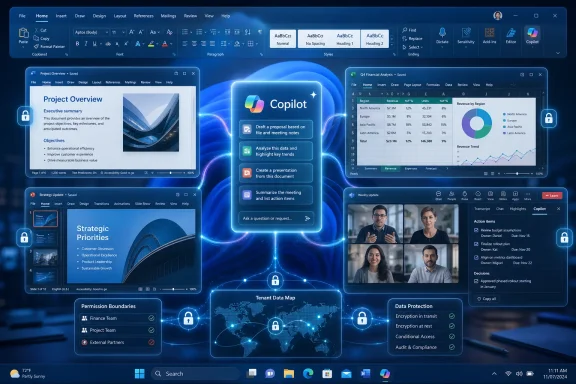 Microsoft Turns Office Into the AI Tollbooth
Microsoft 365 Copilot arrives inside products that many organizations already treat as work infrastructure rather than software. Word is where policy becomes prose, Excel is where numbers become decisions, PowerPoint is where internal politics becomes a deck, and Teams is where much of the modern workday now disappears. By embedding Copilot there, Microsoft does not need to persuade workers to adopt a new app; it needs only to persuade finance and IT that the additional license is worth activating.That is the elegance of the model. Copilot is not sold like a consumer chatbot, competing for attention in a browser tab. It is sold as a premium layer on top of the work graph that Microsoft already controls: documents in SharePoint and OneDrive, email in Exchange, meetings and chats in Teams, identities in Entra ID, and policies in Purview.
The original pitch leaned heavily on transformation. Copilot would help users draft, summarize, analyze, and retrieve information using natural language. But the more durable commercial pitch is quieter and more powerful: Microsoft wants every knowledge worker seat to become more expensive because the software is now doing more of the cognitive scaffolding around that work.
That is why investors watch Copilot so closely. A $30-per-user monthly add-on may sound ordinary in enterprise software, but at Microsoft 365 scale it represents one of the most tempting revenue expansion opportunities in the company’s history. The catch is that the same simplicity that makes the number exciting to Wall Street makes it uncomfortable for CIOs.
The Ribbon Was Always the Best Place to Hide a Revolution
The most consequential design decision in Microsoft 365 Copilot is that it does not ask users to leave Office. In Word, the assistant can help generate a first draft, rewrite a section, change tone, or summarize a document. In Excel, it can explain a table, suggest formulas, identify trends, and propose charts. In PowerPoint, it can turn source material into slides. In Teams, it can recap meetings and extract follow-up tasks.None of these actions is individually magical anymore. Since the arrival of modern large language models, users have seen chatbots produce passable prose, code, outlines, and summaries on demand. What changes inside Microsoft 365 is proximity. Copilot is close to the file, close to the calendar, close to the thread, close to the permissions model, and close to the worker’s muscle memory.
That proximity matters because most office work is not a blank-page problem. It is a context problem. The user does not simply want “a proposal”; they want a proposal based on the meeting from Tuesday, the customer email from last week, the pricing spreadsheet in SharePoint, and the language their company uses when it is trying to sound confident but not legally exposed.
Microsoft’s advantage is that it can plausibly claim to know where that context lives. Copilot’s architecture is built around grounding prompts in Microsoft Graph and the user’s tenant data, subject to existing access controls. In plain English, the assistant is supposed to answer not just from a general model, but from the documents, messages, meetings, and files the user is already allowed to see.
That makes Copilot feel less like an AI novelty and more like a new interface for the Microsoft 365 estate. Search was the old interface. Folders were the older one. Copilot is Microsoft’s attempt to make the prompt the next one.
The $30 Seat Is a Product Strategy, Not Just a Price
When Microsoft announced Copilot for Microsoft 365 at $30 per user per month for enterprise customers, the number did more than establish a list price. It told the market that Microsoft believed generative AI in Office deserved its own premium, not merely a modest bundle uplift. That decision framed Copilot as a new paid tier of work rather than a convenience feature.The early rollout reinforced that posture. Microsoft first aimed Copilot at larger enterprise customers, where account teams, compliance reviews, and procurement cycles could absorb the complexity. The later removal of the 300-seat minimum and expansion to smaller businesses made the product more accessible, but the commercial center of gravity remained clear: this is a business subscription intended to sit on top of existing Microsoft 365 plans.
For a 50-person company, $30 per user per month is noticeable. For a 5,000-person enterprise, it is a budget conversation. The list price invites a brutally practical question: can Copilot save enough time, reduce enough friction, or improve enough output to justify a recurring charge that may rival or exceed the underlying productivity license?
Microsoft’s answer is that Copilot pays for itself through minutes recovered from email, meetings, drafting, and analysis. The believable version of that argument is not that every worker becomes dramatically more productive. It is that certain high-friction tasks become less awful: writing the first version of a document, catching up on a missed meeting, distilling a long thread, or turning scattered notes into something presentable.
That is also where the risk sits. If Copilot is treated as an across-the-board entitlement, many organizations will pay for users who rarely invoke it. If it is treated as a targeted tool for workers with dense document, meeting, and analysis workloads, the economics become easier to defend. Microsoft would prefer the former. CIOs should start with the latter.
Copilot’s Real Power Is Context, and Context Is Messy
The seductive demo version of Copilot assumes that an organization’s data is clean, permissioned correctly, current, and semantically useful. Many IT administrators know the darker truth. SharePoint sites accumulate abandoned documents, Teams channels sprawl, file permissions drift, and old drafts live next to approved versions with names that made sense only to the person who created them.Copilot does not eliminate that mess. It exposes it.
Because Copilot works against the user’s accessible content, it inherits the quality of the tenant underneath it. If users have access to too much, Copilot may make oversharing more visible. If documents are stale, duplicated, or badly labeled, the assistant may surface the wrong context with impressive fluency. If the organization has never taken information governance seriously, Copilot becomes an expensive way to discover that problem.
This is why Microsoft’s security and compliance story is simultaneously reassuring and incomplete. The company emphasizes that Copilot respects existing Microsoft 365 permissions, sensitivity labels, encryption, and tenant boundaries. That is essential, and it is far better than telling employees to paste confidential data into random public AI tools.
But respecting existing permissions is not the same as making existing permissions wise. A user who can access a forgotten HR spreadsheet, a broad “all employees” SharePoint library, or a poorly secured finance folder may be able to summon information faster than before. Copilot does not necessarily create the exposure. It accelerates discovery.
For administrators, the first Copilot project should not be prompt training. It should be data hygiene. The assistant’s value depends on whether the tenant is fit to be queried in natural language by people who may not know where the sensitive edges are.
The Assistant Still Needs an Editor
Copilot’s most useful outputs often look better than they are. A meeting summary can be clean but miss the political nuance of who actually committed to what. A Word draft can sound polished while softening a technical constraint into marketing haze. An Excel explanation can be directionally helpful while still requiring the user to verify the data, formula logic, and business meaning.This is the central paradox of AI assistance in Office. The better the output reads, the more dangerous it can become when users stop checking it. Fluent text has authority even when it is wrong. A neatly formatted summary can create the impression of completeness even when it omitted the one caveat that mattered.
Microsoft generally frames Copilot as a partner that works alongside users. That is the right framing, but it is also a liability shield. In real deployments, organizations will need to decide where Copilot output can be used casually and where it must be treated as a draft requiring human review.
The distinction matters most in regulated and high-stakes environments. Legal, finance, healthcare, public sector, and security teams cannot simply adopt a “looks good” workflow. They need policies that separate internal summarization from external communication, rough analysis from official reporting, and brainstorming from decisions.
For WindowsForum’s IT-pro audience, the practical rule is simple: Copilot can reduce the cost of producing a first pass, but it does not remove accountability for the final pass. The human still owns the send button.
Teams May Be the Killer App Because Meetings Are the Pain Point
If Word and Excel are the symbolic heart of Office, Teams may be where Copilot’s value becomes most obvious. Meetings are the tax knowledge workers pay for organizational alignment. They are also where information evaporates: decisions are implied, tasks are spoken but not written, and absent colleagues are left to reconstruct events from chat fragments and calendar titles.Copilot’s ability to summarize meetings, identify action items, and answer questions about what was discussed attacks a pain point that almost everyone recognizes. Unlike document drafting, which varies by role and taste, meeting fatigue is universal enough to give Copilot an immediate foothold.
The value is especially clear for employees who join late, miss a meeting, or need to catch up across time zones. A usable recap can be the difference between rewatching an hour-long recording and spending five minutes reviewing decisions and assignments. For managers, that is the sort of measurable convenience that can justify pilot programs.
But meeting intelligence also raises cultural questions. If every discussion can be summarized, searched, and action-itemed, employees may change how they speak. Sensitive conversations may move elsewhere. Informal debate may become more guarded. The transcript is no longer merely a record; it becomes raw material for an assistant that can reinterpret the meeting later.
That does not make Teams Copilot bad. It makes it powerful in a way that organizations should acknowledge. Meeting summaries are not just productivity artifacts. They are institutional memory with an algorithmic editor.
Excel Shows the Promise and the Boundary
Excel is the most revealing Copilot surface because spreadsheets are where business users most often confuse tool proficiency with analytical confidence. A user may understand the business question but not know the right formula. Another may know formulas but lack the time to narrate what the data implies. Copilot tries to bridge that gap by letting users ask plain-language questions of structured data.This is genuinely useful. Asking Excel to explain a dataset, highlight anomalies, propose a chart, or suggest a formula can lower the barrier for employees who are not spreadsheet power users. It can also speed up routine exploratory work for analysts who already know what they are doing.
Yet Excel also makes Copilot’s limits impossible to ignore. A plausible explanation of bad data is still bad analysis. A suggested chart can emphasize the wrong relationship. A formula can appear correct while failing at edge cases. In spreadsheets, errors do not merely embarrass; they compound.
That means Copilot in Excel should be treated as an accelerator for analysis, not a substitute for analytical control. It is strongest when the user can judge the result. It is weakest when the user is asking the assistant to compensate for not understanding the underlying model, data structure, or business process.
In that sense, Copilot may widen the productivity gap rather than flatten it. Skilled users can make the assistant work harder for them. Unskilled users may accept outputs they cannot evaluate. That is not a reason to avoid Copilot, but it is a reason to pair deployment with training that teaches verification, not just prompting.
The Security Pitch Is Stronger Than the Consumer AI Alternative
For many enterprises, the strongest argument for Microsoft 365 Copilot is not that it is the most creative AI tool. It is that it is the sanctioned one. Employees already use generative AI whether IT blesses it or not, and every unsanctioned paste into an external chatbot creates a data governance headache.Copilot gives Microsoft a persuasive answer to shadow AI. It keeps the assistant inside the Microsoft 365 service boundary, uses the tenant’s identity and permission model, and integrates with administrative controls that enterprises already understand. For organizations deep in the Microsoft stack, that is a compelling security posture compared with a patchwork of browser-based AI tools and unmanaged accounts.
The company also emphasizes that prompts, responses, and Microsoft Graph data are not used to train the foundation models used by Microsoft 365 Copilot. For legal and compliance teams, that distinction matters. It does not answer every question about data handling, retention, audit, or model behavior, but it addresses one of the most immediate objections to generative AI at work.
Still, the security pitch can be oversold if it becomes a substitute for governance. Copilot is safer than many consumer alternatives because it operates within enterprise controls. But it also makes those controls more important than ever. A bad permissions model wrapped in an enterprise AI assistant is still a bad permissions model.
The winning IT posture is not blanket trust or blanket fear. It is conditional enablement: license the right users, clean the right repositories, monitor the right risks, and assume that Copilot will reveal weaknesses in the Microsoft 365 environment that were easier to ignore when humans had to click through folders manually.
Microsoft’s AI Bet Runs Through the Admin Center
The consumer story of AI is about chatbots. The enterprise story is about administration. Copilot adoption will be decided less by the sparkle of the prompt box than by how cleanly IT can license it, govern it, audit it, explain it, and support it.This is where Microsoft’s platform advantage becomes obvious. Copilot plugs into existing identity, compliance, and management layers. Admins can think about it in the same universe as Entra ID, Purview, SharePoint, Teams, and Microsoft 365 licensing. That does not make the work easy, but it makes the work legible.
The deployment path should look more like a security rollout than a feature launch. Organizations need to identify candidate groups, review data exposure, create acceptable-use guidance, establish review rules for external content, and measure actual usage. A broad license purchase without telemetry is simply faith-based procurement.
Training also needs to be more sober than the marketing. Users do not need a mystical course in prompt engineering. They need examples tied to their jobs, clear warnings about hallucinations, and a working understanding that Copilot can only be as good as the information and instructions it receives.
The best deployments will treat Copilot as a system change. The worst will treat it as a perk.
The Stock-Market Story Is Bigger Than Office
Microsoft’s shares trade partly on the belief that the company can convert its AI investments into durable, high-margin software revenue. Microsoft 365 Copilot is central to that narrative because it attaches AI directly to one of the company’s most defensible franchises. Azure may provide the infrastructure story, but Office provides the seat-expansion story.The strategic logic is easy to understand. Microsoft has already persuaded businesses to standardize on Microsoft 365. Copilot offers a way to raise average revenue per user without requiring customers to abandon existing workflows. If even a meaningful minority of paid Microsoft 365 users adopt the add-on, the recurring revenue opportunity is enormous.
But investors should be careful not to confuse availability with adoption. A product can be generally available and still face slow enterprise uptake. Budgets, compliance reviews, uncertain return on investment, and uneven user behavior can all delay expansion. AI enthusiasm does not automatically convert into paid seats at scale.
There is also competitive pressure. Google has its own AI layer for Workspace. OpenAI, Anthropic, and a long list of enterprise AI vendors are trying to own pieces of the workflow. Microsoft’s advantage is distribution and integration, but rivals may compete on model quality, flexibility, price, or developer ecosystems.
The investor case for Copilot is therefore not that Microsoft has already won the AI productivity market. It is that Microsoft has the strongest default position from which to monetize AI inside everyday business software. That is a very different claim, and a more defensible one.
The Branding Confusion Is Part of the Cost
Microsoft’s Copilot branding has become sprawling enough to test the patience of even seasoned administrators. There is Microsoft Copilot, Microsoft 365 Copilot, Copilot Chat, Copilot Studio, GitHub Copilot, Security Copilot, and various Copilot-branded experiences across Windows, Edge, Dynamics, and the web. The names sound related because they are, but the licenses, data boundaries, and use cases can differ materially.That matters because business buyers need clarity. A user may ask why Copilot appears in one app but not another. An executive may assume a free Copilot chat experience is the same as the paid Microsoft 365 Copilot license. An admin may have to explain why grounding in organizational data, app integration, and enterprise controls depend on which Copilot is actually being discussed.
Microsoft is not new to licensing complexity, but AI makes the confusion more consequential. The difference between a general chatbot and a tenant-grounded assistant is not cosmetic. It affects what data can be used, what controls apply, and what value the product can deliver.
The company has been moving toward clearer packaging, but the brand still carries baggage from a rapid rollout across many product lines. For IT teams, precise language is now part of deployment discipline. “Copilot” is not enough. The question is which Copilot, under which license, with access to which data, inside which app.
That is not pedantry. It is governance.
The Practical Answer Is a Measured Pilot, Not a Mandate
Organizations looking at Microsoft 365 Copilot in 2026 should resist both extremes. The skeptics who dismiss it as autocomplete with a license fee underestimate how useful contextual summarization and drafting can be inside the Microsoft 365 estate. The boosters who imagine instant transformation underestimate how stubborn workflows, data quality problems, and human review requirements remain.The sensible path is a measured pilot with a narrow scope and a clear definition of success. Pick roles where the pain is obvious: managers drowning in meetings, sales teams writing account summaries, analysts producing recurring reports, consultants building decks, legal operations staff reviewing internal material, or executives who need rapid briefings across email and documents.
Then measure behavior, not vibes. Are users invoking Copilot repeatedly after the novelty fades? Are they saving time on identifiable tasks? Are outputs being edited rather than blindly accepted? Are support tickets increasing because users misunderstand the tool? Are security teams discovering overshared content that needs cleanup?
The goal is not to prove that Copilot is magical. The goal is to determine where it is mundane enough to become valuable. Enterprise software wins when it becomes habit.
The Copilot Calculation Belongs Close to the Budget Line
Before Microsoft 365 Copilot becomes another default checkbox in the enterprise stack, buyers should force it through a practical filter. The question is not whether AI will matter in productivity software. It already does. The question is where Microsoft’s paid implementation creates enough value to justify its seat cost.- Organizations should start with users whose work depends heavily on meetings, documents, email synthesis, and recurring analysis.
- IT teams should review SharePoint, OneDrive, Teams, and sensitivity-label practices before broad deployment.
- Business leaders should judge Copilot on repeated usage and workflow impact, not launch-week excitement.
- Users should treat Copilot output as a draft or analytical aid, not as an authority.
- Security teams should view Copilot as a reason to improve permissions hygiene, not as proof that governance is already solved.
- Finance teams should expect uneven returns across roles and avoid buying every user a license simply because the button is available.
References
- Primary source: ad-hoc-news.de
Published: 2026-06-25T18:22:13.376388
Microsoft 365 Copilot from Microsoft Corp. - subscription assistant now baked into Office
Microsoft 365 Copilot brings AI-powered help directly into Word, Excel, PowerPoint and Teams with a per-user subscription model. This bestseller drives the price of Microsoft Corp. shares (ISIN US5949181045).www.ad-hoc-news.de - Official source: microsoft.com
Announcing Copilot for Microsoft 365 general availability and Microsoft 365 Chat | Microsoft 365 Blog
Discover the latest AI innovations across Microsoft 365 Copilot, Bing Chat Enterprise, and Windows.www.microsoft.com - Related coverage: windowscentral.com
Microsoft 365 Copilot launches at $30 per person per month | Windows Central
Microsoft's long-awaited AI-powered experience, Microsoft 365 Copilot, is finally shipping to broad availability across Word, Excel, PowerPoint, and Teams.www.windowscentral.com - Official source: learn.microsoft.com
How does Microsoft 365 Copilot work? | Microsoft Learn
Learn how Microsoft 365 Copilot works within the service boundary of your Microsoft 365 tenant. And, how it uses Microsoft Graph to get your organization data based on user permissions. Copilot also honors Conditional Access and multifactor authentication (MFA).learn.microsoft.com - Official source: techcommunity.microsoft.com
Expanding availability of Copilot for Microsoft 365 | Microsoft Community Hub
New availability of Copilot for Microsoft 365 announced today techcommunity.microsoft.com
- Official source: blogs.microsoft.com
Introducing Microsoft 365 Copilot – your copilot for work - The Official Microsoft Blog
Humans are hard-wired to dream, to create, to innovate. Each of us seeks to do work that gives us purpose — to write a great novel, to make a discovery, to build strong communities, to care for the sick. The urge to connect to the core of our work lives in all of us. But...blogs.microsoft.com
- Related coverage: computerworld.com
Microsoft 365 Copilot rollout set for Nov. 1 – Computerworld
The generative AI assistant will be available to enterprise customers for $30 per user each month; meanwhile, an invite-only early access program for SMBs has begun. www.computerworld.com
- Related coverage: techradar.com
Microsoft 365 Copilot is generally available now - but there's an expensive hitch | TechRadar
If you want Microsoft 365 Copilot, you’ll need to pay an extra $9,000 per monthwww.techradar.com - Official source: developer.microsoft.com
Microsoft 365 Copilot | Extend and Customize Copilot
Extend, enrich, and customize Microsoft Microsoft 365 Copilot. Explore Copilot extensibility options such as agents, API plugins, and Copilot connectors to expand AI-powered productivity, skills, and creativity.developer.microsoft.com - Related coverage: techrepublic.com
Microsoft 365 Copilot Release Date Set for November
The AI assistant will launch across Microsoft products, from 365 to Windows, and includes a prompt-writing tool.www.techrepublic.com
- Related coverage: axios.com
Microsoft puts a price tag on its AI "copilots" for business
$30 a month per user could add up to billions for the software giant.www.axios.com
- Related coverage: 302795.fs1.hubspotusercontent-na1.net
- Related coverage: techriver.com
- Official source: cdn-dynmedia-1.microsoft.com
