

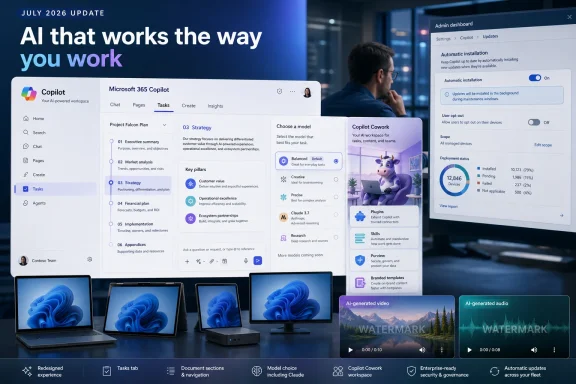
Microsoft shipped 40-plus Copilot updates across Microsoft 365 in July 2026, making Copilot Cowork generally available, adding Anthropic Claude as an option in Copilot Chat for active subscribers, redesigning menus, introducing a Tasks tab, improving document navigation, adding persistent watermarks to AI-generated video and audio, and resuming automatic installation of the Microsoft 365 Copilot app on eligible commercial Windows devices.
The July 2026 package combines product availability, interface changes, content-handling improvements, governance features, and Windows distribution:
The practical conclusion is narrower: Microsoft is expanding the range of Copilot capabilities available within Microsoft 365 while making model choice and task-related interface elements more visible.
Employees with active subscriptions may see Claude as an option in Copilot Chat. Users may also encounter redesigned menus, the Tasks tab, document-navigation improvements, and other July changes as the staged deployment progresses.
Organizations using Copilot Cowork gain access to its generally available capabilities, including plugins, updated skill management, Purview integration, and branded templates. Each component may require a different level of organizational review depending on how the organization intends to use it.
Administrators responsible for commercial Microsoft 365 Apps on Windows must decide whether to permit automatic installation of the Microsoft 365 Copilot app. Because the installation setting is on by default, leaving it unchanged may result in deployment to eligible devices.
The exact user experience may depend on subscription status and rollout timing. The July-to-August staged rollout means that features may not appear simultaneously for every user, device, or tenant. It does not establish a universal deployment sequence.
The verified information establishes that Cowork includes multiple capabilities, plugins, updated skill management, Purview integration, and branded templates. It does not establish unattended execution, automatic artifact creation, persistent background processing, or granular task-state monitoring.
For administrators, the practical implication is that Cowork should be evaluated as a collection of capabilities rather than approved or rejected only as a product name. An organization may have different requirements for plugins, templates, skills, model options, and compliance integration.
The useful governance question is concrete: Which Copilot components has the organization reviewed, and which users need them?
Answering that question can help an organization decide whether Cowork should be made broadly available, limited while it is evaluated, or held back until internal review is complete.
Any use of pilot groups, approval records, support ownership, or internal deployment documentation should be understood as WindowsForum-recommended practice rather than a Microsoft requirement.
Microsoft’s addition of Claude is nevertheless strategically important. It makes model choice a visible part of Copilot Chat and demonstrates that the Copilot product family can offer a model from another provider.
For employees, the change may appear as another model option. For organizations, it introduces a basic support and policy consideration: results may vary depending on the model selected, the prompt, the source material, and the surrounding Copilot experience.
Internal guidance should avoid treating every available model as interchangeable. It should also avoid promising that a particular model will always produce a specific type or quality of output.
Where Copilot output contributes to a repeatable business process, WindowsForum recommends testing that process with the model options available to the intended users. This is a practical recommendation, not a Microsoft requirement or a guarantee of consistency.
The table avoids assigning recommended workloads to Claude, describing Cowork as a delegated-work system, or claiming that the Microsoft 365 Copilot app provides access to every listed experience.
Administrators should therefore evaluate the available integration against their organization’s existing Microsoft 365 governance requirements instead of assuming that the presence of Purview automatically makes every use compliant.
The same precision applies to the other Cowork components.
Updated skill management is available, but the verified information does not establish a particular task taxonomy, administrative structure, or migration from earlier menus.
Plugins are available, but their presence alone does not identify what each plugin connects to, which information it exchanges, how permissions apply, or how data is retained.
Branded templates are available, but that does not guarantee that every generated result will comply automatically with an organization’s visual identity, writing style, legal requirements, or approval process.
These boundaries are not arguments against the features. They distinguish verified availability from operational details that require additional documentation or tenant-level evaluation.
The name “Tasks” does not by itself establish what actions can run there, whether work continues in the background, which status indicators are available, or whether the tab maintains a complete execution history.
Even within those limits, the interface change matters because users and support teams may need updated guidance for locating features and understanding current menu terminology.
Organizations should use product names consistently and avoid calling every Copilot interaction a task. A concise glossary can reduce confusion:
For a short document, the difference may be modest. For a long PDF, policy manual, technical report, contract, or structured Word document, more precise navigation can reduce the effort required to inspect the source behind a Copilot response.
The central benefit is not guaranteed correctness. It is better verifiability.
A reference to a page, section, or heading gives the user a place to check. It does not prove that Copilot interpreted the passage correctly, considered every relevant exception, or found all applicable information elsewhere in the document.
Document structure can also be imperfect. Scanned pages, inconsistent headings, repeated section names, and poorly assembled PDFs may limit the value of structural navigation. Organizations should continue to distinguish a useful source pointer from a complete legal, technical, or compliance review.
The July improvement nevertheless gives users a better starting point for human verification. WindowsForum recommends instructing users to open the referenced section and compare the response with the source before relying on it for consequential work.
A persistent watermark gives recipients a visible indication that video or audio was generated using AI. It adds a disclosure signal to the content rather than relying entirely on accompanying text or on the person distributing the file.
A watermark does not verify the factual accuracy of the media, identify every source used to generate it, or replace human approval. Organizations publishing Copilot-generated media should continue to apply their normal editorial, legal, communications, and accessibility reviews.
Administrators should also avoid promising watermark controls that they have not confirmed. The available facts do not establish a specific administrator policy, configurable watermark design, spoken audio disclosure, or protections against cropping, re-recording, or other transformations.
WindowsForum recommends updating user guidance so content creators know that AI-generated video and audio may carry persistent visible disclosure and understand that the watermark does not replace review.
This is the most immediate operational change in the July package because it can alter the managed Windows application footprint without a separate customer-initiated deployment.
The supported instruction is deliberately bounded:
In the Microsoft 365 Apps admin center, locate the default-on Copilot app automatic-installation setting and disable it if your organization has not approved deployment.
Administrators should consult current first-party Microsoft documentation before relying on an exact navigation path, permission requirement, control label, or description of the setting’s effects. Those details are not established by the verified fact set used for this article.
Opting out of this automatic-installation mechanism should not be described as disabling Copilot everywhere. It does not necessarily remove an app already installed, revoke subscriptions, block browser access, or disable Copilot features within other Microsoft 365 products.
Whether an organization should opt out remains a local deployment decision.
For organizations already prepared for the Copilot app, automatic installation may reduce deployment work. For organizations still reviewing licensing, support, security, compliance, or user communications, opting out temporarily may preserve a deliberate rollout.
“Eligible” should not be treated as synonymous with “approved.” Microsoft determines technical eligibility for the automatic-installation mechanism; each customer determines organizational approval.
Administrators should therefore use conditional language in support material. A feature may appear for some users before others. A redesigned menu may reach one environment at a different time from another. A user with an active subscription may receive Claude when the rollout reaches the relevant experience.
The supplied facts do not identify Microsoft’s operational rationale for staging the release. Although phased deployment is common in cloud services, no specific explanation should be attributed to Microsoft without supporting documentation.
WindowsForum recommends that support staff collect enough context to distinguish a rollout difference from a product problem. Relevant details may include subscription status, the Copilot product or application being used, the selected model when visible, and the interface observed by the user. This is troubleshooting advice, not a required Microsoft support procedure.
July 2026 — Microsoft ships 40-plus Copilot updates, makes Copilot Cowork generally available, adds Claude as an option in Copilot Chat for active subscribers, redesigns menus, introduces the Tasks tab, improves document navigation, and adds persistent watermarks to AI-generated video and audio.
July through August 2026 — Microsoft stages the broader rollout of the Copilot changes.
The timeline separates the automatic app-installation window from the broader cloud-feature rollout. The periods overlap, but they are not the same administrative event.
First, decide whether the Microsoft 365 Copilot app should be installed automatically. If the answer is no or not yet, locate and disable the default-on automatic-installation setting in the Microsoft 365 Apps admin center.
Second, identify which users have active subscriptions and may see Claude in Copilot Chat. Do not assign Claude a preferred workload unless the organization has evaluated it for that purpose.
Third, determine whether Cowork is approved for broad use, limited evaluation, or no current use. Review its verified components—plugins, updated skill management, Purview integration, and branded templates—individually rather than relying on the Cowork name as a complete risk assessment.
Fourth, update training material for the redesigned menus, Tasks tab, and document-navigation changes. Explain what is known without promising background execution, detailed task states, or progress-monitoring features that have not been verified.
Fifth, maintain human review for AI-generated media and document answers. Persistent watermarks disclose AI involvement in generated video and audio, while document pointers can make source checking easier. Neither feature establishes accuracy or replaces approval.
Finally, monitor the July-to-August 2026 rollout and revise internal guidance when Microsoft publishes additional first-party details. WindowsForum recommends dating screenshots and interface instructions so help-desk staff can distinguish current material from guidance created earlier in the staged deployment.
Microsoft now has Cowork generally available, Claude available as a Copilot Chat option for active subscribers, plugins, updated skill management, branded templates, Purview integration, redesigned app menus, a Tasks tab, better document navigation, persistent watermarks for generated video and audio, and an application that may arrive automatically on eligible commercial Windows devices.
The immediate administrative priority is straightforward: review the default-on automatic-installation setting and opt out if deployment has not been approved.
The longer-term decision is broader. Organizations must determine which Copilot products, models, components, and content-handling features fit their requirements, and then describe those choices accurately to users. As the July-to-August rollout continues, the organizations best prepared for Copilot will be those that separate verified capabilities from assumptions, treat automatic installation as an explicit deployment decision, and update their guidance as Microsoft documents the remaining operational details.
Taken together, the July changes support a broader conclusion: Copilot is becoming a multi-model operating layer for Microsoft 365, combining model choice, Copilot capabilities, governance integrations, organizational components, and Windows distribution. That is WindowsForum analysis, not Microsoft terminology.Admin action
The Microsoft 365 Copilot app may be installed automatically on eligible devices between mid-June and mid-July 2026 unless an administrator opts out. The setting is on by default.
In the Microsoft 365 Apps admin center, locate the default-on Copilot app automatic-installation setting and disable it if your organization has not approved deployment.
This opt-out applies to the automatic-installation mechanism described here. It should not be interpreted as removing an app that is already installed, revoking licenses, or disabling every Copilot experience.
 What Changed
The July 2026 package combines product availability, interface changes, content-handling improvements, governance features, and Windows distribution:- Copilot Cowork is generally available.
- Anthropic Claude is an option in Copilot Chat for users with active subscriptions.
- Cowork includes plugins, updated skill management, Microsoft Purview integration, and branded templates.
- The Microsoft 365 Copilot app has redesigned menus and a new Tasks tab.
- Copilot can use sections, pages, and headings when navigating documents and can point users to more specific parts of source material.
- AI-generated video and audio receive visible, persistent watermarks.
- The Copilot app may install automatically on eligible Windows devices with commercial Microsoft 365 desktop apps.
- The broader feature rollout continues during July through August 2026.
The practical conclusion is narrower: Microsoft is expanding the range of Copilot capabilities available within Microsoft 365 while making model choice and task-related interface elements more visible.
What Microsoft has not documented here
The verified July information does not establish detailed task-execution or status mechanics, the data flows and permission behavior of every plugin, the precise enforcement behavior of Purview integration, or administrator controls for persistent watermarks. Those details should not be inferred from feature names alone.
Who Is Affected
The updates affect three overlapping groups.Employees with active subscriptions may see Claude as an option in Copilot Chat. Users may also encounter redesigned menus, the Tasks tab, document-navigation improvements, and other July changes as the staged deployment progresses.
Organizations using Copilot Cowork gain access to its generally available capabilities, including plugins, updated skill management, Purview integration, and branded templates. Each component may require a different level of organizational review depending on how the organization intends to use it.
Administrators responsible for commercial Microsoft 365 Apps on Windows must decide whether to permit automatic installation of the Microsoft 365 Copilot app. Because the installation setting is on by default, leaving it unchanged may result in deployment to eligible devices.
The exact user experience may depend on subscription status and rollout timing. The July-to-August staged rollout means that features may not appear simultaneously for every user, device, or tenant. It does not establish a universal deployment sequence.
Cowork Reaches General Availability
Copilot Cowork is the most prominent product-availability change in the July package. Its general availability moves it beyond a preview or limited-release phase and makes its associated capabilities relevant to a wider set of organizational deployment decisions.The verified information establishes that Cowork includes multiple capabilities, plugins, updated skill management, Purview integration, and branded templates. It does not establish unattended execution, automatic artifact creation, persistent background processing, or granular task-state monitoring.
For administrators, the practical implication is that Cowork should be evaluated as a collection of capabilities rather than approved or rejected only as a product name. An organization may have different requirements for plugins, templates, skills, model options, and compliance integration.
The useful governance question is concrete: Which Copilot components has the organization reviewed, and which users need them?
Answering that question can help an organization decide whether Cowork should be made broadly available, limited while it is evaluated, or held back until internal review is complete.
Any use of pilot groups, approval records, support ownership, or internal deployment documentation should be understood as WindowsForum-recommended practice rather than a Microsoft requirement.
Claude Makes Model Choice Visible
Anthropic Claude is now an option in Copilot Chat for users with active subscriptions. The verified information establishes its availability but does not assign Claude a preferred workload or claim that it is better suited to document analysis, research, structured writing, or another specific task.Microsoft’s addition of Claude is nevertheless strategically important. It makes model choice a visible part of Copilot Chat and demonstrates that the Copilot product family can offer a model from another provider.
For employees, the change may appear as another model option. For organizations, it introduces a basic support and policy consideration: results may vary depending on the model selected, the prompt, the source material, and the surrounding Copilot experience.
Internal guidance should avoid treating every available model as interchangeable. It should also avoid promising that a particular model will always produce a specific type or quality of output.
Where Copilot output contributes to a repeatable business process, WindowsForum recommends testing that process with the model options available to the intended users. This is a practical recommendation, not a Microsoft requirement or a guarantee of consistency.
| Experience or product | Verified interaction or role | Verified model position | Verified July 2026 change |
|---|---|---|---|
| Copilot Chat | Conversational prompts and responses | Claude is an option for users with active subscriptions | Claude availability |
| Copilot Cowork | A generally available Copilot capability set | Includes multiple capabilities and model-related choices | General availability, with plugins, updated skill management, Purview integration, and branded templates |
| Microsoft 365 Copilot app | A Microsoft 365 application for Windows | No additional model-access claim is established by the verified facts | Redesigned menus and a new Tasks tab |
Purview, Skills, Plugins, and Templates Add Administrative Surfaces
Microsoft Purview integration is part of the generally available Cowork feature set. That makes compliance and information-governance review relevant to a Cowork deployment, but the verified facts do not define the exact controls or enforcement behavior supplied by the integration.Administrators should therefore evaluate the available integration against their organization’s existing Microsoft 365 governance requirements instead of assuming that the presence of Purview automatically makes every use compliant.
The same precision applies to the other Cowork components.
Updated skill management is available, but the verified information does not establish a particular task taxonomy, administrative structure, or migration from earlier menus.
Plugins are available, but their presence alone does not identify what each plugin connects to, which information it exchanges, how permissions apply, or how data is retained.
Branded templates are available, but that does not guarantee that every generated result will comply automatically with an organization’s visual identity, writing style, legal requirements, or approval process.
These boundaries are not arguments against the features. They distinguish verified availability from operational details that require additional documentation or tenant-level evaluation.
WindowsForum recommendations
Organizations evaluating Cowork may want to:- Identify the Cowork components available to intended users.
- Assign an internal owner to each plugin, skill collection, or template set that the organization chooses to use.
- Decide whether initial access should be broad or limited during evaluation.
- Give users an escalation route for unexpected behavior.
- Review Purview integration through the organization’s established compliance process.
The Copilot App Gains a Tasks Tab
Microsoft has redesigned menus in the Microsoft 365 Copilot app and introduced a Tasks tab. These should be treated as verified interface changes without assigning undocumented mechanics or intentions to them.The name “Tasks” does not by itself establish what actions can run there, whether work continues in the background, which status indicators are available, or whether the tab maintains a complete execution history.
Even within those limits, the interface change matters because users and support teams may need updated guidance for locating features and understanding current menu terminology.
Organizations should use product names consistently and avoid calling every Copilot interaction a task. A concise glossary can reduce confusion:
- Copilot Chat: the conversational prompt-and-response experience.
- Copilot Cowork: a generally available Copilot capability set that includes the verified Cowork components.
- Tasks tab: a new section in the Microsoft 365 Copilot app.
- Model: an available AI option, including Claude for active Copilot Chat subscribers.
- Skill, plugin, and template: separate Cowork components that should be described according to what the organization has enabled and evaluated.
Document Navigation Improves Verifiability
Copilot’s improved document navigation addresses a practical limitation of AI-assisted work with long files. The updated experience can use document structure, including sections, pages, and headings, when navigating source material. It can also direct users to more specific parts of a document.For a short document, the difference may be modest. For a long PDF, policy manual, technical report, contract, or structured Word document, more precise navigation can reduce the effort required to inspect the source behind a Copilot response.
The central benefit is not guaranteed correctness. It is better verifiability.
A reference to a page, section, or heading gives the user a place to check. It does not prove that Copilot interpreted the passage correctly, considered every relevant exception, or found all applicable information elsewhere in the document.
Document structure can also be imperfect. Scanned pages, inconsistent headings, repeated section names, and poorly assembled PDFs may limit the value of structural navigation. Organizations should continue to distinguish a useful source pointer from a complete legal, technical, or compliance review.
The July improvement nevertheless gives users a better starting point for human verification. WindowsForum recommends instructing users to open the referenced section and compare the response with the source before relying on it for consequential work.
Persistent Watermarks Add Visible AI Disclosure
Microsoft is adding visible, persistent watermarks to AI-generated video and audio. That is the extent of the verified watermark information in the supplied fact set.A persistent watermark gives recipients a visible indication that video or audio was generated using AI. It adds a disclosure signal to the content rather than relying entirely on accompanying text or on the person distributing the file.
A watermark does not verify the factual accuracy of the media, identify every source used to generate it, or replace human approval. Organizations publishing Copilot-generated media should continue to apply their normal editorial, legal, communications, and accessibility reviews.
Administrators should also avoid promising watermark controls that they have not confirmed. The available facts do not establish a specific administrator policy, configurable watermark design, spoken audio disclosure, or protections against cropping, re-recording, or other transformations.
WindowsForum recommends updating user guidance so content creators know that AI-generated video and audio may carry persistent visible disclosure and understand that the watermark does not replace review.
Automatic Installation Is the Immediate Admin Priority
The Microsoft 365 Copilot app may be installed automatically on eligible Windows devices with commercial Microsoft 365 desktop apps between mid-June and mid-July 2026 unless an administrator opts out. The automatic-installation setting is on by default.This is the most immediate operational change in the July package because it can alter the managed Windows application footprint without a separate customer-initiated deployment.
The supported instruction is deliberately bounded:
In the Microsoft 365 Apps admin center, locate the default-on Copilot app automatic-installation setting and disable it if your organization has not approved deployment.
Administrators should consult current first-party Microsoft documentation before relying on an exact navigation path, permission requirement, control label, or description of the setting’s effects. Those details are not established by the verified fact set used for this article.
Opting out of this automatic-installation mechanism should not be described as disabling Copilot everywhere. It does not necessarily remove an app already installed, revoke subscriptions, block browser access, or disable Copilot features within other Microsoft 365 products.
Whether an organization should opt out remains a local deployment decision.
WindowsForum analysis
Automatic installation reverses the usual decision sequence: instead of acting only to deploy the app, an administrator may need to act to delay deployment while internal review occurs.For organizations already prepared for the Copilot app, automatic installation may reduce deployment work. For organizations still reviewing licensing, support, security, compliance, or user communications, opting out temporarily may preserve a deliberate rollout.
“Eligible” should not be treated as synonymous with “approved.” Microsoft determines technical eligibility for the automatic-installation mechanism; each customer determines organizational approval.
Action checklist for admins
The following items are WindowsForum recommendations, not Microsoft requirements:- Review the automatic-installation control in the Microsoft 365 Apps admin center during the mid-June-to-mid-July 2026 installation window.
- Disable the setting if automatic deployment has not been approved.
- Document the local deployment decision if that is part of the organization’s normal change-management process.
- Use the organization’s existing device-management or software-reporting tools, where available, to determine whether the app is already present.
- Identify which users have active subscriptions and may receive Claude as an option in Copilot Chat.
- Decide whether Cowork should be broadly available or evaluated with a limited group.
- Review the plugins, skills, templates, and Purview integration that the organization intends to use.
- Update internal documentation to reflect the redesigned menus and new Tasks tab.
- Remind users to verify document answers against referenced pages, sections, or headings.
- Inform content creators that AI-generated video and audio may include visible, persistent watermarks.
- Monitor Microsoft communications during July through August 2026 for rollout and documentation updates.
- Test uncertain product behavior before describing it in organization-wide guidance.
Staged Deployment Requires Careful Language
The July changes are rolling out gradually during July through August 2026. That supports the possibility of temporary differences in availability, but it does not prove that every organization will experience a particular deployment pattern.Administrators should therefore use conditional language in support material. A feature may appear for some users before others. A redesigned menu may reach one environment at a different time from another. A user with an active subscription may receive Claude when the rollout reaches the relevant experience.
The supplied facts do not identify Microsoft’s operational rationale for staging the release. Although phased deployment is common in cloud services, no specific explanation should be attributed to Microsoft without supporting documentation.
WindowsForum recommends that support staff collect enough context to distinguish a rollout difference from a product problem. Relevant details may include subscription status, the Copilot product or application being used, the selected model when visible, and the interface observed by the user. This is troubleshooting advice, not a required Microsoft support procedure.
Timeline
Mid-June to mid-July 2026 — The Microsoft 365 Copilot app may be installed automatically on eligible Windows devices with commercial Microsoft 365 desktop apps unless an administrator opts out.July 2026 — Microsoft ships 40-plus Copilot updates, makes Copilot Cowork generally available, adds Claude as an option in Copilot Chat for active subscribers, redesigns menus, introduces the Tasks tab, improves document navigation, and adds persistent watermarks to AI-generated video and audio.
July through August 2026 — Microsoft stages the broader rollout of the Copilot changes.
The timeline separates the automatic app-installation window from the broader cloud-feature rollout. The periods overlap, but they are not the same administrative event.
What Admins Should Do Now
The July package does not require an abstract reinvention of AI governance. It does require several concrete local decisions.First, decide whether the Microsoft 365 Copilot app should be installed automatically. If the answer is no or not yet, locate and disable the default-on automatic-installation setting in the Microsoft 365 Apps admin center.
Second, identify which users have active subscriptions and may see Claude in Copilot Chat. Do not assign Claude a preferred workload unless the organization has evaluated it for that purpose.
Third, determine whether Cowork is approved for broad use, limited evaluation, or no current use. Review its verified components—plugins, updated skill management, Purview integration, and branded templates—individually rather than relying on the Cowork name as a complete risk assessment.
Fourth, update training material for the redesigned menus, Tasks tab, and document-navigation changes. Explain what is known without promising background execution, detailed task states, or progress-monitoring features that have not been verified.
Fifth, maintain human review for AI-generated media and document answers. Persistent watermarks disclose AI involvement in generated video and audio, while document pointers can make source checking easier. Neither feature establishes accuracy or replaces approval.
Finally, monitor the July-to-August 2026 rollout and revise internal guidance when Microsoft publishes additional first-party details. WindowsForum recommends dating screenshots and interface instructions so help-desk staff can distinguish current material from guidance created earlier in the staged deployment.
Copilot Is Becoming a Platform Decision
The July release expands Copilot without requiring speculative claims about autonomous work, unified interfaces, or undocumented workflow states.Microsoft now has Cowork generally available, Claude available as a Copilot Chat option for active subscribers, plugins, updated skill management, branded templates, Purview integration, redesigned app menus, a Tasks tab, better document navigation, persistent watermarks for generated video and audio, and an application that may arrive automatically on eligible commercial Windows devices.
The immediate administrative priority is straightforward: review the default-on automatic-installation setting and opt out if deployment has not been approved.
The longer-term decision is broader. Organizations must determine which Copilot products, models, components, and content-handling features fit their requirements, and then describe those choices accurately to users. As the July-to-August rollout continues, the organizations best prepared for Copilot will be those that separate verified capabilities from assumptions, treat automatic installation as an explicit deployment decision, and update their guidance as Microsoft documents the remaining operational details.
References
- Primary source: iNews Zoombangla
Published: 2026-07-10T11:55:08.369608
Loading…
inews.zoombangla.com - Official source: microsoft.com
Copilot Cowork: A new way of getting work done | Microsoft 365 Blog
Copilot Cowork turns intent into action across Microsoft 365—automating tasks, coordinating workflows, and keeping you in control. See how.www.microsoft.com - Official source: techcommunity.microsoft.com
Loading…
techcommunity.microsoft.com - Official source: support.microsoft.com
- Official source: support.claude.com
Release notes | Claude Help Center
support.claude.com
- Official source: fpc.microsoft.com
Loading…
fpc.microsoft.com
- Official source: cdn-dynmedia-1.microsoft.com
- Related coverage: axios.com
Microsoft explores DeepSeek for Copilot Cowork
Microsoft will also shift to usage-based pricing for the enterprise agent.www.axios.com
- Related coverage: windowscentral.com
This is Microsoft's new "Copilot Cowork": An experiment with Anthropic's Claude AI models that plans and delegates your work | Windows Central
Microsoft ships Copilot Cowork to its Frontier program.www.windowscentral.com - Related coverage: techradar.com
Microsoft makes Copilot Cowork open to everyone, and wants to help you tackle even the trickiest work tasks | TechRadar
Copilot Cowork gets an upgrade as it opens to all userswww.techradar.com - Related coverage: itpro.com
Copilot Cowork is now generally available: Everything you need to know, including pricing, usage limits, and new features | IT Pro
Microsoft has announced that Copilot Cowork is now generally available for users globally, following a beta period via the tech giant’s Frontier program.www.itpro.com - Related coverage: tomsguide.com
Biggest Microsoft Build 2026 announcements — agentic AI, RTX Spark Dev Box, GitHub Copilot app, new MAI models, and more | Tom's Guide
All the big news from Microsoft's AI-focused eventwww.tomsguide.com - Official source: learn.microsoft.com
Loading…
learn.microsoft.com