

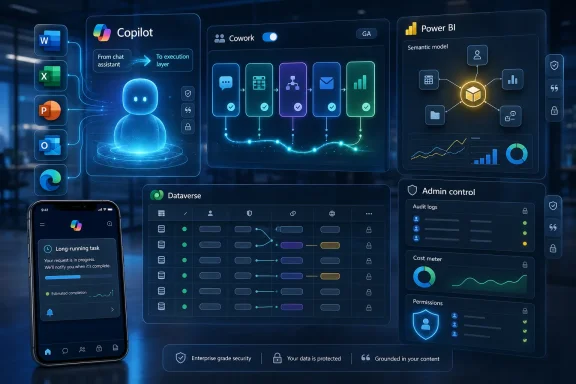
Microsoft added a broad June 2026 wave of Microsoft 365 Copilot features across Cowork, Word, PowerPoint, Excel, Outlook, Notebooks, Power BI, Dataverse, and admin controls, with Copilot Cowork’s general availability as the month’s clearest signal of where the product is heading. The story is not merely that Copilot gained more buttons. Microsoft is trying to turn Copilot from a chat box beside Office into an execution layer that can reason across corporate data, act through apps, and justify its work after the fact. That ambition is powerful, but it also makes governance, cost control, and data hygiene far more central than they were when Copilot was mostly summarizing meetings and drafting emails.
For the first year of Microsoft 365 Copilot’s life, the product was easiest to describe as a writing and summarization layer grafted onto familiar Office surfaces. It drafted emails in Outlook, summarized meetings in Teams, generated slide outlines in PowerPoint, and helped users ask questions about documents. Useful, sometimes impressive, but still bounded by the user’s immediate prompt and the app in front of them.
June 2026 is different because the center of gravity has shifted from help me write this to go do this. Copilot Cowork becoming generally available is the headline because it reframes Copilot as an agentic system rather than a static assistant. Microsoft’s language around “complex workflows” is not incidental marketing; it is the product direction.
The toggle inside the Microsoft 365 Copilot app matters because it lowers the psychological barrier to delegation. Users are not being asked to install a separate automation platform or learn a low-code workflow designer before trying agentic work. They are being invited to hand tasks to Copilot from within the same work hub where Microsoft has already been trying to concentrate chat, search, files, meetings, and organizational context.
That also means the risks move closer to ordinary users. A Copilot that answers a bad question badly wastes time. A Copilot that touches business data, generates documents, edits visuals, uses a browser, calls plugins, and runs long enough to send a mobile notification can create operational consequences.
Cowork’s ability to choose an AI model based on the task is one of the most important details. Microsoft is no longer pretending that one model is always the right model for every job. A planning task, a writing task, a data analysis task, and a visual generation task may have different cost, latency, reasoning, and safety characteristics, and Cowork is being positioned as the broker that abstracts those choices away from the user.
That abstraction is both the sales pitch and the governance challenge. Users want a system that simply picks the right tool. Admins want to know which model was used, what data it touched, what it generated, what it cost, and whether the organization’s compliance posture survived the trip.
The expanded plugin support is similarly double-edged. More plugins make Cowork more useful because real enterprise work rarely lives entirely inside one document or one Microsoft app. But every integration also expands the permission surface, the troubleshooting surface, and the number of places where a workflow can fail in non-obvious ways.
Custom skills push the product further into enterprise-specific automation. This is where Copilot starts to look less like a consumer AI assistant with a corporate license and more like a programmable work substrate. If organizations can encode specialized skills for recurring tasks, Copilot becomes a layer where institutional process can be captured, reused, and scaled.
That makes Edge support a major step toward practical autonomy. A workflow that can reason over Microsoft 365 data but cannot interact with browser-based tools will frequently stop just when it becomes useful. Give it browser context and the agent can begin bridging the gap between documents, SaaS applications, internal portals, and research sources.
The mobile push notifications for long-running tasks are another small feature with large implications. Microsoft is acknowledging that agentic work will not always complete in the time frame of a normal chat response. Some tasks will run in the background, require follow-up, or finish after the user has moved on to a different device.
That makes Copilot feel less like a chatbot and more like a delegated worker. The notification model implicitly says: assign the task, let it progress, and return when it needs you or when it has finished. This is a subtle but important change in user behavior, because the user is no longer waiting for text to stream into a window.
It also raises expectations. If Microsoft encourages users to delegate work that runs beyond the active session, the product has to become more transparent about status, failure, intermediate decisions, and rollback. A long-running AI task that quietly goes wrong is harder to tolerate than a weak paragraph in a draft email.
That is a meaningful upgrade for executives, analysts, and operations teams. If Copilot can answer questions from governed Power BI assets, it has a better chance of producing responses that align with the organization’s accepted definitions of revenue, churn, pipeline, headcount, or utilization. In enterprise analytics, the definition of a number often matters as much as the number itself.
Dataverse preview support points in the same direction. Dataverse underpins a large amount of Power Platform and Dynamics 365 data, which makes it a rich target for Copilot queries. If Copilot can search and reason over Dataverse business data, it becomes more relevant to sales, service, finance, operations, and custom app scenarios.
The preview status matters, though. Microsoft’s stated path toward broader availability later in the year suggests confidence, but preview features are still where organizations should test permission behavior, response quality, performance, and auditability before letting business users rely on them. AI over business data is only valuable when it respects the same boundaries that govern the underlying systems.
This is where Microsoft’s Work IQ framing comes into focus. Copilot is most compelling when it can combine user context, organizational knowledge, files, meetings, emails, and structured business data. It is also most dangerous when those layers are poorly governed, stale, over-permissioned, or misunderstood.
By letting users verify the basis of Copilot responses more directly, Microsoft is trying to make Copilot less of an oracle and more of an auditable reasoning interface. That distinction matters. Enterprises do not need AI to be mystically confident; they need it to be traceable enough that a human can decide whether to trust it.
This becomes especially important as Copilot reasons over Power BI, Dataverse, emails, comments, SharePoint libraries, and OneDrive folders. The more sources Copilot can access, the more users need to know which source actually shaped the answer. A response grounded in a certified Power BI model is not the same as a response grounded in a stale deck from last quarter.
The new Regenerate action belongs in the same trust conversation. Letting users try alternate responses, including responses based on a different model, acknowledges that AI output is not deterministic truth. It is a generated interpretation, and sometimes the useful answer is the one that emerges after comparison.
That comparison capability could help power users, but it also risks encouraging model shopping. If a user keeps regenerating until the answer matches a preferred assumption, traceability becomes even more important. Trust features need to make it easier to validate the answer, not merely easier to obtain a more flattering one.
The productivity case is obvious. A Copilot that can understand what is visible could help users interpret dashboards, troubleshoot UI flows, summarize complex pages, or explain application states without requiring careful copy-and-paste. For support, training, accessibility, and analysis, screen-aware AI could become a genuinely useful layer.
The security and privacy questions are equally obvious. Screen content is not neatly permissioned like a SharePoint document or a Power BI semantic model. It can contain snippets from many systems at once, some intended for Copilot and some merely present because the user’s desktop is cluttered.
Microsoft will need to make the boundaries painfully clear. Users and admins will want to know when screen content is captured, how long it is retained, whether it is used for model improvement, what tenant controls exist, and how sensitive information is handled. Without that clarity, Copilot Vision risks becoming one of those features that looks magical in a demo and radioactive in a regulated environment.
The broader point is that Copilot is no longer just asking Microsoft 365 what it knows. It is inching toward perceiving the workspace as the user sees it. That is a profound product shift, and it deserves more scrutiny than the usual feature-roundup treatment.
Adding Outlook emails as references is particularly practical. Much of corporate memory lives in email threads, even in organizations that wish it did not. Decisions, approvals, customer nuance, vendor commitments, and project history often sit in inboxes rather than neatly maintained knowledge bases.
By letting users ground notebooks in email alongside other content, Microsoft is giving Copilot a better shot at understanding the messy continuity of work. A project brief based only on files may miss the real story. A brief that can also incorporate the email thread where the decision was made may be more useful.
Opening Notebooks to all Copilot Chat users also broadens Microsoft’s funnel. Even users without the full Microsoft 365 Copilot license can begin building persistent AI workspaces around collections of references. That may increase adoption and familiarity, while also making the case for richer licensed capabilities later.
This is classic Microsoft platform strategy. Make the organizational habit broadly available, then attach the deepest value to the paid tier. The risk is that users may expect parity across Copilot Chat and Microsoft 365 Copilot experiences, only to discover that licensing, data access, and app integration still create uneven edges.
The ability to reason over comments and apply edits based on them is especially significant. Comments are where review intent lives. They often capture the difference between “make this shorter” and “make this acceptable to legal,” between a cosmetic change and a strategic correction.
If Copilot can use comments as actionable instructions, Word shifts from drafting assistant to revision operator. That could speed up review cycles, particularly for proposals, policies, reports, and legal-adjacent documents where feedback is scattered across many comments. But it also means users must inspect whether Copilot interpreted the feedback correctly, because comments are often ambiguous, political, or context-dependent.
Preserving Copilot Chat conversation history from chat to apps is another step toward continuity. One of the frustrations of current AI workflows is context fragmentation: the user explains the task in one place, then has to restate it when moving to the document. Microsoft is trying to reduce that friction by carrying the conversation into the work surface.
The iOS expansion matters for a different reason. Mobile Office editing has historically been constrained by screen size and input friction. Agentic Copilot features could make mobile document work more realistic by letting users request intent-level changes rather than manually manipulate paragraphs on glass.
The first wave of AI presentation tools often produced plausible but generic decks. Enterprises do not merely need slides; they need slides that look like they came from the company, use the right tone, cite the right source material, and avoid mangling regulated claims or customer commitments. Brand kits are not decorative in this context. They are governance expressed as design.
Reusable skills in PowerPoint are also important because presentation work is repetitive. Sales updates, quarterly business reviews, project status decks, training modules, and executive briefings often follow patterns. If teams can encode those patterns into Copilot skills, PowerPoint becomes less about one-off generation and more about standardized communication workflows.
Excel’s updates move in a different direction. Skills in Copilot for Excel, personalization, and workbook rules suggest Microsoft is trying to make AI spreadsheet work more context-aware and less generic. Excel users do not merely ask for calculations; they operate inside models, conventions, assumptions, and house rules that vary by team.
Workbook rules could become a crucial guardrail if implemented well. Spreadsheets are famously flexible, which is both their strength and their failure mode. If Copilot can understand and respect workbook-specific rules, it may reduce the risk of AI-generated edits that technically work but violate the logic of the model.
The larger split is instructive. In PowerPoint, Microsoft is trying to constrain Copilot with brand and content sources. In Excel, it is trying to constrain Copilot with personalization and workbook logic. In both cases, the goal is the same: make AI output less generic by binding it to the organization’s actual working patterns.
The Outlook Classic note is also a reminder that Microsoft’s AI strategy has to live inside the company’s messy client transition strategy. Microsoft can announce ambitious Copilot features, but many enterprises still operate across classic Win32 Office apps, web apps, mobile apps, new Outlook, old Outlook, and managed desktop images. Feature availability is not a single line; it is a matrix.
Planner Agent arriving in Copilot Chat is another sign that Microsoft wants Copilot to manage work, not just describe it. Planning is a natural domain for agentic AI because it involves breaking intent into tasks, assigning structure, and maintaining progress. If Planner Agent can reliably turn conversations into actionable plans, it could become one of the more immediately useful Copilot features for teams.
But planning also reveals the limits of AI delegation. A project plan is not valuable because it has neatly named tasks. It is valuable because the dependencies are realistic, the owners are correct, the dates reflect capacity, and the assumptions have been tested against reality. Copilot can help structure the work, but humans still own the political and operational truth.
Researcher model selection in Copilot Chat fits this same pattern of giving users more control while making the product more complex. Picking a model directly in the conversation is useful for sophisticated users who understand the trade-offs. For everyone else, it adds another decision at the exact moment Microsoft is also selling Cowork as the system that can choose the model for them.
The most important administrative issue is no longer whether users can access Copilot. It is what Copilot can access on their behalf, what it can do with that access, how much it costs while doing it, and how clearly the organization can reconstruct what happened afterward. Agentic AI turns governance from a licensing checklist into an operational discipline.
Cost management deserves special attention. Model choice, long-running tasks, usage-based agentic work, and richer reasoning all imply more variable consumption patterns. The old mental model of a predictable per-user productivity license does not fully capture a world where autonomous tasks may consume different resources depending on complexity.
Security teams will also need to revisit old assumptions about data exposure. Copilot generally respects user permissions, but respecting permissions is not the same as having well-designed permissions. Many organizations have years of over-shared SharePoint sites, broad Teams memberships, inherited OneDrive links, and poorly classified files. Copilot makes those problems more visible because it can retrieve and synthesize information faster than a human browsing folders.
This is why June’s most practical message for admins is not “turn on the new features.” It is: inventory your data, review your permissions, understand your audit trails, and decide where agentic execution is appropriate before business units discover it organically.
The same feature can be transformative or risky depending on the tenant. Power BI grounding is excellent if the semantic models are trusted. Dataverse reasoning is useful if business data permissions are accurate. Outlook references in Notebooks are powerful if users understand what context they are adding. Cowork plugins are valuable if integrations are reviewed and monitored.
This is the hidden dividing line in enterprise AI adoption. Vendors talk about capability. IT departments live with preconditions. The better Copilot gets, the more it depends on all the unglamorous work that preceded it.
Microsoft has an incentive to make Copilot feel effortless, and June’s updates largely push in that direction. Toggle Cowork. Add email references. Pick a model. Generate an image. Reuse a skill. Ask Power BI. Query Dataverse. But behind every simplified user action is an administrative question about data, permissions, compliance, cost, and accountability.
That does not make the update bad. It makes it consequential. The organizations that get the most from this wave will be the ones that treat Copilot as a platform deployment, not an Office feature pack.
The most concrete takeaways are these:
 Microsoft’s June Update Turns Copilot From Assistant Into Actor
For the first year of Microsoft 365 Copilot’s life, the product was easiest to describe as a writing and summarization layer grafted onto familiar Office surfaces. It drafted emails in Outlook, summarized meetings in Teams, generated slide outlines in PowerPoint, and helped users ask questions about documents. Useful, sometimes impressive, but still bounded by the user’s immediate prompt and the app in front of them.June 2026 is different because the center of gravity has shifted from help me write this to go do this. Copilot Cowork becoming generally available is the headline because it reframes Copilot as an agentic system rather than a static assistant. Microsoft’s language around “complex workflows” is not incidental marketing; it is the product direction.
The toggle inside the Microsoft 365 Copilot app matters because it lowers the psychological barrier to delegation. Users are not being asked to install a separate automation platform or learn a low-code workflow designer before trying agentic work. They are being invited to hand tasks to Copilot from within the same work hub where Microsoft has already been trying to concentrate chat, search, files, meetings, and organizational context.
That also means the risks move closer to ordinary users. A Copilot that answers a bad question badly wastes time. A Copilot that touches business data, generates documents, edits visuals, uses a browser, calls plugins, and runs long enough to send a mobile notification can create operational consequences.
Cowork Is the New Front Door to Microsoft’s Agent Strategy
Copilot Cowork’s general availability is the pivotal June feature because it gives Microsoft a mainstream vehicle for agentic workflows inside Microsoft 365. The feature had already been visible through preview programs, but general availability changes the conversation from curiosity to deployment planning. For IT departments, “available” is not the same as “adopted,” yet it does mean the pilot phase can no longer be treated as something happening safely off to the side.Cowork’s ability to choose an AI model based on the task is one of the most important details. Microsoft is no longer pretending that one model is always the right model for every job. A planning task, a writing task, a data analysis task, and a visual generation task may have different cost, latency, reasoning, and safety characteristics, and Cowork is being positioned as the broker that abstracts those choices away from the user.
That abstraction is both the sales pitch and the governance challenge. Users want a system that simply picks the right tool. Admins want to know which model was used, what data it touched, what it generated, what it cost, and whether the organization’s compliance posture survived the trip.
The expanded plugin support is similarly double-edged. More plugins make Cowork more useful because real enterprise work rarely lives entirely inside one document or one Microsoft app. But every integration also expands the permission surface, the troubleshooting surface, and the number of places where a workflow can fail in non-obvious ways.
Custom skills push the product further into enterprise-specific automation. This is where Copilot starts to look less like a consumer AI assistant with a corporate license and more like a programmable work substrate. If organizations can encode specialized skills for recurring tasks, Copilot becomes a layer where institutional process can be captured, reused, and scaled.
The Browser and the Phone Make Agentic Work Feel Real
Cowork’s new ability to use Edge is not just another integration checkbox. Browser capability means the agent can operate in the messy middle of modern work, where critical information often sits in web apps, dashboards, portals, intranet pages, and vendor systems. For many enterprises, the browser is the real operating system; Office is merely where the outputs are polished.That makes Edge support a major step toward practical autonomy. A workflow that can reason over Microsoft 365 data but cannot interact with browser-based tools will frequently stop just when it becomes useful. Give it browser context and the agent can begin bridging the gap between documents, SaaS applications, internal portals, and research sources.
The mobile push notifications for long-running tasks are another small feature with large implications. Microsoft is acknowledging that agentic work will not always complete in the time frame of a normal chat response. Some tasks will run in the background, require follow-up, or finish after the user has moved on to a different device.
That makes Copilot feel less like a chatbot and more like a delegated worker. The notification model implicitly says: assign the task, let it progress, and return when it needs you or when it has finished. This is a subtle but important change in user behavior, because the user is no longer waiting for text to stream into a window.
It also raises expectations. If Microsoft encourages users to delegate work that runs beyond the active session, the product has to become more transparent about status, failure, intermediate decisions, and rollback. A long-running AI task that quietly goes wrong is harder to tolerate than a weak paragraph in a draft email.
Data Grounding Moves From Documents to the Business Core
The June additions around Power BI and Dataverse show Microsoft trying to ground Copilot in the systems where business truth is supposed to live. Power BI enterprise data support gives Copilot a more formal analytical spine than simple file retrieval. Instead of merely summarizing a spreadsheet someone attached to a chat, Copilot can reason over reports and semantic models that organizations already use for metrics and decision-making.That is a meaningful upgrade for executives, analysts, and operations teams. If Copilot can answer questions from governed Power BI assets, it has a better chance of producing responses that align with the organization’s accepted definitions of revenue, churn, pipeline, headcount, or utilization. In enterprise analytics, the definition of a number often matters as much as the number itself.
Dataverse preview support points in the same direction. Dataverse underpins a large amount of Power Platform and Dynamics 365 data, which makes it a rich target for Copilot queries. If Copilot can search and reason over Dataverse business data, it becomes more relevant to sales, service, finance, operations, and custom app scenarios.
The preview status matters, though. Microsoft’s stated path toward broader availability later in the year suggests confidence, but preview features are still where organizations should test permission behavior, response quality, performance, and auditability before letting business users rely on them. AI over business data is only valuable when it respects the same boundaries that govern the underlying systems.
This is where Microsoft’s Work IQ framing comes into focus. Copilot is most compelling when it can combine user context, organizational knowledge, files, meetings, emails, and structured business data. It is also most dangerous when those layers are poorly governed, stale, over-permissioned, or misunderstood.
Deep Citations Are Microsoft’s Answer to the Trust Gap
Deep citations may sound like a quality-of-life feature, but they are central to Copilot’s enterprise credibility. The problem with AI answers in business settings has never been only hallucination. It is the inability to quickly determine whether a plausible answer is grounded in the right source, the right version, and the right organizational context.By letting users verify the basis of Copilot responses more directly, Microsoft is trying to make Copilot less of an oracle and more of an auditable reasoning interface. That distinction matters. Enterprises do not need AI to be mystically confident; they need it to be traceable enough that a human can decide whether to trust it.
This becomes especially important as Copilot reasons over Power BI, Dataverse, emails, comments, SharePoint libraries, and OneDrive folders. The more sources Copilot can access, the more users need to know which source actually shaped the answer. A response grounded in a certified Power BI model is not the same as a response grounded in a stale deck from last quarter.
The new Regenerate action belongs in the same trust conversation. Letting users try alternate responses, including responses based on a different model, acknowledges that AI output is not deterministic truth. It is a generated interpretation, and sometimes the useful answer is the one that emerges after comparison.
That comparison capability could help power users, but it also risks encouraging model shopping. If a user keeps regenerating until the answer matches a preferred assumption, traceability becomes even more important. Trust features need to make it easier to validate the answer, not merely easier to obtain a more flattering one.
Copilot Vision Pushes the Boundary From Work Graph to Screen Graph
Copilot Vision’s upcoming ability to generate insights based on what it sees on the user’s screen is one of the more consequential future-facing items in the June roundup. Microsoft has spent years building value around the Microsoft Graph, but screen understanding moves toward a broader and messier domain. The screen can include Microsoft apps, third-party apps, web dashboards, local files, remote sessions, and accidental sensitive material.The productivity case is obvious. A Copilot that can understand what is visible could help users interpret dashboards, troubleshoot UI flows, summarize complex pages, or explain application states without requiring careful copy-and-paste. For support, training, accessibility, and analysis, screen-aware AI could become a genuinely useful layer.
The security and privacy questions are equally obvious. Screen content is not neatly permissioned like a SharePoint document or a Power BI semantic model. It can contain snippets from many systems at once, some intended for Copilot and some merely present because the user’s desktop is cluttered.
Microsoft will need to make the boundaries painfully clear. Users and admins will want to know when screen content is captured, how long it is retained, whether it is used for model improvement, what tenant controls exist, and how sensitive information is handled. Without that clarity, Copilot Vision risks becoming one of those features that looks magical in a demo and radioactive in a regulated environment.
The broader point is that Copilot is no longer just asking Microsoft 365 what it knows. It is inching toward perceiving the workspace as the user sees it. That is a profound product shift, and it deserves more scrutiny than the usual feature-roundup treatment.
Notebooks Become the Place Where Work Context Accumulates
Copilot Notebooks gained two important changes in June: support for Outlook emails as references and availability for all Copilot Chat users rather than only Microsoft 365 Copilot license holders. Together, those moves make Notebooks less of a premium side feature and more of a general-purpose context container.Adding Outlook emails as references is particularly practical. Much of corporate memory lives in email threads, even in organizations that wish it did not. Decisions, approvals, customer nuance, vendor commitments, and project history often sit in inboxes rather than neatly maintained knowledge bases.
By letting users ground notebooks in email alongside other content, Microsoft is giving Copilot a better shot at understanding the messy continuity of work. A project brief based only on files may miss the real story. A brief that can also incorporate the email thread where the decision was made may be more useful.
Opening Notebooks to all Copilot Chat users also broadens Microsoft’s funnel. Even users without the full Microsoft 365 Copilot license can begin building persistent AI workspaces around collections of references. That may increase adoption and familiarity, while also making the case for richer licensed capabilities later.
This is classic Microsoft platform strategy. Make the organizational habit broadly available, then attach the deepest value to the paid tier. The risk is that users may expect parity across Copilot Chat and Microsoft 365 Copilot experiences, only to discover that licensing, data access, and app integration still create uneven edges.
Word Is Becoming the Test Bed for AI-Assisted Editing
The June Word updates are numerous, but their collective meaning is more interesting than any single item. Model choice is now available in Copilot in Word, users can create and insert images, Copilot Catchup appears as a content card, agentic capabilities reach iOS, and chat history carries from Copilot Chat into the apps. Word is becoming a proving ground for AI that edits, remembers, and acts inside a living document.The ability to reason over comments and apply edits based on them is especially significant. Comments are where review intent lives. They often capture the difference between “make this shorter” and “make this acceptable to legal,” between a cosmetic change and a strategic correction.
If Copilot can use comments as actionable instructions, Word shifts from drafting assistant to revision operator. That could speed up review cycles, particularly for proposals, policies, reports, and legal-adjacent documents where feedback is scattered across many comments. But it also means users must inspect whether Copilot interpreted the feedback correctly, because comments are often ambiguous, political, or context-dependent.
Preserving Copilot Chat conversation history from chat to apps is another step toward continuity. One of the frustrations of current AI workflows is context fragmentation: the user explains the task in one place, then has to restate it when moving to the document. Microsoft is trying to reduce that friction by carrying the conversation into the work surface.
The iOS expansion matters for a different reason. Mobile Office editing has historically been constrained by screen size and input friction. Agentic Copilot features could make mobile document work more realistic by letting users request intent-level changes rather than manually manipulate paragraphs on glass.
PowerPoint and Excel Show the Split Between Brand Control and Analytical Control
PowerPoint’s June features focus on brand and reuse. The Brand Kit Picker lets users create presentations aligned with approved organizational templates, while reusable Copilot skills and references to SharePoint libraries and OneDrive folders make slide generation more grounded in corporate assets. That is exactly where AI slide creation needs to go if it is to survive contact with enterprise communications teams.The first wave of AI presentation tools often produced plausible but generic decks. Enterprises do not merely need slides; they need slides that look like they came from the company, use the right tone, cite the right source material, and avoid mangling regulated claims or customer commitments. Brand kits are not decorative in this context. They are governance expressed as design.
Reusable skills in PowerPoint are also important because presentation work is repetitive. Sales updates, quarterly business reviews, project status decks, training modules, and executive briefings often follow patterns. If teams can encode those patterns into Copilot skills, PowerPoint becomes less about one-off generation and more about standardized communication workflows.
Excel’s updates move in a different direction. Skills in Copilot for Excel, personalization, and workbook rules suggest Microsoft is trying to make AI spreadsheet work more context-aware and less generic. Excel users do not merely ask for calculations; they operate inside models, conventions, assumptions, and house rules that vary by team.
Workbook rules could become a crucial guardrail if implemented well. Spreadsheets are famously flexible, which is both their strength and their failure mode. If Copilot can understand and respect workbook-specific rules, it may reduce the risk of AI-generated edits that technically work but violate the logic of the model.
The larger split is instructive. In PowerPoint, Microsoft is trying to constrain Copilot with brand and content sources. In Excel, it is trying to constrain Copilot with personalization and workbook logic. In both cases, the goal is the same: make AI output less generic by binding it to the organization’s actual working patterns.
Outlook and Planner Bring Copilot Back to the Workday Grind
Outlook’s June changes are less flashy than Cowork, but they matter because email remains the daily cockpit for many workers. Outlook on the web already supports Copilot directly in the compose canvas for refining messages, while Outlook Classic users are slated to gain more direct access to Copilot settings. That may sound minor, but parity gaps between new and classic Outlook experiences remain a recurring irritant for Microsoft 365 customers.The Outlook Classic note is also a reminder that Microsoft’s AI strategy has to live inside the company’s messy client transition strategy. Microsoft can announce ambitious Copilot features, but many enterprises still operate across classic Win32 Office apps, web apps, mobile apps, new Outlook, old Outlook, and managed desktop images. Feature availability is not a single line; it is a matrix.
Planner Agent arriving in Copilot Chat is another sign that Microsoft wants Copilot to manage work, not just describe it. Planning is a natural domain for agentic AI because it involves breaking intent into tasks, assigning structure, and maintaining progress. If Planner Agent can reliably turn conversations into actionable plans, it could become one of the more immediately useful Copilot features for teams.
But planning also reveals the limits of AI delegation. A project plan is not valuable because it has neatly named tasks. It is valuable because the dependencies are realistic, the owners are correct, the dates reflect capacity, and the assumptions have been tested against reality. Copilot can help structure the work, but humans still own the political and operational truth.
Researcher model selection in Copilot Chat fits this same pattern of giving users more control while making the product more complex. Picking a model directly in the conversation is useful for sophisticated users who understand the trade-offs. For everyone else, it adds another decision at the exact moment Microsoft is also selling Cowork as the system that can choose the model for them.
The Admin Story Is No Longer Optional
The June roundup’s management enhancements may not be as exciting as image creation in Word or Cowork’s mobile notifications, but they are the features that determine whether Copilot can scale responsibly. Microsoft 365 Copilot is now touching more apps, more data sources, more models, more plugins, and more user workflows. That makes admin controls the difference between a strategic deployment and a slow-motion permission audit.The most important administrative issue is no longer whether users can access Copilot. It is what Copilot can access on their behalf, what it can do with that access, how much it costs while doing it, and how clearly the organization can reconstruct what happened afterward. Agentic AI turns governance from a licensing checklist into an operational discipline.
Cost management deserves special attention. Model choice, long-running tasks, usage-based agentic work, and richer reasoning all imply more variable consumption patterns. The old mental model of a predictable per-user productivity license does not fully capture a world where autonomous tasks may consume different resources depending on complexity.
Security teams will also need to revisit old assumptions about data exposure. Copilot generally respects user permissions, but respecting permissions is not the same as having well-designed permissions. Many organizations have years of over-shared SharePoint sites, broad Teams memberships, inherited OneDrive links, and poorly classified files. Copilot makes those problems more visible because it can retrieve and synthesize information faster than a human browsing folders.
This is why June’s most practical message for admins is not “turn on the new features.” It is: inventory your data, review your permissions, understand your audit trails, and decide where agentic execution is appropriate before business units discover it organically.
The June Copilot Wave Rewards Prepared Tenants and Punishes Messy Ones
Microsoft’s June 2026 Copilot release is best understood as a maturity test for customers. Organizations with clean identity, disciplined information architecture, labeled sensitive data, governed Power BI models, and clear AI policies will find more to like. Organizations that treated Copilot as a shiny add-on may find that the new features expose unresolved platform debt.The same feature can be transformative or risky depending on the tenant. Power BI grounding is excellent if the semantic models are trusted. Dataverse reasoning is useful if business data permissions are accurate. Outlook references in Notebooks are powerful if users understand what context they are adding. Cowork plugins are valuable if integrations are reviewed and monitored.
This is the hidden dividing line in enterprise AI adoption. Vendors talk about capability. IT departments live with preconditions. The better Copilot gets, the more it depends on all the unglamorous work that preceded it.
Microsoft has an incentive to make Copilot feel effortless, and June’s updates largely push in that direction. Toggle Cowork. Add email references. Pick a model. Generate an image. Reuse a skill. Ask Power BI. Query Dataverse. But behind every simplified user action is an administrative question about data, permissions, compliance, cost, and accountability.
That does not make the update bad. It makes it consequential. The organizations that get the most from this wave will be the ones that treat Copilot as a platform deployment, not an Office feature pack.
The Month Microsoft Made Copilot Harder to Ignore
June’s Copilot additions are too broad to dismiss as incremental polish, but they are also too uneven to treat as a finished revolution. The product is still a moving target, and Microsoft’s own preview-to-GA cadence shows how quickly the company is iterating. For WindowsForum readers, the practical point is that Copilot is becoming more deeply embedded in the work surfaces many organizations already depend on.The most concrete takeaways are these:
- Copilot Cowork is now generally available and marks Microsoft’s clearest move from AI assistance toward delegated, multi-step work.
- Copilot’s new Power BI and Dataverse grounding makes business data governance more important than prompt-writing skill.
- Deep citations and Regenerate are trust features, but they only help if users are trained to verify outputs rather than accept fluent answers.
- Word, PowerPoint, and Excel are gaining app-specific Copilot behaviors that reflect how people actually revise documents, build decks, and manage spreadsheets.
- Copilot Notebooks are becoming a broader context workspace now that Outlook emails can be added as references and access has expanded to Copilot Chat users.
- Admins should treat the June wave as a governance event, because agentic AI magnifies existing permission, compliance, and cost-management weaknesses.
References
- Primary source: Neowin
Published: 2026-06-30T22:50:13.595800
Loading…
www.neowin.net - Official source: techcommunity.microsoft.com
Loading…
techcommunity.microsoft.com - Official source: learn.microsoft.com
Release Notes for Microsoft 365 Copilot | Microsoft Learn
Lists the features that reach General Availability in each release of Microsoft 365 Copilot.learn.microsoft.com - Official source: support.microsoft.com
- Related coverage: rcpmag.com
Microsoft Announces General Availability of Copilot Cowork Following Successful Preview -- Redmond Channel Partner
Microsoft has officially launched Copilot Cowork for organizations worldwide.rcpmag.com - Related coverage: mwpro.co.uk
Loading…
mwpro.co.uk
- Related coverage: computerworld.com
Microsoft launches Copilot Cowork with usage-based pricing – Computerworld
Copilot Cowork customers can choose from Anthropic and OpenAI models to run the AI agent, while Microsoft reportedly plans to offer an open source model from DeepSeek to lower costs. www.computerworld.com
- Related coverage: hbs.net
Loading…
www.hbs.net - Related coverage: windowscentral.com
This is Microsoft's new "Copilot Cowork": An experiment with Anthropic's Claude AI models that plans and delegates your work | Windows Central
Microsoft ships Copilot Cowork to its Frontier program.www.windowscentral.com - Related coverage: itpro.com
Copilot Cowork is now generally available: Everything you need to know, including pricing, usage limits, and new features | IT Pro
Microsoft has announced that Copilot Cowork is now generally available for users globally, following a beta period via the tech giant’s Frontier program.www.itpro.com - Related coverage: techradar.com
Microsoft makes Copilot Cowork open to everyone, and wants to help you tackle even the trickiest work tasks | TechRadar
Copilot Cowork gets an upgrade as it opens to all userswww.techradar.com - Related coverage: m365maps.com
- Official source: cdn-dynmedia-1.microsoft.com
- Related coverage: arturmarkus.com
Microsoft 365 Copilot Rolls Out 27 New Features in January 2026, Adds GPT-5.2 Model Selector with 3 Reasoning Modes
PDF documentwww.arturmarkus.com
- Related coverage: databear.com
Loading…
databear.com