

Digital Trends has highlighted a growing mobile-app annoyance: AI assistants are no longer confined to apps users deliberately open for AI. They are becoming prominent fixtures in photo libraries, messaging services, music players and productivity tools—often with recurring prompts rather than a durable “no thanks” choice.
For Windows and Microsoft 365 users, the sharpest example is Microsoft’s own mobile strategy. Microsoft’s support documentation says the Microsoft 365 Copilot app is moving to an “AI-first” experience. On iOS and Android, document editing and full file browsing are being shifted out to the dedicated Word, Excel, PowerPoint and OneDrive apps, while the central app opens to Copilot chat.
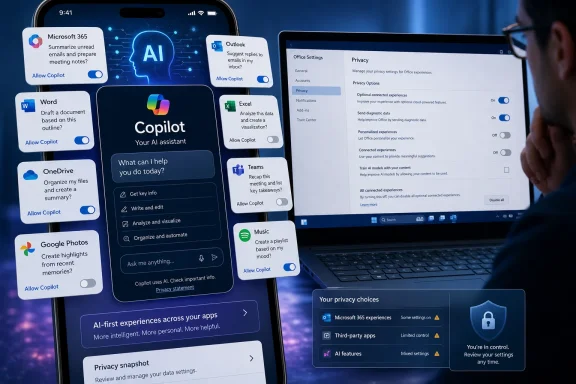
Microsoft does provide a per-app Enable Copilot checkbox in Word, Excel and PowerPoint for Windows and Mac. But, per Microsoft’s advisory, that control is unavailable in the iOS, Android and web versions of those applications.
Mobile users can instead change privacy settings to disable Copilot-related connected experiences, but that is a broad switch. Microsoft warns it can also disable features including Outlook suggested replies, Word text predictions, PowerPoint Designer and automatic image alt text. Outlook is the exception: its mobile apps have a dedicated Copilot toggle that applies across devices using the same account.
That distinction matters for admins and users trying to keep AI out of routine document work without losing unrelated cloud features. A visible Copilot button can be removed from the desktop ribbon, but Microsoft notes that hiding the icon is not the same as turning the service off.
Spotify, meanwhile, announced “Talk to Spotify” on July 14. The beta lets eligible Premium users aged 18 and over in supported markets type or speak requests from the Home and Now Playing screens, including requests to change music, explore listening history, or ask about podcasts and audiobooks.
The useful cases are obvious: finding a forgotten photo, extracting details from a long PDF, or refining an awkward music search. The complaint is not that such tools exist, but that product design increasingly treats them as the default front door rather than an optional capability.
For Windows users, the practical answer is to review Copilot settings separately in each desktop Office app, use Outlook’s dedicated toggle where available, and recognize that equivalent mobile controls remain more limited.
For Windows and Microsoft 365 users, the sharpest example is Microsoft’s own mobile strategy. Microsoft’s support documentation says the Microsoft 365 Copilot app is moving to an “AI-first” experience. On iOS and Android, document editing and full file browsing are being shifted out to the dedicated Word, Excel, PowerPoint and OneDrive apps, while the central app opens to Copilot chat.
 Opt-out controls remain uneven
Microsoft does provide a per-app Enable Copilot checkbox in Word, Excel and PowerPoint for Windows and Mac. But, per Microsoft’s advisory, that control is unavailable in the iOS, Android and web versions of those applications.Mobile users can instead change privacy settings to disable Copilot-related connected experiences, but that is a broad switch. Microsoft warns it can also disable features including Outlook suggested replies, Word text predictions, PowerPoint Designer and automatic image alt text. Outlook is the exception: its mobile apps have a dedicated Copilot toggle that applies across devices using the same account.
That distinction matters for admins and users trying to keep AI out of routine document work without losing unrelated cloud features. A visible Copilot button can be removed from the desktop ribbon, but Microsoft notes that hiding the icon is not the same as turning the service off.
The pattern extends beyond Microsoft
Google Photos’ Ask Photos uses Gemini to search libraries and answer questions based on photos, face labels and related account information. Google says the feature is experimental and may return inaccurate or inappropriate results. Its support material provides controls for Photos Activity and query-review participation, while other Gemini-linked services can have separate data controls.Spotify, meanwhile, announced “Talk to Spotify” on July 14. The beta lets eligible Premium users aged 18 and over in supported markets type or speak requests from the Home and Now Playing screens, including requests to change music, explore listening history, or ask about podcasts and audiobooks.
The useful cases are obvious: finding a forgotten photo, extracting details from a long PDF, or refining an awkward music search. The complaint is not that such tools exist, but that product design increasingly treats them as the default front door rather than an optional capability.
For Windows users, the practical answer is to review Copilot settings separately in each desktop Office app, use Outlook’s dedicated toggle where available, and recognize that equivalent mobile controls remain more limited.
References
- Primary source: Digital Trends
Published: 2026-07-18T11:53:38+00:00
Every app on my phone has decided I need AI, and none of them bothered to ask - Digital Trends
Every app wants to become an AI app, even when users keep dismissing the invitation. Somehow, software that promises to understand us still can’t remember when we’ve said no.www.digitaltrends.com