

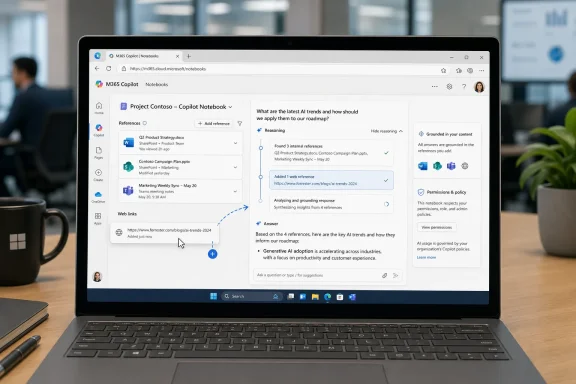
Microsoft launched Roadmap ID 516040 for Microsoft 365 Copilot in May 2026, giving users of the Microsoft 365 web app a way to add web links as references inside Copilot Notebooks for Worldwide standard multi-tenant customers. The change looks small because the interface action is small: paste a link, add it to the notebook, and let Copilot reason over it. But the product signal is larger. Microsoft is trying to turn Copilot Notebooks from a workspace grounded mostly in files and Microsoft 365 artifacts into a more flexible research surface that can absorb the web as part of everyday knowledge work.
Copilot Notebooks already sat in an awkward but potentially powerful place inside Microsoft 365. They were not quite OneNote, not quite Loop, not quite a chat history, and not quite a document library. Microsoft’s pitch has been that a notebook is a persistent context container: a place where you gather the materials for a project and ask Copilot to reason across them.
Adding web links as references sharpens that identity. A notebook can now become a boundary layer between internal work and external evidence, where a project plan can sit beside a vendor page, a regulatory notice, a competitor announcement, or a public technical document. That is closer to how work actually happens than the earlier model, where grounding was biased toward documents already living in OneDrive, SharePoint, OneNote, or other Microsoft 365 surfaces.
The move also says something about Microsoft’s confidence in retrieval-augmented AI. The company does not want Copilot to be a general chatbot that occasionally sees your files. It wants Copilot to be a work assistant that can be deliberately pointed at a curated pile of material and asked to produce answers, summaries, drafts, and next steps from that pile.
That distinction matters. The more Copilot relies on broad web search, the more it competes with every other AI assistant. The more it relies on carefully selected references, the more it becomes a Microsoft 365 workflow feature rather than just another prompt box.
That kind of friction sounds trivial until it becomes daily work. Knowledge workers already maintain messy private systems of browser tabs, copied text, screenshots, Teams messages, and half-named documents. Copilot Notebooks is Microsoft’s attempt to domesticate that mess by making the reference set the durable unit of work.
The interesting part is not that Copilot can read a link. Many AI tools can summarize webpages. The interesting part is that Microsoft is making the link part of a notebook’s ongoing context, alongside other materials that may update over time.
This turns the notebook into something closer to a live project dossier. If references stay current as Microsoft says, then the notebook is less like a static binder and more like a managed workspace whose answers can shift as source material changes. That can be useful, but it also introduces a new kind of uncertainty: the same prompt may not always produce the same grounded answer next month if the linked reference changes.
Web links complicate that neat story. External references are not governed like SharePoint files. They may disappear, change, redirect, require authentication, or present different content depending on geography, cookies, or session state. Public web content is also not guaranteed to follow an organization’s retention, classification, or sensitivity rules.
That does not make the feature reckless. It makes it consequential. Microsoft is effectively saying that the modern work graph does not stop at the tenant boundary, and that Copilot must be able to deal with outside material if it is going to be useful for real projects.
This is the right bet. It is also the sort of bet that turns administrators into policy designers rather than mere license assigners. If Copilot Notebooks becomes a common place to mix internal files with external web references, organizations will need norms for what belongs in a notebook, which notebooks can be shared, and when web-grounded outputs require review.
That difference is not just a licensing footnote. It is a product segmentation line. Microsoft is using Notebooks to make the paid Microsoft 365 Copilot tier feel like the serious workbench, while Copilot Chat gets a smaller but still useful version of the experience.
The permissions model remains central. Copilot can only use organizational content that the user has permission to access and that has been added as a reference. In shared notebooks, access to linked files can become part of the sharing experience, but missing permissions can still send recipients into the familiar request-access loop.
Web links add a different wrinkle. Microsoft’s own support language distinguishes among source types and licensing contexts, and administrators should not assume that every link-like thing behaves the same way. A link to a SharePoint file, an internal URL, and a public website may all look like “links” to a user, but they live in different governance realities.
For IT pros, that means rollout communication matters. If users hear “Copilot Notebooks can use links,” they may assume the feature is a universal web ingestion tool. The safer message is narrower: notebooks can use supported references, including links in supported contexts, and the usefulness of the output depends on access, source quality, and tenant policy.
For WindowsForum readers, the immediate impact is likely to appear in the browser. Edge tabs, Microsoft 365 web sessions, SharePoint pages, Outlook on the web, and Copilot notebooks increasingly form the workspace for many users, even when the PC itself remains the anchor device. The old model was local app first, cloud document second. The new model is context first, app second.
That shift is uncomfortable for users who prefer the clarity of local files and desktop applications. It can feel as if every task is being pulled into a subscription-backed web surface with an AI sidebar attached. But the reason Microsoft keeps pushing in this direction is simple: Copilot becomes more valuable when work is represented as connected context rather than isolated files.
The risk is that Microsoft ends up with too many overlapping canvases. OneNote notebooks, Copilot Notebooks, Loop pages, Copilot Pages, Word drafts, Teams chats, and SharePoint libraries all want to be where work happens. The web-link reference feature helps Copilot Notebooks make its case, but it does not fully resolve the “which notebook is this notebook?” confusion that users have already voiced around Microsoft’s expanding productivity vocabulary.
Imagine a sysadmin maintaining a migration notebook. The notebook might contain an internal deployment checklist, a few SharePoint-hosted design documents, a Teams meeting recap, and now a vendor’s public support article. Copilot can be asked to identify mismatches between the vendor’s current guidance and the organization’s internal plan.
That is where notebooks could earn their keep. They create a place where external change can be evaluated against internal intent. The AI is not merely summarizing the world; it is reconciling the world with your organization’s own documents.
The same pattern applies across departments. A finance team can compare public investor material against internal planning notes. A legal team can track public agency guidance against contract templates. A product team can ground competitive analysis in a curated mix of public pages and private strategy documents.
The danger, of course, is false confidence. A grounded answer is not automatically a correct answer. It is an answer shaped by the chosen references, the model’s interpretation, and the freshness and availability of the sources. The notebook improves the odds by narrowing context, but it does not remove the need for human judgment.
That has competitive implications. Google has pushed notebook-style AI research experiences around source-grounded synthesis. OpenAI and others have been moving toward persistent projects and memory-like workspaces. Microsoft’s advantage is not that its model will always be better at summarizing a page. Its advantage is that the notebook can sit next to the documents, identities, permissions, meetings, and files where enterprise work already lives.
But Microsoft also carries the burden of enterprise expectations. Consumer AI products can be fuzzy about source handling and still delight users. Microsoft 365 Copilot has to satisfy compliance teams, records managers, security administrators, and skeptical CIOs who have already been asked to justify premium AI licensing.
Web-link support makes the product more useful, and therefore more exposed. The more Copilot Notebooks becomes a real research surface, the more users will rely on it for decisions. The more they rely on it, the more Microsoft will have to explain what was read, what was ignored, how current it was, and why an answer was produced.
A user might be allowed to access an internal strategy document and a public competitor page. There may be nothing wrong with placing both in the same notebook. But the synthesis produced from that combination could be sensitive, revealing, or inappropriate to share broadly.
This is where organizations will need new habits. Permissions remain necessary, but they are not sufficient. Teams will need to think about notebook purpose, sharing scope, source hygiene, and output review. In practice, that means Copilot Notebooks may become another place where data classification and user education collide.
Microsoft would prefer customers to see this as empowerment rather than risk. That is understandable. The entire Copilot value proposition depends on reducing the distance between information and action. But in enterprise environments, reducing distance also reduces the friction that once prevented accidental disclosure or sloppy analysis.
The web-link reference feature therefore deserves neither panic nor blind enthusiasm. It is a productivity feature with governance consequences. That is true of most meaningful enterprise AI improvements now.
The status matters because Copilot features often arrive unevenly. Tenants, rings, licenses, and cloud instances can all affect what users actually see. Even with a roadmap item marked launched, administrators should expect some variance in interface availability and behavior, especially in organizations with strict release controls or customized Microsoft 365 configurations.
The target cloud instance is Worldwide standard multi-tenant, not sovereign or specialized government clouds. That is another important boundary. Microsoft’s AI feature cadence often begins with commercial worldwide tenants before moving, if it moves at all, into more controlled cloud environments.
For admins, the action item is simple: test before announcing. Open the Microsoft 365 Copilot app on the web, create or open a notebook, inspect the reference options, and verify what kinds of links your users can add under your tenant’s licensing and policy configuration. The roadmap says the feature is launched; your deployment still deserves a pilot.
 Microsoft Turns the Notebook Into a Boundary Layer
Copilot Notebooks already sat in an awkward but potentially powerful place inside Microsoft 365. They were not quite OneNote, not quite Loop, not quite a chat history, and not quite a document library. Microsoft’s pitch has been that a notebook is a persistent context container: a place where you gather the materials for a project and ask Copilot to reason across them.Adding web links as references sharpens that identity. A notebook can now become a boundary layer between internal work and external evidence, where a project plan can sit beside a vendor page, a regulatory notice, a competitor announcement, or a public technical document. That is closer to how work actually happens than the earlier model, where grounding was biased toward documents already living in OneDrive, SharePoint, OneNote, or other Microsoft 365 surfaces.
The move also says something about Microsoft’s confidence in retrieval-augmented AI. The company does not want Copilot to be a general chatbot that occasionally sees your files. It wants Copilot to be a work assistant that can be deliberately pointed at a curated pile of material and asked to produce answers, summaries, drafts, and next steps from that pile.
That distinction matters. The more Copilot relies on broad web search, the more it competes with every other AI assistant. The more it relies on carefully selected references, the more it becomes a Microsoft 365 workflow feature rather than just another prompt box.
The Web Link Is Small, but the Workflow Shift Is Not
For users, the practical appeal is obvious. A product manager researching a market, a lawyer tracking public guidance, a sysadmin collecting vendor advisories, or a sales team watching customer pages no longer has to convert every outside source into a PDF or paste excerpts into a document before Copilot can use it in a notebook.That kind of friction sounds trivial until it becomes daily work. Knowledge workers already maintain messy private systems of browser tabs, copied text, screenshots, Teams messages, and half-named documents. Copilot Notebooks is Microsoft’s attempt to domesticate that mess by making the reference set the durable unit of work.
The interesting part is not that Copilot can read a link. Many AI tools can summarize webpages. The interesting part is that Microsoft is making the link part of a notebook’s ongoing context, alongside other materials that may update over time.
This turns the notebook into something closer to a live project dossier. If references stay current as Microsoft says, then the notebook is less like a static binder and more like a managed workspace whose answers can shift as source material changes. That can be useful, but it also introduces a new kind of uncertainty: the same prompt may not always produce the same grounded answer next month if the linked reference changes.
Microsoft Is Selling Curation as the Antidote to AI Sprawl
The enterprise AI problem in 2026 is no longer merely whether a model can answer a question. It is whether anyone can tell what the model was allowed to know when it answered. Copilot Notebooks is Microsoft’s answer to that governance anxiety: users assemble a reference set, Copilot reasons within that set, and administrators can talk about permissions, access, and source boundaries.Web links complicate that neat story. External references are not governed like SharePoint files. They may disappear, change, redirect, require authentication, or present different content depending on geography, cookies, or session state. Public web content is also not guaranteed to follow an organization’s retention, classification, or sensitivity rules.
That does not make the feature reckless. It makes it consequential. Microsoft is effectively saying that the modern work graph does not stop at the tenant boundary, and that Copilot must be able to deal with outside material if it is going to be useful for real projects.
This is the right bet. It is also the sort of bet that turns administrators into policy designers rather than mere license assigners. If Copilot Notebooks becomes a common place to mix internal files with external web references, organizations will need norms for what belongs in a notebook, which notebooks can be shared, and when web-grounded outputs require review.
The Fine Print Still Belongs on the Admin’s Desk
Microsoft’s support material around Copilot Notebooks makes clear that references are not an unlimited magic pile. Microsoft 365 Copilot users can add more than 300 references to a notebook, but only up to the first 300 are used for grounding. Copilot Chat users have a lower reference ceiling, with up to 50 references used for grounding.That difference is not just a licensing footnote. It is a product segmentation line. Microsoft is using Notebooks to make the paid Microsoft 365 Copilot tier feel like the serious workbench, while Copilot Chat gets a smaller but still useful version of the experience.
The permissions model remains central. Copilot can only use organizational content that the user has permission to access and that has been added as a reference. In shared notebooks, access to linked files can become part of the sharing experience, but missing permissions can still send recipients into the familiar request-access loop.
Web links add a different wrinkle. Microsoft’s own support language distinguishes among source types and licensing contexts, and administrators should not assume that every link-like thing behaves the same way. A link to a SharePoint file, an internal URL, and a public website may all look like “links” to a user, but they live in different governance realities.
For IT pros, that means rollout communication matters. If users hear “Copilot Notebooks can use links,” they may assume the feature is a universal web ingestion tool. The safer message is narrower: notebooks can use supported references, including links in supported contexts, and the usefulness of the output depends on access, source quality, and tenant policy.
This Is Also a Windows Story, Even If It Ships on the Web
The roadmap entry lists the platform as web, which might make this feel distant from Windows. It is not. Microsoft’s current productivity strategy treats Windows, Edge, Microsoft 365, and Copilot as a stack, not as separate products. A feature that appears first in the Microsoft 365 web app can still change how Windows users organize their workday.For WindowsForum readers, the immediate impact is likely to appear in the browser. Edge tabs, Microsoft 365 web sessions, SharePoint pages, Outlook on the web, and Copilot notebooks increasingly form the workspace for many users, even when the PC itself remains the anchor device. The old model was local app first, cloud document second. The new model is context first, app second.
That shift is uncomfortable for users who prefer the clarity of local files and desktop applications. It can feel as if every task is being pulled into a subscription-backed web surface with an AI sidebar attached. But the reason Microsoft keeps pushing in this direction is simple: Copilot becomes more valuable when work is represented as connected context rather than isolated files.
The risk is that Microsoft ends up with too many overlapping canvases. OneNote notebooks, Copilot Notebooks, Loop pages, Copilot Pages, Word drafts, Teams chats, and SharePoint libraries all want to be where work happens. The web-link reference feature helps Copilot Notebooks make its case, but it does not fully resolve the “which notebook is this notebook?” confusion that users have already voiced around Microsoft’s expanding productivity vocabulary.
The Best Use Case Is Not Summarizing a Webpage
The least interesting demo for this feature is asking Copilot to summarize a single webpage. That is table stakes. The more valuable scenario is asking Copilot to compare a web reference against internal project materials.Imagine a sysadmin maintaining a migration notebook. The notebook might contain an internal deployment checklist, a few SharePoint-hosted design documents, a Teams meeting recap, and now a vendor’s public support article. Copilot can be asked to identify mismatches between the vendor’s current guidance and the organization’s internal plan.
That is where notebooks could earn their keep. They create a place where external change can be evaluated against internal intent. The AI is not merely summarizing the world; it is reconciling the world with your organization’s own documents.
The same pattern applies across departments. A finance team can compare public investor material against internal planning notes. A legal team can track public agency guidance against contract templates. A product team can ground competitive analysis in a curated mix of public pages and private strategy documents.
The danger, of course, is false confidence. A grounded answer is not automatically a correct answer. It is an answer shaped by the chosen references, the model’s interpretation, and the freshness and availability of the sources. The notebook improves the odds by narrowing context, but it does not remove the need for human judgment.
Copilot Notebooks Is Becoming Microsoft’s Research Product
The March 2026 refresh of Copilot Notebooks positioned the experience as a home for understanding work, projects, and evolving information. Web-link references fit that arc neatly. Microsoft is not merely bolting a link picker onto an existing feature; it is building toward a research workspace that lives inside Microsoft 365.That has competitive implications. Google has pushed notebook-style AI research experiences around source-grounded synthesis. OpenAI and others have been moving toward persistent projects and memory-like workspaces. Microsoft’s advantage is not that its model will always be better at summarizing a page. Its advantage is that the notebook can sit next to the documents, identities, permissions, meetings, and files where enterprise work already lives.
But Microsoft also carries the burden of enterprise expectations. Consumer AI products can be fuzzy about source handling and still delight users. Microsoft 365 Copilot has to satisfy compliance teams, records managers, security administrators, and skeptical CIOs who have already been asked to justify premium AI licensing.
Web-link support makes the product more useful, and therefore more exposed. The more Copilot Notebooks becomes a real research surface, the more users will rely on it for decisions. The more they rely on it, the more Microsoft will have to explain what was read, what was ignored, how current it was, and why an answer was produced.
The Governance Problem Moves From Access to Intent
Traditional Microsoft 365 governance asks whether a user can access a file. Copilot governance has to ask what a user can do with the relationship among many files, links, messages, and notes. That is a harder problem.A user might be allowed to access an internal strategy document and a public competitor page. There may be nothing wrong with placing both in the same notebook. But the synthesis produced from that combination could be sensitive, revealing, or inappropriate to share broadly.
This is where organizations will need new habits. Permissions remain necessary, but they are not sufficient. Teams will need to think about notebook purpose, sharing scope, source hygiene, and output review. In practice, that means Copilot Notebooks may become another place where data classification and user education collide.
Microsoft would prefer customers to see this as empowerment rather than risk. That is understandable. The entire Copilot value proposition depends on reducing the distance between information and action. But in enterprise environments, reducing distance also reduces the friction that once prevented accidental disclosure or sloppy analysis.
The web-link reference feature therefore deserves neither panic nor blind enthusiasm. It is a productivity feature with governance consequences. That is true of most meaningful enterprise AI improvements now.
The Roadmap Date Tells Its Own Story
The roadmap item was created in October 2025, reached general availability in May 2026, and was marked launched after a June 30, 2026 update. That timeline suggests a feature that Microsoft wanted in the market quickly but still treated as part of a staged Copilot Notebooks rollout.The status matters because Copilot features often arrive unevenly. Tenants, rings, licenses, and cloud instances can all affect what users actually see. Even with a roadmap item marked launched, administrators should expect some variance in interface availability and behavior, especially in organizations with strict release controls or customized Microsoft 365 configurations.
The target cloud instance is Worldwide standard multi-tenant, not sovereign or specialized government clouds. That is another important boundary. Microsoft’s AI feature cadence often begins with commercial worldwide tenants before moving, if it moves at all, into more controlled cloud environments.
For admins, the action item is simple: test before announcing. Open the Microsoft 365 Copilot app on the web, create or open a notebook, inspect the reference options, and verify what kinds of links your users can add under your tenant’s licensing and policy configuration. The roadmap says the feature is launched; your deployment still deserves a pilot.
The Link Button Makes Copilot More Useful and More Accountable
This launch is one of those Microsoft 365 changes that will be invisible to some users and immediately valuable to others. Its importance depends on whether your work already involves collecting sources and asking what they mean together. For those users, the link button is not cosmetic; it is a reduction in the tax they pay to make AI useful.- Microsoft has marked Roadmap ID 516040 as launched for Microsoft 365 Copilot and the Microsoft 365 web app, with general availability listed for May 2026.
- Copilot Notebooks can now incorporate web links as references, expanding the reference model beyond the familiar Microsoft 365 file-centered workflow.
- The feature is most useful when web material is compared against internal files, meeting notes, plans, and project documents rather than summarized in isolation.
- Administrators should validate licensing, reference limits, sharing behavior, and tenant policy before treating the feature as universally available.
- The governance challenge is shifting from whether users can access individual sources to what Copilot can synthesize from a curated set of sources.
- The launch strengthens Copilot Notebooks’ claim to be Microsoft’s persistent AI research workspace inside Microsoft 365.
References
- Primary source: Microsoft 365 Roadmap
Published: 2026-06-30T22:57:58.6723014Z
Loading…
www.microsoft.com - Official source: support.microsoft.com
Loading…
support.microsoft.com - Official source: techcommunity.microsoft.com
Loading…
techcommunity.microsoft.com - Official source: learn.microsoft.com
Loading…
learn.microsoft.com - Related coverage: pccentral.net
Loading…
pccentral.net - Related coverage: linkedin.com
Loading…
www.linkedin.com
- Related coverage: windowscentral.com
How to get started with Microsoft Copilot — your new AI assistant that’s everywhere and nowhere | Windows Central
Copilot is more than just an app on Windows 11, and in this guide, I'll outline the steps to get started with the AI chatbot and actions with the app and the integration across the desktop.www.windowscentral.com