

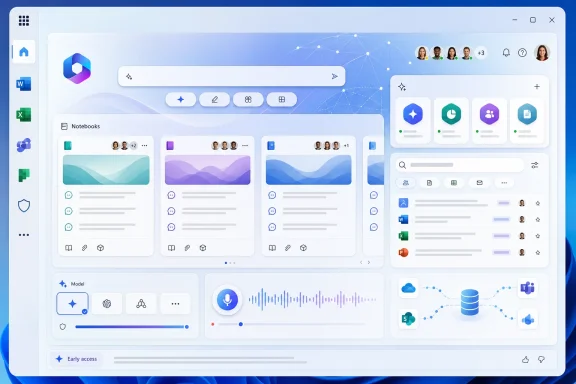
Microsoft is redesigning Microsoft 365 Copilot with compact navigation, a restored “waffle” app menu, Copilot Notebooks, agent and co-work controls, Work IQ search, selectable AI models, and expanded voice tools across the main interface. This is an early-access redesign rolling out rapidly, so features and controls may not yet be visible to every user.
According to Mike Tholfsen’s demonstration, the changes are arriving quickly. The verified additions show Copilot becoming more than a prompt box: it is increasingly a workspace from which users can open Microsoft 365 applications, collect project material, search organizational data, access agents, choose among available models, and use voice features. WindowsForum’s analysis is that the surrounding workspace—not simply the quality of an individual AI response—is becoming central to the product.
The most revealing feature in the redesign may also be the least technically ambitious: the return of the familiar “waffle” menu. It gives users direct access to applications including Word, Excel, and Planner, restoring a recognizable navigation convention to an interface that has increasingly encouraged workers to begin with Copilot rather than a specific Office application.
That reversal matters because Microsoft 365 users do not experience their work as one continuous AI conversation. They move among documents, spreadsheets, plans, messages, meetings, searches, and unfinished tasks. An interface that obscures those destinations forces users to translate familiar application-based workflows into an AI-first model.
The redesigned waffle menu acknowledges that the older mental model remains useful. Users can pin or unpin tools directly in the interface, keeping frequently used applications close while removing less relevant destinations. The practical result is a compromise between Copilot-centered navigation and habits accumulated through years of using Office.
Geeky Gadgets’ walkthrough characterizes the broader redesign as cleaner and less cluttered, with reorganized navigation and more compact buttons and menus. That reflects a real interface challenge: Copilot now includes chats, agents, histories, collaboration features, search options, content-creation tools, model choices, and personalization controls.
The interface must expose those capabilities without making users hunt through a maze of competing destinations. The waffle menu is a straightforward response. Instead of implying that every task begins with a prompt, it gives users a direct route to the applications where much of their work still takes place.
Navigation is becoming part of Copilot’s value proposition, not merely the furniture surrounding its AI responses.
Compression, however, is not the same as simplification. Moving controls into flyouts can make a screen calmer while increasing the number of concepts users must understand. Microsoft 365 Copilot now asks workers to distinguish among applications, chats, notebooks, agents, model choices, response-depth settings, organizational search, external web search, voice features, histories, and notifications.
Professional software becomes complex because professional work is complex. The danger is not complexity itself but ambiguity about where information lives, which feature is active, and what material is influencing the current task.
A pinned Word shortcut should behave like a dependable destination. A notebook should remain recognizably different from a chat. An agent should be clearly identified as a specialized tool. A model selector should tell users what they have selected without requiring them to become AI benchmark specialists.
For ordinary users, the redesigned screen could feel less intimidating. For administrators and support teams, a rapid early-access rollout creates a separate challenge. When controls move or appear gradually, screenshots, help-desk scripts, and training documents can become outdated quickly.
Organizations should therefore distinguish stable concepts from temporary interface placement. Internal guidance should explain what notebooks, agents, Work IQ, model selection, and external-search controls are for, rather than relying entirely on screenshots that may not match every user’s current view.
That is a practical improvement over repeatedly locating the same conversation or recreating a list of relevant references. A worker can use a notebook to bring related material together and return to it as the project develops.
The benefit is not limited to convenience. In knowledge work, much of the effort involved in using AI lies in preparing and maintaining context. Employees must find authoritative material, identify stale drafts, preserve useful creations, and decide which prior discussions remain relevant.
Notebooks gives that work a visible home. It is well suited to research, planning, document production, recurring team activities, and projects that extend beyond a single chat session.
Consolidation does not validate the collected material. An outdated reference, an inaccurate AI creation, or an incomplete set of project chats can still lead users in the wrong direction. A neatly organized notebook can look authoritative even when its contents have not been reviewed.
Organizations should consequently treat notebooks as work containers that still require ordinary project discipline. Useful practices include clear naming, identifiable ownership, periodic review, and removal or replacement of stale material. Teams should also decide which notebook creations are preliminary and which have been checked for use in a deliverable.
The central benefit is concrete and source-bounded: users gain one place to collect project chats, references, and creations. The quality of that collection remains a human responsibility.
A tool hidden in a catalogue is easy to forget. A tool pinned in the main interface is easier to incorporate into a recurring process. Departments with approved agents for specific tasks can make those tools more readily accessible to employees.
The same convenience creates a management concern. Users may accumulate agents with overlapping purposes, continue using an agent after its role has changed, or select one because its name sounds relevant without knowing whether it is appropriate for the task.
The redesigned navigation improves access; it does not establish reliability or approval. Organizations still need clear agent names, descriptions, owners, intended uses, and retirement procedures. Internal guidance should identify which agents are approved and explain the work each one is designed to support.
The interface also needs to preserve a visible distinction between a general Copilot conversation and work performed through a specialized agent. Users should know when they have selected a different tool rather than assuming that every item in the interface behaves identically.
WindowsForum’s practical conclusion is simple: pinning is valuable when it reinforces a managed set of useful agents. Without that discipline, easier discovery can turn into agent sprawl.
The immediate appeal is reduced switching. Moving among windows and platforms requires workers to relocate the correct item and re-establish what they were doing. Bringing collaboration closer to Copilot keeps more of that activity in one interface.
Integration also increases the importance of identifying the status of each object. Employees need to distinguish among a chat response, notebook creation, document, shared collaboration item, and temporary AI-generated draft. Bringing these activities together does not make them interchangeable.
For teams, the most important test is not the number of clicks saved. It is whether colleagues can tell what they are reviewing, whether it is still a draft, and what must happen before it is ready to use.
This is one of the redesign’s recurring themes: Copilot is gathering more parts of the working process into a shared surface. WindowsForum’s analysis is that this improves continuity only when the interface preserves clear boundaries among conversations, source material, creations, and finished work.
Employees frequently know that relevant information exists without knowing where it is stored. Organization-wide search reduces the effort required to locate that material and makes internal information easier to reach through Copilot.
The verified facts establish search across organizational data, but they do not establish broader claims about how Work IQ interprets intent, assembles context, or formats its results. Administrators and users should evaluate its output directly instead of assuming that every query will produce a complete answer or replace review of the underlying material.
Important decisions should still be checked against authoritative sources. This is especially important for legal, financial, personnel, security, and operational work, where an incomplete or outdated internal item can have consequences even if it is easy to find.
The redesign also provides an option to disable external web searches. That gives organizations a direct decision to make about whether Copilot should be able to search beyond organizational data.
Disabling external web search changes the information available to the system; it does not certify the accuracy of internal content. An organization’s files can still be stale, duplicated, incomplete, or poorly labeled. Internal information may also be accessible more broadly than its owners intended.
For that reason, the practical deployment issue is not simply whether Work IQ can search organizational data. It is whether the organization’s information is maintained well enough to be found and used responsibly.
Teams should identify authoritative repositories, archive obsolete material, correct unclear ownership, and review existing access arrangements. Work IQ can make internal information easier to discover, which also makes weaknesses in information management harder to ignore.
“Not used for model training” does not answer every governance question. Organizations must still consider who can access particular information, whether sensitive content is correctly classified, how generated creations are reviewed, and when external web search is appropriate.
The option to disable external web searches is therefore meaningful, but it requires a policy decision. Some work depends on public information, while other workflows are intended to remain focused on internal material. Administrators should decide which approach matches their requirements and communicate that decision plainly.
Users also need to understand that internal search and external search serve different purposes. Restricting external web search does not make every organizational source current or correct. Allowing external search does not remove the need to verify public information before relying on it.
The strongest practical warning is straightforward: AI access follows the quality and accessibility of the information available to it. Organizations should address outdated documents, excessive access, duplicate files, and unclear ownership rather than expecting the Copilot interface to solve those underlying problems.
Those are the verified changes. The supplied evidence does not support definitive claims about comparative speed, reasoning quality, behavior, availability patterns, or data-handling differences between the models. Organizations should test the available choices against their own work rather than treating a model name as a guaranteed performance ranking.
A visible model picker introduces a new user decision. Some workers will naturally select the newest-sounding name or assume that greater response depth always produces greater accuracy. Neither assumption is established by the supplied information.
Response depth should be treated as a control over the requested level of response, not as a truth setting. Longer or more detailed output still requires review.
For casual drafting, model experimentation can be useful. For repeatable analyses or standardized processes, teams should record which model and depth setting were used when those choices materially affect the output. That creates a clearer basis for comparing results and investigating inconsistencies.
WindowsForum’s analysis is that visible model choice turns AI selection into a workplace process question. The product fact is narrower: GPT 5.5 and Opus are selectable, and users can adjust response depth.
Because the redesign remains in early access and is rolling out rapidly, users should test these controls only when they appear in their interface. Their absence does not necessarily indicate a local fault.
For accessibility, voice input can be significant. It gives people who find sustained typing difficult another way to interact with Microsoft 365. It can also help users capture ideas when speaking is more practical than typing.
Speech differs from written prompting. Spoken instructions are often longer, less structured, and more conversational. Users testing the feature should pay close attention to names, specialized terminology, punctuation, and corrections before relying on the result.
Meeting transcription deserves especially careful local evaluation. The supplied evidence confirms the feature but does not establish detailed controls for notice, consent, listening indicators, retention, or meeting-record handling. Organizations should apply their existing rules and legal requirements rather than assuming that the presence of a Copilot control settles those questions.
The same caution applies to storage and distribution. Users should verify what the feature actually produces and where the resulting material appears before introducing it into sensitive or regulated workflows.
The source-bounded recommendation is therefore to test voice and transcription where available, beginning with low-risk scenarios. Confirm transcription accuracy, review the resulting text, and determine whether the feature fits existing organizational practices before expanding its use.
Saved Memories and Chat History are more consequential because they introduce continuity across interactions. The supplied evidence supports the presence of those features, but it does not establish specific review, correction, or memory-management controls.
Users and administrators should avoid making assumptions about what can be inspected or changed until those controls are visible and tested. Internal guidance should describe observed behavior rather than promising management options that have not been verified.
The distinction among different information sources remains important. Material in the current chat is not the same as chats, references, and creations collected in a notebook. Organizational information reached through Work IQ is different again. Saved memories and chat history add another potential source of continuity.
Users should not infer that all of those sources carry equal authority. A prior conversation or personalization detail should not outweigh an authoritative project reference simply because Copilot presents the resulting response fluently.
Advanced Notification Settings add another layer of personalization. The verified information supports the presence of those settings, but not detailed claims about notification contents or how they behave on shared screens.
The sensible approach is to review the settings that are actually available, reduce unnecessary alerts, and avoid assuming that notifications will always hide sensitive context. Notifications should support the workday rather than turn Copilot into an interruption engine.
The product facts are substantial without speculative embellishment. Copilot now presents more of the Microsoft 365 working environment through one main interface.
WindowsForum’s analysis is that this makes Copilot a broader workspace and control surface rather than merely a place to enter prompts. That interpretation follows from the combination of navigation, search, project organization, agents, collaboration, model selection, and voice—not from any single feature.
The trade-off is that users have more decisions to make. They must choose which applications and agents to pin, which material to collect, whether external search is appropriate, which available model to use, how much response depth to request, and when voice or transcription fits the task.
A cleaner design succeeds only when those choices remain understandable. Compact menus should not hide important state. Consolidated project material should not be mistaken for verified material. Organization-wide search should not replace source checking. A selectable model should not be treated as a guaranteed quality ranking.
The early-access rollout makes testing especially important. Administrators should document what their users can actually see, separate verified behavior from expectations, and revise guidance as the interface develops.
Copilot’s next phase is not defined solely by better answers. It is defined by whether Microsoft can make applications, organizational information, project material, agents, models, and interaction methods feel coherent inside one workspace. The redesigned interface is a clear step in that direction; its long-term value will depend on whether users can understand and control the expanding system around the prompt box.
According to Mike Tholfsen’s demonstration, the changes are arriving quickly. The verified additions show Copilot becoming more than a prompt box: it is increasingly a workspace from which users can open Microsoft 365 applications, collect project material, search organizational data, access agents, choose among available models, and use voice features. WindowsForum’s analysis is that the surrounding workspace—not simply the quality of an individual AI response—is becoming central to the product.
 Microsoft Is Rebuilding the Front Door to Office
The most revealing feature in the redesign may also be the least technically ambitious: the return of the familiar “waffle” menu. It gives users direct access to applications including Word, Excel, and Planner, restoring a recognizable navigation convention to an interface that has increasingly encouraged workers to begin with Copilot rather than a specific Office application.That reversal matters because Microsoft 365 users do not experience their work as one continuous AI conversation. They move among documents, spreadsheets, plans, messages, meetings, searches, and unfinished tasks. An interface that obscures those destinations forces users to translate familiar application-based workflows into an AI-first model.
The redesigned waffle menu acknowledges that the older mental model remains useful. Users can pin or unpin tools directly in the interface, keeping frequently used applications close while removing less relevant destinations. The practical result is a compromise between Copilot-centered navigation and habits accumulated through years of using Office.
Geeky Gadgets’ walkthrough characterizes the broader redesign as cleaner and less cluttered, with reorganized navigation and more compact buttons and menus. That reflects a real interface challenge: Copilot now includes chats, agents, histories, collaboration features, search options, content-creation tools, model choices, and personalization controls.
The interface must expose those capabilities without making users hunt through a maze of competing destinations. The waffle menu is a straightforward response. Instead of implying that every task begins with a prompt, it gives users a direct route to the applications where much of their work still takes place.
Navigation is becoming part of Copilot’s value proposition, not merely the furniture surrounding its AI responses.
A Cleaner Screen Cannot Hide a More Complicated Product
Reducing visual clutter is useful, particularly in an application intended to remain open throughout the working day. Compact buttons, consolidated menus, and reorganized controls reduce the effort required to find a conversation, launch an application, or select a specialized tool.Compression, however, is not the same as simplification. Moving controls into flyouts can make a screen calmer while increasing the number of concepts users must understand. Microsoft 365 Copilot now asks workers to distinguish among applications, chats, notebooks, agents, model choices, response-depth settings, organizational search, external web search, voice features, histories, and notifications.
Professional software becomes complex because professional work is complex. The danger is not complexity itself but ambiguity about where information lives, which feature is active, and what material is influencing the current task.
A pinned Word shortcut should behave like a dependable destination. A notebook should remain recognizably different from a chat. An agent should be clearly identified as a specialized tool. A model selector should tell users what they have selected without requiring them to become AI benchmark specialists.
For ordinary users, the redesigned screen could feel less intimidating. For administrators and support teams, a rapid early-access rollout creates a separate challenge. When controls move or appear gradually, screenshots, help-desk scripts, and training documents can become outdated quickly.
Organizations should therefore distinguish stable concepts from temporary interface placement. Internal guidance should explain what notebooks, agents, Work IQ, model selection, and external-search controls are for, rather than relying entirely on screenshots that may not match every user’s current view.
Copilot Notebooks Consolidates Project Material
Copilot Notebooks addresses a problem that chat interfaces routinely create: useful material becomes scattered across conversations, references, drafts, and generated outputs. The verified capability consolidates chats, references, and creations in one place, giving users a more organized way to collect material associated with a project.That is a practical improvement over repeatedly locating the same conversation or recreating a list of relevant references. A worker can use a notebook to bring related material together and return to it as the project develops.
The benefit is not limited to convenience. In knowledge work, much of the effort involved in using AI lies in preparing and maintaining context. Employees must find authoritative material, identify stale drafts, preserve useful creations, and decide which prior discussions remain relevant.
Notebooks gives that work a visible home. It is well suited to research, planning, document production, recurring team activities, and projects that extend beyond a single chat session.
Consolidation does not validate the collected material. An outdated reference, an inaccurate AI creation, or an incomplete set of project chats can still lead users in the wrong direction. A neatly organized notebook can look authoritative even when its contents have not been reviewed.
Organizations should consequently treat notebooks as work containers that still require ordinary project discipline. Useful practices include clear naming, identifiable ownership, periodic review, and removal or replacement of stale material. Teams should also decide which notebook creations are preliminary and which have been checked for use in a deliverable.
The central benefit is concrete and source-bounded: users gain one place to collect project chats, references, and creations. The quality of that collection remains a human responsibility.
Agents Move From Specialist Feature to Everyday Navigation
The Agents flyout provides access to specific tools and allows users to pin them for faster navigation. Pinning changes how agents fit into daily work.A tool hidden in a catalogue is easy to forget. A tool pinned in the main interface is easier to incorporate into a recurring process. Departments with approved agents for specific tasks can make those tools more readily accessible to employees.
The same convenience creates a management concern. Users may accumulate agents with overlapping purposes, continue using an agent after its role has changed, or select one because its name sounds relevant without knowing whether it is appropriate for the task.
The redesigned navigation improves access; it does not establish reliability or approval. Organizations still need clear agent names, descriptions, owners, intended uses, and retirement procedures. Internal guidance should identify which agents are approved and explain the work each one is designed to support.
The interface also needs to preserve a visible distinction between a general Copilot conversation and work performed through a specialized agent. Users should know when they have selected a different tool rather than assuming that every item in the interface behaves identically.
WindowsForum’s practical conclusion is simple: pinning is valuable when it reinforces a managed set of useful agents. Without that discipline, easier discovery can turn into agent sprawl.
Co-Work Brings Collaboration Into the Main Interface
Co-Work Integration allows users to collaborate from within the main interface without moving between platforms, according to the supplied demonstration.The immediate appeal is reduced switching. Moving among windows and platforms requires workers to relocate the correct item and re-establish what they were doing. Bringing collaboration closer to Copilot keeps more of that activity in one interface.
Integration also increases the importance of identifying the status of each object. Employees need to distinguish among a chat response, notebook creation, document, shared collaboration item, and temporary AI-generated draft. Bringing these activities together does not make them interchangeable.
For teams, the most important test is not the number of clicks saved. It is whether colleagues can tell what they are reviewing, whether it is still a draft, and what must happen before it is ready to use.
This is one of the redesign’s recurring themes: Copilot is gathering more parts of the working process into a shared surface. WindowsForum’s analysis is that this improves continuity only when the interface preserves clear boundaries among conversations, source material, creations, and finished work.
Work IQ Puts Organizational Search at the Center
Work IQ supports search across an organization’s data. That is one of the redesign’s most consequential capabilities because workplace information is often distributed across numerous files, conversations, plans, and other internal resources.Employees frequently know that relevant information exists without knowing where it is stored. Organization-wide search reduces the effort required to locate that material and makes internal information easier to reach through Copilot.
The verified facts establish search across organizational data, but they do not establish broader claims about how Work IQ interprets intent, assembles context, or formats its results. Administrators and users should evaluate its output directly instead of assuming that every query will produce a complete answer or replace review of the underlying material.
Important decisions should still be checked against authoritative sources. This is especially important for legal, financial, personnel, security, and operational work, where an incomplete or outdated internal item can have consequences even if it is easy to find.
The redesign also provides an option to disable external web searches. That gives organizations a direct decision to make about whether Copilot should be able to search beyond organizational data.
Disabling external web search changes the information available to the system; it does not certify the accuracy of internal content. An organization’s files can still be stale, duplicated, incomplete, or poorly labeled. Internal information may also be accessible more broadly than its owners intended.
For that reason, the practical deployment issue is not simply whether Work IQ can search organizational data. It is whether the organization’s information is maintained well enough to be found and used responsibly.
Teams should identify authoritative repositories, archive obsolete material, correct unclear ownership, and review existing access arrangements. Work IQ can make internal information easier to discover, which also makes weaknesses in information management harder to ignore.
Data Protection Does Not Replace Information Governance
The source material states that enterprise-grade data protection prevents organizational information from being used to train AI models. That is an important boundary for workplace use and helps distinguish sanctioned enterprise activity from employees placing corporate information into unapproved consumer tools.“Not used for model training” does not answer every governance question. Organizations must still consider who can access particular information, whether sensitive content is correctly classified, how generated creations are reviewed, and when external web search is appropriate.
The option to disable external web searches is therefore meaningful, but it requires a policy decision. Some work depends on public information, while other workflows are intended to remain focused on internal material. Administrators should decide which approach matches their requirements and communicate that decision plainly.
Users also need to understand that internal search and external search serve different purposes. Restricting external web search does not make every organizational source current or correct. Allowing external search does not remove the need to verify public information before relying on it.
The strongest practical warning is straightforward: AI access follows the quality and accessibility of the information available to it. Organizations should address outdated documents, excessive access, duplicate files, and unclear ownership rather than expecting the Copilot interface to solve those underlying problems.
Model Selection Makes AI Choice Visible
The redesigned Microsoft 365 Copilot includes selectable GPT 5.5 and Opus models. Users can also adjust response depth.Those are the verified changes. The supplied evidence does not support definitive claims about comparative speed, reasoning quality, behavior, availability patterns, or data-handling differences between the models. Organizations should test the available choices against their own work rather than treating a model name as a guaranteed performance ranking.
| Selectable model | Verified availability detail | Verified response control | Practical action |
|---|---|---|---|
| GPT 5.5 | Named as a selectable model | Response depth can be adjusted | Test with approved, representative tasks where the option is available |
| Opus | Named as a selectable model | Response depth can be adjusted | Compare outputs against the same source material where the option is available |
Response depth should be treated as a control over the requested level of response, not as a truth setting. Longer or more detailed output still requires review.
For casual drafting, model experimentation can be useful. For repeatable analyses or standardized processes, teams should record which model and depth setting were used when those choices materially affect the output. That creates a clearer basis for comparing results and investigating inconsistencies.
WindowsForum’s analysis is that visible model choice turns AI selection into a workplace process question. The product fact is narrower: GPT 5.5 and Opus are selectable, and users can adjust response depth.
Because the redesign remains in early access and is rolling out rapidly, users should test these controls only when they appear in their interface. Their absence does not necessarily indicate a local fault.
Voice Expands the Ways Users Can Work
The redesign adds voice chat and transcription tools for hands-free interaction. Demonstrated uses include dictating a document and conducting a meeting.For accessibility, voice input can be significant. It gives people who find sustained typing difficult another way to interact with Microsoft 365. It can also help users capture ideas when speaking is more practical than typing.
Speech differs from written prompting. Spoken instructions are often longer, less structured, and more conversational. Users testing the feature should pay close attention to names, specialized terminology, punctuation, and corrections before relying on the result.
Meeting transcription deserves especially careful local evaluation. The supplied evidence confirms the feature but does not establish detailed controls for notice, consent, listening indicators, retention, or meeting-record handling. Organizations should apply their existing rules and legal requirements rather than assuming that the presence of a Copilot control settles those questions.
The same caution applies to storage and distribution. Users should verify what the feature actually produces and where the resulting material appears before introducing it into sensitive or regulated workflows.
The source-bounded recommendation is therefore to test voice and transcription where available, beginning with low-risk scenarios. Confirm transcription accuracy, review the resulting text, and determine whether the feature fits existing organizational practices before expanding its use.
Personalization Must Remain Understandable
Light and Dark Modes are the simplest personalization options in the redesign. Their effects are immediate and easy to understand.Saved Memories and Chat History are more consequential because they introduce continuity across interactions. The supplied evidence supports the presence of those features, but it does not establish specific review, correction, or memory-management controls.
Users and administrators should avoid making assumptions about what can be inspected or changed until those controls are visible and tested. Internal guidance should describe observed behavior rather than promising management options that have not been verified.
The distinction among different information sources remains important. Material in the current chat is not the same as chats, references, and creations collected in a notebook. Organizational information reached through Work IQ is different again. Saved memories and chat history add another potential source of continuity.
Users should not infer that all of those sources carry equal authority. A prior conversation or personalization detail should not outweigh an authoritative project reference simply because Copilot presents the resulting response fluently.
Advanced Notification Settings add another layer of personalization. The verified information supports the presence of those settings, but not detailed claims about notification contents or how they behave on shared screens.
The sensible approach is to review the settings that are actually available, reduce unnecessary alerts, and avoid assuming that notifications will always hide sensitive context. Notifications should support the workday rather than turn Copilot into an interruption engine.
What Users Should Do Now
Because this is an early-access redesign in a rapid rollout, users should focus on the features that are visible in their own interface:- Open the waffle menu and pin frequently used tools, including Word, Excel, Planner, and other applications used regularly.
- Use Copilot Notebooks to collect project chats, references, and creations instead of leaving related material scattered across separate locations.
- Pin approved agents that support recurring work, and avoid treating every discoverable agent as automatically approved.
- Decide whether external web search should be disabled based on the organization’s research needs and information policy.
- Test voice and transcription only where available, beginning with low-risk material and reviewing the resulting text for accuracy.
- Test GPT 5.5, Opus, and response-depth choices only where available, using the same representative task and source material when comparing outputs.
- Update internal guidance by feature and purpose, rather than depending on screenshots that could change during the rollout.
Administrator Checklist
| Area | Immediate check | Reason |
|---|---|---|
| App navigation | Identify which Microsoft 365 tools users should pin | Keeps frequent applications easy to reach |
| Notebooks | Establish naming, ownership, and review practices | Collected material can become stale or incomplete |
| Agents | Publish an approved-agent list with clear purposes | Easier access can also create agent sprawl |
| Work IQ | Review authoritative sources and existing access | Organization-wide search depends on data quality and permissions |
| External web search | Decide whether it should remain enabled | The setting changes the information boundary available to Copilot |
| Models | Test selectable models and response depth with representative work | Model names alone do not establish suitability |
| Voice and transcription | Pilot with low-risk scenarios under existing policies | Detailed operational controls are not established by the supplied evidence |
| Memories and history | Test visible behavior before documenting it | Specific review or correction controls have not been verified |
| Notifications | Review the settings that are actually present | Reduces distraction and avoids unsupported assumptions about alert content |
| Training | Focus on concepts rather than fixed screen locations | The early-access interface is rolling out rapidly |
The Redesign’s Real Test Is Operational Clarity
The redesign brings useful improvements: familiar application navigation, better access to frequently used tools, project material consolidated in Notebooks, pinnable agents, organization-wide Work IQ search, an external-web-search control, selectable models, adjustable response depth, voice features, and expanded personalization.The product facts are substantial without speculative embellishment. Copilot now presents more of the Microsoft 365 working environment through one main interface.
WindowsForum’s analysis is that this makes Copilot a broader workspace and control surface rather than merely a place to enter prompts. That interpretation follows from the combination of navigation, search, project organization, agents, collaboration, model selection, and voice—not from any single feature.
The trade-off is that users have more decisions to make. They must choose which applications and agents to pin, which material to collect, whether external search is appropriate, which available model to use, how much response depth to request, and when voice or transcription fits the task.
A cleaner design succeeds only when those choices remain understandable. Compact menus should not hide important state. Consolidated project material should not be mistaken for verified material. Organization-wide search should not replace source checking. A selectable model should not be treated as a guaranteed quality ranking.
The early-access rollout makes testing especially important. Administrators should document what their users can actually see, separate verified behavior from expectations, and revise guidance as the interface develops.
Copilot’s next phase is not defined solely by better answers. It is defined by whether Microsoft can make applications, organizational information, project material, agents, models, and interaction methods feel coherent inside one workspace. The redesigned interface is a clear step in that direction; its long-term value will depend on whether users can understand and control the expanding system around the prompt box.
References
- Primary source: Geeky Gadgets
Published: None
Loading…
www.geeky-gadgets.com - Official source: learn.microsoft.com
Choose a model for Copilot Cowork | Microsoft Learn
Pick the right model for your task in Microsoft 365 Copilot Cowork.learn.microsoft.com - Official source: microsoft.com
Introducing a new design for Microsoft 365 Copilot | Microsoft 365 Blog
Copilot’s redesigned experience delivers faster performance, adaptive tools, and clearer AI-powered workflows to help you easily move from intention to outcome.www.microsoft.com - Official source: support.microsoft.com
How web search works in Microsoft 365 Copilot Chat and agents | Microsoft Support
How web search works in Microsoft 365 Copilot Chat and agentssupport.microsoft.com - Official source: techcommunity.microsoft.com
Loading…
techcommunity.microsoft.com - Official source: adoption.microsoft.com