

Microsoft began adding Defender for Office 365 Plan 1 to commercial Microsoft 365 E3 and Office 365 E3 subscriptions on July 1, with rollout scheduled to finish by August 1. For administrators, that means licensing for Safe Links, Safe Attachments, and the fuller Defender anti-phishing policy set is arriving in existing E3 tenants—alongside Microsoft’s July 2026 E3 price increases.
The immediate value is substantial: E3 organizations that previously relied largely on Exchange Online Protection can now deploy URL time-of-click checks, attachment detonation, impersonation protection, and improved reporting without purchasing Plan 1 separately. But the important operational detail is less exciting: a newly available license is not the same as a hardened mail-security configuration.
Security Boulevard’s syndicated post from IRONSCALES correctly identifies the practical divide, though its conclusions about third-party coverage should be treated as vendor positioning. Microsoft’s own documentation is clearer on the baseline: Plan 1 adds strong prevention and detection controls, while Plan 2 remains the tier for much of the deeper investigation, automation, hunting, and user-training work.
Microsoft’s licensing notice says Defender for Office 365 Plan 1 is one of several capabilities being rolled into E3 during the summer rollout. Eligible tenants should receive Message Center notice ahead of availability, but IT teams should confirm both that the service plan is present and that affected users are properly licensed.
The feature set is not confined to Exchange Online email. Plan 1 includes Safe Links for email, supported Office clients, and Teams; Safe Attachments for email; and Safe Attachments protection for SharePoint, OneDrive, and Teams files. It also introduces Defender-specific anti-phishing features such as user and domain impersonation protection, mailbox-intelligence impersonation checks, and phishing thresholds.
That does not mean every tenant suddenly has an aggressive blocking posture. Microsoft gives administrators choices between default, Standard, Strict, and custom threat policies. An organization that has accumulated exceptions, legacy mail-flow rules, or a third-party secure email gateway may find that its new capability is only partly active—or active in a mode that does not match its risk tolerance.
The first job is therefore not to buy another product. It is to inventory what Defender is actually enforcing.
In the Microsoft Defender portal, administrators should review anti-phishing policies with particular attention to protected users and protected domains. Populate the user-impersonation list with executives, finance leaders, HR staff, procurement contacts, and anyone authorized to alter payment details or approve urgent transfers. Domain impersonation protection should include the organization’s own domains and the external brands that are routinely involved in financial or operational workflows.
This is also the right time to validate SPF, DKIM, and DMARC. Those controls are not a substitute for phishing detection—display-name impersonation and lookalike domains can bypass a simplistic authentication-based decision—but they give Microsoft’s filters and internal responders better signal. A DMARC policy that is merely monitored forever, with widespread legitimate senders failing alignment, is not a mature control.
Microsoft’s Plan 1 documentation also calls out mailbox intelligence, which uses relationship signals to help identify unusual impersonation attempts. That can be useful in environments where attackers imitate a known vendor or executive, but it should be evaluated alongside privacy, operational requirements, and the inevitable edge cases of shared mailboxes and newly established business relationships.
For email, administrators should decide whether to use Dynamic Delivery. The option gives recipients the message body while an attachment is being analyzed, replacing the file temporarily with a placeholder. It is usually a sensible balance for business users, but teams should test it with workflows that depend on time-sensitive documents, automated processing, encrypted messages, or partner-supplied archives.
Safe Links is equally valuable because it evaluates supported URLs at the time a user clicks them. That matters when a previously harmless link is later repointed to a credential-harvesting page or malware download. It also produces click data that can be useful during an incident: administrators can determine who encountered a malicious destination and take follow-up action.
Neither feature should be described as magic. Sandboxing can be evaded or delayed, and Safe Links does not turn a link into something users should trust blindly. QR-code phishing is an especially relevant reminder: a malicious destination encoded in an image is not an ordinary clickable URL in the email body. Security awareness still matters, as do browser, endpoint, identity, and conditional-access controls.
Define who receives quarantine notifications, who can preview messages, what users may release themselves, and which categories always require an administrator review. The correct answer will differ for a 40-person professional-services firm and a regulated enterprise, but ambiguity is the worst outcome. If employees cannot understand why an email disappeared or how to report a false positive, they will route around the control.
Enable and promote Microsoft’s integrated message-reporting experience in Outlook. User reports are not merely help-desk traffic; they are a detection channel. A well-run process should allow users to report suspected phishing quickly, route the submission to Microsoft and the security team as appropriate, and give reporters enough feedback to keep them engaged.
Administrators should also monitor the resulting trends rather than reacting to a single noisy day. Watch phishing detections, quarantined categories, user-submitted messages, allowed items, and false positives over several weeks. A sudden increase in blocks can represent an attack campaign, a policy change, a legitimate sender failure, or all three.
Plan 2, included with Microsoft 365 E5 and available through add-ons, adds the capabilities that matter most when a small security team needs to investigate and contain incidents at scale. That list includes Threat Explorer rather than the more limited real-time detections view, Threat Trackers, campaigns, attack simulation training, advanced hunting, and Automated Investigation and Response.
In practical terms, E3 administrators can now deploy a much better front line against malicious mail. They should not assume that E3 has acquired automated post-breach investigation or a complete phishing-training program. A tenant that has a lean IT team, frequent targeted attacks, or strict response-time requirements still needs to assess whether Plan 2, the broader Defender Suite, a SIEM/SOC workflow, or a complementary email-security product fits its operational model.
That assessment should be based on measured gaps, not a generic promise that another layer will catch everything Microsoft misses. Run the native controls in a known configuration, review actual detections and incidents, test mail flow, and identify what analysts cannot investigate or remediate quickly enough.
By August 1, most eligible E3 tenants should have the new Plan 1 entitlement. The meaningful milestone comes afterward: whether administrators turn that entitlement into defensible anti-phishing, attachment, link, quarantine, and reporting policies before the next convincing fraudulent message reaches a user’s inbox.
The immediate value is substantial: E3 organizations that previously relied largely on Exchange Online Protection can now deploy URL time-of-click checks, attachment detonation, impersonation protection, and improved reporting without purchasing Plan 1 separately. But the important operational detail is less exciting: a newly available license is not the same as a hardened mail-security configuration.
Security Boulevard’s syndicated post from IRONSCALES correctly identifies the practical divide, though its conclusions about third-party coverage should be treated as vendor positioning. Microsoft’s own documentation is clearer on the baseline: Plan 1 adds strong prevention and detection controls, while Plan 2 remains the tier for much of the deeper investigation, automation, hunting, and user-training work.
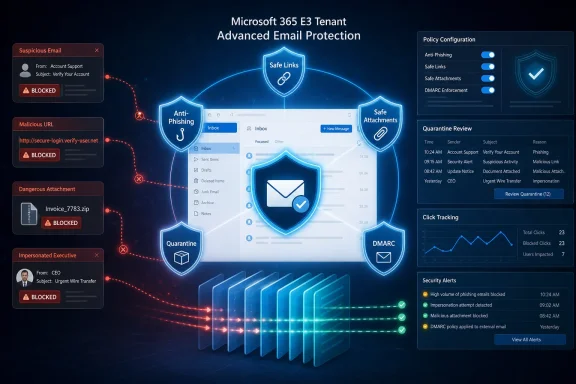 E3 Now Has the Tools, Not a Finished Deployment
Microsoft’s licensing notice says Defender for Office 365 Plan 1 is one of several capabilities being rolled into E3 during the summer rollout. Eligible tenants should receive Message Center notice ahead of availability, but IT teams should confirm both that the service plan is present and that affected users are properly licensed.The feature set is not confined to Exchange Online email. Plan 1 includes Safe Links for email, supported Office clients, and Teams; Safe Attachments for email; and Safe Attachments protection for SharePoint, OneDrive, and Teams files. It also introduces Defender-specific anti-phishing features such as user and domain impersonation protection, mailbox-intelligence impersonation checks, and phishing thresholds.
That does not mean every tenant suddenly has an aggressive blocking posture. Microsoft gives administrators choices between default, Standard, Strict, and custom threat policies. An organization that has accumulated exceptions, legacy mail-flow rules, or a third-party secure email gateway may find that its new capability is only partly active—or active in a mode that does not match its risk tolerance.
The first job is therefore not to buy another product. It is to inventory what Defender is actually enforcing.
The First Configuration Pass Should Focus on Identity Fraud
The most valuable Plan 1 change for many E3 customers is impersonation protection. Commodity malware remains important, but invoice fraud, payroll redirection, fake executive messages, and credential theft frequently depend on messages that look plausible rather than technically exotic.In the Microsoft Defender portal, administrators should review anti-phishing policies with particular attention to protected users and protected domains. Populate the user-impersonation list with executives, finance leaders, HR staff, procurement contacts, and anyone authorized to alter payment details or approve urgent transfers. Domain impersonation protection should include the organization’s own domains and the external brands that are routinely involved in financial or operational workflows.
This is also the right time to validate SPF, DKIM, and DMARC. Those controls are not a substitute for phishing detection—display-name impersonation and lookalike domains can bypass a simplistic authentication-based decision—but they give Microsoft’s filters and internal responders better signal. A DMARC policy that is merely monitored forever, with widespread legitimate senders failing alignment, is not a mature control.
Microsoft’s Plan 1 documentation also calls out mailbox intelligence, which uses relationship signals to help identify unusual impersonation attempts. That can be useful in environments where attackers imitate a known vendor or executive, but it should be evaluated alongside privacy, operational requirements, and the inevitable edge cases of shared mailboxes and newly established business relationships.
Safe Attachments and Safe Links Need Policy Decisions
Safe Attachments provides a sandboxing layer for suspicious email attachments. Microsoft describes the process as detonation in a virtual environment, allowing it to identify harmful behavior that signature-based anti-malware scanning might miss. In E3, that protection now extends beyond the inbox to collaboration files in SharePoint, OneDrive, and Teams.For email, administrators should decide whether to use Dynamic Delivery. The option gives recipients the message body while an attachment is being analyzed, replacing the file temporarily with a placeholder. It is usually a sensible balance for business users, but teams should test it with workflows that depend on time-sensitive documents, automated processing, encrypted messages, or partner-supplied archives.
Safe Links is equally valuable because it evaluates supported URLs at the time a user clicks them. That matters when a previously harmless link is later repointed to a credential-harvesting page or malware download. It also produces click data that can be useful during an incident: administrators can determine who encountered a malicious destination and take follow-up action.
Neither feature should be described as magic. Sandboxing can be evaded or delayed, and Safe Links does not turn a link into something users should trust blindly. QR-code phishing is an especially relevant reminder: a malicious destination encoded in an image is not an ordinary clickable URL in the email body. Security awareness still matters, as do browser, endpoint, identity, and conditional-access controls.
Quarantine Is a Security Control—and a Support Workflow
A strict anti-phishing policy that sends legitimate mail into a confusing quarantine creates pressure to weaken the policy. That is why quarantine configuration deserves the same attention as detection settings.Define who receives quarantine notifications, who can preview messages, what users may release themselves, and which categories always require an administrator review. The correct answer will differ for a 40-person professional-services firm and a regulated enterprise, but ambiguity is the worst outcome. If employees cannot understand why an email disappeared or how to report a false positive, they will route around the control.
Enable and promote Microsoft’s integrated message-reporting experience in Outlook. User reports are not merely help-desk traffic; they are a detection channel. A well-run process should allow users to report suspected phishing quickly, route the submission to Microsoft and the security team as appropriate, and give reporters enough feedback to keep them engaged.
Administrators should also monitor the resulting trends rather than reacting to a single noisy day. Watch phishing detections, quarantined categories, user-submitted messages, allowed items, and false positives over several weeks. A sudden increase in blocks can represent an attack campaign, a policy change, a legitimate sender failure, or all three.
E3 Still Stops Short of the E5 Security Operations Model
The line between Plan 1 and Plan 2 remains important. Microsoft’s product documentation characterizes Plan 1 as the prevention and detection tier. It includes real-time detections, the email entity page, URL trace, reporting, alerts, and some SIEM integration.Plan 2, included with Microsoft 365 E5 and available through add-ons, adds the capabilities that matter most when a small security team needs to investigate and contain incidents at scale. That list includes Threat Explorer rather than the more limited real-time detections view, Threat Trackers, campaigns, attack simulation training, advanced hunting, and Automated Investigation and Response.
In practical terms, E3 administrators can now deploy a much better front line against malicious mail. They should not assume that E3 has acquired automated post-breach investigation or a complete phishing-training program. A tenant that has a lean IT team, frequent targeted attacks, or strict response-time requirements still needs to assess whether Plan 2, the broader Defender Suite, a SIEM/SOC workflow, or a complementary email-security product fits its operational model.
That assessment should be based on measured gaps, not a generic promise that another layer will catch everything Microsoft misses. Run the native controls in a known configuration, review actual detections and incidents, test mail flow, and identify what analysts cannot investigate or remediate quickly enough.
By August 1, most eligible E3 tenants should have the new Plan 1 entitlement. The meaningful milestone comes afterward: whether administrators turn that entitlement into defensible anti-phishing, attachment, link, quarantine, and reporting policies before the next convincing fraudulent message reaches a user’s inbox.
References
- Primary source: Security Boulevard
Published: 2026-07-16T11:00:00+00:00
You just got Defender for Office 365 in E3. Here's how far it goes. - Security Boulevard
If you run email security on Microsoft 365 E3, you woke up to an upgrade you didn't ask for. As of July 1, Microsoft folds Defender for Office 365 Plan 1 into Microsoft 365 E3 and Office 365 E3, and it lands in tenants through August 1. Safe Links, Safe Attachments, and a stronger...securityboulevard.com - Official source: learn.microsoft.com
Why do I need Microsoft Defender for Office 365? - Microsoft Defender for Office 365 | Microsoft Learn
Learn how Microsoft Defender for Office 365 protects email and collaboration from phishing, malware, and business email compromise with Plan 1 and Plan 2 features.learn.microsoft.com - Official source: cdn-dynmedia-1.microsoft.com