

Windows teams should keep DOCX, XLSX, and PPTX wherever Microsoft 365 features and collaboration fidelity matter, while standardizing on ODF for vendor-neutral editable records and PDF/A for final archival copies. The right policy is not a company-wide winner-takes-all format mandate; it is a workload-based rule that separates active Office documents from portable records and fixed-layout publications.
That distinction matters after The Document Foundation renewed its attack on Microsoft’s file-format strategy on July 17, 2026. In a post titled How proprietary formats have become Microsoft’s main tool for lock-in, the organization behind LibreOffice argued that Office’s default OOXML workflow creates a practical dependency on Microsoft software, even when other applications can technically open the files.
The criticism identifies a real interoperability problem, but “OOXML is proprietary” is too blunt to help an IT department decide what to deploy. Microsoft documents multiple OOXML conformance classes, including Transitional and Strict, and Microsoft 365 can also open and save OpenDocument Format files. The operational question is not whether a format carries an open-standard label; it is whether the applications in a real workflow preserve the document’s content, behavior, layout, and editability.
The Document Foundation’s case rests on practical dependency. If a DOCX, XLSX, or PPTX file opens elsewhere but returns with shifted formatting, altered behavior, or reduced usability, users will predictably return to Microsoft Office. Compatibility exists at the file-extension level without necessarily existing at the workflow level.
Microsoft’s own support documentation acknowledges that friction. Word can open and save
That is an important point for both camps. LibreOffice cannot reasonably reduce every DOCX file to an inaccessible proprietary container, because OOXML is documented and implemented beyond Microsoft Office. Microsoft, meanwhile, does not claim that saving to ODF guarantees a lossless round trip.
Microsoft’s distinction between OOXML Transitional and OOXML Strict makes the binary framing even less useful. A file opening successfully says little about which parts of the format, legacy behavior, formatting model, or application-specific functionality the receiving software reproduces accurately.
Interoperability therefore has several levels:
This category includes documents whose formatting and behavior are part of the work rather than decoration. A collaboratively edited Word document, a presentation that must remain visually exact during revision, or an Excel workbook dependent on Office-specific functionality should remain in its Microsoft-native format while active.
The deciding factor is workflow fidelity, not brand loyalty. If changing the format forces users to rebuild content, recheck every revision, maintain parallel master files, or avoid features they are otherwise expected to use, the organization has created an expensive interoperability ritual rather than meaningful independence.
Administrators should also resist the temptation to treat “simple-looking” files as simple. A polished Word document can contain a substantial amount of structure behind an ordinary page, while a presentation with only a few slides may still rely on formatting behavior that another application interprets differently. The only reliable test is to open, edit, save, and reopen representative files in every supported application.
Microsoft’s own guidance offers a sensible method for mixed environments. When people collaborate between Word and non-Word applications, they should minimize formatting during drafting, complete as much writing as possible first, and apply final formatting later. Before distribution, the converted file should be closed, reopened, and checked in the format recipients will receive.
That advice is effectively an admission that conversion is a workflow stage requiring validation. IT teams should document who performs that validation instead of assuming individual users will notice every change.
The benefit is not that every ODF application will display every document identically. Microsoft’s compatibility documentation rules out that assumption. The benefit is that the organization has selected a vendor-neutral format as the authoritative editable record and can design templates, formatting rules, and acceptance tests around that choice.
This only works if ODF becomes more than an export checkbox. An organization cannot produce complex documents in Word, convert them to ODT at the end, ignore conversion warnings, and call the result an open-document strategy. The ODF copy must be opened in the applications the policy is intended to support, inspected, and treated as the controlled record.
A workable adoption process is straightforward:
PDF is appropriate for fixed-layout distribution, while PDF/A belongs in the policy for final archival copies. The editable source can remain in DOCX when Microsoft Office fidelity matters or in ODF when vendor-neutral editing is required, but the retained final copy should not depend on reopening the original authoring workflow merely to reproduce the approved page.
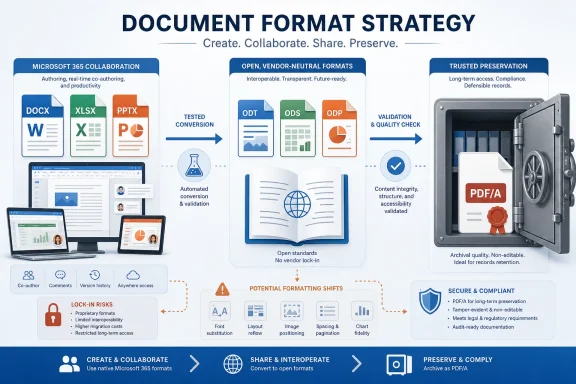
This suggests a three-tier policy rather than a forced migration:
The table is a starting point, not a substitute for testing. A team may need both an editable master and a fixed final copy, provided the records policy clearly identifies which is authoritative for each purpose.
Round-trip editing is the most dangerous scenario. A file created in Word, edited in an ODF application, reopened in Word, and then converted again may accumulate changes that were not obvious during the first handoff. Administrators should test repeated conversions, not merely a one-time export, if mixed-suite editing is expected.
Users also need a clear escalation path. If a converted document loses formatting, content, or usability, they should know whether to simplify the file, return to the designated native format, or produce a fixed PDF for delivery. Quietly repairing every file in Microsoft Office conceals the interoperability cost and makes later policy decisions less informed.
The Document Foundation is right that document formats can create durable dependencies. Microsoft is equally clear that compatibility between Word and ODF applications has limits. Taken together, those positions support a more useful conclusion than either side’s marketing: interoperability risk is real, measurable, and highly dependent on what the document is expected to do.
Windows teams should now identify the documents that genuinely require Microsoft-native behavior, establish ODF as the authoritative editable format only where vendor-neutral access is an explicit goal, and create PDF/A copies when editing has ended. The next format problem will not be solved by declaring OOXML or ODF the universal winner; it will be solved by knowing which file is the master, which applications must preserve it, and who verifies the result before it becomes a permanent record.
That distinction matters after The Document Foundation renewed its attack on Microsoft’s file-format strategy on July 17, 2026. In a post titled How proprietary formats have become Microsoft’s main tool for lock-in, the organization behind LibreOffice argued that Office’s default OOXML workflow creates a practical dependency on Microsoft software, even when other applications can technically open the files.
The criticism identifies a real interoperability problem, but “OOXML is proprietary” is too blunt to help an IT department decide what to deploy. Microsoft documents multiple OOXML conformance classes, including Transitional and Strict, and Microsoft 365 can also open and save OpenDocument Format files. The operational question is not whether a format carries an open-standard label; it is whether the applications in a real workflow preserve the document’s content, behavior, layout, and editability.
 LibreOffice’s Lock-In Argument Meets Microsoft’s Own Warning
The Document Foundation’s case rests on practical dependency. If a DOCX, XLSX, or PPTX file opens elsewhere but returns with shifted formatting, altered behavior, or reduced usability, users will predictably return to Microsoft Office. Compatibility exists at the file-extension level without necessarily existing at the workflow level.Microsoft’s own support documentation acknowledges that friction. Word can open and save
.odt files, and Microsoft 365 applications support other ODF formats, including PowerPoint’s .odp, but Microsoft warns that formatting, content, or usability can be affected as files move between Office and ODF applications. It also explains that applications may implement comparable features differently, leaving a converted file readable but not operationally identical.That is an important point for both camps. LibreOffice cannot reasonably reduce every DOCX file to an inaccessible proprietary container, because OOXML is documented and implemented beyond Microsoft Office. Microsoft, meanwhile, does not claim that saving to ODF guarantees a lossless round trip.
Microsoft’s distinction between OOXML Transitional and OOXML Strict makes the binary framing even less useful. A file opening successfully says little about which parts of the format, legacy behavior, formatting model, or application-specific functionality the receiving software reproduces accurately.
Interoperability therefore has several levels:
- The receiving application may extract the text and basic document structure.
- It may display the document closely enough for casual review.
- It may preserve the layout required for printing or formal distribution.
- It may allow continued editing without changing formatting or behavior.
- It may survive repeated editing and conversion across multiple office suites.
Keep Microsoft-Native Files Where Office Is Part of the Workflow
DOCX, XLSX, and PPTX remain the practical formats for teams whose documents depend on Microsoft 365 collaboration or advanced Office features. If users are jointly editing in Word, Excel, or PowerPoint and expect the result to remain fully functional in those applications, converting the working copy to ODF introduces risk without removing the organization’s underlying Office dependency.This category includes documents whose formatting and behavior are part of the work rather than decoration. A collaboratively edited Word document, a presentation that must remain visually exact during revision, or an Excel workbook dependent on Office-specific functionality should remain in its Microsoft-native format while active.
The deciding factor is workflow fidelity, not brand loyalty. If changing the format forces users to rebuild content, recheck every revision, maintain parallel master files, or avoid features they are otherwise expected to use, the organization has created an expensive interoperability ritual rather than meaningful independence.
Administrators should also resist the temptation to treat “simple-looking” files as simple. A polished Word document can contain a substantial amount of structure behind an ordinary page, while a presentation with only a few slides may still rely on formatting behavior that another application interprets differently. The only reliable test is to open, edit, save, and reopen representative files in every supported application.
Microsoft’s own guidance offers a sensible method for mixed environments. When people collaborate between Word and non-Word applications, they should minimize formatting during drafting, complete as much writing as possible first, and apply final formatting later. Before distribution, the converted file should be closed, reopened, and checked in the format recipients will receive.
That advice is effectively an admission that conversion is a workflow stage requiring validation. IT teams should document who performs that validation instead of assuming individual users will notice every change.
Move Durable Editable Records to ODF Deliberately
ODF is the stronger choice when an organization needs an editable record that is not tied by policy to one office-suite vendor. That may include internal policies, procedural documentation, reusable public-sector material, or institutional records expected to remain editable by future users with different software.The benefit is not that every ODF application will display every document identically. Microsoft’s compatibility documentation rules out that assumption. The benefit is that the organization has selected a vendor-neutral format as the authoritative editable record and can design templates, formatting rules, and acceptance tests around that choice.
This only works if ODF becomes more than an export checkbox. An organization cannot produce complex documents in Word, convert them to ODT at the end, ignore conversion warnings, and call the result an open-document strategy. The ODF copy must be opened in the applications the policy is intended to support, inspected, and treated as the controlled record.
A workable adoption process is straightforward:
- Classify existing document types by collaboration requirements, formatting sensitivity, and retention purpose.
- Select representative files rather than testing only blank documents and basic templates.
- Open, edit, save, and reopen those files in Microsoft 365 and the approved ODF application.
- Record changes to content, layout, and usability instead of using “file opened” as the success criterion.
- Simplify templates that fail repeatedly, or retain Microsoft-native formats for those workloads.
- Define which format is the authoritative master so users do not edit competing DOCX and ODT copies.
- Revalidate converted documents before external delivery or retention.
PDF/A Ends the Editing Argument for Final Records
Many format disputes continue only because organizations fail to distinguish working documents from completed ones. If a document is approved, no longer intended for collaborative editing, and must retain a fixed appearance, an editable office format may be the wrong archival object regardless of whether it is DOCX or ODT.PDF is appropriate for fixed-layout distribution, while PDF/A belongs in the policy for final archival copies. The editable source can remain in DOCX when Microsoft Office fidelity matters or in ODF when vendor-neutral editing is required, but the retained final copy should not depend on reopening the original authoring workflow merely to reproduce the approved page.
This suggests a three-tier policy rather than a forced migration:
| Document state | Preferred format |
|---|---|
| Active collaboration using Microsoft 365 features | DOCX, XLSX, or PPTX |
| Vendor-neutral editable record | ODT, ODS, or ODP |
| Fixed-layout distribution or completed archival record | PDF or PDF/A |
The Real Risk Is Unmanaged Conversion
A blanket ODF mandate can disrupt Office-heavy teams, but a blanket OOXML default can leave long-lived records dependent on Microsoft-compatible behavior indefinitely. Both approaches avoid the harder task of classifying documents and assigning ownership for conversion testing.Round-trip editing is the most dangerous scenario. A file created in Word, edited in an ODF application, reopened in Word, and then converted again may accumulate changes that were not obvious during the first handoff. Administrators should test repeated conversions, not merely a one-time export, if mixed-suite editing is expected.
Users also need a clear escalation path. If a converted document loses formatting, content, or usability, they should know whether to simplify the file, return to the designated native format, or produce a fixed PDF for delivery. Quietly repairing every file in Microsoft Office conceals the interoperability cost and makes later policy decisions less informed.
The Document Foundation is right that document formats can create durable dependencies. Microsoft is equally clear that compatibility between Word and ODF applications has limits. Taken together, those positions support a more useful conclusion than either side’s marketing: interoperability risk is real, measurable, and highly dependent on what the document is expected to do.
Windows teams should now identify the documents that genuinely require Microsoft-native behavior, establish ODF as the authoritative editable format only where vendor-neutral access is an explicit goal, and create PDF/A copies when editing has ended. The next format problem will not be solved by declaring OOXML or ODF the universal winner; it will be solved by knowing which file is the master, which applications must preserve it, and who verifies the result before it becomes a permanent record.
References
- Primary source: blog.documentfoundation.org
ODF and proprietary formats: a comparison - TDF Community Blog
When we create or share a document – whether a simple text, complex spreadsheet or professional presentation – we make a choice that goes far beyond the file extension. This is because the format gives us, or takes away, control over the content. This post compares the Open Document...blog.documentfoundation.org - Independent coverage: neowin.net
LibreOffice bashes Microsoft for "absurd" OOXML format and Excel's handling of dates - Neowin
LibreOffice just launched another brutal attack on Microsoft Office, accusing it of trapping users with broken and misleading file standards. www.neowin.net
- Independent coverage: dev.blog.documentfoundation.org
Outlook for the new year 2026 - LibreOffice Development Blog
In this blog post, I briefly discuss the year 2025 around the LibreOffice development blog, and the outlook for 2026. dev.blog.documentfoundation.org
- Independent coverage: golem.de
- Independent coverage: tecnoblog.net
LibreOffice critica Microsoft por complicar formatos do Office • Tecnoblog
The Document Foundation criticou complexidade do OOXML, padrão dos formatos do Office. Texto afirma que Microsoft dificulta compatibilidade com soluções de terceiros. tecnoblog.net
- Independent coverage: windowsreport.com
LibreOffice Criticizes Euro-Office Over ODF Support and Microsoft Format Defaults
LibreOffice has criticized Euro-Office again, saying the suite still favors Microsoft’s OOXML formats while lacking stronger ODF support. windowsreport.com
