

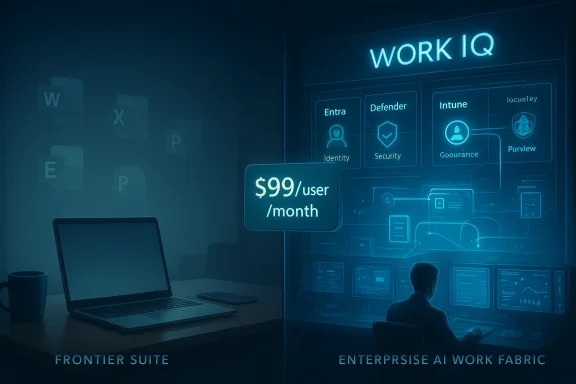
The rise of Microsoft 365’s new agentic direction marks more than a product update; it signals a philosophical shift away from the old idea of the personal computer as a private, user-shaped workspace. Microsoft’s latest Frontier-era enterprise push makes that change feel unmistakable, with the company introducing a Microsoft 365 E7 Frontier Suite priced at $99 per user per month and pairing it with Wave 3 AI features built for long-running, multi-step work. At the same time, Microsoft is expanding its Work IQ context layer and deepening Copilot’s reach across Word, Excel, PowerPoint, and Outlook, but much of the most ambitious functionality is clearly aimed at organizations rather than home users.
Microsoft 365 has always lived in two worlds: the familiar consumer office suite that helped students, freelancers, and families write papers, build budgets, and make slides, and the enterprise platform that IT departments standardized across entire organizations. For years, those two worlds overlapped enough that a home user could still feel ownership over the tools, even as Microsoft steadily pushed the service model, the cloud, and the account sign-in wall. That balance is now wobbling because the newest wave of innovation is being designed around organizational data, managed identities, and controlled deployment, not around the lone user making a resume at the kitchen table.
The clearest signal is Microsoft’s new Frontier framing. The company says the new enterprise bundle combines Copilot, Agent 365, Microsoft Entra, Defender, Intune, and Purview in one premium package, and it is explicitly positioning the suite around governance, security, and agent management at scale. That is a sensible pitch for large companies, but it also reveals where Microsoft sees the highest-margin future: not in selling static productivity software to individuals, but in selling AI-infused operational control to enterprises.
The consumer side has not been abandoned, but it has clearly been narrowed into a lighter experience. Microsoft says Microsoft 365 Personal and Family subscribers now get Copilot in the core apps with monthly AI credits, while the consumer Copilot app remains a conversational chat experience rather than a full enterprise-grade work platform. In other words, the home edition gets tastefully capped access, while the company’s most powerful new features are increasingly wrapped around business licenses, admin controls, and organizational context.
That’s the backdrop for the increasingly common complaint that Microsoft 365 no longer feels truly personal. The old value proposition was simple: Word was a blank page, Excel was a spreadsheet you could shape yourself, and PowerPoint was a canvas for your own judgment. The new promise is different. Microsoft wants those apps to become intelligent assistants that can interpret work, automate workflows, and execute tasks across systems, which is excellent for corporations but less obviously helpful for someone who just wants a quiet word processor.
This is not just a pricing difference; it is a product design decision. Microsoft’s own materials describe Work IQ as the intelligence layer that understands you, your job, and your company by connecting individual and organizational knowledge. That is extremely powerful in a corporate tenant, where files, chats, meetings, and permissions are managed centrally, but much less compelling for a private user whose documents live in a handful of folders and whose needs rarely justify enterprise-grade context plumbing.
Microsoft’s pitch is that the bundle closes the gap between productivity apps and security tools while giving organizations visibility into their AI agents. That positioning makes sense in a world where companies worry about shadow AI, data leakage, and uncontrolled automation. Still, the business logic is hard to ignore: the company is monetizing the same shift that makes the platform feel less personal, and it is doing so at a tier that most consumers will never touch.
The company clearly believes that AI should be ambient and everywhere. That vision has merit when the software is helping a user summarize a meeting or clean a dataset, but it becomes less charming when every app begins to behave like a control center for automation. For many people, the elegance of Word or Excel was always that you could ignore all the complexity until you needed it. Agentic AI blurs that boundary by making complexity a default layer rather than an optional one.
But context is a double-edged sword. To make an AI assistant smart, you have to give it access to the kind of information that users have historically treated as private or compartmentalized. Microsoft’s own documentation about connected experiences explains that these features are cloud-backed and content-aware, and the company also provides privacy and policy controls precisely because this layer is sensitive. That means the technology is not neutral; it depends on trust, permissions, and the comfort level of the organization or individual using it.
The downside is that this “digital coworker” model naturally fits a managed workplace better than a personal laptop. Business users already live in systems with shared files, standardized workflows, and clear permission boundaries. Home users do not. That means the most advanced Copilot experiences are being designed for the environment where software can be monitored, governed, and measured, not for the chaos of a personal machine where people just want help writing a school paper or tracking household expenses.
There are practical advantages here, of course. The consumer product still gives people help with writing, summarizing, and light content generation, and the company has added more value to those subscriptions over time. But it is also hard to miss that the consumer story is about access while the enterprise story is about capability. One is designed to make the product more appealing; the other is designed to make the platform more indispensable.
That does not mean the technology is bad. It does mean organizations need to think carefully about what gets automated and what gets preserved as human work. If every entry-level task is delegated to an agent, the next generation may find itself trained on strategy without ever having developed the muscle memory that strategy depends on. The efficiency gain is real, but so is the long-term talent risk.
For rivals, that raises the bar. Google, Adobe, Notion, and a growing field of AI-native productivity startups can offer elegant point solutions, but Microsoft is no longer selling isolated features. It is offering a managed productivity stack with enterprise controls, AI models, app integration, and identity services under one umbrella. That makes switching costs higher and makes “good enough” alternatives easier to dismiss in procurement meetings.
The bigger question is whether “personal computing” can survive as a meaningful category inside a platform that now prioritizes managed AI work. If the best features are increasingly tied to tenant data, enterprise controls, and subscription tiers most individuals will never buy, then the home user’s role may shrink from participant to spectator. That would not kill Microsoft 365, but it would change what the product is for.
Source: How-To Geek The death of the “personal” computer: Why Microsoft 365 isn’t for you or me anymore
 Background
Microsoft 365 has always lived in two worlds: the familiar consumer office suite that helped students, freelancers, and families write papers, build budgets, and make slides, and the enterprise platform that IT departments standardized across entire organizations. For years, those two worlds overlapped enough that a home user could still feel ownership over the tools, even as Microsoft steadily pushed the service model, the cloud, and the account sign-in wall. That balance is now wobbling because the newest wave of innovation is being designed around organizational data, managed identities, and controlled deployment, not around the lone user making a resume at the kitchen table.The clearest signal is Microsoft’s new Frontier framing. The company says the new enterprise bundle combines Copilot, Agent 365, Microsoft Entra, Defender, Intune, and Purview in one premium package, and it is explicitly positioning the suite around governance, security, and agent management at scale. That is a sensible pitch for large companies, but it also reveals where Microsoft sees the highest-margin future: not in selling static productivity software to individuals, but in selling AI-infused operational control to enterprises.
The consumer side has not been abandoned, but it has clearly been narrowed into a lighter experience. Microsoft says Microsoft 365 Personal and Family subscribers now get Copilot in the core apps with monthly AI credits, while the consumer Copilot app remains a conversational chat experience rather than a full enterprise-grade work platform. In other words, the home edition gets tastefully capped access, while the company’s most powerful new features are increasingly wrapped around business licenses, admin controls, and organizational context.
That’s the backdrop for the increasingly common complaint that Microsoft 365 no longer feels truly personal. The old value proposition was simple: Word was a blank page, Excel was a spreadsheet you could shape yourself, and PowerPoint was a canvas for your own judgment. The new promise is different. Microsoft wants those apps to become intelligent assistants that can interpret work, automate workflows, and execute tasks across systems, which is excellent for corporations but less obviously helpful for someone who just wants a quiet word processor.
The Enterprise Feature Gap
The most obvious change is that the feature gap between commercial and consumer Microsoft 365 is widening again. Microsoft has made clear that its most advanced AI capabilities are tied to enterprise licenses, while consumer offerings focus on bounded use and credit-based access. That means the people who already pay the most get the richest automation, the best governance, and the most ambitious agentic workflows, while personal subscribers are left with a thinner slice of the same AI story.This is not just a pricing difference; it is a product design decision. Microsoft’s own materials describe Work IQ as the intelligence layer that understands you, your job, and your company by connecting individual and organizational knowledge. That is extremely powerful in a corporate tenant, where files, chats, meetings, and permissions are managed centrally, but much less compelling for a private user whose documents live in a handful of folders and whose needs rarely justify enterprise-grade context plumbing.
Why the gap matters
When Microsoft reserves the newest features for commercial tiers, it changes the pace of innovation for everyone else. Personal users effectively become observers of the platform’s future instead of participants in it. They can see where the suite is going, but they don’t get to drive it there.- Enterprise customers get the deepest AI integrations first.
- Consumer users get limited or delayed versions of the same ideas.
- The most valuable features are tied to admin-managed environments.
- Personal workflows increasingly look like secondary use cases.
- The platform’s center of gravity shifts toward IT, compliance, and scale.
The $99 Frontier Suite
The Frontier Suite pricing is the kind of number that immediately changes the conversation. At $99 per user per month, Microsoft is no longer selling an office suite in the old sense; it is selling a premium enterprise AI operating layer. That number may be rational for a large company if the bundle replaces multiple point solutions, but it is a psychological barrier for individuals and small teams that instantly signals “not for you.”Microsoft’s pitch is that the bundle closes the gap between productivity apps and security tools while giving organizations visibility into their AI agents. That positioning makes sense in a world where companies worry about shadow AI, data leakage, and uncontrolled automation. Still, the business logic is hard to ignore: the company is monetizing the same shift that makes the platform feel less personal, and it is doing so at a tier that most consumers will never touch.
Pricing as strategy
Pricing here is not merely an accounting choice. It is a product signal that says the future of Microsoft 365 is being built around organizations that can pay for trust, governance, and agent management at scale. That may be perfectly reasonable from a commercial standpoint, but it also means the average user is no longer the product manager’s north star.- The bundle consolidates premium AI and security tools.
- The price makes the value proposition enterprise-first.
- Individual users are unlikely to justify the monthly cost.
- Microsoft can fund deeper platform investment through corporate accounts.
- The “personal” product becomes a cheaper, narrower derivative.
AI Bloat and Interface Fatigue
The next issue is usability. Microsoft has long struggled with the tension between adding power and preserving simplicity, but AI raises that tension to a new level. A spreadsheet app with extra menu items is annoying; a spreadsheet app that constantly invites you into agent workflows, model selection, background automation, and contextual prompts can feel like a pilot’s cockpit when all you wanted was a steering wheel.The company clearly believes that AI should be ambient and everywhere. That vision has merit when the software is helping a user summarize a meeting or clean a dataset, but it becomes less charming when every app begins to behave like a control center for automation. For many people, the elegance of Word or Excel was always that you could ignore all the complexity until you needed it. Agentic AI blurs that boundary by making complexity a default layer rather than an optional one.
When simplicity becomes a casualty
The old productivity promise was that the software would get out of your way. The new promise is that the software will think alongside you, or even on your behalf. That can be transformative, but it also introduces cognitive overhead every time the interface tries to explain what it can do, when it can do it, and which version of the feature your license actually unlocks.- More features can mean more friction.
- More AI surfaces can mean more prompts and more confusion.
- Background automation can obscure what the software is doing.
- Users may spend more time learning the tool than using it.
- The app risks becoming feature-rich but task-poor.
Work IQ and Context Harvesting
The power behind Microsoft’s new Copilot experiences is Work IQ, which Microsoft describes as the intelligence layer that connects files, emails, chats, meetings, and organizational data to make AI responses more relevant. That is a major technical step because it shifts Copilot from a generic chatbot into a system that can reason over a company’s actual work graph. In enterprise settings, this is exactly the sort of grounded context that makes AI useful instead of merely chatty.But context is a double-edged sword. To make an AI assistant smart, you have to give it access to the kind of information that users have historically treated as private or compartmentalized. Microsoft’s own documentation about connected experiences explains that these features are cloud-backed and content-aware, and the company also provides privacy and policy controls precisely because this layer is sensitive. That means the technology is not neutral; it depends on trust, permissions, and the comfort level of the organization or individual using it.
Privacy, permission, and perception
For enterprise customers, the pitch is straightforward: the AI only sees what users are authorized to see, and the organization gets compliance and management controls. For individuals, the perception is harder to shake. The software is learning from your materials, but the payoff often lands elsewhere, behind commercial licensing walls and company-managed tenants.- Work IQ makes Copilot feel more personal inside companies.
- It also makes the data layer more deeply embedded.
- Permission boundaries are important but not emotionally reassuring.
- Privacy controls exist, but they can be complex and uneven.
- The more useful the AI becomes, the more data it wants.
Copilot as a Corporate Worker
Microsoft’s most aggressive Copilot story now centers on tasks like multi-step research, meeting prep, workbook analysis, and document creation. The company’s new agent approach is meant to offload repetitive work from people and shift the software closer to a digital coworker that can operate over time rather than merely answer a prompt. For enterprises, that is a compelling vision because it promises scale, consistency, and less manual busywork.The downside is that this “digital coworker” model naturally fits a managed workplace better than a personal laptop. Business users already live in systems with shared files, standardized workflows, and clear permission boundaries. Home users do not. That means the most advanced Copilot experiences are being designed for the environment where software can be monitored, governed, and measured, not for the chaos of a personal machine where people just want help writing a school paper or tracking household expenses.
From helper to operator
This shift matters because it changes the identity of the software. A helper suggests; an operator acts. Once the suite starts running workflows in the background, the user becomes more of an overseer than a creator, and that is a very different kind of relationship with a productivity tool.- Copilot is becoming more autonomous.
- Enterprise users get the most complete workflow automation.
- The software is moving from reactive to proactive.
- Human review remains necessary, but the machine does more upfront.
- The gap between “assist” and “do” is narrowing.
What Consumer Users Actually Get
The consumer side of Microsoft 365 is not empty, but it is increasingly bounded. Microsoft says Personal, Family, and Premium subscribers can access Copilot in the apps with usage limits and AI credits, while the standalone consumer Copilot app is a conversational chat experience. That means consumer AI exists, but it is framed as a feature set with guardrails rather than as the flagship implementation of Microsoft’s future.There are practical advantages here, of course. The consumer product still gives people help with writing, summarizing, and light content generation, and the company has added more value to those subscriptions over time. But it is also hard to miss that the consumer story is about access while the enterprise story is about capability. One is designed to make the product more appealing; the other is designed to make the platform more indispensable.
The limited promise
The result is a subtle but important distinction. Consumer Copilot is useful, but it is not the same as having a fully managed AI layer tied into the organization’s data and workflow fabric. That difference is easy to overlook in marketing copy and impossible to ignore in real use.- Consumer users get helpful AI, but with limits.
- Licensing determines which features appear.
- Shared household plans do not always share AI access equally.
- The richest capabilities are mostly commercial.
- The product is more accessible, but not equally empowered.
The Learning Pipeline Problem
There is also a quieter, more structural concern: automation can hollow out the apprenticeship path. Microsoft’s agentic features are designed to handle laborious tasks such as research synthesis, meeting packet drafting, and data wrangling. Those are exactly the kinds of jobs that once gave junior workers a way to learn industries from the inside out, one repetitive assignment at a time.That does not mean the technology is bad. It does mean organizations need to think carefully about what gets automated and what gets preserved as human work. If every entry-level task is delegated to an agent, the next generation may find itself trained on strategy without ever having developed the muscle memory that strategy depends on. The efficiency gain is real, but so is the long-term talent risk.
What gets lost when routine work disappears
The tricky part is that routine work is often where competence is built. Repetition teaches pattern recognition, judgment, and the ability to catch errors. When software removes too much of that repetition, workers may become faster at using tools but weaker at understanding the output.- Automation can reduce entry-level opportunities.
- Junior employees may lose the chance to build judgment.
- Companies may save time but sacrifice institutional depth.
- The software can accelerate output without developing people.
- Long-term skills may erode if humans stop doing the basics.
Competitive Implications
Microsoft’s pivot also changes the competitive landscape. For enterprise buyers, the company is trying to bundle AI, identity, security, governance, and application-level assistants into a single ecosystem that is difficult to unwind. That is classic Microsoft strategy: win by making the platform so complete that rivals have to compete not just with features, but with integration depth, compliance posture, and procurement simplicity.For rivals, that raises the bar. Google, Adobe, Notion, and a growing field of AI-native productivity startups can offer elegant point solutions, but Microsoft is no longer selling isolated features. It is offering a managed productivity stack with enterprise controls, AI models, app integration, and identity services under one umbrella. That makes switching costs higher and makes “good enough” alternatives easier to dismiss in procurement meetings.
Why this matters for the market
The market impact goes beyond subscriptions. If the center of productivity software becomes AI orchestration rather than document creation, then vendors will compete on who can best ground agent behavior in business data and who can prove governance at scale. That is a different game from selling the cleanest word processor or the prettiest slide editor.- Microsoft is turning productivity into a platform play.
- Enterprise AI is becoming a security-and-governance sale.
- Rivals must match integration, not just intelligence.
- Consumer software may lag because the money is in business.
- The most important competition may be over trust, not novelty.
Strengths and Opportunities
Microsoft’s strategy is not without merit. In fact, for enterprise customers, it is probably one of the most coherent AI roadmaps in the industry. The company is combining models, context, security, and workflow orchestration in a way that few rivals can match, and that gives it a strong position in the next phase of business software.- Deep enterprise integration gives customers a single platform for AI, identity, and governance.
- Work IQ makes Copilot more context-aware and useful inside organizations.
- Agent management helps enterprises control automation instead of fearing it.
- Bundled security lowers the friction of adopting AI at scale.
- Commercial stickiness makes Microsoft harder to replace.
- Consumer AI credits still keep the home side in the game, even if modestly.
- Cross-app consistency means the same AI logic can span Word, Excel, PowerPoint, and Outlook.
Risks and Concerns
The danger is that Microsoft optimizes so heavily for enterprise buyers that it forgets why the personal computer became culturally important in the first place. People did not fall in love with Office because it was deeply governed; they valued it because it was theirs, flexible, familiar, and surprisingly powerful without needing an IT department to explain every feature. That emotional contract is fraying.- Consumer erosion could make Microsoft 365 feel less welcoming to individuals.
- Complexity creep may burden users who just want simple tools.
- Privacy anxiety rises as more context is harvested for AI.
- License fragmentation creates confusion over what people actually get.
- Skill atrophy is possible if junior work gets automated too aggressively.
- Feature fatigue may push some users toward simpler alternatives.
- Trust risk grows if AI outputs are inaccurate or opaque.
Looking Ahead
The next few months will tell us whether Microsoft can balance these two identities without alienating the people who made its tools ubiquitous in the first place. The launch of the Frontier Suite on May 1, along with the expansion of Wave 3 features and agent tooling, will show whether the company can keep its enterprise pitch coherent while still offering consumers a reason to care.The bigger question is whether “personal computing” can survive as a meaningful category inside a platform that now prioritizes managed AI work. If the best features are increasingly tied to tenant data, enterprise controls, and subscription tiers most individuals will never buy, then the home user’s role may shrink from participant to spectator. That would not kill Microsoft 365, but it would change what the product is for.
- The May 1 launch of the Frontier Suite will be a key pricing and adoption test.
- Consumer Copilot limits and credits will determine whether home users stay engaged.
- Enterprise controls around Work IQ and agent permissions will matter for trust.
- Rival suites will look for openings in simplicity and user privacy.
- Microsoft’s ability to reduce AI friction will decide whether the interface feels helpful or bloated.
Source: How-To Geek The death of the “personal” computer: Why Microsoft 365 isn’t for you or me anymore
