

Multi‑Geo In‑Region Routing has moved out of preview and reached General Availability in December 2025, giving Microsoft 365 customers with Multi‑Geo deployments a long‑anticipated control point over where inbound email actually enters Exchange Online for geographically distributed users. This is not a cosmetic change — it alters the inbound mail entry point for anonymous and hybrid mail, maps accepted domains to geo regions, and can prevent cross‑geography transit for incoming SMTP sessions when properly configured. For multinational organizations wrestling with data residency rules, regulatory audits, or internal sovereignty mandates, In‑Region Routing is a practical new tool in the Microsoft 365 toolbox — but it requires careful planning, explicit licensing, and an understanding of how mail flow, compliance tooling, and hybrid connectors interact.
Microsoft 365 Multi‑Geo has, for years, let large tenants place individual user mailboxes and other workload data into satellite geographies while retaining a single tenant control plane. That model depends on the PreferredDataLocation (PDL) attribute (also surfaced as MailboxRegion in Exchange Online) to determine where mailboxes live at rest. Under the classic Multi‑Geo behavior, however, inbound anonymous and hybrid email historically entered Exchange Online at the tenant’s primary provisioned geography first and then moved internally to the mailbox region. That meant SMTP sessions for mail destined to a mailbox hosted in Europe might still terminate in the tenant’s Primary Provisioned Geography (for example, North America) before Microsoft relayed the message internally to the European mailbox store.
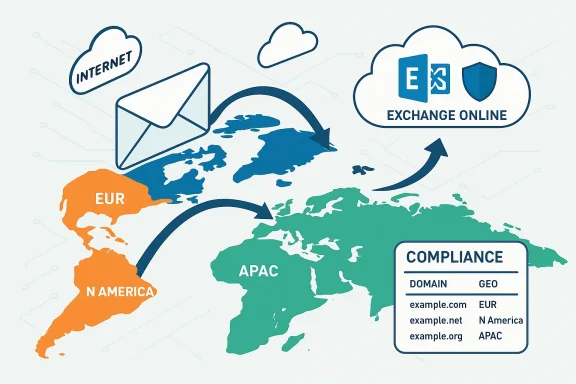
For many customers, that approach provided consistency and predictable routing. But for organisations where the geography of ingress matters — either for legal compliance, contractual obligations, or internal security boundaries — routing first through the primary geography created an unacceptable cross‑border data path. In‑Region Routing addresses that gap by enabling admins to determine the geographic ingress point for anonymous inbound mail and hybrid inbound mail based on accepted domain → geo mappings and how those domains are aligned with users.
Key technical pieces:
However, the feature’s value depends on disciplined implementation. Organizations must inventory domains and recipients, verify licensing and tenant Multi‑Geo configuration, test hybrid connectors and third‑party systems, and re‑examine their Microsoft Purview and eDiscovery scopes. Failure to plan can create compliance illusions — where mail appears to be processed in‑region but copies or indices still cross borders due to other services.
For any enterprise already using or evaluating Microsoft 365 Multi‑Geo, now is the moment to run a targeted in‑region routing assessment: map domains to regions, pilot the configuration, and use monitoring and audit evidence to validate outcomes before scaling. When combined with sound governance, In‑Region Routing materially reduces cross‑border mail processing and simplifies the compliance conversation — but it should be one element in a broader, documented, and testable data sovereignty strategy.
If you manage a Multi‑Geo tenant, consider these immediate next actions:
Source: Microsoft Exchange Team Blog Multi-Geo In-Region Routing General Availability | Microsoft Community Hub
 Background
Microsoft 365 Multi‑Geo has, for years, let large tenants place individual user mailboxes and other workload data into satellite geographies while retaining a single tenant control plane. That model depends on the PreferredDataLocation (PDL) attribute (also surfaced as MailboxRegion in Exchange Online) to determine where mailboxes live at rest. Under the classic Multi‑Geo behavior, however, inbound anonymous and hybrid email historically entered Exchange Online at the tenant’s primary provisioned geography first and then moved internally to the mailbox region. That meant SMTP sessions for mail destined to a mailbox hosted in Europe might still terminate in the tenant’s Primary Provisioned Geography (for example, North America) before Microsoft relayed the message internally to the European mailbox store.For many customers, that approach provided consistency and predictable routing. But for organisations where the geography of ingress matters — either for legal compliance, contractual obligations, or internal security boundaries — routing first through the primary geography created an unacceptable cross‑border data path. In‑Region Routing addresses that gap by enabling admins to determine the geographic ingress point for anonymous inbound mail and hybrid inbound mail based on accepted domain → geo mappings and how those domains are aligned with users.
What In‑Region Routing is — and what it isn’t
At a glance: the capability
- What it does: Lets admins associate accepted domains with specific Microsoft 365 geo‑regions so that inbound anonymous mail and hybrid inbound mail for those domains can enter Exchange Online directly in the recipient’s geography instead of the tenant’s primary geography.
- Scope: Applies to anonymous inbound mail (internet mail delivered by external senders) and hybrid inbound mail from on‑premises Exchange (when hybrid mail flows through Exchange Online). It does not change outbound routing, internal tenant replication or mailbox moves.
- Licensing: In‑Region Routing is an included capability of the Multi‑Geo add‑on (the Microsoft 365 Multi‑Geo Capabilities add‑on) and requires a properly configured Multi‑Geo tenant to operate.
- Default state: Disabled by default. Admins must opt in and configure accepted domains and domain–region alignments.
What it is not
- It is not a separate paid product outside Multi‑Geo; it builds on the Multi‑Geo framework.
- It is not a silver‑bullet for every sovereignty requirement; some compliance or security tooling (for example, global eDiscovery tooling, tenant‑level logging or third‑party archiving) may still involve cross‑region processing and should be reviewed.
- It does not automatically move mailboxes — it routes inbound mail to the region where the recipient’s mailbox is hosted (or intended to be hosted) but mailbox placement remains governed by PDL and mailbox move processes.
How it works — a technical overview
In‑Region Routing introduces configuration options that let administrators tie accepted domains to a geo region and align that domain with users who have mailboxes or recipients in the same region. The effect is that inbound anonymous and hybrid SMTP sessions for those domain recipients are terminated by Exchange Online infrastructure located in the specified geography, and message processing and storage occur in the recipient’s region.Key technical pieces:
- Accepted Domains per geo: Admins can mark accepted domains with a geo property indicating the intended processing geography.
- User alignment: Accepted domains should be aligned with users who are assigned the matching PDL / MailboxRegion, so that mail for recipients in that domain will be processed within the recipient’s region.
- Inbound path: When an incoming SMTP connection arrives at Microsoft’s front‑end infrastructure, Exchange Online evaluates the accepted domain’s geo mapping and the recipient mailbox region to determine whether to terminate the session locally (in the recipient region) or forward it internally.
- Hybrid behavior: For hybrid mail (when on‑premises Exchange delivers via connectors into Exchange Online), the configuration ensures the message enters Exchange Online in the recipient’s region when the accepted domain and user PDL align.
- Operational defaults: If domains or users aren’t aligned, or if the feature is not enabled, the classic behavior remains: inbound mail first enters the tenant’s primary region and is then relayed internally.
Why organizations will care: compliance, risk reduction, and operational control
For organizations operating across regulated markets, In‑Region Routing is significant for three practical reasons:- Data residency and sovereignty: Routing inbound mail directly to the recipient’s region helps meet requirements that govern where communications are processed and stored, reducing the number of cross‑border hops and simplifying audit evidence for regulators.
- Minimized exposure of sensitive mail flow metadata: While Microsoft’s internal network is secure, many customers prefer their mail not to cross certain jurisdictions at any point. Ensuring ingress occurs in‑region reduces exposure of metadata and content to those optics.
- Consistency with hybrid on‑prem requirements: Large enterprises frequently maintain hybrid environments for legal intercept, journaling, or eDiscovery workflows. In‑Region Routing makes it possible for hybrid inbound mail to be processed within the same region as the recipient, removing a mismatch that previously complicated compliance attestations.
Administration and deployment: a practical checklist
Planning and executing an In‑Region Routing deployment should be treated like any other compliance‑sensitive change: inventory, map, test, monitor. Below are practical steps to follow before enabling IRR in production.- Inventory accepted domains and user PDLs
- Export the tenant’s accepted domains and all mailbox PreferredDataLocation / MailboxRegion assignments.
- Identify which domains are used by users in satellite geographies versus the primary geography.
- Review Multi‑Geo licensing and tenant configuration
- Confirm adequate Multi‑Geo licenses are purchased and assigned for users hosted in satellite geographies.
- Verify that AllowedMailboxRegions and DefaultMailboxRegion match your intended configuration.
- Map accepted domains to geographies
- Decide which accepted domains should be bound to which geo.
- Ensure domains that span multiple geographies are handled with explicit policies (for example, use subdomains to separate regional mail ingress if needed).
- Validate hybrid connectors and MX/SmartHost settings
- For hybrid inbound mail, verify connectors and on‑premises send connectors behave with the new routing decisions.
- Confirm that any third‑party smart host or relay configurations account for region‑specific termination points.
- Test thoroughly in staged environments
- Deploy IRR to a small set of accepted domains and users.
- Verify mail originates externally, terminates in the expected geography, and is both delivered and discoverable by compliance tooling.
- Audit Purview, DLP, retention and eDiscovery
- Examine how regional ingress impacts Microsoft Purview policies, retention labels, DLP rules, and eDiscovery workflows.
- Update configurations or processes where regional scoping assumptions break.
- Monitor and iterate
- Use message trace and monitoring to ensure mail termination geography is as expected.
- Capture logs for audit trails and share details with legal/compliance teams.
Real‑world mail flow scenarios and edge cases
Below are practical scenarios and the operational implications admins should plan for.- Scenario: External sender to user in Paris (mailbox hosted in EUR).
- With IRR enabled and the recipient’s accepted domain mapped to EUR, the inbound SMTP session will be terminated by Exchange Online infrastructure servicing Europe and the message will be processed and stored there.
- If the domain isn’t mapped or the feature is disabled, the same message might terminate in the tenant’s primary geography and then be relayed internally — creating cross‑region exposure.
- Scenario: On‑premises Exchange hybrid send to a European mailbox.
- When connectors deliver to Exchange Online, IRR can cause the SMTP session to enter Exchange Online at the recipient’s region rather than the tenant’s primary geography, assuming domain and PDL alignment.
- Scenario: Shared mailbox or Microsoft 365 Group used across geographies.
- Shared resources complicate mapping because shared mailboxes or groups are not always tied to a single user PDL. Admins must determine how to classify shared resources and may need to centralize such mailboxes or accept cross‑region processing for shared workloads.
- Scenario: Third‑party archiving and journaling.
- Some archiving or compliance capture happens before or independent of Exchange Online processing. Verify where journaling endpoints operate; if an outbound journaling configuration sends copies to a central region, inbound ingress geography will not change that copy’s transit path.
- Failure / fallback modes
- If accepted domain mapping fails or mailbox region data is inconsistent, Exchange Online falls back to default behavior (ingress at tenant primary geography). Logs and message trace will flag the fallback; implement monitoring to detect unexpected fallbacks.
Compliance and governance: benefits and cautionary notes
In‑Region Routing reduces the attack surface from a data residency perspective, but it is not a single‑change cure for compliance. Understand both the gains and the limitations.- Benefits
- Stronger alignment with regional laws: Routing ingress directly to the recipient region supports many territorial data residency expectations.
- Easier audits: When inbound mail ingress correlates with mailbox domicile, audit trails are simpler to explain.
- Reduced cross‑border metadata exposure: Lowering the number of internal hops can help meet contractual or internal governance requirements.
- Caveats and risks
- Not all processing is local: Tenant‑wide services, centralized logging, and some compliance tooling may still process or index data centrally. Make no assumptions without verifying each component.
- Policy coverage gaps: Conditional access, Purview DLP, eDiscovery and retention policies might have scopes tied to the primary geography. Enabling IRR can surface mismatches that require reconfiguration.
- Complexity in shared scenarios: Organizations that intentionally share domains across regions (for brand or marketing reasons) may need to implement subdomain strategies or accept manual routing exceptions.
- Documentation and attestation: Regulators will expect documentation showing your mapping decisions, monitoring evidence, and evidence of testing. Build those artifacts as part of deployment.
Security implications
From a security standpoint, In‑Region Routing offers useful controls but also creates new operational dependencies.- Positive effects
- Reduced exposure of mail content or metadata crossing sensitive jurisdictions.
- Local termination makes it easier to apply region‑specific security controls and for local security teams to validate routing.
- Operational security concerns
- Ensure anti‑spam, anti‑malware, and threat protection policies apply equally in each region. If protections are configured only at tenant primary geography, messages terminating in a satellite region could be treated differently unless policies are propagated.
- Logging and incident response processes must be updated so security teams can collect forensics from regional infrastructure quickly.
- Identity and access management (IAM) flows remain centralized. Be mindful that central admin operations might still access data for global maintenance, and document those access paths.
Monitoring, troubleshooting and supportability
Operationalizing IRR requires mature monitoring and a support plan.- Message trace and monitoring: Use message trace to confirm ingress region, delivery latency, and any fallback routing. Capture long‑term records for audit.
- Alerts: Implement alerts for unexpected cross‑region hops or for mailflow failures where an accepted domain mapping was expected but not applied.
- Testing automation: Create automated tests that send synthetic messages from external senders and from on‑premises hybrid systems to validate geographic termination and downstream processing.
- Support path: Coordinate with your Microsoft account team for high‑impact incidents — region‑specific issues may require Microsoft involvement to trace internal routing.
Deployment patterns and recommended best practices
- Start small and phased. Activate IRR for a pilot domain and a subset of users in a single geography. Verify mail flow, compliance tooling interactions, and performance before broad rollout.
- Use domain segmentation for mixed regions. If a corporate domain is used globally, consider regional subdomains (for example, eu.example.com) for users in each region where precise regional routing is required.
- Document everything. Produce a configuration map: accepted domains → geo region, users → PDL, connectors → expected ingress behavior, and the compliance reasoning for each decision.
- Coordinate teams. IRR touches security, compliance, network, identity, Exchange, and hybrid operations. Run cross‑functional deployment sprints and tabletop exercises.
- Revisit retention and discovery policy scopes. Confirm that retention labels, hold policies and DLP rules behave identically across regions or adjust them with region‑aware scopes.
- Plan for disaster recovery. Understand how IRR behaves during outages of a specific geography and validate your fallback plans.
Limitations, unanswered questions, and where to be cautious
Microsoft’s In‑Region Routing is an important capability, but it is not a universal data sovereignty panacea. Administrators should remain cautious about:- How third‑party cloud processing is impacted: Services such as compliance exports, archiving, and indexing provided by third parties might still move a copy of the message out of the region before IRR applies. Verify every external system.
- Shared resources and group mailboxes: These often exist independently from per‑user PDL decisions and require special handling.
- Scope of Microsoft Purview interactions: Some Purview functions may rely on centralized processing or search indices. Confirm whether Purview activities respect region‑based processing expectations in your compliance model.
- Edge cases with smart hosts and hybrid relays: Custom mail path topologies can create situations where mail incorrectly terminates at unexpected geographies; test thoroughly.
- Legal interpretations: Different countries interpret “processing” and “ingress” differently. IRR aligns the technical ingress, but you must verify legal sufficiency with counsel.
Final verdict: strategic, practical, but not automatic
Multi‑Geo In‑Region Routing delivers a concrete capability that closes an operational gap that many multinational tenants have lived with for years. It is a strategic win — enabling inbound mail to be processed in the same geography as the recipient when domains and PDLs are aligned — and it addresses a clear class of regulatory and contractual needs.However, the feature’s value depends on disciplined implementation. Organizations must inventory domains and recipients, verify licensing and tenant Multi‑Geo configuration, test hybrid connectors and third‑party systems, and re‑examine their Microsoft Purview and eDiscovery scopes. Failure to plan can create compliance illusions — where mail appears to be processed in‑region but copies or indices still cross borders due to other services.
For any enterprise already using or evaluating Microsoft 365 Multi‑Geo, now is the moment to run a targeted in‑region routing assessment: map domains to regions, pilot the configuration, and use monitoring and audit evidence to validate outcomes before scaling. When combined with sound governance, In‑Region Routing materially reduces cross‑border mail processing and simplifies the compliance conversation — but it should be one element in a broader, documented, and testable data sovereignty strategy.
If you manage a Multi‑Geo tenant, consider these immediate next actions:
- Inventory all accepted domains and mailbox PDLs.
- Confirm Multi‑Geo license coverage and tenant AllowedMailboxRegions.
- Run a controlled pilot for a single region and a single accepted domain.
- Validate Purview, DLP, retention, and journaling behavior against your compliance requirements.
- Build an audit pack (configuration export, message traces, test results) to demonstrate the behavior to legal and compliance stakeholders.
Source: Microsoft Exchange Team Blog Multi-Geo In-Region Routing General Availability | Microsoft Community Hub
