

Microsoft 365 tenants should push passkeys now in staged rings, using device-bound passkeys for administrators and highly privileged users, synced passkeys for lower-risk users, and hardened recovery controls across the tenant before broad enrollment campaigns reach the general workforce. That is the practical answer in Microsoft’s own guidance, not a theoretical identity architecture debate. The trap is treating “passkeys” as a single rollout switch when Microsoft is explicitly describing different assurance models for different people.
The sharper news angle is not that passkeys resist phishing; that story has been told to death. The live risk for Entra ID and Microsoft 365 administrators is that attackers are moving toward the paths around the credential: enrollment, help desk resets, recovery, and user coaching. Microsoft’s passkey documentation and its May 2026 Security Blog messaging make the same point in different language: a passkey cannot be tricked into authenticating to a malicious lookalike site, but account recovery must be hardened so it does not become a backdoor for cyberattackers.
For most Microsoft 365 tenants, the decision should be “move now, but segment aggressively.” Start with privileged accounts, identity administrators, security operators, break-glass-adjacent workflows, and users with access to sensitive data. For those groups, favor device-bound passkeys because Microsoft recommends them for admins and highly privileged users.
For the broader workforce, synced passkeys are usually the more workable starting point. Microsoft’s own FAQ says synced passkeys are recommended for users with non-admin permissions, largely because they reduce the recoverability and reissuance burden that comes with device-bound credentials. That is not a small operational detail; it is the difference between a rollout the service desk can survive and one that collapses under lost-device tickets.
The Windows wrinkle matters. Microsoft Entra passkey on Windows is in public preview and requires opt-in, so tenants that are conservative about preview features may reasonably wait for general availability before a broad Windows rollout. That does not mean waiting on passkeys altogether. It means using Microsoft Authenticator, FIDO2 security keys, and synced passkey providers where appropriate while you pilot Windows passkeys with controlled groups.
The near-term decision tree is straightforward. Use device-bound passkeys for privileged roles. Use synced passkeys for standard users. Pilot Entra passkey on Windows rather than treating the preview as a default enterprise baseline. And before any of that becomes a broad registration campaign, tighten the processes that let a user recover, reset, or add authentication methods.
That warning should change how tenants design rollouts. A passkey is bound to a relying party, so it will not authenticate to a fake Microsoft 365 sign-in page the way a password or one-time code might. But if an attacker can convince a user, help desk agent, or delegated admin to enroll a new method or reset access, the attacker no longer needs to defeat the passkey.
This is where vishing belongs in the passkey conversation. A voice call that pressures a user to approve a registration, visit Security info, add a method, or “complete migration to passkeys” is not attacking FIDO2 cryptography. It is attacking the ceremony around the credential. That is exactly why enrollment and recovery deserve as much design attention as sign-in.
WindowsForum readers have already seen the Microsoft 365 phishing ecosystem move in this direction. Recent discussions around credential harvesting, adversary-in-the-middle kits, QR-code phishing, and spear-phishing tactics all point to the same trend: attackers prefer the path users can be persuaded to take. Passkeys close one well-known door, but they make the remaining doors more valuable.
The exact attacker script will vary, and administrators should be careful not to invent a single canonical playbook. But the likely pressure points are obvious because they mirror normal onboarding: open Security info, add a sign-in method, choose Passkey, complete MFA, name the passkey, and confirm creation. Microsoft’s registration flow is designed for legitimate self-service; social engineering tries to wrap that legitimate flow in a false story.
This is why “passkeys stop phishing” is an incomplete message for end users. It can create a dangerous mental shortcut: if the word passkey appears, the user assumes the process is safe. Training needs to be more precise. A passkey protects sign-in to the legitimate service after it is enrolled; it does not make every call, QR code, help desk request, or registration prompt trustworthy.
The prerequisite attackers care about is not a cryptographic weakness. It is the user’s existing ability to add or recover authentication methods. If the tenant allows broad self-service registration with weak monitoring, permissive recovery, and limited help desk verification, the attacker’s job becomes persuasion rather than exploitation.
That is the practical defender lesson. Passkey rollout should reduce credential theft risk, but it also creates a new operational hotspot: who can enroll, when they can enroll, under what prompts, with what notification, and how quickly security staff can detect and reverse a suspicious method addition.
For Entra passkey on Windows, the profile requires special care. Microsoft says administrators configure a passkey profile that targets the Windows Hello AAGUIDs, uses device-bound passkey type, and does not enforce attestation. The admin then goes to the Enable and Target tab, turns the method on, adds a target group, selects the relevant profile, and saves.
That is the mechanics. The policy decision is more important: do not target “All users” on day one just because the wizard permits it. Create groups for privileged users, early adopters, help desk staff, standard users, and exception populations. Test registration, sign-in, lost-device recovery, and method removal before the campaign becomes visible to everyone.
For synced passkeys, Microsoft’s user-facing registration flow runs through Security info. Users sign in to Security info, complete MFA, choose Add sign-in method, select Passkey, proceed through the device’s passkey provider prompts, name the passkey, and confirm creation. On iOS, Microsoft calls out Settings > General > AutoFill & Passwords, with “Set Up Codes In” set to Passwords; on Android, it points users to Settings > Security and privacy > More security settings > Passwords, passkeys, and autofill, then provider selection, with device differences expected.
That user procedure is simple enough to be abused by a convincing caller. Admins should therefore pair any registration campaign with a plain rule: IT will not call users and ask them to add a passkey during an unsolicited session. If enrollment help is needed, users should start from a known internal portal or scheduled support channel, not from a link, QR code, phone instruction, or chat message.
Device-bound passkeys make lifecycle management harder. A user may need separate registration per device. Replacing hardware is more painful. Recovery workflows become more visible. But that friction is precisely why they are appropriate for administrator roles: the credential should not silently travel across an ecosystem of personal or unmanaged devices.
The compliance argument is equally important. Microsoft’s FAQ says administrators cannot currently see or control exactly which devices hold a copy of a synced passkey, nor query where that synced passkey has synchronized. For normal users, the usability and phishing-resistance benefits can outweigh that visibility gap. For privileged users, that gap is harder to justify.
In practice, privileged rollout should start with a clean inventory of role assignments, not with a passkey configuration screen. Identify Global Administrators, Privileged Role Administrators, Authentication Administrators, Exchange and SharePoint administrators, security roles, and any accounts with standing access to production systems. Then target these users with device-bound methods and stricter recovery rules.
Break-glass accounts require separate treatment. The verified Microsoft facts here do not prescribe a break-glass passkey model, so the safe recommendation is not to improvise one. Keep emergency access accounts governed by your documented Microsoft 365 emergency access policy, test them regularly, and do not casually fold them into the same passkey enrollment campaign as normal admins.
The alternative is a beautiful security model that users abandon or the help desk cannot sustain. Every lost phone, replaced laptop, rebuilt profile, and newly issued device becomes a support moment. Device-bound credentials are excellent when the device boundary is part of the security requirement. They are less excellent when the business simply needs thousands of people to stop typing passwords into phishable prompts.
Synced passkeys still deliver the central win: phishing-resistant sign-in against lookalike sites. Microsoft says a passkey only works for the site or app it was created for and requires the user to unlock it with local verification such as biometrics or PIN. That makes the old “enter your Microsoft 365 password here” phish much less useful.
But administrators should explain the tradeoff honestly. Synced passkeys improve phishing resistance, but they do not give the tenant perfect visibility into every device where the passkey may exist. If a department handles regulated data, sensitive financial operations, or privileged workflows, it may need the device-bound side of the house even if synced passkeys are approved for everyone else.
This is the policy split Microsoft is effectively nudging tenants toward. Do not ask whether synced passkeys are “secure” in the abstract. Ask whether the user’s risk profile requires strict device boundary control. If yes, use device-bound passkeys. If no, synced passkeys are often the fastest route away from passwords and weaker MFA.
A strong sign-in method is only as strong as the process for replacing it. If a user loses every method, who verifies them? If the help desk resets authentication, what proof is required? If a user adds a new passkey, who is notified? If a privileged user’s methods change, does security see it quickly enough to intervene?
The default instinct in many organizations is to reduce friction at recovery because locked-out users are loud and business interruption is measurable. Attackers understand that. They exploit urgency, executive pressure, and support fatigue. Passkeys raise the value of those social-engineering opportunities because direct credential theft becomes less reliable.
This is where tenants should spend time before enabling broad passkey nudges. Review who can reset authentication methods. Review the identity proofing process for lost devices. Review whether users receive notifications when methods are added or changed. Review sign-in logs, audit logs, and alerting around passkey creation and use, which Microsoft identifies as places admins can monitor passkey activity.
The right recovery model will vary by tenant maturity. But the principle is stable: if the recovery path is weaker than the sign-in path, attackers will use the recovery path. A passkey rollout that ignores this is not passwordless maturity; it is security theater with better cryptography.
But Microsoft’s documentation says the feature is in public preview and requires opt-in. That makes it a pilot candidate for most tenants, not a default for every Windows user. Public preview does not mean unusable; it means the risk appetite and support model should be explicit.
The admin configuration has enough nuance to justify caution. Windows Hello AAGUIDs must be explicitly allowed in the passkey profile, the passkey type is device-bound, and attestation is not enforced for that profile. Microsoft also distinguishes Entra passkey on Windows from Windows Hello for Business, which remains the recommended solution for signing into corporate managed, Entra joined or registered devices.
That distinction matters for WindowsForum’s audience. Windows Hello for Business and Entra passkey on Windows both use Windows Hello, but they are not the same product behavior. The former is tied to managed device sign-in and single sign-on scenarios; the latter is a FIDO2 passkey stored in the local Windows Hello container for Entra authentication. Confusing the two will produce bad rollout plans and worse help desk scripts.
The prudent path is to test Windows passkeys with IT, security, and a small cross-section of unmanaged or personally owned Windows devices. Validate registration conflicts, user messaging, passkey removal, device replacement, and support documentation. Then expand once Microsoft’s preview posture aligns with your tenant’s tolerance for change.
That monitoring should become part of the rollout plan, not a later enhancement. Security operations should know what normal registration looks like: which groups are in scope, when campaigns run, which devices and providers are expected, and what volume is typical. Without that baseline, a malicious enrollment blends into the success metrics.
Help desk telemetry matters too. A spike in calls about “passkey migration,” “new Microsoft login,” “security verification,” or “IT told me to add a method” should be investigated as a possible social-engineering campaign. The attacker may never send a traditional phishing link if a phone call and a legitimate Microsoft page will do.
User guidance should be blunt. A legitimate passkey rollout should be announced through known channels, scheduled in advance, and reachable from trusted internal documentation. Users should be told not to scan QR codes, follow unsolicited links, or add sign-in methods because someone on the phone tells them to. They should also know how to report a suspicious enrollment attempt without being punished for nearly falling for it.
For related reading, WindowsForum’s coverage of Microsoft 365 credential harvesting and adversary-in-the-middle kits is useful background because it shows how quickly attackers adapt once defenders close older routes. The same pattern is likely here: as passkeys reduce phishable sign-ins, attackers will spend more energy on enrollment, recovery, and support impersonation.
The sharper news angle is not that passkeys resist phishing; that story has been told to death. The live risk for Entra ID and Microsoft 365 administrators is that attackers are moving toward the paths around the credential: enrollment, help desk resets, recovery, and user coaching. Microsoft’s passkey documentation and its May 2026 Security Blog messaging make the same point in different language: a passkey cannot be tricked into authenticating to a malicious lookalike site, but account recovery must be hardened so it does not become a backdoor for cyberattackers.
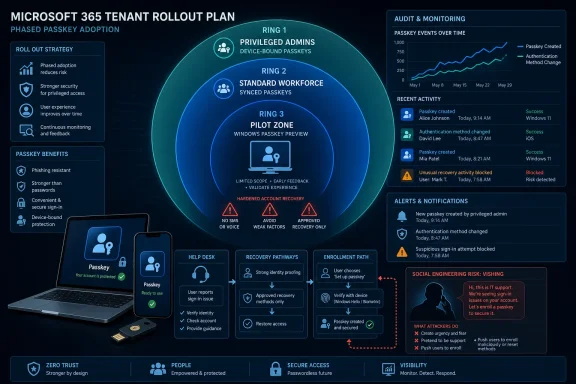 The Right Answer Is a Segmented Rollout, Not a Tenant-Wide Leap of Faith
For most Microsoft 365 tenants, the decision should be “move now, but segment aggressively.” Start with privileged accounts, identity administrators, security operators, break-glass-adjacent workflows, and users with access to sensitive data. For those groups, favor device-bound passkeys because Microsoft recommends them for admins and highly privileged users.For the broader workforce, synced passkeys are usually the more workable starting point. Microsoft’s own FAQ says synced passkeys are recommended for users with non-admin permissions, largely because they reduce the recoverability and reissuance burden that comes with device-bound credentials. That is not a small operational detail; it is the difference between a rollout the service desk can survive and one that collapses under lost-device tickets.
The Windows wrinkle matters. Microsoft Entra passkey on Windows is in public preview and requires opt-in, so tenants that are conservative about preview features may reasonably wait for general availability before a broad Windows rollout. That does not mean waiting on passkeys altogether. It means using Microsoft Authenticator, FIDO2 security keys, and synced passkey providers where appropriate while you pilot Windows passkeys with controlled groups.
The near-term decision tree is straightforward. Use device-bound passkeys for privileged roles. Use synced passkeys for standard users. Pilot Entra passkey on Windows rather than treating the preview as a default enterprise baseline. And before any of that becomes a broad registration campaign, tighten the processes that let a user recover, reset, or add authentication methods.
Microsoft’s Passkey Guidance Quietly Says the Hard Part Out Loud
Microsoft’s public positioning around passkeys is familiar: phishing-resistant authentication, simpler sign-in, fewer passwords, fewer prompts. That is all true, but it is also the easy part of the story. The more important sentence for administrators is Microsoft’s warning that account recovery must be strengthened so it does not become a backdoor for attackers.That warning should change how tenants design rollouts. A passkey is bound to a relying party, so it will not authenticate to a fake Microsoft 365 sign-in page the way a password or one-time code might. But if an attacker can convince a user, help desk agent, or delegated admin to enroll a new method or reset access, the attacker no longer needs to defeat the passkey.
This is where vishing belongs in the passkey conversation. A voice call that pressures a user to approve a registration, visit Security info, add a method, or “complete migration to passkeys” is not attacking FIDO2 cryptography. It is attacking the ceremony around the credential. That is exactly why enrollment and recovery deserve as much design attention as sign-in.
WindowsForum readers have already seen the Microsoft 365 phishing ecosystem move in this direction. Recent discussions around credential harvesting, adversary-in-the-middle kits, QR-code phishing, and spear-phishing tactics all point to the same trend: attackers prefer the path users can be persuaded to take. Passkeys close one well-known door, but they make the remaining doors more valuable.
The Attack Path Moves From Stealing Passwords to Steering Enrollment
The most useful way to think about Entra passkey enrollment vishing is as an attack against timing and trust. A user receives a call, chat, or message from someone claiming to be IT, security, or a Microsoft 365 migration team. The attacker’s goal is to make the user believe a passkey enrollment action is expected, urgent, and safe.The exact attacker script will vary, and administrators should be careful not to invent a single canonical playbook. But the likely pressure points are obvious because they mirror normal onboarding: open Security info, add a sign-in method, choose Passkey, complete MFA, name the passkey, and confirm creation. Microsoft’s registration flow is designed for legitimate self-service; social engineering tries to wrap that legitimate flow in a false story.
This is why “passkeys stop phishing” is an incomplete message for end users. It can create a dangerous mental shortcut: if the word passkey appears, the user assumes the process is safe. Training needs to be more precise. A passkey protects sign-in to the legitimate service after it is enrolled; it does not make every call, QR code, help desk request, or registration prompt trustworthy.
The prerequisite attackers care about is not a cryptographic weakness. It is the user’s existing ability to add or recover authentication methods. If the tenant allows broad self-service registration with weak monitoring, permissive recovery, and limited help desk verification, the attacker’s job becomes persuasion rather than exploitation.
That is the practical defender lesson. Passkey rollout should reduce credential theft risk, but it also creates a new operational hotspot: who can enroll, when they can enroll, under what prompts, with what notification, and how quickly security staff can detect and reverse a suspicious method addition.
The First Settings Path Admins Should Review Is Not the Shiny One
Administrators looking for the concrete place to start should go to the Microsoft Entra admin center and review Authentication methods. Microsoft’s Windows passkey documentation describes the relevant path: sign in as an account with at least Authentication Policy Administrator permissions, then browse to Entra ID > Authentication methods. From there, select Passkey (FIDO2), configure passkey profiles, and decide which users and groups are targeted.For Entra passkey on Windows, the profile requires special care. Microsoft says administrators configure a passkey profile that targets the Windows Hello AAGUIDs, uses device-bound passkey type, and does not enforce attestation. The admin then goes to the Enable and Target tab, turns the method on, adds a target group, selects the relevant profile, and saves.
That is the mechanics. The policy decision is more important: do not target “All users” on day one just because the wizard permits it. Create groups for privileged users, early adopters, help desk staff, standard users, and exception populations. Test registration, sign-in, lost-device recovery, and method removal before the campaign becomes visible to everyone.
For synced passkeys, Microsoft’s user-facing registration flow runs through Security info. Users sign in to Security info, complete MFA, choose Add sign-in method, select Passkey, proceed through the device’s passkey provider prompts, name the passkey, and confirm creation. On iOS, Microsoft calls out Settings > General > AutoFill & Passwords, with “Set Up Codes In” set to Passwords; on Android, it points users to Settings > Security and privacy > More security settings > Passwords, passkeys, and autofill, then provider selection, with device differences expected.
That user procedure is simple enough to be abused by a convincing caller. Admins should therefore pair any registration campaign with a plain rule: IT will not call users and ask them to add a passkey during an unsolicited session. If enrollment help is needed, users should start from a known internal portal or scheduled support channel, not from a link, QR code, phone instruction, or chat message.
Device-Bound Passkeys Belong Where Blast Radius Is Highest
Privileged users are different. They are fewer in number, easier to inventory, and far more expensive to lose. Microsoft’s recommendation for device-bound passkeys for admins and highly privileged users should be treated as a minimum bar, not an aspirational state.Device-bound passkeys make lifecycle management harder. A user may need separate registration per device. Replacing hardware is more painful. Recovery workflows become more visible. But that friction is precisely why they are appropriate for administrator roles: the credential should not silently travel across an ecosystem of personal or unmanaged devices.
The compliance argument is equally important. Microsoft’s FAQ says administrators cannot currently see or control exactly which devices hold a copy of a synced passkey, nor query where that synced passkey has synchronized. For normal users, the usability and phishing-resistance benefits can outweigh that visibility gap. For privileged users, that gap is harder to justify.
In practice, privileged rollout should start with a clean inventory of role assignments, not with a passkey configuration screen. Identify Global Administrators, Privileged Role Administrators, Authentication Administrators, Exchange and SharePoint administrators, security roles, and any accounts with standing access to production systems. Then target these users with device-bound methods and stricter recovery rules.
Break-glass accounts require separate treatment. The verified Microsoft facts here do not prescribe a break-glass passkey model, so the safe recommendation is not to improvise one. Keep emergency access accounts governed by your documented Microsoft 365 emergency access policy, test them regularly, and do not casually fold them into the same passkey enrollment campaign as normal admins.
Synced Passkeys Are the Pragmatic Choice for the Rest of the Business
For standard users, synced passkeys are the better adoption engine. Microsoft’s FAQ frames them as the best option for most users and organizations because they solve issuance and recovery problems that otherwise slow passwordless deployments. That is the language of operational reality.The alternative is a beautiful security model that users abandon or the help desk cannot sustain. Every lost phone, replaced laptop, rebuilt profile, and newly issued device becomes a support moment. Device-bound credentials are excellent when the device boundary is part of the security requirement. They are less excellent when the business simply needs thousands of people to stop typing passwords into phishable prompts.
Synced passkeys still deliver the central win: phishing-resistant sign-in against lookalike sites. Microsoft says a passkey only works for the site or app it was created for and requires the user to unlock it with local verification such as biometrics or PIN. That makes the old “enter your Microsoft 365 password here” phish much less useful.
But administrators should explain the tradeoff honestly. Synced passkeys improve phishing resistance, but they do not give the tenant perfect visibility into every device where the passkey may exist. If a department handles regulated data, sensitive financial operations, or privileged workflows, it may need the device-bound side of the house even if synced passkeys are approved for everyone else.
This is the policy split Microsoft is effectively nudging tenants toward. Do not ask whether synced passkeys are “secure” in the abstract. Ask whether the user’s risk profile requires strict device boundary control. If yes, use device-bound passkeys. If no, synced passkeys are often the fastest route away from passwords and weaker MFA.
Recovery Is the New Perimeter for Passwordless Tenants
The passkey debate tends to focus on registration and sign-in, but recovery is where many tenants will either win or lose. Microsoft’s warning that recovery can become a backdoor is not a throwaway line. It is the core administrative challenge of passwordless identity.A strong sign-in method is only as strong as the process for replacing it. If a user loses every method, who verifies them? If the help desk resets authentication, what proof is required? If a user adds a new passkey, who is notified? If a privileged user’s methods change, does security see it quickly enough to intervene?
The default instinct in many organizations is to reduce friction at recovery because locked-out users are loud and business interruption is measurable. Attackers understand that. They exploit urgency, executive pressure, and support fatigue. Passkeys raise the value of those social-engineering opportunities because direct credential theft becomes less reliable.
This is where tenants should spend time before enabling broad passkey nudges. Review who can reset authentication methods. Review the identity proofing process for lost devices. Review whether users receive notifications when methods are added or changed. Review sign-in logs, audit logs, and alerting around passkey creation and use, which Microsoft identifies as places admins can monitor passkey activity.
The right recovery model will vary by tenant maturity. But the principle is stable: if the recovery path is weaker than the sign-in path, attackers will use the recovery path. A passkey rollout that ignores this is not passwordless maturity; it is security theater with better cryptography.
Windows Passkeys Deserve a Pilot Ring Before the Company-Wide Nudge
Microsoft Entra passkey on Windows is strategically important because it brings device-bound passkeys into the Windows Hello container without requiring the device to be Microsoft Entra joined or registered. That is a big deal for personal, unmanaged, or shared-device scenarios where users still need phishing-resistant access to Entra ID.But Microsoft’s documentation says the feature is in public preview and requires opt-in. That makes it a pilot candidate for most tenants, not a default for every Windows user. Public preview does not mean unusable; it means the risk appetite and support model should be explicit.
The admin configuration has enough nuance to justify caution. Windows Hello AAGUIDs must be explicitly allowed in the passkey profile, the passkey type is device-bound, and attestation is not enforced for that profile. Microsoft also distinguishes Entra passkey on Windows from Windows Hello for Business, which remains the recommended solution for signing into corporate managed, Entra joined or registered devices.
That distinction matters for WindowsForum’s audience. Windows Hello for Business and Entra passkey on Windows both use Windows Hello, but they are not the same product behavior. The former is tied to managed device sign-in and single sign-on scenarios; the latter is a FIDO2 passkey stored in the local Windows Hello container for Entra authentication. Confusing the two will produce bad rollout plans and worse help desk scripts.
The prudent path is to test Windows passkeys with IT, security, and a small cross-section of unmanaged or personally owned Windows devices. Validate registration conflicts, user messaging, passkey removal, device replacement, and support documentation. Then expand once Microsoft’s preview posture aligns with your tenant’s tolerance for change.
Detection Has to Watch the Moment the Credential Is Born
The defender’s best window is often not the sign-in attempt; it is the enrollment event. A suspicious passkey creation, especially for a privileged user or from an unusual support context, should be treated as a high-signal identity event. Microsoft says admins can use audit logs, sign-in logs, and user notifications to track passkey creation and usage.That monitoring should become part of the rollout plan, not a later enhancement. Security operations should know what normal registration looks like: which groups are in scope, when campaigns run, which devices and providers are expected, and what volume is typical. Without that baseline, a malicious enrollment blends into the success metrics.
Help desk telemetry matters too. A spike in calls about “passkey migration,” “new Microsoft login,” “security verification,” or “IT told me to add a method” should be investigated as a possible social-engineering campaign. The attacker may never send a traditional phishing link if a phone call and a legitimate Microsoft page will do.
User guidance should be blunt. A legitimate passkey rollout should be announced through known channels, scheduled in advance, and reachable from trusted internal documentation. Users should be told not to scan QR codes, follow unsolicited links, or add sign-in methods because someone on the phone tells them to. They should also know how to report a suspicious enrollment attempt without being punished for nearly falling for it.
For related reading, WindowsForum’s coverage of Microsoft 365 credential harvesting and adversary-in-the-middle kits is useful background because it shows how quickly attackers adapt once defenders close older routes. The same pattern is likely here: as passkeys reduce phishable sign-ins, attackers will spend more energy on enrollment, recovery, and support impersonation.
The Admin Checklist Microsoft 365 Tenants Actually Need
The practical decision is not passkeys or no passkeys. It is whether the tenant can roll them out with enough segmentation, monitoring, and recovery hardening to avoid creating a cleaner sign-in experience with a dirtier support backdoor.- Start passkeys now for privileged roles, but use device-bound passkeys and stricter recovery controls rather than synced credentials for high-impact accounts.
- Use synced passkeys for standard users when strict device boundary control is not a hard requirement, because Microsoft recommends them for non-admin populations.
- Treat Entra passkey on Windows as a controlled pilot while it remains in public preview and requires opt-in, especially for broad unmanaged Windows scenarios.
- Review account recovery before mass enrollment, because Microsoft explicitly warns recovery can become a backdoor for cyberattackers.
- Monitor passkey creation and method changes through audit logs, sign-in logs, and user notifications, not just successful passkey sign-ins.
- Train users that passkeys resist fake sign-in pages, but unsolicited enrollment instructions by phone, chat, QR code, or email are still suspect.
References
- Primary source: learn.microsoft.com
Register a synced passkey (FIDO2) - Microsoft Entra ID | Microsoft Learn
Learn how to register a synced passkey (FIDO2) as an authentication method on Windows, iOS, or Android by using a browser for phishing-resistant sign-in.learn.microsoft.com - Independent coverage: microsoft.com
World Passkey Day: Advancing passwordless authentication | Microsoft Security Blog
This World Passkey Day, read how Microsoft is advancing passkey adoption to replace passwords, cut phishing risk, and deliver simpler, more secure sign-ins.www.microsoft.com - Primary source: WindowsForum
New Phishing Threat: Exploiting Microsoft 365 for Credential Harvesting | Windows Forum
A new breed of phishing attack is shaking up the cybersecurity landscape for Windows and Microsoft 365 users alike. Gone are the days when cybercriminals...windowsforum.com