

Administrators deciding whether to move Microsoft 365 users to Deferred release should keep most users on Standard release unless a specific, major deferred-capable Microsoft 365 Copilot change creates governance, training, compliance, or business-readiness risk. Deferred release is a short buffer for eligible major changes, not a feature-by-feature approval system. Standard release remains the practical default for generally available Microsoft 365 change, while Targeted release remains a separate early-access option for supported services.
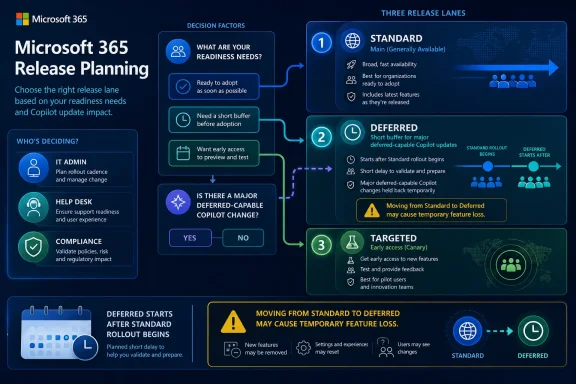
The quickest administrative answer is this: use Standard release for ordinary users who benefit from timely generally available features; use Deferred release for departments that need extra preparation for major Microsoft 365 Copilot updates that Microsoft identifies as both major and deferred-capable; and keep a small early-access group in Targeted release where the service still supports it. Do not treat Deferred release as a selective feature firewall. Microsoft says individual features cannot be deferred; once an eligible audience is configured, major deferred-capable updates follow that timing automatically.
The important shift in Microsoft 365 release planning is not another channel name. The important shift is that admins increasingly have to decide who should see change first, who should validate it, and who needs a short delay when a change is big enough to justify preparation.
Standard release remains the default path for generally available Microsoft 365 features. In plain English, most users receive new capabilities when Microsoft makes them generally available for that release audience. For many organizations, especially small and midsize tenants without formal change boards, this is still the right answer because it avoids building a backlog of delayed features that IT must explain and later reconcile.
Deferred release is narrower than the name may suggest. The modern Standard/Deferred model initially applies to Microsoft 365 Copilot updates that are both major and deferred-capable, with Microsoft indicating that the model will expand over time. Admins should not assume every Microsoft 365 feature, every service, or every UI change can be delayed by putting users in Deferred release.
Deferred release also does not create an item-by-item approval queue. If a feature qualifies for Deferred release, the delay is based on the release audience setting. Admins are not approving each individual capability one at a time, and they cannot defer individual features while accepting others in the same release audience.
Targeted release sits in a different lane. It is still the early-access mechanism for some Microsoft 365 services, allowing selected users or the whole organization to see supported updates before the broader Standard audience. That makes it useful for IT, help desk, trainers, and power users, but it does not replace the Standard-versus-Deferred decision for eligible generally available updates.
The practical operating model is simple:
In the Microsoft 365 admin center, release options are managed under Settings > Org settings > Organization profile > Release preferences. From there, an admin can choose the organization’s release preference and, where supported, configure selected users for Targeted release. Release-preference changes are an administrative control, so they should be handled by users with the appropriate Microsoft 365 admin role rather than by ordinary end users. In practice, this is usually a global admin or another admin role with permission to manage organization settings.
Before changing release audiences, document the intended policy. A release policy should answer five questions:
So the administrative risk is not just “when will the feature arrive?” It is also “what will users lose if we change their release audience after they already had access?”
That is why release settings should not be treated as casual toggles. A technically correct setting can still create a support problem if users suddenly lose a feature they used yesterday. Admins should test the user impact before reassigning large groups, especially during an active rollout.
For most tenants, Standard release is the least complicated state. It keeps users closer to Microsoft’s current product behavior, public training materials, and support assumptions. It also reduces the chance that IT must explain why one department has a feature and another does not.
That does not mean Standard release is risk-free. Features can arrive in waves, experiences can differ across accounts or workloads, and roadmap timing should not be treated as a per-tenant promise. But the solution is not automatically to delay everyone. The solution is to pair Standard release with monitoring, pilot users, support readiness, and clear internal communications.
The case for Standard release is strongest when a feature is additive, low-risk, or already familiar from adjacent Microsoft 365 experiences. If a change does not affect compliance posture, critical workflows, training needs, or executive-facing behavior, delaying it may create more overhead than value.
A delay is only useful if the organization does something with the extra time. If Deferred release merely postpones confusion without creating validation, communications, training, or policy work, then it is not governance. It is delay without a plan.
WindowsForum’s own Microsoft 365 coverage has repeatedly shown why this matters. In the forum’s discussion of Microsoft 365 changes during 2024, the user-facing theme was a year of rapid productivity updates, reinvention, and some polarizing shifts. That is the lived reality admins are managing: not one isolated feature, but a steady stream of changes that users notice at different times and with different levels of tolerance.
That distinction will frustrate organizations accustomed to highly controlled deployment rings. In Windows servicing, many admins think in terms of deferral policies, deadlines, feature update windows, quality updates, and staged rings. Microsoft 365 cloud features do not map cleanly onto that model because many service experiences change continuously.
Deferred release still has value. A short buffer can be enough time to update internal screenshots, prepare help desk scripts, validate impact with legal or compliance teams, and warn business units about visible workflow changes. For regulated departments, high-touch support groups, or teams with tightly controlled procedures, that delay may prevent confusion.
But Deferred release is not a tenant-specific change freeze. It is not a feature-by-feature approval queue. It cannot be used to defer one individual feature while allowing another individual feature on the same release path. The setting applies to eligible major deferred-capable updates once the audience is configured.
That makes Deferred release best suited to users and departments, not wish lists of features. Put the groups that need extra readiness time into Deferred. Keep IT, support, trainers, and selected champions closer to early visibility. Avoid pretending Deferred release is a feature approval board.
Those users are not there for novelty. Their job is to turn “something changed” into a known issue, a training note, a screenshot update, a support script, or a business decision.
The catch is that Targeted release is not available for every service or every type of change. Some updates roll out at the organization level. Some appear through the newer Standard/Deferred model. Some depend on licensing, app version, policy, geography, or workload-specific rollout behavior.
That is why the best release strategy is layered. Targeted release is the warning system where supported. Standard release is the main production audience. Deferred release is the protected lane for users who need more time before eligible major changes land.
WindowsForum readers have already seen this larger pattern across Microsoft 365 reporting. The forum’s coverage of public roadmap entries and admin notices around Copilot agents, Edge AI, mobile Outlook, Excel capabilities, and governance showed how broad the Microsoft 365 change stream can be. Separate WindowsForum reports on late-2024 and early-2025 Microsoft 365 updates described productivity, collaboration, and security improvements arriving across the ecosystem rather than as a single isolated product release. The practical lesson for admins is simple: the “when” matters almost as much as the “what.”
An admin who only tracks whether a feature is generally available will miss the operational question. The better question is which users should see it during each phase and what the organization must learn before the next audience gets it.
Message center should remain part of the operational workflow because it contains Microsoft 365 change communications that admins commonly review alongside tenant administration work. The important point is not to rank one Microsoft source against another without context. The practical habit is to use the Roadmap for directional awareness, use Message center for change communications, and validate actual behavior with pilot users.
A useful internal tracking model separates four signals:
WindowsForum’s coverage of Microsoft 365 April 2025 updates made the same broader point from a user-facing angle: productivity and security improvements now arrive across platforms and workloads. Admins need a repeatable way to translate that stream into readiness tasks.
Admins should treat the Deferred window as a preparation sprint. Once Standard rollout begins for an eligible deferred-capable major update, the clock is moving for Deferred users. Waiting until the entire Standard population has stabilized may consume the buffer that Deferred release was supposed to provide.
That also changes how pilot groups should be built. If a sensitive department is placed in Deferred, someone still needs to see the change early enough to validate it. That may be an IT admin, trainer, help desk lead, or business-process owner in Targeted release where supported or in Standard release where appropriate.
A weak pilot group contains only curious users. A strong pilot group contains people who can answer operational questions:
If a feature is generally available, not identified as a major deferred-capable Microsoft 365 Copilot change, and unlikely to disrupt workflows, Standard release should remain the default. The burden of proof should be on delaying change, not accepting it.
For departments with sensitive workflows, the answer may change. Legal, finance, compliance, customer support, executive support, and regulated operations may need predictable communications and tested guidance before visible Microsoft 365 Copilot changes arrive. Those are plausible Deferred release candidates when the change is major and deferred-capable.
The worst candidates for Deferred release are users who simply dislike change. That sounds harsh, but it is operationally important. If Deferred becomes the place where every complaint goes to sleep, IT inherits release-management debt without gaining meaningful control.
A better model is to assign audiences by function:
That creates a user-experience trap. A feature appears for users in Standard release. The organization decides it wants more time. Admins move those users to Deferred. Some users may then perceive the missing feature as a bug, license problem, service outage, or support regression.
The safer approach is to decide audience strategy before a major rollout, not during the reaction. If a group belongs in Deferred, place it there as part of a planned release policy. If a group has already been living in Standard, think carefully before moving it backward during an active rollout window.
Communication is part of the control plane. If users may temporarily lose access because of an audience change, tell the help desk before users discover it. A technically valid setting that creates unexplained feature loss is still a poor operational decision.
The larger lesson is that release management is now part of user trust. Users do not care whether a feature moved because of roadmap timing, Message center eligibility, or release-audience logic. They care whether the tools they used yesterday still work today.
A tenant may receive cloud service changes through one release audience while desktop Office apps follow a separate update channel policy. A user’s experience can depend on release audience, license, app version, workload, policy, region, and the rollout state of a specific service.
That matters for troubleshooting. If a user asks why a feature is missing, the answer may involve several factors:
A mature organization should maintain a simple matrix:
Start with a combined review of Microsoft 365 change communications, public roadmap signals, support tickets, and pilot observations. Use the Microsoft 365 Roadmap for broader planning awareness, but do not treat a roadmap entry as proof that a specific tenant, region, or user will receive a feature on a specific day.
Next, maintain an early-observer group. This group should include administrators, help desk staff, trainers, and business representatives from departments sensitive to workflow changes. Their job is to confirm what changed, capture screenshots, test critical workflows, and report whether documentation or policy updates are needed.
Then create a visible internal calendar. It does not need to be elaborate. It needs to show:
This is where WindowsForum’s enthusiast and sysadmin readership has an advantage. The community tends to notice subtle Microsoft 365 UI and feature changes early. The challenge is turning that early visibility into disciplined tenant operations rather than scattered “something changed” reports.
Deferred release should be used selectively for users or departments that need extra preparation for major Microsoft 365 Copilot updates that are identified as deferred-capable. It should not be used as a general-purpose delay switch for everyone.
Before moving users backward from Standard to Deferred, test with a small group, notify support staff, and explain the possible temporary feature loss to affected users.
Admins should combine roadmap monitoring with Microsoft 365 change communications, pilot-user observations, and support-ticket patterns.
Do not fill the group only with curious power users. The group’s job is to validate workflows, update support materials, and prepare communications.
The reason should be operational, not emotional. “This department dislikes change” is not enough. “This department needs validated guidance before a major Copilot workflow change” is a stronger reason.
Admins should document both separately. Otherwise, troubleshooting missing features becomes guesswork.
The quickest administrative answer is this: use Standard release for ordinary users who benefit from timely generally available features; use Deferred release for departments that need extra preparation for major Microsoft 365 Copilot updates that Microsoft identifies as both major and deferred-capable; and keep a small early-access group in Targeted release where the service still supports it. Do not treat Deferred release as a selective feature firewall. Microsoft says individual features cannot be deferred; once an eligible audience is configured, major deferred-capable updates follow that timing automatically.
 Microsoft Turns Release Planning Into An Audience Decision
The important shift in Microsoft 365 release planning is not another channel name. The important shift is that admins increasingly have to decide who should see change first, who should validate it, and who needs a short delay when a change is big enough to justify preparation.Standard release remains the default path for generally available Microsoft 365 features. In plain English, most users receive new capabilities when Microsoft makes them generally available for that release audience. For many organizations, especially small and midsize tenants without formal change boards, this is still the right answer because it avoids building a backlog of delayed features that IT must explain and later reconcile.
Deferred release is narrower than the name may suggest. The modern Standard/Deferred model initially applies to Microsoft 365 Copilot updates that are both major and deferred-capable, with Microsoft indicating that the model will expand over time. Admins should not assume every Microsoft 365 feature, every service, or every UI change can be delayed by putting users in Deferred release.
Deferred release also does not create an item-by-item approval queue. If a feature qualifies for Deferred release, the delay is based on the release audience setting. Admins are not approving each individual capability one at a time, and they cannot defer individual features while accepting others in the same release audience.
Targeted release sits in a different lane. It is still the early-access mechanism for some Microsoft 365 services, allowing selected users or the whole organization to see supported updates before the broader Standard audience. That makes it useful for IT, help desk, trainers, and power users, but it does not replace the Standard-versus-Deferred decision for eligible generally available updates.
The practical operating model is simple:
- Targeted release is for early exposure where supported.
- Standard release is the mainstream generally available path.
- Deferred release is a short runway for eligible major Microsoft 365 Copilot changes when the organization needs more time to prepare.
How To Set Release Options In The Microsoft 365 Admin Center
The policy matters more than the click path, but admins still need a concrete place to start.In the Microsoft 365 admin center, release options are managed under Settings > Org settings > Organization profile > Release preferences. From there, an admin can choose the organization’s release preference and, where supported, configure selected users for Targeted release. Release-preference changes are an administrative control, so they should be handled by users with the appropriate Microsoft 365 admin role rather than by ordinary end users. In practice, this is usually a global admin or another admin role with permission to manage organization settings.
Before changing release audiences, document the intended policy. A release policy should answer five questions:
- Which users should see supported changes early?
- Which users should remain on the normal generally available path?
- Which users need extra preparation for major deferred-capable Microsoft 365 Copilot changes?
- Who validates the change before it reaches sensitive departments?
- What happens if a user loses access after being moved backward from Standard to Deferred?
So the administrative risk is not just “when will the feature arrive?” It is also “what will users lose if we change their release audience after they already had access?”
That is why release settings should not be treated as casual toggles. A technically correct setting can still create a support problem if users suddenly lose a feature they used yesterday. Admins should test the user impact before reassigning large groups, especially during an active rollout.
Standard Release Is Still The Default For A Reason
Standard release is easy to criticize because it exposes users to change sooner. It is also easy to underestimate. Microsoft 365 is a cloud productivity platform built around continuous delivery, not the old rhythm of a desktop suite upgrade every several years.For most tenants, Standard release is the least complicated state. It keeps users closer to Microsoft’s current product behavior, public training materials, and support assumptions. It also reduces the chance that IT must explain why one department has a feature and another does not.
That does not mean Standard release is risk-free. Features can arrive in waves, experiences can differ across accounts or workloads, and roadmap timing should not be treated as a per-tenant promise. But the solution is not automatically to delay everyone. The solution is to pair Standard release with monitoring, pilot users, support readiness, and clear internal communications.
The case for Standard release is strongest when a feature is additive, low-risk, or already familiar from adjacent Microsoft 365 experiences. If a change does not affect compliance posture, critical workflows, training needs, or executive-facing behavior, delaying it may create more overhead than value.
A delay is only useful if the organization does something with the extra time. If Deferred release merely postpones confusion without creating validation, communications, training, or policy work, then it is not governance. It is delay without a plan.
WindowsForum’s own Microsoft 365 coverage has repeatedly shown why this matters. In the forum’s discussion of Microsoft 365 changes during 2024, the user-facing theme was a year of rapid productivity updates, reinvention, and some polarizing shifts. That is the lived reality admins are managing: not one isolated feature, but a steady stream of changes that users notice at different times and with different levels of tolerance.
Deferred Release Buys Time, Not Feature Control
Deferred release sounds like a brake pedal, but it is closer to a timed merge lane. It can give admins more time before eligible major changes reach selected users, but it does not allow IT to approve or reject every individual feature.That distinction will frustrate organizations accustomed to highly controlled deployment rings. In Windows servicing, many admins think in terms of deferral policies, deadlines, feature update windows, quality updates, and staged rings. Microsoft 365 cloud features do not map cleanly onto that model because many service experiences change continuously.
Deferred release still has value. A short buffer can be enough time to update internal screenshots, prepare help desk scripts, validate impact with legal or compliance teams, and warn business units about visible workflow changes. For regulated departments, high-touch support groups, or teams with tightly controlled procedures, that delay may prevent confusion.
But Deferred release is not a tenant-specific change freeze. It is not a feature-by-feature approval queue. It cannot be used to defer one individual feature while allowing another individual feature on the same release path. The setting applies to eligible major deferred-capable updates once the audience is configured.
That makes Deferred release best suited to users and departments, not wish lists of features. Put the groups that need extra readiness time into Deferred. Keep IT, support, trainers, and selected champions closer to early visibility. Avoid pretending Deferred release is a feature approval board.
Targeted Release Remains The Canary Cage, But Not For Everything
Targeted release still has a role, especially for admins who need a preview of supported changes before the main Standard audience sees them. Selected IT staff, help desk leads, trainers, accessibility reviewers, and business champions should be in that early-access population where the relevant service supports it.Those users are not there for novelty. Their job is to turn “something changed” into a known issue, a training note, a screenshot update, a support script, or a business decision.
The catch is that Targeted release is not available for every service or every type of change. Some updates roll out at the organization level. Some appear through the newer Standard/Deferred model. Some depend on licensing, app version, policy, geography, or workload-specific rollout behavior.
That is why the best release strategy is layered. Targeted release is the warning system where supported. Standard release is the main production audience. Deferred release is the protected lane for users who need more time before eligible major changes land.
WindowsForum readers have already seen this larger pattern across Microsoft 365 reporting. The forum’s coverage of public roadmap entries and admin notices around Copilot agents, Edge AI, mobile Outlook, Excel capabilities, and governance showed how broad the Microsoft 365 change stream can be. Separate WindowsForum reports on late-2024 and early-2025 Microsoft 365 updates described productivity, collaboration, and security improvements arriving across the ecosystem rather than as a single isolated product release. The practical lesson for admins is simple: the “when” matters almost as much as the “what.”
An admin who only tracks whether a feature is generally available will miss the operational question. The better question is which users should see it during each phase and what the organization must learn before the next audience gets it.
The Roadmap Is A Signal, Not A Tenant Calendar
The Microsoft 365 Roadmap is useful, but admins should treat it as a high-level planning signal rather than a precise tenant-specific deployment ledger. It can help teams see upcoming work, status changes, and expected direction, but it should not be used as the only source for when a specific user in a specific tenant will see a feature.Message center should remain part of the operational workflow because it contains Microsoft 365 change communications that admins commonly review alongside tenant administration work. The important point is not to rank one Microsoft source against another without context. The practical habit is to use the Roadmap for directional awareness, use Message center for change communications, and validate actual behavior with pilot users.
A useful internal tracking model separates four signals:
- Is the feature only on the roadmap, or is it approaching rollout?
- Has Microsoft described it as a major change?
- Is it deferred-capable under the relevant release model?
- Which internal audience will see it first?
WindowsForum’s coverage of Microsoft 365 April 2025 updates made the same broader point from a user-facing angle: productivity and security improvements now arrive across platforms and workloads. Admins need a repeatable way to translate that stream into readiness tasks.
The Deferred Window Is A Preparation Sprint
The most important timing detail is easy to misread: Deferred release begins after Standard rollout begins, not after every Standard user everywhere has the feature. In staged cloud rollouts, that difference matters.Admins should treat the Deferred window as a preparation sprint. Once Standard rollout begins for an eligible deferred-capable major update, the clock is moving for Deferred users. Waiting until the entire Standard population has stabilized may consume the buffer that Deferred release was supposed to provide.
That also changes how pilot groups should be built. If a sensitive department is placed in Deferred, someone still needs to see the change early enough to validate it. That may be an IT admin, trainer, help desk lead, or business-process owner in Targeted release where supported or in Standard release where appropriate.
A weak pilot group contains only curious users. A strong pilot group contains people who can answer operational questions:
- Does the feature change a documented workflow?
- Does it affect compliance, records, privacy, or data-handling expectations?
- Does the help desk need a script?
- Do screenshots in training material need updates?
- Will executives or customer-facing teams notice the change?
- Are there policy controls that must be reviewed?
One Decisive Audience Framework
Use blast radius as the main decision rule.If a feature is generally available, not identified as a major deferred-capable Microsoft 365 Copilot change, and unlikely to disrupt workflows, Standard release should remain the default. The burden of proof should be on delaying change, not accepting it.
For departments with sensitive workflows, the answer may change. Legal, finance, compliance, customer support, executive support, and regulated operations may need predictable communications and tested guidance before visible Microsoft 365 Copilot changes arrive. Those are plausible Deferred release candidates when the change is major and deferred-capable.
The worst candidates for Deferred release are users who simply dislike change. That sounds harsh, but it is operationally important. If Deferred becomes the place where every complaint goes to sleep, IT inherits release-management debt without gaining meaningful control.
A better model is to assign audiences by function:
- Keep IT, support, training, and selected business champions in earlier visibility paths where possible.
- Keep ordinary knowledge workers on Standard unless there is a specific reason not to.
- Use Deferred for groups whose business impact justifies a short delay for eligible major Microsoft 365 Copilot changes.
- Revisit the audience design before large Copilot or workflow changes, not during user backlash.
Action Checklist For Admins
Use the following checklist before changing release audiences.Recommended Default Policy For Most Tenants
For most organizations, the default policy should be:- Keep the broad workforce on Standard release.
- Maintain a small Targeted release group where supported.
- Use Deferred release only for departments with a documented readiness, compliance, training, support, or governance reason tied to major deferred-capable Microsoft 365 Copilot updates.
- Do not use Deferred release as a general complaint bucket.
- Do not promise business units that Deferred release can block individual features.
Pilot Group Design
A useful pilot group should include more than enthusiastic early adopters. Build it with roles that can convert early exposure into operational readiness:- Microsoft 365 administrators.
- Help desk leads.
- Trainers and documentation owners.
- Security, compliance, or privacy reviewers where relevant.
- Business-process owners from sensitive departments.
- Accessibility or assistive-technology testers where needed.
- A small number of practical power users who report clearly.
Review Cadence
Set a recurring release review cadence instead of reacting feature by feature. A practical rhythm is:- Weekly: Review Microsoft 365 change communications, roadmap signals, support tickets, and pilot feedback.
- Monthly: Review release audience membership and confirm that Deferred users still have a valid reason to be there.
- Before major Copilot changes: Confirm whether the change is deferred-capable, who owns validation, and which departments need communications.
- After rollout: Record what happened, what users reported, and whether the audience policy should change.
Keep These Users On Standard Release
Most users should stay on Standard release if they meet these conditions:- They use Microsoft 365 in ordinary productivity workflows.
- They benefit from timely generally available improvements.
- Their work is not governed by a special validation process.
- Their department can tolerate normal cloud-service change.
- Their workflows are already supported by current Microsoft documentation and training.
- Delaying eligible changes would create more confusion than value.
Put These Users In Deferred Release
Deferred release is a better fit for users or departments that meet one or more of these conditions:- They work in regulated, legal, compliance, finance, or records-sensitive processes.
- They support executives or customer-facing teams where visible UI changes need advance warning.
- They rely on tightly documented workflows that must be validated before change lands.
- They require updated screenshots, training materials, internal policy review, or help desk scripts before major changes.
- They are affected by Copilot-related governance, data-handling, or adoption concerns.
- The organization has a named owner who will use the delay period for readiness work.
Before Moving Users From Standard To Deferred
Run these checks before moving users backward from Standard to Deferred:- Check whether affected users already have the feature. If they do, moving them may remove access until the Deferred audience receives it.
- Ask whether the change is happening during an active rollout. Audience changes are riskier while features are still appearing unevenly.
- Notify the help desk before changing the setting. Support staff should know that feature loss may be expected.
- Prepare user messaging. If a feature may disappear temporarily, users need a plain-English explanation.
- Test with a small group first. Do not move a large department without confirming the effect.
- Document the reason for the move. If there is no compliance, training, workflow, or support reason, reconsider the change.
- Set a review date. Deferred release should not become a permanent dumping ground for every change-sensitive user.
- Confirm pilot coverage. Someone in IT, support, or the business must still see the change early enough to prepare.
The Hidden Risk Is Moving Users Backward
Microsoft’s warning that users moved from Standard to Deferred might lose access to not-yet-Deferred features deserves more attention. In many organizations, release-audience changes are treated as harmless policy edits. In this case, the edit can change what users can actually see or use.That creates a user-experience trap. A feature appears for users in Standard release. The organization decides it wants more time. Admins move those users to Deferred. Some users may then perceive the missing feature as a bug, license problem, service outage, or support regression.
The safer approach is to decide audience strategy before a major rollout, not during the reaction. If a group belongs in Deferred, place it there as part of a planned release policy. If a group has already been living in Standard, think carefully before moving it backward during an active rollout window.
Communication is part of the control plane. If users may temporarily lose access because of an audience change, tell the help desk before users discover it. A technically valid setting that creates unexplained feature loss is still a poor operational decision.
The larger lesson is that release management is now part of user trust. Users do not care whether a feature moved because of roadmap timing, Message center eligibility, or release-audience logic. They care whether the tools they used yesterday still work today.
Do Not Confuse Release Audiences With App Update Channels
Admins should be careful with the word “channel.” Microsoft 365 service release options and Microsoft 365 Apps update channels are related change-management concepts, but they are not the same control surface.A tenant may receive cloud service changes through one release audience while desktop Office apps follow a separate update channel policy. A user’s experience can depend on release audience, license, app version, workload, policy, region, and the rollout state of a specific service.
That matters for troubleshooting. If a user asks why a feature is missing, the answer may involve several factors:
- The user’s release audience.
- Whether the feature is available in that workload.
- Whether the feature is still rolling out.
- Whether the user has the required license.
- Whether the desktop app version supports it.
- Whether a policy or admin setting blocks it.
- Whether the feature is web-only, app-only, or service-dependent.
A mature organization should maintain a simple matrix:
- Which users are in Targeted release where supported.
- Which users are on Standard release.
- Which users are on Deferred release.
- Which devices are on which Microsoft 365 Apps update channel.
- Which departments require extra communications before major changes.
The Practical Tracking Playbook Is Still Mostly Manual
The hard part is not defining Standard release or Targeted release. The hard part is running a daily administrative process that turns Microsoft 365 change into predictable support and training work.Start with a combined review of Microsoft 365 change communications, public roadmap signals, support tickets, and pilot observations. Use the Microsoft 365 Roadmap for broader planning awareness, but do not treat a roadmap entry as proof that a specific tenant, region, or user will receive a feature on a specific day.
Next, maintain an early-observer group. This group should include administrators, help desk staff, trainers, and business representatives from departments sensitive to workflow changes. Their job is to confirm what changed, capture screenshots, test critical workflows, and report whether documentation or policy updates are needed.
Then create a visible internal calendar. It does not need to be elaborate. It needs to show:
- Feature name.
- Affected Microsoft 365 workload.
- Expected rollout state.
- Whether the change appears to be major.
- Whether it is deferred-capable under the applicable model.
- Which internal audiences are exposed.
- Who owns validation.
- Who owns communications.
- Whether help desk material is ready.
This is where WindowsForum’s enthusiast and sysadmin readership has an advantage. The community tends to notice subtle Microsoft 365 UI and feature changes early. The challenge is turning that early visibility into disciplined tenant operations rather than scattered “something changed” reports.
What To Do Next
If you manage a Microsoft 365 tenant, take these steps now:- Adopt Standard release as the default for most users. Do not move broad populations to Deferred without a documented business reason.
- Create a small early-observer group. Include IT, help desk, training, compliance, accessibility, and business-process representatives where appropriate.
- Reserve Deferred release for specific departments with real readiness needs. Legal, compliance, finance, executive support, records-sensitive teams, and tightly scripted operations are the most plausible candidates.
- Document who can change release preferences. Limit changes to appropriate Microsoft 365 admins and record the reason for each audience change.
- Warn before moving users from Standard to Deferred. Users may lose access to Standard features that have not yet reached Deferred.
- Do not promise feature-by-feature control. Deferred release cannot defer individual features.
- Review the policy monthly. Confirm that every Deferred group still has a valid reason to remain there.
- After major Copilot changes, hold a short retrospective. Capture what users reported, what the help desk saw, and whether your pilot group was early enough to help.
Frequently Asked Questions
Should most Microsoft 365 users be on Standard or Deferred release?
Most users should remain on Standard release. Standard release is the practical default for ordinary knowledge workers who benefit from timely generally available Microsoft 365 improvements and do not need a special validation process before change arrives.Deferred release should be used selectively for users or departments that need extra preparation for major Microsoft 365 Copilot updates that are identified as deferred-capable. It should not be used as a general-purpose delay switch for everyone.
Does Deferred release apply to every Microsoft 365 feature?
No. Admins should not assume Deferred release applies to every Microsoft 365 feature, service, or UI change. The Standard/Deferred model initially applies to Microsoft 365 Copilot updates that Microsoft identifies as major and deferred-capable. Microsoft has indicated that the model will expand over time, but that does not make it a universal control for all Microsoft 365 services today.Can admins defer individual Microsoft 365 features one by one?
No. Deferred release is not a feature-by-feature approval queue. Admins cannot use it to approve one individual feature, reject another, or build a custom feature firewall. If an update is eligible for Deferred release, timing follows the configured release audience.What is the risk of moving users from Standard to Deferred?
The key risk is that users may lose access to features that are already available in Standard release but not yet available in Deferred release. If a user had access yesterday and loses it after an audience change, the help desk may receive reports that look like bugs, licensing problems, or service incidents.Before moving users backward from Standard to Deferred, test with a small group, notify support staff, and explain the possible temporary feature loss to affected users.
Is the Microsoft 365 Roadmap a reliable tenant-specific deployment calendar?
No. Treat the Microsoft 365 Roadmap as a high-level planning signal. It is useful for awareness and directional planning, but it should not be treated as a precise calendar for when a specific user in a specific tenant will receive a feature.Admins should combine roadmap monitoring with Microsoft 365 change communications, pilot-user observations, and support-ticket patterns.
Is Targeted release the same as Deferred release?
No. Targeted release is for early exposure where supported. It helps IT, trainers, help desk leads, and selected business users see supported changes before the broader Standard audience. Deferred release is a delayed path for eligible major deferred-capable updates. They solve different problems and should be used together only where the organization has a clear audience design.Who should be in Targeted release?
A small Targeted release group should include people who can convert early exposure into readiness work: Microsoft 365 admins, help desk leads, trainers, documentation owners, compliance or privacy reviewers where relevant, accessibility testers, and business-process owners from sensitive departments.Do not fill the group only with curious power users. The group’s job is to validate workflows, update support materials, and prepare communications.
Who should be in Deferred release?
Deferred release is appropriate for departments that need extra preparation before eligible major Microsoft 365 Copilot changes arrive. Common candidates include legal, compliance, finance, executive support, regulated operations, records-sensitive teams, and groups with tightly documented workflows.The reason should be operational, not emotional. “This department dislikes change” is not enough. “This department needs validated guidance before a major Copilot workflow change” is a stronger reason.
Are Microsoft 365 release audiences the same as Microsoft 365 Apps update channels?
No. Microsoft 365 service release audiences and Microsoft 365 Apps update channels are different control surfaces. A user’s experience may depend on release audience, desktop app update channel, license, policy, workload, app version, geography, and rollout state.Admins should document both separately. Otherwise, troubleshooting missing features becomes guesswork.
What is the safest policy for a typical tenant?
For most tenants, the safest policy is:- Keep most users on Standard release.
- Maintain a small Targeted release group where supported.
- Use Deferred release only for departments with documented readiness needs tied to major deferred-capable Microsoft 365 Copilot updates.
- Review audience membership monthly.
- Warn users and the help desk before moving anyone from Standard to Deferred.
References
- Primary source: learn.microsoft.com
Set up the Standard or Targeted release options for Microsoft 365 - Microsoft 365 admin | Microsoft Learn
Learn how to set up the targeted release option for new Microsoft 365 product and feature updates in the Microsoft 365 admin center.learn.microsoft.com - Independent coverage: microsoft.com
Microsoft 365 Roadmap | Microsoft 365
The Microsoft 365 Roadmap lists updates that are currently planned for applicable subscribers. Check here for more information on the status of new features and updates.www.microsoft.com
- Independent coverage: support.microsoft.com
Use a screen reader with the Microsoft 365 Roadmap | Microsoft Support
Use a screen reader with the Microsoft 365 Roadmapsupport.microsoft.com - Independent coverage: techcommunity.microsoft.com
July 2025 - Microsoft 365 US Public Sector Roadmap Newsletter | Microsoft Community Hub
Exchange Exchange Server Subscription Edition (SE) is now released and available Discover the Future of AI in Government Are you ready to explore the... techcommunity.microsoft.com
- Primary source: WindowsForum
Microsoft 365 2024: Major Updates and Changes to Enhance Productivity | Windows Forum
If you're someone who frequently uses Microsoft 365 to power through tasks or tap into productivity gold, buckle up! The year 2024 has been a whirlwind of...windowsforum.com
