

Microsoft 365 Roadmap ID 545896 is in development. The planned capability, Structured Document Generation with Forms, targets SharePoint and Microsoft Copilot for Microsoft 365 on desktop and web. Microsoft lists it for Worldwide Standard Multi-Tenant Preview and General Availability, with GA currently targeted for September 2026.
Those are the confirmed facts. The roadmap describes a way for organizations to support standardized document creation, management, and generation at scale in SharePoint while applying governance and compliance. It does not yet provide enough verified detail to confirm the authoring workflow, supported field types, licensing model, automation hooks, permission behavior, metadata handling, sensitivity-label behavior, or document-conversion capabilities.
The operational appeal is nevertheless clear: centrally managed SharePoint templates could help organizations produce more consistent contracts, agreements, proposals, HR documents, and other repeatable business records. The important distinction is between that likely practical value and product behavior Microsoft has not yet documented publicly in sufficient detail.
Structured Document Generation with Forms should not be treated as a general-purpose writing assistant based on the roadmap description alone. Microsoft’s stated focus is standardized document creation, management, and generation at scale in SharePoint.
That framing points toward repeatable business documents rather than unrestricted drafting. Contracts, agreements, proposals, and HR documents commonly combine approved organizational content with information that changes for each transaction, customer, project, vendor, or employee. The challenge is keeping the stable portions controlled while allowing authorized people to supply the information needed for a particular document.
Today, many organizations address that challenge through copied files, shared folders, email attachments, locally saved templates, manual checklists, custom workflows, or specialist document-automation products. These approaches can work, but they become difficult to govern when users retain old copies or when process ownership is unclear.
A native SharePoint capability could create a more consistent operating model centered on managed templates and standardized outputs. That is the practical value administrators should evaluate. The roadmap entry does not yet establish exactly how users will interact with a template or how much of the process will be automated.
Microsoft has also not confirmed in the supplied material that employees will generate documents without editing an underlying file. That may be a reasonable product-design possibility, but it should not be presented as released or documented behavior until Microsoft publishes verifiable implementation guidance.
The strategic opportunity is consolidation. Instead of maintaining one system for templates, another for data collection, another for generated files, and additional integrations for governance, organizations may be able to keep more of the process within Microsoft 365. Whether the feature ultimately achieves that level of consolidation will depend on details that remain unconfirmed.
The roadmap does support one important conclusion: SharePoint is central to the planned experience. Administrators can therefore begin examining the quality of their existing SharePoint information architecture without assuming anything about the unreleased configuration workflow.
Useful planning questions include:
This planning model should not be mistaken for Microsoft’s confirmed permission or license design. The supplied roadmap information does not say which role will require Microsoft 365 Copilot, which SharePoint permissions will be necessary, or whether submitters and template owners will have different licensing requirements.
Organizations should avoid purchasing licenses or redesigning access groups based on assumptions. Licensing, permissions, and administrative boundaries should be tested against Microsoft’s official Preview documentation when that material becomes available and can be verified.
Even if Microsoft provides a simple authoring interface, organizational responsibility will remain distributed. Legal may own contract language, HR may own employment content, brand teams may control presentation, records managers may determine retention, and IT may operate the SharePoint environment. The product can provide a common platform, but it cannot decide who has authority over the business content.
Organizations considering Roadmap 545896 should therefore treat template lifecycle management as a prerequisite. That lifecycle should include drafting, subject-matter review, approval, publication, periodic review, revision, and retirement.
Each important template should have:
The same caution applies to dynamic or conditional behavior. The supplied material does not confirm that template owners can create conditional sections or rules. If Microsoft introduces such capabilities, organizations should test them as business logic.
A rule based on country, document type, employee category, transaction value, or another attribute can affect more than appearance. It may determine which approved language appears in a consequential record. Every supported path would therefore need positive, negative, boundary, and exception testing.
The correct validation standard is not simply whether the system creates a file. The organization must determine whether the output contains the intended content, reaches the appropriate location, receives the necessary controls, and remains usable throughout its lifecycle.
Those behaviors may eventually be included, but the supplied roadmap description does not confirm them. Administrators should not build project plans around AI-assisted template conversion until Microsoft provides first-party technical guidance.
During Preview, template owners should evaluate any AI-assisted behavior with the same scrutiny applied to other administrative recommendations. A suggested field name or mapping can appear plausible while carrying the wrong business meaning.
For example, a document may contain several dates representing creation, execution, commencement, expiration, renewal, or review. Correctly identifying text as a date would not establish which business concept it represents. The same issue applies to names, addresses, monetary amounts, legal entities, departments, and project identifiers.
Human owners must remain responsible for:
It also does not confirm supported Word formats, document elements, field controls, images, tables, repeating sections, or other advanced layout features. Organizations with complex templates should prepare representative samples for Preview evaluation rather than assuming full compatibility.
A useful sample set might include:
Link behavior also remains unconfirmed. The supplied material does not establish whether a published form will retain the same address after a template is revised, moved, republished, or replaced. Any process that distributes links through an intranet, Teams, email, or business application should test link stability during Preview.
Desktop and web are listed as target platforms, but that classification does not prove feature parity. Administrators should verify which tasks work in each environment, which browsers and Office clients are supported, and whether authoring differs from submission or management.
It does not say whether submitted values will become SharePoint columns, remain attached to a form response, be embedded only in a document, or be exposed through an API or connector. It also does not describe how edits to a generated document would affect any associated structured information.
The same limitation applies to Power Automate. No verified material supplied for this article confirms dedicated triggers, actions, or connectors for Roadmap 545896. Existing SharePoint capabilities may support some surrounding automation, but administrators should not assume that a generated document or form submission will expose a particular event or data structure.
Preview testing should answer questions such as:
Admins should plan to test the complete information path:
Organizations handling legal, financial, personnel, health, or customer information should avoid using the earliest Preview stages for their most sensitive processes. A lower-risk pilot can reveal how data is stored, how access behaves, and what administrative evidence is available before consequential content is introduced.
The verified facts do not support a March 17, 2026 Preview announcement, an earlier July availability target, or the assertion that Preview documentation is already available. Those claims should not be used in deployment planning.
July 10, 2026 — Microsoft updated the roadmap entry. Its status remains in development.
September 2026 — Microsoft currently targets General Availability for Worldwide Standard Multi-Tenant customers.
The month-level GA target should not be treated as a guaranteed activation date for every tenant. Roadmap dates can change, and staged cloud deployment can affect when a capability appears for a particular organization.
The roadmap identifies Worldwide Standard Multi-Tenant availability. Organizations using specialized Microsoft cloud environments should not assume that the September target applies to their tenants unless Microsoft separately confirms support.
Admins should also distinguish Preview planning from production commitment. A Preview can help evaluate fit, security, supportability, and process design, but it should not force an organization into a fixed production deadline before Microsoft confirms the final service behavior.
The best pilot is likely to be a high-volume, repeatable document with a clear owner and manageable risk. An internal project document, routine acknowledgement, standard customer communication, or low-risk agreement may expose the product’s strengths and limitations without placing the organization’s most consequential records in an early-stage service.
The pilot team should include business owners, SharePoint administrators, records or compliance specialists, security personnel, support staff, and representative end users. Each group will identify different problems.
Business owners can assess content accuracy. Users can evaluate clarity and accessibility. Records teams can inspect lifecycle behavior. Security teams can test access boundaries. Administrators can examine monitoring and recovery. Support teams can determine whether errors produce enough information for practical troubleshooting.
The pilot should test change as well as initial setup. Revise the template, adjust an input, alter access, and retire an obsolete version. Then confirm what happens to existing links, historical documents, pending requests, integrations, and audit records.
Failure testing should include incomplete submissions, invalid values, duplicate requests, unavailable services, revoked permissions, template changes, and users with different access levels. The goal is to learn how the service behaves outside the ideal demonstration path.
Microsoft’s potential advantage is its proximity to the collaboration and content-management environment many organizations already use. If Structured Document Generation with Forms integrates cleanly with SharePoint governance and Microsoft 365 administration, it could reduce the number of separate products and custom connections needed for common document processes.
That outcome is not guaranteed. Mature specialist platforms may offer deeper document logic, broader data connections, advanced clause management, electronic-signature integration, or industry-specific controls. Organizations should compare the Microsoft feature against actual requirements rather than assuming native integration makes it universally preferable.
The central evaluation question is straightforward: can Roadmap 545896 produce controlled, standardized outputs from centrally managed SharePoint templates while fitting the organization’s security, compliance, support, and lifecycle model?
For now, Microsoft has confirmed the destination more clearly than the route. Structured Document Generation with Forms is in development, covers SharePoint and Microsoft Copilot for Microsoft 365 on desktop and web, and currently targets Worldwide Standard Multi-Tenant GA in September 2026. The detailed authoring, licensing, automation, metadata, permissions, and compliance behavior remains to be verified.
That leaves administrators with useful work to do before GA: inventory fragmented template processes, identify accountable owners, define governance requirements, select low-risk pilots, and prepare objective Preview tests. Those steps do not depend on speculative product behavior, and they will remain valuable even if Microsoft adjusts the schedule or final implementation.
If the feature ultimately provides a reliable native path from centrally managed templates to governed SharePoint outputs, it could simplify a category of work that organizations often support through copied files and fragile integrations. Until Microsoft publishes the necessary technical detail, however, Roadmap 545896 should be treated as a promising direction and a planning opportunity—not as a documented deployment ready for production instructions.
Those are the confirmed facts. The roadmap describes a way for organizations to support standardized document creation, management, and generation at scale in SharePoint while applying governance and compliance. It does not yet provide enough verified detail to confirm the authoring workflow, supported field types, licensing model, automation hooks, permission behavior, metadata handling, sensitivity-label behavior, or document-conversion capabilities.
The operational appeal is nevertheless clear: centrally managed SharePoint templates could help organizations produce more consistent contracts, agreements, proposals, HR documents, and other repeatable business records. The important distinction is between that likely practical value and product behavior Microsoft has not yet documented publicly in sufficient detail.
What is confirmed / what is not yet confirmed
Confirmed
Not yet confirmed in the supplied material
- The feature is named Structured Document Generation with Forms.
- It is tracked as Microsoft 365 Roadmap ID 545896.
- Its status is in development.
- It targets SharePoint and Microsoft Copilot for Microsoft 365.
- Desktop and web are listed as platforms.
- Preview and General Availability are planned for Worldwide Standard Multi-Tenant customers.
- General Availability is currently targeted for September 2026.
- The roadmap entry was created on January 9, 2026, and updated on July 10, 2026.
- Microsoft describes the goal as standardized document creation, management, and generation at scale with governance and compliance in SharePoint.
- The exact template-authoring and publishing workflow.
- Whether Word documents are required or how existing documents are converted.
- Whether AI identifies or recommends fields.
- Supported field types, validation options, and conditional rules.
- Metadata mappings and storage behavior.
- Power Automate triggers, actions, or connectors.
- License requirements for authors, administrators, or submitters.
- Persistent-link behavior after template updates.
- PDF generation or limitations involving sensitivity labels.
- The detailed permission model for forms and generated files.
- Exact configuration steps or administrative click paths.
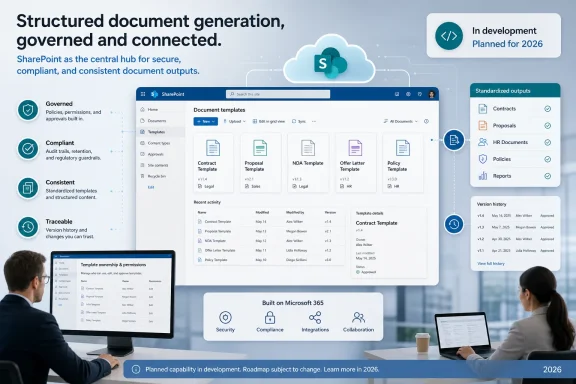 Microsoft Is Standardizing Document Production
Structured Document Generation with Forms should not be treated as a general-purpose writing assistant based on the roadmap description alone. Microsoft’s stated focus is standardized document creation, management, and generation at scale in SharePoint.That framing points toward repeatable business documents rather than unrestricted drafting. Contracts, agreements, proposals, and HR documents commonly combine approved organizational content with information that changes for each transaction, customer, project, vendor, or employee. The challenge is keeping the stable portions controlled while allowing authorized people to supply the information needed for a particular document.
Today, many organizations address that challenge through copied files, shared folders, email attachments, locally saved templates, manual checklists, custom workflows, or specialist document-automation products. These approaches can work, but they become difficult to govern when users retain old copies or when process ownership is unclear.
A native SharePoint capability could create a more consistent operating model centered on managed templates and standardized outputs. That is the practical value administrators should evaluate. The roadmap entry does not yet establish exactly how users will interact with a template or how much of the process will be automated.
Microsoft has also not confirmed in the supplied material that employees will generate documents without editing an underlying file. That may be a reasonable product-design possibility, but it should not be presented as released or documented behavior until Microsoft publishes verifiable implementation guidance.
SharePoint Could Become the Control Plane for Managed Templates
SharePoint already gives organizations a place to manage business content, access, version history, and compliance controls. Roadmap 545896 suggests Microsoft intends to extend that role into standardized document generation.The strategic opportunity is consolidation. Instead of maintaining one system for templates, another for data collection, another for generated files, and additional integrations for governance, organizations may be able to keep more of the process within Microsoft 365. Whether the feature ultimately achieves that level of consolidation will depend on details that remain unconfirmed.
The roadmap does support one important conclusion: SharePoint is central to the planned experience. Administrators can therefore begin examining the quality of their existing SharePoint information architecture without assuming anything about the unreleased configuration workflow.
Useful planning questions include:
- Which document processes already depend on SharePoint?
- Where are the authoritative templates stored?
- Who owns the wording and business rules for each template?
- Which libraries hold completed documents?
- Are access controls aligned with the sensitivity of those documents?
- Are outdated templates still accessible through old sites, attachments, or local copies?
- Can the organization identify the current approved version of each important template?
- Are retention and compliance requirements defined for generated outputs?
Clear Ownership Will Matter More Than the Interface
Standardized document generation usually involves at least two broad roles: the people responsible for the controlled process and the people who need a completed document. Roadmap 545896 does not define a final role model, but organizations can begin planning around that separation.| Planning role | Primary responsibility | Likely area of concern | Pre-GA question |
|---|---|---|---|
| Business process owner | Define the purpose and approved content of the document | Accuracy, policy, exceptions, and revision cycles | Who has authority to approve and retire the template? |
| SharePoint administrator or site owner | Maintain the governed SharePoint environment | Libraries, access, lifecycle, and support | Which sites and libraries are appropriate for the process? |
| Compliance or records owner | Define regulatory and records requirements | Retention, disposition, auditing, and information protection | What controls must apply to completed documents? |
| Document user | Supply process information and use the resulting output | Clarity, accessibility, and turnaround time | Is the experience understandable without specialized training? |
| Automation owner | Maintain any connected business process | Approvals, notifications, integrations, and failure handling | Which integrations are required, and are they actually supported? |
Organizations should avoid purchasing licenses or redesigning access groups based on assumptions. Licensing, permissions, and administrative boundaries should be tested against Microsoft’s official Preview documentation when that material becomes available and can be verified.
Even if Microsoft provides a simple authoring interface, organizational responsibility will remain distributed. Legal may own contract language, HR may own employment content, brand teams may control presentation, records managers may determine retention, and IT may operate the SharePoint environment. The product can provide a common platform, but it cannot decide who has authority over the business content.
The Output Will Be Only as Trustworthy as Its Governance
Central management can reduce inconsistency, but it does not make a template accurate by itself. A standardized process can reproduce obsolete language just as efficiently as current language.Organizations considering Roadmap 545896 should therefore treat template lifecycle management as a prerequisite. That lifecycle should include drafting, subject-matter review, approval, publication, periodic review, revision, and retirement.
Each important template should have:
- A named business owner.
- A documented purpose and intended audience.
- An approval authority.
- A review schedule.
- A record of material changes.
- Defined handling for legal, policy, or branding updates.
- A process for removing obsolete copies from common distribution points.
- A method for determining which template version produced a historical document.
The same caution applies to dynamic or conditional behavior. The supplied material does not confirm that template owners can create conditional sections or rules. If Microsoft introduces such capabilities, organizations should test them as business logic.
A rule based on country, document type, employee category, transaction value, or another attribute can affect more than appearance. It may determine which approved language appears in a consequential record. Every supported path would therefore need positive, negative, boundary, and exception testing.
The correct validation standard is not simply whether the system creates a file. The organization must determine whether the output contains the intended content, reaches the appropriate location, receives the necessary controls, and remains usable throughout its lifecycle.
AI’s Role Has Not Yet Been Defined in Sufficient Detail
The feature targets Microsoft Copilot for Microsoft 365, but that product association does not prove that AI will analyze documents, identify fields, suggest mappings, or configure forms.Those behaviors may eventually be included, but the supplied roadmap description does not confirm them. Administrators should not build project plans around AI-assisted template conversion until Microsoft provides first-party technical guidance.
During Preview, template owners should evaluate any AI-assisted behavior with the same scrutiny applied to other administrative recommendations. A suggested field name or mapping can appear plausible while carrying the wrong business meaning.
For example, a document may contain several dates representing creation, execution, commencement, expiration, renewal, or review. Correctly identifying text as a date would not establish which business concept it represents. The same issue applies to names, addresses, monetary amounts, legal entities, departments, and project identifiers.
Human owners must remain responsible for:
- Defining the meaning of each captured value.
- Approving the language and structure of the template.
- Distinguishing required information from optional information.
- Reviewing any suggested mappings.
- Establishing naming standards.
- Testing unusual and incomplete inputs.
- Confirming that generated outputs satisfy the business requirement.
The Authoring Surface Remains Unconfirmed
The current roadmap entry does not establish whether organizations will begin from Word files, create templates directly in SharePoint, use a separate form designer, or move between multiple Microsoft 365 applications.It also does not confirm supported Word formats, document elements, field controls, images, tables, repeating sections, or other advanced layout features. Organizations with complex templates should prepare representative samples for Preview evaluation rather than assuming full compatibility.
A useful sample set might include:
- A simple letter with a small number of variable values.
- A multi-page agreement containing tables and headers.
- A proposal with branding and optional content.
- An HR document containing sensitive personal information.
- A template with multiple regional or departmental variants.
- A document requiring accessibility review.
- A document that must retain precise formatting when printed.
Link behavior also remains unconfirmed. The supplied material does not establish whether a published form will retain the same address after a template is revised, moved, republished, or replaced. Any process that distributes links through an intranet, Teams, email, or business application should test link stability during Preview.
Desktop and web are listed as target platforms, but that classification does not prove feature parity. Administrators should verify which tasks work in each environment, which browsers and Office clients are supported, and whether authoring differs from submission or management.
Metadata and Automation Are Important Questions, Not Confirmed Features
Structured document generation becomes substantially more useful when the values used to create a document are also available to search, reporting, routing, and workflow systems. However, the supplied roadmap entry does not confirm metadata behavior.It does not say whether submitted values will become SharePoint columns, remain attached to a form response, be embedded only in a document, or be exposed through an API or connector. It also does not describe how edits to a generated document would affect any associated structured information.
The same limitation applies to Power Automate. No verified material supplied for this article confirms dedicated triggers, actions, or connectors for Roadmap 545896. Existing SharePoint capabilities may support some surrounding automation, but administrators should not assume that a generated document or form submission will expose a particular event or data structure.
Preview testing should answer questions such as:
- What event indicates that a generation request has completed?
- Where are submitted values stored?
- Can those values be read without parsing the document?
- Is the output created synchronously or through a background process?
- What happens when generation fails?
- Can workflows distinguish a generated document from an uploaded file?
- Are identifiers stable enough for integration with another system?
- How are retries, duplicate submissions, and partial failures handled?
- Can an approval occur before generation, after generation, or both?
- What audit information is available to administrators?
Governance Must Cover the Complete Process
The roadmap explicitly associates the feature with governance and compliance, making those concerns central rather than optional. Even so, the entry does not explain exactly how existing SharePoint controls will interact with templates, forms, submitted information, or generated documents.Admins should plan to test the complete information path:
- Who can access the entry point?
- What information can a user submit?
- Where is that information processed or stored?
- Where is the generated document placed?
- Who can view, modify, download, share, or delete it?
- Which retention and information-protection controls apply?
- What audit events are recorded?
- What happens when a template is changed or retired?
- How are failed or abandoned requests handled?
- What remains after a generated document is deleted?
Organizations handling legal, financial, personnel, health, or customer information should avoid using the earliest Preview stages for their most sensitive processes. A lower-risk pilot can reveal how data is stored, how access behaves, and what administrative evidence is available before consequential content is introduced.
The September Target Is a Planning Signal
Roadmap ID 545896 was created on January 9, 2026. It was updated on July 10, 2026, remains classified as in development, and currently lists September 2026 as the target for General Availability.The verified facts do not support a March 17, 2026 Preview announcement, an earlier July availability target, or the assertion that Preview documentation is already available. Those claims should not be used in deployment planning.
Timeline
January 9, 2026 — Microsoft created Roadmap ID 545896 for Structured Document Generation with Forms.July 10, 2026 — Microsoft updated the roadmap entry. Its status remains in development.
September 2026 — Microsoft currently targets General Availability for Worldwide Standard Multi-Tenant customers.
The month-level GA target should not be treated as a guaranteed activation date for every tenant. Roadmap dates can change, and staged cloud deployment can affect when a capability appears for a particular organization.
The roadmap identifies Worldwide Standard Multi-Tenant availability. Organizations using specialized Microsoft cloud environments should not assume that the September target applies to their tenants unless Microsoft separately confirms support.
Admins should also distinguish Preview planning from production commitment. A Preview can help evaluate fit, security, supportability, and process design, but it should not force an organization into a fixed production deadline before Microsoft confirms the final service behavior.
Preview Should Validate the Business Process
A useful Preview assessment should go beyond confirming that the feature can produce a document. It should determine whether the complete process is understandable, governable, supportable, and reliable.The best pilot is likely to be a high-volume, repeatable document with a clear owner and manageable risk. An internal project document, routine acknowledgement, standard customer communication, or low-risk agreement may expose the product’s strengths and limitations without placing the organization’s most consequential records in an early-stage service.
The pilot team should include business owners, SharePoint administrators, records or compliance specialists, security personnel, support staff, and representative end users. Each group will identify different problems.
Business owners can assess content accuracy. Users can evaluate clarity and accessibility. Records teams can inspect lifecycle behavior. Security teams can test access boundaries. Administrators can examine monitoring and recovery. Support teams can determine whether errors produce enough information for practical troubleshooting.
The pilot should test change as well as initial setup. Revise the template, adjust an input, alter access, and retire an obsolete version. Then confirm what happens to existing links, historical documents, pending requests, integrations, and audit records.
Failure testing should include incomplete submissions, invalid values, duplicate requests, unavailable services, revoked permissions, template changes, and users with different access levels. The goal is to learn how the service behaves outside the ideal demonstration path.
Pre-GA readiness checklist for admins
- Identify a high-volume, standardized document process with a clearly accountable business owner.
- Inventory the current templates, distribution methods, workflows, permissions, and storage locations.
- Remove or clearly mark obsolete templates that could undermine the future managed process.
- Document the required inputs, outputs, approvals, metadata, retention, and information-protection controls.
- Select representative templates ranging from simple to moderately complex.
- Define acceptance criteria for document accuracy, formatting, accessibility, performance, and recoverability.
- Establish a test site or library that reflects realistic security and governance requirements.
- Identify the users who may need authoring, administrative, submission, review, or support access.
- Defer final license assignments until Microsoft confirms the applicable requirements.
- Treat Power Automate integration as an open question until supported triggers, actions, and data behavior are verified.
- Test Preview behavior across the desktop and web environments used by the organization.
- Validate access to the entry point, submitted information, and generated output separately.
- Examine audit records, version history, retention behavior, sharing controls, and deletion outcomes.
- Test template revision, replacement, retirement, and rollback.
- Create a support and escalation plan for failed or incomplete generation requests.
- Require business, security, compliance, and records approval before production use.
- Recheck Roadmap ID 545896 and official Microsoft documentation before setting a launch date.
Microsoft Is Entering a Mature Document-Automation Market
Form-driven document assembly is not new. Legal operations systems, contract platforms, proposal tools, workflow products, customer-management applications, and specialist SharePoint solutions have supported standardized document production for years.Microsoft’s potential advantage is its proximity to the collaboration and content-management environment many organizations already use. If Structured Document Generation with Forms integrates cleanly with SharePoint governance and Microsoft 365 administration, it could reduce the number of separate products and custom connections needed for common document processes.
That outcome is not guaranteed. Mature specialist platforms may offer deeper document logic, broader data connections, advanced clause management, electronic-signature integration, or industry-specific controls. Organizations should compare the Microsoft feature against actual requirements rather than assuming native integration makes it universally preferable.
The central evaluation question is straightforward: can Roadmap 545896 produce controlled, standardized outputs from centrally managed SharePoint templates while fitting the organization’s security, compliance, support, and lifecycle model?
For now, Microsoft has confirmed the destination more clearly than the route. Structured Document Generation with Forms is in development, covers SharePoint and Microsoft Copilot for Microsoft 365 on desktop and web, and currently targets Worldwide Standard Multi-Tenant GA in September 2026. The detailed authoring, licensing, automation, metadata, permissions, and compliance behavior remains to be verified.
That leaves administrators with useful work to do before GA: inventory fragmented template processes, identify accountable owners, define governance requirements, select low-risk pilots, and prepare objective Preview tests. Those steps do not depend on speculative product behavior, and they will remain valuable even if Microsoft adjusts the schedule or final implementation.
If the feature ultimately provides a reliable native path from centrally managed templates to governed SharePoint outputs, it could simplify a category of work that organizations often support through copied files and fragile integrations. Until Microsoft publishes the necessary technical detail, however, Roadmap 545896 should be treated as a promising direction and a planning opportunity—not as a documented deployment ready for production instructions.
References
- Primary source: Microsoft 365 Roadmap
Published: 2026-07-10T21:58:35.1674832Z
Loading…
www.microsoft.com - Official source: techcommunity.microsoft.com
Loading…
techcommunity.microsoft.com - Official source: learn.microsoft.com
Loading…
learn.microsoft.com - Official source: support.microsoft.com
Loading…
support.microsoft.com - Official source: marketplace.microsoft.com
Loading…
marketplace.microsoft.com - Related coverage: mwpro.co.uk
Loading…
mwpro.co.uk